Kotlin

Abstract Factory Design Pattern

Abstract Factory Pattern in Kotlin: A Comprehensive Guide

Design patterns play a significant role in solving recurring software design problems. The Abstract Factory pattern is a creational design pattern that provides an interface to create families of related or dependent objects without specifying their concrete classes. This pattern is especially useful when your system needs to support multiple types of products that share common characteristics but may have different implementations.

In this blog, we will dive deep into the Abstract Factory pattern, explore why it’s useful, and implement it in Kotlin.

What is Abstract Factory Pattern?

We will look at the Abstract Factory Pattern in detail, but before that, let’s first understand one core concept: the ‘object family.

Object family

An “object family” refers to a group of related or dependent objects that are designed to work together. In the context of software design, particularly in design patterns like the Abstract Factory, an object family is a set of products that are designed to interact or collaborate with each other. Each product in this family shares a common theme, behavior, or purpose, making sure they can work seamlessly together without compatibility issues.

For example, if you’re designing a UI theme for a mobile app, you might have an object family that includes buttons, text fields, and dropdowns that all conform to a particular style (like “dark mode” or “light mode”). These objects are designed to be used together to prevent mismatching styles or interactions.

In software, preventing mismatches is crucial because inconsistencies between objects can cause bugs, user confusion, or functionality breakdowns. Design patterns like Abstract Factory help ensure that mismatched objects don’t interact, preventing unwanted behavior and making sure that all components belong to the same family.

Abstract Factory Pattern

The Abstract Factory pattern operates at a higher level of abstraction compared to the Factory Method pattern. Let me break this down in simple terms:

  1. Factory Method pattern: It provides an interface for creating an object but allows subclasses to alter the type of objects that will be created. In other words, it returns one of several possible sub-classes (or concrete products). You have a single factory that produces specific instances of a class, based on some logic or criteria.
  2. Abstract Factory pattern: It goes one step higher. Instead of just returning one concrete product, it returns a whole factory (a set of related factories). These factories, in turn, are responsible for producing families of related objects. In other words, the Abstract Factory itself creates factories (or “creators”) that will eventually return specific sub-classes or concrete products.

So, the definition is:

The Abstract Factory Pattern defines an interface or abstract class for creating families of related (or dependent) objects without specifying their concrete subclasses. This means that an abstract factory allows a class to return a factory of classes. Consequently, the Abstract Factory Pattern operates at a higher level of abstraction than the Factory Method Pattern. The Abstract Factory Pattern is also known as a “kit.”
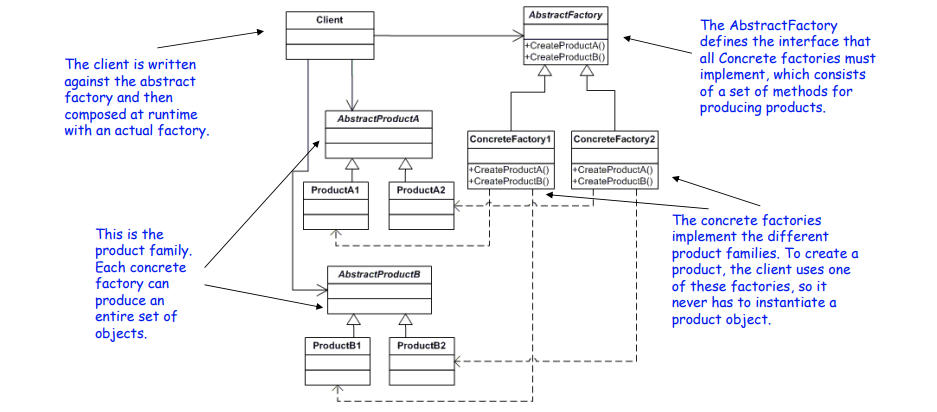
Structure of Abstract Factory Design Pattern

Abstract Factory:

  • Defines methods for creating abstract products.
  • Acts as an interface that declares methods for creating each type of product.
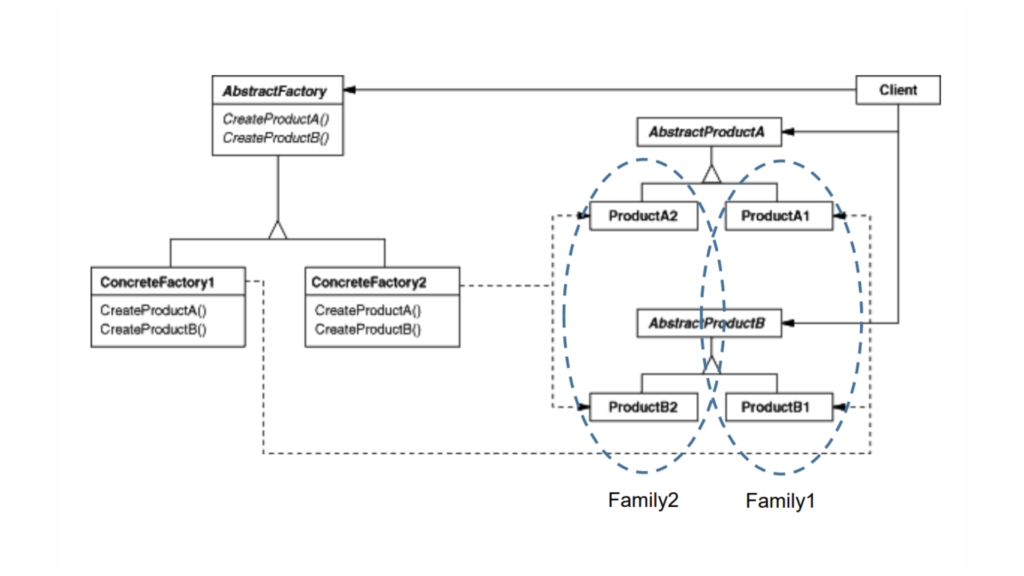
Concrete Factory:

  • Implements the Abstract Factory methods to create concrete products.
  • Each Concrete Factory is responsible for creating products that belong to a specific family or theme.

Abstract Product:

  • Defines an interface or abstract class for a type of product object.
  • This could be a generalization of the product that the factory will create.

Concrete Product:

  • Implements the Abstract Product interface.
  • Represents specific instances of the products that the factory will create.

Client:

  • Uses the Abstract Factory and Abstract Product interfaces to work with the products.
  • The client interacts with the factories through the abstract interfaces, so it does not need to know about the specific classes of the products it is working with.

Step-by-Step Walkthrough: Implementing the Abstract Factory in Kotlin

Let’s assume we’re working with a UI theme system where we have families of related components, such as buttons and checkboxes. These components can be styled differently based on a Light Theme or a Dark Theme.

Now, let’s implement a GUI theme system with DarkTheme and LightTheme using the Abstract Factory pattern.

Step 1: Define the Abstract Products

First, we’ll define interfaces for products, i.e., buttons and checkboxes, which can have different implementations for each theme.

Kotlin
// Abstract product: Button
interface Button {
    fun paint()
}

// Abstract product: Checkbox
interface Checkbox {
    fun paint()
}

These are abstract products that define the behaviors common to all buttons and checkboxes, regardless of the theme.

Step 2: Create Concrete Products

Next, we create concrete implementations for the DarkTheme and LightTheme variations of buttons and checkboxes.

Kotlin
// Concrete product for DarkTheme: DarkButton
class DarkButton : Button {
    override fun paint() {
        println("Rendering Dark Button")
    }
}

// Concrete product for DarkTheme: DarkCheckbox
class DarkCheckbox : Checkbox {
    override fun paint() {
        println("Rendering Dark Checkbox")
    }
}

// Concrete product for LightTheme: LightButton
class LightButton : Button {
    override fun paint() {
        println("Rendering Light Button")
    }
}

// Concrete product for LightTheme: LightCheckbox
class LightCheckbox : Checkbox {
    override fun paint() {
        println("Rendering Light Checkbox")
    }
}

Each product conforms to its respective interface while providing theme-specific rendering logic.

Step 3: Define Abstract Factory Interface

Now, we define the abstract factory that will create families of related objects (buttons and checkboxes).

Kotlin
// Abstract factory interface
interface GUIFactory {
    fun createButton(): Button
    fun createCheckbox(): Checkbox
}

This factory is responsible for creating theme-consistent products without knowing their concrete implementations.

Step 4: Create Concrete Factories

We now define two concrete factories that implement the GUIFactory interface for DarkTheme and LightTheme.

Kotlin
// Concrete factory for DarkTheme
class DarkThemeFactory : GUIFactory {
    override fun createButton(): Button {
        return DarkButton()
    }

    override fun createCheckbox(): Checkbox {
        return DarkCheckbox()
    }
}

// Concrete factory for LightTheme
class LightThemeFactory : GUIFactory {
    override fun createButton(): Button {
        return LightButton()
    }

    override fun createCheckbox(): Checkbox {
        return LightCheckbox()
    }
}

Each concrete factory creates products that belong to a specific theme (dark or light).

Step 5: Client Code

The client is agnostic about the theme being used. It interacts with the abstract factory to create theme-consistent buttons and checkboxes.

Kotlin
// Client code
class Application(private val factory: GUIFactory) {
    fun render() {
        val button = factory.createButton()
        val checkbox = factory.createCheckbox()
        button.paint()
        checkbox.paint()
    }
}

fun main() {
    // Client is configured with a concrete factory
    val darkFactory: GUIFactory = DarkThemeFactory()
    val app1 = Application(darkFactory)
    app1.render()

    val lightFactory: GUIFactory = LightThemeFactory()
    val app2 = Application(lightFactory)
    app2.render()
}


//Output
Rendering Dark Button
Rendering Dark Checkbox
Rendering Light Button
Rendering Light Checkbox

Here, in this code:

  • The client, Application, is initialized with a factory, either DarkThemeFactory or LightThemeFactory.
  • Based on the factory, it creates and renders theme-consistent buttons and checkboxes.

Real-World Examples

Suppose we have different types of banks, like a Retail Bank and a Corporate Bank. Each bank offers different types of accounts and loans:

  • Retail Bank offers Savings Accounts and Personal Loans.
  • Corporate Bank offers Business Accounts and Corporate Loans.

We want to create a system where the client (e.g., a bank application) can interact with these products without needing to know the specific classes that implement them.

Here, we’ll use the Abstract Factory Pattern to create families of related objects: bank accounts and loan products.

Implementation

Abstract Products

Kotlin
// Abstract Product for Accounts
interface Account {
    fun getAccountType(): String
}

// Abstract Product for Loans
interface Loan {
    fun getLoanType(): String
}

Concrete Products

Kotlin
// Concrete Product for Retail Bank Savings Account
class RetailSavingsAccount : Account {
    override fun getAccountType(): String {
        return "Retail Savings Account"
    }
}

// Concrete Product for Retail Bank Personal Loan
class RetailPersonalLoan : Loan {
    override fun getLoanType(): String {
        return "Retail Personal Loan"
    }
}

// Concrete Product for Corporate Bank Business Account
class CorporateBusinessAccount : Account {
    override fun getAccountType(): String {
        return "Corporate Business Account"
    }
}

// Concrete Product for Corporate Bank Corporate Loan
class CorporateLoan : Loan {
    override fun getLoanType(): String {
        return "Corporate Loan"
    }
}

Abstract Factory

Kotlin
// Abstract Factory for creating Accounts and Loans
interface BankFactory {
    fun createAccount(): Account
    fun createLoan(): Loan
}

Concrete Factories

Kotlin
// Concrete Factory for Retail Bank
class RetailBankFactory : BankFactory {
    override fun createAccount(): Account {
        return RetailSavingsAccount()
    }

    override fun createLoan(): Loan {
        return RetailPersonalLoan()
    }
}

// Concrete Factory for Corporate Bank
class CorporateBankFactory : BankFactory {
    override fun createAccount(): Account {
        return CorporateBusinessAccount()
    }

    override fun createLoan(): Loan {
        return CorporateLoan()
    }
}

Client

Kotlin
fun main() {
    // Client code that uses the abstract factory
    val retailFactory: BankFactory = RetailBankFactory()
    val corporateFactory: BankFactory = CorporateBankFactory()

    val retailAccount: Account = retailFactory.createAccount()
    val retailLoan: Loan = retailFactory.createLoan()

    val corporateAccount: Account = corporateFactory.createAccount()
    val corporateLoan: Loan = corporateFactory.createLoan()

    println("Retail Bank Account: ${retailAccount.getAccountType()}")
    println("Retail Bank Loan: ${retailLoan.getLoanType()}")

    println("Corporate Bank Account: ${corporateAccount.getAccountType()}")
    println("Corporate Bank Loan: ${corporateLoan.getLoanType()}")
}


//Output

Retail Bank Account: Retail Savings Account
Retail Bank Loan: Retail Personal Loan
Corporate Bank Account: Corporate Business Account
Corporate Bank Loan: Corporate Loan

Here,

  • Abstract Products (Account and Loan): Define the interfaces for the products.
  • Concrete Products: Implement these interfaces with specific types of accounts and loans for different banks.
  • Abstract Factory (BankFactory): Provides methods to create abstract products.
  • Concrete Factories (RetailBankFactory, CorporateBankFactory): Implement the factory methods to create concrete products.
  • Client: Uses the factory to obtain the products and interact with them, without knowing their specific types.

This setup allows the client to work with different types of banks and their associated products without being tightly coupled to the specific classes that implement them.

Let’s see one more, suppose you are creating a general-purpose gaming environment and want to support different types of games. Player objects interact with Obstacle objects, but the types of players and obstacles vary depending on the game you are playing. You determine the type of game by selecting a particular GameElementFactory, and then the GameEnvironment manages the setup and play of the game.

Implementation

Abstract Products

Kotlin
// Abstract Product for Obstacle
interface Obstacle {
    fun action()
}

// Abstract Product for Player
interface Player {
    fun interactWith(obstacle: Obstacle)
}

Concrete Products

Kotlin
// Concrete Product for Player: Kitty
class Kitty : Player {
    override fun interactWith(obstacle: Obstacle) {
        print("Kitty has encountered a ")
        obstacle.action()
    }
}

// Concrete Product for Player: KungFuGuy
class KungFuGuy : Player {
    override fun interactWith(obstacle: Obstacle) {
        print("KungFuGuy now battles a ")
        obstacle.action()
    }
}

// Concrete Product for Obstacle: Puzzle
class Puzzle : Obstacle {
    override fun action() {
        println("Puzzle")
    }
}

// Concrete Product for Obstacle: NastyWeapon
class NastyWeapon : Obstacle {
    override fun action() {
        println("NastyWeapon")
    }
}

Abstract Factory

Kotlin
// Abstract Factory
interface GameElementFactory {
    fun makePlayer(): Player
    fun makeObstacle(): Obstacle
}

Concrete Factories

Kotlin
// Concrete Factory: KittiesAndPuzzles
class KittiesAndPuzzles : GameElementFactory {
    override fun makePlayer(): Player {
        return Kitty()
    }

    override fun makeObstacle(): Obstacle {
        return Puzzle()
    }
}

// Concrete Factory: KillAndDismember
class KillAndDismember : GameElementFactory {
    override fun makePlayer(): Player {
        return KungFuGuy()
    }

    override fun makeObstacle(): Obstacle {
        return NastyWeapon()
    }
}

Game Environment

Kotlin
// Game Environment
class GameEnvironment(private val factory: GameElementFactory) {
    private val player: Player = factory.makePlayer()
    private val obstacle: Obstacle = factory.makeObstacle()

    fun play() {
        player.interactWith(obstacle)
    }
}

Main Function

Kotlin
fun main() {
    // Creating game environments with different factories
    val kittiesAndPuzzlesFactory: GameElementFactory = KittiesAndPuzzles()
    val killAndDismemberFactory: GameElementFactory = KillAndDismember()

    val game1 = GameEnvironment(kittiesAndPuzzlesFactory)
    val game2 = GameEnvironment(killAndDismemberFactory)

    println("Game 1:")
    game1.play() // Output: Kitty has encountered a Puzzle

    println("Game 2:")
    game2.play() // Output: KungFuGuy now battles a NastyWeapon
}

Here,

Abstract Products:

  • Obstacle and Player are interfaces that define the methods for different game elements.

Concrete Products:

  • Kitty and KungFuGuy are specific types of players.
  • Puzzle and NastyWeapon are specific types of obstacles.

Abstract Factory:

  • GameElementFactory defines the methods for creating Player and Obstacle.

Concrete Factories:

  • KittiesAndPuzzles creates a Kitty player and a Puzzle obstacle.
  • KillAndDismember creates a KungFuGuy player and a NastyWeapon obstacle.

Game Environment:

  • GameEnvironment uses the factory to create and interact with game elements.

Main Function:

  • Demonstrates how different game environments (factories) produce different combinations of players and obstacles.

This design allows for a flexible gaming environment where different types of players and obstacles can be easily swapped in and out based on the chosen factory, demonstrating the power of the Abstract Factory Pattern in managing families of related objects.

Abstract Factory Pattern in Android Development

When using a Dependency Injection framework, you might use the Abstract Factory pattern to provide different implementations of dependencies based on runtime conditions.

Kotlin
// Abstract Product
interface NetworkClient {
    fun makeRequest(url: String): String
}

// Concrete Products
class HttpNetworkClient : NetworkClient {
    override fun makeRequest(url: String): String = "HTTP Request to $url"
}

class HttpsNetworkClient : NetworkClient {
    override fun makeRequest(url: String): String = "HTTPS Request to $url"
}

// Abstract Factory 
interface NetworkClientFactory {
    fun createClient(): NetworkClient
}

//Concrete Factories
class HttpClientFactory : NetworkClientFactory {
    override fun createClient(): NetworkClient = HttpNetworkClient()
}

class HttpsClientFactory : NetworkClientFactory {
    override fun createClient(): NetworkClient = HttpsNetworkClient()
}

//Client code
fun main() {
    val factory: NetworkClientFactory = HttpsClientFactory() // or HttpClientFactory()

    val client: NetworkClient = factory.createClient()
    println(client.makeRequest("softaai.com")) // Output: HTTPS Request to softaai.com or HTTP Request to softaai.com
}

When to Use Abstract Factory?

A system must be independent of how its products are created: This means you want to decouple the creation logic from the actual usage of objects. The system will use abstract interfaces, and the concrete classes that create the objects will be hidden from the user, promoting flexibility.

A system should be configured with one of multiple families of products: If your system needs to support different product variants that are grouped into families (like different UI components for MacOS, Windows, or Linux), Abstract Factory allows you to switch between these families seamlessly without changing the underlying code.

A family of related objects must be used together: Often, products in a family are designed to work together, and mixing objects from different families could cause problems. Abstract Factory ensures that related objects (like buttons, windows, or icons in a GUI) come from the same family, preserving compatibility.

You want to reveal only interfaces of a family of products and not their implementations: This approach hides the actual implementation details, exposing only the interface. By doing so, you make the system easier to extend and maintain, as any changes to the product families won’t affect client code directly.

Abstract Factory vs Factory Method

The Factory Method pattern provides a way to create a single product, while the Abstract Factory creates families of related products. If you only need to create one type of object, the Factory Method might be sufficient. However, if you need to handle multiple related objects (like in our theme example), the Abstract Factory is more suitable.

Advantages of Abstract Factory

  • Isolation of Concrete Classes: The client interacts with factory interfaces, making it independent of concrete class implementations.
  • Consistency Among Products: The factory ensures that products from the same family are used together, preventing inconsistent states.
  • Scalability: Adding new families (themes) of products is straightforward. You only need to introduce new factories and product variants without affecting existing code.

Disadvantages of Abstract Factory

  • Complexity: As more product families and variations are introduced, the number of classes can grow substantially, leading to more maintenance complexity.
  • Rigid Structure: If new types of products are required that don’t fit the existing family structure, refactoring may be needed.

Conclusion

The Abstract Factory pattern in Kotlin is a powerful tool when you need to create families of related objects without specifying their exact concrete classes. In this blog, we explored the structure of the Abstract Factory pattern and implemented it in Kotlin by building a UI component factory. This pattern promotes flexibility and consistency, especially in scenarios where new families of objects may need to be added in the future.

By using this pattern, you can easily manage and extend your codebase with minimal impact on existing code, making it a great choice for scalable systems.

Factory Method Design Pattern

Unlocking the Power of Factory Method Design Pattern in Kotlin: A Smart Way to Create Objects

In the world of software development, creating objects might seem like a routine task, but what if you could supercharge the way you do it? Imagine having a design that lets you seamlessly create objects without tightly coupling your code to specific classes. Enter the Factory Method Design Pattern—a powerful yet flexible approach that turns...

Membership Required

You must be a member to access this content.

View Membership Levels

Already a member? Log in here
singleton in kotlin

Mastering the Singleton in Kotlin: A Comprehensive Guide

The Singleton design pattern is one of the simplest yet most commonly used patterns in software development. Its main purpose is to ensure that a class has only one instance while providing a global point of access to it. This pattern is especially useful when you need to manage shared resources such as database connections,...

Membership Required

You must be a member to access this content.

View Membership Levels

Already a member? Log in here
Bill Pugh Singleton Pattern

Master the Powerful Bill Pugh Singleton: Unleashing Initialization-on-Demand in Kotlin

Singleton patterns are a common design pattern used in software development to ensure a class has only one instance and provides a global point of access to it. While there are several ways to implement a Singleton in Java, one of the most efficient and recommended methods is the Initialization-on-Demand Holder Idiom, also known as...

Membership Required

You must be a member to access this content.

View Membership Levels

Already a member? Log in here
Introduction To Design Patterns

Proven Design Patterns for Crafting Robust Software Solutions

In the world of software development, design patterns emerge as essential tools, offering time-tested solutions to common challenges. These patterns are not just arbitrary guidelines but are structured, proven approaches derived from the collective experience of seasoned developers. By understanding and applying design patterns, developers can craft efficient, maintainable, and scalable software systems. Introduction to...

Membership Required

You must be a member to access this content.

View Membership Levels

Already a member? Log in here
Functional Programming in Kotlin

A Deep Dive into Functional Programming in Kotlin and unleashing the Dynamic Potential

Functional programming has gained widespread popularity for its emphasis on immutability, higher-order functions, and declarative style. Kotlin, a versatile and modern programming language, seamlessly incorporates functional programming concepts, allowing developers to write concise, expressive, and maintainable code. In this blog post, we’ll delve into the world of functional programming in Kotlin, exploring its key features,...

Membership Required

You must be a member to access this content.

View Membership Levels

Already a member? Log in here
Kotlin's OOP Constructs

Mastering Kotlin’s Powerful Object-Oriented Programming (OOP) for Seamless Development Success

Kotlin, the JVM’s rising star, isn’t just known for its conciseness and elegance. It’s also a powerful object-oriented language, packing a punch with its intuitive and modern take on OOP concepts. Whether you’re a seasoned Java veteran or a curious newbie, navigating Kotlin’s object-oriented playground can be both exciting and, well, a bit daunting.

But fear not, fellow programmer! This blog takes you on a guided tour of Kotlin’s OOP constructs, breaking down each element with practical examples and clear explanations. Buckle up, and let’s dive into the heart of Kotlin’s object-oriented magic!

BTW, What is Contruct?

The term “construct” is defined as a fancy way to refer to allowed syntax within a programming language. It implies that when creating objects, defining categories, specifying relationships, and other similar tasks in the context of programming, one utilizes the permissible syntax provided by the programming language. In essence, “language constructs” are the syntactic elements or features within the language that enable developers to express various aspects of their code, such as the creation of objects, organization into categories, establishment of relationships, and more.

In simple words, Language constructs are the specific rules and structures that are permitted within a programming language to create different elements of a program. They are essentially the building blocks that programmers use to express concepts and logic in a way that the computer can understand.

Kotlin Construct

Kotlin provides a rich set of language constructs that empower developers to articulate their programs effectively. In this section, we’ll explore several of these constructs, including but not limited to: Class Definitions, Inheritance Mechanisms, Abstract Classes, Interface Implementations, Object Declarations, and Companion Objects.

Classes

Classes serve as the fundamental building blocks in Kotlin, offering a template that encapsulates state, behavior, and a specific type for instances (more details on this will be discussed later). Defining a class in Kotlin requires only a name. For instance:

Kotlin
class VeryBasic

While VeryBasic may not be particularly useful, it remains a valid Kotlin syntax. Despite lacking state or behavior, instances of the VeryBasic type can still be declared, as demonstrated below:

Kotlin
fun main(args: Array<String>) {
    val basic: VeryBasic = VeryBasic()
}

In this example, the basic value is of type VeryBasic, indicating that it is an instance of the VeryBasic class. Kotlin’s type inference capability allows for a more concise declaration:

Kotlin
fun main(args: Array<String>) {
    val basic = VeryBasic()
}

In this revised version, Kotlin infers the type of the basic variable. As a VeryBasic instance, basic inherits the state and behavior associated with the VeryBasic type, which, in this case, is none—making it a somewhat melancholic example.

Properties

As mentioned earlier, classes in Kotlin can encapsulate a state, with the class’s state being represented by properties. Let’s delve into the example of a BlueberryCupcake class:

Kotlin
class BlueberryCupcake {
    var flavour = "Blueberry"
}

Here, the BlueberryCupcake class possesses a property named flavour of type String. Instances of this class can be created and manipulated, as demonstrated in the following code snippet:

Kotlin
fun main(args: Array<String>) {
    val myCupcake = BlueberryCupcake()
    println("My cupcake has ${myCupcake.flavour}")
}

Given that the flavour property is declared as a variable, its value can be altered dynamically during runtime:

Kotlin
fun main(args: Array<String>) {
    val myCupcake = BlueberryCupcake()
    myCupcake.flavour = "Almond"
    println("My cupcake has ${myCupcake.flavour}")
}

In reality, cupcakes do not change their flavor, unless they become stale. To mirror this in code, we can declare the flavour property as a value, rendering it immutable:

Kotlin
class BlueberryCupcake {
    val flavour = "Blueberry"
}

Attempting to reassign a value to a property declared as a val results in a compilation error, as demonstrated below:

Kotlin
fun main(args: Array<String>) {
    val myCupcake = BlueberryCupcake()
    myCupcake.flavour = "Almond" // Compilation error: Val cannot be reassigned
    println("My cupcake has ${myCupcake.flavour}")
}

Now, let’s introduce a new class for almond cupcakes, the AlmondCupcake class:

Kotlin
class AlmondCupcake {
    val flavour = "Almond"
}

Interestingly, both BlueberryCupcake and AlmondCupcake share identical structures; only the internal value changes. In reality, you don’t need different baking tins for distinct cupcake flavors. Similarly, a well-designed Cupcake class can be employed for various instances:

Kotlin
class Cupcake(val flavour: String)

The Cupcake class features a constructor with a flavour parameter, which is assigned to the flavour property. In Kotlin, to enhance readability, you can use syntactic sugar to define it more succinctly:

Kotlin
class Cupcake(val flavour: String)

This streamlined syntax allows us to create several instances of the Cupcake class with different flavors:

Kotlin
fun main(args: Array<String>) {
    val myBlueberryCupcake = Cupcake("Blueberry")
    val myAlmondCupcake = Cupcake("Almond")
    val myCheeseCupcake = Cupcake("Cheese")
    val myCaramelCupcake = Cupcake("Caramel")
}

In essence, this example showcases how Kotlin’s concise syntax and flexibility in property declaration enable the creation of classes representing real-world entities with ease.

Methods

In Kotlin, a class’s behavior is defined through methods, which are technically member functions. Let’s explore an example using the Cupcake class:

Kotlin
class Cupcake(val flavour: String) {
    fun eat(): String {
        return "nom, nom, nom... delicious $flavour cupcake"
    }
}

In this example, the eat() method is defined within the Cupcake class, and it returns a String value. To demonstrate, let’s call the eat() method:

Kotlin
fun main(args: Array<String>) {
    val myBlueberryCupcake = Cupcake("Blueberry")
    println(myBlueberryCupcake.eat())
}

Executing this code will produce the following output:

Kotlin
nom, nom, nom... delicious Blueberry cupcake

While this example may not be mind-blowing, it serves as an introduction to methods. As we progress, we’ll explore more intricate and interesting aspects of defining and utilizing methods in Kotlin.

Inheritance

Inheritance is a fundamental concept that involves organizing entities into groups and subgroups and also establishing relationships between them. In an inheritance hierarchy, moving up reveals more general features and behaviors, while descending highlights more specific ones. For instance, a burrito and a microprocessor are both objects, yet their purposes and uses differ significantly.

Let’s introduce a new class, Biscuit:

Kotlin
class Biscuit(val flavour: String) {
    fun eat(): String {
        return "nom, nom, nom... delicious $flavour biscuit"
    }
}

Remarkably, this class closely resembles the Cupcake class. To address code duplication, we can refactor these classes by introducing a common superclass, BakeryGood:

Kotlin
open class BakeryGood(val flavour: String) {
    fun eat(): String {
        return "nom, nom, nom... delicious $flavour bakery good"
    }
}

class Cupcake(flavour: String): BakeryGood(flavour)
class Biscuit(flavour: String): BakeryGood(flavour)

Here, both Cupcake and Biscuit extend BakeryGood, sharing its behavior and state. This establishes an is-a relationship, where Cupcake (and Biscuit) is a BakeryGood, and BakeryGood is the superclass.

Note the use of the open keyword to indicate that BakeryGood is designed to be extended. In Kotlin, a class must be marked as open to enable inheritance.

The process of consolidating common behaviors and states in a parent class is termed generalization. However, our initial attempt encounters unexpected results when calling the eat() method with a reference to BakeryGood:

Kotlin
fun main(args: Array<String>) {
    val myBlueberryCupcake: BakeryGood = Cupcake("Blueberry")
    println(myBlueberryCupcake.eat())
}

To refine this behavior, we modify the BakeryGood class to include a name() method:

Kotlin
open class BakeryGood(val flavour: String) {
    fun eat(): String {
        return "nom, nom, nom... delicious $flavour ${name()}"
    }

    open fun name(): String {
        return "bakery good"
    }
}

class Cupcake(flavour: String): BakeryGood(flavour) {
    override fun name(): String {
        return "cupcake"
    }
}

class Biscuit(flavour: String): BakeryGood(flavour) {
    override fun name(): String {
        return "biscuit"
    }
}

Now, calling the eat() method produces the expected output:

Kotlin
nom, nom, nom... delicious Blueberry cupcake

Here, the process of extending classes and overriding behavior in a hierarchy is called specialization. A key guideline is to place general states and behaviors at the top of the hierarchy (generalization) and specific states and behaviors in subclasses (specialization).

We can further extend subclasses, such as introducing a new Roll class:

Kotlin
open class Roll(flavour: String): BakeryGood(flavour) {
    override fun name(): String {
        return "roll"
    }
}

class CinnamonRoll: Roll("Cinnamon")

Subclasses, like CinnamonRoll, can be extended as well, marked as open. We can also create classes with additional properties and methods, exemplified by the Donut class:

Kotlin
open class Donut(flavour: String, val topping: String) : BakeryGood(flavour) {
    override fun name(): String {
        return "donut with $topping topping"
    }
}

fun main(args: Array<String>) {
    val myDonut = Donut("Custard", "Powdered sugar")
    println(myDonut.eat())
}

This flexibility in inheritance and specialization allows for a versatile and hierarchical organization of classes in Kotlin.

Abstract classes

Up to this point, our bakery model has been progressing smoothly. However, a potential issue arises when we realize we can instantiate the BakeryGood class directly, making it too generic. To address this, we can mark BakeryGood as abstract:

Kotlin
abstract class BakeryGood(val flavour: String) {
    fun eat(): String {
        return "nom, nom, nom... delicious $flavour ${name()}"
    }

    abstract fun name(): String
}

By marking it as abstract, we ensure that BakeryGood can’t be instantiated directly, resolving our concern. The abstract keyword denotes that the class is intended solely for extension, and it cannot be instantiated on its own.

The distinction between abstract and open lies in their instantiation capabilities. While both modifiers allow for class extension, open permits instantiation, whereas abstract does not.

Now, given that we can’t instantiate BakeryGood directly, the name() method in the class becomes less useful. Most subclasses, except for CinnamonRoll, override it. Therefore, we redefine the BakeryGood class:

Kotlin
abstract class BakeryGood(val flavour: String) {
    fun eat(): String {
        return "nom, nom, nom... delicious $flavour ${name()}"
    }

    abstract fun name(): String
}

Here, the name() method is marked as abstract, lacking a body, only declaring its signature. Any class directly extending BakeryGood must implement (override) the name() method.

Let’s introduce a new class, Customer, representing a bakery customer:

Kotlin
class Customer(val name: String) {
    fun eats(food: BakeryGood) {
        println("$name is eating... ${food.eat()}")
    }
}

The eats(food: BakeryGood) method accepts a BakeryGood parameter, allowing any instance of a class that extends BakeryGood, regardless of hierarchy levels. It’s important to note that we can’t instantiate BakeryGood directly.

Consider the scenario where we want a simple BakeryGood instance, like for testing purposes. An alternative approach is using an anonymous subclass:

Kotlin
fun main(args: Array<String>) {
    val mario = Customer("Mario")
    mario.eats(object : BakeryGood("TEST_1") {
        override fun name(): String {
            return "TEST_2"
        }
    })
}

Here, the object keyword introduces an object expression, defining an instance of an anonymous class that extends a type. The anonymous class must override the name() method and pass a value for the BakeryGood constructor, similar to how a standard class would.

Additionally, an object expression can be used to declare values:

Kotlin
val food: BakeryGood = object : BakeryGood("TEST_1") {
    override fun name(): String {
        return "TEST_2"
    }
}
mario.eats(food)

This demonstrates how Kotlin’s flexibility with abstract classes, inheritance, and anonymous subclasses allows for a versatile and hierarchical organization of classes in a bakery scenario.

Interfaces

Creating hierarchies is effectively facilitated by open and abstract classes, yet their utility has limitations. In certain cases, subsets may bridge seemingly unrelated hierarchies. Take, for instance, the bipedal nature shared by birds and great apes; both belong to the categories of animals and vertebrates, despite lacking a direct relationship. To address such scenarios, Kotlin introduces interfaces as a distinct construct, recognizing that other programming languages may handle this issue differently.

While our bakery goods are commendable, their preparation involves an essential step: cooking. The existing code employs an abstract class named BakeryGood to define various baked products, accompanied by methods like eat() and bake().

Kotlin
abstract class BakeryGood(val flavour: String) {
    fun eat(): String {
        return "nom, nom, nom... delicious $flavour ${name()}"
    }

    fun bake(): String {
        return "is hot here, isn't??"
    }

    abstract fun name(): String
}

However, a complication arises when considering items like donuts, which are not baked but fried. One potential solution is to move the bake() method to a separate abstract class named Bakeable.

Kotlin
abstract class Bakeable {
    fun bake(): String {
        return "is hot here, isn't??"
    }
}

By doing so, the code attempts to address the issue and introduces a class called Cupcake that extends both BakeryGood and Bakeable. Unfortunately, Kotlin imposes a restriction, allowing a class to extend only one other class at a time. This limitation prompts the need for an alternative approach.

The subsequent code explores a different strategy to resolve this limitation, emphasizing the intricate nature of class extension in Kotlin.

Kotlin
class Cupcake(flavour: String) : BakeryGood(flavour), Bakeable() { // Compilation error: Only one class // may appear in a supertype list
    
    override fun name(): String {
        return "cupcake"
    }
}

The above code snippets illustrate the attempt to reconcile the challenge of combining the BakeryGood and Bakeable functionalities in a single class, highlighting the restrictions imposed by Kotlin’s class extension mechanism.

Kotlin doesn’t allow a class to extend multiple classes simultaneously. Instead, we can make Cupcake extend BakeryGood and implement the Bakeable interface:

Kotlin
interface Bakeable {
    fun bake(): String {
        return "It's hot here, isn't it??"
    }
}

An interface named Bakeable is defined with a method bake() that returns a string. Interfaces in Kotlin define a type that specifies behavior, such as the bake() method in the Bakeable interface.

Kotlin
class Cupcake(flavour: String) : BakeryGood(flavour), Bakeable {
    override fun name(): String {
        return "cupcake"
    }
}

A class named Cupcake is created, which extends both BakeryGood and implements the Bakeable interface. It has a method name() that returns “cupcake.”

Now, let’s highlight the similarities and differences between open/abstract classes and interfaces:

Similarities

  1. Both are types with an is-a relationship.
  2. Both define behaviors through methods.
  3. Neither abstract classes nor interfaces can be instantiated directly.

Differences

  1. A class can extend just one open or abstract class but can extend many interfaces.
  2. An open/abstract class can have constructors, whereas interfaces cannot.
  3. An open/abstract class can initialize its own values, whereas an interface’s values must be initialized in the classes that implement the interface.
  4. An open class must declare methods that can be overridden as open, while an abstract class can have both open and abstract methods.
  5. In an interface, all methods are open, and a method with no implementation doesn’t need an abstract modifier.

Here’s an example demonstrating the use of an interface and an open class:

Kotlin
interface Fried {
    fun fry(): String
}

open class Donut(flavour: String, val topping: String) : BakeryGood(flavour), Fried {
    override fun fry(): String {
        return "*swimming in oil*"
    }

    override fun name(): String {
        return "donut with $topping topping"
    }
}

When choosing between an open class, an abstract class, or an interface, consider the following guidelines:

  • Use an open class when the class should be both extended and instantiated.
  • Use an abstract class when the class can’t be instantiated, a constructor is needed, or there is initialization logic (using init blocks).
  • Use an interface when multiple inheritances must be applied, and no initialization logic is needed.

It’s recommended to start with an interface for a more straightforward and modular design. Move to abstract or open classes when data initialization or constructors are required.

Finally, object expressions can also be used with interfaces:

Kotlin
val somethingFried = object : Fried {
    override fun fry(): String {
        return "TEST_3"
    }
}

This showcases the flexibility of Kotlin’s object expressions in conjunction with interfaces.

Objects

Objects in Kotlin serve as natural singletons, meaning they naturally come as language features and not just as implementations of behavioral patterns seen in other languages. In Kotlin, every object is a singleton, presenting interesting patterns and practices, but they can also be risky if misused to maintain global state.

Object expressions are a way to create singletons, and they don’t need to extend any type. Here’s an example:

Kotlin
fun main(args: Array<String>) {
    val expression = object {
        val property = ""
        fun method(): Int {
            println("from an object expression")
            return 42
        }
    }

    val i = "${expression.method()} ${expression.property}"
    println(i)
}

In this example, the expression value is an object that doesn’t have any specific type. Its properties and functions can be accessed as needed.

However, there is a restriction: object expressions without a type can only be used locally, inside a method, or privately, inside a class. Here’s an example demonstrating this limitation:

Kotlin
class Outer {
    val internal = object {
        val property = ""
    }
}

fun main(args: Array<String>) {
    val outer = Outer()
    println(outer.internal.property) // Compilation error: Unresolved reference: property
}

In this case, trying to access the property value outside the Outer class results in a compilation error.

It’s important to note that while object expressions provide a convenient way to create singletons, their use should be considered carefully. They are especially useful for coordinating actions across the system, but if misused to maintain global state, they can lead to potential issues. Careful consideration of the design and scope of objects in Kotlin is crucial to avoid unintended consequences.

Object Declaration

An object declaration is a way to create a named singleton:

Kotlin
object Oven {
    fun process(product: Bakeable) {
        println(product.bake())
    }
}

In this example, Oven is a named singleton. It’s a singleton because there’s only one instance of Oven, and it’s named as an object declaration. You don’t need to instantiate Oven to use it.

Kotlin
fun main(args: Array<String>) {
    val myAlmondCupcake = Cupcake("Almond")
    Oven.process(myAlmondCupcake)
}

Here, an instance of the Cupcake class is created, and the Oven.process method is called to process the myAlmondCupcake. Objects, being singletons, allow you to access their methods directly without instantiation.

Objects Extending Other Types

Objects can also extend other types, such as interfaces:

Kotlin
interface Oven {
    fun process(product: Bakeable)
}

object ElectricOven : Oven {
    override fun process(product: Bakeable) {
        println(product.bake())
    }
}

In this case, ElectricOven is an object that extends the Oven interface. It provides an implementation for the process method defined in the Oven interface.

Kotlin
fun main(args: Array<String>) {
    val myAlmondCupcake = Cupcake("Almond")
    ElectricOven.process(myAlmondCupcake)
}

Here, an instance of Cupcake is created, and the ElectricOven.process method is called to process the myAlmondCupcake.

In short, object declarations are a powerful feature in Kotlin, allowing the creation of singletons with or without names. They provide a clean and concise way to encapsulate functionality and state, making code more modular and maintainable.

Companion objects

Objects declared inside a class/interface and marked as companion object are called companion objects. They are associated with the class/interface and can be used to define methods or properties that are related to the class as a whole.

Kotlin
class Cupcake(flavour: String) : BakeryGood(flavour), Bakeable {
    override fun name(): String {
        return "cupcake"
    }

    companion object {
        fun almond(): Cupcake {
            return Cupcake("almond")
        }

        fun cheese(): Cupcake {
            return Cupcake("cheese")
        }
    }
}

In this example, the Cupcake class has a companion object with two methods: almond() and cheese(). These methods can be called directly using the class name without instantiating the class.

Kotlin
fun main(args: Array<String>) {
    val myBlueberryCupcake: BakeryGood = Cupcake("Blueberry")
    val myAlmondCupcake = Cupcake.almond()
    val myCheeseCupcake = Cupcake.cheese()
    val myCaramelCupcake = Cupcake("Caramel")
}

Here, various instances of Cupcake are created using the companion object’s methods. Note that Cupcake.almond() and Cupcake.cheese() can be called without creating an instance of the Cupcake class.

Limitation on Usage from Instances

Companion object’s methods can’t be used from instances:

Kotlin
fun main(args: Array<String>) {
    val myAlmondCupcake = Cupcake.almond()
    val myCheeseCupcake = myAlmondCupcake.cheese() // Compilation error: Unresolved reference: cheese
}

In this example, attempting to call cheese() on an instance of Cupcake results in a compilation error. Companion object’s methods are meant to be called directly on the class, not on instances.

Using Companion Objects Outside the Class

Companion objects can be used outside the class as values with the name Companion:

Kotlin
fun main(args: Array<String>) {
    val factory: Cupcake.Companion = Cupcake.Companion
}

Here, Cupcake.Companion is used as a value. It’s a way to reference the companion object outside the class.

Named Companion Objects

A companion object can also have a name:

Kotlin
class Cupcake(flavour: String) : BakeryGood(flavour), Bakeable {
    override fun name(): String {
        return "cupcake"
    }

    companion object Factory {
        fun almond(): Cupcake {
            return Cupcake("almond")
        }

        fun cheese(): Cupcake {
            return Cupcake("cheese")
        }
    }
}

Now, the companion object has a name, Factory. This allows for a more structured and readable organization of companion objects.

Kotlin
fun main(args: Array<String>) {
    val factory: Cupcake.Factory = Cupcake.Factory
}

Here, Cupcake.Factory is used as a value, referencing the named companion object.

Usage Without a Name

Companion objects can also be used without a name:

Kotlin
fun main(args: Array<String>) {
    val factory: Cupcake.Factory = Cupcake
}

In this example, Cupcake without parentheses refers to the companion object itself. This usage is equivalent to Cupcake.Factory and can be seen as a shorthand syntax.

Don’t be confused by this syntax. The Cupcake value without parenthesis is the companion object; Cupcake() is an instance.

Conclusion

Kotlin’s support for object-oriented programming constructs empowers developers to build robust, modular, and maintainable code. With features like concise syntax, interoperability with Java, and modern language features, Kotlin continues to be a top choice for developers working on a wide range of projects, from mobile development to backend services. As we’ve explored in this guide, Kotlin’s OOP constructs provide a solid foundation for creating efficient and scalable applications.Kotlin’s language constructs are more than just features; they’re a philosophy. They encourage conciseness, expressiveness, and safety, making your code a joy to write. So, take your first step into the Kotlin world, and prepare to be amazed by its magic!

basic kotlin syntax

Kotlin Syntax: A Comprehensive Guide with Examples and Explanations

Kotlin, a modern and concise programming language, has captivated developers worldwide with its expressive nature and powerful features. For developers familiar with C-style syntax languages, like Java, C#, or Scala, Kotlin’s syntax will feel like a comfortable homecoming. While it shares many similarities with its predecessors, Kotlin introduces unique features that make it concise, expressive,...

Membership Required

You must be a member to access this content.

View Membership Levels

Already a member? Log in here
Kotlin DSL

Elevate Your Skills: Unlock Kotlin DSL Proficiency and Mastering Kotlin DSL for Peak Performance in Domain-Specific Languages

Kotlin, an impressive and modern programming language, has rapidly gained popularity in the developer community since its release. One of its standout features is the ability to create Domain-Specific Languages (DSLs), which are specialized programming languages tailored to solve specific problems within particular domains. In this blog, we will delve into Kotlin DSLs in detail,...

Membership Required

You must be a member to access this content.

View Membership Levels

Already a member? Log in here
kotlin inline properties

Unveiling the Power: A Deep Dive into Kotlin Inline Properties for Enhanced Development Magic

Kotlin, known for its concise syntax and powerful features, has gained immense popularity among developers. One of its notable features is the ability to declare kotlin inline properties. Kotlin inline properties combine the benefits of properties and inline functions, providing improved performance and better control over code structure. In this blog post, we’ll dive deep...

Membership Required

You must be a member to access this content.

View Membership Levels

Already a member? Log in here
error: Content is protected !!