

Kotlin is known for being expressive, concise, and fully interoperable with Java. But when working with annotations in Kotlin, especially when defining your own, you might encounter something called @Target. If you’re wondering what @Target in Kotlin is, why it matters, and how to use it effectively—this guide is for you.
Let’s break it down, step-by-step.
What Is @Target in Kotlin?
In Kotlin, @Target is a meta-annotation. That means it’s an annotation used to annotate other annotations. It specifies where your custom annotation can be applied in the code.
For example, can your annotation be used on a class? A function? A property? That’s what @Target defines.
Kotlin uses the AnnotationTarget enum to list all possible valid locations.
Basic Syntax:
@Target(AnnotationTarget.CLASS, AnnotationTarget.FUNCTION)
annotation class MyAnnotation
In this example, MyAnnotation can only be used on classes and functions.
Why @Target in Kotlin Matters
Without @Target, your custom annotation could be misused. Kotlin wouldn’t know where it should or shouldn’t be applied. That could lead to:
- Confusing code
- Compilation warnings or errors
- Unintended behavior, especially when interoperating with Java
By clearly defining usage points, you make your code more maintainable, readable, and safe.
Understanding AnnotationTarget Options
Kotlin gives you a range of options for @Target. Here are the most common ones:
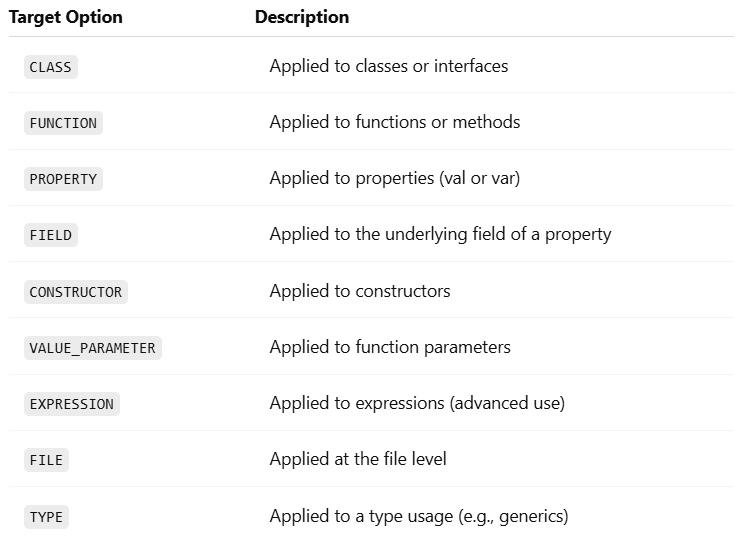
@TargetYou can use more than one if needed:
@Target(AnnotationTarget.CLASS, AnnotationTarget.FUNCTION, AnnotationTarget.CONSTRUCTOR)
annotation class AuditLog
This lets you use @AuditLog on multiple types of declarations.
Example: Creating a Custom Annotation
Let’s say you’re building a system where you want to mark certain functions as “experimental”.
Step 1: Define the Annotation
@Target(AnnotationTarget.FUNCTION)
@Retention(AnnotationRetention.RUNTIME)
annotation class ExperimentalFeature(val message: String = "This is experimental")@Target(AnnotationTarget.FUNCTION): Only allows this annotation on functions.@Retention(RUNTIME): Keeps the annotation at runtime (optional but useful).
Step 2: Use the Annotation
@ExperimentalFeature("Might be unstable in production")
fun newAlgorithm() {
    println("Running experimental algorithm...")
}
Step 3: Read the Annotation at Runtime (Optional)
fun checkExperimentalAnnotations() {
    val method = ::newAlgorithm
    val annotation = method.annotations.find { it is ExperimentalFeature } as? ExperimentalFeature

    if (annotation != null) {
        println("Warning: ${annotation.message}")
    }
}
This prints:
Warning: Might be unstable in productionTips for Using @Target in Kotlin
- Be specific: The more targeted your annotation, the less chance of misuse.
- Use multiple targets wisely: Don’t overgeneralize.
- Pair with @Retention: Decide whether your annotation should be available at runtime, compile time, or source level.
- Think Java Interop: If you’re interoperating with Java, know that
@Targetin Kotlin maps to@Targetin Java too.
Conclusion
@Target in Kotlin is more than just a syntactic detail. It controls how annotations behave, where they’re valid, and how your tools (including the compiler and IDE) handle them.
If you’re building libraries, frameworks, or just want clean annotation usage, understanding @Target in Kotlin is essential. With the right @Target settings, your custom annotations stay safe, purposeful, and powerful.