

Close your eyes for a moment. Imagine typing a sentence like “Create a melancholic piano piece that feels like a rainy Sunday afternoon” — and seconds later, an original, studio-quality composition plays back that captures exactly that mood. No musician needed. No recording studio. No hours of editing.
That’s not science fiction. That’s Generative Audio AI working right now, today.
Or picture this: a voiceover artist records just five minutes of audio. A few days later, a company uses her voice — cloned using Generative Audio AI — to narrate an audiobook in three different languages, with perfect pronunciation and natural emotional inflection. She approved it, she gets paid, and the publisher saves weeks of studio time.
We are living in the most transformative era in the history of sound. Generative Audio AI isn’t just a tech trend — it’s a complete rethinking of how humans and machines interact with one of our most fundamental senses.
In this deep-dive blog, we’ll unpack exactly how this technology works, walk through real code examples you can try yourself, and explore where this revolution is taking us. Whether you’re a developer, a musician, a podcaster, or simply a curious mind, buckle up — this is going to be a fascinating ride.
What Is Generative Audio AI — Really?
Let’s start simple.
Generative Audio AI is a category of artificial intelligence that can create audio content — voices, music, sound effects, ambient soundscapes — from scratch, based on patterns it learned from existing audio data.
The “generative” part is key. This isn’t AI that simply plays back pre-recorded sounds or filters noise from a recording. This is AI that invents new audio that has never existed before.
Think of it like this: you teach a child thousands of songs, and eventually they start humming melodies they’ve never heard before. Generative Audio AI does something similar — it absorbs patterns from massive datasets of audio and learns the underlying “grammar” of sound.
There are three main flavors of Generative Audio AI:
Voice AI — Cloning, synthesizing, and modifying human voices.
Music AI — Composing original music in any genre, mood, or style.
Sound Design AI — Generating environmental sounds, Foley effects, and custom audio textures.
Each of these uses different underlying model architectures, but they all share one fundamental goal: make computers understand and create sound the way humans do.
A Brief History: From Sine Waves to Neural Nets
To appreciate where we are, it helps to know where we started.
The Early Days (1950s–1990s)
The first computer-generated speech came in 1961 when an IBM 704 computer sang “Daisy Bell.” It was a milestone, but it was also clearly robotic — syllables strung together with no understanding of rhythm, emotion, or naturalness.
For decades, text-to-speech systems worked using a technique called concatenative synthesis — essentially, massive libraries of recorded phonemes (the smallest units of speech) stitched together algorithmically. The results were functional but unmistakably artificial.
Early music generation was similarly primitive — rule-based systems that could follow music theory but couldn’t improvise, feel, or surprise.
The Deep Learning Breakthrough (2010s)
Everything changed when deep learning matured. Two major breakthroughs stand out:
WaveNet (2016) — DeepMind released WaveNet, a neural network that generated raw audio waveforms sample by sample. For the first time, synthesized speech sounded genuinely human. The catch? It was painfully slow — generating one second of audio took minutes.
GANs Applied to Audio (2018–2019) — Generative Adversarial Networks, already a sensation in image generation, were adapted for audio. Models like GAN-TTS and MelGAN could generate high-quality audio far faster than WaveNet.
The Transformer Era (2020s–Now)
Then came transformer models — the same architecture powering GPT and other language models. When applied to audio, transformers unlocked a new level of coherence, expressiveness, and creative generation.
Models like AudioLM, MusicGen, Tortoise TTS, Vall-E, and Stable Audio represent the current cutting edge. They can generate minutes of high-quality, contextually appropriate audio from a simple text prompt.
That’s where we are today. And we’re just getting started.
How Machines Actually Learn to Understand Sound
Before a machine can create audio, it needs to understand audio. Here’s how that actually works.
Sound as Data
Sound is, at its core, vibration — pressure waves moving through air. A microphone converts those waves into electrical signals, which are then digitized into a sequence of numbers called samples. A standard audio file contains 44,100 samples per second (44.1 kHz), meaning one minute of audio is about 2.6 million individual data points.
That’s a lot of raw data. Processing it directly is computationally expensive, so AI systems typically work with spectrograms instead.
What’s a Spectrogram?
A spectrogram is a visual representation of audio that shows how the frequency content changes over time.

Think of it as a heat map where:
- The X-axis is time
- The Y-axis is frequency (pitch)
- The color/brightness represents amplitude (loudness)
By converting audio to spectrograms, we transform an audio problem into an image problem — and image processing is something neural networks are extremely good at.
The most common variant used in Generative Audio AI is the Mel spectrogram, which uses a perceptual frequency scale that matches how human ears actually perceive pitch differences.
The Training Process
Here’s a simplified breakdown of how a Generative Audio AI model learns:
- Data Collection — Thousands to millions of hours of audio are gathered (speech, music, environmental sounds).
- Feature Extraction — Raw audio is converted into Mel spectrograms or other intermediate representations.
- Model Training — A neural network is fed these representations and learns to predict what comes next (autoregressive models) or to reconstruct audio from noise (diffusion models).
- Conditioning — The model is conditioned on text descriptions, speaker embeddings, or style tokens, so it learns to associate specific inputs with specific audio characteristics.
- Evaluation & Fine-Tuning — Human raters listen to outputs and score them on naturalness, accuracy, and quality. This feedback helps refine the model.
The result is a model that has internalized the “rules” of sound so deeply that it can create new sounds that follow those rules — even for combinations it’s never encountered before.
Voice Cloning: The Science of Copying a Human Voice
Voice cloning is arguably the most fascinating — and controversial — application of Generative Audio AI. Let’s dig into how it actually works.
What Makes a Voice Unique?
Every human voice has a distinct acoustic fingerprint shaped by:
- The size and shape of the vocal tract
- Resonance characteristics of the skull and chest cavity
- Speaking rhythm and pace
- Pitch range and variation patterns
- Emotional coloration and prosody
- Accent and dialect-specific phoneme pronunciations
When we talk about cloning a voice, we’re talking about capturing all of these characteristics and encoding them into a mathematical representation that a model can replicate.
Speaker Embeddings: The DNA of a Voice
The key technology behind voice cloning is speaker embeddings — compact numerical vectors (essentially lists of numbers) that represent the unique characteristics of a specific voice.
A speaker embedding is generated by a specialized neural network called a speaker encoder. You feed it a few seconds of someone’s voice, and it outputs a vector — typically 256 or 512 numbers — that uniquely identifies that speaker.
Here’s a conceptual illustration:
# Conceptual example of speaker embedding extraction
# In practice, you'd use a pretrained speaker encoder model

import numpy as np

def extract_speaker_embedding(audio_file, speaker_encoder_model):
    """
    Takes a short audio clip and returns a vector that
    represents the unique characteristics of that speaker's voice.

    Parameters:
    -----------
    audio_file : str
        Path to a WAV file containing the target voice (as little as 5-30 seconds)
    speaker_encoder_model : SpeakerEncoder
        A pretrained neural net that maps audio → embedding vectors

    Returns:
    --------
    embedding : np.ndarray
        A 256-dimensional vector capturing the voice's unique characteristics
    """
    # Load and preprocess the audio
    waveform = load_audio(audio_file, sample_rate=16000)

    # Convert to mel spectrogram for the encoder
    mel_spec = audio_to_mel_spectrogram(waveform)

    # Run through the speaker encoder
    # This is where the magic happens — the model distills
    # all the unique vocal characteristics into a fixed-size vector
    embedding = speaker_encoder_model(mel_spec)

    # Normalize the embedding (important for consistent results)
    embedding = embedding / np.linalg.norm(embedding)

    return embedding  # Shape: (256,) — the "DNA" of this voice

# Example usage:
# voice_dna = extract_speaker_embedding("target_speaker.wav", encoder_model)
# This vector now encodes everything distinctive about the speaker's voice
The extract_speaker_embedding function converts a raw audio file into a Mel spectrogram (a visual frequency representation of the audio), then feeds it through a pretrained speaker encoder neural network. The output is a 256-dimensional vector — think of it as the voice’s “fingerprint.” This fingerprint is later used by the synthesis model to generate new speech that sounds like the target speaker.
The Two-Stage Voice Cloning Pipeline
Once you have the speaker embedding, voice cloning typically involves two stages:
Stage 1: Text to Mel Spectrogram
The synthesis model takes your text and the speaker embedding as inputs, and generates a Mel spectrogram — a visual representation of what the audio should look like frequency-wise.
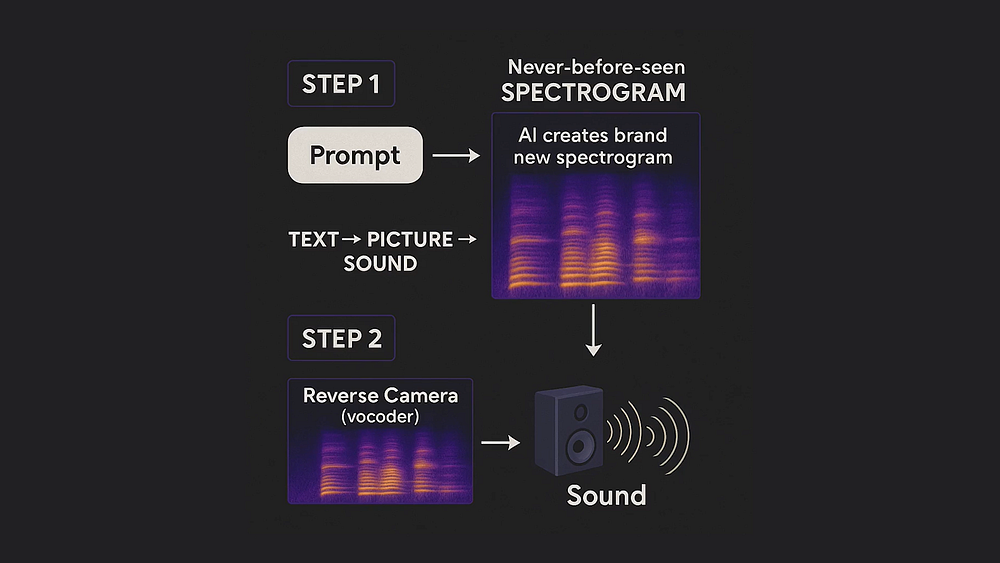
Stage 2: Mel Spectrogram to Waveform
A second model called a vocoder (like WaveGlow, HiFi-GAN, or BigVGAN) converts the Mel spectrogram into an actual audio waveform you can play.
# Simplified two-stage voice cloning pipeline
# Using a Tacotron2-style synthesizer + HiFi-GAN vocoder

import torch

def clone_voice_pipeline(text, speaker_embedding, synthesizer, vocoder):
    """
    Full pipeline: text + voice embedding → spoken audio

    Stage 1: Synthesizer maps (text + speaker embedding) → mel spectrogram
    Stage 2: Vocoder maps mel spectrogram → audio waveform

    Parameters:
    -----------
    text : str
        The words you want the cloned voice to say
    speaker_embedding : torch.Tensor
        The 256-dim voice "fingerprint" from extract_speaker_embedding()
    synthesizer : nn.Module
        Tacotron2 or similar text-to-mel model
    vocoder : nn.Module
        HiFi-GAN or similar mel-to-audio model

    Returns:
    --------
    audio_waveform : np.ndarray
        Raw audio samples ready to save as a WAV file
    """

    # --- Stage 1: Text → Mel Spectrogram ---

    # Tokenize the text into phoneme IDs
    # Example: "Hello" → [h, ə, l, oʊ] → [18, 41, 27, 55]
    text_tokens = text_to_phoneme_ids(text)
    text_tensor = torch.LongTensor(text_tokens).unsqueeze(0)

    # The synthesizer uses BOTH the text AND the speaker embedding
    # The speaker embedding tells it "sound like THIS person"
    # The text tells it "say THESE words"
    with torch.no_grad():
        mel_spectrogram, _ = synthesizer.inference(
            text_tokens=text_tensor,
            speaker_embedding=speaker_embedding.unsqueeze(0),
            # Controls speaking pace — higher = slower speech
            length_scale=1.0,
            # Controls how much pitch varies — higher = more expressive
            pitch_scale=1.0
        )
    # mel_spectrogram shape: (1, 80, T) where T is time steps
    # 80 mel frequency bins capturing the full tonal texture of speech

    # --- Stage 2: Mel Spectrogram → Audio Waveform ---

    # The vocoder is a neural upsampler — it takes the compact
    # mel representation and generates the actual sound wave
    with torch.no_grad():
        audio_waveform = vocoder(mel_spectrogram)

    # Squeeze batch dimension and convert to numpy
    audio_waveform = audio_waveform.squeeze().cpu().numpy()

    return audio_waveform  # Ready to save as WAV or stream

# Usage:
# audio = clone_voice_pipeline(
#     text="Welcome to the future of audio technology.",
#     speaker_embedding=voice_dna,
#     synthesizer=tts_model,
#     vocoder=hifi_gan_model
# )
# save_audio("output.wav", audio, sample_rate=22050)
The first stage runs the text through a phoneme tokenizer (which converts words to their sound units), then a synthesizer model uses both those phonemes AND the speaker’s voice fingerprint to generate a Mel spectrogram. Think of this as the “blueprint” of the audio. The second stage feeds that blueprint into a vocoder — a neural network that’s essentially an expert at converting spectral blueprints into real, listenable sound waves. The result is audio that sounds like the target speaker saying words they never recorded.
Text-to-Speech (TTS): From Robotic to Indistinguishable
Modern Generative Audio AI has made TTS so good that human listeners often can’t tell the difference between synthesized and real speech. Here’s what makes modern TTS special.
The Key Ingredients of Natural-Sounding Speech
Prosody — The natural rise and fall of pitch, the pauses between phrases, the subtle emphasis on certain syllables. Early TTS systems had flat, monotonous prosody. Modern models learn prosody from data.
Coarticulation — In natural speech, sounds blend into each other. The “t” in “butter” sounds different from the “t” in “top” because of neighboring sounds. Neural TTS models capture this naturally.
Breathing and Micro-pauses — Real humans breathe between sentences. They hesitate occasionally. They have micro-pauses. Modern TTS models incorporate these to sound more human.
A Practical TTS Example Using a Modern API
# Modern Text-to-Speech with emotional control
# This example shows the style of API calls used with
# services like ElevenLabs, Google Cloud TTS, or Azure Neural Voice

import requests
import json

def generate_speech_with_emotion(
    text: str,
    voice_id: str,
    emotion: str = "neutral",
    stability: float = 0.5,
    speaking_rate: float = 1.0
) -> bytes:
    """
    Generate expressive speech with controllable emotion.

    Parameters:
    -----------
    text : str
        The text to convert to speech
    voice_id : str
        ID of the voice to use (from your TTS provider)
    emotion : str
        Target emotion: "neutral", "happy", "sad", "excited", "calm"
    stability : float
        0.0 = very expressive/variable, 1.0 = very stable/consistent
    speaking_rate : float
        1.0 = normal speed, 0.75 = 75% speed, 1.25 = 25% faster

    Returns:
    --------
    audio_bytes : bytes
        Raw MP3 or WAV audio bytes you can save or stream
    """

    # Emotion maps to specific prosody settings internally
    # Each emotion shifts the pitch contour, speaking rate,
    # and energy distribution across the spectrogram differently
    emotion_presets = {
        "neutral":  {"pitch_shift": 0.0,  "energy_boost": 1.0},
        "happy":    {"pitch_shift": +2.0, "energy_boost": 1.3},
        "sad":      {"pitch_shift": -3.0, "energy_boost": 0.7},
        "excited":  {"pitch_shift": +4.0, "energy_boost": 1.5},
        "calm":     {"pitch_shift": -1.0, "energy_boost": 0.85},
    }

    preset = emotion_presets.get(emotion, emotion_presets["neutral"])

    # Build the request payload
    payload = {
        "text": text,
        "voice_settings": {
            "voice_id": voice_id,
            "stability": stability,
            "similarity_boost": 0.8,  # How closely to match voice characteristics
            "style": preset["energy_boost"],
            "speaking_rate": speaking_rate * (1.0 + preset["pitch_shift"] / 20),
        },
        "model_id": "eleven_multilingual_v2",  # Supports 29 languages
        "output_format": "mp3_44100_128"        # 44.1kHz, 128kbps MP3
    }

    # Make the API call (replace with your actual endpoint and API key)
    response = requests.post(
        url="https://api.your-tts-provider.com/v1/text-to-speech",
        headers={
            "xi-api-key": "YOUR_API_KEY_HERE",
            "Content-Type": "application/json"
        },
        data=json.dumps(payload)
    )

    if response.status_code == 200:
        return response.content  # Raw audio bytes
    else:
        raise Exception(f"TTS API error: {response.status_code} - {response.text}")

# Practical example — generate a podcast intro in an excited voice:
audio_bytes = generate_speech_with_emotion(
    text="""Welcome back to Tech Frontier! Today, we're diving deep into
            Generative Audio AI — the technology that's changing how we
            think about sound forever.""",
    voice_id="josh_professional_v2",
    emotion="excited",
    stability=0.45,
    speaking_rate=0.95  # Slightly slower for clarity
)

# Save to file
with open("podcast_intro.mp3", "wb") as f:
    f.write(audio_bytes)

print("Generated podcast intro successfully!")
This function wraps a modern TTS API with emotional control. The key insight is that different emotions map to different acoustic parameters — a happy voice has a higher pitch contour and more energy, while a sad voice is lower and more subdued. The stability parameter controls how consistent vs. expressive the voice sounds — lower stability means more natural variation (like a real human), while higher stability sounds more measured and consistent (great for customer service bots). The similarity_boost ensures the output closely matches the chosen voice’s characteristics. Once the API returns audio bytes, you can save them directly as an MP3 file.
Music Generation: When AI Becomes the Composer
This is where Generative Audio AI gets truly mind-bending. Teaching a machine to compose original, emotionally resonant music requires understanding not just patterns, but tension and release, harmony and dissonance, rhythm and silence.
How Music Generation Models Think
Unlike speech, music has multiple simultaneous streams of information:
- Melody — The main tune
- Harmony — Chords supporting the melody
- Rhythm — The timing pattern of notes
- Timbre — The characteristic quality of each instrument
- Structure — Verse, chorus, bridge — how sections relate
Modern music generation models handle this in different ways. Symbolic models work with MIDI-like representations (think of piano roll notation). Audio models like MusicGen work directly with audio tokens.
Using Meta’s MusicGen for Prompt-Based Music Creation
# Music generation using Meta's MusicGen model
# Install first: pip install audiocraft

from audiocraft.models import MusicGen
from audiocraft.data.audio import audio_write
import torch

def generate_music_from_prompt(
    prompt: str,
    duration_seconds: int = 30,
    model_size: str = "medium"
) -> None:
    """
    Generate original music from a text description.

    Parameters:
    -----------
    prompt : str
        Natural language description of the music you want.
        Be specific! Include genre, mood, instruments, tempo.
    duration_seconds : int
        How many seconds of audio to generate (max ~30s for 'small' model)
    model_size : str
        "small" (300M params), "medium" (1.5B params), "large" (3.3B params)
        Larger = better quality but slower and needs more GPU memory

    The model internally:
    1. Tokenizes your text prompt using a frozen T5 text encoder
    2. Generates audio tokens autoregressively (like a language model predicts words)
    3. Decodes audio tokens back to waveforms using the EnCodec decoder
    """

    print(f"Loading MusicGen-{model_size} model...")
    model = MusicGen.get_pretrained(f"facebook/musicgen-{model_size}")

    # Configure generation parameters
    model.set_generation_params(
        duration=duration_seconds,
        # Temperature controls creativity vs. faithfulness
        # Higher (>1.0) = more creative/random, Lower (<1.0) = more predictable
        temperature=1.0,
        # Top-k sampling — only consider the top 250 most likely next tokens
        # Prevents the model from generating incoherent audio
        top_k=250,
        # Classifier-free guidance scale
        # Higher = follows prompt more strictly (try 3.0 to 5.0)
        cfg_coef=3.0,
    )

    print(f"Generating {duration_seconds}s of music for prompt: '{prompt}'")

    # Generate audio — this returns a tensor of shape (batch, channels, samples)
    with torch.no_grad():
        wav = model.generate(
            descriptions=[prompt],  # Can pass multiple prompts for batch generation
            progress=True           # Show a progress bar in the terminal
        )

    # wav shape: (1, 1, num_samples) — batch=1, mono=1
    # Sample rate is always 32000 Hz for MusicGen

    # Save the generated audio
    output_filename = "generated_music"
    audio_write(
        stem_name=output_filename,
        wav=wav[0],           # Take the first (only) batch item
        sample_rate=32000,    # MusicGen's native sample rate
        strategy="loudness",  # Normalize loudness for consistent playback volume
        loudness_compressor=True  # Apply gentle dynamic compression
    )

    print(f"✓ Music saved as '{output_filename}.wav'")


# --- Example prompts to try ---

# Cinematic & emotional
generate_music_from_prompt(
    prompt="""An epic orchestral piece with swelling strings and triumphant brass,
              building tension then releasing into a soaring, hopeful melody.
              Suitable for a film climax scene.""",
    duration_seconds=30,
    model_size="medium"
)

# Lo-fi & chill
generate_music_from_prompt(
    prompt="""Lo-fi hip hop beat with warm vinyl crackle, mellow Rhodes piano,
              soft jazz drums at 85 BPM, and a lazy bassline.
              Perfect for studying or late-night coding sessions.""",
    duration_seconds=30,
    model_size="medium"
)

# Electronic & energetic
generate_music_from_prompt(
    prompt="""Energetic progressive house music with a driving four-on-the-floor
              kick drum at 128 BPM, arpeggiated synthesizers, a euphoric breakdown,
              and a powerful drop with sweeping pads.""",
    duration_seconds=30,
    model_size="large"  # Use large for better electronic music quality
)
This script loads Meta’s MusicGen model — a transformer-based audio language model trained on 20,000 hours of licensed music — and generates original compositions from text descriptions. The temperature parameter is particularly interesting: just like in text generation, higher temperatures produce more creative/surprising outputs while lower temperatures produce safer, more predictable ones. The cfg_coef (classifier-free guidance coefficient) controls how strictly the model follows your prompt — higher values mean it sticks closer to your description but may produce slightly less musically natural results. The output is a 32kHz stereo WAV file you can immediately play.
Sound Effect & Ambient Audio Generation
Beyond voices and music, Generative Audio AI is transforming sound design — the art of creating the audio environment around us.
Practical Sound Generation with AudioCraft
# Environmental and Foley sound generation using Meta's AudioGen
# Part of the AudioCraft library (same family as MusicGen, but for sounds)

from audiocraft.models import AudioGen
from audiocraft.data.audio import audio_write

def generate_sound_effect(
    description: str,
    duration: float = 5.0,
    variations: int = 3
) -> list:
    """
    Generate multiple variations of a sound effect from a text description.
    Generating multiple variations is standard practice because generative
    models have inherent randomness — some outputs will be better than others.

    Parameters:
    -----------
    description : str
        Describe the sound in plain English. Include context for realism.
        Good: "Heavy rain on a metal roof with distant rolling thunder"
        Bad: "Rain" (too vague — model has to guess)
    duration : float
        Length of each generated sound effect in seconds
    variations : int
        Number of different versions to generate (pick the best one)

    Returns:
    --------
    List of generated audio tensors — listen to each and pick your favorite
    """

    print("Loading AudioGen model...")
    # AudioGen-medium has 1.5B parameters, trained on environmental sounds
    model = AudioGen.get_pretrained("facebook/audiogen-medium")

    model.set_generation_params(
        duration=duration,
        temperature=1.2,   # Slightly higher temp for more varied sound textures
        top_k=250,
        cfg_coef=3.0
    )

    # Generate multiple variations simultaneously (efficient batch processing)
    # The same prompt generates different results each time due to
    # the stochastic (random) nature of the generation process
    prompts = [description] * variations

    print(f"Generating {variations} variations of: '{description}'")
    wavs = model.generate(descriptions=prompts, progress=True)

    # Save each variation for comparison
    output_files = []
    for i, wav in enumerate(wavs):
        filename = f"sfx_variation_{i+1}"
        audio_write(
            stem_name=filename,
            wav=wav,
            sample_rate=16000,    # AudioGen outputs at 16kHz
            strategy="loudness"
        )
        output_files.append(f"{filename}.wav")
        print(f"  ✓ Saved variation {i+1}: {filename}.wav")

    return output_files


# --- Real-world sound design use cases ---

# Game audio — dynamic ambience
generate_sound_effect(
    description="Dense medieval tavern ambience: murmuring crowd, clinking tankards, "
                "a bard playing a lute in the background, fire crackling in the hearth",
    duration=10.0,
    variations=3
)

# Film Foley — specific action sound
generate_sound_effect(
    description="Heavy wooden door creaking open slowly on rusty hinges, "
                "in a large empty stone castle corridor",
    duration=3.0,
    variations=5  # More variations for a specific one-shot Foley sound
)

# Podcast/YouTube production — ambient background
generate_sound_effect(
    description="Calm coffee shop ambience: gentle background chatter, "
                "coffee machine hissing, occasional cup clink, soft jazz music barely audible",
    duration=30.0,  # Long loop for continuous background use
    variations=2
)
AudioGen is the sound-effect counterpart to MusicGen. It was trained on a large dataset of environmental sounds and Foley recordings. The key here is the prompting strategy — specific, contextually rich descriptions consistently produce better results than vague ones.
The code generates multiple variations intentionally, because with generative models, you often need to “roll the dice” a few times to get exactly the right texture and character. In professional sound design workflows, generating 5–10 variations and selecting the best one is completely standard practice.
The Core Models Powering Generative Audio AI
Let’s take a step back and look at the major model architectures that make all of this possible.
Autoregressive Models (Language-Style Generation)
These models generate audio token by token, left to right, like predicting the next word in a sentence. AudioLM and MusicGen use this approach. They’re coherent and expressive but can be slow for long audio segments.
Diffusion Models (Noise to Signal)
Diffusion models start with pure random noise and gradually remove it, guided by a text condition, until structured audio emerges. Stable Audio, AudioLDM 2, and DiffWave use this approach. They’re particularly good at producing rich, textured audio.
# Conceptual illustration of how diffusion works for audio
# (simplified — not a runnable implementation)

import numpy as np

def diffusion_audio_generation_concept(text_prompt, num_steps=50):
    """
    Demonstrates the conceptual flow of diffusion-based audio generation.

    The model:
    1. Starts with pure random noise (thinks of it as static)
    2. At each step, predicts "which parts of this noise are NOT signal"
    3. Subtracts the noise, guided by the text prompt
    4. After enough steps, structured, meaningful audio remains

    This is analogous to a sculptor removing material from marble —
    the audio was "always there," you just had to remove what wasn't it.
    """

    # Start: pure Gaussian noise (nothing but static)
    # Shape: (audio_length_samples,) — e.g., 220500 samples = 5 seconds at 44.1kHz
    latent = np.random.randn(220500)
    print(f"Step 0: Pure noise — entropy = {np.std(latent):.3f}")

    # Encode the text prompt into a conditioning vector
    # This vector guides the denoising at every step
    text_embedding = encode_text(text_prompt)  # Shape: (768,)

    # Iteratively denoise, guided by the text prompt
    for step in range(num_steps, 0, -1):

        # Noise level decreases with each step
        # Early steps: large-scale structure (overall shape of the audio)
        # Later steps: fine details (texture, timbre nuances)
        noise_level = step / num_steps

        # The denoiser neural network predicts what to remove at this step
        # It simultaneously considers:
        # - Current noisy latent (what the audio looks like now)
        # - The text embedding (what audio we're aiming for)
        # - The current noise level (how much noise to expect)
        noise_prediction = denoiser_network(latent, text_embedding, noise_level)

        # Remove the predicted noise
        # As noise_level decreases, meaningful structure emerges
        latent = latent - (noise_level * noise_prediction)

        if step % 10 == 0:
            structure_score = 1.0 - noise_level
            print(f"Step {num_steps - step + 1}/{num_steps}: "
                  f"Audio structure: {structure_score:.0%} formed")

    # The latent is now a structured audio representation
    # Decode it back to a waveform
    final_audio = decode_latent_to_waveform(latent)
    print("Generation complete!")

    return final_audio

# Example:
# audio = diffusion_audio_generation_concept(
#     "A gentle acoustic guitar melody over soft rainfall"
# )
This conceptual walkthrough illustrates why diffusion models are so powerful. Rather than generating audio sequentially, they refine it progressively — like developing a photograph in a darkroom, where the image slowly emerges from a blank, foggy slate.
The noise_level schedule is critical: early denoising steps establish large-scale structure (the overall form of the music or voice), while later steps refine fine-grained details (specific timbres, subtle textures). The text embedding acts as a “compass” at every step, ensuring the audio develops in the direction of the prompt.
Voice Activity Detection + Conditioning
High-quality voice cloning systems also use Voice Activity Detection (VAD) to ensure clean reference audio:
# Voice Activity Detection — cleaning reference audio before cloning
# This step is crucial for high-quality voice cloning

import numpy as np

def preprocess_reference_audio(audio_path: str, target_sample_rate: int = 16000) -> np.ndarray:
    """
    Clean and prepare a voice recording for use as a cloning reference.

    Problems this solves:
    - Background music or noise that confuses the speaker encoder
    - Silence or breathing sounds that waste the reference "quota"
    - Volume inconsistencies that affect embedding quality
    - Multiple speakers (only want one voice in the reference)

    Parameters:
    -----------
    audio_path : str
        Path to the reference audio file (WAV, MP3, etc.)
    target_sample_rate : int
        Speaker encoders typically expect 16kHz audio

    Returns:
    --------
    clean_speech : np.ndarray
        Cleaned, resampled audio containing only active speech segments
    """

    # Load audio and resample to target sample rate
    waveform, original_sr = load_audio_file(audio_path)
    waveform = resample_audio(waveform, original_sr, target_sample_rate)

    # --- Step 1: Noise Reduction ---
    # Estimate the noise profile from the quietest parts of the audio
    # (assumed to be background noise rather than speech)
    noise_profile = estimate_noise_floor(waveform, percentile=10)
    waveform = spectral_subtract(waveform, noise_profile)

    # --- Step 2: Voice Activity Detection ---
    # Split audio into 10ms frames
    frame_length = int(target_sample_rate * 0.01)  # 160 samples at 16kHz
    frames = split_into_frames(waveform, frame_length)

    # For each frame, determine if it contains speech or silence
    # The VAD looks at: energy level, zero-crossing rate, spectral centroid
    speech_frames = []
    for frame in frames:
        energy = np.sum(frame ** 2)
        zero_crossing_rate = np.mean(np.abs(np.diff(np.sign(frame))))

        # A frame is "speech" if it has sufficient energy AND
        # the right frequency characteristics (not just noise bursts)
        is_speech = (
            energy > SPEECH_ENERGY_THRESHOLD and
            MIN_SPEECH_ZCR < zero_crossing_rate < MAX_SPEECH_ZCR
        )

        if is_speech:
            speech_frames.append(frame)

    # Concatenate only the speech frames
    clean_speech = np.concatenate(speech_frames)

    # --- Step 3: Normalization ---
    # Normalize to -23 LUFS (broadcast standard loudness)
    # Ensures consistent embedding quality regardless of recording volume
    clean_speech = normalize_loudness(clean_speech, target_lufs=-23.0)

    print(f"Original duration: {len(waveform)/target_sample_rate:.1f}s")
    print(f"Clean speech duration: {len(clean_speech)/target_sample_rate:.1f}s")
    print(f"Speech ratio: {len(clean_speech)/len(waveform):.1%}")

    return clean_speech
This preprocessing pipeline solves a common practical problem — real-world audio recordings are messy. Before feeding audio to a speaker encoder for cloning, this function removes background noise using spectral subtraction (estimating what “silence” sounds like and removing it from the full signal), uses Voice Activity Detection to keep only frames that actually contain speech (discarding breathing, silence, and noise), and normalizes the loudness to a broadcast standard.
Cleaner reference audio = better speaker embeddings = more accurate voice cloning.
Real-World Applications Across Industries
Generative Audio AI isn’t just a lab experiment — it’s reshaping multiple industries right now.
Podcasting & Content Creation
Podcasters are using Generative Audio AI to generate custom intro jingles in seconds, create synthetic co-hosts or guest voices for solo creators, auto-generate multiple language versions of episodes with voice preservation, and clean up audio quality on budget recordings.
Video Game Development
Game studios use Generative Audio AI for procedurally generated ambient sound environments that never repeat, dynamic NPC dialogue that responds to player actions in real time, instant voice acting for prototyping before hiring voice actors, and adaptive music that shifts mood based on gameplay state.
Accessibility & Assistive Technology
This may be the most profound application. Generative Audio AI is giving voice to people with ALS, throat cancer, or other conditions that have taken away their ability to speak — by cloning their voice before they lose it, or by creating a personalized synthetic voice that sounds natural rather than robotic.
Film & TV Production
The entertainment industry uses Generative Audio AI for de-aging actor voices to match younger archive footage, generating background crowd chatter and ambient sound environments, dubbing foreign-language versions while preserving the original actor’s voice characteristics, and creating custom music scores that adapt to final cut timing.
Customer Experience & Telephony
Customer service is transformed by hyper-natural AI voices for IVR systems, real-time emotion detection in customer calls with appropriate voice response tuning, and personalized voice assistants that match brand personality.
Education & E-Learning
Educational platforms are using Generative Audio AI to narrate courses in hundreds of languages while keeping instructor personality, adapt reading speed and tone to different learning levels, and create immersive audio environments for historical or scientific simulations.
Ethical Considerations: The Dark Side of the Wave
We’d be doing you a disservice if we only talked about the exciting possibilities without confronting the real risks. Generative Audio AI introduces some serious ethical challenges.
The Deepfake Voice Problem
The same technology that lets an ALS patient preserve their voice can be used to impersonate world leaders, create fake audio evidence in legal proceedings, or conduct voice phishing (“vishing”) scams. This is not hypothetical — it’s already happening.
Detection Is Racing to Keep Up
AI audio detection tools (like those developed by organizations like Resemble AI and Pindrop) analyze spectral artifacts, unnatural prosody patterns, and “fingerprints” left by specific generative models. But it’s an arms race — as generation quality improves, detection becomes harder.
Consent and Ownership
Whose voice data was used to train these models? Did they consent? Many early training datasets scraped audio from the internet without explicit consent. This raises significant questions about data rights, artist compensation, and intellectual property.
Regulatory Response
The EU AI Act includes provisions specifically addressing synthetic audio. Several US states have passed legislation requiring disclosure of AI-generated audio in political advertising. Several music labels are actively pursuing legal action against AI companies that trained on their catalogs without licensing.
Responsible Development Practices
The Generative Audio AI community is developing practical safeguards: audio watermarking (encoding invisible signals in AI-generated audio to identify its origin), provenance metadata standards, voice cloning consent verification systems, and model cards that document training data sources.
The technology itself is neutral. What matters is how it’s governed, and that’s a conversation all of us need to be part of.
The Future: Where Generative Audio AI Is Headed
Here’s what the next 2–5 years likely hold for Generative Audio AI.
Real-Time Everything
Today’s voice cloning and music generation usually takes seconds to minutes. The next frontier is real-time generation at low latency — enabling live AI voice translation during phone calls, real-time adaptive game music, and instant custom voice creation in the moment.
Multimodal Audio-Visual Generation
Future systems will generate audio synchronized with video — not just matching music to a scene, but generating Foley sounds, dialogue, and music simultaneously with visual content generation. Imagine: describe a 30-second video scene, get back video and audio as a unified output.
Personalized AI Music Companions
Rather than static playlists, AI music companions will generate music continuously, adapting in real time to your heart rate, activity level, mood (inferred from device sensors), and even the specific task you’re doing. Your workout music will literally be composed for your exact pace and energy in that moment.
Zero-Shot Cross-Lingual Voice Transfer
Current voice cloning works best within one language. Future models will clone your voice and immediately speak in 50+ languages with authentic accent, preserved personality, and natural prosody — without needing native recordings in each language.
On-Device Generation
As hardware improves, Generative Audio AI will move from cloud servers to your phone, earbuds, and smart speakers — enabling offline, private, low-latency generation that doesn’t send your data anywhere.
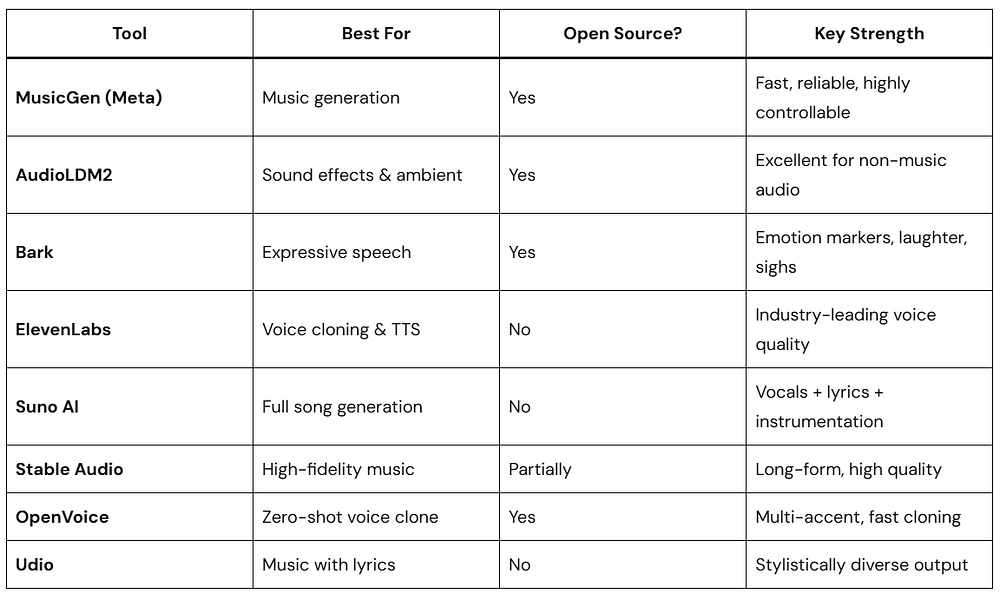
Best Generative Audio AI Tools in 2026
FAQs
Q: How much audio do I need to clone a voice accurately?
Modern systems like VALL-E can clone a voice from as little as 3 seconds of reference audio, though 30–60 seconds typically produces significantly better results. For professional-grade cloning, 5–10 minutes of clean speech data is considered ideal.
Q: What’s the difference between TTS and voice cloning?
TTS (Text-to-Speech) converts text to speech using a predefined voice. Voice cloning goes further — it captures a specific person’s unique voice characteristics so you can make that specific voice say anything new. Voice cloning is essentially personalized TTS.
Q: Is AI-generated music protected by copyright?
This is currently unsettled law. In most jurisdictions, copyright requires human authorship, meaning purely AI-generated music with no human creative input currently has limited copyright protection. However, the legal landscape is evolving rapidly. Consult a music IP attorney for current guidance specific to your situation.
Q: What hardware do I need to run these models locally?
Smaller TTS models can run on a standard laptop CPU. MusicGen-small and AudioGen-medium require a GPU with at least 8GB VRAM. Larger, higher-quality models (MusicGen-large, Stable Audio) benefit from 16GB+ VRAM. Cloud API alternatives (ElevenLabs, OpenAI TTS, Google Cloud TTS) eliminate hardware requirements entirely.
Q: How can I detect if audio is AI-generated?
Tools like AI Speech Classifier (by ElevenLabs), Resemble Detect, and Adobe’s Content Authenticity Initiative tools analyze spectral artifacts to identify AI-generated audio. No tool is perfect, but detection accuracy above 90% is achievable for current-generation models.
Q: Can AI music generation be used commercially?
It depends on the tool and license. MusicGen’s training data includes licensed music, and Meta has specific licensing terms. Stability AI’s Stable Audio uses only licensed training data. Always check the specific terms of the model and service you use before commercial use.
Conclusion
We’re standing at an extraordinary inflection point. Generative Audio AI is giving individuals the creative tools that previously required entire professional teams. It’s giving voice to those who’ve lost theirs. It’s creating musical forms and sonic textures that have never been heard before.
But like every transformative technology, it demands something from us — thoughtfulness, responsibility, and genuine engagement with the ethical questions it raises.
The machines have learned to listen, to understand, and now to create. What we do with that capability is entirely up to us.
Whether you’re a developer looking to integrate audio AI into your apps, a musician curious about collaboration with AI tools, or simply someone fascinated by the future of sound — the best time to start exploring Generative Audio AI is right now.
The revolution isn’t coming. It’s already playing through your speakers.