Kotlin Lambda expressions are a powerful feature of Kotlin that allow for the creation of anonymous functions that can be passed as arguments to other functions. They are a concise and expressive way to define small pieces of functionality, making them an essential tool for functional programming in Kotlin. In this guide, we will cover...
Kotlin is a powerful programming language that has been gaining popularity in recent years. One of its key features is extension functions. Kotlin Extension functions allow developers to add functionality to existing classes without having to modify the original class. In this blog, we will discuss kotlin extension functions in Kotlin and provide some examples...
Kotlin Kadane’s algorithm is a well-known algorithm used for finding the maximum subarray sum in a given array. It is an efficient algorithm that works in O(n) time complexity. In this blog, we will discuss Kadane’s algorithm and how to implement it using the Kotlin programming language.
KotlinKadane’s Algorithm
Kadane’s algorithm is a dynamic programming algorithm that works by iterating over the array and keeping track of the maximum subarray sum seen so far. The algorithm maintains two variables, max_so_far and max_ending_here, where max_so_far is the maximum subarray sum seen so far, and max_ending_here is the maximum subarray sum that ends at the current index.
The algorithm starts by setting both max_so_far and max_ending_here to the first element of the array. It then iterates over the remaining elements of the array, updating max_ending_here by adding the current element to it. If max_ending_here becomes negative, it is reset to zero, as any subarray with a negative sum cannot be the maximum subarray. If max_ending_here is greater than max_so_far, max_so_far is updated with the value of max_ending_here. At the end of the iteration, max_so_far will contain the maximum subarray sum.
Kotlin Implementation
Now let’s see how we can implement Kadane’s algorithm using Kotlin:
In this implementation, we first initialize max_so_far and max_ending_here to the first element of the array. We then loop over the remaining elements of the array and update max_ending_here by adding the current element to it. If max_ending_here becomes negative, it is reset to zero. If max_ending_here is greater than max_so_far, max_so_far is updated with the value of max_ending_here. Finally, the function returns max_so_far.
Let’s test our implementation with an example:
Kotlin
funmain() {val arr = intArrayOf(-2, -3, 4, -1, -2, 1, 5, -3)val maxSum = maxSubArraySum(arr)println(\"Maximum subarray sum is: $maxSum\")}
Output:
Maximum subarray sum is: 7
In this example, we have an array of integers, and we want to find the maximum subarray sum. Our implementation correctly returns 7, which is the maximum subarray sum.
Conclusion
Kadane’s algorithm is a simple yet powerful algorithm for finding the maximum subarray sum in an array. In this blog, we have seen how to implement Kadane’s algorithm using Kotlin. This implementation works in O(n) time complexity, making it an efficient algorithm for solving the maximum subarray problem.
Kotlin is a popular programming language that offers a wide range of features for developers to write concise and expressive code. One of the most powerful features of Kotlin is its scope functions, which are a set of functions that allow you to execute a block of code within the context of an object. In this blog post, we’ll explore Kotlins scope functions and how you can use them to write more efficient and readable code.
Overview of Kotlin Scope Functions
Kotlin offers five scope functions: let, run, with, apply, and also. Each of these functions has its unique use cases and can be used to execute a block of code in a specific context. Let’s take a closer look at each of these functions:
1. Let
The let function allows you to execute a block of code on a nullable object. If the object is null, the block of code is not executed. Otherwise, the block of code is executed, and the result of the block is returned. This function is particularly useful when you need to perform some operations on an object that may or may not be null.
2. Run
The run function is similar to the let function, but it is used to execute a block of code on a non-null object. The result of the block is returned, and the object on which the code is executed is referred to as this within the block.
3. With
The with function is used to execute a block of code on an object without the need for an explicit receiver. This function is particularly useful when you need to perform multiple operations on the same object.
4. Apply
The apply function is similar to the with function, but it is used to modify the object on which the code is executed. The object is returned after the block of code is executed, making this function particularly useful for initializing objects.
5. Also
The also function is used to perform some side effects on an object. The object is returned after the block of code is executed, and this function is particularly useful when you need to log or debug some values.
Benefits of Kotlin Scope Functions
Kotlin scope functions offer a number of benefits for developers, including:
Concise and readable code: Kotlin scope functions allow us to write more concise and readable code by reducing the need for intermediate variables.
Reduced boilerplate: Scope functions eliminate the need for redundant code and make it easier to perform operations on objects.
Improved debugging: Kotlin scope functions provide more visibility into the state of objects by allowing you to perform side effects and log values.
Examples
Let’s take a look at some examples of how we can use Kotlin scope functions in our code.
1. Using let to perform operations on a nullable object:
Kotlin
val name: String? = "softAai"name?.let { println(it) }
In this example, we use the let function to print the value of the name variable only if it is not null.
2. Using run to initialize an object:
Kotlin
val person = Person().run { firstName = "amol" lastName = "pawar"this}
In this example, we use the run function to initialize a Person object and set its properties. The object is returned after the block of code is executed.
3. Using apply to modify an object:
Kotlin
val person = Person().apply { firstName = "Amol" lastName = "Pawar"}
In this example, we use the apply function to modify a Person object by setting its properties. The object is returned after the block of code is executed.
4. Using with to perform multiple operations on the same object:
Kotlin
val person = Person()with(person) { firstName = "Amol" lastName = "Pawar" age = 20 occupation = "Software Developer"}
In this example, we use the with function to perform multiple operations on the person object. The with function allows us to omit the explicit receiver when accessing the properties and methods of the person object.
5. Using also to perform side effects on an object:
Kotlin
val person = Person("amol", "pawar", 20)person.also { logger.info("Person created: $it")}
In this example, we use the also function to log the creation of a person object using a logger. The also function allows us to perform a side effect on the person object and return it afterwards.
Disadvantage of Kotlin Scope Functions
While Kotlins scope functions offer a number of benefits, there are also some potential disadvantages to consider:
Overuse: It’s possible to overuse scope functions, which can make code less readable and harder to maintain. It’s important to use these functions judiciously and only where they add value.
Learning curve: While the concept of scope functions is relatively simple, it can take some time to become comfortable using them effectively. New developers may find them confusing at first.
Performance: While the performance impact of Kotlin scope functions is typically minimal, using them extensively can potentially slow down our code. However, this is rarely a concern in practice.
Conclusion
Overall,the benefits of Kotlin scope functions in Kotlin generally outweigh the potential drawbacks. By using these functions judiciously and with care, we can write more efficient and expressive code.
Destructuring in Kotlin is a feature that allows developers to extract values from complex data structures into separate variables. This makes it easier to access individual components of the data, making code more readable and easier to maintain. Destructuring allows developers to efficiently extract values from complex data structures like arrays, lists, maps, and even...
Jetpack Compose, the modern Android UI toolkit, has revolutionized the way developers build user interfaces for Android applications. One of the powerful features that Compose provides is the getApplicationContext function, commonly referred to as “Get Context.” In this blog post, we will delve into the intricacies of Get Context in Jetpack Compose and explore how...
In the realm of programming languages, arrays traditionally serve as containers for elements of the same data type. However, Kotlin, the versatile language developed by JetBrains, introduces a refreshing departure from this convention. In Kotlin, an array isn’t confined to homogenous data; instead, it becomes a dynamic repository capable of accommodating values of various data types within a single structure. This unique feature signifies that Kotlin arrays can seamlessly store integers, strings, characters, and more, all coexisting harmoniously within the same array. This flexibility not only sets Kotlin apart but also opens up a realm of possibilities for developers seeking a more expressive and adaptable approach to array management.
In this blog post, we will explore the intricacies of Kotlin arrays, unraveling the capabilities that make them a powerful tool in the hands of programmers.
Kotlin Array Properties
Arrays are 0 index based
The size of array is fixed, we can not increase or decrease once declare
Arrays are mutable as array elements can be changed after declaration.
Kotlin array can be created using Array<T>class and using some Kotlin functions.
The Kotlin array can be created using the constructor of the Array class. The constructor expects two parameters: first is size of the array and second is an init function. The init function is used to initialize the array:
Kotlin
var numbers = Array(3, init = { i -> i * 3})
Here, an array of size 3 is created and initialized by elements using the formula index * 3. The array created will contain [0, 3, 6].
2. Create an Array using functions
The easiest way to create an array is using arrayOf() function. We can pass the array elements as the parameter while calling the arrayOf() function.
Let us create an array of integers:
Kotlin
val marks = arrayOf(10,9,3,4,5)
In the above code, we created an array of integers. As the size of an array is fixed, we cannot add elements to this later on. The size of this array will be fixed i.e. 5.
In the above example, the type of array is not mentioned. Hence, different types of elements can be added to this array:
Kotlin
val differentTypeArray = arrayOf(10,4,5,"Array string", 'c', 10.5f)
If we want to fix the type of the elements in an array, the type can be mentioned at the time of the creation of the array, like this:
Kotlin
val marks = arrayOf<Int>(10,4,5,8,9)
3. Primitive types Array
Kotlin also has classes that represent arrays of primitive types and their respective helper functions likeByteArray -> byteArrayOf(), ShortArray ->shortArrayOf(), IntArray -> intArrayOf(), and so on. using both we can create arrays in kotlin
Kotlin
val x: IntArray = intArrayOf(0, 1, 2)// or// Example of initializing the values in the array using a lambda// Array of int of size 5 with values [0, 1, 2] (values initialized to their index value)var arr = IntArray(3) { it * 1 }
Note →
The elements of an array can be accessed and modified using get() and set() functions. instead of this, we can also use [] to access array elements providing the index value within the square brackets.
Kotlin
funmain() {val marks = arrayOf<Int>(10,4,5,8,9)println(marks.get(0))// update the value of the first element of the array marks.set(0,100)println(marks.get(0))println(marks[1])// setting new value for second element of array marks[1] = 200println(marks[1])}
Traversing the Array using for loop and forEach()
Kotlin
funmain() {val marks = arrayOf<Int>(10,4,5,8,9)// traverse the array using for loop and print for (i in marks)println(i)// Array elements can also be accessed using forEach() in Kotlin marks.forEach { i ->println(i) }}
Conclusion
Kotlin arrays offer a robust and flexible mechanism for working with collections of data. Whether you’re developing Android applications or backend services, understanding the intricacies of Kotlin arrays is essential for writing efficient and concise code. This guide has covered the basics, manipulation, and various array functions, empowering you to harness the full potential of Kotlin arrays in your projects.
Solving problems related to array traversal and manipulation is a common task in programming interviews and competitive coding. One such interesting problem is finding the minimum number of jumps required to reach the end of an array. In this blog post, we will explore the problem, understand the underlying concepts, and implement a solution in Kotlin.
Minimum jumps Problem Statement
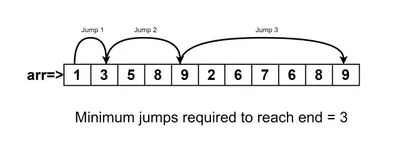
Problem Statement → Given an array of N integers arr[] where each element represents the max length of the jump that can be made forward from that element. Find the minimum jumps (minimum number of jumps) to reach the end of the array (starting from the first element). If an element is 0, then you can not move through that element.
Example:
Let’s consider an example to understand the problem better.
The minimum number of jumps (minimum jumps) required to reach the end of the array is 4. We can take the following jumps: 2 -> 3 -> 4 -> 1 -> 1.
Note: Return -1 if you can’t reach the end of the array.
Approach
To solve this problem, we can use a greedy approach. We start at the first element and, at each step, choose the next element that maximizes the range of reachable indices. We keep track of the current range, the next range, and the number of jumps made so far.
Solution →
To solve this problem we need to first break down the problem and understand it carefully.
Let’s assume we have a simple array → [3,4,5,2,3,1,4,2]
So the value at array[0] = 3, which represents the maximum or at most 3 jumps we can make towards the end of the array. that means it could be either 1 or 2 or 3. Let’s take another example array[2] = 5, here also we can jump from index 2 towards the end of the array either 1, 2, 3, 4, or 5 maximum jumps.
Now suppose any array element is 0 in that case, we can’t jump, so that jump path won’t be part of our optimal solution.
By taking care of the above two conditions, simple logic we can think that we need to iterate from the start position to till second last position in the array, why because we know from the start to the maximum position we can jump to the end of the array is second last position of the array.
Now the big question comes to mind how will know which jump is optimal
if 0 elements come somewhere in the array, will that affect our entire jump path, so to know that we will add the array index to the array element, so that, if the 0 value comes somewhere we know that our maximum jump will remain as it is, and we will skip that jump path and this is the basic logic of this problem, we need to add index and value at index in the array and then compare maximum jump reach.
So to solve this problem we required three variables and initially, all are zero
maxReach → it will help us to keep track of the maximum reach index we can reach from every current index in the array.
current → it will help us to keep track of the current position that we are moving ahead toward the end of the array.
jumps → it is required to find the minumum jumps( minimum number of jumps) or optimal solution to this problem.
Let’s implement this approach in Kotlin:
Kotlin
funmain() {val array = arrayOf(2, 3, 1, 1, 2, 4, 2, 0, 1, 1)println(findMinimumNumbersOfJumpsToEnd(array))}funfindMinimumNumbersOfJumpsToEnd(array: Array<Int>): Int {var maxReach = 0var current = 0var jumps = 0for (i in0 until array.size) { //iterate till end of array maxReach = Math.max(maxReach, i + array[i]) // 1if (current >= array.size - 1) { // 2break } elseif (maxReach <= i) { // 3return -1 } elseif (i == current) { // 4 current = maxReach jumps++ } }return jumps}
Here is why we add “i + array[i]”, we are adding to know that at any point our array contains any 0 value, so in such case, our maxReach will remain that particular index.
When our current reach to second last element of an array or beyond that, then we break the loop and return the final minimum jumps. we are handling this condition inside for loop that’s why we are not iterating for loop till the second last position in the array, otherwise, if we skip this one then, surely use array.size -1 in for loop.
If maxReach is i means at i index definitely 0 value presents or if below i means maxReach is behind the i, in such case, we can’t reach the end, so return -1.
Suppose we reached the current position (which is previously updated as maxReach) then, definitely, we found out the next maxReach index value, so now, here inside that block, we update that one, also as we are only interested in the maximum reach index among all possible jumps, that, we already found and updated in current, so we increment jumps by 1.
Conclusion
In this blog post, we explored the problem of finding the minimum jumps (minimum number of jumps) required to reach the end of an array. We implemented a solution in Kotlin using a greedy approach. This problem not only tests our algorithmic skills but also helps us understand how to efficiently traverse an array to minimize the number of steps taken.
Note → Time and space complexity are high-level measures of scalability. They don’t measure the actual speed of the algorithm itself.
Space Complexity
The time complexity of an algorithm isn’t the only performance metric against which algorithms are ranked. Another important metric is its space complexity, which is a measure of the amount of memory it uses.
So basically, It is made up of Auxiliary space (extra or temporary space) and Input space (all possible inputs).
Since numbers.sorted() produces a new list with the same size of numbers, the space complexity of printSorted is O(n)
While the above function is simple and elegant, there may be some situations in which you want to allocate as little memory as possible. You could rewrite the above function like this:
The above algorithm only allocates memory for a few variables. Since the amount of memory allocated is constant and does not depend on the size of the list, the space complexity is O(1).
Tradeoff → This is in contrast with the previous function, which allocates an entire list to create the sorted representation of the source array. The tradeoff here is that you sacrifice time and code readability to use as little memory as possible. This is common in a problem since a problem cannot have both low computing time and low memory consumption. you either use more memory and solve the problem more quickly or use more time to solve the problem but with limited memory.
Note →The best algorithm/program should have the minimum space complexity. The lesser space used, the faster it executes.
Note → Time and space complexity are high-level measures of scalability. They don’t measure the actual speed of the algorithm itself. Time complexity in Kotlin Time complexity is a measure of the time required to run an algorithm as the input size increases and we use Big O notation to represent it. Let’s go through...