Kotlin is a modern, statically typed programming language that runs on the Java Virtual Machine (JVM). One of its key features is support for lambda expressions, which provide a concise and expressive way to define functions inline. In Kotlin, lambdas can capture local variables, which allows them to extend the scope of those variables beyond...
When Kotlin was first introduced, developers quickly fell in love with its powerful language features, including sealed classes. However, there was one thing that seemed to be missing: sealed interfaces. At the time, the Kotlin compiler was unable to guarantee that someone couldn’t implement an interface in Java code, which made it difficult to implement...
Kotlin’s object keyword can be used in a variety of situations, all of which revolve around defining a class and creating an instance of that class at the same time. In this blog post, we’ll explore the different ways in which the object keyword can be used in Kotlin. The object keyword in Kotlin is...
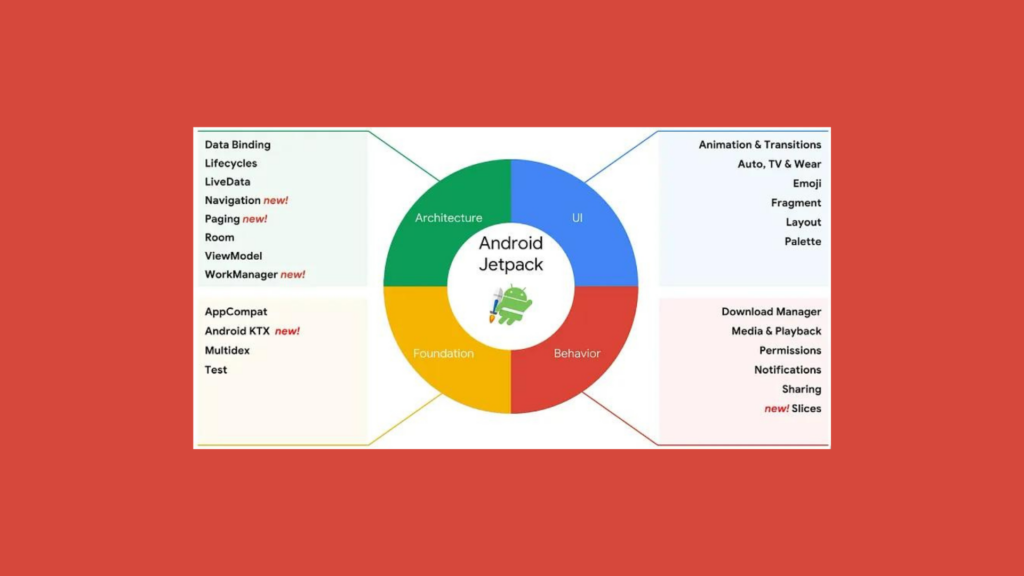
Jetpack Components is a collection of libraries that provide developers with ready-made solutions to common problems encountered when building Android apps. These libraries are designed to work together seamlessly, allowing developers to quickly and easily build high-quality apps. In this article, we will take a closer look at the different Jetpack Components and how they can be used to build better Android apps.
Jetpack Architecture Components
The Architecture Components is a set of libraries that help developers build robust, testable, and maintainable apps. It includes the following components:
ViewModel
The ViewModel component helps manage the UI-related data in a lifecycle-conscious way. It allows data to survive configuration changes such as screen rotations, making it easier to handle data in your app.
LiveData
LiveData is a data holder class that allows you to observe changes in data and update the UI accordingly. It is lifecycle-aware, which means it automatically updates the UI when the app goes into the foreground and stops updates when the app goes into the background.
Room
Room is a SQLite database library that provides an easy-to-use abstraction layer over SQLite. It provides compile-time checks for SQL queries and allows you to easily map Java objects to database tables.
Paging
The Paging library helps you load large data sets efficiently and gradually. It loads data in chunks, making it easier to handle large data sets without consuming too much memory.
WorkManager
WorkManager is a library that makes it easy to schedule deferrable, asynchronous tasks that are expected to run even if the app is closed or the device is restarted.
Navigation
The Navigation component helps you implement navigation between screens in your app. It provides a consistent and predictable way to navigate between destinations in your app.
UI Components
The UI Components are a set of libraries that help you build beautiful and functional user interfaces. It includes the following components:
Compose UI Toolkit
Compose is a modern UI toolkit that enables developers to build beautiful and responsive user interfaces using a declarative programming model. It simplifies the UI development process by allowing developers to express their UI components in code, using a Kotlin-based DSL.
RecyclerView
RecyclerView is a flexible and efficient way to display large data sets. It allows you to customize the way items are displayed and provides built-in support for animations.
CardView
CardView is a customizable view that displays information in a card-like format. It provides a consistent and attractive way to display information in your app.
ConstraintLayout
ConstraintLayout is a flexible and powerful layout manager that allows you to create complex layouts with a flat view hierarchy. It provides a variety of constraints that allow you to create responsive and adaptive layouts.
ViewPager2
ViewPager2 is an updated version of the ViewPager library that provides better performance and improved API consistency. It allows you to swipe between screens in your app, making it a popular choice for building onboarding experiences.
Material Components
Material Components is a collection of UI components that implement Google’s Material Design guidelines. It provides a consistent look and feel across different Android devices and versions.
Behavior Components
The Behavior Components are a set of libraries that help you implement common app behaviors. It includes the following components:
Download Manager
The Download Manager component makes it easy to download files in your app. It provides a powerful API that allows you to manage downloads, monitor progress, and handle errors.
Media
The Media component provides a set of APIs for working with media files in your app. It allows you to play, record, and manage media files with ease.
Notifications
The Notifications component provides a set of APIs for creating and managing notifications in your app. It allows you to create rich, interactive notifications that engage users.
Sharing
The Sharing component provides a set of APIs for sharing content from your app. It allows you to share text, images, and other types of content with other apps and services.
Foundation Components
The Foundation library provides a set of core utility classes and functions that are used across the other Jetpack libraries. It includes the following components:
AppCompat
AppCompat is a library that provides backwards compatibility for newer Android features on older Android versions. It allows developers to use the latest features of Android while still supporting older versions of the platform.
Android KTX
Android KTX is a set of Kotlin extensions that make writing Android code easier and more concise. It provides extension functions for many of the Android framework classes, making them easier to use and reducing the amount of boilerplate code needed.
Multidex
Multidex is a library that provides support for apps that have a large number of methods, which can cause the 64K method limit to be exceeded. It allows developers to build apps that use more than 64K methods by splitting the app’s classes into multiple dex files.
Test
The Test library provides a set of testing utilities for Android apps, including JUnit extensions, Espresso UI testing, and Mockito mocking framework.
Core
The Core library provides a set of classes and functions that are used across many of the other Jetpack libraries, including utilities for handling lifecycle events, threading, and resource management.
Conclusion
The Jetpack Components are a powerful set of libraries and tools that enable developers to build high-quality Android apps quickly and efficiently. By using these components, developers can focus on building the core features of their apps while relying on well-tested and well-documented solutions for common problems. The Compose UI toolkit takes this a step further, simplifying the UI development process by allowing developers to express their UI components in code. Together, these components make Jetpack a valuable resource for any Android developer.
Kotlin is a powerful and modern programming language that has been gaining popularity in recent years due to its concise and expressive syntax, strong type system, and seamless interoperability with Java. One of the most important features of Kotlin that sets it apart from other languages is its support for constructors, which play a crucial...
Kotlin interfaces are a fundamental part of the language and are used extensively in many Kotlin projects. In this blog, we’ll cover all the important aspects of Kotlin interfaces, including their syntax, uses, and examples. Kotlin Interfaces In Kotlin, an interface is a type that defines a set of method signatures that a class can...
Monkey patching is a technique used in some programming languages that allows developers to modify or extend the behavior of existing classes at runtime, without the need to modify the original source code. This technique can be useful for adding new functionality to existing code, or for patching bugs or other issues in third-party libraries or frameworks.
In Kotlin, monkey patching refers to the ability to add, modify, or replace methods or properties of an existing class at runtime, without modifying the original class source code. However, unlike in some other languages, such as Python, monkey patching is not a common practice in Kotlin, and it is generally discouraged due to the potential for introducing unexpected behavior and making the code more difficult to maintain.
In Kotlin, monkey patching can be achieved in several ways, including:
Extension functions
Kotlin supports extension functions, which allow you to add new methods to an existing class without modifying the class itself. To define an extension function, you simply declare a function outside of the original class and prefix its name with the class name. For example, to add a new method called “greet” to the String class, you could define the following extension function:
Kotlin
funString.greet() {println("Hello, $this!")}
This function can then be called on any String instance as if it were a method of the original class:
Kotlin
val name = "softAai"name.greet() // prints "Hello, softAai!"
Reflection
Kotlin also supports reflection, which allows you to inspect and modify the properties and methods of a class at runtime. This can be used to monkey patch a class by dynamically adding or modifying its properties or methods. For example, to add a new method called “scream” to the String class using reflection, you could define the following code:
This code would add a new method to the String class called “scream”, which replaces the value of the “value” field with a new character array containing the string “AHHHHH”. However, it’s worth noting that this approach can be complex and error-prone, and should be used with caution.
Proxy classes
Another way to achieve monkey patching in Kotlin is to use proxy classes, which are classes that intercept method calls and modify their behavior at runtime. This can be useful for adding new functionality to existing classes or for patching bugs or other issues in third-party libraries or frameworks. To create a proxy class, you would typically define a new class that implements the same interface or extends the same base class as the original class, and then override the desired methods to add or modify their behavior.
Real-world examples of monkey patching
Here are some real-world examples of monkey patching in Kotlin:
Adding a new method to an existing class using extension functions
Let’s say you’re working on a project that uses a third-party library that provides a “Person” class with some basic functionality, but you need to add a new method to the class that isn’t provided by the library. You could use an extension function to monkey patch the “Person” class and add the new method:
Now, you can call the “greet” method on any instance of the “Person” class, even though it’s not part of the original class definition:
Kotlin
val person = Person("amol", 25)person.greet() // prints "Hello, amol!"
Modifying the behavior of an existing class using reflection
Let’s say you’re working on a project that uses a third-party library that provides a “Math” class with some basic math functions, but you need to modify the behavior of the “sqrt” function to always return a specific value(here 3.0). You could use reflection to monkey patch the “Math” class and modify the “sqrt” method:
Now, whenever the “sqrt” method is called on the “Math” class, it will always return 3.0, regardless of the input value.
Adding new functionality to an existing class using proxy classes:
Let’s say you’re working on a project that uses a third-party library that provides a “Database” class with some basic database functionality, but you need to add a new method to the class that isn’t provided by the library. You could use a proxy class to monkey patch the “Database” class and add the new method:
Now, instead of using the original “Database” class provided by the library, you can use the “DatabaseProxy” class, which extends the original class and adds the new “backup” method:
Kotlin
val database = DatabaseProxy(Database())database.query("SELECT * FROM users")database.backup()
Note that while these examples demonstrate how monkey patching can be achieved in Kotlin, it’s generally recommended to avoid this technique as much as possible, as it can make the code more difficult to understand and maintain. Instead, it’s often better to work with the original source code or use Kotlin’s built-in features, such as extension functions, to add new functionality to existing classes.
One potential issue with monkey patching that should be noted is that it can lead to naming collisions if multiple patches are applied to the same class or library. This can make it difficult to keep track of which patches are being used and can lead to unpredictable behavior. To avoid this, it’s important to use clear and consistent naming conventions for monkey patches and to document them clearly in the codebase.
Another consideration with monkey patching is that it can potentially introduce security vulnerabilities if patches are used to modify sensitive or critical parts of the codebase. It’s important to carefully review and test any monkey patches before applying them in production, and to consider alternative approaches if there are security concerns.
Pros:
Flexibility: Monkey patching allows developers to modify or add functionality to existing classes or libraries without modifying their original source code, which can be especially useful when working with third-party libraries or legacy code.
Rapid prototyping: Monkey patching can also be useful for quickly prototyping or testing new features or functionality without modifying the original source code, allowing developers to experiment and iterate more quickly.
Code reusability: Monkey patching can help reduce code duplication by allowing developers to extend the functionality of existing classes or libraries, rather than writing new code from scratch.
Cons:
Readability and maintainability: Monkey patching can make code more difficult to read and understand, especially for other developers who are not familiar with the codebase. Additionally, since monkey patching modifies existing code at runtime, it can make debugging and maintaining the code more difficult.
Unpredictable behavior: Since monkey patching modifies existing code at runtime, it can lead to unpredictable behavior and unintended consequences. This is especially true when patching code from third-party libraries, as it can be difficult to know how the patch will interact with other parts of the codebase.
Dependency on implementation details: Monkey patching often relies on implementation details of the existing code, such as private methods or fields, which can change between different versions or implementations of the code. This can lead to code that is fragile and difficult to maintain over time.
Conclusion
In general, monkey patching should be used sparingly and only when necessary, as it can have unintended consequences and make code more difficult to maintain. If possible, it’s often better to work with the original source code or use Kotlin’s built-in features, such as extension functions, to add new functionality to existing classes.
Overall, while monkey patching can be a useful technique in some cases, it should be used with caution and with a thorough understanding of its benefits and drawbacks. Developers should carefully consider whether monkey patching is the best approach for their particular use case and should be prepared to document and maintain any patches they create over time.
In Kotlin, an inner class is a class that is nested inside another class, and it has access to the outer class’s properties and methods. Inner classes are useful when you need to group related classes together or when you need to access the outer class’s properties and methods from within the inner class. In...
Clean Architecture and MVVM Architecture are two popular architectural patterns for building robust, maintainable, and scalable Android applications. In this article, we will discuss how to implement Clean Architecture and MVVM Architecture in an Android application using Kotlin. We will cover all aspects of both architectures in-depth and explain how they work together to create...
Jetpack Compose is a modern UI toolkit for building Android apps with Kotlin. One of the challenges of building UIs is loading and displaying images, which can be time-consuming and resource-intensive. Fortunately, the Coil library provides a simple and efficient way to load and display images in Jetpack Compose. What is Coil? The coil is a...