The Command Design Pattern is a behavioral design pattern that encapsulates a request as an independent object, storing all necessary information to process the request. This pattern is especially beneficial in scenarios where you need to:
Separate the initiator of the request (the sender) from the object responsible for executing it (the receiver).
Implement functionality for undoing and redoing operations.
Facilitate the queuing, logging, or scheduling of requests for execution.
Let’s embark on a journey to understand the Command design pattern, its purpose, and how we can implement it in Kotlin. Along the way, I’ll share practical examples and insights to solidify our understanding.
Command Design Pattern
At its core, the Command Design Pattern decouples the sender (the one making a request) from the receiver (the one handling the request). Instead of calling methods directly, the sender issues a command that encapsulates the details of the request. This way, the sender only knows about the command interface and not the specific implementation.
In short,
Sender: Issues commands.
Command: Encapsulates the request.
Receiver: Executes the request.
Structure of the Command Pattern
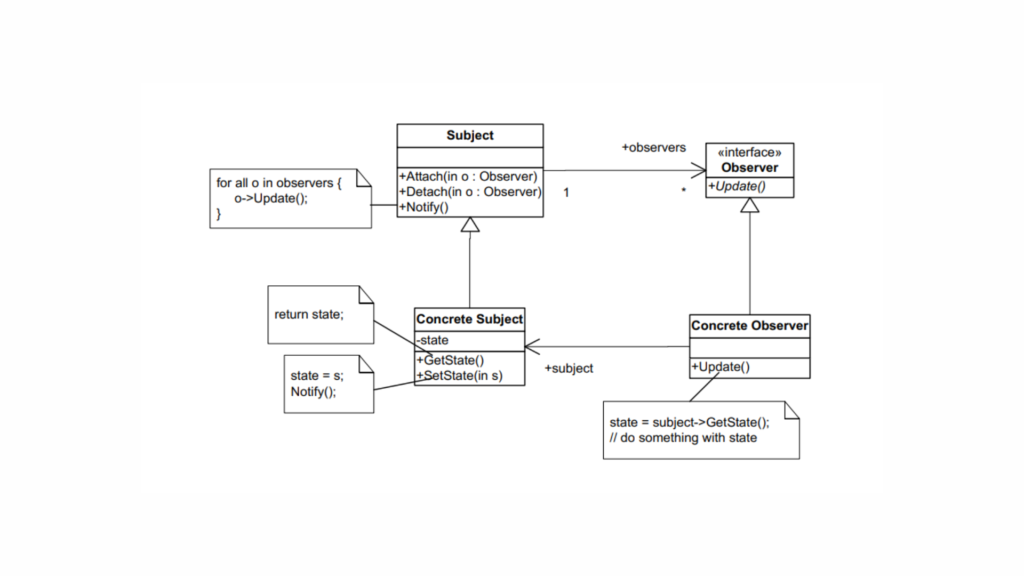
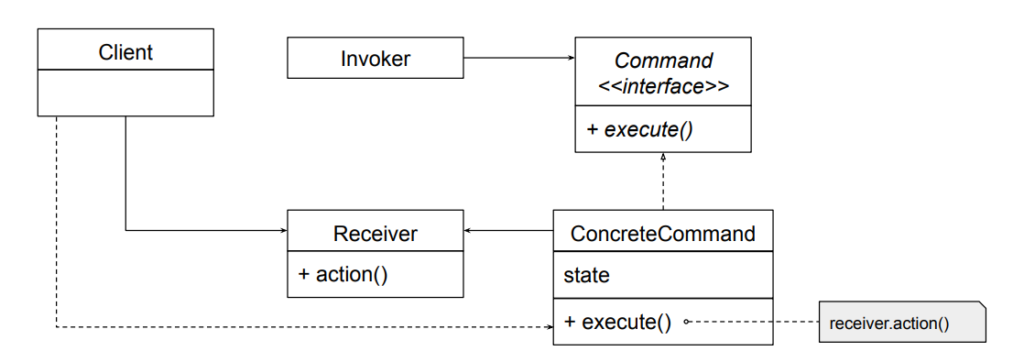
Before we dive into code, let’s see the primary components of this pattern:
Command: An interface or abstract class defining a single method, execute().
ConcreteCommand: Implements the Command interface and encapsulates the actions to be performed.
Receiver: The object that performs the actual work.
Invoker: The object that triggers the command’s execution.
Client: The entity that creates and configures commands.
Command Pattern Implementation
Imagine a smart home system, similar to Google Home, where you can control devices like turning lights on/off or playing music. This scenario can be a great example to demonstrate the implementation of the Command design pattern.
Kotlin
// Command.ktinterfaceCommand {funexecute()}
Create Receivers
The receiver performs the actual actions. For simplicity, we’ll create two receivers: Light and MusicPlayer.
Kotlin
// Light.ktclassLight {funturnOn() {println("Light is turned ON") }funturnOff() {println("Light is turned OFF") }}// MusicPlayer.ktclassMusicPlayer {funplayMusic() {println("Music is now playing") }funstopMusic() {println("Music is stopped") }}
Create Concrete Commands
Each concrete command encapsulates a request to the receiver.
The invoker doesn’t know the details of the commands but can execute them. In this case, our remote is the center of home automation and can control everything.
Now, let’s create the client code to see the pattern in action.
Kotlin
// Main.ktfunmain() {// Receiversval light = Light()val musicPlayer = MusicPlayer()// Commandsval turnOnLight = TurnOnLightCommand(light)val turnOffLight = TurnOffLightCommand(light)val playMusic = PlayMusicCommand(musicPlayer)val stopMusic = StopMusicCommand(musicPlayer)// Invokerval remoteControl = RemoteControl()// Set and execute commands remoteControl.setCommand(turnOnLight) remoteControl.setCommand(playMusic) remoteControl.executeCommands() // Executes: Light ON, Music Playing remoteControl.setCommand(turnOffLight) remoteControl.setCommand(stopMusic) remoteControl.executeCommands() // Executes: Light OFF, Music Stopped}
Here,
Command Interface: The Command interface ensures uniformity. Whether it’s turning on a light or playing music, all commands implement execute().
Receivers: The Light and MusicPlayer classes perform the actual work. They are decoupled from the invoker.
Concrete Commands: Each command bridges the invoker and the receiver. This encapsulation allows us to add new commands easily without modifying the existing code (We will see it shortly after this).
Invoker: The RemoteControl acts as a controller. It queues and executes commands, providing flexibility for batch operations.
Client Code: We bring all components together, creating a functional smart home system.
Enhancing the Pattern
If we wanted to add undo functionality, we could introduce an undo() method in the Command interface. Each concrete command would then implement the reversal logic. For example:
Flexibility: Adding new commands doesn’t affect existing code, adhering to the Open/Closed Principle.
Decoupling: The sender (invoker) doesn’t need to know about the receiver’s implementation.
Undo/Redo Support: With a little modification, you can store executed commands and reverse their actions.
Command Queues: Commands can be queued for delayed execution.
Disadvantages
Complexity: For simple use cases, this pattern may feel overengineered due to the additional classes.
Memory Overhead: Keeping a history of commands may increase memory usage.
Conclusion
The Command design pattern is a powerful tool in a developer’s toolkit, allowing us to build systems that are flexible, decoupled, and easy to extend. Kotlin’s concise and expressive syntax makes implementing this pattern a breeze, ensuring both clarity and functionality.
I hope this deep dive has demystified the Command pattern for you. Now it’s your turn — experiment with the code, tweak it, and see how you can apply it in your own projects..!
Have you ever had to manage an object’s behavior based on its state? You might have ended up writing a series of if-else or when statements to handle different scenarios. Sound familiar? (Especially if you’re working with Android and Kotlin!) If so, it’s time to explore the State Design Pattern—a structured approach to simplify your...
Design patterns are a cornerstone of writing clean, maintainable, and reusable code. One of the more elegant patterns, the Chain of Responsibility (CoR), allows us to build a flexible system where multiple handlers can process a request in a loosely coupled manner. Today, we’ll dive deep into how this design pattern works and how to implement it in Kotlin.
What is the Chain of Responsibility Pattern?
The Chain of Responsibility design pattern is a behavioral design pattern that allows passing a request along a chain of handlers, where each handler has a chance to process the request or pass it along to the next handler in the chain. The main goal is to decouple the sender of a request from its receivers, giving multiple objects a chance to handle the request.
That means the CoR pattern allows multiple objects to handle a request without the sender needing to know which object handled it. The request is passed along a chain of objects (handlers), where each handler has the opportunity to process it or pass it to the next one.
Think of a company where a request, such as budget approval, must go through several levels of management. At each level, the manager can either address the request or escalate it to the next level.
Now imagine another situation: an employee submits a leave application. Depending on the duration of leave, it might need approval from different authorities, such as a team leader, department head, or higher management.
These scenarios capture the essence of the Chain of Responsibility design pattern, where a request is passed along a series of handlers, each with the choice to process it or forward it.
Why Use the Chain of Responsibility Pattern?
Before we delve into the structure and implementation of the Chain of Responsibility (CoR) pattern, let’s first understand why it’s important.
Consider a situation where multiple objects are involved in processing a request, and the handling varies depending on the specific conditions. For example, in online shopping platforms like Myntra or Amazon, or food delivery services such as Zomato or Swiggy, a customer might use a discount code or coupon. The system needs to determine if the code is valid or decide which discount should apply based on the circumstances.
This is where the Chain of Responsibility pattern becomes highly useful. Rather than linking the request to a specific handler, it enables the creation of a chain of handlers, each capable of managing the request in its unique way. This makes the system more adaptable, allowing developers to easily add, remove, or modify handlers without affecting the core logic.
So, the Chain of Responsibility pattern offers several advantages:
Decouples the sender and receiver: The sender doesn’t need to know which object in the chain will handle the request.
Simplifies the code: It eliminates complex conditionals and decision trees by delegating responsibility to handlers in the chain.
Adds flexibility: New handlers can be seamlessly added to the chain without impacting the existing implementation.
We’ll look at the actual code and explore additional real-world examples shortly to make this concept even clearer.
Structure of the Chain of Responsibility Pattern
The Chain of Responsibility pattern consists of:
Handler Interface: Declares a method to process requests and optionally set the next handler.
Concrete Handlers: Implements the interface and processes the request.
Client Code: Creates and configures the chain.
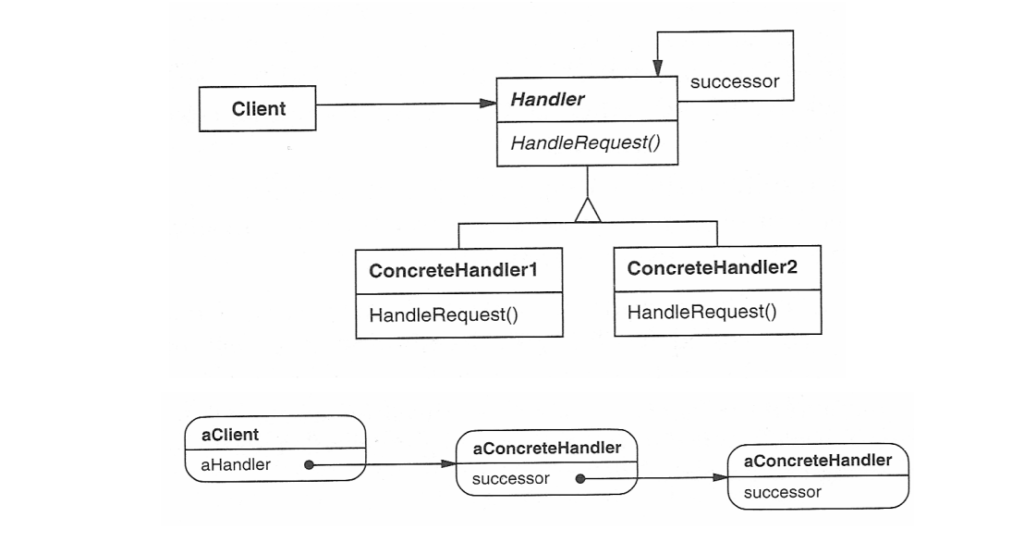
Structure of the Chain of Responsibility
Handler (Abstract Class or Interface)
Defines the interface for handling requests and the reference to the next handler in the chain.
This defines an interface for handling requests, usually with a method like handleRequest(). It may also have a reference to the next handler in the chain.
The handler may choose to process the request or pass it on to the next handler.
ConcreteHandler
Implement the handleRequest() method to either process the request or pass it to the next handler.
These are the actual handler classes that implement the handleRequest() method. Each concrete handler will either process the request or pass it to the next handler in the chain.
If a handler is capable of processing the request, it does so; otherwise, it forwards the request to the next handler in the chain.
Client
Interacts only with the first handler in the chain, unaware of the specific handler processing the request.
Kotlin
funmain() {val handlerA = ConcreteHandlerA()val handlerB = ConcreteHandlerB() handlerA.setNextHandler(handlerB)// Client sends the request to the first handler handlerA.handleRequest("A") // Handler A processes the request handlerA.handleRequest("B") // Handler B processes the request}
The client sends the request to the first handler in the chain. The client does not need to know which handler will eventually process the request.
As we can see, this structure allows requests to pass through multiple handlers in the chain, with each handler having the option to process the request or delegate it.
Now, let’s roll up our sleeves and dive into real-world use case code.
Real-World Use Case
Now, let’s roll up our sleeves and dive into real-world use case code.
Handling Employee Request
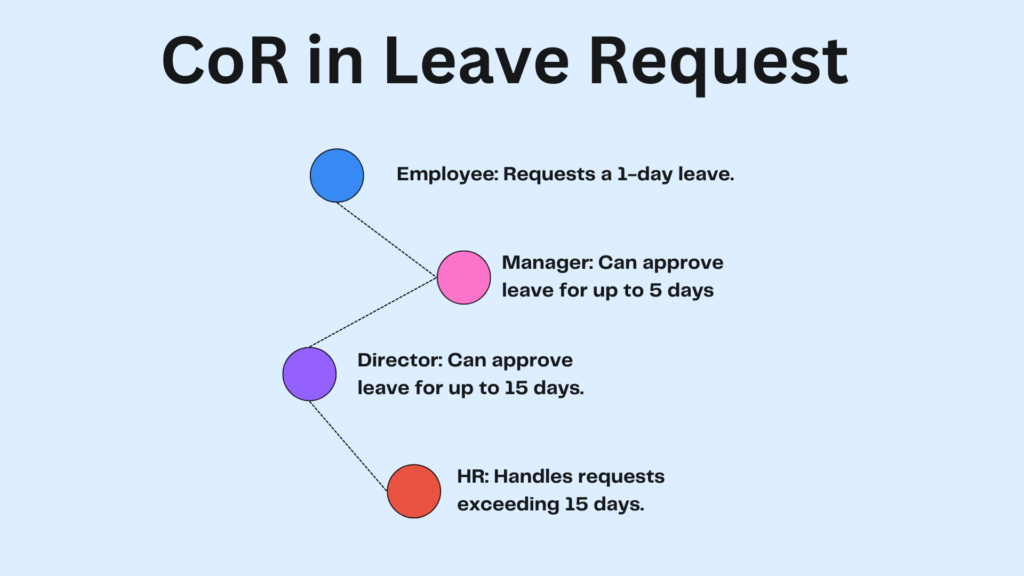
Let’s revisit our employee leave request scenario, where we need to approve a leave request in a company. The leave request should be processed by different authorities depending on the amount of leave being requested. Here’s the hierarchy:
CoR in Leave Request
Employee: Initiates the leave request by submitting it to their immediate supervisor or system.
Manager (up to 5 days): Approves short leaves to handle minor requests efficiently.
Director (up to 15 days): Approves extended leaves, ensuring alignment with organizational policies.
HR (more than 15 days): Handles long-term leave requests, requiring policy compliance or special considerations.
Using the Chain of Responsibility, we can chain the approval process such that if one handler (e.g., Manager) cannot process the request, it is passed to the next handler (e.g., Director).
Define the Handler Interface
The handler interface is a blueprint for the handlers that will process requests. Each handler can either process the request or pass it along to the next handler in the chain.
Kotlin
// Create the Handler interfaceinterfaceLeaveRequestHandler {funhandleRequest(request: LeaveRequest)}
In this case, the handleRequest function takes a LeaveRequest object, which holds the details of the leave request, and processes it.
Define the Request Object
The request object contains all the information related to the request. Here, we’ll create a simple LeaveRequest class.
Kotlin
// Create the LeaveRequest objectdataclassLeaveRequest(val employeeName: String, val numberOfDays: Int)
Create Concrete Handlers
Now, we’ll implement different concrete handlers for each authority: Manager, Director, and HR. Each handler will check if it can approve the leave request based on the number of days requested.
Each handler checks whether the request can be processed. If it cannot, the request is passed to the next handler in the chain.
Set Up the Chain
Next, we’ll set up the chain of responsibility. We will link the handlers so that each handler knows who to pass the request to if it can’t handle it.
Kotlin
// Setup the chainfuncreateLeaveApprovalChain(): LeaveRequestHandler {val hr = HR()val director = Director(hr)val manager = Manager(director)return manager // The chain starts with the Manager}
If the Manager can’t approve the leave (i.e., the request is for more than 5 days), it passes the request to the Director.
If the Director can’t approve the leave (i.e., the request is for more than 15 days), it passes the request to HR, which will handle it.
Test the Chain of Responsibility
Now, let’s create a LeaveRequest and pass it through the chain.
Kotlin
funmain() {val leaveRequest = LeaveRequest("amol pawar", 10)val approvalChain = createLeaveApprovalChain() approvalChain.handleRequest(leaveRequest)}// OUTPUT// Director approved amol pawar's leave for 10 days.
Now, let’s explore an E-Commerce Discount System using CoR.
Discount Handling in an E-Commerce System
Let’s imagine a scenario with platforms like Myntra, Flipkart, or Amazon, where we have different types of discounts:
Coupon Discount (10% off)
Member Discount (5% off)
Seasonal Discount (15% off)
In this case, we’ll pass a request for a discount through a chain of handlers. Each handler checks if it can process the request or passes it to the next one in the chain.
Let’s now see how we can implement the Chain of Responsibility pattern in this case.
Define the Handler Interface
The handler interface will define a method handleRequest() that every concrete handler will implement.
Here, the setNext() method will allow us to chain multiple handlers together, and handleRequest() will process the request.
Concrete Handlers
Let’s define the different discount handlers. Each one will check if it can handle the discount request. If it can’t, it will forward it to the next handler.
Handlers: We define three concrete handlers, each responsible for applying a specific discount: coupon, member, and seasonal.
Chaining: We chain the handlers together using setNext(). The chain is set up such that if one handler can’t process the request, it passes the request to the next handler.
Request Processing: The client sends a request for the original amount (1000.0 in our example) to the first handler (couponHandler). If the handler can process the request, it applies the discount and returns the discounted amount. If it can’t, it forwards the request to the next handler.
But here’s the twist: what if we want to apply only the member discount? What will the output be, and how can we achieve this? Let’s see how we can do it. To achieve this, we need to set all other discounts to either 0 or negative. Only then will we get the exact output we want.
Here, I’ll skip the actual code and just show the changes and the output.
Kotlin
val couponHandler = CouponDiscountHandler(0.0) val memberHandler = MemberDiscountHandler(5.0) // only applying 5% offval seasonalHandler = SeasonalDiscountHandler(-5.0) // 0 or negative // Output // Applying Member Discount: 5.0%// Final Amount after applying discounts: 950.0
Please note that this might seem a bit confusing, so let me clarify. In this example, we apply only one discount at a time. To achieve this, we set the other discounts to zero, ensuring that only the selected discount is applied. This is because we’ve set the starting handler to the coupon discount, which prevents the other discounts from being applied sequentially. As we often see on platforms like Flipkart and Amazon, only one coupon can typically be applied at a time.
However, this doesn’t mean that applying multiple coupons sequentially (i.e., applying all selected discounts at once) is impossible using the Chain of Responsibility (CoR) pattern. In fact, it can be achieved through the accumulation of discounts, where the total amount is updated after each sequential discount (e.g., coupon, member discount, seasonal discount). This allows us to apply all the discounts and calculate the final amount.
The sequential discount approach is particularly useful in the early stages of a business, when the goal is to attract more users or customers. In well-established e-commerce systems, however, only one discount is usually applied. In our case, we achieve this by setting the other discounts to either zero or a negative value.
Just to clarify, this explanation is a simplified scenario to help understand the concept. Real-world use cases often involve more complexities and variations. I hope this helps clear things up..!
Now, one more familiar use case that many of us have likely worked with in past projects is the Logging System.
Logging System
Let’s implement a logging system where log messages are passed through a chain of loggers. Each logger decides whether to handle the log or pass it along. We’ll include log levels: INFO, DEBUG, and ERROR.
Define a Base Logger Class
First, we’ll create an abstract Logger class. This will act as the base for all specific loggers.
Kotlin
abstractclassLogger(privateval level: Int) {privatevar nextLogger: Logger? = null// Set the next logger in the chainfunsetNext(logger: Logger): Logger {this.nextLogger = loggerreturn logger }// Handle the log requestfunlogMessage(level: Int, message: String) {if (this.level == level) {write(message)return// To stop further propagation } nextLogger?.logMessage(level, message) }// Abstract method for handling the logprotectedabstractfunwrite(message: String)}
Here,
level: Defines the log level this logger will handle.
nextLogger: Points to the next handler in the chain.
setNext: Configures the next logger in the chain, enabling chaining.
logMessage: Checks if the logger should process the message based on its level. If not, it delegates the task to the next logger in the chain.
return: Why used return here..? The return is used to prevent the log message from being passed to the next logger after it has been processed. It ensures that once a logger handles the message, it won’t be forwarded further, avoiding redundant output.
Create Specific Logger Implementations
Let’s create concrete loggers for INFO, DEBUG, and ERROR levels.
We instantiate the loggers and chain them together using setNext.
The chain starts with InfoLogger and ends with ErrorLogger.
Using the Logger Chain
Now, let’s test our chain.
Kotlin
funmain() {val loggerChain = getLoggerChain()println("Testing Chain of Responsibility:") loggerChain.logMessage(1, "This is an info message.") loggerChain.logMessage(2, "This is a debug message.") loggerChain.logMessage(3, "This is an error message.")}
Output
Kotlin
Testing Chain of Responsibility:INFO: Thisisaninfomessage.DEBUG: Thisisadebugmessage.ERROR: Thisisanerrormessage.
Basically, what happens here is,
A log with level 1 is processed by InfoLogger.
A log with level 2 is handled by DebugLogger.
A log with level 3 is processed by ErrorLogger.
If no logger in the chain can handle a request, it simply passes through without being processed.
Extending the Chain
What if we wanted to add more log levels, like TRACE? Easy..! Just implement a TraceLogger and link it to the chain without modifying the existing code.
Form Validation: Sequential checks for input validation.
Payment Processing: Delegating payment methods to appropriate processors.
Advantages and Disadvantages
Advantages
Flexibility: Easily add or remove handlers in the chain.
Decoupling: The sender doesn’t know which handler processes the request.
Open/Closed Principle: New handlers can be added without modifying existing code.
Disadvantages
No Guarantee of Handling: If no handler processes the request, it may go unhandled.
Debugging Complexity: Long chains can be hard to trace.
Conclusion
The Chain of Responsibility pattern offers an elegant solution for delegating requests through a sequence of handlers. By decoupling the sender of a request from its receivers, this approach enhances flexibility and improves the maintainability of your code. Each handler focuses on specific tasks and passes unhandled requests to the next handler in the chain.
In this guide, we explored practical examples to illustrate the use of the Chain of Responsibility pattern in Kotlin, showcasing its application in scenarios like leave approval and discount processing. The pattern proves highly adaptable to diverse use cases, allowing for clean and organized request handling.
Incorporating this pattern into your design helps build systems that are easier to extend, maintain, and scale, ensuring they remain robust in the face of changing requirements.
The Chain of Responsibility Pattern is a powerful design pattern that helps streamline the process of handling requests in a system. By allowing multiple handlers to process a request, this pattern ensures that the request is passed through a chain until it’s appropriately dealt with. In this blog, we will explore essential Chain of Responsibility Pattern examples, diving into its structure and providing key insights on how this pattern can be effectively used to create more flexible and maintainable code. Whether you’re new to design patterns or looking to expand your knowledge, this guide will help you understand the full potential of this pattern.
What is the Chain of Responsibility (CoR) Pattern?
The Chain of Responsibility design pattern is a behavioral design pattern that allows passing a request along a chain of handlers, where each handler has a chance to process the request or pass it along to the next handler in the chain. The main goal is to decouple the sender of a request from its receivers, giving multiple objects a chance to handle the request.
Think of a company where a request, such as budget approval, must go through several levels of management. At each level, the manager can either address the request or escalate it to the next level.
Now imagine another situation: an employee submits a leave application. Depending on the duration of leave, it might need approval from different authorities, such as a team leader, department head, or higher management.
These scenarios capture the essence of the Chain of Responsibility design pattern, where a request is passed along a series of handlers, each with the choice to process it or forward it.
Why Use the Chain of Responsibility Pattern?
Before we delve into the structure and implementation of the Chain of Responsibility (CoR) pattern, let’s first understand why it’s important.
Consider a situation where multiple objects are involved in processing a request, and the handling varies depending on the specific conditions. For example, in online shopping platforms like Myntra or Amazon, or food delivery services such as Zomato or Swiggy, a customer might use a discount code or coupon. The system needs to determine if the code is valid or decide which discount should apply based on the circumstances.
This is where the Chain of Responsibility pattern becomes highly useful. Rather than linking the request to a specific handler, it enables the creation of a chain of handlers, each capable of managing the request in its unique way. This makes the system more adaptable, allowing developers to easily add, remove, or modify handlers without affecting the core logic.
Structure of the Chain of Responsibility Pattern
Key Idea
Decouple the sender and receiver.
Each handler in the chain determines if it can handle the request.
Structure of the Chain of Responsibility
Handler (Abstract Class or Interface)
Defines the interface for handling requests and the reference to the next handler in the chain.
This defines an interface for handling requests, usually with a method like handleRequest(). It may also have a reference to the next handler in the chain.
The handler may choose to process the request or pass it on to the next handler.
ConcreteHandler
Implement the handleRequest() method to either process the request or pass it to the next handler.
These are the actual handler classes that implement the handleRequest() method. Each concrete handler will either process the request or pass it to the next handler in the chain.
If a handler is capable of processing the request, it does so; otherwise, it forwards the request to the next handler in the chain.
Client
Interacts only with the first handler in the chain, unaware of the specific handler processing the request.
Kotlin
funmain() {val handlerA = ConcreteHandlerA()val handlerB = ConcreteHandlerB() handlerA.setNextHandler(handlerB)// Client sends the request to the first handler handlerA.handleRequest("A") // Handler A processes the request handlerA.handleRequest("B") // Handler B processes the request}
The client sends the request to the first handler in the chain. The client does not need to know which handler will eventually process the request.
Chain of Responsibility Pattern Examples : Real-World Use Cases
Now, let’s roll up our sleeves and dive into real-world use case code.
Handling Employee Request
Let’s revisit our employee leave request scenario, where we need to approve a leave request in a company. The leave request should be processed by different authorities depending on the amount of leave being requested. Here’s the hierarchy:
Employee: Initiates the leave request by submitting it to their immediate supervisor or system.
Manager (up to 5 days): Approves short leaves to handle minor requests efficiently.
Director (up to 15 days): Approves extended leaves, ensuring alignment with organizational policies.
HR (more than 15 days): Handles long-term leave requests, requiring policy compliance or special considerations.
Using the Chain of Responsibility, we can chain the approval process such that if one handler (e.g., Manager) cannot process the request, it is passed to the next handler (e.g., Director).
Define the Handler Interface
The handler interface is a blueprint for the handlers that will process requests. Each handler can either process the request or pass it along to the next handler in the chain.
Kotlin
// Create the Handler interfaceinterfaceLeaveRequestHandler {funhandleRequest(request: LeaveRequest)}
In this case, the handleRequest function takes a LeaveRequest object, which holds the details of the leave request, and processes it.
Define the Request Object
The request object contains all the information related to the request. Here, we’ll create a simple LeaveRequest class.
Kotlin
// Create the LeaveRequest objectdataclassLeaveRequest(val employeeName: String, val numberOfDays: Int)
Create Concrete Handlers
Now, we’ll implement different concrete handlers for each authority: Manager, Director, and HR. Each handler will check if it can approve the leave request based on the number of days requested.
Each handler checks whether the request can be processed. If it cannot, the request is passed to the next handler in the chain.
Set Up the Chain
Next, we’ll set up the chain of responsibility. We will link the handlers so that each handler knows who to pass the request to if it can’t handle it.
Kotlin
// Setup the chainfuncreateLeaveApprovalChain(): LeaveRequestHandler {val hr = HR()val director = Director(hr)val manager = Manager(director)return manager // The chain starts with the Manager}
If the Manager can’t approve the leave (i.e., the request is for more than 5 days), it passes the request to the Director.
If the Director can’t approve the leave (i.e., the request is for more than 15 days), it passes the request to HR, which will handle it.
Test the Chain of Responsibility
Now, let’s create a LeaveRequest and pass it through the chain.
Kotlin
funmain() {val leaveRequest = LeaveRequest("amol pawar", 10)val approvalChain = createLeaveApprovalChain() approvalChain.handleRequest(leaveRequest)}// OUTPUT// Director approved amol pawar's leave for 10 days.
Now, one more familiar use case that many of us have likely worked with in past projects is the Logging System.
Logging System
Let’s implement a logging system where log messages are passed through a chain of loggers. Each logger decides whether to handle the log or pass it along. We’ll include log levels: INFO, DEBUG, and ERROR.
Define a Base Logger Class
First, we’ll create an abstract Logger class. This will act as the base for all specific loggers.
Kotlin
abstractclassLogger(privateval level: Int) {privatevar nextLogger: Logger? = null// Set the next logger in the chainfunsetNext(logger: Logger): Logger {this.nextLogger = loggerreturn logger }// Handle the log requestfunlogMessage(level: Int, message: String) {if (this.level == level) {write(message)return// To stop further propagation } nextLogger?.logMessage(level, message) }// Abstract method for handling the logprotectedabstractfunwrite(message: String)}
Here,
level: Defines the log level this logger will handle.
nextLogger: Points to the next handler in the chain.
setNext: Configures the next logger in the chain, enabling chaining.
logMessage: Checks if the logger should process the message based on its level. If not, it delegates the task to the next logger in the chain.
return: Why used return here..? The return is used to prevent the log message from being passed to the next logger after it has been processed. It ensures that once a logger handles the message, it won’t be forwarded further, avoiding redundant output.
Create Specific Logger Implementations
Let’s create concrete loggers for INFO, DEBUG, and ERROR levels.
We instantiate the loggers and chain them together using setNext.
The chain starts with InfoLogger and ends with ErrorLogger.
Using the Logger Chain
Now, let’s test our chain.
Kotlin
funmain() {val loggerChain = getLoggerChain()println("Testing Chain of Responsibility:") loggerChain.logMessage(1, "This is an info message.") loggerChain.logMessage(2, "This is a debug message.") loggerChain.logMessage(3, "This is an error message.")}
Output
Kotlin
Testing Chain of Responsibility:INFO: Thisisaninfomessage.DEBUG: Thisisadebugmessage.ERROR: Thisisanerrormessage.
Basically, what happens here is,
A log with level 1 is processed by InfoLogger.
A log with level 2 is handled by DebugLogger.
A log with level 3 is processed by ErrorLogger.
If no logger in the chain can handle a request, it simply passes through without being processed.
Extending the Chain
What if we wanted to add more log levels, like TRACE? Easy..! Just implement a TraceLogger and link it to the chain without modifying the existing code.
Form Validation: Sequential checks for input validation.
Payment Processing: Delegating payment methods to appropriate processors.
Advantages and Disadvantages
Advantages
Flexibility: Easily add or remove handlers in the chain.
Decoupling: The sender doesn’t know which handler processes the request.
Open/Closed Principle: New handlers can be added without modifying existing code.
Disadvantages
No Guarantee of Handling: If no handler processes the request, it may go unhandled.
Debugging Complexity: Long chains can be hard to trace.
Cocnlusion
The Chain of Responsibility Pattern offers a flexible and scalable solution to handling requests, making it an essential tool for developers looking to decouple their system’s components. Through the examples and insights shared, it becomes clear how this pattern can simplify complex workflows and enhance maintainability. By mastering the structure and application of the Chain of Responsibility pattern, you can ensure your systems are more adaptable to future changes, ultimately improving both code quality and overall project efficiency.
The Chain of Responsibility pattern is a behavioral design pattern that allows a request to be passed along a chain of handlers until it is processed. This pattern is particularly powerful in scenarios where multiple objects can process a request, but the handler is not determined until runtime. In this blog, we will be unveiling the powerful structure of the Chain of Responsibility pattern, breaking down its key components and flow. By the end, you’ll have a solid understanding of how this pattern can improve flexibility and scalability in your application design.
What is the Chain of Responsibility (CoR) Pattern?
The Chain of Responsibility design pattern is a behavioral design pattern that allows passing a request along a chain of handlers, where each handler has a chance to process the request or pass it along to the next handler in the chain. The main goal is to decouple the sender of a request from its receivers, giving multiple objects a chance to handle the request.
That means the CoR pattern allows multiple objects to handle a request without the sender needing to know which object handled it. The request is passed along a chain of objects (handlers), where each handler has the opportunity to process it or pass it to the next one.
Think of a company where a request, such as budget approval, must go through several levels of management. At each level, the manager can either address the request or escalate it to the next level.
Now imagine another situation: an employee submits a leave application. Depending on the duration of leave, it might need approval from different authorities, such as a team leader, department head, or higher management.
Why Use the Chain of Responsibility Pattern?
Before we delve into the structure and implementation of the Chain of Responsibility (CoR) pattern, let’s first understand why it’s important.
Consider a situation where multiple objects are involved in processing a request, and the handling varies depending on the specific conditions. For example, in online shopping platforms like Myntra or Amazon, or food delivery services such as Zomato or Swiggy, a customer might use a discount code or coupon. The system needs to determine if the code is valid or decide which discount should apply based on the circumstances.
This is where the Chain of Responsibility pattern becomes highly useful. Rather than linking the request to a specific handler, it enables the creation of a chain of handlers, each capable of managing the request in its unique way. This makes the system more adaptable, allowing developers to easily add, remove, or modify handlers without affecting the core logic.
So, the Chain of Responsibility pattern offers several advantages:
Decouples the sender and receiver: The sender doesn’t need to know which object in the chain will handle the request.
Simplifies the code: It eliminates complex conditionals and decision trees by delegating responsibility to handlers in the chain.
Adds flexibility: New handlers can be seamlessly added to the chain without impacting the existing implementation.
These scenarios capture the essence of the Chain of Responsibility design pattern, where a request is passed along a series of handlers, each with the choice to process it or forward it.
Structure of the Chain of Responsibility Pattern
The Chain of Responsibility pattern consists of:
Handler Interface: Declares a method to process requests and optionally set the next handler.
Concrete Handlers: Implements the interface and processes the request.
Client Code: Creates and configures the chain.
Structure of the Chain of Responsibility
Handler (Abstract Class or Interface)
Defines the interface for handling requests and the reference to the next handler in the chain.
This defines an interface for handling requests, usually with a method like handleRequest(). It may also have a reference to the next handler in the chain.
The handler may choose to process the request or pass it on to the next handler.
ConcreteHandler
Implement the handleRequest() method to either process the request or pass it to the next handler.
These are the actual handler classes that implement the handleRequest() method. Each concrete handler will either process the request or pass it to the next handler in the chain.
If a handler is capable of processing the request, it does so; otherwise, it forwards the request to the next handler in the chain.
Client
Interacts only with the first handler in the chain, unaware of the specific handler processing the request.
Kotlin
funmain() {val handlerA = ConcreteHandlerA()val handlerB = ConcreteHandlerB() handlerA.setNextHandler(handlerB)// Client sends the request to the first handler handlerA.handleRequest("A") // Handler A processes the request handlerA.handleRequest("B") // Handler B processes the request}
The client sends the request to the first handler in the chain. The client does not need to know which handler will eventually process the request.
As we can see, this structure allows requests to pass through multiple handlers in the chain, with each handler having the option to process the request or delegate it.
Advantages and Disadvantages
Advantages
Flexibility: Easily add or remove handlers in the chain.
Decoupling: The sender doesn’t know which handler processes the request.
Open/Closed Principle: New handlers can be added without modifying existing code.
Disadvantages
No Guarantee of Handling: If no handler processes the request, it may go unhandled.
Debugging Complexity: Long chains can be hard to trace.
Conclusion
The Chain of Responsibility pattern offers a robust solution for handling requests in a decoupled and flexible way, allowing for easier maintenance and scalability. By understanding the structure and key components of this pattern, you can effectively apply it to scenarios where multiple handlers are required to process requests in a dynamic and streamlined manner. Whether you’re developing complex systems or optimizing existing architectures, this pattern is a valuable tool that can enhance the efficiency and adaptability of your software design.
Every developer wants code that’s simple to understand, easy to update, and built to last. But achieving this isn’t always easy! Thankfully, a few core principles—SOLID, DRY, KISS, and YAGNI—can help guide the way. Think of these as your trusty shortcuts to writing code that’s not only easy on the eyes but also a breeze to maintain and scale.
In Kotlin, these principles fit naturally, thanks to the language’s clean and expressive style. In this blog, we’ll explore each one with examples to show how they can make your code better without making things complicated. Ready to make coding a little easier? Let’s get started!
Introduction to Design Principles
Design principles serve as guidelines to help developers create code that’s flexible, reusable, and robust. They are essential in reducing technical debt, maintaining code quality, and ensuring ease of collaboration within teams.
Let’s dive into each principle in detail.
SOLID Principles
The SOLID principles are a collection of five design principles introduced by Robert C. Martin (Uncle Bob) that make software design more understandable, flexible, and maintainable.
S – Single Responsibility Principle (SRP)
Definition: A class should have only one reason to change. Each class should focus on a single responsibility or task.
This principle prevents classes from becoming too complex and difficult to manage. Each class should focus on a single task, making it easy to understand and maintain.
Let’s say we have a class that both processes user data and saves it to a database.
Kotlin
// Violates SRP: Does multiple thingsclassUserProcessor {funprocessUser(user: User) {// Logic to process user }funsaveUser(user: User) {// Logic to save user to database }}
Solution: Split responsibilities by creating two separate classes.
Kotlin
classUserProcessor {funprocess(user: User) {// Logic to process user }}classUserRepository {funsave(user: User) {// Logic to save user to database }}
Now, UserProcessor only processes users, while UserRepository only saves them, adhering to SRP.
Let’s consider one more example: suppose we have an Invoice class. If we mix saving the invoice and sending it by email, this class will have more than one responsibility, violating the Single Responsibility Principle (SRP). Here’s how we can fix it:
Kotlin
classInvoice {funcalculateTotal() {// Logic to calculate total }}classInvoiceSaver {funsave(invoice: Invoice) {// Logic to save invoice to database }}classEmailSender {funsendInvoice(invoice: Invoice) {// Logic to send invoice via email }}
Here, the Invoice class focuses solely on managing invoice data. The InvoiceSaver class takes care of saving invoices, while EmailSender handles sending them via email. This separation makes the code easier to modify and test, as each class has a single responsibility.
O – Open/Closed Principle (OCP)
Definition: Classes should be open for extension but closed for modification.
This means that you should be able to add new functionality without changing existing code. In Kotlin, this can often be achieved using inheritance or interfaces.
Imagine we have a Notification class that sends email notifications. Later, we may need to add SMS notifications.
Kotlin
// Violates OCP: Modifying the class each time a new notification type is neededclassNotification {funsendEmail(user: User) {// Email notification logic }}
Solution: Use inheritance to allow extending the notification types without modifying existing code.
In this scenario, the Notifier can be easily extended without changing any existing classes, which perfectly aligns with the Open/Closed Principle (OCP). To illustrate this further, imagine we have a PaymentProcessor class. If we want to introduce new payment types without altering the current code, using inheritance or interfaces would be a smart approach.
With this setup, adding a new payment type, such as CryptoPayment, is straightforward. We simply create a new class that implements the Payment interface, and there’s no need to modify the existing PaymentProcessor class. This approach perfectly adheres to the Open/Closed Principle (OCP).
L – Liskov Substitution Principle (LSP)
Note: Many of us misunderstand this concept or do not fully grasp it. Many developers believe that LSP is similar to dynamic polymorphism, but this is not entirely true, as they often overlook the key part of the LSP definition: ‘without altering the correctness of the program.’
Definition: Subtypes must be substitutable for their base types without altering the correctness of the program. This means that if a program uses a base type, it should be able to work with any of its subtypes without unexpected behavior or errors.
The Liskov Substitution Principle (LSP) ensures that subclasses can replace their parent classes while maintaining the expected behavior of the program. Violating LSP can lead to unexpected bugs and issues, as subclasses may not conform to the behaviors defined by their parent classes.
Let’s understand this with an example: Consider a Vehicle class with a drive function. If we create a Bicycle subclass, it might violate LSP because bicycles don’t “drive” in the same way cars do.
Kotlin
// Violates LSP: Bicycle shouldn't be a subclass of VehicleopenclassVehicle {openfundrive() {// Default drive logic }}classCar : Vehicle() {overridefundrive() {// Car-specific drive logic }}classBicycle : Vehicle() {overridefundrive() {throwUnsupportedOperationException("Bicycles cannot drive like cars") }funpedal() {// Pedal logic }}
In this example, Bicycle violates LSP because it cannot fulfill the contract of the drive method defined in Vehicle, leading to an exception when invoked.
Solution: To respect LSP, we can separate the hierarchy into interfaces that accurately represent the behavior of each type. Here’s how we can implement this:
Now, Car implements the Drivable interface, providing a proper implementation for drive(). The Bicycle class does not implement Drivable, as it doesn’t need to drive. Each class behaves correctly according to its nature, adhering to the Liskov Substitution Principle.
One more thing I want to add: suppose we have an Animal class and a Bird subclass.
In this example, Bird can replace Animal without any issues because it properly fulfills the expected behavior of the move function. When move is called on a Bird object, it produces the output “Bird flies,” which is a valid extension of the behavior defined by Animal.
This illustrates the Liskov Substitution Principle: any class inheriting from Animal should be able to act like an Animal, maintaining the expected interface and behavior.
Additional Consideration: To ensure adherence to LSP, all subclasses must conform to the expectations set by the superclass. For example, if another subclass, such as Fish, is created but its implementation of move behaves in a way that contradicts the Animal contract, it would violate LSP.
I — Interface Segregation Principle (ISP)
Definition: Clients should not be forced to depend on methods they do not use. In other words, a class should not be required to implement interfaces it doesn’t need.
ISP suggests creating specific interfaces that are relevant to the intended functionality, rather than forcing a class to implement unnecessary methods.
Think about a real-world software development scenario: if there’s a Worker interface that requires both code and test methods, then a Manager class would have to implement both—even if all it really does is manage the team.
Kotlin
// Violates ISP: Manager doesn't need to codeinterfaceWorker {funcode()funtest()}classDeveloper : Worker {overridefuncode() {// Coding logic }overridefuntest() {// Testing logic }}classManager : Worker {overridefuncode() {// Not applicable }overridefuntest() {// Not applicable }}
By splitting up the interfaces, we make sure that DayWorker only has the methods it actually needs, keeping the code simpler and reducing the chances of errors.
D — Dependency Inversion Principle (DIP)
Definition: High-level modules should not depend on low-level modules. Both should depend on abstractions.
DIP encourages loose coupling by focusing on dependencies being based on abstractions, not on concrete implementations.
Let’s break this down: if OrderService directly depends on EmailService, any change in the email logic will also impact OrderService.
Now, OrderService depends on NotificationService, an abstraction, instead of directly depending on the concrete EmailService.
Here’s another use case: let’s take a look at a simple data fetching mechanism in mobile applications.
Kotlin
interfaceDataRepository {funfetchData(): String}classRemoteRepository : DataRepository {overridefunfetchData() = "Data from remote"}classLocalRepository : DataRepository {overridefunfetchData() = "Data from local storage"}classDataService(privateval repository: DataRepository) {fungetData(): String {return repository.fetchData() }}
By injecting DataRepository, DataService depends on an abstraction. We can now easily switch between RemoteRepository and LocalRepository.
Other Core Principles
Beyond SOLID, let’s look at three more principles often used to simplify and improve code.
DRY Principle – Don’t Repeat Yourself
Definition: Avoid code duplication. Each piece of logic should exist in only one place. Instead of repeating code, reuse functionality through methods, classes, or functions.
Let’s say we want to calculate discounts in different parts of the application.
Here, the when expression simplifies the code while achieving the same result.
YAGNI Principle – You Aren’t Gonna Need It
Definition: Don’t add functionality until you really need it. Only add features when they’re actually required, not just because you think you might need them later.
Imagine we’re building a calculator and think about adding a sin function, even though the requirements only need addition and subtraction.
Kotlin
classCalculator {funadd(a: Int, b: Int): Int = a + bfunsubtract(a: Int, b: Int): Int = a - b// Avoid adding unnecessary functions like sin() unless required}
Here, we adhere to YAGNI by only implementing what’s needed. Extra functionality can lead to complex maintenance and a bloated codebase.
Another example of violating YAGNI is when we add functionality to the user manager that we don’t actually need.
The archiveUser method can be added later if needed, that way we’re following the YAGNI principle.
Conclusion
To wrap it up, following design principles like SOLID, DRY, KISS, and YAGNI can make a huge difference in the quality of your code. They help you write cleaner, more maintainable, and less error-prone code, making life easier for you and anyone else who works with it. Kotlin’s clear and expressive syntax is a great fit for applying these principles, so you can keep your code simple, efficient, and easy to understand. Stick to these principles, and your code will be in great shape for the long haul!
In the realm of object-oriented programming, designing robust and maintainable systems is paramount. One of the foundational principles that help achieve this is the Liskov Substitution Principle (LSP). If you’ve ever dealt with class hierarchies, you’ve likely encountered situations where substitutability can lead to confusion or errors. In this blog post, we’ll break down the Liskov Substitution Principle, understand its importance, and see how to implement it effectively using Kotlin.
If S is a subtype of T, then objects of type T should be replaceable with objects of type S without affecting the correctness of the program.
In simple words, a subclass should work in place of its superclass without causing any problems. This helps us avoid mistakes and makes our code easier to expand without bugs. For example, if you have a class Bird and a subclass Penguin, you should be able to use Penguin anywhere you use Bird without issues.
Why is Liskov Substitution Principle Important?
Promotes Code Reusability: Following LSP allows developers to create interchangeable classes, enhancing reusability and reducing code duplication.
Enhances Maintainability: When subclasses adhere to LSP, the code becomes easier to understand and maintain, as the relationships between classes are clearer.
Reduces Bugs: By ensuring that subclasses can stand in for their parent classes, LSP helps to minimize bugs that arise from unexpected behaviors when substituting class instances.
Real-World LSP Example: Shapes
Let’s dive into an example involving shapes to illustrate LSP clearly. We’ll start by designing a base class and its subclasses, and then we’ll analyze whether the design adheres to the Liskov Substitution Principle.
The Base Class
First, we create a base class called Shape that has an abstract method for calculating the area:
Now, let’s analyze: Does it follow the Liskov Substitution Principle (LSP)?
In the above code, both Rectangle and Square can be used wherever Shape is expected, and they produce correct results. This adheres to the Liskov Substitution Principle, as substituting a Shape with a Rectangle or Square doesn’t affect the program’s correctness.
Violating LSP: A Cautionary Tale
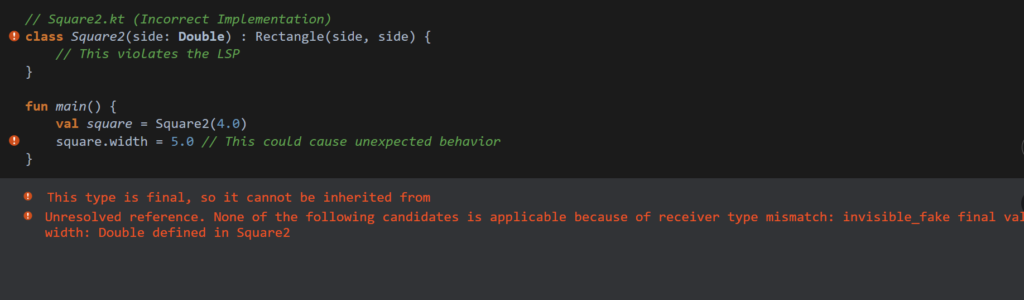
Now, let’s explore a scenario where we might inadvertently violate LSP. Imagine if we tried to implement a Square as a subclass of Rectangle:
Kotlin
// Square2.kt (Incorrect Implementation: For illustrative purposes only)classSquare2(side: Double) : Rectangle(side, side) {// This violates the LSP}
Here, we try to treat Square as a special type of Rectangle. While this might seem convenient, it can cause issues, especially if we later try to set the width and height separately.
Kotlin
funmain() {val square = Square2(4.0) square.width = 5.0// This could cause unexpected behavior}
Leads to bugs and unexpected behavior
By trying to force a square to be a rectangle, we create scenarios where our expectations of behavior break down, violating LSP.
A Better Approach: Interfaces
To adhere to LSP more effectively, we can use interfaces instead of inheritance for our shapes:
With this approach, we can freely create different shapes while ensuring they all adhere to the contract specified by the Shape interface.
Note: Many of us misunderstand this concept or do not fully grasp it. Many developers believe that LSP is similar to dynamic polymorphism, but this is not entirely true, as they often overlook the key part of the LSP definition: ‘without altering the correctness of the program.’
Definition: Subtypes must be substitutable for their base types without altering the correctness of the program. This means that if a program uses a base type, it should be able to work with any of its subtypes without unexpected behavior or errors.
The Liskov Substitution Principle (LSP) ensures that subclasses can replace their parent classes while maintaining the expected behavior of the program. Violating LSP can lead to unexpected bugs and issues, as subclasses may not conform to the behaviors defined by their parent classes.
Let’s understand this with a few more examples: Consider a Vehicle class with a drive function. If we create a Bicycle subclass, it may violate the Liskov Substitution Principle (LSP) because bicycles don’t ‘drive’ in the same way that cars do.
Kotlin
// Violates LSP: Bicycle shouldn't be a subclass of VehicleopenclassVehicle {openfundrive() {// Default drive logic }}classCar : Vehicle() {overridefundrive() {// Car-specific drive logic }}classBicycle : Vehicle() {overridefundrive() {throwUnsupportedOperationException("Bicycles cannot drive like cars") }funpedal() {// Pedal logic }}
In this example, Bicycle violates LSP because it cannot fulfill the contract of the drive method defined in Vehicle, leading to an exception when invoked.
Solution: To respect LSP, we can separate the hierarchy into interfaces that accurately represent the behavior of each type. Here’s how we can implement this:
Now, Car implements the Drivable interface, providing a proper implementation for drive(). The Bicycle class does not implement Drivable, as it doesn’t need to drive. Each class behaves correctly according to its nature, adhering to the Liskov Substitution Principle.
One more thing I want to add: suppose we have an Animal class and a Bird subclass.
In this example, Bird can replace Animal without any issues because it properly fulfills the expected behavior of the move function. When move is called on a Bird object, it produces the output “Bird flies,” which is a valid extension of the behavior defined by Animal.
This illustrates the Liskov Substitution Principle: any class inheriting from Animal should be able to act like an Animal, maintaining the expected interface and behavior.
Additional Consideration: To ensure adherence to LSP, all subclasses must conform to the expectations set by the superclass. For example, if another subclass, such as Fish, is created but its implementation of move behaves in a way that contradicts the Animal contract, it would violate LSP.
How to Avoid Violating LSP
Use interfaces or abstract classes that define behavior and allow different implementations.
Ensure that method signatures and expected behaviors remain consistent across subclasses.
Consider using composition over inheritance to avoid inappropriate subclassing.
Best Practices for Implementing LSP
Design Interfaces Thoughtfully: Design interfaces or base classes to capture only the behavior that all subclasses should have.
Avoid Overriding Behavior: When a method in a subclass changes expected behavior, it often signals a design issue.
Use Composition: When two classes share some behavior but have different constraints, use composition rather than inheritance.
Conclusion
The Liskov Substitution Principle is a fundamental concept that enhances the design of object-oriented systems. By ensuring that subclasses can be substituted for their parent classes without affecting program correctness, we create code that is more robust, maintainable, and reusable.
When designing your classes, always ask yourself: Can this subclass be used interchangeably with its parent class without altering expected behavior? If the answer is no, it’s time to reconsider your design.
Embracing LSP not only helps you write better code but also fosters a deeper understanding of your application’s architecture. So, the next time you’re faced with a class hierarchy, keep the Liskov Substitution Principle in mind, and watch your code transform into a cleaner, more maintainable version of itself!
The Proxy design pattern is a structural pattern that acts as a stand-in or “placeholder” for another object, helping control access to it. By applying this pattern, you add an extra layer that manages an object’s behavior, all without altering the original object. In this article, we’ll explore the basics of the Proxy pattern, dive into real-world examples where it proves useful, and guide you through a Kotlin implementation with step-by-step explanations to make everything clear and approachable.
Proxy Design Pattern
In programming, objects sometimes need additional layers of control—whether it’s for performance optimizations, access restrictions, or simplifying complex operations. The Proxy pattern achieves this by creating a “proxy” class that represents another class. This proxy class controls access to the original class and can be used to introduce additional logic before or after the actual operations.
It’s particularly useful in situations where object creation is resource-intensive, or you want finer control over how and when the object interacts with other parts of the system. In Android, proxies are commonly used for lazy loading, network requests, and logging.
When to Use Proxy Pattern
The Proxy pattern is beneficial when:
You want to control access to an object.
You need to defer object initialization (lazy initialization).
You want to add functionalities, like caching or logging, without modifying the actual object.
Structure of Proxy Pattern
The Proxy Pattern involves three main components:
Subject Interface – Defines the common interface that both the RealSubject and Proxy implement.
RealSubject – The actual object being represented or accessed indirectly.
Proxy – Controls access to the RealSubject.
Types of Proxies
Different types of proxies serve distinct purposes:
Remote Proxy: Manages resources in remote systems.
Virtual Proxy: Manages resource-heavy objects and instantiates them only when needed.
Protection Proxy: Controls access based on permissions.
Cache Proxy: Caches responses to improve performance.
Real-World Use Cases
The Proxy pattern is widely used in scenarios such as:
Virtual Proxies: Delaying object initialization (e.g., for memory-heavy objects).
Protection Proxies: Adding security layers to resources (e.g., restricting access).
Remote Proxies: Representing objects that are in different locations (e.g., APIs).
Let’s consider a video streaming scenario, similar to popular platforms like Disney+ Hotstar, Netflix, or Amazon Prime. Here, a proxy can be used to control access to video data based on the user’s subscription type. For instance, the proxy could restrict access to premium content for free-tier users, ensuring that only eligible users can stream certain videos. This adds a layer of control, enhancing security and user experience while keeping the main video service logic clean and focused.
The RealVideoService class represents the actual video streaming service. It implements the VideoService interface and streams video.
Kotlin
classRealVideoService : VideoService {overridefunstreamVideo(videoId: String): String {// Simulate streaming a large video filereturn"Streaming video content for video ID: $videoId" }}
Create the Proxy Class
The VideoServiceProxy class controls access to the RealVideoService. We’ll implement it so only premium users can access certain videos, adding a layer of security.
Kotlin
classVideoServiceProxy(privateval isPremiumUser: Boolean) : VideoService {// Real service referenceprivateval realVideoService = RealVideoService()overridefunstreamVideo(videoId: String): String {returnif (isPremiumUser) {// Delegate call to real object if the user is premium realVideoService.streamVideo(videoId) } else {// Restrict access for non-premium users"Upgrade to premium to stream this video." } }}
Testing the Proxy
Now, let’s simulate clients trying to stream a video through the proxy.
Kotlin
funmain() {val premiumUserProxy = VideoServiceProxy(isPremiumUser = true)val regularUserProxy = VideoServiceProxy(isPremiumUser = false)println("Premium User Request:")println(premiumUserProxy.streamVideo("premium_video_123"))println("Regular User Request:")println(regularUserProxy.streamVideo("premium_video_123"))}
Output
Kotlin
Premium User Request:Streaming video content for video ID: premium_video_123Regular User Request:Upgrade to premium to stream this video.
Here,
Interface (VideoService): The VideoService interface defines the contract for streaming video.
Real Object (RealVideoService): The RealVideoService implements the VideoService interface, providing the actual video streaming functionality.
Proxy Class (VideoServiceProxy): The VideoServiceProxy class implements the VideoService interface and controls access to RealVideoService. It checks whether the user is premium and either allows streaming or restricts it.
Client: The client interacts with VideoServiceProxy, not with RealVideoService. The proxy makes the access control transparent for the client.
Benefits and Limitations
Benefits
Controlled Access: Allows us to restrict access based on custom logic.
Lazy Initialization: We can load resources only when required.
Security: Additional security checks can be implemented.
Limitations
Complexity: It can add unnecessary complexity if access control is not required.
Performance: May slightly impact performance because of the extra layer.
Conclusion
The Proxy design pattern is a powerful tool for managing access, adding control, and optimizing performance in your applications. By introducing a proxy, you can enforce access restrictions, add caching, or defer resource-intensive operations, all without changing the core functionality of the real object. In our video streaming example, the proxy ensures only authorized users can access premium content, demonstrating how this pattern can provide both flexibility and security. Mastering the Proxy pattern in Kotlin can help you build more robust and scalable applications, making it a valuable addition to your design pattern toolkit.
Ever notice how every app we use—from Amazon to our banking apps—makes everything seem so effortless? What we see on the surface is just the tip of the iceberg. Beneath that sleek interface lies a mountain of complex code working tirelessly to ensure everything runs smoothly. This is where the Facade Design Pattern shines, providing...
Have you ever stopped to marvel at how breathtaking mobile games have become? Think about the background graphics in popular games like PUBG or Pokémon GO. (Honest confession: I haven’t played these myself, but back in my college days, my friends and I used to have epic Counter-Strike and I.G.I. 2 sessions—and, funny enough, the same group now plays PUBG—except me!) Anyway, the real question is: have you noticed just how detailed the game worlds are? You’ve got lush grass fields, towering trees, cozy houses, and fluffy clouds—so many objects that make these games feel alive. But here’s the kicker: how do they manage all that without your phone overheating or the game lagging as the action intensifies?
It turns out that one of the sneaky culprits behind game lag is the sheer number of objects being created over and over, all of which take up precious memory. That’s where the Flyweight Design Pattern swoops in like a hero.
Picture this: you’re playing a game with hundreds of trees, houses, and patches of grass. Now, instead of creating a brand-new tree or patch of grass every time, wouldn’t it make sense to reuse these elements when possible? After all, many of these objects share the same traits—like the green color of grass or the texture of tree leaves. The Flyweight pattern allows the game to do just that: reuse common properties across objects to save memory and keep performance snappy.
In this blog, we’re going to break down exactly how the Flyweight Design Pattern works, why it’s such a game-changer for handling large numbers of similar objects, and how you can use it to optimize your own projects. Let’s dive in and find out how it all works!
What is the Flyweight Pattern?
The Flyweight Pattern is a structural design pattern that reduces memory consumption by sharing as much data as possible with similar objects. Instead of storing the same data repeatedly across multiple instances, the Flyweight pattern stores shared data in a common object and only uses unique data in individual objects. This concept is particularly useful when creating a large number of similar objects.
The core idea behind this pattern is to:
1. Identify and separate intrinsic and extrinsic data.
Intrinsic data is shared across all objects and remains constant.
Extrinsic data is unique to each object instance.
2. Store intrinsic data in a shared flyweight object, and pass extrinsic data at runtime.
Let’s break it down with our game example. Imagine a field of grass where each blade has a common characteristic: color. All the grass blades are green, which remains constant across the entire field. This is the intrinsic data — something that doesn’t change, like the color.
Now, think about the differences between the blades of grass. Some may vary in height or shape, like a blade being wider in the middle or taller than another. Additionally, the exact position of each blade in the field differs. These varying factors, such as height and position, are the extrinsic data.
Without using the Flyweight pattern, you would store both the common and unique data for each blade of grass in separate objects, which quickly leads to redundancy and memory bloat. However, with the Flyweight pattern, we extract the common data (the color) and share it across all grass blades using one object. The varying data (height, shape, and position) is stored separately for each blade, reducing memory usage significantly.
In short, the Flyweight pattern helps optimize your game by sharing common attributes while keeping only the unique properties in separate objects. This is especially useful when working with a large number of similar objects like blades of grass in a game.
Structure of Flyweight Design Pattern
Before we jump into the code, let’s break down the structure of the Flyweight Design Pattern to understand how it works:
Flyweight
Defines an interface that allows flyweight objects to receive and act on external (extrinsic) state.
ConcreteFlyweight
Implements the Flyweight interface and stores intrinsic state (internal, unchanging data).
Must be shareable across different contexts.
UnsharedConcreteFlyweight
While the Flyweight pattern focuses on sharing information, there can be cases where instances of concrete flyweight classes are not shared. These objects may hold their own state.
FlyweightFactory
Creates and manages flyweight objects.
Ensures that flyweight objects are properly shared to avoid duplication.
Client
Holds references to flyweight objects.
Computes or stores the external (extrinsic) state that the flyweights use.
Basically, the Flyweight pattern works by dividing the object state into two categories:
Intrinsic State: Data that can be shared across multiple objects. It is stored in a shared, immutable object.
Extrinsic State: Data that is unique to each object instance and is passed to the object when it is used.
Using a Flyweight Factory, objects that share the same intrinsic state are created once and reused multiple times. This approach leads to significant memory savings.
Real World Examples
Grass Field Example
Let’s first implement the Flyweight pattern with a grass field example by creating a Flyweight interface, defining concrete Flyweight classes, building a factory to manage them, and demonstrating their usage with a client.
Define the Flyweight Interface
This interface will declare the method that the flyweight objects will implement.
Create UnsharedConcreteFlyweight Class (if necessary)
If you need blades that may have unique characteristics, you can have this class. For simplicity, we won’t implement any specific logic here.
Kotlin
classUnsharedConcreteGrassBlade : GrassBlade {// Implementation for unshared concrete flyweight if neededoverridefundisplay(extrinsicState: GrassBladeState) {// Not shared, just a placeholder }}
Create the FlyweightFactory
This factory class will manage the creation and sharing of grass blade objects.
GrassBlade Interface: This defines a method display that takes an extrinsicState.
ConcreteGrassBlade Class: Implements the Flyweight interface and stores the intrinsic state (color).
GrassBladeFactory: Manages the creation and sharing of ConcreteGrassBlade instances based on color.
GrassBladeState Class: Holds the extrinsic state for each grass blade, such as height and position.
Main Function: This simulates the game, creates multiple grass blades, and demonstrates how shared data and unique data are handled efficiently.
Forest Example
Let’s build the forest now. Here, we’ll render a forest with grass, trees, and flowers, reusing objects to minimize memory usage and improve performance by applying the Flyweight pattern.
In this example, the ForestObject will represent a shared object (like grass, trees, and flowers), and the Forest class will be responsible for managing and rendering these objects with variations in their positions and other properties.
Kotlin
// Step 1: Flyweight InterfaceinterfaceForestObject {funrender(x: Int, y: Int) // Render object at given coordinates}// Step 2: Concrete Flyweight Classes (Grass, Tree, Flower)classGrass : ForestObject {privateval color = "Green"// Shared propertyoverridefunrender(x: Int, y: Int) {println("Rendering Grass at position ($x, $y) with color $color") }}classTree : ForestObject {privateval type = "Oak"// Shared propertyoverridefunrender(x: Int, y: Int) {println("Rendering Tree of type $type at position ($x, $y)") }}classFlower : ForestObject {privateval color = "Yellow"// Shared propertyoverridefunrender(x: Int, y: Int) {println("Rendering Flower at position ($x, $y) with color $color") }}// Step 3: Flyweight Factory (Manages the creation and reuse of objects)classForestObjectFactory {privateval objects = mutableMapOf<String, ForestObject>()// Returns an existing object or creates a new one if it doesn't existfungetObject(type: String): ForestObject {return objects.getOrPut(type) {when (type) {"Grass"->Grass()"Tree"->Tree()"Flower"->Flower()else->throwIllegalArgumentException("Unknown forest object type") } } }}// Step 4: Forest Class (Client code to manage and render the forest)classForest(privateval factory: ForestObjectFactory) {privateval objectsInForest = mutableListOf<Pair<ForestObject, Pair<Int, Int>>>()// Adds a new object with specified type and coordinatesfunplantObject(type: String, x: Int, y: Int) {val forestObject = factory.getObject(type) objectsInForest.add(Pair(forestObject, Pair(x, y))) }// Renders the entire forestfunrenderForest() {for ((obj, position) in objectsInForest) { obj.render(position.first, position.second) } }}// Step 5: Testing the Flyweight Patternfunmain() {val factory = ForestObjectFactory()val forest = Forest(factory)// Planting various objects in the forest (reusing the same objects) forest.plantObject("Grass", 10, 20) forest.plantObject("Grass", 15, 25) forest.plantObject("Tree", 30, 40) forest.plantObject("Tree", 35, 45) forest.plantObject("Flower", 50, 60) forest.plantObject("Flower", 55, 65)// Rendering the forest forest.renderForest()}
Here,
Flyweight Interface (ForestObject): This interface defines the method render, which will be used to render objects in the forest.
Concrete Flyweights (Grass, Tree, Flower): These classes implement the ForestObject interface and have shared properties like color and type that are common across multiple instances.
Flyweight Factory (ForestObjectFactory): This class manages the creation and reuse of objects. It ensures that if an object of the same type already exists, it will return the existing object rather than creating a new one.
Client Class (Forest): This class is responsible for planting objects in the forest and rendering them. It uses the factory to obtain objects and stores their positions.
Main Function: In the main function, we plant several objects in the forest, but thanks to the Flyweight Design Pattern, we reuse existing objects to save memory.
Output
Kotlin
Rendering Grass at position (10, 20) with color GreenRendering Grass at position (15, 25) with color GreenRendering Tree of type Oak at position (30, 40)Rendering Tree of type Oak at position (35, 45)Rendering Flower at position (50, 60) with color YellowRendering Flower at position (55, 65) with color Yellow
Basically, even though we planted multiple grass, tree, and flower objects, the game only created one object per type, thanks to the factory. These objects are reused, with only their positions varying. This approach saves memory and improves performance, especially when there are thousands of similar objects in the game world.
Few more Usecases
Text Rendering Systems: Letters that share the same font, size, and style can be stored as flyweights, while the position of each character in the document is extrinsic.
Icons in Operating Systems: Many icons in file browsers share the same image but differ in position or name.
Web Browsers: Rendering engines often use flyweights to manage CSS style rules, ensuring that the same styles aren’t recalculated multiple times.
Advantages of the Flyweight Pattern
Memory Efficient: Reduces the number of objects by sharing common data, thus saving memory.
Improves Performance: With fewer objects to manage, the program can run faster.
Scalability: Useful in applications with many similar objects (e.g., games, graphical applications).
Drawbacks of the Flyweight Pattern
Increased Complexity: The pattern introduces more complexity as you need to manage both intrinsic and extrinsic state separately.
Less Flexibility: Changes to the intrinsic state can affect all instances of the flyweight, which might not be desired in all situations.
Thread-Safety Issues: Careful management of shared state is required in a multi-threaded environment.
When to Use Flyweight Pattern
When an application has many similar objects: If creating each object individually would use too much memory, like in games with numerous characters or environments.
When object creation is expensive: Reusing objects can prevent the overhead of frequently creating new objects.
When intrinsic and extrinsic states can be separated: The pattern is effective when most object properties are shareable.
Conclusion
The Flyweight design pattern is a powerful tool when you need to optimize memory usage by sharing objects with similar properties. In this post, we explored how the Flyweight pattern works, saw a real-world analogy, and implemented it in Kotlin using grass field and forest examples in a game.
While the Flyweight pattern can be a great way to reduce memory usage, it’s important to carefully analyze whether it’s necessary in your specific application. For simple applications, this pattern might introduce unnecessary complexity. However, when dealing with a large number of objects with similar characteristics, Flyweight is a great choice.
By understanding the intrinsic and extrinsic state separation, you can effectively implement the Flyweight pattern in Kotlin to build more efficient applications.