Fingerprint authentication has become a widely used method for securing mobile devices and applications. In Android, fingerprint recognition is commonly integrated to enhance security, offering a faster, more convenient way to unlock devices and authenticate transactions. But what makes fingerprint authentication on Android so secure? The answer lies in the Trusted Execution Environment (TEE) –...
Application security is essential in any mobile app development strategy, especially on Android, where protecting user data and app integrity is paramount. This guide explores practical security measures, like app signing, certificate checksum verification, authorized install checks, code obfuscation, and secure distribution. We’ll walk through each step with hands-on examples in Kotlin, making complex security...
As a Kotlin developer, you’re no stranger to the numerous architectural patterns in Android app development. From the well-established MVP (Model-View-Presenter) to the widely-used MVVM (Model-View-ViewModel), and now, the emerging MVI (Model-View-Intent), it’s easy to feel lost in the sea of choices. But here’s the thing: MVI is rapidly becoming the go-to architecture for many,...
Mobile app architecture is one of the most crucial aspects of app development. It’s like building a house; if your foundation is shaky, no matter how fancy the decorations are, the house will collapse eventually. In this blog post, We’ll discuss the mobile app architecture goals, with an emphasis on creating systems that are independent...
So, you’ve just sat down to build an Android app, and naturally, you want to execute some background tasks. Perhaps you’re thinking, ‘Should I use a Thread? Maybe AsyncTask? No, wait—that’s deprecated!’ Don’t worry, we’ve all been there. In the wild, vast world of Android development, managing background tasks is like trying to control a...
Android development has evolved significantly over the years, driven by advances in technology and the increasing expectations of users. To succeed as an Android developer today, it’s crucial to keep up with the latest tools, techniques, and best practices. In this guide I will walk you through the key aspects of modern Android development, breaking...
The smartphones we rely on today seem like magic little devices, but their history is surprisingly recent. And a big player in that story? Android. Let’s take a trip down memory lane and explore how this open-source operating system went from a camera concept to the king of mobile.
Brewing in the Cauldron: 2003-2005
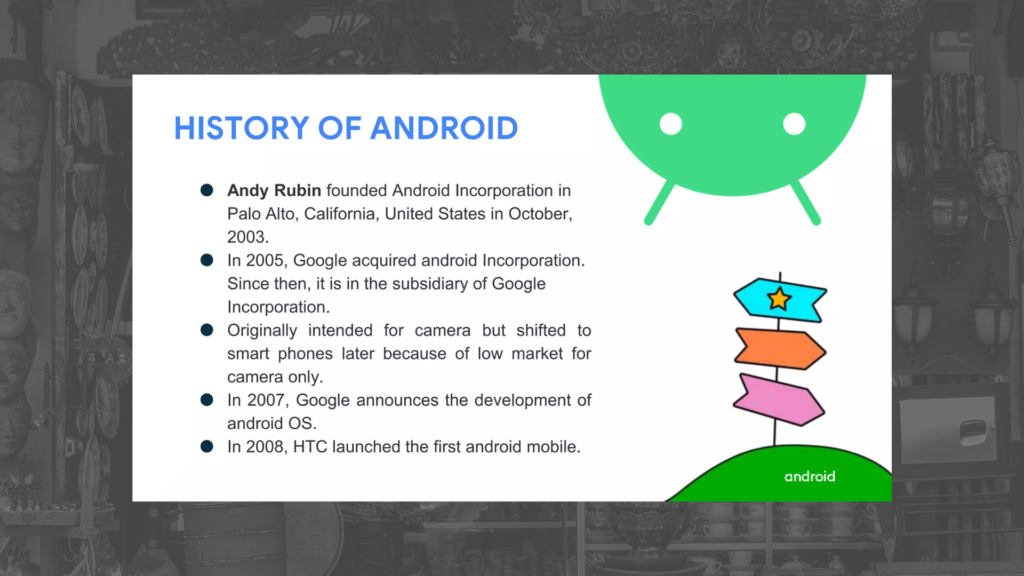
The story starts in 2003 with a company called Android Inc. led by Andy Rubin (nicknamed “Android” for his love of robots). Their initial goal? An operating system for digital cameras! Imagine a camera that could be more than just a point-and-shoot – that was the dream. But the market for super-smart cameras just wasn’t there, so they pivoted. In 2005, Google came knocking, recognizing the potential of this mobile OS and acquiring Android Inc. Suddenly, the little camera OS had the backing of a tech giant, and its destiny changed.
Going Open Source: 2007-2008
Google ditched the camera idea and focused on smartphones. A bold move was made: basing Android on the Linux kernel, an open-source software foundation. This meant anyone could tinker and create with Android, fostering a spirit of collaboration. In 2007, the Open Handset Alliance (OHA) was formed, a group of tech companies including HTC, Samsung, and LG who would help develop and promote this new OS.
The first test balloons were released – developer previews – to gather feedback and build excitement. Finally, in 2008, the world saw the first commercially available Android phone: the HTC Dream, also known as the T-Mobile G1 in the US. It wasn’t perfect – chunky design, limited app selection – but it was a start. More importantly, it was open, customizable, and offered a glimpse of the future.
The Rise of the Machines (and Apps): 2009-2011
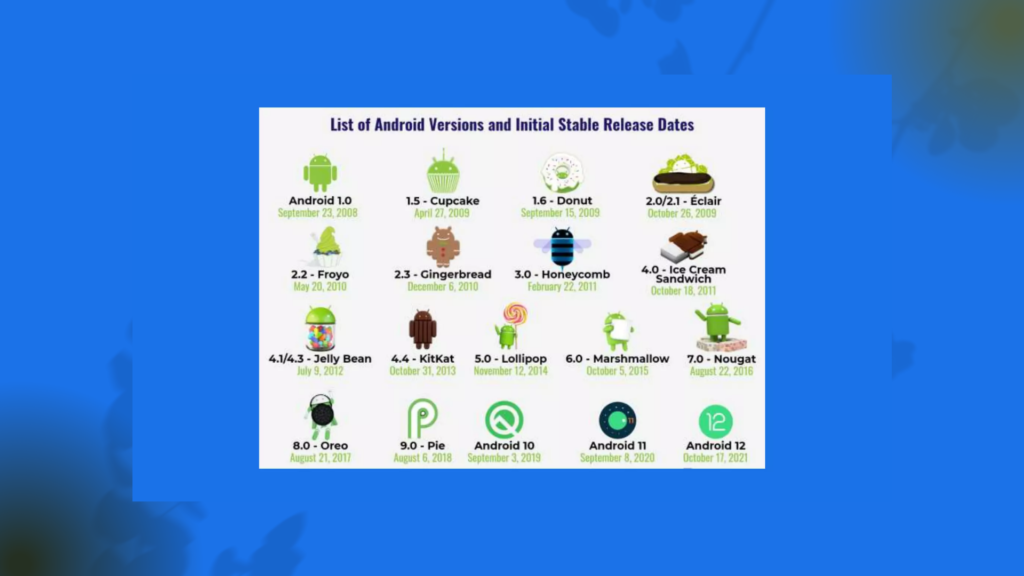
The next few years were a whirlwind of updates. Each version, creatively named with a delicious dessert theme (Cupcake, Donut, Eclair!), brought new features and functionalities. The app store, then called the Android Market (now Google Play Store), exploded with possibilities. Users could personalize their phones like never before, from adding games and social media apps to productivity tools and messaging services.
Manufacturers like Samsung and Motorola jumped on board, creating a wave of Android-powered devices with different screen sizes, features, and price points. This variety gave consumers more choice and helped Android gain ground against competitors like Apple’s iOS.
Maturity and Domination: 2011-Present
By the early 2010s, Android had become the dominant mobile OS. Updates became more streamlined, with a focus on improving performance, design, and security. Features like voice assistants (hello, Google Assistant!), multi-tasking, and better camera integration became commonplace.
Today, Android runs on billions of devices around the world. It’s constantly evolving, with new versions offering features like foldable displays and smarter AI integration. The open-source spirit remains strong, with developers constantly pushing the boundaries of what’s possible.
The Future of Android
So, where does Android go from here? The future is full of possibilities. We might see even more integration with artificial intelligence, seamless connections between devices, and a focus on user privacy and security. One thing’s for sure: the little camera OS that could has become a mobile giant, and its story is far from over.
Imagine a world where you could test drive a car, play a game, or edit a photo without ever downloading an app. Enter the realm of Android Instant Apps, a revolutionary technology that lets users experience apps directly from their web browsers, without committing to the storage space or installation hassle. Android Instant Apps have...
React Native and Node.js are two powerful technologies that, when combined, can create dynamic and scalable applications. React Native is a JavaScript framework for building cross-platform mobile applications, developed by Facebook, allows developers to build cross-platform mobile apps using JavaScript and React. On the other hand, Node.js, built on Chrome’s V8 JavaScript runtime, is a...
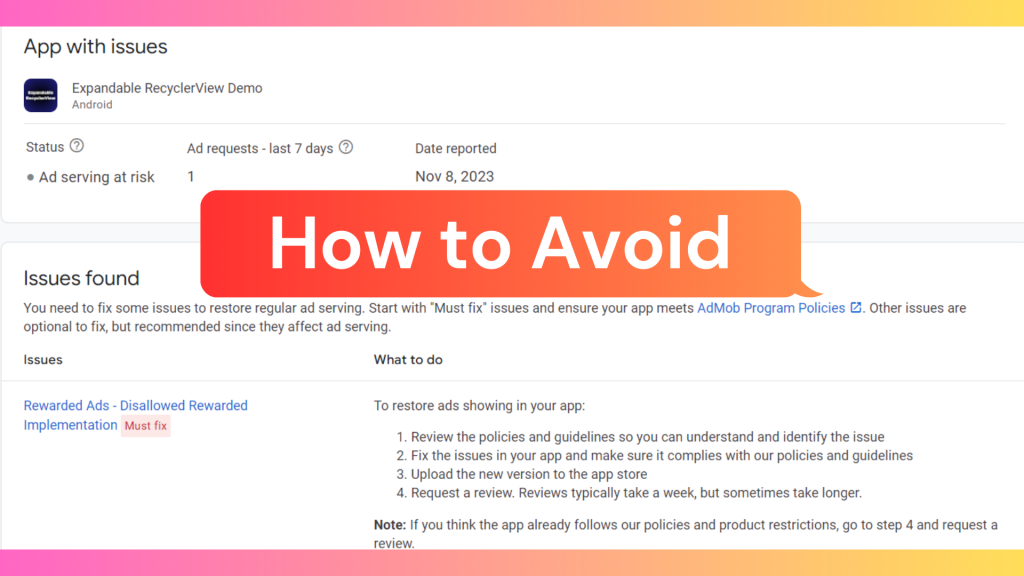
In the dynamic landscape of mobile applications, advertising has become a pivotal element in the revenue model for many developers. One particular ad format, rewarded ads, stands out for its popularity, offering a non-intrusive way to engage users while providing valuable incentives. However, as with any advertising strategy, we developers must navigate potential pitfalls to ensure a positive user experience and compliance with platform guidelines.
Rewarded ads serve as an effective means to incentivize users to watch ads in exchange for rewards like in-game currency, power-ups, or exclusive content. Despite their advantages, developers need to exercise caution to avoid violating Google’s AdMob policies, which could result in account suspension or even a ban.
This blog post is dedicated to exploring common issues associated with rewarded ad implementations that can lead to disapproval or removal from app stores. By examining these instances, my goal is to provide developers with insights on avoiding these pitfalls and maintaining a seamless integration of rewarded ads within their applications.
Here, we’ll take a look at some of the most common disallowed implementations of rewarded ads, and how to avoid them.
1. Showing rewarded ads without user consent
One of the most important rules of rewarded ads is that you must always obtain user consent before showing them. This means that you should never show a rewarded ad automatically, or without the user having a clear understanding of what they’re getting into.
Here are some examples of disallowed implementations:
Showing a rewarded ad when the user opens your app for the first time.
Showing a rewarded ad when the user is in the middle of a game or other activity.
Showing a rewarded ad without a clear “Watch Ad” button or other call to action.
Misrepresenting the reward that the user will receive.
2. Showing rewarded ads that are not relevant to your app
Another important rule is that you should only show rewarded ads that are relevant to your app and its target audience. This means that you should avoid showing ads for products or services that are unrelated to your app, or that are not appropriate for your users.
Examples of disallowed implementations:
Showing rewarded ads for adult products or services in a children’s app.
Showing rewarded ads for gambling or other high-risk activities in an app that is not targeted at adults.
Showing rewarded ads for products or services that are not available in the user’s country or region.
3. Requiring users to watch a rewarded ad in order to progress in the game or app
Rewarded ads should always be optional. You should never require users to watch a rewarded ad in order to progress in your game or app. This includes features such as unlocking new levels, characters, or items.
Examples of disallowed implementations:
Requiring users to watch a rewarded ad in order to unlock a new level in a game.
Requiring users to watch a rewarded ad in order to continue playing after they lose.
Requiring users to watch a rewarded ad in order to access certain features of your app.
4. Incentivizing users to watch rewarded ads repeatedly
You should not incentivize users to watch rewarded ads repeatedly in a short period of time. This means that you should avoid giving users rewards for watching multiple rewarded ads in a row, or for watching rewarded ads more than a certain number of times per day.
Examples of disallowed implementations:
Giving users a reward for watching 5 ads in a row.
Giving users a bonus reward for watching 10 ads per day.
Giving users a reward for watching the same rewarded ad multiple times.
5. Using rewarded ads to promote deceptive or misleading content
Rewarded ads should not be used to promote deceptive or misleading content. This includes content that makes false claims about products or services, or that is intended to trick users into doing something they don’t want to do.
Examples of disallowed implementations:
Promoting a weight loss product that claims to guarantee results.
Promoting a fake mobile game that is actually a scam.
Promoting a phishing website that is designed to steal users’ personal information.
How to Avoid Disallowed Implementations of Rewarded Ads
Reasons and solutions for Disallowed Rewarded Implementation
1. Policy Violations:
Ad networks often have stringent policies regarding the content and presentation of rewarded ads. Violations of these policies can lead to disallowed implementations.
Solution: Thoroughly review the policies of the ad network you are working with and ensure that your rewarded ads comply with all guidelines. Regularly update your creative content to align with evolving policies.
The best way to avoid disallowed implementations of rewarded ads is to follow Google’s AdMob policies. These policies are designed to protect users and ensure that rewarded ads are implemented in a fair and ethical way.
2. User Experience Concerns:
If the rewarded ads disrupt the user experience by being intrusive or misleading, platforms may disallow their implementation.
Solution:Prioritize user experience by creating non-intrusive, relevant, and engaging rewarded ad experiences. Conduct user testing to gather feedback and make necessary adjustments.
3. Frequency and Timing Issues:
Bombarding users with too many rewarded ads or displaying them at inconvenient times can lead to disallowed implementations.
Solution:Implement frequency capping to control the number of rewarded ads a user sees within a specific time frame. Additionally, carefully choose the timing of ad placements to avoid disrupting critical user interactions.
4. Technical Glitches:
Technical issues, such as bugs or glitches in the rewarded ad implementation, can trigger disallowances.
Solution:Regularly audit your ad implementation for technical issues. Work closely with your development team to resolve any bugs promptly. Keep your SDKs and APIs up to date to ensure smooth functioning.
5. Non-Compliance with Platform Guidelines:
Different platforms may have specific guidelines for rewarded ads. Failure to comply with these guidelines can result in disallowed implementations.
Solution:Familiarize yourself with the specific guidelines of the platforms you are targeting. Customize your rewarded ad strategy accordingly to meet the requirements of each platform.
6. Inadequate Disclosure:
Lack of clear and conspicuous disclosure regarding the incentivized nature of the ads can lead to disallowances.
Solution:Clearly communicate to users that they are engaging with rewarded content. Use prominent visual cues and concise text to disclose the incentive.
Conclusion
While rewarded ads can be a lucrative revenue stream for developers, it’s essential to implement them responsibly and in accordance with Google’s AdMob policiesand guidelines. Striking the right balance between user engagement and monetization is key to building a successful and sustainable app. By avoiding the common pitfalls discussed in this blog post, we developers can create a positive user experience, maintain compliance with platform policies, and foster long-term success in the competitive world of mobile applications.