AI/ML

NNAPI

Neural Networks API (NNAPI) Explained: The Ultimate 2025 Guide to Android’s AI Acceleration

Artificial intelligence on mobile devices is no longer a futuristic concept — it’s part of our daily tech life. From facial recognition to voice assistants, AI is everywhere. For Android developers, the Neural Networks API (NNAPI) is the key to unlocking efficient on-device AI. In this guide, you’ll learn everything about NNAPI, why it matters, how it...

Membership Required

You must be a member to access this content.

View Membership Levels

Already a member? Log in here
ONNX Runtime

What Is ONNX Runtime? A Beginner’s Guide to Faster AI Model Inference

If you’ve ever worked with AI models, you know how exciting it is to see them in action. But here’s the catch — many models are slow to run, especially in production environments. That’s where ONNX Runtime comes in. It’s a game-changer for speeding up model inference without changing the model itself.

In this guide, you’ll learn exactly what ONNX Runtime is, why it’s useful, and how you can use it to run your AI models faster. Whether you’re a beginner in AI or an experienced developer looking for performance boosts, this post will break it down simply and clearly.

What Is ONNX Runtime (ORT)?

ONNX Runtime is an open-source, high-performance engine for running machine learning models. Developed by Microsoft, it supports models trained in popular frameworks like PyTorch, TensorFlow, and scikit-learn by converting them to the ONNX (Open Neural Network Exchange) format.

Think of ONNX Runtime as a universal language interpreter for AI models. You train your model in any framework, convert it to ONNX, and then ONNX Runtime takes care of running it efficiently across various hardware (CPU, GPU, even specialized accelerators).

Why Use ONNX Runtime?

Speed

ONNX Runtime is optimized for speed. It reduces inference time dramatically compared to native frameworks.

Cross-Platform

It runs on Windows, Linux, macOS, Android, and iOS. You can use it in cloud services, edge devices, or even mobile apps.

Flexibility

Supports models from PyTorch, TensorFlow, scikit-learn, XGBoost, and more — once converted to ONNX.

Cost-Efficient

Faster inference means fewer resources and lower cloud costs. Who doesn’t like saving money..?

How Does ONNX Runtime Work?

Here’s the simple flow:

  1. Train your model using TensorFlow, PyTorch, or another framework.
  2. Export the model to ONNX format.
  3. Use ONNX Runtime to run inference — faster and more efficiently.

Running a Model with ONNX Runtime

Let’s see a basic Python example to understand how to use ONNX Runtime.

Install ONNX Runtime

Python
pip install onnxruntime

This command installs the CPU version. If you have a GPU, you can install the GPU version like this:

Python
pip install onnxruntime-gpu

Load an ONNX Model

Let’s say you have a model called model.onnx.

Python
import onnxruntime as ort

# Create an inference session
session = ort.InferenceSession("model.onnx")

Prepare Input

You need to know the input names and shapes.

Python
import numpy as np

# Get input name
input_name = session.get_inputs()[0].name

# Create dummy input
input_data = np.random.randn(1, 3, 224, 224).astype(np.float32)

Run Inference

Python
# Run inference
outputs = session.run(None, {input_name: input_data})

print("Model Output:", outputs[0])

That’s it! You just ran an AI model using ONNX Runtime in a few lines of code.

How to Convert Models to ONNX Format

Python
import torch

# Example PyTorch model
model = torch.hub.load('pytorch/vision', 'resnet18', pretrained=True)
model.eval()

# Dummy input
dummy_input = torch.randn(1, 3, 224, 224)

# Export to ONNX
torch.onnx.export(model, dummy_input, "resnet18.onnx")

Now you can use resnet18.onnx with ONNX Runtime for fast inference.

When Should You Use ONNX Runtime?

Use CaseONNX Runtime Benefit
Production deploymentFaster inference and hardware flexibility
Edge devices (IoT)Smaller footprint and speed
Cloud servicesReduced inference costs
Multi-framework pipelinesEasier model standardization

If you need consistent, fast model inference across different environments, ONNX Runtime is a solid choice.

ONNX Runtime vs Native Frameworks

FeaturePyTorch/TensorFlowONNX Runtime
Inference SpeedGoodFaster, optimized kernels
Deployment FlexibilityLimitedMulti-platform, hardware-optimized
Framework Lock-inYesNo, cross-framework support
Learning CurveFramework-specificSimple API, easy to adopt

Tips for Maximizing ONNX Runtime Performance

  • Use ONNX Optimizer: Tools like onnxoptimizer help remove redundant operations.
  • Enable Graph Optimizations: ONNX Runtime automatically optimizes computation graphs.
  • Leverage Execution Providers: Choose CUDAExecutionProvider for GPU, CPUExecutionProvider for CPU, or others like TensorRT.
  • Batch Inputs: Inference is faster with batched data.

Conclusion

ONNX Runtime is not just a tool — it’s a performance booster for AI inference. It simplifies deployment, cuts inference time, and makes your AI projects more scalable.

If you’ve been struggling with slow model inference or complicated deployments, ONNX Runtime is your friend. Install it, give it a try, and see the speed-up for yourself.

FAQs

Q: Is ONNX Runtime free?
 Yes, it’s completely open-source and free to use under the MIT license.

Q: Can I use ONNX Runtime with GPU?
 Absolutely. Just install onnxruntime-gpu and you’re good to go.

Q: Does ONNX Runtime support quantized models?
 Yes! It supports quantization for even faster and smaller models.

Model Inference in AI

Model Inference in AI Explained Simply: How Your AI Models Make Real-World Predictions

Artificial Intelligence (AI) seems like magic — type a prompt and it answers, upload a picture and it identifies objects, or speak to your phone and it replies smartly. But what happens behind the scenes when an AI makes these decisions? The answer lies in a crucial process called model inference in AI.

In this guide, we’ll keep things simple and walk through a few easy coding examples. Whether you’re new to AI or just curious about how it works, you’ll come away with a clear understanding of how AI models make real-world predictions.

What is Model Inference in AI?

Think of AI as a student who spends months studying (training) and finally takes a test (inference). Model inference in AI refers to the phase where a trained model uses its knowledge to make predictions or decisions on new data it hasn’t seen before.

  • Training = Learning phase
  • Inference = Prediction phase (real-world usage)

When you ask a chatbot a question or upload an image to an app, the model is performing inference — it’s not learning at that moment but applying what it has already learned.

Real-Life Examples of Model Inference

  • Typing on your phone and seeing autocomplete suggestions? Model inference.
  • Netflix recommending a movie? Model inference.
  • AI detecting tumors in medical images? Model inference.

It’s the AI’s way of taking what it learned and helping you in the real world.

Why is Model Inference Important?

Without inference, AI would be useless after training. The whole point of AI is to make smart decisions quickly and reliably on new data.

Here’s why model inference in AI matters:

  • Speed: Fast inference means smooth user experiences (think instant translations or responses).
  • Efficiency: Good inference balances accuracy with hardware constraints (e.g., smartphones vs servers).
  • Real-World Application: From healthcare diagnoses to personalized recommendations, inference powers the AI tools we use daily.

Model Inference vs Model Training

How Model Inference in AI Works 

Let’s walk through a typical inference workflow in simple terms.

1. Input Data

This is the real-world information the AI needs to process:

  • Text prompt (chatbots)
  • Image (object detection)
  • Voice (speech recognition)

2. Preprocessing

Before sending the input to the model, it’s cleaned and formatted:

  • Text is tokenized (split into words or subwords).
  • Images are resized or normalized.
  • Audio is converted into frequency data.

3. Model Prediction (Inference)

The preprocessed data enters the trained model:

  • The model applies mathematical operations (like matrix multiplications).
  • It calculates probabilities or outputs based on its training.

4. Postprocessing

The raw model output is converted into human-friendly results:

  • Probabilities are converted to labels (“cat” or “dog”).
  • Text tokens are transformed back into readable sentences.

5. Output

Finally, the AI gives you the result: a prediction, an answer, or an action.

Image Classification Inference

Let’s see a practical example using Python and a pretrained model from PyTorch.

Python
import torch
from torchvision import models, transforms
from PIL import Image

# Load a pretrained model (ResNet18)
model = models.resnet18(pretrained=True)
model.eval()  # Set model to inference mode
# Preprocessing steps
preprocess = transforms.Compose([
    transforms.Resize(256),
    transforms.CenterCrop(224),
    transforms.ToTensor(),
    transforms.Normalize(mean=[0.485, 0.456, 0.406],
                         std=[0.229, 0.224, 0.225]),
])
# Load and preprocess the image
image = Image.open("cat.jpg")
input_tensor = preprocess(image)
input_batch = input_tensor.unsqueeze(0)  # Add batch dimension
# Model Inference
with torch.no_grad():
    output = model(input_batch)
# Get the predicted class
_, predicted_class = torch.max(output, 1)
print(f"Predicted class index: {predicted_class.item()}")

Here,

  • model.eval() puts the model in inference mode.
  • Preprocessing ensures the image matches the model’s expected input format.
  • torch.no_grad() disables gradient calculations (saves memory).
  • The model predicts the class index of the image — this could be mapped to actual class names using imagenet_classes.

Let’s see one more working example using TensorFlow and a pre-trained model.

Python
import tensorflow as tf
import numpy as np
from tensorflow.keras.applications import MobileNetV2
from tensorflow.keras.applications.mobilenet_v2 import preprocess_input, decode_predictions
from tensorflow.keras.preprocessing import image

# Load a pre-trained model
model = MobileNetV2(weights='imagenet')

# Load and preprocess image
img_path = 'dog.jpg'  # path to your image
img = image.load_img(img_path, target_size=(224, 224))
img_array = image.img_to_array(img)
img_array = np.expand_dims(img_array, axis=0)
img_array = preprocess_input(img_array)

# Perform inference
predictions = model.predict(img_array)

# Decode predictions
decoded = decode_predictions(predictions, top=1)[0]
print(f"Predicted: {decoded[0][1]} with confidence {decoded[0][2]:.2f}")

Here,

  • We load MobileNetV2, a pre-trained model.
  • We preprocess the image to fit model input size.
  • model.predict() runs model inference.
  • The result is a human-readable prediction.

So, basically,

  • ResNet-18 is for general-purpose use where computational resources are available — great for accuracy without worrying too much about speed.
  • MobileNetV2 is designed for efficiency, trading off a bit of accuracy for speed and low resource use, especially on mobile or embedded devices.

If you need speed and small model size, go for MobileNetV2.
If you need accuracy and don’t care about size/speed, ResNet-18 is a solid choice.

Optimizing Model Inference in AI

In real-world applications, inference needs to be fast, efficient, and accurate. Here are some common optimization techniques:

  • Quantization: Reduce model size by using lower precision (e.g., float32 → int8).
  • Model Pruning: Remove unnecessary neurons or layers.
  • Hardware Acceleration: Use GPUs, TPUs, or specialized chips.
  • Batching: Process multiple inputs at once to maximize efficiency.
  • ONNX and TensorRT: Export models to efficient formats for deployment.
  • Edge AI: Run inference directly on mobile/IoT devices.

These techniques allow you to deploy AI on devices ranging from cloud servers to mobile phones.

Inference Deployment: How AI Models Go Live

There are three common ways to deploy model inference in AI:

  1. Cloud Inference: AI models run on powerful servers (e.g., AWS, Azure).
  2. Edge Inference: Models run on devices (phones, cameras).
  3. Hybrid Inference: Combines both to balance speed and accuracy.

Example: Google Lens uses edge inference for instant results, but may use cloud inference for more complex tasks.

Real-Life Examples of Model Inference in AI

Every time you use AI, you’re actually seeing model inference in action..!

Best Practices for Responsible Model Inference

To ensure trustworthy AI, especially in sensitive applications, keep these tips in mind:

  • Monitor inference outputs for bias.
  • Ensure privacy during inference (especially for personal data).
  • Test models in diverse scenarios before deployment.
  • Optimize for both performance and fairness.

FAQs on Model Inference in AI

Is inference always faster than training?

 Yes! Inference happens in real-time, while training can take days.

Can inference happen offline?

 Yes. With edge inference, AI runs without internet access.

Do I need GPUs for inference?

 Not always. Many models run fine on CPUs, especially after optimization.

Conclusion: Bringing AI to Life

Model inference in AI is where the magic happens — when AI takes all its training and applies it to make real-world decisions. Whether it’s recommending a Netflix show, identifying diseases, or powering chatbots, inference ensures that AI doesn’t just stay in labs but actively helps people.

Quick Recap,

  • Model inference = real-time predictions using trained AI models.
  • Involves preprocessing, prediction, and postprocessing.
  • Optimizations make inference faster and efficient.
  • Responsible inference means ethical, fair, and private AI.

By understanding inference, you gain a deeper appreciation of how AI works, and you’re better equipped to build or use AI responsibly.

History of Artificial Intelligence

History of Artificial Intelligence: Key Milestones That Shaped the Future

Artificial Intelligence (AI) has transformed from a theoretical concept into a driving force behind modern technology. This journey, marked by significant milestones, showcases humanity’s relentless pursuit of creating machines that can think and learn.

A Brief History of Artificial Intelligence

The idea of Artificial Intelligence (AI) isn’t as recent as it may seem. Its roots go back to as early as 1950 when Alan Turing introduced the Turing test. The first chatbot computer program, ELIZA, emerged in the 1960s. Notably, in 1977, IBM’s Deep Blue, a chess computer, achieved a groundbreaking feat by defeating a world chess champion in two out of six games, with one win for the champion and three games resulting in a draw.

Fast forward to 2011, and Apple unveiled Siri as a digital assistant, marking another milestone in the evolution of AI. Additionally, in 2015, Elon Musk and a group of visionaries established OpenAI, contributing to the ongoing advancements in the field.

Key moments in the timeline of AI

  • 1950: The Turing Test: Alan Turing’s proposed test is still an important benchmark for measuring machine intelligence. It asks whether a machine can hold a conversation indistinguishable from a human.
  • 1956: The Dartmouth Workshop: This event is considered the birth of AI as a dedicated field of research.
  • 1960s: ELIZA: One of the first chatbots, ELIZA simulated a psychotherapist by using pattern matching and keyword responses. Although not truly “intelligent,” it sparked conversations about machine communication.
  • 1980s: Expert Systems: These knowledge-based systems tackled specific problems in domains like medicine and finance.
  • 1990s: Artificial Neural Networks: Inspired by the brain, these algorithms showed promise in pattern recognition and learning.
  • 1997: Deep Blue: This chess-playing computer defeated Garry Kasparov, the world champion, in a historic match. It demonstrated the power of AI in complex strategic games.
  • 2010s: Deep Learning: This powerful approach enables machines to learn from vast amounts of data, leading to breakthroughs in image recognition, speech recognition, and natural language processing.
  • 2011: Siri: Apple’s voice assistant made AI more accessible and integrated into everyday life. Siri paved the way for other virtual assistants like Alexa and Google Assistant.
  • 2015: OpenAI: Founded by Elon Musk and others, OpenAI aims to research and develop safe and beneficial AI for humanity.

Recent Key Milestones

  • 2016: AlphaGo defeats Lee Sedol: DeepMind’s AlphaGo program made history by defeating Lee Sedol, a world champion in the complex game of Go. This win marked a significant milestone in AI’s ability to master challenging strategic tasks.
  • 2016: Rise of Generative Adversarial Networks (GANs): GANs emerged as a powerful technique for generating realistic images, videos, and other forms of creative content. This opened up new possibilities for applications in art, design, and entertainment.
  • 2017: Breakthroughs in natural language processing: AI systems achieved significant improvements in tasks like machine translation and text summarization, blurring the lines between human and machine communication.
  • 2017: Self-driving cars take center stage: Companies like Waymo and Tesla made significant progress in developing self-driving car technology, raising hopes for a future of autonomous transportation.
  • 2018: AlphaStar masters StarCraft II: DeepMind’s AlphaStar AI defeated professional StarCraft II players, showcasing its ability to excel in real-time strategy games with complex and dynamic environments.
  • 2018: Rise of Explainable AI: As AI systems became more complex, the need for explainability grew. Explainable AI techniques were developed to make AI decisions more transparent and understandable for humans.
  • 2019: AI for social good: Applications of AI for social good gained traction, including using AI to detect diseases, predict natural disasters, and combat climate change.
  • 2019: Generative AI models: Generative AI models like GPT-3 and Jurassic-1 Jumbo became increasingly sophisticated, capable of generating human-quality text, code, and even music.
  • 2020–23: The boom of large language models: LLMs like LaMDA, Megatron-Turing NLG, and WuDao 2.0 pushed the boundaries of AI’s ability to understand and generate language, leading to advancements in conversational AI, writing assistance, and code generation.
  • 2020–23: AI in healthcare: AI continues to revolutionize healthcare with applications in medical diagnosis, drug discovery, and personalized medicine.
  • 2020–23: Focus on ethical AI: Concerns about bias, fairness, and transparency in AI have led to increased focus on developing ethical AI practices and regulations.

These are just a few highlights of the incredible progress made in AI since 2015. The field continues to evolve at a rapid pace, with new breakthroughs and applications emerging all the time. As we move forward, it’s crucial to ensure that AI is developed and used responsibly, for the benefit of all humanity.

Conclusion

The history of artificial intelligence reflects humanity’s relentless pursuit to understand and replicate intelligent behavior. From its theoretical roots to its wide-ranging real-world applications, AI has grown into a transformative force across industries. As technology continues to advance, AI will remain at the forefront — shaping the future of how we live, work, and interact with the world around us.

How AI Evolved

How AI Evolved: A Timeline of Artificial Intelligence from 1950 to 2025

Artificial Intelligence (AI) didn’t pop up overnight. It’s the result of decades of experiments, setbacks, breakthroughs, and brilliant minds pushing the limits of what’s possible. If you’ve ever wondered how we got from simple logic-based machines to AI models writing poetry or driving cars, this post is for you.

Let’s break it down, decade by decade.

1950s: The Concept Takes Shape

Where it all began. In 1950, British mathematician Alan Turing asked a simple but revolutionary question: “Can machines think?” This led to the creation of the Turing Test, designed to assess a machine’s ability to exhibit human-like intelligence. If you couldn’t tell whether you were chatting with a human or a machine — that machine passed.

By 1956, the term “Artificial Intelligence” was officially coined at the Dartmouth Conference. This moment marked the birth of AI as a legitimate field of study.

🔹 Key Moment: AI moves from speculative fiction to academic research.

1960s–1970s: Early Tools and First Disappointments

The 1960s gave us ELIZA, a computer program developed by Joseph Weizenbaum that mimicked a psychotherapist. It was one of the first experiments in natural language processing (NLP).

Then came Shakey the Robot in 1969, a mobile robot that could perceive its surroundings, make decisions, and act. It was groundbreaking — but slow, limited, and expensive.

However, optimism started to fade. AI research promised a lot but delivered slowly. By the late 1970s, funding dried up in what became known as the first AI winter.

🔹 Key Moment: AI hits a wall. Big dreams, small results.

1980s–1990s: Expert Systems & a Comeback

In the 1980s, we saw a revival thanks to expert systems — software that mimicked decision-making abilities of a human expert. Programs like XCON, used by DEC to configure computer systems, were early commercial successes.

Then came the chess showdown. In 1997, IBM’s Deep Blue beat world chess champion Garry Kasparov. This was no parlor trick. It showed AI could win at a game requiring deep strategic thinking.

🔹 Key Moment: AI proves it can beat the best — on their turf.

2000s: Laying the Foundation with Machine Learning

The 2000s were quieter but critical. Researchers shifted toward machine learning — teaching machines to learn from data. In 2006, Geoffrey Hinton and team reintroduced deep learning, a method that mimicked the human brain’s neural networks.

We started seeing results. AI began identifying images, recognizing speech, and recommending content with growing accuracy.

🔹 Key Moment: AI starts to learn — really learn — from data.

2010s: AI Breaks into the Mainstream

This decade was an explosion.

  • 2011: IBM’s Watson defeated champions on the game show Jeopardy!, understanding natural language and delivering accurate answers.
  • 2016: Google’s AlphaGo beat Go champion Lee Sedol. Go was seen as the final frontier because of its deep strategic complexity.
  • NLP and Image Recognition improved dramatically, leading to real-world applications: voice assistants, recommendation engines, facial recognition, and self-driving car pilots.

🔹 Key Moment: AI goes from lab experiment to everyday tool.

2020s: AI for Everyone

The 2020s are where we are now — and it’s wild.

  • 2020: OpenAI released GPT-3, a massive language model capable of writing essays, answering questions, and generating code with uncanny fluency.
  • 2022: Tools like ChatGPT put AI in people’s pockets. Everyone from students to CEOs started using it.
  • 2025: New open-source models like DeepSeek-R1 are leveling the playing field, offering top-tier performance without the billion-dollar price tag.

AI is no longer niche. It’s everywhere: content creation, healthcare, law, customer service, finance, and more.

🔹 Key Moment: AI becomes democratized — accessible, useful, and powerful.

Conclusion

AI’s story is still unfolding — but one thing is clear: it’s gone from an idea on paper to a force shaping the future. Whether you’re writing code, building products, or just using your phone, AI is part of your life now.

It’s up to us to steer its future — responsibly, creatively, and with purpose.

FAQ: AI Evolution in a Nutshell

What year did AI begin?
 AI was officially born in 1956 at the Dartmouth Conference.

Who is considered the father of AI?
 Alan Turing is widely credited as the father of AI due to his 1950 paper and the Turing Test.

When did AI beat a human in chess?
 In 1997, IBM’s Deep Blue defeated world chess champion Garry Kasparov.

What is deep learning in AI?
 Deep learning is a subset of machine learning that uses neural networks with many layers to analyze data and make predictions.

What’s the latest advancement in AI (2025)?
 Open-source models like DeepSeek-R1 are delivering near state-of-the-art results, making AI more accessible and transparent.

Types of AI

How Many Types of AI Exist? The Complete Guide to Understanding AI Classification

Artificial Intelligence (AI) can be categorized in two main ways: by capability (how intelligent it is) and by approach (how it works). In this post, we’ll walk you through both classification methods to help you better understand the different types of AI.

Types of AI by Capabilities:

Artificial Narrow Intelligence (ANI): This is the most common type of AI we see today. It’s also known as weak AI or narrow AI. ANIs are designed to excel at specific tasks, like playing chess, recognizing faces, or recommending products. They’re trained on vast amounts of data related to their specific domain and can perform those tasks with superhuman accuracy and speed. However, they lack the general intelligence and adaptability of humans and can’t apply their skills to other domains.

Artificial General Intelligence (AGI): This is the holy grail of AI research. AGI, also known as strong AI, would be able to understand and learn any intellectual task that a human can. It would have common sense, reasoning abilities, and the ability to adapt to new situations. While AGI is still theoretical, significant progress is being made in areas like machine learning and natural language processing that could pave the way for its development.

Artificial Super Intelligence (ASI): This is a hypothetical type of AI that would surpass human intelligence in all aspects. ASIs would not only be able to perform any intellectual task better than humans, but they might also possess consciousness, emotions, and even self-awareness. The development of ASI is purely speculative, and its potential impact on humanity is a topic of much debate.

Types of AI by Approach:

Machine Learning: This is a broad category of AI that involves algorithms that learn from data without being explicitly programmed. Common types of machine learning include supervised learning, unsupervised learning, and reinforcement learning. Machine learning is used in a wide variety of applications, from facial recognition to spam filtering to self-driving cars.

Deep Learning: This is a subset of machine learning that uses artificial neural networks to learn from data. Deep learning networks are inspired by the structure and function of the brain, and they have been able to achieve impressive results in areas like image recognition, natural language processing, and speech recognition.

Natural Language Processing (NLP): This field of AI focuses on enabling machines to understand and generate human language. This includes tasks like machine translation, speech recognition, and sentiment analysis. NLP is used in a variety of applications, from chatbots to virtual assistants to personalized news feeds.

Robotics: This field of AI focuses on the design and construction of intelligent machines that can interact with the physical world. Robots are used in a variety of applications, from manufacturing to healthcare to space exploration.

Computer Vision: This field of AI focuses on enabling machines to understand and interpret visual information from the real world. This includes tasks like object detection, image recognition, and video analysis. Computer vision is used in a variety of applications, from medical imaging to autonomous vehicles to security systems.

Conclusion

Understanding the different types of AI helps set realistic expectations and fosters informed discussions about its role in society. While we’re surrounded by Narrow AI in our daily lives, the journey toward General and Super AI is ongoing and filled with challenges and ethical considerations.

Stay curious and informed as AI continues to evolve and shape our world.

What is AI

What Is AI and How Is It Changing the World Around Us?

If you’ve ever asked Siri to set a reminder, had Netflix recommend the perfect movie, or used Google Maps to avoid traffic, you’ve already experienced the impact of Artificial Intelligence — whether you realized it or not. But what is AI, really? And how is it quietly but powerfully reshaping the world around us?

In this guide, we’ll break it all down in simple terms, show real examples of AI at work, and even look at a basic machine learning project in Python to see AI in action.

What Is AI?

Artificial Intelligence (AI) is a broad field of computer science focused on building machines that can mimic human intelligence. That means learning from data, solving problems, understanding language, recognizing images or patterns, and even making decisions — just like humans do.

But here’s the key: AI doesn’t think like us. It processes massive amounts of information way faster, and often in ways we can’t easily interpret. Some AI systems are narrow (great at doing one thing, like recommending music), while others are moving toward general intelligence — able to learn and adapt across tasks.

Real-World Applications of AI

Let’s move from theory to the real world. AI is already embedded in almost every major industry — and it’s not slowing down.

1. AI in Healthcare: Smarter Diagnoses and Personalized Care

AI is changing the way doctors diagnose and treat illness. Algorithms trained on thousands of medical images can now spot tumors or early signs of disease more accurately than humans in some cases.

Example: Some hospitals use AI to analyze X-rays and MRIs, flagging anomalies for doctors to review. AI can also recommend treatments tailored to a patient’s specific genetic makeup.

How AI helps: It saves time, reduces human error, and makes personalized medicine a reality.

2. AI in Finance: Safer Transactions and Smarter Investments

From detecting fraud to managing risk, the finance sector uses AI heavily.

Example: Your bank might use an AI algorithm to block suspicious transactions. Meanwhile, hedge funds use machine learning models to analyze market trends and automate high-speed trades.

How AI helps: AI helps keep your money safe and can even grow it more efficiently.

3. AI in Transportation: Self-Driving Cars and Smarter Traffic

Self-driving vehicles sound futuristic, but many of them are already on the road. These cars rely on AI to read traffic signs, track pedestrians, and make real-time driving decisions.

Example: Tesla’s Autopilot uses AI to analyze road conditions and drive semi-autonomously. Cities are also using AI to optimize traffic signals to reduce congestion.

How AI helps: AI could help reduce accidents and traffic jams while making transport more efficient.

4. AI in Education: Customized Learning for Every Student

AI is helping educators tailor content to each student’s pace and style.

Example: Online platforms like Khan Academy or Duolingo use AI to adjust questions based on how well a student is doing. AI can also provide instant feedback, freeing up teachers to focus on hands-on support.

How AI helps: Students learn better when the material meets them where they are.

5. AI at Home: Smarter Living with Everyday Devices

Your smart speaker, smart thermostat, and even your vacuum cleaner might be powered by AI.

Example: Alexa or Google Assistant learn your voice patterns and preferences. Smart fridges can suggest recipes based on what’s inside.

How AI helps: AI makes your home more convenient, efficient, and customized to your lifestyle.

A Simple AI Example

Let’s walk through a small project using Python to predict if someone has diabetes based on health data. This uses a machine learning technique called classification.

Python
import pandas as pd
from sklearn.model_selection import train_test_split
from sklearn.ensemble import RandomForestClassifier
from sklearn.metrics import accuracy_score

# Load dataset
data = pd.read_csv('diabetes.csv')

# Split data into features and target
X = data.drop('Outcome', axis=1)
y = data['Outcome']

# Split data into training and testing sets
X_train, X_test, y_train, y_test = train_test_split(X, y, test_size=0.2, random_state=42)

# Create and train the model
model = RandomForestClassifier()
model.fit(X_train, y_train)

# Make predictions
predictions = model.predict(X_test)

# Evaluate the model
accuracy = accuracy_score(y_test, predictions)
print(f'Accuracy: {accuracy}')

Here,

  • We load health data from a CSV file where each row represents a patient.
  • The “Outcome” column tells us whether they have diabetes (1) or not (0).
  • We train a model using the Random Forest algorithm — a popular method that builds many decision trees and averages the results.
  • The model makes predictions, and we check how many it got right using accuracy score.

This is just one example of how AI can learn from data and make useful predictions.

Challenges and Ethical Questions Around AI

Despite the hype, AI isn’t magic. It comes with real challenges and responsibilities.

Bias and Fairness

If you train an AI on biased data, it can make unfair decisions — like favoring one group over another in hiring or lending. Developers must audit data carefully and test models for fairness.

Privacy and Surveillance

AI systems collect and analyze enormous amounts of personal data. Who owns that data? How is it protected? These are major questions regulators and developers need to answer.

Job Automation

AI could automate parts of many jobs — from truck driving to legal research. While it will create new roles too, we must support workers through training and reskilling.

Accountability

When an AI system makes a mistake — like denying a loan or misdiagnosing an illness — who’s responsible? The developer? The company? The algorithm? These are complex legal and ethical issues still being debated.

Key Takeaways

  • What is AI? It’s a way of making machines think and learn like humans.
  • AI is already changing healthcare, finance, education, transportation, and even how we live at home.
  • Simple tools like machine learning models can make accurate predictions using real-world data.
  • We must approach AI with ethics, fairness, and responsibility in mind.
  • The future of AI is both exciting and uncertain — but it’s one we can shape together.

https://medium.com/softaai-blogs/demystifying-the-machine-a-deep-dive-into-artificial-intelligence-63da53e12eeb

Conclusion

Artificial Intelligence is transforming the world around us, offering opportunities to improve efficiency, enhance decision-making, and solve complex problems. Understanding what AI is and how it impacts various sectors is essential for navigating the future. As we continue to integrate AI into our lives, it’s vital to address ethical considerations and ensure that these technologies are developed and used responsibly.

Elo Rating System

AI vs. AI: How the Elo Rating System Powers Intelligent Matchups

In the world of artificial intelligence, competition isn’t just a human affair. AI models, from game-playing bots to language processors, often face off to determine which one performs better. But how do we quantify and compare their performance? The answer is the Elo Rating System — a method originally designed for chess but now pivotal in evaluating AI matchups.

What Is the Elo Rating System?

The Elo Rating System is a method for calculating the relative skill levels of players in zero-sum games like chess. Named after its creator, Arpad Elo, this system assigns a numerical rating to each player, which adjusts based on game outcomes. When applied to AI, it offers a dynamic way to assess and compare model performance over time.

Why Use Elo Ratings for AI?

AI models are often evaluated based on accuracy, precision, recall, or other static metrics. However, these don’t always capture how a model performs relative to others. The Elo system introduces a competitive aspect, allowing for:

  • Dynamic Evaluation: Models’ ratings adjust as they win or lose against others.
  • Relative Performance: Understand how a model stacks up against peers.
  • Continuous Benchmarking: Track performance over time with ongoing matchups.

How Does the Elo Rating System Work?

At its core, the Elo system updates a player’s rating based on the expected outcome versus the actual result. The formula is:

New Rating = Old Rating + K × (Actual Score — Expected Score)

Where:

  • K is a constant determining the sensitivity of rating changes.
  • Actual Score is 1 for a win, 0.5 for a draw, and 0 for a loss.
  • Expected Score is calculated using the difference in ratings between two players.

The expected score for Player A against Player B is:

Expected Score = 1 / (1 + 10^((Rating_B — Rating_A)/400))

This formula ensures that beating a higher-rated opponent yields a significant rating increase, while losing to a lower-rated one results in a notable decrease.

Let’s Define the Terms:

R₁ = Rating of Player 1 (e.g., Alice)

R₂ = Rating of Player 2 (e.g., Bob)

E₁ = Expected score for Player 1

S₁ = Actual result for Player 1

  • Win = 1
  • Draw = 0.5
  • Loss = 0

K = Constant (controls how fast ratings change; common value = 32)

Step-by-Step Formula

1. Compute Expected Score for Player 1:

2. Update Rating:

Example: Alice vs Bob

Let’s say:

  • Alice has a rating of 1600
  • Bob has a rating of 1500
  • K = 32

and Alice wins the match.

Step 1: Calculate Expected Scores

For Alice:

So Alice is expected to win 64% of the time.

Step 2: Calculate New Ratings

Since Alice won, her actual score S=1

Result:

Notice how the net change is 0? That’s what zero-sum means.

So,

Total change = 0 → Zero-sum confirmed

Elo formula ensures that beating a higher-rated opponent yields a significant rating increase, while losing to a lower-rated one results in a notable decrease.

Implementing the Elo Rating System in Python

Let’s walk through a simple Python implementation to illustrate how the Elo Rating System can be applied to AI models.

Python
import math

def expected_score(rating_a, rating_b):
    return 1 / (1 + 10 ** ((rating_b - rating_a) / 400))
def update_ratings(rating_a, rating_b, result_a, k=32):
    """
    rating_a: Current rating of Player A
    rating_b: Current rating of Player B
    result_a: Actual result for Player A (1=win, 0.5=draw, 0=loss)
    k: K-factor determining sensitivity
    """
    expected_a = expected_score(rating_a, rating_b)
    expected_b = expected_score(rating_b, rating_a)
    new_rating_a = rating_a + k * (result_a - expected_a)
    new_rating_b = rating_b + k * ((1 - result_a) - expected_b)
    return new_rating_a, new_rating_b

Usage:

Python
# Initial ratings
rating_model_x = 1500
rating_model_y = 1600

# Model X wins against Model Y
new_rating_x, new_rating_y = update_ratings(rating_model_x, rating_model_y, result_a=1)
print(f"New Rating for Model X: {new_rating_x}")
print(f"New Rating for Model Y: {new_rating_y}")


# OUTPUT 
New Rating for Model X: 1520.4820799936924
New Rating for Model Y: 1579.5179200063076

In this example, the change is ±20.4821; hence, the total change is 0, and the zero-sum nature is confirmed.

Real-World Applications in AI

The Elo Rating System isn’t just theoretical; it’s actively used in various AI domains:

  • Game AI: Platforms like Unity’s ML-Agents use Elo ratings to evaluate and match AI agents in games, ensuring balanced and competitive environments.
  • Language Models: Researchers employ Elo ratings to compare the performance of different language models, especially in tasks like translation or summarization.
  • Reinforcement Learning: In environments where agents learn by interacting, Elo ratings help in benchmarking progress and strategy effectiveness.

Advantages of Using Elo Ratings in AI

  • Scalability: Easily accommodates new models entering the competition.
  • Simplicity: Straightforward calculations make it accessible for various applications.
  • Adaptability: Adjusts to performance changes over time, reflecting improvements or regressions.

Conclusion

The Elo Rating System offers a dynamic and relative approach to evaluating AI models. By focusing on head-to-head performance, it provides insights beyond static metrics, fostering a competitive environment that drives innovation and improvement.

Whether you’re developing game AI, language models, or reinforcement learning agents, incorporating this Rating System can enhance your evaluation framework, ensuring your models are not just performing well in isolation but truly excelling in the broader AI arena.

Elo Rating System

What Is the Elo Rating System in AI: A Pillar for Competitive AI Evaluation

In the world of competitive games, whether it’s chess, esports, or AI agents battling it out in virtual arenas, measuring skill accurately is vital. One name dominates this space: the Elo rating system. Originally designed for chess, Elo has become a core tool in artificial intelligence, particularly in reinforcement learning (RL) and self-play environments.

In this blog, we’ll break down what Elo ratings really are, how the formula works, and why the concept of a zero-sum rating system is so important in both human and machine learning competition.

What Is the Elo Rating System?

The Elo rating system was developed by physicist Arpad Elo as a way to calculate the relative skill levels of players. It’s widely used in chess, esports rankings, and increasingly in AI research, especially where agents are trained through competition or self-play.

Unlike fixed scoring systems, Elo is dynamic and comparative — your score changes based on who you play and how well you perform.

What Is a Zero-Sum Rating System?

Before we dive into the Elo formula, it’s important to understand zero-sum systems.

Definition:

A zero-sum system is one in which the total amount of points exchanged between players always adds up to zero.

That means:

  • If Player A gains 10 points, Player B must lose 10 points.
  • The net change is zero, hence the term zero-sum.

This principle keeps the rating pool balanced, making Elo a fair and effective system for competitive environments.

Elo Rating Formula Explained

Now let’s explore the formula behind Elo scores. At its core, the Elo system updates a player’s rating based on the expected outcome versus the actual result. The formula is:

New Rating = Old Rating + K × (Actual Score — Expected Score)

Where:

  • K is a constant determining the sensitivity of rating changes.
  • Actual Score is 1 for a win, 0.5 for a draw, and 0 for a loss.
  • Expected Score is calculated using the difference in ratings between two players.

The expected score for Player A against Player B is:

Expected Score = 1 / (1 + 10^((Rating_B — Rating_A)/400))

This formula ensures that beating a higher-rated opponent yields a significant rating increase, while losing to a lower-rated one results in a notable decrease.

Let’s Define the Terms:

R₁ = Rating of Player 1 (e.g., Alice)

R₂ = Rating of Player 2 (e.g., Bob)

E₁ = Expected score for Player 1

S₁ = Actual result for Player 1

  • Win = 1
  • Draw = 0.5
  • Loss = 0

K = Constant (controls how fast ratings change; common value = 32)

Step-by-Step Formula

1. Compute Expected Score for Player 1:

2. Update Rating:

Example: Alice vs Bob

Let’s say:

  • Alice has a rating of 1600
  • Bob has a rating of 1500
  • K = 32

and Alice wins the match.

Step 1: Calculate Expected Scores

For Alice:

So Alice is expected to win 64% of the time.

Step 2: Calculate New Ratings

Since Alice won, her actual score S=1

Result:

Notice how the net change is 0? That’s what zero-sum means. 

So, 

Total change = 0 → Zero-sum confirmed

Why This Makes Sense?

  • If a stronger player beats a weaker one, they gain only a few points — it was expected.
  • If a weaker player beats a stronger one, they gain many points — it was an upset!

Elo formula ensures that beating a higher-rated opponent yields a significant rating increase, while losing to a lower-rated one results in a notable decrease.

Why Elo Scores Matter in AI

Elo ratings aren’t just for humans. They’re a powerful tool in AI system evaluation, particularly in:

1. Reinforcement Learning (RL)

In RL, agents learn by trial and error. Elo scores allow researchers to:

  • Measure progress over time
  • Compare current agents with past versions
  • Select the best-performing policies

This is heavily used in self-play systems like AlphaGo, MuZero, and OpenAI Five.

2. Game AI and Agent Evaluation

In environments like chess, Go, StarCraft, or Dota 2, Elo ratings help rank multiple AI agents efficiently without needing absolute performance benchmarks.

3. Tournament-Style Testing

When running simulations or agent competitions, Elo allows for fair and dynamic matchups. You don’t need to evaluate against all players — just a few can give you a meaningful ranking.

Key Takeaways

  • Elo rating is a dynamic, zero-sum scoring system that ranks players or agents based on their performance against each other.
  • It’s fair, scalable, and statistically grounded.
  • In AI, Elo ratings are essential for evaluating agents in competitive or game-like environments.
  • The zero-sum nature ensures that the system remains stable and meaningful over time.

Conclusion

Whether you’re building a chess bot or training a reinforcement learning agent, understanding and implementing the Elo rating system provides a robust, interpretable, and fair way to measure skill. As AI continues to evolve, especially in competitive environments, Elo remains one of the most trusted tools for evaluation — and for good reason.

Gemini's World Google IO 2025

Gemini’s World: Unpacking the AI Revolution at Google I/O 2025

In a world racing toward intelligent everything, Google I/O 2025 didn’t just showcase AI innovation — it delivered a clear message: the future is now, and it’s powered by Gemini.

From record-breaking model advancements to immersive communication tools and personalized AI agents, Google is reshaping the very fabric of human-computer interaction. Let’s take a walk through the biggest announcements and what they mean for developers, users, and the AI ecosystem.

Shipping at a Relentless Pace

Google isn’t just moving fast — it’s moving relentlessly. The unveiling of Gemini 2.5 Pro was a defining moment, demonstrating more than 300 Elo point gains over its predecessor and sweeping the LMArena leaderboard in every category.

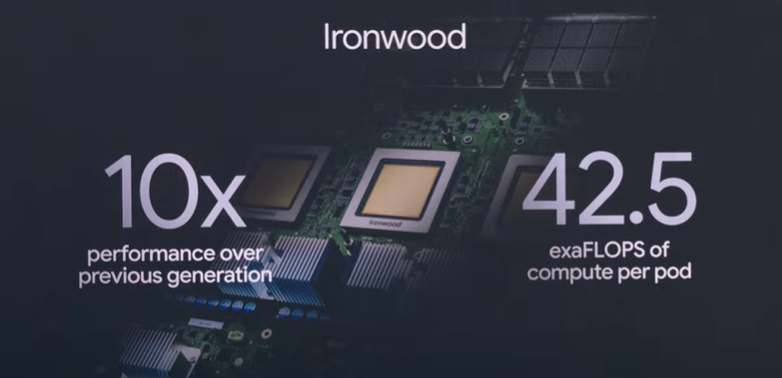
But such progress isn’t magic — it’s muscle. The new Ironwood TPU v7 is the backbone, delivering 10x performance gains and packing an astonishing 42.5 exaflops of compute per pod. This isn’t just speed; it’s a tectonic shift in AI infrastructure.

Google’s performance-per-dollar strategy also shines here. As model prices come down, capability skyrockets — shifting the Pareto frontier and redefining what’s possible at every price point.

AI Adoption Is Skyrocketing

If 2024 was the year AI went mainstream, 2025 is the year it became inescapable:

  • 480 trillion tokens are now processed monthly — up from 9.7 trillion just a year ago.
  • Over 7 million developers are actively building with Gemini — 5x growth.
  • The Gemini app has surpassed 400 million monthly active users, with usage of Gemini 2.5 Pro up 45%.

These numbers aren’t just metrics — they’re a movement. AI isn’t a sidekick anymore; it’s becoming central to how we live, work, and create.

From Research to Reality: Beam, Astra, and Agent Mode

Project Starline → Google Beam

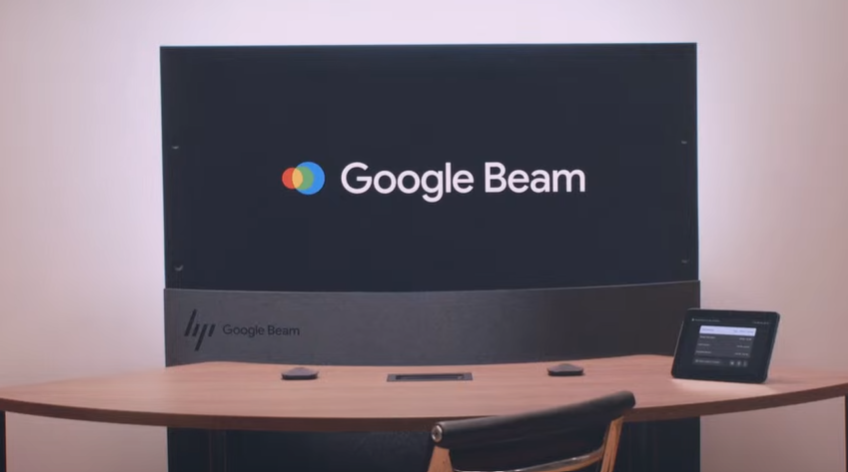
What began as a moonshot — Project Starline — has matured into Google Beam, a next-gen video platform that uses AI + six cameras to transform flat 2D streams into stunningly realistic 3D lightfield video calls.

With millimeter-accurate head tracking at 60 FPS, Beam isn’t just a communication tool — it’s an immersive experience. The first devices, built with HP, will be rolling out to select customers later this year.

Google Meet Gets Real-Time Translation

Prepare for more inclusive meetings with real-time speech translation in Google Meet, even matching the speaker’s tone and cadence. Beta access for Spanish and English is rolling out to AI Pro and Ultra subscribers.

/media/32730071f91bb5895917a7c5d2a6bd0b

Project Astra → Gemini Live

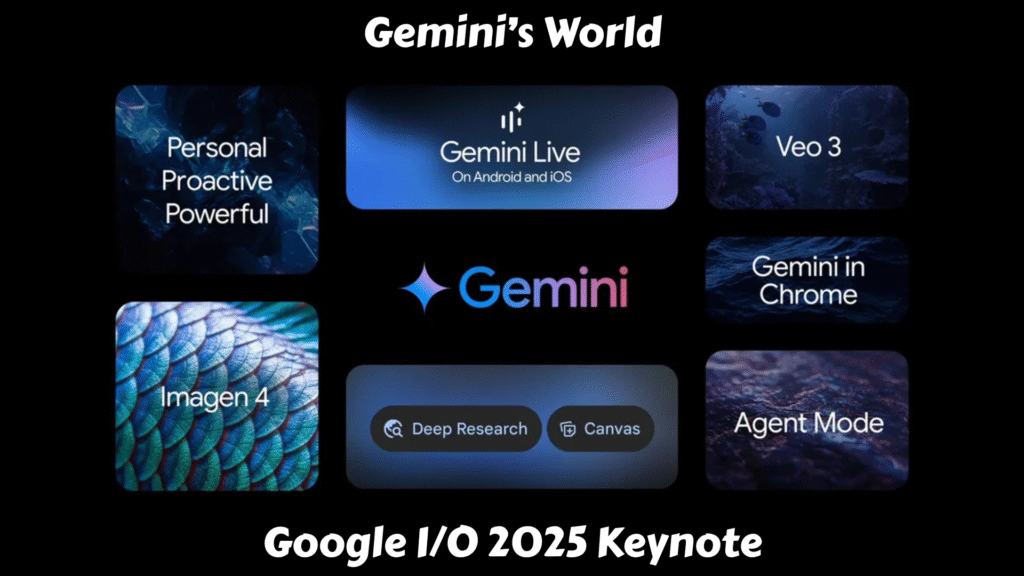
Project Astra’s dream of a universal, perceptive AI assistant is now Gemini Live. It adds real-time camera and screen-sharing to AI assistance — already used for everything from interview prep to marathon training.

Now rolling out to Android and iOS, Gemini Live is a glimpse into an AI that doesn’t just answer questions — it understands your world.

Project Mariner → Agent Mode

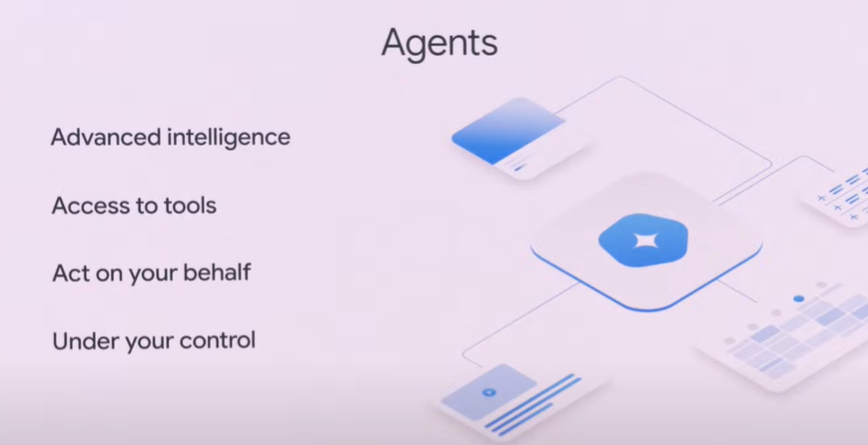
The future of AI isn’t just reactive — it’s agentic. Enter Agent Mode, an evolution of Project Mariner that enables Gemini to perform actions on your behalf — like adjusting filters on Zillow and even scheduling home tours.

Agent Mode is powered by developer-facing tools like the Gemini API, the new Model Context Protocol (MCP), and the Agent2Agent protocol, allowing AI agents to interact, reason, and collaborate across services.

Personalization With a Purpose

Gemini is getting personal. A major new feature called personal context allows Gemini to draw insights from your Google Workspace data — with full privacy and user control.

A standout example? Personalized Smart Replies in Gmail. If a friend asks about a road trip you’ve taken, Gemini can fetch your past itineraries and files to generate a response that not only contains the right info — but also sounds just like you.

Coming later this year, this kind of personalization is poised to transform how we interact with all Google services — from Search to Gemini to Gmail.

The Rise of AI Mode in Google Search

AI in Search isn’t new, but this year it’s getting a serious upgrade. The all-new AI Mode in Search allows for longer, more complex queries, advanced reasoning, and multi-turn interactions.

Search behavior is changing: people are submitting 2–3x longer queries, and AI Overviews now serve over 1.5 billion users across 200+ countries. With Gemini 2.5 integrated, AI Mode is now faster, smarter, and more accurate than ever — and it’s rolling out in the U.S. today.

Gemini 2.5 Flash and Deep Think

Developers, meet your new best friend: Gemini 2.5 Flash. It’s lean, blazing fast, and surprisingly powerful. While it trails only the Pro model on benchmarks, it excels at low latency and cost-effective inference — ideal for production-scale deployments.

Meanwhile, Gemini 2.5 Pro is getting a turbo boost with Deep Think, a new experimental reasoning mode that uses parallel thinking techniques to enhance logical, long-context reasoning.

Generative Media: Imagen 4, Veo 3 & Flow

Creativity is being redefined with the debut of:

All of these are now integrated into the Gemini app, offering creative professionals new ways to dream, design, and direct using AI.

Jules: Your New Asynchronous Coding Partner

Jules, which had previously been in a limited preview within Google Labs, is now widely available in public beta through the Gemini app. It’s designed to be an asynchronous, agentic coding assistant that integrates directly with a developer’s existing repositories, particularly GitHub.

Video by Muhammad (Prompt Engineering)

During the I/O keynote and subsequent developer sessions, demonstrations showcased how Jules can tackle real-world scenarios. Imagine asking Jules to “update all Node.js dependencies to the latest stable version” or “write comprehensive unit tests for the user authentication module.” Jules would then:

  1. Clone the repository to a secure VM.
  2. Analyze the codebase and understand the task’s context.
  3. Formulate a plan of action (which the developer can review and approve).
  4. Execute the changes asynchronously.
  5. Generate a pull request with the updated code, along with an audio changelog explaining what was done and why.

This process transforms what could be hours of tedious, repetitive work into a few minutes of review, allowing developers to allocate their valuable time to innovative feature development, architectural design, or complex problem-solving — the aspects of coding that truly require human creativity and strategic thinking.

Music AI Sandbox: A New Toolkit for Musicians

The Music AI Sandbox, now powered by the advanced Lyria 2 music generation model and its real-time counterpart, Lyria RealTime, is designed as an experimental suite of tools for songwriters, producers, and musicians. It’s built on the premise of fostering creativity, not replacing it.

Shankar Mahadevan’s presence at I/O 2025 and his endorsement of the Music AI Sandbox underscored Google’s commitment to responsible AI development that respects and enhances human artistry. This wasn’t about AI composing chart-topping hits independently; it was about providing a powerful, intuitive co-creator.

A More Proactive Gemini App

Gemini is no longer just reactive — it’s now proactive. With new Deep Research tools, you can upload files, connect to Gmail and Drive, and generate detailed research reports.

You can even use Canvas to turn ideas into dynamic infographics, quizzes, and podcasts in seconds. And the adoption of vibe coding with Canvas is empowering users to build apps just by chatting with Gemini.

Android 16: AI-Powered Evolution, Not a Revolution

While Google I/O 2025 was undeniably dominated by the sweeping integration of Gemini AI across nearly every Google product, Android, the company’s flagship mobile operating system, still held its ground, showcasing significant advancements that build upon the AI-first philosophy. Rather than a radical overhaul, Android 16’s presence at I/O highlighted a refined, more intelligent, and deeply integrated experience, with a strong emphasis on personalized design and enhanced user interaction.

It’s worth noting that much of the foundational insight into Android 16’s core features was already previewed during The Android Show: I/O Edition just before the main keynote. This allowed Google to dedicate prime I/O stage time to the broader AI vision, while still providing developers and enthusiasts a clear roadmap for the next iteration of Android.

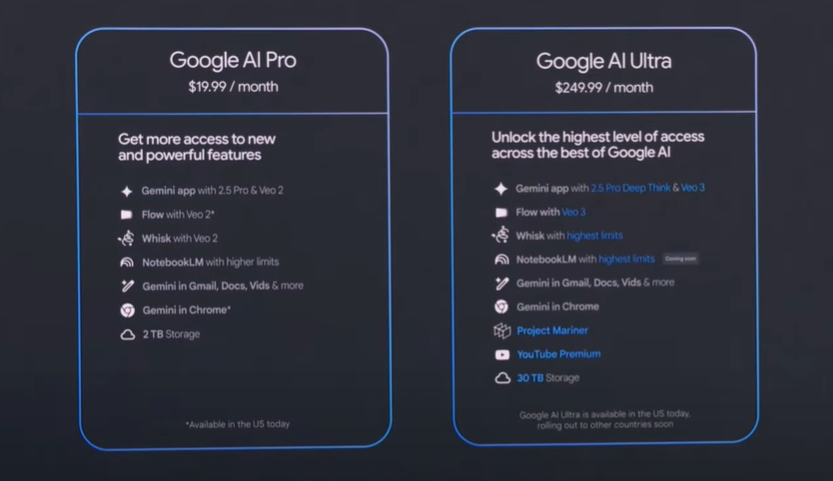
New Subscription Tiers: Unlocking Premium AI

To access the bleeding edge of Google’s AI advancements, two new subscription tiers were announced:

Screenshot from Google I/O 2025 Keynote on YouTube, © Google
  • Google AI Pro ($19.99/month): Renamed from AI Premium, this tier offers higher rate limits, expanded access to features like Gemini Deep Research, Canvas, and Flow with Veo 2 models. It also includes 2TB of storage and NotebookLM.
  • Google AI Ultra ($249.99/month): Positioned as the “VIP pass,” this premium tier provides the highest usage limits, early access to experimental AI products like Project Mariner, Veo 3, and Gemini 2.5 Pro with Deep Think mode. It also bundles 30TB of storage (across Photos, Drive, Gmail), a YouTube Premium subscription, and early access to “Agent Mode” in the Gemini app and Gemini in Chrome. First-time subscribers can avail a 50% discount for the initial three months.

An AI Opportunity That’s Bigger Than Tech

Perhaps the most touching moment came from a personal story: riding a Waymo with his parents, Sundar Pichai saw firsthand the awe technology can inspire. His father’s amazement reminded us all that while the code and infrastructure are crucial, what truly matters is impact — on real people, in real moments.

Google is betting big on a future where AI doesn’t just power apps — it powers lives.

Conclusion: Gemini’s Next Chapter

Google I/O 2025 was more than a product showcase — it was a manifesto for AI’s future. With Gemini at the center, the vision is clear: build models that are fast, affordable, powerful, and personal. Build tools that augment human potential, not replace it. And most importantly, build with a purpose — to empower every developer, creator, and dreamer on the planet.

The AI revolution is here. And this time, it’s deeply human.

TL;DR — Key Highlights from Google I/O 2025:

  • Gemini 2.5 Pro leads global benchmarks; Flash offers ultra-fast, low-cost inference.
  • Ironwood TPUs deliver 42.5 exaflops and 10x speed improvements.
  • AI Mode in Search redefines how we ask and receive answers.
  • Google Beam and Veo 3 bring immersive 3D video and audio generation.
  • Deep Think enhances Gemini’s reasoning with parallel thinking.
  • Smart, personalized Gmail replies via personal context.
  • Imagen 4 + Flow unlock next-gen creativity.
  • Agent Mode enables Gemini to take actions on your behalf.
error: Content is protected !!