

Artificial Intelligence (AI) seems like magic — type a prompt and it answers, upload a picture and it identifies objects, or speak to your phone and it replies smartly. But what happens behind the scenes when an AI makes these decisions? The answer lies in a crucial process called model inference in AI.
In this guide, we’ll keep things simple and walk through a few easy coding examples. Whether you’re new to AI or just curious about how it works, you’ll come away with a clear understanding of how AI models make real-world predictions.
What is Model Inference in AI?
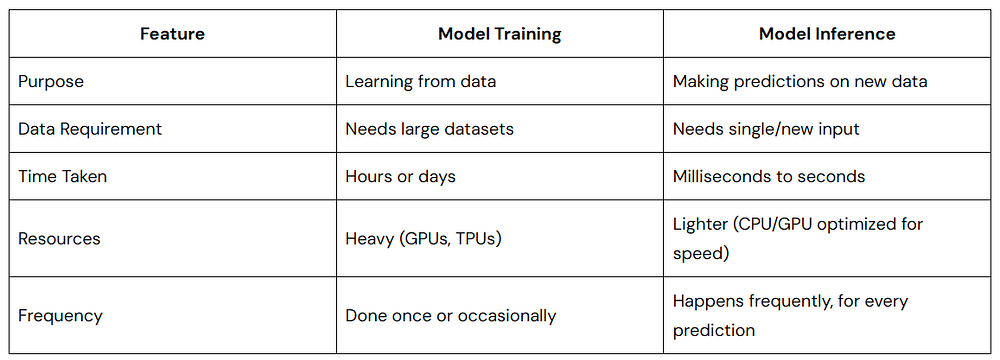
Think of AI as a student who spends months studying (training) and finally takes a test (inference). Model inference in AI refers to the phase where a trained model uses its knowledge to make predictions or decisions on new data it hasn’t seen before.
- Training = Learning phase
- Inference = Prediction phase (real-world usage)
When you ask a chatbot a question or upload an image to an app, the model is performing inference — it’s not learning at that moment but applying what it has already learned.
Real-Life Examples of Model Inference
- Typing on your phone and seeing autocomplete suggestions? Model inference.
- Netflix recommending a movie? Model inference.
- AI detecting tumors in medical images? Model inference.
It’s the AI’s way of taking what it learned and helping you in the real world.
Why is Model Inference Important?
Without inference, AI would be useless after training. The whole point of AI is to make smart decisions quickly and reliably on new data.
Here’s why model inference in AI matters:
- Speed: Fast inference means smooth user experiences (think instant translations or responses).
- Efficiency: Good inference balances accuracy with hardware constraints (e.g., smartphones vs servers).
- Real-World Application: From healthcare diagnoses to personalized recommendations, inference powers the AI tools we use daily.
Model Inference vs Model Training
How Model Inference in AI Works
Let’s walk through a typical inference workflow in simple terms.
1. Input Data
This is the real-world information the AI needs to process:
- Text prompt (chatbots)
- Image (object detection)
- Voice (speech recognition)
2. Preprocessing
Before sending the input to the model, it’s cleaned and formatted:
- Text is tokenized (split into words or subwords).
- Images are resized or normalized.
- Audio is converted into frequency data.
3. Model Prediction (Inference)
The preprocessed data enters the trained model:
- The model applies mathematical operations (like matrix multiplications).
- It calculates probabilities or outputs based on its training.
4. Postprocessing
The raw model output is converted into human-friendly results:
- Probabilities are converted to labels (“cat” or “dog”).
- Text tokens are transformed back into readable sentences.
5. Output
Finally, the AI gives you the result: a prediction, an answer, or an action.
Image Classification Inference
Let’s see a practical example using Python and a pretrained model from PyTorch.
import torch
from torchvision import models, transforms
from PIL import Image

# Load a pretrained model (ResNet18)
model = models.resnet18(pretrained=True)
model.eval()  # Set model to inference mode
# Preprocessing steps
preprocess = transforms.Compose([
    transforms.Resize(256),
    transforms.CenterCrop(224),
    transforms.ToTensor(),
    transforms.Normalize(mean=[0.485, 0.456, 0.406],
                         std=[0.229, 0.224, 0.225]),
])
# Load and preprocess the image
image = Image.open("cat.jpg")
input_tensor = preprocess(image)
input_batch = input_tensor.unsqueeze(0)  # Add batch dimension
# Model Inference
with torch.no_grad():
    output = model(input_batch)
# Get the predicted class
_, predicted_class = torch.max(output, 1)
print(f"Predicted class index: {predicted_class.item()}")
Here,
model.eval()puts the model in inference mode.- Preprocessing ensures the image matches the model’s expected input format.
torch.no_grad()disables gradient calculations (saves memory).- The model predicts the class index of the image — this could be mapped to actual class names using
imagenet_classes.
Let’s see one more working example using TensorFlow and a pre-trained model.
import tensorflow as tf
import numpy as np
from tensorflow.keras.applications import MobileNetV2
from tensorflow.keras.applications.mobilenet_v2 import preprocess_input, decode_predictions
from tensorflow.keras.preprocessing import image

# Load a pre-trained model
model = MobileNetV2(weights='imagenet')

# Load and preprocess image
img_path = 'dog.jpg'  # path to your image
img = image.load_img(img_path, target_size=(224, 224))
img_array = image.img_to_array(img)
img_array = np.expand_dims(img_array, axis=0)
img_array = preprocess_input(img_array)

# Perform inference
predictions = model.predict(img_array)

# Decode predictions
decoded = decode_predictions(predictions, top=1)[0]
print(f"Predicted: {decoded[0][1]} with confidence {decoded[0][2]:.2f}")
Here,
- We load MobileNetV2, a pre-trained model.
- We preprocess the image to fit model input size.
- model.predict() runs model inference.
- The result is a human-readable prediction.
So, basically,
- ResNet-18 is for general-purpose use where computational resources are available — great for accuracy without worrying too much about speed.
- MobileNetV2 is designed for efficiency, trading off a bit of accuracy for speed and low resource use, especially on mobile or embedded devices.
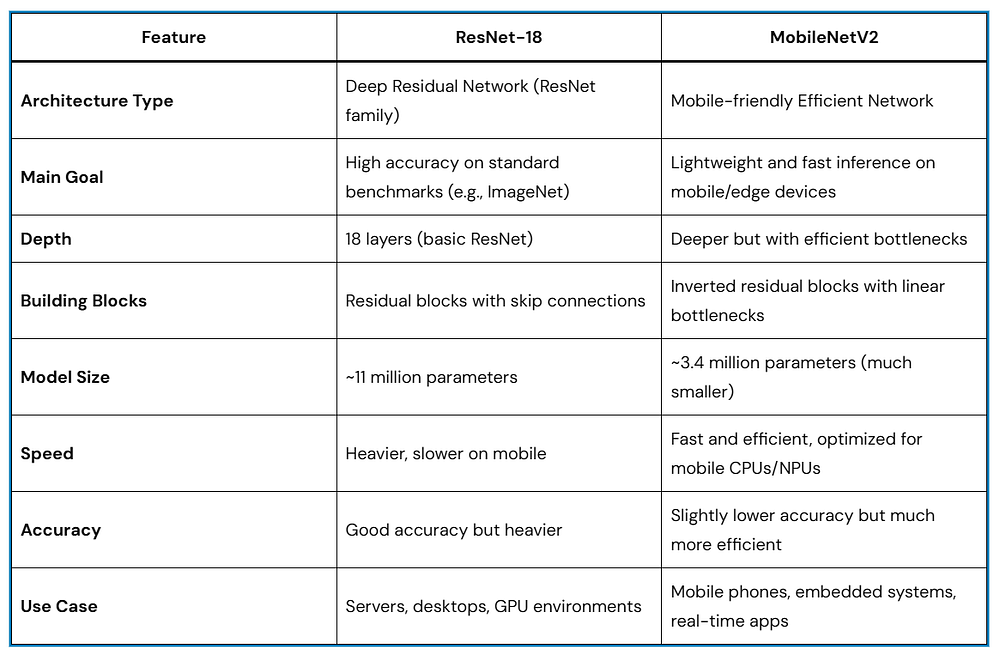
If you need speed and small model size, go for MobileNetV2.
If you need accuracy and don’t care about size/speed, ResNet-18 is a solid choice.
Optimizing Model Inference in AI
In real-world applications, inference needs to be fast, efficient, and accurate. Here are some common optimization techniques:
- Quantization: Reduce model size by using lower precision (e.g., float32 → int8).
- Model Pruning: Remove unnecessary neurons or layers.
- Hardware Acceleration: Use GPUs, TPUs, or specialized chips.
- Batching: Process multiple inputs at once to maximize efficiency.
- ONNX and TensorRT: Export models to efficient formats for deployment.
- Edge AI: Run inference directly on mobile/IoT devices.
These techniques allow you to deploy AI on devices ranging from cloud servers to mobile phones.
Inference Deployment: How AI Models Go Live
There are three common ways to deploy model inference in AI:
- Cloud Inference: AI models run on powerful servers (e.g., AWS, Azure).
- Edge Inference: Models run on devices (phones, cameras).
- Hybrid Inference: Combines both to balance speed and accuracy.
Example: Google Lens uses edge inference for instant results, but may use cloud inference for more complex tasks.
Real-Life Examples of Model Inference in AI

Every time you use AI, you’re actually seeing model inference in action..!
Best Practices for Responsible Model Inference
To ensure trustworthy AI, especially in sensitive applications, keep these tips in mind:
- Monitor inference outputs for bias.
- Ensure privacy during inference (especially for personal data).
- Test models in diverse scenarios before deployment.
- Optimize for both performance and fairness.
FAQs on Model Inference in AI
Is inference always faster than training?
Yes! Inference happens in real-time, while training can take days.
Can inference happen offline?
Yes. With edge inference, AI runs without internet access.
Do I need GPUs for inference?
Not always. Many models run fine on CPUs, especially after optimization.
Conclusion: Bringing AI to Life
Model inference in AI is where the magic happens — when AI takes all its training and applies it to make real-world decisions. Whether it’s recommending a Netflix show, identifying diseases, or powering chatbots, inference ensures that AI doesn’t just stay in labs but actively helps people.
Quick Recap,
- Model inference = real-time predictions using trained AI models.
- Involves preprocessing, prediction, and postprocessing.
- Optimizations make inference faster and efficient.
- Responsible inference means ethical, fair, and private AI.
By understanding inference, you gain a deeper appreciation of how AI works, and you’re better equipped to build or use AI responsibly.