AI/ML

Artificial Neural Networks

Artificial Neural Networks Explained: How ANNs Mimic the Human Brain

Artificial Neural Networks (ANNs) are one of the driving forces behind today’s AI revolution. From recognizing faces in photos to powering voice assistants, they’re everywhere. But what exactly are they? And how do they mimic the human brain? Let’s break it down step by step.

What Are Artificial Neural Networks?

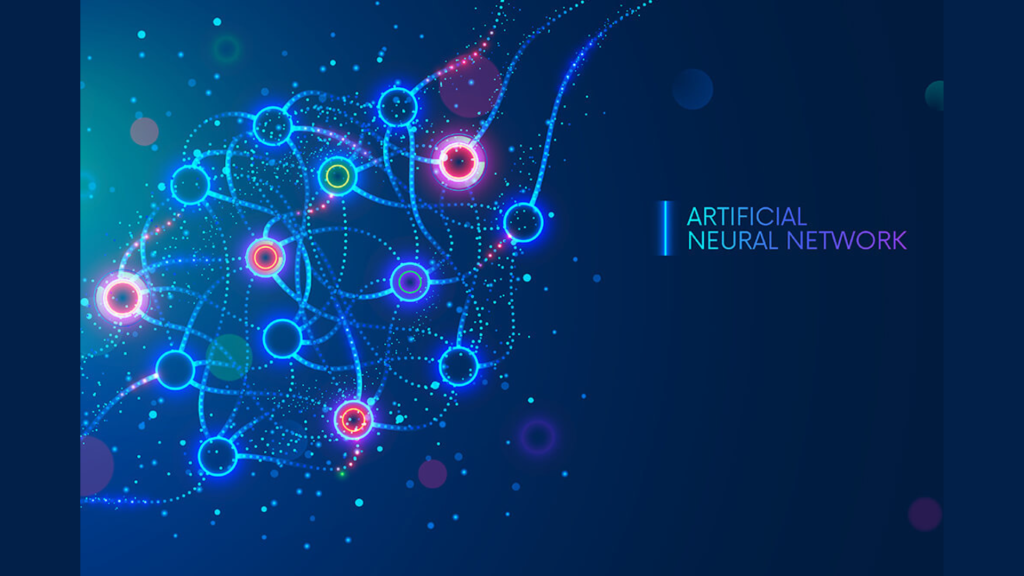
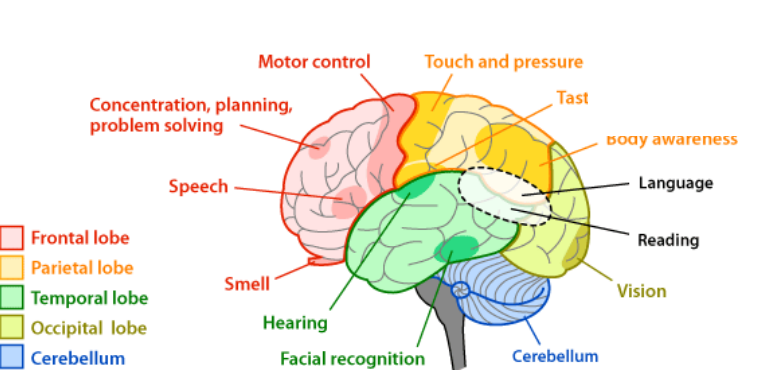
Artificial Neural Networks are computational models inspired by how the human brain processes information. Just like our brains use billions of interconnected neurons to learn and make decisions, ANNs use layers of artificial “neurons” to detect patterns, classify data, and make predictions.

At their core, ANNs are about finding relationships in data. Whether it’s images, text, or numbers, they can spot patterns we might miss.

How the Human Brain Inspires ANNs

The inspiration for ANNs comes directly from biology:

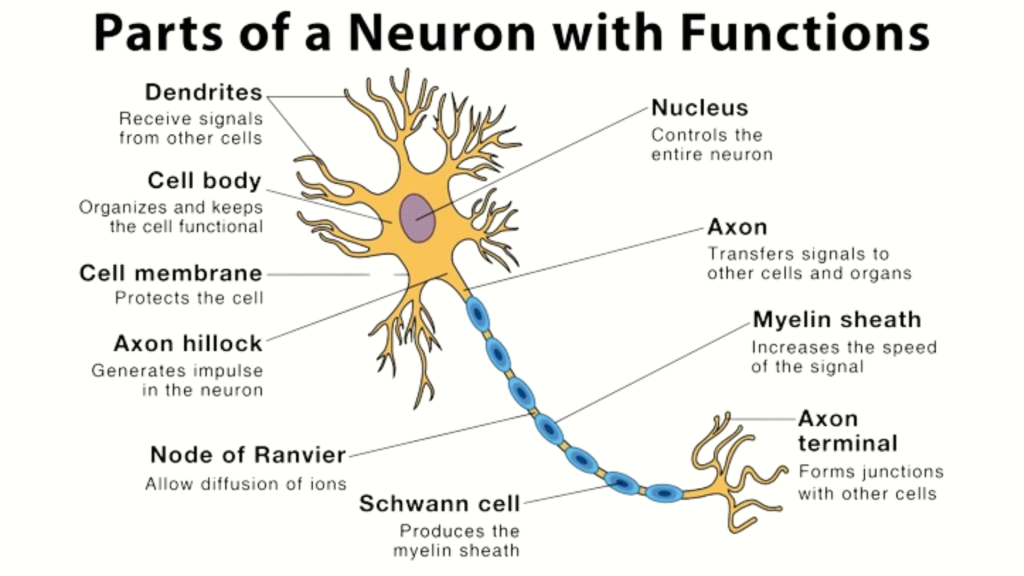
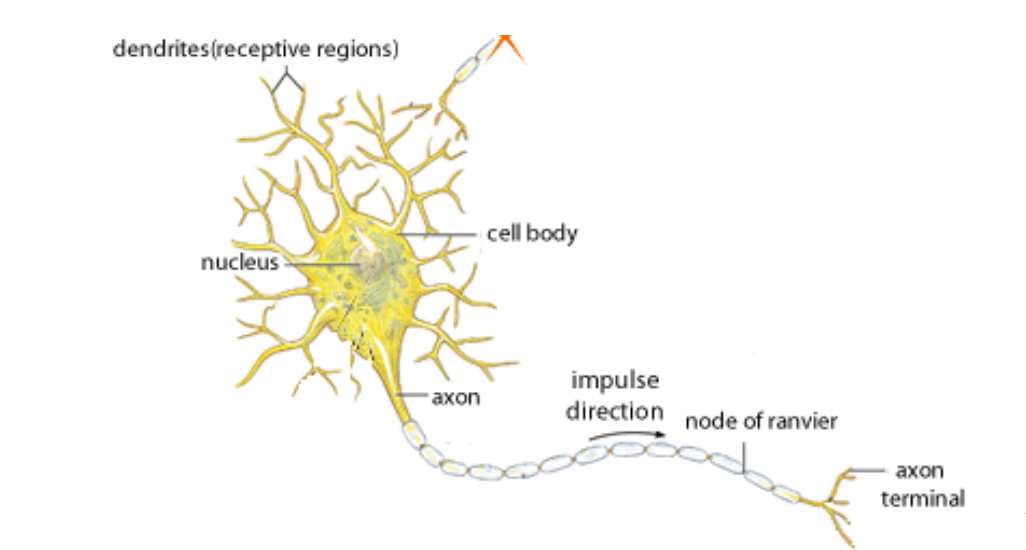
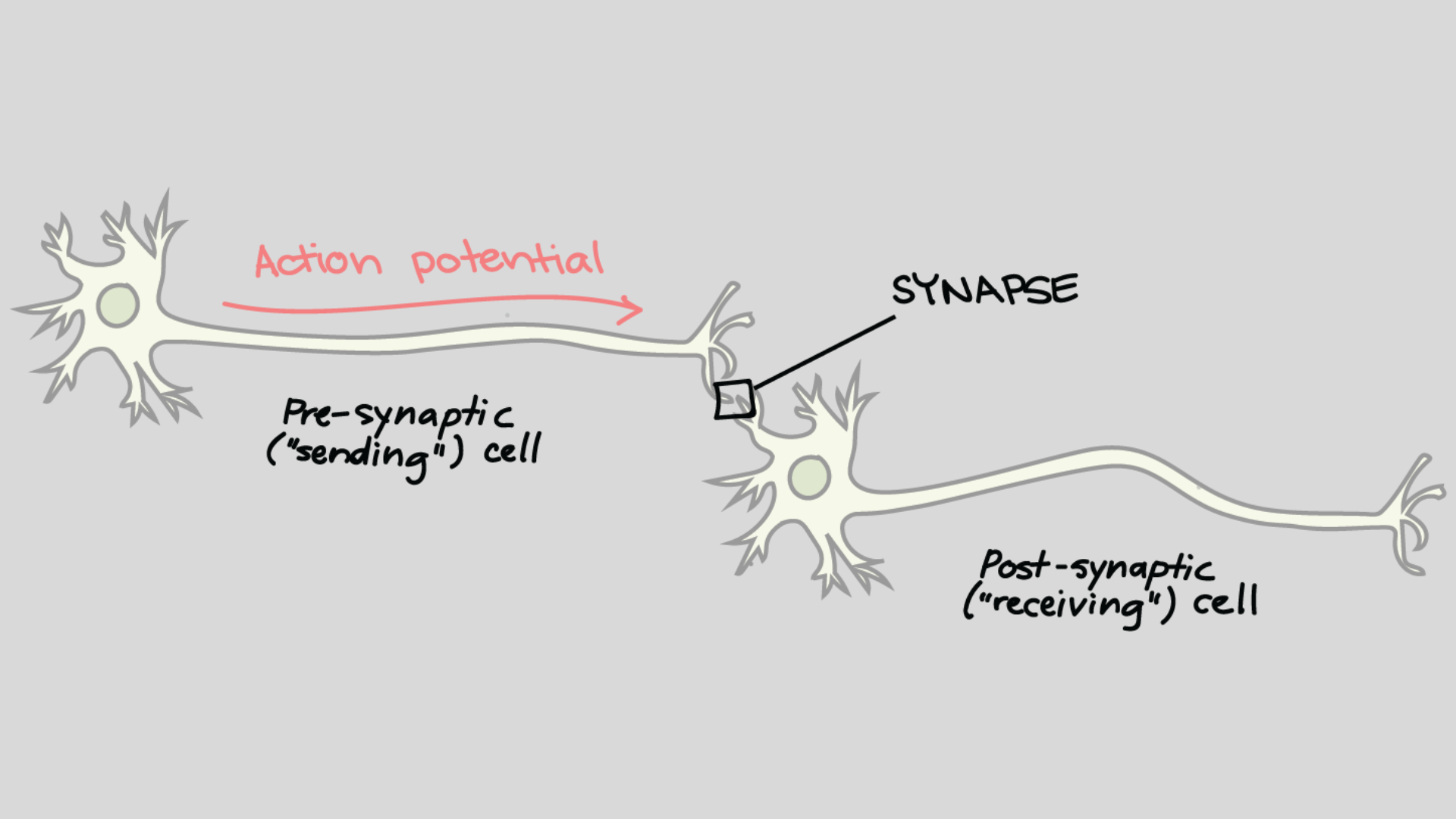
  • Neurons in the brain receive signals, process them, and pass them along if the signal is strong enough.
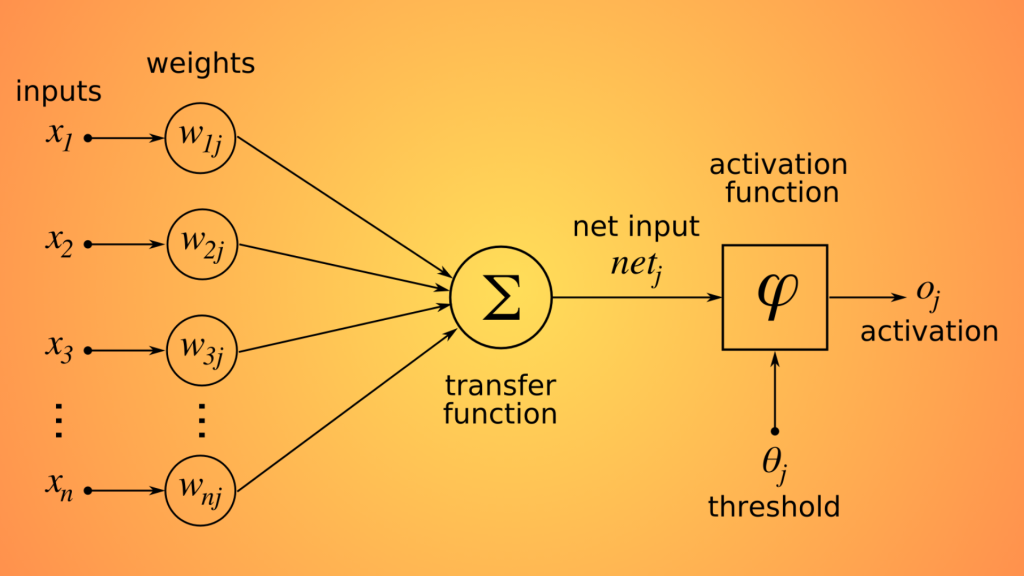
  • Artificial neurons work in a similar way: they take input, apply weights (importance), add them up, and pass the result through an activation function.

Think of it like this:

  • Neurons = nodes in a network.
  • Synapses = weights between nodes.
  • Brain learning = adjusting synapse strengths.
  • ANN learning = adjusting weights during training.

Anatomy of an Artificial Neural Network

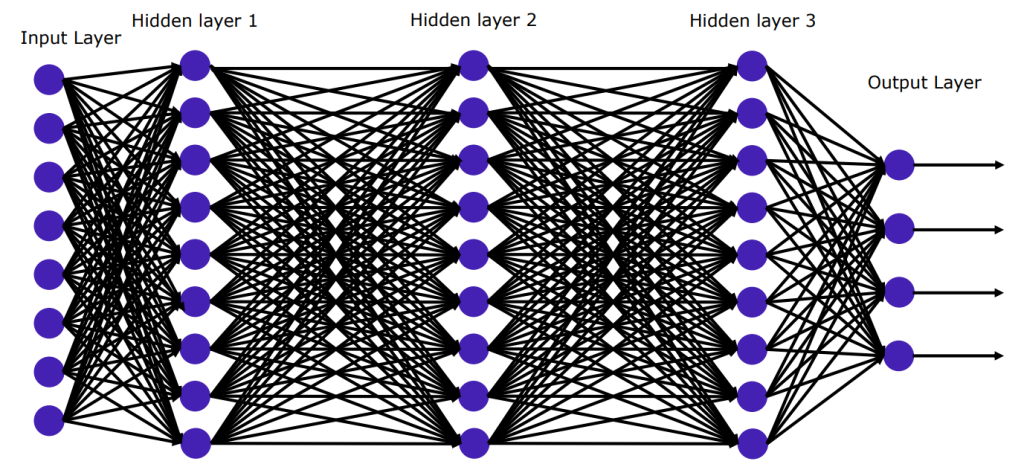
Every ANN is built from layers:

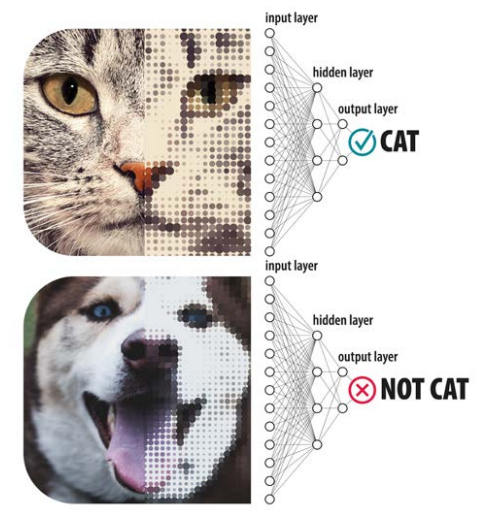
  1. Input Layer — Where data enters the network.
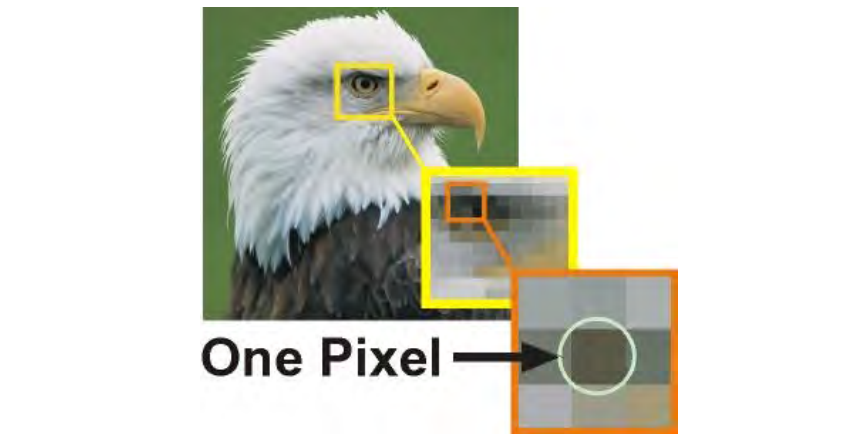
     Example: pixels of an image.
  2. Hidden Layers — Where the “thinking” happens.
     These layers detect patterns, like edges, shapes, or textures.
  3. Output Layer — Where results are produced.
     Example: labeling an image as a “cat” or “dog.”

Each connection between neurons has a weight, and learning means updating those weights to improve accuracy.

How ANNs Learn: The Training Process

Training an ANN is like teaching a child. You show it examples, it makes guesses, and you correct it until it improves. Here’s the typical process:

  1. Forward Propagation — Data flows through the network, producing an output.
  2. Loss Calculation — The network checks how far its prediction is from the correct answer.
  3. Backward Propagation (Backprop) — The error flows backward through the network, adjusting weights to reduce mistakes.
  4. Repeat — This cycle happens thousands or even millions of times until the network becomes accurate.

A Simple Neural Network in Python

Let’s build a tiny ANN to classify numbers using TensorFlow and Keras. Don’t worry — it’s simpler than it looks.

Python
import tensorflow as tf
from tensorflow.keras.models import Sequential
from tensorflow.keras.layers import Dense

# Step 1: Build the model
model = Sequential([
    Dense(16, input_shape=(10,), activation='relu'),  # hidden layer with 16 neurons
    Dense(8, activation='relu'),                      # another hidden layer
    Dense(1, activation='sigmoid')                    # output layer (binary classification)
])

# Step 2: Compile the model
model.compile(optimizer='adam',
              loss='binary_crossentropy',
              metrics=['accuracy'])

# Step 3: Train the model with dummy data
import numpy as np
X = np.random.rand(100, 10)  # 100 samples, 10 features each
y = np.random.randint(2, size=100)  # 100 labels (0 or 1)
model.fit(X, y, epochs=10, batch_size=8)
  • Dense layers: These are fully connected layers where every neuron talks to every neuron in the next layer.
  • Activation functions: relu helps capture complex patterns; sigmoid squashes outputs between 0 and 1, making it great for yes/no predictions.
  • Optimizer (adam): Decides how the network updates its weights.
  • Loss function (binary_crossentropy): Measures how far off predictions are from actual results.
  • Training (fit): This is where learning happens—weights get adjusted to reduce errors.

Why Artificial Neural Networks Matter

Artificial Neural Networks power much of modern AI, including:

  • Image recognition (Google Photos, self-driving cars)
  • Natural language processing (chatbots, translation apps)
  • Healthcare (disease prediction, drug discovery)
  • Finance (fraud detection, stock predictions)

Their strength lies in adaptability: once trained, they can generalize knowledge and apply it to new, unseen data.

Challenges of ANNs

While powerful, ANNs have challenges:

  • Data hungry: They need lots of examples to learn.
  • Black box problem: It’s often hard to understand why a network makes certain decisions.
  • Computational cost: Training large ANNs requires heavy computing power.

Researchers are working on making them more efficient and interpretable.

Conclusion

Artificial Neural Networks are one of the best examples of how humans have borrowed ideas from nature — specifically the brain — to solve complex problems. They’re not truly “intelligent” in the human sense, but their ability to learn from data is transforming industries.

As we move forward, ANNs will continue to evolve, becoming more powerful and more transparent. Understanding the basics today means you’ll be ready for the AI-powered world of tomorrow.

What Is Machine Learning

What Is Machine Learning? A Fundamental Guide for Developers

Machine learning (ML) has moved from being a research topic in the mid-20th century to powering the products and systems we use every day — from personalized social feeds to fraud detection and self-driving cars. For developers, understanding machine learning isn’t just optional anymore — it’s becoming a core skill.

In this guide, we’ll break down what machine learning is, why it matters, and how it differs from traditional programming. We’ll also explore practical applications, key concepts, and frequently asked questions to give you both a clear foundation and actionable knowledge.

What Is Machine Learning?

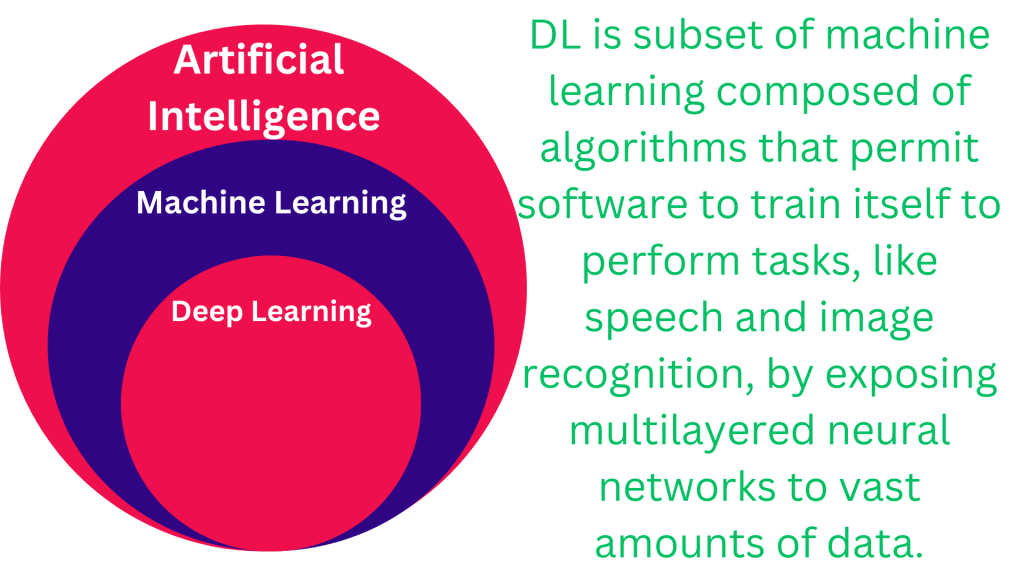
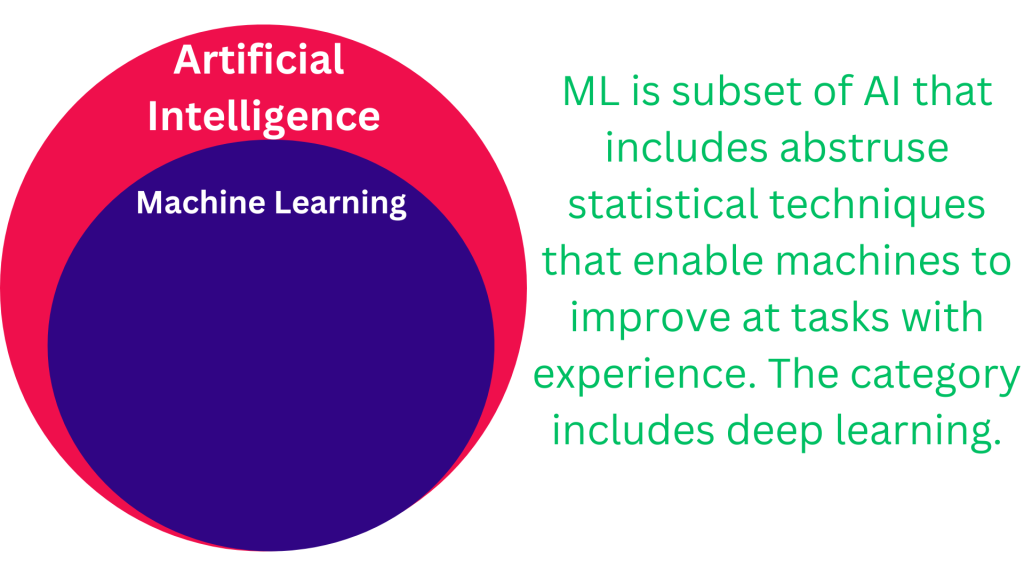
Machine learning is a subfield of artificial intelligence (AI) that focuses on building algorithms and statistical models that allow computers to perform tasks without being explicitly programmed. Instead of following hardcoded instructions, machine learning systems learn from data and improve their performance over time.

The term was popularized by Arthur Samuel in 1959, who defined it as “the ability to learn without being explicitly programmed.” In practice, this means ML systems adapt as they encounter new, dynamic data, making them especially powerful in environments where rules can’t be rigidly defined.

A simple real-world example: Facebook’s News Feed algorithm. Instead of engineers manually writing rules for what content you see, ML algorithms analyze your interactions — likes, shares, time spent on posts — and adjust the feed to fit your preferences.

Traditional Programming vs. Machine Learning

To understand machine learning, it helps to compare it with traditional programming:

Traditional programming:

  • Input: Data + Explicit Rules (coded by humans)
  • Output: Result

Machine learning:

  • Input: Data + Results (labels or outcomes)
  • Output: Rules/Patterns (learned by the system)

In ML, the system doesn’t need step-by-step instructions. Instead, it identifies patterns and relationships in the data and uses them to make predictions or decisions when faced with new inputs.

Why Machine Learning Matters for Developers

For developers, machine learning is more than a buzzword — it’s a toolkit to solve problems that would otherwise be impossible to hardcode. Some reasons ML is important:

  • Scalability: Automates decision-making on massive datasets.
  • Adaptability: Continuously improves as new data arrives.
  • Versatility: Powers diverse use cases like recommendation engines, speech recognition, and cybersecurity.

Core Applications of Machine Learning

Here are a few domains where ML has a direct impact:

  • Personalization: Recommendation systems (Netflix, Amazon, Spotify).
  • Natural Language Processing (NLP): Chatbots, translation, sentiment analysis.
  • Computer Vision: Image recognition, facial detection, autonomous vehicles.
  • Finance: Fraud detection, algorithmic trading, credit scoring.
  • Healthcare: Diagnostics, predictive analytics, drug discovery.

Key Concepts in Machine Learning (For Developers)

  • Supervised Learning: Training models with labeled data (e.g., spam vs. non-spam emails).
  • Unsupervised Learning: Finding patterns in unlabeled data (e.g., customer segmentation).
  • Reinforcement Learning: Learning through trial and error (e.g., game-playing AI).
  • Overfitting: When a model memorizes training data instead of generalizing.
  • Training vs. Testing Data: Splitting datasets to ensure the model performs well on unseen inputs.

FAQs About Machine Learning

1. How is machine learning different from AI?
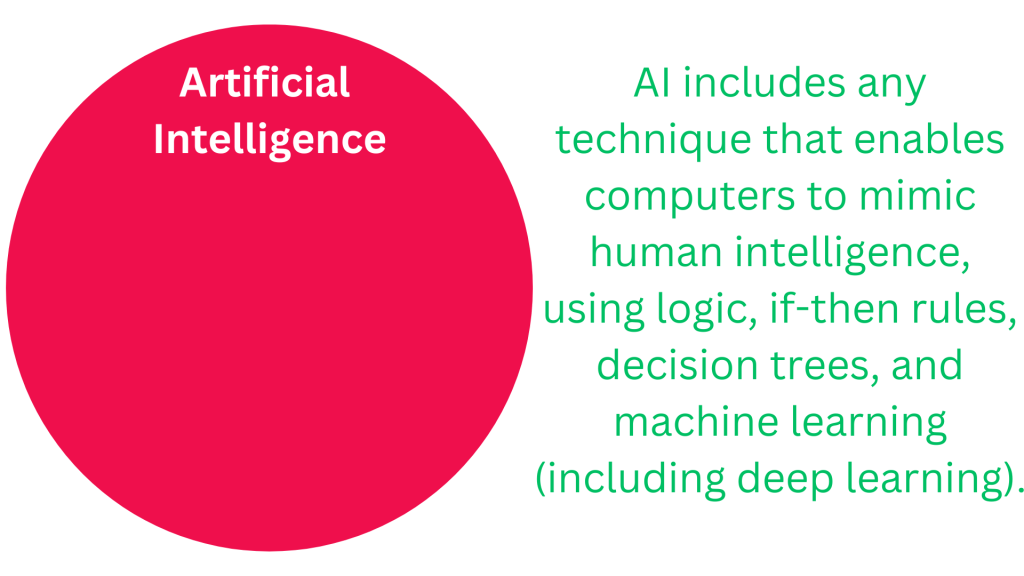
 AI is the broader field of building intelligent machines. Machine learning is a subset that specifically uses data-driven algorithms to learn and improve without explicit programming.

2. Do I need to be a math expert to start with ML?
 A strong foundation in linear algebra, probability, and statistics helps, but modern frameworks like TensorFlow and PyTorch make it easier for developers to get started without advanced math.

3. What programming languages are best for machine learning?
 Python is the most popular due to libraries like scikit-learn, TensorFlow, and PyTorch. R and Julia are also strong in data science and ML.

4. Is machine learning only useful for big tech companies?
 No. ML is applied in startups, finance, healthcare, retail, and even small businesses that want to automate processes or personalize user experiences.

5. How can developers start learning ML?

  • Start with Python and scikit-learn for basics.
  • Experiment with Kaggle datasets.
  • Move into TensorFlow or PyTorch for deep learning.
  • Apply concepts to personal or open-source projects.

Conclusion

Machine learning transforms the way we approach software development. Instead of coding rigid rules, we now build systems that learn, adapt, and scale as data grows. For developers, this shift means new opportunities — and a responsibility to understand the concepts driving modern technology.

By mastering the fundamentals of ML, you’ll be better equipped to design smarter applications, solve complex problems, and stay ahead in a rapidly evolving tech landscape.

Tensors Explained

Tensors Explained: From Basic Math to Neural Networks

If you’ve ever stepped into the world of machine learning or deep learning, you’ve likely come across the word tensor. It sounds technical, maybe even intimidating, but don’t worry — tensors are not as scary as they seem. In this post, we’ll break them down step by step. By the end, you’ll understand what tensors are, how they work in math, and why they’re the backbone of neural networks.

This guide — Tensors Explained — is designed to be simple, and practical, so you can use it as both an introduction and a reference.

What Is a Tensor?

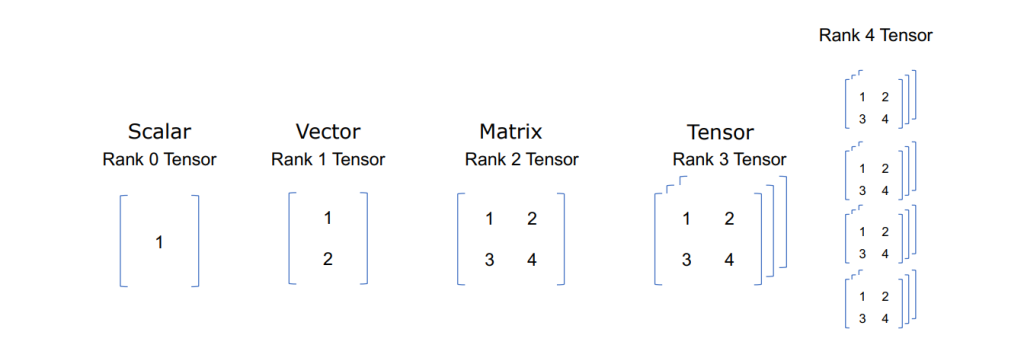
At its core, a tensor is just a way to organize numbers. Think of it as a container for data, similar to arrays or matrices you may have seen in math or programming.

  • A scalar is a single number (0D tensor). Example: 7
  • A vector is a list of numbers (1D tensor). Example: [2, 5, 9]
  • A matrix is a table of numbers (2D tensor). Example:
Python
[[1, 2, 3],
 [4, 5, 6]]
  • A higher-dimensional tensor is like stacking these tables on top of each other (3D, 4D, etc.). Example: an image with height, width, and color channels.

So, tensors are just a generalization of these ideas. They give us a unified way to handle everything from a single number to multi-dimensional datasets.

Why Are Tensors Important?

You might wonder: Why not just stick to vectors and matrices?

The answer is scalability. Real-world data — like images, audio, or video — is often multi-dimensional. A grayscale image might be a 2D tensor (height × width), while a color image is a 3D tensor (height × width × RGB channels). Neural networks need a structure flexible enough to handle all these shapes, and tensors are perfect for that.

Tensors in Python (with NumPy)

Before we dive into deep learning frameworks like PyTorch or TensorFlow, let’s see tensors in action using NumPy, Python’s go-to library for numerical operations.

Python
import numpy as np

# Scalar (0D Tensor)
scalar = np.array(5)

# Vector (1D Tensor)
vector = np.array([1, 2, 3])

# Matrix (2D Tensor)
matrix = np.array([[1, 2], [3, 4]])

# 3D Tensor
tensor_3d = np.array([[[1, 2], [3, 4]], 
                      [[5, 6], [7, 8]]])

print("Scalar:", scalar.shape)
print("Vector:", vector.shape)
print("Matrix:", matrix.shape)
print("3D Tensor:", tensor_3d.shape)

// Output 

Scalar: ()
Vector: (3,)
Matrix: (2, 2)
3D Tensor: (2, 2, 2)
  • .shape tells us the dimensions of the tensor.
  • A scalar has shape (), a vector (3,), a matrix (2,2), and our 3D tensor (2,2,2).

This shows how data naturally fits into tensors depending on its structure.

Tensors in Deep Learning

When working with neural networks, tensors are everywhere.

  • Input data: Images, text, or sound are stored as tensors.
  • Weights and biases: The parameters that networks learn are also tensors.
  • Operations: Matrix multiplications, dot products, and convolutions are all tensor operations.

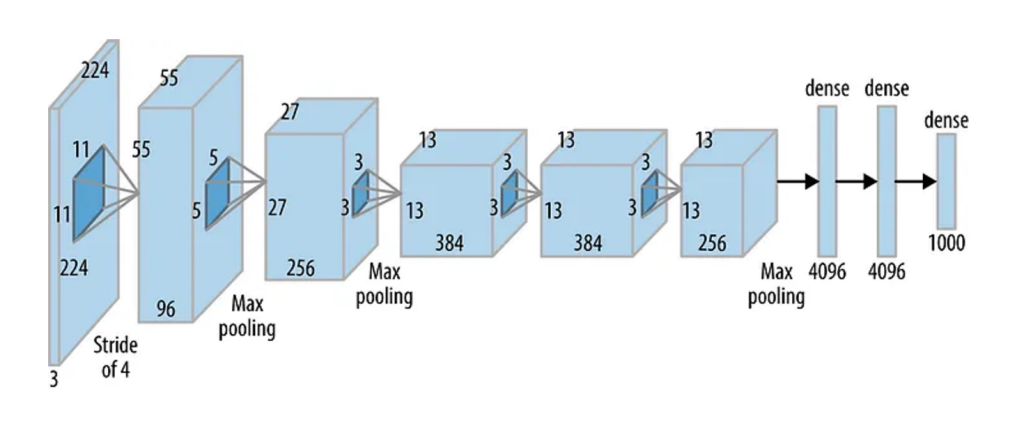
For example, when you feed an image into a convolutional neural network (CNN), that image is represented as a 3D tensor (height × width × channels). Each layer of the network transforms it into new tensors until you get a prediction.

PyTorch Example

PyTorch makes tensor operations easy. Here’s a quick demo:

Python
import torch

# Create a tensor
x = torch.tensor([[1, 2], [3, 4]], dtype=torch.float32)

y = torch.tensor([[5, 6], [7, 8]], dtype=torch.float32)

# Perform operations

# Matrix addition
z = x + y

# Matrix multiplication
w = torch.matmul(x, y)

print("Addition:\n", z)
print("Multiplication:\n", w)

// Output

Addition:
 tensor([[ 6.,  8.],
        [10., 12.]])
Multiplication:
 tensor([[19., 22.],
        [43., 50.]])
  • x and y are 2D tensors (matrices).
  • x + y performs element-wise addition.
  • torch.matmul(x, y) computes the matrix multiplication, crucial in neural networks for transforming inputs.

Run on Google Colab or Kaggle Notebooks to see the output.

How Tensors Power Neural Networks

Here’s how it all ties together:

  1. Data enters as a tensor — For example, a batch of 32 images (32 × 28 × 28 × 3).
  2. Operations happen — Layers apply transformations (like convolutions or activations) to these tensors.
  3. Backpropagation uses tensors — Gradients (also tensors) flow backward to adjust weights.
  4. The model learns — With every iteration, tensor operations shape the network’s intelligence.

Without tensors, deep learning frameworks wouldn’t exist — they’re the universal language of AI models.

Key Takeaways

  • Tensors are just containers for numbers, generalizing scalars, vectors, and matrices.
  • They’re crucial because modern data (images, videos, text) is multi-dimensional.
  • Libraries like NumPy, PyTorch, and TensorFlow make working with tensors simple.
  • Neural networks rely on tensor operations for learning and predictions.

Conclusion

This was Tensors Explained — a complete walk from the basics of math to their role in powering neural networks. The next time you hear about tensors in machine learning, you won’t need to panic. Instead, you’ll know they’re simply structured ways of handling data, and you’ve already worked with them countless times without realizing it.

Whether you’re just starting or diving deeper into deep learning, mastering tensors is the first big step.

Notebook in Programming

What is a Notebook in Programming & Data Science?

If you’ve ever dipped your toes into data science or modern programming, you’ve probably heard people talk about “notebooks.” But what exactly is a Notebook in Programming, and why has it become such an essential tool for developers, analysts, and data scientists? 

Let’s break it down.

The Basics: What is a Notebook?

A notebook in programming is an interactive environment where you can write and run code, explain your thought process in text, and even visualize results — all in one place.

Think of it like a digital lab notebook. Instead of scribbling notes and equations by hand, you type code into “cells,” run them instantly, and document your steps with explanations. This makes notebooks perfect for experimenting, learning, and sharing ideas.

The most popular example is the Jupyter Notebook, widely used in Python-based data science projects. But notebooks aren’t limited to Python — they support many languages, including R, Julia, and even JavaScript.

Why Notebooks Are Game-Changers

Here’s why notebooks are loved by programmers and data scientists alike:

  1. Interactive coding — You can test small pieces of code quickly.
  2. Readable workflows — Combine code with explanations, formulas, and charts.
  3. Visualization-friendly — Display graphs and plots inline for instant insights.
  4. Collaboration — Share your notebook so others can run and understand your work.
  5. Reproducibility — Anyone with your notebook can replicate your analysis step by step.

Structure of a Notebook

A typical notebook is made up of cells.

  • Code cells: Where you write and run code.
  • Markdown cells: Where you write text, explanations, or documentation.
  • Output cells: Where results, plots, or tables appear after running code.

This mix of code + explanation makes notebooks much easier to follow than raw scripts.

How Does a Notebook Work?

The notebook is organized into cells — either for code or Markdown (formatted text). Users write code in a code cell and run it, after which outputs — including data tables, charts, or message prints — appear immediately below that cell. For example:

Python
print("Hello from my Notebook in Programming!")

When run, this cell will simply show:

Python
Hello from my Notebook in Programming!

Markdown cells are for documentation, step-by-step explanations, or visual instructions. That means it’s easy to mix narrative, equations, and even images right beside the code.

A Simple Example

Let’s look at how a notebook might be used in Python for a basic data analysis task.

Importing Libraries

JavaScript
import pandas as pd
import matplotlib.pyplot as plt

Here, we load pandas for data handling and matplotlib for visualization.

Loading Data

JavaScript
data = pd.DataFrame({
    "Month": ["Jan", "Feb", "Mar", "Apr"],
    "Sales": [250, 300, 400, 350]
})
data

This creates a small dataset of monthly sales. In a notebook, the output appears right under the code cell, making it easy to check.

Visualizing the Data

Python
plt.plot(data["Month"], data["Sales"], marker="o")
plt.title("Monthly Sales")
plt.xlabel("Month")
plt.ylabel("Sales")
plt.show()

And just like that, a line chart appears in the notebook itself. No switching to another program — your code and results live side by side.

jupyter notebook

Beyond Data Science

While notebooks shine in data science, they’re not limited to it. Developers use notebooks for:

  • Prototyping machine learning models
  • Exploring new libraries
  • Teaching programming concepts
  • Documenting research

Some teams even use notebooks as living documentation for projects, because they explain not only what the code does but also why it was written that way.

Best Practices for Using Notebooks

To make the most of a Notebook in Programming, keep these things in mind:

  • Keep cells short and focused — Easier to debug and understand.
  • Add markdown explanations — Don’t just drop code, explain it.
  • Organize your workflow — Use headings, bullet points, and sections.
  • Version control — Save versions (e.g., using Git) so work isn’t lost.
  • Export when needed — You can turn notebooks into HTML, PDF, or scripts.

Note: Git is not built into Jupyter Notebook. However, there are different ways to use it, and developers often rely on Git to version-control notebooks, especially in data science workflows.

Conclusion

A Notebook in Programming is more than just a coding tool — it’s a storytelling platform for data and code. Whether you’re learning Python, analyzing sales trends, or building a machine learning model, notebooks give you a flexible, interactive way to code and communicate your ideas clearly.

If you’re new to programming or data science, starting with Jupyter Notebooks is one of the fastest ways to build skills. It’s like having a coding playground, a documentation hub, and a results dashboard — all rolled into one.

Takeaway: A notebook bridges the gap between code and communication. It’s not just about writing programs — it’s about making your work understandable, shareable, and reproducible.

Symbolic AI

The Evolution of Artificial Intelligence: Why Symbolic AI Still Matters in Today’s AI Landscape

Artificial Intelligence (AI) has been in constant evolution for more than five decades, transforming from early symbolic reasoning systems to the powerful neural networks we use today. While much of the spotlight now shines on machine learning and deep learning, understanding the roots of AI is essential for grasping its current capabilities — and limitations.

At the heart of AI’s history lies Symbolic AI, often referred to as “good old-fashioned AI.” Though sometimes overshadowed by modern techniques, symbolic methods remain relevant, powering everything from simple decision-making systems to advanced robotics. 

In this article, we’ll explore the origins of Symbolic AI, how it works, its strengths and weaknesses, and why it continues to hold value in today’s AI-driven world.

What Is Symbolic AI?

Symbolic AI is the practice of encoding human knowledge into explicit rules that a machine can follow. Instead of learning patterns from massive datasets (like modern neural networks do), symbolic AI relies on logical reasoning structures such as:

“If X = Y and Y = Z, then X = Z.”

From the 1950s through the 1990s, symbolic approaches dominated AI research and applications. Even though they’ve been largely supplanted by machine learning, symbolic methods are still actively used in:

  • Control systems (e.g., thermostats, traffic lights)
  • Decision support (e.g., tax calculation systems)
  • Industrial automation
  • Robotics and expert systems

The Building Blocks of Symbolic AI

1. Expert Systems

Expert systems simulate the decision-making abilities of human specialists. A domain expert encodes knowledge into a set of if-then-else rules, which the computer uses to reach conclusions.

For example, an early medical expert system might include rules like:

  • IF patient has a fever AND sore throat → THEN possible diagnosis = strep infection.

The advantages of expert systems include:

  • Transparency: Easy to understand and debug.
  • Human-in-the-loop: Directly reflects expert knowledge.
  • Customizability: Can be updated as rules evolve.

Limitations: Expert systems struggle in domains where knowledge is vast and constantly changing. For instance, simulating a doctor’s full expertise would require millions of rules and exceptions — quickly becoming unmanageable.

Best-fit use case: Domains with stable rules and clear variables, such as calculating tax liability based on income, allowances, and levies.

2. Fuzzy Logic

Unlike expert systems that rely on binary answers (true/false), fuzzy logic allows for degrees of truth — any value between 0 and 1. This makes it well-suited for handling uncertainty and nuanced variables.

Example:
 Instead of saying “Patient has a fever if temperature > 37°C”, fuzzy logic assigns a truth value. A 37.5°C fever might be 0.6 “true,” factoring in age, time of day, or other conditions.

Practical applications of fuzzy logic include:

  • Consumer electronics: Cameras adjusting brightness automatically.
  • Finance: Stock trading systems balancing complex market conditions.
  • Automation: Household appliances like washing machines or air conditioners adapting to usage patterns.

The Strengths and Weaknesses of Symbolic AI

Strengths:

  • Transparent decision-making process.
  • Effective in structured, rule-based environments.
  • Reliable in repetitive, well-defined tasks.

Weaknesses:

  • Requires heavy human intervention for updates and improvements.
  • Struggles with dynamic environments where variables and rules change frequently.
  • Cannot match the adaptability of modern machine learning systems.

This is why Symbolic AI is affectionately known as “Good Old-Fashioned AI” (GOFAI) — useful, reliable, but limited compared to today’s deep learning technologies.

Why Symbolic AI Still Matters Today

Despite its limitations, Symbolic AI hasn’t disappeared. In fact, it plays a crucial role when explainability and transparency are required — two areas where neural networks often fall short.

For example:

  • In medical decision support systems, doctors benefit from clear, rule-based outputs they can verify.
  • In legal and financial systems, symbolic AI ensures compliance with codified regulations.
  • In safety-critical applications (like aviation control), rules-based AI adds a layer of predictability and trust.

In many industries, hybrid approaches are now emerging — combining symbolic reasoning with machine learning to achieve both transparency and adaptability.

Conclusion

The journey of AI from symbolic reasoning to artificial neural networks shows just how far the field has advanced. Yet, symbolic AI remains a cornerstone, offering clarity, reliability, and control in areas where modern machine learning struggles.

Key takeaway: While deep learning dominates headlines, Symbolic AI continues to provide practical, trustworthy solutions in rule-driven environments. For the future, expect to see more hybrid systems that merge the best of both worlds — symbolic reasoning for transparency and neural networks for adaptability.

FAQs About Symbolic AI

Q1. What is the main difference between Symbolic AI and Machine Learning?
 Symbolic AI uses explicit rules programmed by humans, while machine learning relies on algorithms that learn from large datasets.

Q2. Is Symbolic AI still used today?
 Yes. It’s widely used in decision support systems, automation, control systems, and industries that require transparency and compliance.

Q3. What are the advantages of fuzzy logic over traditional expert systems?
 Fuzzy logic handles uncertainty better by assigning “degrees of truth,” making it more flexible for real-world scenarios.

Q4. Why is Symbolic AI called ‘Good Old-Fashioned AI’?
 Because it was the dominant approach in the early decades of AI research (1950s–1990s) and is still respected for its reliability, despite being overtaken by newer methods.

Q5. Will Symbolic AI ever become obsolete?
 Unlikely. While machine learning dominates today, Symbolic AI’s strength in transparency and rule-based decision-making ensures it will remain valuable, especially in regulated or safety-critical industries.

Symbolic AI Explained

Symbolic AI Explained Simply: How It Thinks Like Humans

Artificial Intelligence (AI) comes in many flavors, but one of the oldest and most fascinating approaches is Symbolic AI. Unlike modern machine learning models that crunch massive datasets to “learn patterns,” symbolic AI tries to mimic how humans reason and solve problems using logic, symbols, and rules.

In this blog, we’ll break down symbolic AI in simple terms, show you how it “thinks,” and even walk through some real life examples.

What Is Symbolic AI?

Symbolic AI is a branch of AI that represents knowledge using symbols (like words or numbers) and manipulates them with rules (logic statements).

Think of it this way:

  • Humans use language, concepts, and reasoning to solve problems.
  • Symbolic AI does the same but in a structured way, using rules like if-then statements.

For example:

  • If it’s raining, then take an umbrella.
  • If you’re hungry, then eat food.

This logical reasoning is exactly what symbolic AI systems are built to do.

Why It’s Like Human Thinking

Our brains often work by categorizing and reasoning. If you know that “all birds can fly” and “a sparrow is a bird,” you can infer that “a sparrow can fly.”

Symbolic AI follows the same process:

  1. Store facts (sparrow is a bird)
  2. Store rules (all birds can fly).
  3. Apply logic (therefore, sparrow can fly).

This makes it interpretable and transparent — unlike black-box neural networks where decisions are often hidden inside layers of weights and biases.

Real-World Applications of Symbolic AI

Even though deep learning dominates headlines today, symbolic AI still powers many systems you use daily:

  • Expert systems in medicine that suggest diagnoses.
  • Search engines that use symbolic reasoning for understanding relationships between words.
  • Chatbots that rely on logic-based conversation flows.
  • Knowledge graphs (like Google’s Knowledge Panel) to connect concepts.

Symbolic Reasoning in Python

Let’s see how symbolic AI works with a small example using the experta library, which is designed for rule-based systems in Python.

Install Experta

Python
pip install experta

Example Code: Animal Classification

Kotlin
from experta import *

class AnimalFacts(KnowledgeEngine):

    @Rule(Fact(has_feathers=True), Fact(can_fly=True))
    def bird(self):
        print("This is likely a Bird.")

    @Rule(Fact(has_fur=True), Fact(says="meow"))
    def cat(self):
        print("This is likely a Cat.")

    @Rule(Fact(has_fur=True), Fact(says="woof"))
    def dog(self):
        print("This is likely a Dog.")

# Run the engine
engine = AnimalFacts()
engine.reset()

# Insert facts
engine.declare(Fact(has_fur=True))
engine.declare(Fact(says="woof"))

engine.run()

Define rules — Each @Rule tells the system how to reason with facts.

  • If something has feathers and can fly → it’s a bird.
  • If something has fur and says “meow” → it’s a cat.
  • If something has fur and says “woof” → it’s a dog.

Declare facts — You feed the system with facts (like “has_fur=True”).

Run the engine — The rules are applied, and the AI makes an inference.

When we run this example, the system prints:

Python
This is likely a Dog.

That’s symbolic AI at work — reasoning step by step like a human would. 

Strengths and Weaknesses of Symbolic AI

Strengths:

  • Easy to explain (transparent reasoning).
  • Good for domains where rules are clear (like medical diagnosis or legal reasoning).
  • Works well with structured knowledge (knowledge graphs, ontologies).

Weaknesses:

  • Struggles with ambiguity or incomplete data.
  • Hard to scale for real-world complexity (imagine writing rules for every possible situation).
  • Less effective for tasks like image recognition, where patterns matter more than explicit rules.

Symbolic AI vs Machine Learning

  • Symbolic AI = Thinks like a human using rules and logic.
  • Machine Learning = Learns patterns from data, often without explicit rules.

The future of AI is likely a hybrid of both:

  • Symbolic AI for reasoning.
  • Machine learning for perception (like vision and speech).

This combination is sometimes called Neuro-Symbolic AI, a promising direction that merges the best of both worlds.

Conclusion

Symbolic AI may not be as flashy as deep learning, but it’s one of the most human-like approaches to building intelligent systems. It reasons, explains, and draws logical conclusions in a way we can understand.

As AI evolves, expect to see symbolic methods come back stronger — especially in areas where transparency, logic, and human-like reasoning matter most.

ONNX Runtime on Android

ONNX Runtime on Android: The Ultimate Guide to Lightning-Fast AI Inference

Artificial intelligence is no longer limited to servers or the cloud. With ONNX Runtime on Android, you can bring high-performance AI inference directly to mobile devices. Whether you’re building smart camera apps, real-time translation tools, or health monitoring software, ONNX Runtime helps you run models fast and efficiently on Android.

In this guide, we’ll break down everything you need to know about ONNX Runtime on Android — what it is, why it matters, and how to get started with practical code examples.

What is ONNX Runtime?

ONNX Runtime is a cross-platform, high-performance engine for running machine learning models in the Open Neural Network Exchange (ONNX) format. It’s optimized for speed and efficiency, supporting models trained in frameworks like PyTorch, TensorFlow, and scikit-learn.

Why Use ONNX Runtime on Android?

  • Speed: Optimized inference using hardware accelerators (like NNAPI).
  • Portability: Train your model once, run it anywhere — desktop, cloud, or mobile.
  • Flexibility: Supports multiple execution providers, including CPU, GPU, and NNAPI.
  • Open Source: ONNX Runtime is backed by Microsoft and a large open-source community.

Setting Up ONNX Runtime on Android

Getting started with ONNX Runtime on Android is simple. Here’s how to set it up step by step.

1. Add ONNX Runtime to Your Android Project

First, update your project’s build.gradle file to include ONNX Runtime dependencies.

Kotlin
dependencies {
    implementation 'com.microsoft.onnxruntime:onnxruntime-android:1.17.0'
}

Replace 1.17.0 with the latest version available on Maven Central.

2. Add the ONNX Model to Assets

Place your .onnx model file in the src/main/assets directory of your Android project. This allows your app to load it at runtime.

3. Android Permissions

No special permissions are required just to run inference with ONNX Runtime on Android, unless your app needs access to the camera, storage, or other hardware.

Loading and Running ONNX Model on Android

Here’s a minimal but complete example of how to load a model and run inference.

Kotlin
import ai.onnxruntime.*

fun runInference(context: Context, inputData: FloatArray): FloatArray {
    val ortEnv = OrtEnvironment.getEnvironment()
    val modelBytes = context.assets.open("model.onnx").readBytes()
    
    val session = ortEnv.createSession(modelBytes)
    val shape = longArrayOf(1, inputData.size.toLong())
    val inputTensor = OnnxTensor.createTensor(ortEnv, inputData, shape)
    
    session.use {
        ortEnv.use {
            inputTensor.use {
                val inputName = session.inputNames.iterator().next()
                val results = session.run(mapOf(inputName to inputTensor))
                val outputTensor = results[0].value as Array<FloatArray>
                return outputTensor[0]
            }
        }
    }
}
  • Create Environment: Initialize ONNX Runtime environment.
  • Load Model: Read the .onnx file from assets.
  • Create Session: Set up an inference session.
  • Prepare Input Tensor: Wrap input data into an ONNX tensor.
  • Run Inference: Call the model with input data and fetch the output.

This is all done locally on the device — no internet connection required.

Optimizing Performance with NNAPI

ONNX Runtime on Android supports Android’s Neural Networks API (NNAPI), which can accelerate inference using hardware like DSPs, GPUs, or NPUs.

To enable NNAPI:

Kotlin
val sessionOptions = OrtSession.SessionOptions()
sessionOptions.addNnapi()
val session = ortEnv.createSession(modelBytes, sessionOptions)

This simple addition can significantly reduce inference time, especially on modern Android devices with dedicated AI hardware.

Best Practices for ONNX Runtime on Android

  • Quantize Models: Use quantization (e.g., int8) to reduce model size and improve speed.
  • Use Async Threads: Run inference off the main thread to keep your UI responsive.
  • Profile Performance: Measure inference time using SystemClock.elapsedRealtime().
  • Update Regularly: Keep ONNX Runtime updated for the latest performance improvements.

Common Use Cases

Here are some practical examples of where ONNX Runtime on Android shines:

  • Real-Time Object Detection: Fast image recognition in camera apps.
  • Voice Commands: Low-latency speech recognition on-device.
  • Health Monitoring: Analyze sensor data in real-time.
  • Smart Assistants: Natural language processing without cloud dependency.

Conclusion

ONNX Runtime on Android offers developers a straightforward way to integrate AI inference into mobile apps without sacrificing speed or battery life. With cross-platform compatibility, hardware acceleration, and a simple API, it’s a top choice for running machine learning models on Android.

If you’re serious about building AI-powered apps, ONNX Runtime on Android is your best bet for fast, efficient, and reliable inference.

NNAPI

Neural Networks API (NNAPI) Explained: The Ultimate 2025 Guide to Android’s AI Acceleration

Artificial intelligence on mobile devices is no longer a futuristic concept — it’s part of our daily tech life. From facial recognition to voice assistants, AI is everywhere. For Android developers, the Neural Networks API (NNAPI) is the key to unlocking efficient on-device AI. In this guide, you’ll learn everything about NNAPI, why it matters, how it...

Membership Required

You must be a member to access this content.

View Membership Levels

Already a member? Log in here
ONNX Runtime

What Is ONNX Runtime? A Beginner’s Guide to Faster AI Model Inference

If you’ve ever worked with AI models, you know how exciting it is to see them in action. But here’s the catch — many models are slow to run, especially in production environments. That’s where ONNX Runtime comes in. It’s a game-changer for speeding up model inference without changing the model itself.

In this guide, you’ll learn exactly what ONNX Runtime is, why it’s useful, and how you can use it to run your AI models faster. Whether you’re a beginner in AI or an experienced developer looking for performance boosts, this post will break it down simply and clearly.

What Is ONNX Runtime (ORT)?

ONNX Runtime is an open-source, high-performance engine for running machine learning models. Developed by Microsoft, it supports models trained in popular frameworks like PyTorch, TensorFlow, and scikit-learn by converting them to the ONNX (Open Neural Network Exchange) format.

Think of ONNX Runtime as a universal language interpreter for AI models. You train your model in any framework, convert it to ONNX, and then ONNX Runtime takes care of running it efficiently across various hardware (CPU, GPU, even specialized accelerators).

Why Use ONNX Runtime?

Speed

ONNX Runtime is optimized for speed. It reduces inference time dramatically compared to native frameworks.

Cross-Platform

It runs on Windows, Linux, macOS, Android, and iOS. You can use it in cloud services, edge devices, or even mobile apps.

Flexibility

Supports models from PyTorch, TensorFlow, scikit-learn, XGBoost, and more — once converted to ONNX.

Cost-Efficient

Faster inference means fewer resources and lower cloud costs. Who doesn’t like saving money..?

How Does ONNX Runtime Work?

Here’s the simple flow:

  1. Train your model using TensorFlow, PyTorch, or another framework.
  2. Export the model to ONNX format.
  3. Use ONNX Runtime to run inference — faster and more efficiently.
Running a Model with ONNX Runtime

Let’s see a basic Python example to understand how to use ONNX Runtime.
Install ONNX Runtime

Python
pip install onnxruntime

This command installs the CPU version. If you have a GPU, you can install the GPU version like this:

Python
pip install onnxruntime-gpu

Load an ONNX Model

Let’s say you have a model called model.onnx.

Python
import onnxruntime as ort

# Create an inference session
session = ort.InferenceSession("model.onnx")

Prepare Input

You need to know the input names and shapes.

Python
import numpy as np

# Get input name
input_name = session.get_inputs()[0].name

# Create dummy input
input_data = np.random.randn(1, 3, 224, 224).astype(np.float32)

Run Inference

Python
# Run inference
outputs = session.run(None, {input_name: input_data})

print("Model Output:", outputs[0])

That’s it! You just ran an AI model using ONNX Runtime in a few lines of code.

How to Convert Models to ONNX Format

Python
import torch

# Example PyTorch model
model = torch.hub.load('pytorch/vision', 'resnet18', pretrained=True)
model.eval()

# Dummy input
dummy_input = torch.randn(1, 3, 224, 224)

# Export to ONNX
torch.onnx.export(model, dummy_input, "resnet18.onnx")

Now you can use resnet18.onnx with ONNX Runtime for fast inference.

When Should You Use ONNX Runtime?

Use CaseONNX Runtime Benefit
Production deploymentFaster inference and hardware flexibility
Edge devices (IoT)Smaller footprint and speed
Cloud servicesReduced inference costs
Multi-framework pipelinesEasier model standardization

If you need consistent, fast model inference across different environments, ONNX Runtime is a solid choice.

ONNX Runtime vs Native Frameworks

FeaturePyTorch/TensorFlowONNX Runtime
Inference SpeedGoodFaster, optimized kernels
Deployment FlexibilityLimitedMulti-platform, hardware-optimized
Framework Lock-inYesNo, cross-framework support
Learning CurveFramework-specificSimple API, easy to adopt

Tips for Maximizing ONNX Runtime Performance

  • Use ONNX Optimizer: Tools like onnxoptimizer help remove redundant operations.
  • Enable Graph Optimizations: ONNX Runtime automatically optimizes computation graphs.
  • Leverage Execution Providers: Choose CUDAExecutionProvider for GPU, CPUExecutionProvider for CPU, or others like TensorRT.
  • Batch Inputs: Inference is faster with batched data.

Conclusion

ONNX Runtime is not just a tool — it’s a performance booster for AI inference. It simplifies deployment, cuts inference time, and makes your AI projects more scalable.

If you’ve been struggling with slow model inference or complicated deployments, ONNX Runtime is your friend. Install it, give it a try, and see the speed-up for yourself.

FAQs

Q: Is ONNX Runtime free?
 Yes, it’s completely open-source and free to use under the MIT license.

Q: Can I use ONNX Runtime with GPU?
 Absolutely. Just install onnxruntime-gpu and you’re good to go.

Q: Does ONNX Runtime support quantized models?
 Yes! It supports quantization for even faster and smaller models.

Model Inference in AI

Model Inference in AI Explained Simply: How Your AI Models Make Real-World Predictions

Artificial Intelligence (AI) seems like magic — type a prompt and it answers, upload a picture and it identifies objects, or speak to your phone and it replies smartly. But what happens behind the scenes when an AI makes these decisions? The answer lies in a crucial process called model inference in AI.

In this guide, we’ll keep things simple and walk through a few easy coding examples. Whether you’re new to AI or just curious about how it works, you’ll come away with a clear understanding of how AI models make real-world predictions.

What is Model Inference in AI?

Think of AI as a student who spends months studying (training) and finally takes a test (inference). Model inference in AI refers to the phase where a trained model uses its knowledge to make predictions or decisions on new data it hasn’t seen before.

  • Training = Learning phase
  • Inference = Prediction phase (real-world usage)

When you ask a chatbot a question or upload an image to an app, the model is performing inference — it’s not learning at that moment but applying what it has already learned.

Real-Life Examples of Model Inference

  • Typing on your phone and seeing autocomplete suggestions? Model inference.
  • Netflix recommending a movie? Model inference.
  • AI detecting tumors in medical images? Model inference.

It’s the AI’s way of taking what it learned and helping you in the real world.

Why is Model Inference Important?

Without inference, AI would be useless after training. The whole point of AI is to make smart decisions quickly and reliably on new data.

Here’s why model inference in AI matters:

  • Speed: Fast inference means smooth user experiences (think instant translations or responses).
  • Efficiency: Good inference balances accuracy with hardware constraints (e.g., smartphones vs servers).
  • Real-World Application: From healthcare diagnoses to personalized recommendations, inference powers the AI tools we use daily.

Model Inference vs Model Training

How Model Inference in AI Works 

Let’s walk through a typical inference workflow in simple terms.

1. Input Data

This is the real-world information the AI needs to process:

  • Text prompt (chatbots)
  • Image (object detection)
  • Voice (speech recognition)

2. Preprocessing

Before sending the input to the model, it’s cleaned and formatted:

  • Text is tokenized (split into words or subwords).
  • Images are resized or normalized.
  • Audio is converted into frequency data.

3. Model Prediction (Inference)

The preprocessed data enters the trained model:

  • The model applies mathematical operations (like matrix multiplications).
  • It calculates probabilities or outputs based on its training.

4. Postprocessing

The raw model output is converted into human-friendly results:

  • Probabilities are converted to labels (“cat” or “dog”).
  • Text tokens are transformed back into readable sentences.

5. Output

Finally, the AI gives you the result: a prediction, an answer, or an action.

Image Classification Inference

Let’s see a practical example using Python and a pretrained model from PyTorch.

Python
import torch
from torchvision import models, transforms
from PIL import Image

# Load a pretrained model (ResNet18)
model = models.resnet18(pretrained=True)
model.eval()  # Set model to inference mode
# Preprocessing steps
preprocess = transforms.Compose([
    transforms.Resize(256),
    transforms.CenterCrop(224),
    transforms.ToTensor(),
    transforms.Normalize(mean=[0.485, 0.456, 0.406],
                         std=[0.229, 0.224, 0.225]),
])
# Load and preprocess the image
image = Image.open("cat.jpg")
input_tensor = preprocess(image)
input_batch = input_tensor.unsqueeze(0)  # Add batch dimension
# Model Inference
with torch.no_grad():
    output = model(input_batch)
# Get the predicted class
_, predicted_class = torch.max(output, 1)
print(f"Predicted class index: {predicted_class.item()}")

Here,

  • model.eval() puts the model in inference mode.
  • Preprocessing ensures the image matches the model’s expected input format.
  • torch.no_grad() disables gradient calculations (saves memory).
  • The model predicts the class index of the image — this could be mapped to actual class names using imagenet_classes.

Let’s see one more working example using TensorFlow and a pre-trained model.

Python
import tensorflow as tf
import numpy as np
from tensorflow.keras.applications import MobileNetV2
from tensorflow.keras.applications.mobilenet_v2 import preprocess_input, decode_predictions
from tensorflow.keras.preprocessing import image

# Load a pre-trained model
model = MobileNetV2(weights='imagenet')

# Load and preprocess image
img_path = 'dog.jpg'  # path to your image
img = image.load_img(img_path, target_size=(224, 224))
img_array = image.img_to_array(img)
img_array = np.expand_dims(img_array, axis=0)
img_array = preprocess_input(img_array)

# Perform inference
predictions = model.predict(img_array)

# Decode predictions
decoded = decode_predictions(predictions, top=1)[0]
print(f"Predicted: {decoded[0][1]} with confidence {decoded[0][2]:.2f}")

Here,

  • We load MobileNetV2, a pre-trained model.
  • We preprocess the image to fit model input size.
  • model.predict() runs model inference.
  • The result is a human-readable prediction.

So, basically,

  • ResNet-18 is for general-purpose use where computational resources are available — great for accuracy without worrying too much about speed.
  • MobileNetV2 is designed for efficiency, trading off a bit of accuracy for speed and low resource use, especially on mobile or embedded devices.

If you need speed and small model size, go for MobileNetV2.
If you need accuracy and don’t care about size/speed, ResNet-18 is a solid choice.

Optimizing Model Inference in AI

In real-world applications, inference needs to be fast, efficient, and accurate. Here are some common optimization techniques:

  • Quantization: Reduce model size by using lower precision (e.g., float32 → int8).
  • Model Pruning: Remove unnecessary neurons or layers.
  • Hardware Acceleration: Use GPUs, TPUs, or specialized chips.
  • Batching: Process multiple inputs at once to maximize efficiency.
  • ONNX and TensorRT: Export models to efficient formats for deployment.
  • Edge AI: Run inference directly on mobile/IoT devices.

These techniques allow you to deploy AI on devices ranging from cloud servers to mobile phones.

Inference Deployment: How AI Models Go Live

There are three common ways to deploy model inference in AI:

  1. Cloud Inference: AI models run on powerful servers (e.g., AWS, Azure).
  2. Edge Inference: Models run on devices (phones, cameras).
  3. Hybrid Inference: Combines both to balance speed and accuracy.

Example: Google Lens uses edge inference for instant results, but may use cloud inference for more complex tasks.

Real-Life Examples of Model Inference in AI

Every time you use AI, you’re actually seeing model inference in action..!

Best Practices for Responsible Model Inference

To ensure trustworthy AI, especially in sensitive applications, keep these tips in mind:

  • Monitor inference outputs for bias.
  • Ensure privacy during inference (especially for personal data).
  • Test models in diverse scenarios before deployment.
  • Optimize for both performance and fairness.

FAQs on Model Inference in AI

Is inference always faster than training?

 Yes! Inference happens in real-time, while training can take days.

Can inference happen offline?

 Yes. With edge inference, AI runs without internet access.

Do I need GPUs for inference?

 Not always. Many models run fine on CPUs, especially after optimization.

Conclusion: Bringing AI to Life

Model inference in AI is where the magic happens — when AI takes all its training and applies it to make real-world decisions. Whether it’s recommending a Netflix show, identifying diseases, or powering chatbots, inference ensures that AI doesn’t just stay in labs but actively helps people.

Quick Recap,

  • Model inference = real-time predictions using trained AI models.
  • Involves preprocessing, prediction, and postprocessing.
  • Optimizations make inference faster and efficient.
  • Responsible inference means ethical, fair, and private AI.

By understanding inference, you gain a deeper appreciation of how AI works, and you’re better equipped to build or use AI responsibly.

error: Content is protected !!