Amol Pawar

Binary Tree in Java

Unlocking the Power of Binary Trees: A Comprehensive Guide to Implementing and Exploring in Java

Binary trees are a fundamental data structure in computer science, widely used for representing hierarchical data. In this blog post, we will delve into the concept of binary trees, their implementation in Java, traversal algorithms, and some common operations associated with them.

Understanding Binary Trees

What is a Tree?

A tree is a non-linear data structure used for storing data. It is comprised of nodes and edges without any cycles. Each node in a tree can point to n number of other nodes within the tree. It serves as a way to represent hierarchical structures, with a parent node called the root and multiple levels of additional nodes.

  • It’s a non-linear data structure used for storing data
  • It is made up of nodes and edges without having any cycle. // its so important
  • Each node in a tree can point to n number of nodes in a tree
  • It is a way of representing a hierarchical structure with a parent node called a root and many levels of additional nodes

What is a Binary Tree?

A binary tree is a hierarchical data structure composed of nodes, where each node has at most two children, referred to as the left child and the right child. The topmost node of the tree is called the root node. Each node contains a data element and references to its left and right children (or null if the child does not exist).

In simple words, A tree is called a binary tree if each node has zero, one, or two children.

Java
       1
      / \
     2   3
    / \
   4   5

Binary trees are commonly used in various applications such as expression trees, binary search trees, and more.

How to represent a Binary Tree in java?

TreeNode Representation:

Java
null<-----|left|data|right|------>null

Structure of TreeNode in a Binary Tree:

To represent a binary tree in Java, we can create a TreeNode class to define the structure of each node in the tree. Here’s how we can do it:

Java
public class TreeNode {
    private int data;      // Data of the node
    private TreeNode left; // Pointer to the left child node
    private TreeNode right; // Pointer to the right child node
    
    // Constructor to initialize the node with data
    public TreeNode(int data) {
        this.data = data;
        this.left = null;
        this.right = null;
    }
    
    // Getters and setters for the data, left, and right pointers
    public int getData() {
        return data;
    }

    public void setData(int data) {
        this.data = data;
    }

    public TreeNode getLeft() {
        return left;
    }

    public void setLeft(TreeNode left) {
        this.left = left;
    }

    public TreeNode getRight() {
        return right;
    }

    public void setRight(TreeNode right) {
        this.right = right;
    }
}

In this TreeNode class:

  • Each node has a data field to store the value of the node.
  • Each node has a left field to store a reference to its left child node.
  • Each node has a right field to store a reference to its right child node.
  • The constructor initializes the node with the given data and sets both left and right pointers to null initially.

With this TreeNode class, you can create instances of the TreeNode class to represent each node in the binary tree. You can then use these instances to build the binary tree by setting the left and right pointers of each node accordingly. The root of the binary tree is typically represented by a reference to the topmost node in the tree. Initially, if the tree is empty, the root reference is set to null. As you add nodes to the tree, you update the root reference accordingly.

In simple words, Initially, the root node points to null. When we create any temporary node to insert into the tree, such as a temporary node with 15 as its data and left and right node pointers pointing to null, we can then add more nodes to the left or right.

How to implement a binary tree in java?

Let’s start by implementing a basic binary tree structure in Java:

Java
public class BinaryTree {

  private TreeNode root;      // Created one root node of TreeNode type
 
  private class TreeNode {
    private TreeNode left;
    private TreeNode right;
    private int data;

    public TreeNode(int data) {
       this.data = data;
    }
  }

  public void createBinaryTree() {
     TreeNode first = new TreeNode(1);
     TreeNode second = new TreeNode(2);
     TreeNode third = new TreeNode(3);
     TreeNode fourth = new TreeNode(4);
     TreeNode fifth = new TreeNode(5);

     root = first;     // root ---> first
     first.left = second;
     first.right = third;  // second <--- first ---> third

     second.left = fourth;
     second.right = fifth;
  }

  public static void main(String[] args) {
     BinaryTree bt = new BinaryTree();
     bt.createBinaryTree();
  }
}

This BinaryTree class represents a simple binary tree. It has a nested class TreeNode which represents each node in the binary tree. The createBinaryTree method initializes the tree structure by creating nodes and linking them appropriately. Finally, the main method demonstrates creating an instance of BinaryTree and initializing it.

Traversal Algorithms

Traversal is the process of visiting all the nodes in a tree in a specific order. There are three common methods for traversing binary trees:

  1. In-order traversal: Visit the left subtree, then the root, and finally the right subtree.
  2. Pre-order traversal: Visit the root, then the left subtree, and finally the right subtree.
  3. Post-order traversal: Visit the left subtree, then the right subtree, and finally the root.

Let’s implement these traversal algorithms in Java.

Pre-Order Traversal Of Binary Tree in Java

  1. Visit the root node.
  2. Traverse the left subtree in pre-order fashion.
  3. Traverse the right subtree in pre-order fashion.

Recursive Pre-Order Traversal

It recursively traverses the tree in the following order: root, left subtree, right subtree.

Java
public void preOrder(TreeNode root) {
    if(root == null) {
        return;
    }
    System.out.print(root.data + " ");
    preOrder(root.left);
    preOrder(root.right);
}

In this code:

  • If the root is null, indicating an empty subtree, the method returns.
  • If the root is not null, it prints the data of the current node, traverses the left subtree recursively, and then traverses the right subtree recursively.

Consider the following binary tree:

Java
     1
    / \
   2   3
  / \
 4   5

In pre-order traversal, the order of node visits would be: 1, 2, 4, 5, 3.

Here’s how the execution progresses:

  1. pre_order_traversal(1) – Visit root node 1.
  2. pre_order_traversal(2) – Visit root node 2.
  3. pre_order_traversal(4) – Visit root node 4.
  4. pre_order_traversal(None) – Backtrack to the previous call (pre_order_traversal(4)), finish left subtree traversal.
  5. pre_order_traversal(5) – Visit root node 5.
  6. pre_order_traversal(None) – Backtrack to the previous call (pre_order_traversal(5)), finish left subtree traversal.
  7. pre_order_traversal(None) – Backtrack to the previous call (pre_order_traversal(2)), finish left subtree traversal.
  8. pre_order_traversal(3) – Visit root node 3.
  9. pre_order_traversal(None) – Backtrack to the previous call (pre_order_traversal(3)), finish right subtree traversal.
  10. pre_order_traversal(None) – Backtrack to the previous call (pre_order_traversal(1)), finish right subtree traversal.

And the output of the traversal will be:

Java
Pre-order traversal: 1 2 4 5 3

In this execution, we maintain a call stack. For each method call, we track the line number and the root node being passed to that method. When we reach the base condition, we backtrack to the previous calls and execute the next steps.

Iterative Pre-Order Traversal Of Binary Tree

Iterative pre-order traversal is a way to traverse a binary tree iteratively, without using recursion. we utilize the stack data structure. Initially, we push the root node onto the stack. While the stack is not empty, we iterate using a while loop and perform pre-order traversal operations. As long as the stack is not empty, we pop the top node from the stack and assign it to the temp node. We then print its data. Since in pre-order traversal, we first visit the left node and then the right node, while pushing nodes into the stack, we need to push the right node first and then the left node so that we process the left node first (due to LIFO).

Java
public void IterativePreOrder() {
    if(root == null) {
        return;
    }

    Stack<TreeNode> stack = new Stack<>();
    stack.push(root);
    while(!stack.isEmpty()) {
        TreeNode temp = stack.pop();
        System.out.println(temp.data);
        if(temp.right != null) {
            stack.push(temp.right);
        }
        if(temp.left != null) {
            stack.push(temp.left);
        }
    }
}

This method iterativePreOrder performs an iterative pre-order traversal of the binary tree. It starts from the root node and uses a stack to keep track of nodes to be visited. It prints the data of each node as it visits them. If a node has a right child, it is pushed onto the stack first so that it is visited after the left child (since pre-order traversal visits the left subtree before the right subtree). Finally, the method returns once all nodes have been visited.

Consider the following binary tree:

Java
       1
      / \
     2   3
    / \
   4   5

The iterative pre-order traversal will visit the nodes in the order: 1, 2, 4, 5, 3.

Here’s how the execution goes step by step:

  1. Start with an empty stack and initialize the current node as the root.
  2. Push the root node onto the stack.
  3. While the stack is not empty, do the following:
    • a. Pop the top node from the stack and process it (print its value or perform any other desired operation).
    • b. Push the right child onto the stack if it exists.
    • c. Push the left child onto the stack if it exists.

Let’s execute the algorithm step by step:

  1. Start with an empty stack: Stack = []
  2. Push the root node (1) onto the stack: Stack = [1]
  3. Pop the top node from the stack (1), process it: Output = [1], Stack = []
  4. Push the right child (3) onto the stack: Stack = [3]
  5. Push the left child (2) onto the stack: Stack = [3, 2]
  6. Pop the top node from the stack (2), process it: Output = [1, 2], Stack = [3]
  7. Push the right child (5) onto the stack: Stack = [3, 5]
  8. Push the left child (4) onto the stack: Stack = [3, 5, 4]
  9. Pop the top node from the stack (4), process it: Output = [1, 2, 4], Stack = [3, 5]
  10. There’s no left or right child for node 4, so proceed.
  11. Pop the top node from the stack (5), process it: Output = [1, 2, 4, 5], Stack = [3]
  12. There’s no left or right child for node 5, so proceed.
  13. Pop the top node from the stack (3), process it: Output = [1, 2, 4, 5, 3], Stack = []
  14. The stack is empty, so the traversal is complete.

The output of the iterative traversal is: [1, 2, 4, 5, 3], which is the pre-order traversal of the given binary tree.

During the execution of iterative pre-order traversal, we follow the described algorithm. We push the root node onto the stack initially. Then, as long as the stack is not empty, we pop nodes from the stack, print their data, and push their right and left children onto the stack accordingly.

In Order Binary Tree traversal

  1. Traverse the left subtree in In-order fashion.
  2. Visit the root node.
  3. Traverse the right subtree in In-order fashion.

In-order traversal of a binary tree involves visiting the left subtree in in-order fashion, then visiting the root node, and finally traversing the right subtree in in-order fashion.

Recursive In-Order Binary Tree Traversal

In Recursive In-order traversal, we visit each node in the tree in the following order:

  1. Recursively traverse the left subtree.
  2. Visit the root node.
  3. Recursively traverse the right subtree.
Java
public void RecursiveInOrder(TreeNode root) {
    if(root == null) { // base case
        return;
    }
    
    RecursiveInOrder(root.left);
    System.out.print(root.data + " ");
    RecursiveInOrder(root.right);
}

In this code:

  • If the root is null, indicating an empty subtree, the method returns.
  • If the root is not null, it recursively traverses the left subtree, then prints the data of the current node, and finally recursively traverses the right subtree.
  • This process effectively traverses the tree in an in-order sequence.

Consider the same binary tree:

Java
     1
    / \
   2   3
  / \
 4   5

In in-order traversal, the order of node visits would be: 4, 2, 5, 1, 3.

Here’s how the execution progresses:

  1. in_order_traversal(1) – Traverse left subtree.
  2. in_order_traversal(2) – Traverse left subtree.
  3. in_order_traversal(4) – Visit root node 4.
  4. in_order_traversal(None)Backtrack to the previous call (in_order_traversal(4)), finish left subtree traversal.
  5. Print root node 2.
  6. in_order_traversal(5) – Visit root node 5.
  7. in_order_traversal(None)Backtrack to the previous call (in_order_traversal(5)), finish left subtree traversal.
  8. Print root node 1.
  9. in_order_traversal(3) – Traverse right subtree.
  10. Print root node 3.
  11. in_order_traversal(None)Backtrack to the previous call (in_order_traversal(1)), finish right subtree traversal.

And the output of the traversal will be:

Java
In-order traversal:4 2 5 1 3

During the execution of recursive in-order traversal, we maintain a method call stack. For each method call, we keep track of the line number and the root node being passed to that method. Initially, we pass the root node to this method. Then, we visit the left subtree of the root node, print the root node’s data, and finally visit the right subtree of the root node. This tracking of each recursive method call, line number, and root node helps during backtracking.

Iterative In Order Traversal of binary tree in java

In iterative in-order traversal, we visit the left node first, then perform in-order traversal for that node, come back to print the root node’s data, and finally visit the right node to perform its in-order traversal.

To achieve this, we create a stack of TreeNodes and initialize a temp node with the root node. We traverse the tree until the stack is not empty or temp is not null (indicating there are nodes to traverse or backtrack).

If temp is not null, we push it onto the stack and move to its left child. If temp is null, indicating we have reached a leaf node, we pop the top node from the stack, print its data, and move to its right child. This process continues until all nodes are traversed.

Java
public void iterativeInOrderTraversal(TreeNode root) {
   if (root == null) {
     return;
   }

  Stack<TreeNode> stack = new Stack<>();
  TreeNode temp = root;
  while (!stack.isEmpty() || temp != null) {
    if (temp != null) {
      stack.push(temp);
      temp = temp.left;
    } else {
      temp = stack.pop();
      System.out.print(temp.data + " ");
      temp = temp.right;
    }    
  }
}

This method iterativeInOrderTraversal performs an iterative in-order traversal of the binary tree. It starts from the root node and uses a stack to keep track of nodes to be visited. It traverses the left subtree first, then visits the current node, and finally traverses the right subtree. If a node has a left child, it is pushed onto the stack and the left child becomes the current node. If a node does not have a left child or has already been visited, it is popped from the stack, its data is printed, and its right child becomes the current node. The traversal continues until all nodes have been visited and the stack is empty.

Consider the same binary tree:

Java
       1
      / \
     2   3
    / \
   4   5

The iterative in-order traversal will visit the nodes in the order: 4, 2, 5, 1, 3.

Here’s how the execution goes step by step:

  1. Start with an empty stack and initialize the current node as the root.
  2. Push the root node onto the stack and move to the left child until reaching a null node.
  3. When a null node is reached, pop the top node from the stack, process it (print its value or perform any other desired operation), and move to its right child.

Let’s execute the algorithm step by step:

  1. Start with an empty stack: Stack = []
  2. Push the root node (1) onto the stack and move to the left child: Stack = [1], Current Node = 1
  3. Move to the left child of 1 (2) and push it onto the stack: Stack = [1, 2], Current Node = 2
  4. Move to the left child of 2 (4) and push it onto the stack: Stack = [1, 2, 4], Current Node = 4
  5. The left child of 4 is null, so pop 4 from the stack, process it: Output = [4], Stack = [1, 2], Current Node = 2
  6. Move to the right child of 4 (null), so no action needed: Output = [4], Stack = [1, 2], Current Node = 2
  7. Process node 2: Output = [4, 2], Stack = [1], Current Node = 2
  8. Move to the right child of 2 (5) and push it onto the stack: Stack = [1, 5], Current Node = 5
  9. The left child of 5 is null, so process node 5: Output = [4, 2, 5], Stack = [1], Current Node = 5
  10. Move to the right child of 5 (null), so no action needed: Output = [4, 2, 5], Stack = [1], Current Node = 5
  11. Process node 1: Output = [4, 2, 5, 1], Stack = [], Current Node = 1
  12. Move to the right child of 1 (3) and push it onto the stack: Stack = [3], Current Node = 3
  13. The left child of 3 is null, so process node 3: Output = [4, 2, 5, 1, 3], Stack = [], Current Node = 3
  14. Move to the right child of 3 (null), so no action needed: Output = [4, 2, 5, 1, 3], Stack = [], Current Node = 3
  15. The stack is empty, so the traversal is complete.

The output of the traversal is: [4, 2, 5, 1, 3], which is the in-order traversal of the given binary tree.

Post Order traversal of Binary Tree

  1. Traverse the left subtree in Post-order fashion.
  2. Traverse the right subtree in Post-order fashion.
  3. Visit the root node.

Recursive Post-Order Traversal of Binary Tree

In recursive post-order traversal, we visit each node in the tree in the following order:

  1. Recursively traverse the left subtree.
  2. Recursively traverse the right subtree.
  3. Visit the root node.
Java
       1
      / \
     2   3
    / \
   4   5

In post-order traversal, the order of node visits would be: 4, 5, 2, 3, 1.

Java
public void RecursivePostOrder(TreeNode root) {
    if(root == null) {
        return;
    }
    
    RecursivePostOrder(root.left);
    RecursivePostOrder(root.right);
    System.out.print(root.data + " ");
}

In this code:

  • If the root is null, indicating an empty subtree, the method returns.
  • If the root is not null, it recursively traverses the left subtree, then recursively traverses the right subtree, and finally prints the data of the current node.
  • This process effectively traverses the tree in a post-order sequence.

Here’s how the execution progresses:

  1. post_order_traversal(1) – Traverse left subtree.
  2. post_order_traversal(2) – Traverse left subtree.
  3. post_order_traversal(4) – Visit root node 4.
  4. post_order_traversal(None) – Backtrack to the previous call (post_order_traversal(4)), finish left subtree traversal.
  5. post_order_traversal(5) – Visit root node 5.
  6. post_order_traversal(None) – Backtrack to the previous call (post_order_traversal(5)), finish left subtree traversal.
  7. Print root node 2.
  8. post_order_traversal(3) – Traverse right subtree.
  9. Print root node 3.
  10. post_order_traversal(None) – Backtrack to the previous call (post_order_traversal(3)), finish right subtree traversal.
  11. Print root node 1.
  12. post_order_traversal(None) – Backtrack to the previous call (post_order_traversal(1)), finish right subtree traversal.

And the output of the traversal will be:

Java
Post-order traversal: 4 5 2 3 1

In recursive post-order traversal, we utilize a method call stack. For each recursive call, we visit the left and right nodes respectively, and then print the data of the root node.

To illustrate this, we maintain a method call stack where we track the line number and the root node being passed to that method. This approach ensures that we visit the left and right subtrees first before printing the data of the root node.

Iterative post-order traversal of a binary tree

Iterative post-order traversal is a bit more complex compared to pre-order and in-order traversals because you need to ensure that you visit the left and right subtrees before processing the root node. One common approach to achieve this iteratively is to use two stacks.

Java
public void iterativePostOrderTraversal(TreeNode root) {
   if (root == null) {
     return;
   }

   Stack<TreeNode> stack1 = new Stack<>();
   Stack<TreeNode> stack2 = new Stack<>();
   stack1.push(root);

   while (!stack1.isEmpty()) {
       TreeNode temp = stack1.pop();
       stack2.push(temp);
       if (temp.left != null) {
           stack1.push(temp.left);
       }
       if (temp.right != null) {
           stack1.push(temp.right);
       }
   }

   while (!stack2.isEmpty()) {
       System.out.print(stack2.pop().data + " ");
   }
}

This method iterativePostOrderTraversal performs an iterative post-order traversal of the binary tree. It starts from the root node and uses two stacks to keep track of nodes to be visited. It pushes nodes onto stack2 in a pre-order traversal (root, right, left) using stack1. After traversing all nodes, it pops nodes from stack2 to print their data, resulting in a post-order traversal (left, right, root). The traversal continues until all nodes have been visited and both stacks are empty.

Here’s how the execution goes step by step:

  1. Start with two empty stacks: Stack1 and Stack2. Initialize the current node as the root.
  2. Push the root node onto Stack1.
  3. While Stack1 is not empty, do the following: a. Pop the top node from Stack1 and push it onto Stack2. b. Push the left child onto Stack1 if it exists. c. Push the right child onto Stack1 if it exists.
  4. Once Stack1 is empty, all nodes have been pushed onto Stack2. Pop nodes from Stack2 to get the post-order traversal.

Let’s execute the algorithm step by step:

  1. Start with two empty stacks: Stack1 = [], Stack2 = [].
  2. Push the root node (1) onto Stack1: Stack1 = [1].
  3. Pop the top node from Stack1 (1) and push it onto Stack2: Stack2 = [1].
  4. Push the right child (3) onto Stack1: Stack1 = [3].
  5. Push the left child (2) onto Stack1: Stack1 = [3, 2].
  6. Pop the top node from Stack1 (2) and push it onto Stack2: Stack2 = [1, 2].
  7. Push the right child (5) onto Stack1: Stack1 = [3, 5].
  8. Push the left child (4) onto Stack1: Stack1 = [3, 5, 4].
  9. Pop the top node from Stack1 (4) and push it onto Stack2: Stack2 = [1, 2, 4].
  10. Pop the top node from Stack1 (5) and push it onto Stack2: Stack2 = [1, 2, 4, 5].
  11. Pop the top node from Stack1 (3) and push it onto Stack2: Stack2 = [1, 2, 4, 5, 3].
  12. All nodes have been processed and pushed onto Stack2.
  13. Pop nodes from Stack2 to get the post-order traversal: Output = [4, 5, 2, 3, 1].

The output of the traversal is: [4, 5, 2, 3, 1], which is the post-order traversal of the given binary tree.

Level order traversal of a Binary Tree in Java

In level order traversal, also known as breadth-first traversal, we visit each node level by level. To achieve this, we use a queue data structure. Initially, we add the root node to the queue. Then, we iterate while the queue is not empty.

During each iteration, we dequeue a node from the queue and assign it to the temp node. We print the data of this node. If the temp node has left and/or right children, we enqueue them into the queue. This ensures that we traverse the tree level by level, visiting each node before moving on to its children.

This approach is useful for applications like level-wise printing of a binary tree or finding the shortest path in a graph represented as a tree.

Java
if (root == null) {
   return;
}

Queue<TreeNode> queue = new LinkedList<>();
queue.offer(root);
while (!queue.isEmpty()) {
  TreeNode temp = queue.poll();
  System.out.print(temp.data + " ");
  if (temp.left != null) {
    queue.offer(temp.left);
  }
  if (temp.right != null) {
    queue.offer(temp.right);
  }
}


// o/p : 1,2,3,4,5

This code performs a level-order traversal of the binary tree using a queue. It starts from the root node and adds it to the queue. Then, it repeatedly dequeues nodes from the queue, prints their data, and enqueues their left and right children if they exist. This process continues until all nodes in the tree have been visited.

Bonus: Binary Search in Java

Binary search in Java is a searching algorithm commonly applied to arrays or lists. It is used to find the position of a target value within a sorted array or list.

Binary trees, on the other hand, are a data structure consisting of nodes in a hierarchy, where each node has at most two children, referred to as the left and right child. Binary search trees (BSTs) are a specific type of binary tree where the values are stored in a sorted order, and each node’s value is greater than all values in its left subtree and less than all values in its right subtree.

While binary search and binary trees share the term “binary,” they are distinct concepts and are not directly related in terms of implementation. However, binary search trees leverage the principles of binary search to efficiently search, insert, and delete elements. The property of binary search trees ensures that searching for a value can be performed efficiently, similar to binary search in sorted arrays.

Here’s the explanation and execution of the binary search algorithm in Java

Java
int low = 0;
int high = nums.length - 1;
while(low <= high) {
  int mid = (high + low) / 2;
  if(nums[mid] == key) {
    return mid;
  }

  if(key < nums[mid]) {
    high = mid - 1;
  } else {
    low = mid + 1;
  }
}
return -1;

In binary search, we look into the array until the low index becomes greater than the high index. We iterate until this condition holds true.

First, we find the mid index of the array using the formula (high + low) / 2.

If we find the key at the exact mid position, we return that mid index.

If the key is less than the value at the mid index, it means our key is in the first half of the array. So, we update high to mid - 1 and continue searching in that half.

If the key is greater than the value at the mid index, it means our key is in the right side of the array. So, we update low to mid + 1 and continue searching in that half.

If we don’t find the key in the array, we return -1, indicating that the key is not present in the array.

Let’s execute the algorithm step by step:

Java
nums[]: 1, 10, 20, 47, 59, 65, 75, 88, 99
key: 65

low = 0, high = 8
Iteration 1:
  mid = (0 + 8) / 2 = 4
  nums[mid] = 59
  Since key (65) > nums[mid], update low = mid + 1 = 4 + 1 = 5

low = 5, high = 8
Iteration 2:
  mid = (5 + 8) / 2 = 6
  nums[mid] = 75
  Since key (65) < nums[mid], update high = mid - 1 = 6 - 1 = 5

low = 5, high = 5
Iteration 3:
  mid = (5 + 5) / 2 = 5
  nums[mid] = 65
  Since key (65) == nums[mid], return mid = 5 (key found at index 5)

Key 65 found at index 5 in the array.

Code

Java
public class BinarySearch {
   
  public int binarySearch(int[] nums, int key) {
     int low = 0;
     int high = nums.length - 1;
     while (low <= high) {
       int mid = (high + low) / 2;
       if (nums[mid] == key) {
          return mid;
       }
       if (key < nums[mid]) {
          high = mid - 1;
       } else {
          low = mid + 1;
       }
    }
    return -1;
  }

  public static void main(String[] args) {
     BinarySearch bs = new BinarySearch();
     int[] nums = {1, 10, 20, 47, 59, 65, 75, 88, 99};
     int key = 65;
     System.out.println(bs.binarySearch(nums, key));
  }
}

This BinarySearch class implements the binary search algorithm to find the index of a key in a sorted array. The binarySearch method takes an array of integers (nums) and a key to search for. It initializes the low and high pointers to the start and end indices of the array, respectively. Then, it iteratively calculates the mid index, compares the key with the element at the mid index, and updates the low and high pointers accordingly based on whether the key is smaller or larger than the mid element. If the key is found, the method returns the index of the key; otherwise, it returns -1. The main method demonstrates how to use the binarySearch method to search for a key in a sorted array and prints the index of the key.

Conclusion

Binary trees are powerful data structures that offer efficient storage and retrieval of hierarchical data. Understanding their implementation and traversal algorithms is crucial for any Java programmer. By mastering binary trees, you’ll be equipped to tackle a wide range of programming challenges that involve hierarchical data representation and manipulation.

Doubly Linked List

Mastering Doubly Linked Lists in Java: A Comprehensive Guide

Doubly Linked Lists are a fundamental data structure in computer science, particularly in Java programming. They offer efficient insertion, deletion, and traversal operations compared to other data structures like arrays or singly linked lists. In this blog, we’ll delve into the concept of doubly linked lists, their implementation in Java, and explore some common operations associated with them.

What is a Doubly Linked List?

A Doubly Linked List is a type of linked list where each node contains a data element and two references or pointers: one pointing to the next node in the sequence, and another pointing to the previous node. This bidirectional linkage allows traversal in both forward and backward directions, making operations like insertion and deletion more efficient compared to singly linked lists.

Each node in a doubly linked list typically has the following structure:

Java
class Node {
    int data;
    Node prev;
    Node next;
}

Here, data represents the value stored in the node, prev is a reference to the previous node, and next is a reference to the next node.

How to represent Doubly Linked List in java?

Doubly Linked List:

  1. It is called a two-way linked list.
  2. Given a node, we can navigate the list in both forward and backward directions, which is not possible in a singly linked list.
  3. In a singly linked list, a node can only be deleted if we have a pointer to its previous node. However, in a doubly linked list, we can delete the node even if we don’t have a pointer to its previous node.
  4. ListNode in a Doubly Linked List:
Java
<------| previous | data | next |------->

In this visual representation:

  • <------ indicates the direction of the previous pointers.
  • |prev| represents the pointer to the previous node.
  • |data| represents the data stored in the node.
  • |next| represents the pointer to the next node.
  • -------> indicates the direction of the next pointers.

Each node in the doubly linked list contains pointers to both the previous and next nodes, allowing bidirectional traversal.

ListNode in a Doubly Linked List:

Java
public class ListNode {
    int data;
    ListNode previous;
    ListNode next;

    public ListNode(int data) {
        this.data = data;
    }
}

Doubly Linked List:

Java
null <-----head-----> 1 <-------> 10 <-------> 15 <-------> 65 <------tail-----> null

Doubly Linked List node has two pointers: previous and next. The list has two pointers:

  • head points to the first node.
  • tail points to the last node of the list.

How to implement Doubly Linked List in java ?

Java
public class DoublyLinkedList {
  private ListNode head;
  private ListNode tail;
  private int length;

  private class ListNode {
    private int data;
    private ListNode next;
    private ListNode previous;

    public ListNode(int data) {
       this.data = data;
    }
  }

  public DoublyLinkedList() {
    this.head = null;
    this.tail = null;
    this.length = 0;
  }

  public boolean isEmpty() {
    return length == 0;    // head == null
  }

  public int length() {
    return length;
  }
}

This Java class DoublyLinkedList defines a doubly linked list. It includes inner class ListNode for representing each node in the list. The class provides methods to check if the list is empty and to get the length of the list. The constructor initializes the head and tail pointers to null and sets the length to 0.

Common Operations of Doubly Linked List in java

Here are some common operations performed on a doubly linked list:

  1. Insertion: Elements can be inserted at the beginning, end, or at any specific position within the list.
  2. Deletion: Elements can be deleted from the list based on their value or position.
  3. Traversal: Traversing the list from the beginning to the end or vice versa.
  4. Search: Searching for a specific element within the list.
  5. Reverse: Reversing the order of elements in the list.

How to print elements of Doubly Linked List in java?

Java
null<-----head------> 1 <-------> 10 <-------> 15 <-------> 25 <------tail------>null

Here, we use two algorithms to print data:

i) It will start from the head and print data until the end, i.e., Forward Direction.

ii) It will start from the tail and print data until the end, i.e., Backward Direction.

Forward Direction Print

Java
ListNode temp = head;
while(temp != null)
{
   System.out.print(temp.data + "-->");
   temp = temp.next;
}
System.out.println("null");

Here, we use a temporary node for traversing purposes. We assign the head node to it, i.e., ListNode temp = head;. Next, we move until the end of the list from the head. While traversing, we print data, and when we reach the end, our while loop terminates. That’s why we need to print ‘null’ on the next line.

Output: 1–>10–>15–>25–>null

Code

Java
public void displayForward() {
  if (head == null) {
    return;
  }
   
  ListNode temp = head;
  while (temp != null) {
    System.out.print(temp.data + "-->");
    temp = temp.next;
  }
  System.out.println("null");
}

This method displayForward is designed to print the elements of the doubly linked list in the forward direction. It starts from the head node and traverses the list, printing the data of each node followed by an arrow (-->). Finally, it prints null to indicate the end of the list. If the list is empty (i.e., head is null), the method simply returns without performing any operation.

Backward Direction Print

Java
ListNode temp = tail;
while(temp != null)
{
  System.out.print(temp.data + "-->");
  temp = temp.previous;
}
System.out.println("null");

Here, we use a temporary node for traversing purposes. We assign the tail node to it, i.e., ListNode temp = tail;. Next, we move back until the end of the list from the tail. While traversing, we print data, and when we reach the end, our while loop terminates. That’s why we need to print ‘null’ on the next line.

Output: 25 –> 15 –> 10 –> 1 –> null

Code

Java
public void displayBackward() {
   if (tail == null) {
      return;
   }

   ListNode temp = tail;
   while (temp != null) {
      System.out.print(temp.data + "-->");
      temp = temp.previous;
   }
   System.out.println("null");  
}

This method displayBackward is designed to print the elements of the doubly linked list in the backward direction. It starts from the tail node and traverses the list, printing the data of each node followed by an arrow (-->). Finally, it prints null to indicate the end of the list. If the list is empty (i.e., tail is null), the method simply returns without performing any operation.

How to insert node at the beginning of Doubly Linked List?

Java
ListNode newNode = new ListNode(value);
if(isEmpty())
{
   tail = newNode;
}
else
{
   head.previous = newNode;
}

newNode.next = head;
head = newNode;
length++; // as we inserted node successfully increase the length by one

Here, the head node plays a major role, while the tail node is only considered when the list node is empty. At that time, both head and tail point to null. So when we insert a new node, we assign it to the tail. At that time, the new node’s previous and next pointers point to null, and both head and tail point to that new node. But the next time when our list contains nodes, how do we insert at the beginning?

Inserting at the beginning means we need to assign newNode to the head’s previous pointer so that the new node will be before the head node. Still, the new node’s next pointer needs to be assigned to the head so that a two-way connection is built between every node.

Finally, we have successfully inserted the new node at the beginning. Our head should point to the new node, so we update it accordingly. However, our tail remains the same at the last node only.

Java
Output:

null<---|previous|10|next|<------->|previous|1|next|---->null // here head --> 10 and tail --> 1

Code

Java
public void insertFirst(int value) {
   ListNode newNode = new ListNode(value);
   if (isEmpty()) {
      tail = newNode;
   } else {
      head.previous = newNode;
   }
   newNode.next = head;
   head = newNode;
   length++;
}

This method insertFirst is designed to insert a new node with the given value at the beginning of the doubly linked list. If the list is empty, the new node becomes both the head and the tail of the list. Otherwise, the new node is inserted before the current head node, and its next reference is updated to point to the current head node. Finally, the length of the list is incremented.

How to insert node at the end of a Doubly Linked List in Java?

Java
ListNode newNode = new ListNode(value);
if(isEmpty())
{
  head = newNode;
}
else
{
  tail.next = newNode;
  newNode.previous = tail;
}
tail = newNode;

The logic is similar to the insertion at the beginning. Here, the tail pointer plays a major role as it points to the end of the list. When the list is empty, both head and tail will point to null. Now, we create a new node with the given value, but its previous and next pointers point to null. So, when the list is empty and we add a new node at the end of the list, it means we only need to point head and tail to the new node. But from the next insertion onward, adjacent nodes will point to each other, maintaining the two-way nature of the main doubly linked list. Therefore, we will add the new node to the tail node’s next pointer, and the new node’s previous pointer will point to the tail node. Here, the head remains the same, only the tail will change every time.

Finally, after every successful insertion, we need to increment the length by 1.

Java
Output: 

null<-----|previous|1|next|<--------->|previous|10|next|------>null // here head --> 1 and newNode & tail --> 10

Code

Java
public void insertLast(int value) {
   ListNode newNode = new ListNode(value);
   if (isEmpty()) {
      head = newNode;   // If the list is initially empty, assign the new node to the head
   } else {
      // Establish two-way connection between the new node and the current tail node
      tail.next = newNode;
      newNode.previous = tail;
   }
   tail = newNode;     // Update the tail to point to the new node
   length++;           // Increment the length of the list by 1
}

This method insertLast is designed to insert a new node with the given value at the end of the doubly linked list. If the list is initially empty, the new node becomes the head of the list. Otherwise, it establishes a two-way connection between the new node and the current tail node, and updates the tail pointer to point to the new node. Finally, it increments the length of the list by 1.

How to delete first node in doubly linked list in java ?

Java
//Sample Input: 

null<---|previous|1|next|<------>|previous|10|next|<-------->|previous|15|next|--->null      // here head --> 1 and tail --> 15
Java
if(isEmpty())
{
   throw new NoSuchElementException();
}
ListNode temp = head;
if(head == tail)
{
   tail = null;
}
else
{
   head.next.previous = null;
}
head = head.next;
temp.next = null;
length--;
return temp;

Here, the tail will not play any major role because it is at the end of the list, and we want to delete the first node. So, the head will play a major role in this case. We assign the head node to the temporary node ‘temp’ because we want to delete the first node.

If the list has only one node, which is also the last node, it means head and tail should point to the same value. In such cases, the tail will be assigned with null, and the head will move to the next pointer, which may also be null. Additionally, we assign null to the temp’s next node, and return the temp node. Furthermore, we need to reduce the length by 1.

If the list has more than one node, we first move to the head’s next node and then remove its previous node. Then, we change the head to the next node so that we remove the head node. Using the statement ‘temp.next = null;’, we remove the head node and return it. Additionally, we need to reduce the length by 1.

Code

Java
public ListNode deleteFirst() {
     if (isEmpty()) {
         throw new NoSuchElementException();
     }
     ListNode temp = head;
     if (head == tail) {
       tail = null;
     } else {
       head.next.previous = null;
     }
     head = head.next;
     temp.next = null;
     length--;
     return temp;
}

This method deleteFirst is designed to delete the first node of the doubly linked list and return the deleted node. If the list is empty, it throws a NoSuchElementException. Otherwise, it removes the head node from the list. If the list contains only one node (head and tail are the same), it sets the tail to null. Otherwise, it updates the previous reference of the next node after the head to null. Finally, it updates the head pointer to the next node, decrements the length of the list, and returns the deleted node.

How to delete last node in Doubly Linked List in java ?

Java
if(isEmpty())
{
  throw new NoSuchElementException();
}
ListNode temp = tail;
if(head == tail)
{
   head = null;
}
else
{
   tail.previous.next = null;
}
tail = tail.previous;
temp.previous = null;
length--;
return temp;

If the list is empty, we throw a NoSuchElementException.

When the list contains only one node, at that time, both head and tail point to the same node. Here, only head will play a major role; elsewhere, the tail plays an important role. To delete the last node in this case, we assign null to head, and the tail’s previous will become the new tail. Then, we delete the tail and return it.

When the list contains more than one node, we delete the connection between two adjacent nodes. We move to the tail’s previous node, then back to the next node and assign null to it. Next, we move our current tail to its previous node, and finally, we remove the connection between the tail and its previous node by setting temp.previous to null. We then return the last node.

Code

Java
public ListNode deleteLast() {
    if (isEmpty()) {
        throw new NoSuchElementException();
    }
    ListNode temp = tail;
    if (head == tail) {
        head = null;
    } else {
        tail.previous.next = null;
    }
    tail = tail.previous;
    temp.previous = null;
    length--;
    return temp;
}

This method deleteLast is designed to delete the last node of the doubly linked list and return the deleted node. If the list is empty, it throws a NoSuchElementException. Otherwise, it removes the tail node from the list. If the list contains only one node (head and tail are the same), it sets the head to null. Otherwise, it updates the next reference of the previous node of the tail to null. Finally, it updates the tail pointer to the previous node, decrements the length of the list, and returns the deleted node.

Advantages of Doubly Linked Lists

Doubly linked lists offer several advantages over other data structures:

  1. Bidirectional traversal: Unlike singly linked lists, where traversal is only possible in one direction, doubly linked lists allow traversal in both forward and backward directions.
  2. Efficient insertion and deletion: Insertion and deletion operations can be performed more efficiently in doubly linked lists since only the adjacent nodes need to be updated.
  3. Dynamic size: Doubly linked lists can grow or shrink dynamically, allowing for efficient memory utilization.

Conclusion

Doubly linked lists are a versatile data structure that provides efficient operations for dynamic storage and retrieval of data. Understanding their implementation and common operations is essential for any Java programmer. By utilizing the bidirectional traversal and efficient insertion/deletion capabilities, doubly linked lists offer an excellent alternative to arrays or singly linked lists in various programming scenarios.

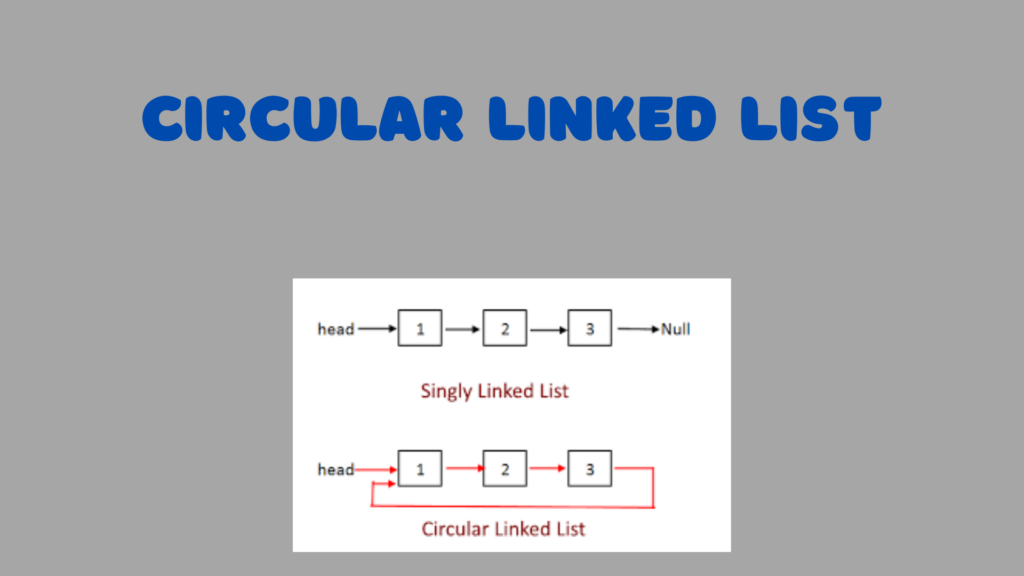
Circular Linked List

Unlocking the Power of Circular Linked Lists in Java: A Comprehensive Guide

Linked lists are a fundamental data structure in computer science, offering flexibility and efficiency in managing collections of data. Among the variations of linked lists, the circular linked list stands out for its unique structure and applications. In this blog post, we’ll delve into the concept of circular linked lists, explore their implementation in Java,...

Membership Required

You must be a member to access this content.

View Membership Levels

Already a member? Log in here
Singly Linked List in Java

Unlocking Singly Linked List Logical Operations in Java: Master Your Skills

Singly linked lists are versatile data structures that offer efficient insertion, deletion, and traversal operations. However, beyond the basic CRUD (Create, Read, Update, Delete) operations, there lies a realm of logical operations that can be performed on singly linked lists. In this detailed blog, we’ll explore some of the most important logical operations that can be applied to singly linked lists in Java, providing insights into their implementation and usage.

How to search an element in a Singly Linked List in Java?

head –> 10 –> 8 –> 1 –> 11 –> null

Java
ListNode current = head;
while(current != null)
{
  if(current.data == searchKey)
  {
    return true;
  }
  current = current.next;
}
return false;

As the main logic, we need to traverse the list node by node. While traversing, we check each node’s data. If it matches the search key, then we’ve found the key; otherwise, we haven’t found it.

  1. We create a temporary node current to traverse the list until the end. Initially, it’s set to the head node, i.e., ListNode current = head.
  2. Using a while loop, we traverse until the end of the list. If current becomes null, it means we’ve reached the end, and we terminate the loop. During traversal, we check each node’s data with the search key. If we find a match, we return true immediately and exit the loop.
Java
while( current  != null )
{
  if(current.data == searchKey)
  {
   return true;
  }
  current = current.next;      // Move to the next node in each iteration 
}
  1. Finally, if we haven’t found the exact search key after traversing the entire list, we return false.

Output:

  • If the search key is 1, then it is found.
  • If the search key is 12, then it is not found.

Code

Java
public boolean find(ListNode head, int searchKey) {
  if (head == null) {
    return false;
  }

  ListNode current = head;
  while (current != null) {
    if (current.data == searchKey) {
      return true;
    }
    current = current.next; // Move to the next node
  }
  return false;
}

This method find is designed to search for a specific key value (searchKey) within the linked list. It returns true if the key is found, and false otherwise. If the list is empty (i.e., head is null), it immediately returns false. Otherwise, it traverses the list, comparing the data value of each node (current.data) with the search key. If a match is found, it returns true. If the end of the list is reached without finding the key, it returns false.

How to reverse a singly linked list in java

Input:

head –> 10 –> 8 –> 1 — > 11 –> null

Output:

head –> 11 –> 1 –> 8 –> 10 –> null

Java
ListNode current = head;
ListNode previous = null;
ListNode next = null;
while(current != null)
{
  next = current.next;
  current.next = previous;
  previous = current;
  current = next;
}
return previous;

The main logic is to traverse the list until the end and apply a logic that reverses the pointing of each node. Ultimately, we obtain the reversed list.

  1. We create three temporary nodes:
    • current points to head.
    • previous initially points to null.
    • next also initially points to null.
  2. We traverse the list node by node using a while loop. The loop iterates until current becomes null.
  3. In each iteration of the while loop, we perform the following operations:
Java
while(current != null)
{
   next = current.next;        // Store the reference to the next node
   current.next = previous;    // Reverse the pointing direction of the current node
   previous = current;         // Move forward: previous becomes current
   current = next;             // Move forward: current becomes next
}
    • First, we move to the next node by assigning next to current.next.
    • Second, we reverse the reference of the current node to point to the previous node.
    • Third, we update previous to be the current node, preparing for the next iteration.
    • Finally, we move forward by assigning next to current.
    This process effectively reverses the pointing direction of each node in the list.
  1. When the while loop terminates, we have reversed the entire list, and the last previous node becomes the new head of the list. So, we return previous.

Output: head --> 11 --> 1 --> 8 --> 10 --> null.

After the reversal, the list becomes reversed.

Code

Java
public ListNode reverse(ListNode head)
{
   if(head == null)
   {
      return head;
   }
   
   ListNode current = head;
   ListNode previous = null;
   ListNode next = null;

   while(current != null)
   {
      next = current.next;
      current.next = previous;
      previous = current;
      current = next;
   }
   return previous;
}

This method reverse is designed to reverse the linked list. If the list is empty (i.e., head is null), it immediately returns null. Otherwise, it iterates through the list, changing the next pointer of each node to point to the previous node. At the end of the iteration, it returns the last node encountered, which becomes the new head of the reversed list.

How to find middle node in singly linked list in java ?

To find the middle node in a singly linked list, we employ the same logic for two different cases.

Case 1: List having an even number of nodes:

For example, head –> 10 –> 8 –> 1 –> 11 –> null

In this case, the middle node is 1.

Case 2: List having an odd number of nodes:

For example, head –> 10 –> 8 –> 1 –> 11 –> 15 –> null

Here again, the middle node is 1.

Java
ListNode slowPtr = head;
ListNode fastPtr = head;
while(fastPtr != null && fastPtr.next != null) {
    slowPtr = slowPtr.next;      // Move slow pointer to the next node
    fastPtr = fastPtr.next.next; // Move fast pointer to two nodes ahead
}
return slowPtr; // Return the slow pointer, which points to the middle node

The main logic involves using two different pointers: a slow pointer and a fast pointer. The slow pointer moves to the next node one by one, while the fast pointer moves two nodes ahead at a time. When the fast pointer reaches the end (either pointing to null or its next points to null), the while loop terminates, and we return the slow pointer, which represents the middle node in both cases.

Code

Java
public ListNode getMiddleNode() {
    if (head == null) {
      return null;
    }
    
    ListNode slowPtr = head;
    ListNode fastPtr = head;
 
    while (fastPtr != null && fastPtr.next != null) {
       slowPtr = slowPtr.next;
       fastPtr = fastPtr.next.next;
    }
    return slowPtr;
}

This method getMiddleNode is designed to find and return the middle node of the linked list. It initializes two pointers, slowPtr and fastPtr, both starting at the head of the list. The slowPtr moves one node at a time while the fastPtr moves two nodes at a time. When the fastPtr reaches the end of the list (or null), the slowPtr will be at the middle node. If the list is empty (i.e., head is null), it returns null.

How to detect a loop in Singly Linked List in java ?

In a given singly linked list, if there exists a loop, it can be identified by employing the following logic.

Consider the linked list: head –> 1 –> 2 –> 3 –> 4 –> 5 –> 6 –> 3

As it can be seen, the list loops back to the node with value 3.

The main logic remains the same as before: we use two different pointers, a slow pointer and a fast pointer. However, in this case, we move the fast pointer first, followed by the slow pointer. Due to the loop, these pointers will eventually meet at the same node. Once the slow and fast pointers are equal, pointing to the same node, we can conclude that there exists a loop in the linked list. If the pointers never meet, then the list does not contain any loop.

Java
ListNode fastPtr = head;
ListNode slowPtr = head;
while(fastPtr != null && fastPtr.next != null) {
    fastPtr = fastPtr.next.next; // Move fast pointer two nodes ahead
    slowPtr = slowPtr.next;      // Move slow pointer one node ahead
    if(slowPtr == fastPtr) {     // If slow pointer meets fast pointer, it indicates a loop
        return true;
    }
}
return false; // If loop termination condition is met without meeting points, return false

The main logic is the same as before: we use two pointers, a slow pointer and a fast pointer, to traverse the list. However, in this case, we move the fast pointer two nodes ahead and the slow pointer one node ahead in each iteration. If the pointers meet at any point during traversal, it indicates the presence of a loop in the list, and we return true. If the loop termination condition is met without the pointers meeting, it means there is no loop in the list, and we return false.

Code

Java
public boolean containsLoop() {
  ListNode fastPtr = head;
  ListNode slowPtr = head;

  while (fastPtr != null && fastPtr.next != null) {
    fastPtr = fastPtr.next.next;        // We need to move fast pointer fast so that it will catch the slow pointer if a loop is present   
    slowPtr = slowPtr.next;
   
    if (slowPtr == fastPtr) {
      return true;
    }
  }
  return false;
}

public void createALoopInLinkedList() {
  ListNode first = new ListNode(1);  
  ListNode second = new ListNode(2);
  ListNode third = new ListNode(3);
  ListNode fourth = new ListNode(4);
  ListNode fifth = new ListNode(5);
  ListNode sixth = new ListNode(6);

  head = first;
  first.next = second;
  second.next = third;
  third.next = fourth;
  fourth.next = fifth;
  fifth.next = sixth;
  sixth.next = third;
}

The method containsLoop checks whether a loop exists in the linked list using Floyd’s Cycle Detection Algorithm. It initializes two pointers, fastPtr and slowPtr, both starting at the head of the list. The fastPtr moves twice as fast as the slowPtr. If there is a loop in the list, eventually, the fastPtr will catch up with the slowPtr. If no loop is found, the method returns false.

The method createALoopInLinkedList is a helper method to create a loop in the linked list for testing purposes. It creates a linked list with six nodes and then creates a loop by making the next reference of the last node point to the third node.

How to find nth node from the end of a Singly Linked List in java?

Consider the singly linked list:

head –> 10 –> 8 –> 1 –> 11 –> 15 –> null

If we want to find the node that is “n” positions from the end of the list, where “n” is given as 2, then the node containing 11 would be that node.

Java
ListNode mainPtr = head;  // It will move forward when the reference pointer covers the nth position forward from the head 
ListNode referencePtr = head;  // It will move twice: first, it covers the nth distance from the head, then it goes till the end with mainPtr, so that mainPtr will reach the exact position
int count = 0;   // It is to track the number of nodes the reference pointer moved forward
while(count < n) {
    refPtr = refPtr.next;
    count++;
}
while(refPtr != null) {
    refPtr = refPtr.next;
    mainPtr = mainPtr.next;
}

return mainPtr;

The main logic involves using two pointers: a main pointer and a reference pointer. The reference pointer moves forward until it reaches the nth position from the head, while the main pointer remains stationary. After reaching the nth position, the reference pointer continues moving until it reaches the end of the list, while the main pointer moves along with it. When the reference pointer reaches the end of the list, the main pointer will be pointing to the nth node from the end of the list.

Code

Java
public ListNode getNthNodeFromEnd(int n) {

 if (head == null) {
    return null;
 }
 
 if (n <= 0) {
     throw new IllegalArgumentException("Invalid value: n = " + n);
 }

 ListNode mainPtr = head;  // It will move forward when the reference pointer covers the nth position forward from the head  
 ListNode refPtr = head;   // It will move twice: first, it covers nth distance from head, then it goes till the end with mainPtr, so that mainPtr will reach the exact position.

 int count = 0;   // It is to track the number of nodes refPtr moved forward

 while (count < n) {
  if (refPtr == null) {
      throw new IllegalArgumentException(n + " is greater than the number of nodes in the list");
  }

  refPtr = refPtr.next;
  count++;
 }

 while (refPtr != null) {
  refPtr = refPtr.next;
  mainPtr = mainPtr.next;
 }

 return mainPtr;    // The returned mainPtr will be at the nth position from the end of the list
}

This method getNthNodeFromEnd is designed to find and return the nth node from the end of the linked list. It initializes two pointers, mainPtr and refPtr, both starting at the head of the list. The refPtr moves forward n positions from the head. Then, both pointers move forward simultaneously until the refPtr reaches the end of the list. At this point, the mainPtr will be at the nth node from the end. If the list is empty or if the value of n is less than or equal to 0, the method throws an IllegalArgumentException.

How to remove duplicates from sorted Singly Linked List in java?

For the given input of a sorted linked list:

head –> 1 –> 1 –> 2 –> 3 –> 3 –> null

The desired output is a sorted linked list with duplicates removed:

head –> 1 –> 2 –> 3 –> null

Java
ListNode current = head;
while(current != null && current.next != null) {
    if(current.data == current.next.data) {
        current.next = current.next.next; // Connect current to the next next node to remove the duplicate node
    } else {
        current = current.next; // Move to the next node if no duplicate is found
    }
}

The main logic involves traversing the list node by node using a current pointer. While traversing, we check whether the data of the current node is equal to the data of the next node. If they are equal, it means a duplicate node is found, so we connect the current node to the next next node, effectively removing the duplicate node between them. If no duplicate is found, we simply move to the next node. This process continues until we reach the end of the list or the current node becomes null.

Code

Java
public void removeDuplicates() {
  
  if (head == null) {
    return;
  }

  ListNode current = head;

  while (current != null && current.next != null) {
     if (current.data == current.next.data) {
       current.next = current.next.next;
     } else {
       current = current.next;
     }
  }
}

This method removeDuplicates is designed to remove duplicates from a sorted linked list. It iterates through the list using the current pointer. If the current node’s data is equal to the data of the next node, it skips the next node by updating the next reference of the current node to skip the duplicate node. Otherwise, it moves the current pointer to the next node in the list. If the list is empty (i.e., head is null), the method returns without performing any operation.

Now, How to insert a node in a sorted Singly Linked List in java?

Given the sorted linked list:

head –> 1 –> 8 –> 10 –> 16 –> null

And a new node:

newNode –> 11 –> null

We want to insert the new node (11) into the sorted list such that the sorting order remains the same.

After insertion, the updated list would be:

head –> 1 –> 8 –> 10 –> 11 –> 16 –> null

Java
ListNode current = head;
ListNode previous = null;
while(current != null && current.data < newNode.data) {
    previous = current;
    current = current.next;
}
// When we reach the insertion point, we have references to current, previous, and newNode.
// Now, we rearrange the pointers so that previous points to newNode and newNode points to current.
newNode.next = current;
if (previous != null) {
    previous.next = newNode;
} else {
    // If previous is null, it means the newNode should become the new head.
    head = newNode;
}
return head;

The main logic involves traversing the sorted linked list until we find the appropriate position to insert the new node while maintaining the sorting order. We traverse the list node by node, comparing the data of each node with the data of the new node. We continue this process until we find a node whose data is greater than or equal to the data of the new node, or until we reach the end of the list.

When we reach the insertion point, we have references to three nodes: the current node, the previous node (the node before the insertion point), and the new node. To insert the new node into the list, we rearrange the pointers so that the previous node points to the new node, and the new node points to the current node.

If the previous node is null, it means that the new node should become the new head of the list. In this case, we update the head pointer to point to the new node.

Code

Java
public ListNode insertInSortedList(int value) {
  ListNode newNode = new ListNode(value);
 
  if (head == null) {
    return newNode;
  }

  ListNode current = head;
  ListNode previous = null;

  while (current != null && current.data < newNode.data) {   // Will go till the end while checking the sorting order between the current node and the new node data 
     previous = current;
     current = current.next;
  }
  
  // When we reach the insertion point, we have our current, previous, and newNode references so we only need to arrange pointers.
  // So that previous will point to newNode and newNode will point to current.
 
  newNode.next = current;
  if (previous == null) { // If the new node is to be inserted at the beginning
    head = newNode;
  } else {
    previous.next = newNode;
  }
  
  return head;    
}

This method insertInSortedList is designed to insert a new node with the provided value into a sorted linked list. If the list is empty (i.e., head is null), the new node becomes the head of the list. Otherwise, it traverses the list to find the correct position to insert the new node while maintaining the sorted order. Once the insertion point is found, it updates the pointers to insert the new node. Finally, it returns the head of the list.

How to remove a given key from singly linked list in java?

Given the linked list:

head –> 1 –> 8 –> 10 –> 11 –> 16 –> null

Suppose our key is 11, and we want to remove it from the list.

After removal, the updated list would be:

head –> 1 –> 8 –> 10 –> 16 –> null

Java
ListNode current = head;
ListNode previous = null;

// Traverse the list to find the node with the key value
while(current != null && current.data != key) {
   previous = current;
   current = current.next;
}

// If we reached the end of the list without finding the key, return
if(current == null) {
  return;
}

// If we found the key, remove the node by adjusting the previous node's next reference
if(previous != null) {
  previous.next = current.next;
} else {
  // If the key is found at the head, update the head pointer to skip the current node
  head = current.next;
}

The main logic involves traversing the linked list until we find the node with the specified key value. While traversing, we keep track of the previous node as well.

If we reach the end of the list without finding the key, it means the key doesn’t exist in the list, so we return without performing any removal.

If we find the node with the key value, we remove it from the list by adjusting the next reference of the previous node to skip over the current node. However, if the key is found at the head of the list, we update the head pointer to skip over the current node.

Code

Java
public void deleteNode(int key) {
 
  ListNode current = head;
  ListNode previous = null;

  // If we find our key at the first node that is head, just update head to point to the next node.
  if (current != null && current.data == key) {
     head = current.next;
     return;
  }

  while (current != null && current.data != key) {
    previous = current;
    current = current.next;
  }
 
  // If we reached the end of the list (current == null), the key was not found, so return without performing any operation.
  if (current == null) {
    return;
  }

  // If we found the key, update the next reference of the previous node to point to the next node of the current node, effectively removing the current node.
  previous.next = current.next;
}

This method deleteNode is designed to delete a node with the given key value from the linked list. It iterates through the list using the current pointer to find the node with the specified key value while keeping track of the previous node using the previous pointer. If the key is found at the first node (head), it updates the head to point to the next node. If the key is found in the middle of the list, it updates the next reference of the previous node to skip the current node. If the key is not found in the list, the method simply returns without performing any operation.

Bonus: Two Sum Problem in java

Problem: Given an array of integers, return the indices of the two numbers such that they add up to a specific target.

Example: Given array of integers: {2, 11, 5, 10, 7, 8}, and target = 9.

Solution: Since arr[0] + arr[4] = 2 + 7 = 9, we return {0, 4} as the indices.

The main logic involves using a map for fast lookup of stored values to find the exact sum of the target. We require one map for lookup purposes and one result array to store the indices of the two numbers that add up to the target sum from the given array. Here’s how it works:

  1. We iterate through the array, examining each element.
  2. At each element, we calculate the difference between the target and the current element.
  3. We check if this difference exists in the map. If it does, it means we have found the two numbers that add up to the target.
  4. We return the indices of the current element and the element with the required difference.
  5. If the difference is not found in the map, we store the current element’s value along with its index in the map for future lookups.

Algorithm & Executions

Java
int[] result = new int[2];
Map<Integer, Integer> map = new HashMap<>();

for(int i = 0; i < numbers.length; i++) {
    int complement = target - numbers[i];
    if(map.containsKey(complement)) {
        result[0] = map.get(complement);
        result[1] = i;
        return result;
    }
    map.put(numbers[i], i);
}

return result;

The main logic involves using a hash map to store the indices of elements in the array. We traverse the array and, for each element, check if its complement (target – current number) exists in the hash map. If it does, it means we have found two numbers that add up to the target, so we return their indices. If not, we add the current number and its index to the hash map for future reference.

Code

Java
public static int[] twoSum(int[] numbers, int target) {
  int[] result = new int[2];
  Map<Integer, Integer> map = new HashMap<>();
 
  for (int i = 0; i < numbers.length; i++) {
    if (!map.containsKey(target - numbers[i])) {
      map.put(numbers[i], i);
    } else {
      result[1] = i;
      result[0] = map.get(target - numbers[i]);
      return result;
    }     
  }

  throw new IllegalArgumentException("Two numbers not found");
}

This method twoSum is designed to find and return the indices of the two numbers in the numbers array that add up to the target value. It utilizes a hashmap to store the difference between the target and each element of the array along with its index. It iterates through the array, checking if the hashmap contains the difference between the target and the current element. If not, it adds the current element and its index to the hashmap. If it finds the difference in the hashmap, it retrieves the index of the other number and returns the indices as the result. If no such pair of numbers is found, it throws an IllegalArgumentException.

Note: Why is this Array Manipulation problem being discussed here?

While the problem of finding two numbers in an array that add up to a specific target is not directly related to singly linked list operations, the underlying logic and problem-solving techniques used in solving array manipulation problems can indeed be helpful in solving problems related to singly linked lists.

Many problem-solving techniques and algorithms used in array manipulation, such as iterating over elements, using hash maps for fast lookups, or employing two-pointer approaches, can also be applied to singly linked list problems. Additionally, understanding how to efficiently manipulate data structures and analyze patterns in data is a fundamental skill that can be transferred across various problem domains.

In the context of computer science and algorithmic problem-solving, building a strong foundation in problem-solving techniques through various types of problems, including those involving arrays, linked lists, trees, graphs, and more, can enhance your ability to tackle a wide range of problems effectively.

So, while the specific problem discussed may not directly relate to singly linked lists, the problem-solving skills and techniques learned from array manipulation problems can certainly be beneficial in solving problems related to singly linked lists and other data structures.

Conclusion

By mastering the logical operations of singly linked list in Java, programmers can unlock the full potential of this versatile data structure. Whether it’s searching, reversing, merging, or detecting loops, understanding these operations equips developers with powerful tools for solving complex problems and building efficient algorithms. With the insights provided in this blog, programmers can elevate their skills and become more proficient in leveraging singly linked lists for various applications.

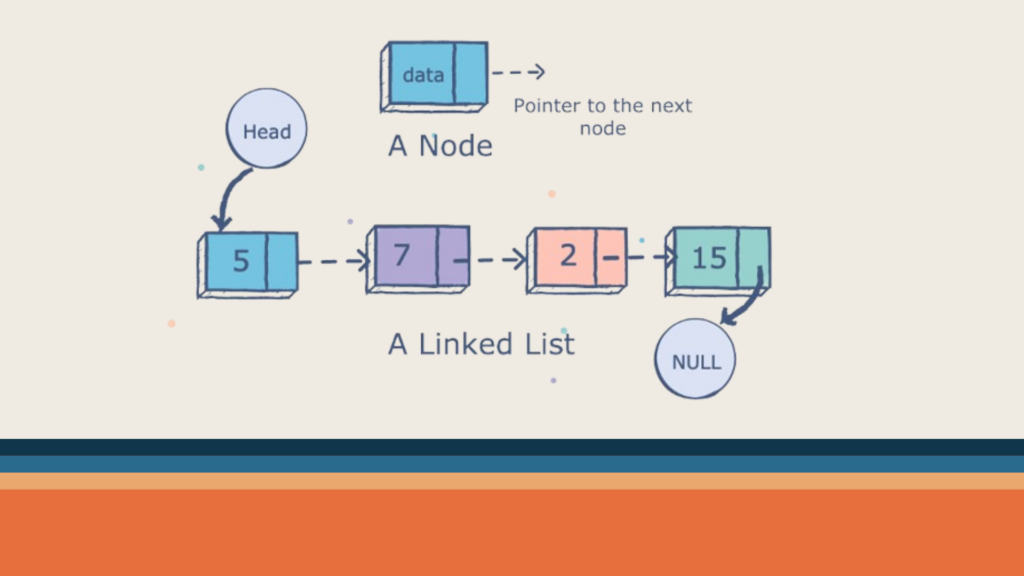
Linked Lists in Java

Understanding Linked Lists in Java: A Comprehensive Guide & Best Guide for Developers

Linked lists are fundamental data structures in computer science that provide dynamic memory allocation and efficient insertion and deletion operations. In Java, linked lists are commonly used for various applications due to their flexibility and versatility. In this blog post, we will explore linked lists in Java in detail, covering their definition, types, operations, and implementation.

What is a Linked List?

A linked list is a linear data structure consisting of a sequence of elements called nodes. Each node contains two parts: the data, which holds the value of the element, and a reference (or link) to the next node in the sequence. Unlike arrays, which have fixed sizes, linked lists can dynamically grow and shrink as elements are added or removed.

Key Concepts

  • Node: The fundamental building block of a linked list. Each node consists of:
    • Data: The actual information you store (e.g., integer, string).
    • Next pointer: References the next node in the list.
    • Previous pointer (for doubly-linked lists): References the preceding node, enabling bidirectional traversal.
  • Head: The starting point of the list, pointing to the first node.
  • Tail: In singly-linked lists, points to the last node. In doubly-linked lists, points to the last node for forward traversal and the first node for backward traversal.

Types of Linked Lists

1. Singly Linked List

In a singly linked list, each node has only one link, which points to the next node in the sequence. Traversal in a singly linked list can only be done in one direction, typically from the head (start) to the tail (end) of the list. Singly-linked lists are relatively simple and efficient in terms of memory usage.

2. Doubly Linked List

In a doubly linked list, each node has two links: one points to the next node, and the other points to the previous node. This bidirectional linking allows traversal in both forward and backward directions. Doubly linked lists typically require more memory per node due to the additional reference for the previous node.

3. Circular Linked List

In a circular linked list, the last node points back to the first node, forming a circular structure. Circular linked lists can be either singly or doubly linked and are useful in scenarios where continuous looping is required.

How to represent a LinkedList in Java ?

Now we know that, A linked list is a data structure used for storing a collection of elements, objects, or nodes, possessing the following properties:

  1. It consists of a sequence of nodes.
  2. Each node contains data and a reference to the next node.
  3. The first node is called the head node.
  4. The last node contains data and points to null.
Java
| data | next | ===> | data | next | ===> | data | next | ===> null

Implementation Of a Node in a linked list

Generic Type Implementation

Java
public class ListNode<T> {
    private T data;
    private ListNode<T> next;
}

In the generic type implementation, the class ListNode<T> represents a node in a linked list that can hold data of any type. The line public class ListNode<T> declares a generic class ListNode with a placeholder type T, allowing flexibility for storing different data types. The private member variable data of type T holds the actual data stored in the node, while the next member variable is a reference to the next node in the linked list, indicated by ListNode<T> next. This design enables the creation of linked lists capable of storing elements of various types, offering versatility and reusability.

Integer Type Implementation

Java
public class ListNode {
    private int data;
    private ListNode next;
}

In contrast to the generic type, the integer type implementation, represented by the class ListNode, is tailored specifically for storing integer data. The class ListNode does not use generics and defines a private member variable data of type int to hold integer values within each node. Similarly, the next member variable is a reference to the next node in the linked list, indicated by ListNode next. This implementation is more specialized and optimized for scenarios where the linked list exclusively stores integer values, potentially offering improved efficiency due to reduced overhead from generics.

Node Diagram

Java
| data | next |===>

This node diagram depicts the structure of each node in the linked list. Each node consists of two components: data, representing the value stored in the node, and next, a pointer/reference to the next node in the sequence. The notation | data | next |===> illustrates this structure, where data holds the value of the node, and next points to the subsequent node in the linked list. The arrow (===>) signifies the connection between nodes, indicating the direction of traversal from one node to another within the linked list.

Representation of Linked List

Java
head ===> |10| ===> |8| ===> |9| ===> |11| ===> null

The representation of the linked list illustrates a sequence of nodes starting from the head node. Each node contains its respective data value, with arrows (===>) indicating the connections between nodes. The notation head ===> |10| ===> |8| ===> |9| ===> |11| ===> null shows the linked list structure, where head denotes the starting point of the list. The data values (10, 8, 9, 11) are enclosed within nodes, and null signifies the end of the linked list. This representation visually demonstrates the organization and connectivity of nodes within the linked list data structure.

Code Implementation

Java
public class LinkedList
{

  private ListNode head; // head node to hold the list
  
  // It contains a static inner class ListNode
  private static class ListNode
  {
     private int data;
     private ListNode next;

     public ListNode(int data) {
          this.data = data;
          this.next = null;
     }
  }

  public static void main(String[] args)
  {
   
  }
}

The above code snippet outlines the structure of a linked list in Java. The LinkedList class serves as the main container for the linked list, featuring a private member variable head that points to the first node. Within this class, there exists a static inner class named ListNode, which defines the blueprint for individual nodes. Each ListNode comprises an integer data field and a reference to the next node. The constructor of ListNode initializes a node with the given data and sets the next reference to null by default. The main method, though currently empty, signifies the program’s entry point where execution begins. It provides a foundational structure for implementing linked lists, enabling the creation and manipulation of dynamic data structures in Java programs.

Common Operations on Linked Lists

We will see each operation in much detail in the next article, where we will discuss Singly Linked Lists in more detail. Right now, let’s see a brief overview of each operation:

1. Insertion

Insertion in a linked list involves adding a new node at a specified position or at the end of the list. Depending on the type of linked list, insertion can be performed efficiently by updating the references of adjacent nodes.

2. Deletion

Deletion involves removing a node from the linked list. Similar to insertion, deletion operations need to update the references of adjacent nodes to maintain the integrity of the list structure.

3. Traversal

Traversal refers to visiting each node in the linked list sequentially. Traversal is essential for accessing and processing the elements stored in the list.

4. Searching

Searching involves finding a specific element within the linked list. Linear search is commonly used for searching in linked lists, where each node is checked sequentially until the desired element is found.

5. Reversing

Reversing a linked list means changing the direction of pointers to create a new list with elements in the opposite order. Reversing can be done iteratively or recursively and is useful in various algorithms and problem-solving scenarios.

Conclusion

Linked lists are powerful data structures in Java that offer dynamic memory allocation and efficient operations for managing collections of elements. Understanding the types of linked lists, their operations, and their implementation in Java is essential for building robust applications and solving complex problems efficiently. Whether you’re a beginner or an experienced Java developer, mastering linked lists will enhance your programming skills and enable you to tackle a wide range of programming challenges effectively. Happy coding!

SinglyLinkedList and It's Logical Operations

Mastering Singly Linked Lists: Essential Basic Insertion and Deletion Operations Explained

Singly linked lists are a fundamental data structure in computer science, offering dynamic flexibility and memory efficiency. In Java, understanding and mastering them is key to unlocking efficient algorithms and problem-solving skills. This blog aims to guide you from basic concepts to advanced techniques, transforming you from a linked list novice to a ninja! Anatomy...

Membership Required

You must be a member to access this content.

View Membership Levels

Already a member? Log in here
android instant app

Exploring Android Instant Apps: A Comprehensive Look at the Try-Before-You-Buy Technology

Imagine a world where you could test drive a car, play a game, or edit a photo without ever downloading an app. Enter the realm of Android Instant Apps, a revolutionary technology that lets users experience apps directly from their web browsers, without committing to the storage space or installation hassle. Android Instant Apps have revolutionized the way users interact with mobile applications by providing a seamless and lightweight experience without the need for installation.

In this blog, we’ll dive deep into the technical aspects of Android Instant Apps, exploring their inner workings, and shedding light on the architecture, development process, benefits, challenges, and key considerations for developers. Get ready to buckle up, as we peel back the layers of this innovative technology!

Understanding Android Instant Apps

Definition

Android Instant Apps are a feature of the Android operating system that allows users to run apps without installing them. Instead of the traditional download-install-open process, users can access Instant Apps through a simple URL or a link.

Working Under the Hood

So, how do Instant Apps work their magic? The key lies in Android App Bundles, a new app publishing format by Google. These bundles contain app modules, including a base module with core functionality and optional feature modules for specific features. Instant Apps consist of a slimmed-down version of the base module, along with any relevant feature modules needed for the immediate task.

When a user clicks on a “Try Now” button or a link associated with an Instant App, Google Play sends the required components to the user’s device. This data is securely contained in a sandbox, separate from other apps and the user’s storage. The device then runs the Instant App like a native app, providing a seamless user experience.

Architecture

The architecture of Android Instant Apps involves modularizing an existing app into smaller, independent modules known as feature modules. These modules are loaded on-demand, making the Instant App experience quick and efficient. The key components include:

  • Base Feature Module: The core functionality of the app.
  • Dynamic Feature Modules: This crucial mechanism allows for downloading additional features on-demand, even within the Instant App environment. This enables developers to offer richer experiences without burdening users with a large initial download.
  • Android App Bundle: As mentioned earlier, these bundles are the foundation of Instant Apps. They provide flexible modularity and enable efficient delivery of app components. It’s a publishing format that includes all the code and resources needed to run the app.
  • Instant-enabled App Bundle: This is a specific type of app bundle specially configured for Instant App functionality. It defines modules and their relationships, allowing Google Play to deliver the right components for the instant experience.

Development Process

Dependency declaration

Kotlin
implementation("com.google.android.gms:play-services-instantapps:17.0.0")

Preparing the App

To make an app instant-ready, developers need to modularize the app into feature modules. This involves refactoring the codebase to separate distinct functionalities into modules. The app is then migrated to the Android App Bundle format.

Specify the appropriate version codes

Ensure that the version code assigned to your app’s instant experience is lower than the version code of the installable app. This aligns with the expectation that users will transition from the Google Play Instant experience to downloading and installing the app on their device, constituting an app update in the Android framework.

Please note: if users have the installed version of your app on their device, that version will always take precedence over your instant experience, even if it’s an older version compared to your instant experience.

To meet user expectations on versioning, you can consider one of the following approaches:

  1. Begin the version codes for the Google Play Instant experience at 1.
  2. Increase the version code of the installable APK significantly, for example, by 1000, to allow sufficient room for the version number of your instant experience to increment.

If you opt to develop your instant app and installable app in separate Android Studio projects, adhere to these guidelines for publishing on Google Play:

  • Maintain the same package name in both Android Studio projects.
  • In the Google Play Console, upload both variants to the same application.

Note: Keep in mind that the version code is not user-facing and is primarily used by the system. The user-facing version name has no constraints. For additional details on setting your app’s version, refer to the documentation on versioning your app.

Modify the target sandbox version

Ensure that your instant app’s AndroidManifest.xml file is adjusted to target the sandbox environment supported by Google Play Instant. Implement this modification by incorporating the android:targetSandboxVersion attribute into the <manifest> element of your app, as illustrated in the following code snippet:

XML
<manifest
   xmlns:android="http://schemas.android.com/apk/res/android"
   ...
   android:targetSandboxVersion="2" ...>

Security Sandbox: Instant Apps run in a secure sandboxed environment on the device, isolated from other apps and data. This protects user privacy and ensures system stability.

The android:targetSandboxVersion attribute plays a crucial role in determining the target sandbox for an app, significantly impacting its security level. By default, its value is set to 1, but an alternative setting of 2 is available. When set to 2, the app transitions to a different SELinux sandbox, providing a higher level of security.

Key restrictions associated with a level-2 sandbox include:

  1. The default value of usesCleartextTraffic in the Network Security Config is false.
  2. Uid sharing is not permitted.

For Android Instant Apps targeting Android 8.0 (API level 26) or higher, the attribute is automatically set to 2. While there is flexibility in setting the sandbox level to the less restrictive level 1 in the installed version of your app, doing so results in non-persistence of app data from the instant app to the installed version. To ensure data persistence, it is essential to set the installed app’s sandbox value to 2.

Once an app is installed, the target sandbox value can only be updated to a higher level. If there is a need to downgrade the target sandbox value, uninstall the app and replace it with a version containing a lower value for this attribute in the manifest.

Define instant-enabled app modules

To signify that your app bundle supports instant experiences, you can choose one of the following methods:

Instant-enable an existing app bundle with a base module:

  • Open the Project panel by navigating to View > Tool Windows > Project in the menu bar.
  • Right-click on your base module, commonly named ‘app’, and select Refactor > Enable Instant Apps Support.
  • In the ensuing dialog, choose your base module from the dropdown menu and click OK. Android Studio automatically inserts the following declaration into the module’s manifest:
XML
<manifest ... xmlns:dist="http://schemas.android.com/apk/distribution">
    <dist:module dist:instant="true" />
    ...
</manifest>

Note: The default name for the base module in an app bundle is ‘app’.

Create an instant-enabled feature module in an existing app bundle with multiple modules:

If you already possess an app bundle with multiple modules, you can create an instant-enabled feature module. This not only instant-enables the app’s base module but also allows for supporting multiple instant entry points within your app.

Note: A single module can contain multiple activities. However, for an app bundle to be instant-enabled, the combined download size of the code and resources within all instant-enabled modules must not exceed 15 MB.
Integrating Seamless Sign-in for Instant Apps

Integrating Seamless Sign-in for Instant Apps

To empower your instant app experience with smooth and secure sign-in, follow these guidelines:

General Instant Apps:

  • Prioritize Smart Lock for Passwords integration within your instant-enabled app bundle. This native Android feature allows users to sign in using saved credentials, enhancing convenience and accessibility.

Instant Play Games:

  • Opt for Google Play Games Services sign-in as the ideal solution for your “Instant play” games. This dedicated framework streamlines user access within the gaming ecosystem, offering familiarity and a frictionless experience.

Note: Choosing the appropriate sign-in method ensures a seamless transition for users entering your instant app, eliminating login hurdles and boosting engagement.

Implement logic for instant experience workflows in your app

Once you have configured your app bundle to support instant experiences, integrate the following logic into your app:

Check whether the app is running as an instant experience

To determine if the user is engaged in the instant experience, employ the isInstantApp() method. This method returns true if the current process is running as an instant experience.

Display an install prompt

If you are developing a trial version of your app or game and want to prompt users to install the full experience, utilize the InstantApps.showInstallPrompt() method. The Kotlin code snippet below illustrates how to use this method:

Kotlin
class MyInstantExperienceActivity : AppCompatActivity {
    // ...
    private fun showInstallPrompt() {
        val postInstall = Intent(Intent.ACTION_MAIN)
                .addCategory(Intent.CATEGORY_DEFAULT)
                .setPackage("your-installed-experience-package-name")

        // The request code is passed to startActivityForResult().
        InstantApps.showInstallPrompt(this@MyInstantExperienceActivity,
                postInstall, requestCode, /* referrer= */ null)
    }
}

Transfer data to an installed experience

When a user decides to install your app, ensure a seamless transition of data from the instant experience to the full version. The process may vary based on the Android version and the targetSandboxVersion:

  • For users on Android 8.0 (API level 26) or higher with a targetSandboxVersion of 2, data transfer is automatic.
  • If manual data transfer is required, use one of the following APIs:
    • For devices running Android 8.0 (API level 26) and higher, utilize the Cookie API.
    • If users interact with your experience on devices running Android 7.1 (API level 25) and lower, implement support for the Storage API. Refer to the sample app for guidance on usage.

By integrating these workflows, you elevate the user experience within your instant-enabled app bundle, enabling smooth transitions and interactions for users across various versions and platforms. This thoughtful implementation ensures that users engaging with your instant experience have a seamless and intuitive journey, whether they choose to install the full version, enjoy a trial, or transfer data between the instant and installed versions. Overall, these workflows contribute to a user-friendly and cohesive experience, accommodating different scenarios and preferences within your app.

Key Technical Considerations

App Links and URL Handling

For users to access the Instant App, developers need to implement URL handling. This involves associating specific URLs with corresponding activities in the app. Android Instant Apps use the ‘Android App Links’ mechanism, ensuring that links open in the Instant App if it’s available.

Dealing with Resource Constraints

Since Instant Apps are designed to be lightweight, developers must be mindful of resource constraints. This includes limiting the size of feature modules, optimizing graphics and media assets, and being cautious with background tasks to ensure a smooth user experience.

Security

Security is a critical aspect of Android Instant Apps. Developers need to implement proper authentication and authorization mechanisms to ensure that user data is protected. Additionally, the app’s modular architecture should not compromise the overall security posture.

Compatibility

Developers must consider the compatibility of Instant Apps with a wide range of Android devices and versions. Testing on different devices and Android versions is crucial to identify and address potential compatibility issues.

User Data and Permissions

Instant Apps should adhere to Android’s permission model. Developers need to request permissions at runtime and ensure that sensitive user data is handled appropriately. Limiting the use of device permissions to only what is necessary enhances user trust.

Deployment and Distribution

Publishing

Publishing an Instant App involves uploading the Android App Bundle to the Google Play Console. Developers can then link the Instant App with the corresponding installed app, ensuring a consistent experience for users.

Distribution

Instant Apps can be distributed through various channels, including the Play Store, websites, and third-party platforms. Developers need to configure their app links and promote the Instant App effectively to reach a broader audience.

Benefits of Instant Apps

  • Increased Conversion Rates: By letting users try before they buy, Instant Apps can significantly boost app installs and engagement.
  • Reduced Storage Requirements: Users don’t need to download the entire app, saving valuable storage space on their devices.
  • Improved Discoverability: Instant Apps can be accessed through Google Play, search results, and website links, leading to wider app exposure.
  • Faster App Delivery: Smaller initial downloads thanks to dynamic feature loading lead to quicker startup times and smoother user experiences.

Challenges

  • Development Complexity: Creating well-functioning Instant Apps requires careful planning and modularization of app code.
  • Limited Functionality: Due to size constraints, Instant Apps may not offer the full range of features as their installed counterparts.
  • Network Dependence: Downloading app components during runtime requires a stable internet connection for optimal performance.

Despite the challenges, Android Instant Apps represent a significant step forward in app accessibility and user experience. As development tools and user adoption mature, we can expect to see even more innovative and engaging Instant App experiences in the future.

Conclusion

Android Instant Apps offer a novel approach to mobile app interaction, providing users with a frictionless experience. Understanding the technical aspects of Instant Apps is essential for developers looking to leverage this technology effectively. By embracing modularization, optimizing resources, and addressing security considerations, developers can create Instant Apps that deliver both speed and functionality. As the mobile landscape continues to evolve, Android Instant Apps represent a significant step towards more efficient and user-friendly mobile experiences.

Functional Programming in Kotlin

A Deep Dive into Functional Programming in Kotlin and unleashing the Dynamic Potential

Functional programming has gained widespread popularity for its emphasis on immutability, higher-order functions, and declarative style. Kotlin, a versatile and modern programming language, seamlessly incorporates functional programming concepts, allowing developers to write concise, expressive, and maintainable code. In this blog post, we’ll delve into the world of functional programming in Kotlin, exploring its key features, benefits, and how it can elevate your coding experience.

What is functional programming in Kotlin?

Functional programming represents a programming paradigm, a distinctive approach to structuring programs. Its core philosophy centers around the transformation of data through expressions, emphasizing the avoidance of side effects. The term “functional” is derived from the mathematical concept of a function, distinct from subroutines, methods, or procedures, wherein a mathematical function establishes a relation between inputs and outputs, ensuring a unique output for each input. For instance, in the function f(x) = x², the input 5 consistently yields the output 25.

Ensuring predictability in function calls within a programming language involves steering clear of mutable state access. Consider the function:

Kotlin
fun f(x: Long): Long {
    return x * x // no access to external state
}

Since the function ‘f’ refrains from accessing external state, invoking ‘f(5)’ will unfailingly yield 25.

In contrast, functions like ‘g’ can exhibit varying behavior due to their reliance on mutable state:

Kotlin
fun main(args: Array<String>) {
    var i = 0
    fun g(x: Long): Long {
        return x * i // accessing mutable state
    }
    println(g(1)) // 0
    i++
    println(g(1)) // 1
    i++
    println(g(1)) // 2
}

The function ‘g’ depends on mutable state and produces different outcomes for the same input.

In practical applications such as Content Management Systems (CMS), shopping carts, or chat applications, where state changes are inevitable, functional programming necessitates explicit and meticulous state management. Techniques for handling state changes in a functional programming paradigm will be explored later.

Embracing a functional programming style yields several advantages:

  1. Code readability and testability: Functions free from dependencies on external mutable state are easier to comprehend and test.
  2. Strategic state and side effect management: Delimiting state manipulation to specific sections of code simplifies maintenance and refactoring.
  3. Enhanced concurrency safety: Absence of mutable state reduces or eliminates the need for locks in concurrent code, promoting safer and more natural concurrency handling.

In short, Functional programming (FP) stands in stark contrast to the traditional imperative paradigm. Instead of focusing on how to achieve a result through sequential commands, Functional programming (FP) emphasizes what the result should be and how it’s composed from pure functions. These functions are the cornerstones of Functional programming (FP), possessing three key traits:

  • Immutability: Functions don’t modify existing data but create new instances with the desired outcome. This leads to predictable and side-effect-free code.
  • Declarative: You focus on what needs to be done, not how. This removes mental overhead and fosters clarity.
  • Composability: Functions can be easily combined and reused, leading to modular and maintainable code.

Basics concepts

Let’s explore some essential FP concepts you’ll encounter in Kotlin:

  • Higher-order functions: Functions that take functions as arguments or return functions as results. Examples include mapfilter, and reduce.
  • Lambdas: Concise anonymous functions used as arguments or within expressions, enhancing code readability and expressiveness.
  • Immutable data structures: Data that cannot be directly modified, ensuring predictable behavior and facilitating concurrent access. Kotlin provides numerous immutable collections like List and Map.
  • Pattern matching: A powerful tool for handling different data structures and extracting specific values based on their type and structure.
  • Recursion: Functions that call themselves, enabling elegant solutions for repetitive tasks and data processing.

First-class and Higher-order functions

The fundamental principle of functional programming lies in first-class functions, a concept integral to languages that treat functions as any other type. In such languages, functions can be utilized as variables, parameters, returns, and even as generalized types. Higher-order functions, which use or return other functions, represent another key aspect of this paradigm.

Kotlin supports both first-class and higher-order functions, exemplified by lambda expressions. Consider the following code, where the lambda function capitalize is defined and used:

Kotlin
val capitalize = { str: String -> str.capitalize() }

fun main(args: Array<String>) {
    println(capitalize("hello world!"))
}

The lambda function capitalize takes a String and returns another String. This type signature, (String) -> String, is syntactic sugar for Function1<String, String>, an interface in the Kotlin standard library. Kotlin’s compiler seamlessly translates the lambda expression into a function object during compilation.

Higher-order functions allow passing functions as parameters, facilitating a more generalized approach. For instance:

Kotlin
fun transform(str: String, fn: (String) -> String): String {
    return fn(str)
}

The transform function takes a String and applies a lambda function to it. This can be further generalized for any type:

Kotlin
fun <T> transform(t: T, fn: (T) -> T): T {
    return fn(t)
}

Usage of the transform function is versatile, allowing functions, references, or even instance methods to be passed:

Kotlin
fun main(args: Array<String>) {
    println(transform("kotlin", capitalize))
    println(transform("kotlin", ::reverse))
    println(transform("kotlin", MyUtils::doNothing))
    println(transform("kotlin", Transformer().::upperCased))
    println(transform("kotlin", Transformer.Companion::lowerCased))
    println(transform("kotlin") { it.substring(0..1) })
    println(transform("kotlin") { it.substring(0..1) })
    println(transform("kotlin") { str -> str.substring(0..1) })
}

Moreover, Kotlin’s flexibility extends to type aliases, which can replace simple interfaces. For instance, the Machine<T> interface and related code can be simplified using a type alias:

Kotlin
typealias Machine<T> = (T) -> Unit

fun <T> useMachine(t: T, machine: Machine<T>) {
    machine(t)
}

class PrintMachine<T> : Machine<T> {
    override fun invoke(p1: T) {
        println(p1)
    }
}

fun main(args: Array<String>) {
    useMachine(5, PrintMachine())
    useMachine(5, ::println)
    useMachine(5) { i ->
        println(i)
    }
}

In this way, Kotlin empowers developers with expressive and concise functional programming features, promoting code readability and flexibility.

Pure functions

Pure functions, a cornerstone of functional programming, exhibit several characteristics, such as the absence of side effects, memory changes, and I/O operations. These functions boast properties like referential transparency and caching (memoization). While Kotlin allows the creation of pure functions, it doesn’t impose strict enforcement, providing developers with flexibility in choosing their programming style.

Consider the following insights into pure functions in Kotlin:

Kotlin
// Example of a pure function
fun add(x: Int, y: Int): Int {
    return x + y
}

fun main(args: Array<String>) {
    val result = add(3, 5)
    println(result)
}

In the above example, the add function is pure, as it solely depends on its input parameters and consistently produces the same output for the same inputs.

Kotlin, unlike some other languages, does not mandate the creation of pure functions. It affords developers the freedom to adopt a purely functional style or incorporate functional elements into their code as needed. While some argue that Kotlin isn’t a strict functional programming tool due to its lack of enforced purity, others appreciate the flexibility it offers.

The absence of enforcement doesn’t diminish Kotlin’s capacity to support functional programming. Developers can leverage Kotlin’s features to write pure functions and enjoy the benefits associated with functional programming principles, such as improved code maintainability, testability, and reasoning about program behavior.

In essence, Kotlin provides a pragmatic approach, allowing developers to strike a balance between functional and imperative programming styles based on their project requirements and preferences. This flexibility positions Kotlin as a versatile language that accommodates a spectrum of programming paradigms, including functional programming.

Recursive Functions

Recursive functions, a fundamental concept in programming, involve a function calling itself with a termination condition. Kotlin supports recursive functions, and the tailrec modifier can be used to optimize their performance. Let’s examine examples of factorial and Fibonacci functions to illustrate these concepts.

Factorial Function

Imperative Implementation
Kotlin
fun factorial(n: Long): Long {
    var result = 1L
    for (i in 1..n) {
        result *= i
    }
    return result
}

This is a straightforward imperative implementation of the factorial function using a for loop to calculate the factorial of a given number n.

Recursive Implementation:
Kotlin
fun functionalFactorial(n: Long): Long {
    fun go(n: Long, acc: Long): Long {
        return if (n <= 0) {
            acc
        } else {
            go(n - 1, n * acc)
        }
    }
    return go(n, 1)
}

In the recursive version, we use an internal recursive function go that calls itself until a base condition (n <= 0) is reached. The accumulator (acc) is multiplied by n at each recursive step.

Tail-Recursive Implementation:
Kotlin
fun tailrecFactorial(n: Long): Long {
    tailrec fun go(n: Long, acc: Long): Long {
        return if (n <= 0) {
            acc
        } else {
            go(n - 1, n * acc)
        }
    }
    return go(n, 1)
}

The tail-recursive version is similar to the recursive one, but with the addition of the tailrec modifier. This modifier informs the compiler that the recursion is tail-recursive, allowing for optimization.

Fibonacci Function

Imperative Implementation
Kotlin
fun fib(n: Long): Long {
    return when (n) {
        0L -> 0
        1L -> 1
        else -> {
            var a = 0L
            var b = 1L
            var c = 0L
            for (i in 2..n) {
                c = a + b
                a = b
                b = c
            }
            c
        }
    }
}

This is a typical imperative implementation of the Fibonacci function using a for loop to iteratively calculate Fibonacci numbers.

Recursive Implementation
Kotlin
fun functionalFib(n: Long): Long {
    fun go(n: Long, prev: Long, cur: Long): Long {
        return if (n == 0L) {
            prev
        } else {
            go(n - 1, cur, prev + cur)
        }
    }
    return go(n, 0, 1)
}

The recursive version uses an internal function go that recursively calculates Fibonacci numbers. The function maintains two previous values (prev and cur) during each recursive call.

Tail-Recursive Implementation:
Kotlin

fun tailrecFib(n: Long): Long {
    tailrec fun go(n: Long, prev: Long, cur: Long): Long {
        return if (n == 0L) {
            prev
        } else {
            go(n - 1, cur, prev + cur)
        }
    }
    return go(n, 0, 1)
}

The tail-recursive version of the Fibonacci function, similar to the recursive one, benefits from the tailrec modifier for potential optimization.

Profiling with executionTime:

To test which implementation is faster, we can write a poor’s man profiler function:

Kotlin
fun executionTime(body: () -> Unit): Long {
    val startTime = System.nanoTime()
    body()
    val endTime = System.nanoTime()
    return endTime - startTime
}
Kotlin
fun main(args: Array<String>) {
    println("factorial: " + executionTime { factorial(20) })
    println("functionalFactorial: " + executionTime { functionalFactorial(20) })
    println("tailrecFactorial: " + executionTime { tailrecFactorial(20) })

    println("fib: " + executionTime { fib(93) })
    println("functionalFib: " + executionTime { functionalFib(93) })
    println("tailrecFib: " + executionTime { tailrecFib(93) })
}

This main function tests the execution time of each implementation using the executionTime function. It helps compare the performance of the imperative, recursive, and tail-recursive versions of both factorial and Fibonacci functions.

These execution times represent the time taken to run each function, providing insights into their relative performance. Please note that actual execution times may vary based on the specific environment and hardware.

The output of the profiling demonstrates that tail-recursive implementations, indicated by the tailrec modifier, are generally more optimized and faster than their purely recursive counterparts. However, it’s essential to note that tail recursion doesn’t automatically make the code faster in all cases, and imperative implementations might still outperform recursive ones. The choice between recursion and tail recursion depends on the specific use case and the characteristics of the problem being solved.

Functional Collections

Functional collections encompass a set of collections designed to facilitate interaction with their elements through high-order functions. Commonly employed operations include filter, map, and fold, denoted by convention across various libraries and programming languages. Distinct from purely functional data structures, which adhere to immutability and leverage lazy evaluation, functional collections may or may not adopt these characteristics. Notably, imperative implementations of algorithms can outperform their functional counterparts.

Kotlin, for instance, boasts a robust functional collection library. Consider a List<Int> named ‘numbers’:

Kotlin
val numbers: List<Int> = listOf(1, 2, 3, 4)

Although initially utilizing a traditional loop to print elements may seem non-functional:

Kotlin
fun main(args: Array<String>) {
    for (i in numbers) {
        println("i = $i")
    }
}

Kotlin’s functional capabilities come to the rescue with succinct lambda expressions:

Kotlin
fun main(args: Array<String>) {
    numbers.forEach { i -> println("i = $i") }
}

When transforming a collection, employing a MutableList<T> facilitates modification. For instance:

Kotlin
val numbersTwice: MutableList<Int> = mutableListOf()
for (i in numbers) {
    numbersTwice.add(i * 2) // Now compiles successfully
}

Yet, this transformation can be achieved more elegantly using the ‘map’ operation:

Kotlin
val numbersTwice: List<Int> = numbers.map { i -> i * 2 }

Demonstrating further advantages, summing elements in a loop:

Kotlin
var sum = 0
for (i in numbers) {
    sum += i
}
println(sum)

Is replaced with a concise and immutable alternative:

Kotlin
val sum = numbers.sum()
println(sum)

Taking it up a notch, utilizing the ‘fold’ method for summing:

Kotlin
val sum = numbers.fold(0) { acc, i -> acc + i }
println(sum)

Where ‘fold’ maintains an accumulator and iterates over the collection, ‘reduce’ achieves a similar result:

Kotlin
val sum = numbers.reduce { acc, i -> acc + i }
println(sum)

Both ‘fold’ and ‘reduce’ have counterparts in ‘foldRight’ and ‘reduceRight,’ iterating from last to first. The choice between these methods depends on the specific requirements of the task at hand.

Basic Functional Collections Operations

Let’s go through the explanation and examples of functional collections in Kotlin.

Iterating with Lambda

Kotlin
val numbers: List<Int> = listOf(1, 2, 3, 4)

fun main(args: Array<String>) {
    // Imperative loop
    for (i in numbers) {
        println("i = $i")
    }

    // Functional approach with forEach
    numbers.forEach { i -> println("i = $i") }
}

n the functional approach, the forEach function is used to iterate over each element of the collection, and a lambda expression is provided to define the action to be performed on each element.

Transforming a Collection

Kotlin
val numbers: List<Int> = listOf(1, 2, 3, 4)

fun main(args: Array<String>) {
    // Imperative transformation
    val numbersTwice: MutableList<Int> = mutableListOf()
    for (i in numbers) {
        numbersTwice.add(i * 2)
    }

    // Functional transformation with map
    val numbersTwiceFunctional: List<Int> = numbers.map { i -> i * 2 }
}

The map function is used to transform each element of the collection according to the provided lambda expression. In the functional approach, it returns a new list without modifying the original one.

Summing Elements

Using fold
Kotlin
val numbers: List<Int> = listOf(1, 2, 3, 4)

fun main(args: Array<String>) {
    // Imperative summing
    var sum = 0
    for (i in numbers) {
        sum += i
    }
    println(sum)

    // Functional summing with fold
    val functionalFoldSum: Int = numbers.fold(0) { acc, i ->
        println("acc, i = $acc, $i")
        acc + i
    }
    println(functionalFoldSum)
}

The fold function iterates over the collection, maintaining an accumulator (acc). It takes an initial value for the accumulator and a lambda that defines the operation to be performed in each iteration. In this case, it’s used for summing the elements.

Using reduce
Kotlin
val numbers: List<Int> = listOf(1, 2, 3, 4)

fun main(args: Array<String>) {
    // Functional summing with reduce
    val functionalReduceSum: Int = numbers.reduce { acc, i ->
        println("acc, i = $acc, $i")
        acc + i
    }
    println(functionalReduceSum)
}

The reduce function is similar to fold, but it doesn’t require an initial value for the accumulator. It starts with the first element of the collection as the initial accumulator value.

Both fold and reduce can be useful for cumulative operations over a collection, and they take a lambda that defines how the accumulation should happen.

Conclusion

Functional programming in Kotlin isn’t just a trend; it’s a powerful toolkit for writing reliable, maintainable, and expressive code. Functional programming in Kotlin offers a powerful paradigm shift, enabling developers to write more expressive, modular, and maintainable code. By embracing immutability, higher-order functions, lambda expressions, and other functional programming concepts, developers can leverage Kotlin’s strengths to build robust and efficient applications. As you delve into the world of functional programming in Kotlin, you’ll discover a new level of productivity and code elegance that can elevate your software development experience.

Kotlin's OOP Constructs

Mastering Kotlin’s Powerful Object-Oriented Programming (OOP) for Seamless Development Success

Kotlin, the JVM’s rising star, isn’t just known for its conciseness and elegance. It’s also a powerful object-oriented language, packing a punch with its intuitive and modern take on OOP concepts. Whether you’re a seasoned Java veteran or a curious newbie, navigating Kotlin’s object-oriented playground can be both exciting and, well, a bit daunting.

But fear not, fellow programmer! This blog takes you on a guided tour of Kotlin’s OOP constructs, breaking down each element with practical examples and clear explanations. Buckle up, and let’s dive into the heart of Kotlin’s object-oriented magic!

BTW, What is Contruct?

The term “construct” is defined as a fancy way to refer to allowed syntax within a programming language. It implies that when creating objects, defining categories, specifying relationships, and other similar tasks in the context of programming, one utilizes the permissible syntax provided by the programming language. In essence, “language constructs” are the syntactic elements or features within the language that enable developers to express various aspects of their code, such as the creation of objects, organization into categories, establishment of relationships, and more.

In simple words, Language constructs are the specific rules and structures that are permitted within a programming language to create different elements of a program. They are essentially the building blocks that programmers use to express concepts and logic in a way that the computer can understand.

Kotlin Construct

Kotlin provides a rich set of language constructs that empower developers to articulate their programs effectively. In this section, we’ll explore several of these constructs, including but not limited to: Class Definitions, Inheritance Mechanisms, Abstract Classes, Interface Implementations, Object Declarations, and Companion Objects.

Classes

Classes serve as the fundamental building blocks in Kotlin, offering a template that encapsulates state, behavior, and a specific type for instances (more details on this will be discussed later). Defining a class in Kotlin requires only a name. For instance:

Kotlin
class VeryBasic

While VeryBasic may not be particularly useful, it remains a valid Kotlin syntax. Despite lacking state or behavior, instances of the VeryBasic type can still be declared, as demonstrated below:

Kotlin
fun main(args: Array<String>) {
    val basic: VeryBasic = VeryBasic()
}

In this example, the basic value is of type VeryBasic, indicating that it is an instance of the VeryBasic class. Kotlin’s type inference capability allows for a more concise declaration:

Kotlin
fun main(args: Array<String>) {
    val basic = VeryBasic()
}

In this revised version, Kotlin infers the type of the basic variable. As a VeryBasic instance, basic inherits the state and behavior associated with the VeryBasic type, which, in this case, is none—making it a somewhat melancholic example.

Properties

As mentioned earlier, classes in Kotlin can encapsulate a state, with the class’s state being represented by properties. Let’s delve into the example of a BlueberryCupcake class:

Kotlin
class BlueberryCupcake {
    var flavour = "Blueberry"
}

Here, the BlueberryCupcake class possesses a property named flavour of type String. Instances of this class can be created and manipulated, as demonstrated in the following code snippet:

Kotlin
fun main(args: Array<String>) {
    val myCupcake = BlueberryCupcake()
    println("My cupcake has ${myCupcake.flavour}")
}

Given that the flavour property is declared as a variable, its value can be altered dynamically during runtime:

Kotlin
fun main(args: Array<String>) {
    val myCupcake = BlueberryCupcake()
    myCupcake.flavour = "Almond"
    println("My cupcake has ${myCupcake.flavour}")
}

In reality, cupcakes do not change their flavor, unless they become stale. To mirror this in code, we can declare the flavour property as a value, rendering it immutable:

Kotlin
class BlueberryCupcake {
    val flavour = "Blueberry"
}

Attempting to reassign a value to a property declared as a val results in a compilation error, as demonstrated below:

Kotlin
fun main(args: Array<String>) {
    val myCupcake = BlueberryCupcake()
    myCupcake.flavour = "Almond" // Compilation error: Val cannot be reassigned
    println("My cupcake has ${myCupcake.flavour}")
}

Now, let’s introduce a new class for almond cupcakes, the AlmondCupcake class:

Kotlin
class AlmondCupcake {
    val flavour = "Almond"
}

Interestingly, both BlueberryCupcake and AlmondCupcake share identical structures; only the internal value changes. In reality, you don’t need different baking tins for distinct cupcake flavors. Similarly, a well-designed Cupcake class can be employed for various instances:

Kotlin
class Cupcake(val flavour: String)

The Cupcake class features a constructor with a flavour parameter, which is assigned to the flavour property. In Kotlin, to enhance readability, you can use syntactic sugar to define it more succinctly:

Kotlin
class Cupcake(val flavour: String)

This streamlined syntax allows us to create several instances of the Cupcake class with different flavors:

Kotlin
fun main(args: Array<String>) {
    val myBlueberryCupcake = Cupcake("Blueberry")
    val myAlmondCupcake = Cupcake("Almond")
    val myCheeseCupcake = Cupcake("Cheese")
    val myCaramelCupcake = Cupcake("Caramel")
}

In essence, this example showcases how Kotlin’s concise syntax and flexibility in property declaration enable the creation of classes representing real-world entities with ease.

Methods

In Kotlin, a class’s behavior is defined through methods, which are technically member functions. Let’s explore an example using the Cupcake class:

Kotlin
class Cupcake(val flavour: String) {
    fun eat(): String {
        return "nom, nom, nom... delicious $flavour cupcake"
    }
}

In this example, the eat() method is defined within the Cupcake class, and it returns a String value. To demonstrate, let’s call the eat() method:

Kotlin
fun main(args: Array<String>) {
    val myBlueberryCupcake = Cupcake("Blueberry")
    println(myBlueberryCupcake.eat())
}

Executing this code will produce the following output:

Kotlin
nom, nom, nom... delicious Blueberry cupcake

While this example may not be mind-blowing, it serves as an introduction to methods. As we progress, we’ll explore more intricate and interesting aspects of defining and utilizing methods in Kotlin.

Inheritance

Inheritance is a fundamental concept that involves organizing entities into groups and subgroups and also establishing relationships between them. In an inheritance hierarchy, moving up reveals more general features and behaviors, while descending highlights more specific ones. For instance, a burrito and a microprocessor are both objects, yet their purposes and uses differ significantly.

Let’s introduce a new class, Biscuit:

Kotlin
class Biscuit(val flavour: String) {
    fun eat(): String {
        return "nom, nom, nom... delicious $flavour biscuit"
    }
}

Remarkably, this class closely resembles the Cupcake class. To address code duplication, we can refactor these classes by introducing a common superclass, BakeryGood:

Kotlin
open class BakeryGood(val flavour: String) {
    fun eat(): String {
        return "nom, nom, nom... delicious $flavour bakery good"
    }
}

class Cupcake(flavour: String): BakeryGood(flavour)
class Biscuit(flavour: String): BakeryGood(flavour)

Here, both Cupcake and Biscuit extend BakeryGood, sharing its behavior and state. This establishes an is-a relationship, where Cupcake (and Biscuit) is a BakeryGood, and BakeryGood is the superclass.

Note the use of the open keyword to indicate that BakeryGood is designed to be extended. In Kotlin, a class must be marked as open to enable inheritance.

The process of consolidating common behaviors and states in a parent class is termed generalization. However, our initial attempt encounters unexpected results when calling the eat() method with a reference to BakeryGood:

Kotlin
fun main(args: Array<String>) {
    val myBlueberryCupcake: BakeryGood = Cupcake("Blueberry")
    println(myBlueberryCupcake.eat())
}

To refine this behavior, we modify the BakeryGood class to include a name() method:

Kotlin
open class BakeryGood(val flavour: String) {
    fun eat(): String {
        return "nom, nom, nom... delicious $flavour ${name()}"
    }

    open fun name(): String {
        return "bakery good"
    }
}

class Cupcake(flavour: String): BakeryGood(flavour) {
    override fun name(): String {
        return "cupcake"
    }
}

class Biscuit(flavour: String): BakeryGood(flavour) {
    override fun name(): String {
        return "biscuit"
    }
}

Now, calling the eat() method produces the expected output:

Kotlin
nom, nom, nom... delicious Blueberry cupcake

Here, the process of extending classes and overriding behavior in a hierarchy is called specialization. A key guideline is to place general states and behaviors at the top of the hierarchy (generalization) and specific states and behaviors in subclasses (specialization).

We can further extend subclasses, such as introducing a new Roll class:

Kotlin
open class Roll(flavour: String): BakeryGood(flavour) {
    override fun name(): String {
        return "roll"
    }
}

class CinnamonRoll: Roll("Cinnamon")

Subclasses, like CinnamonRoll, can be extended as well, marked as open. We can also create classes with additional properties and methods, exemplified by the Donut class:

Kotlin
open class Donut(flavour: String, val topping: String) : BakeryGood(flavour) {
    override fun name(): String {
        return "donut with $topping topping"
    }
}

fun main(args: Array<String>) {
    val myDonut = Donut("Custard", "Powdered sugar")
    println(myDonut.eat())
}

This flexibility in inheritance and specialization allows for a versatile and hierarchical organization of classes in Kotlin.

Abstract classes

Up to this point, our bakery model has been progressing smoothly. However, a potential issue arises when we realize we can instantiate the BakeryGood class directly, making it too generic. To address this, we can mark BakeryGood as abstract:

Kotlin
abstract class BakeryGood(val flavour: String) {
    fun eat(): String {
        return "nom, nom, nom... delicious $flavour ${name()}"
    }

    abstract fun name(): String
}

By marking it as abstract, we ensure that BakeryGood can’t be instantiated directly, resolving our concern. The abstract keyword denotes that the class is intended solely for extension, and it cannot be instantiated on its own.

The distinction between abstract and open lies in their instantiation capabilities. While both modifiers allow for class extension, open permits instantiation, whereas abstract does not.

Now, given that we can’t instantiate BakeryGood directly, the name() method in the class becomes less useful. Most subclasses, except for CinnamonRoll, override it. Therefore, we redefine the BakeryGood class:

Kotlin
abstract class BakeryGood(val flavour: String) {
    fun eat(): String {
        return "nom, nom, nom... delicious $flavour ${name()}"
    }

    abstract fun name(): String
}

Here, the name() method is marked as abstract, lacking a body, only declaring its signature. Any class directly extending BakeryGood must implement (override) the name() method.

Let’s introduce a new class, Customer, representing a bakery customer:

Kotlin
class Customer(val name: String) {
    fun eats(food: BakeryGood) {
        println("$name is eating... ${food.eat()}")
    }
}

The eats(food: BakeryGood) method accepts a BakeryGood parameter, allowing any instance of a class that extends BakeryGood, regardless of hierarchy levels. It’s important to note that we can’t instantiate BakeryGood directly.

Consider the scenario where we want a simple BakeryGood instance, like for testing purposes. An alternative approach is using an anonymous subclass:

Kotlin
fun main(args: Array<String>) {
    val mario = Customer("Mario")
    mario.eats(object : BakeryGood("TEST_1") {
        override fun name(): String {
            return "TEST_2"
        }
    })
}

Here, the object keyword introduces an object expression, defining an instance of an anonymous class that extends a type. The anonymous class must override the name() method and pass a value for the BakeryGood constructor, similar to how a standard class would.

Additionally, an object expression can be used to declare values:

Kotlin
val food: BakeryGood = object : BakeryGood("TEST_1") {
    override fun name(): String {
        return "TEST_2"
    }
}
mario.eats(food)

This demonstrates how Kotlin’s flexibility with abstract classes, inheritance, and anonymous subclasses allows for a versatile and hierarchical organization of classes in a bakery scenario.

Interfaces

Creating hierarchies is effectively facilitated by open and abstract classes, yet their utility has limitations. In certain cases, subsets may bridge seemingly unrelated hierarchies. Take, for instance, the bipedal nature shared by birds and great apes; both belong to the categories of animals and vertebrates, despite lacking a direct relationship. To address such scenarios, Kotlin introduces interfaces as a distinct construct, recognizing that other programming languages may handle this issue differently.

While our bakery goods are commendable, their preparation involves an essential step: cooking. The existing code employs an abstract class named BakeryGood to define various baked products, accompanied by methods like eat() and bake().

Kotlin
abstract class BakeryGood(val flavour: String) {
    fun eat(): String {
        return "nom, nom, nom... delicious $flavour ${name()}"
    }

    fun bake(): String {
        return "is hot here, isn't??"
    }

    abstract fun name(): String
}

However, a complication arises when considering items like donuts, which are not baked but fried. One potential solution is to move the bake() method to a separate abstract class named Bakeable.

Kotlin
abstract class Bakeable {
    fun bake(): String {
        return "is hot here, isn't??"
    }
}

By doing so, the code attempts to address the issue and introduces a class called Cupcake that extends both BakeryGood and Bakeable. Unfortunately, Kotlin imposes a restriction, allowing a class to extend only one other class at a time. This limitation prompts the need for an alternative approach.

The subsequent code explores a different strategy to resolve this limitation, emphasizing the intricate nature of class extension in Kotlin.

Kotlin
class Cupcake(flavour: String) : BakeryGood(flavour), Bakeable() { // Compilation error: Only one class // may appear in a supertype list
    
    override fun name(): String {
        return "cupcake"
    }
}

The above code snippets illustrate the attempt to reconcile the challenge of combining the BakeryGood and Bakeable functionalities in a single class, highlighting the restrictions imposed by Kotlin’s class extension mechanism.

Kotlin doesn’t allow a class to extend multiple classes simultaneously. Instead, we can make Cupcake extend BakeryGood and implement the Bakeable interface:

Kotlin
interface Bakeable {
    fun bake(): String {
        return "It's hot here, isn't it??"
    }
}

An interface named Bakeable is defined with a method bake() that returns a string. Interfaces in Kotlin define a type that specifies behavior, such as the bake() method in the Bakeable interface.

Kotlin
class Cupcake(flavour: String) : BakeryGood(flavour), Bakeable {
    override fun name(): String {
        return "cupcake"
    }
}

A class named Cupcake is created, which extends both BakeryGood and implements the Bakeable interface. It has a method name() that returns “cupcake.”

Now, let’s highlight the similarities and differences between open/abstract classes and interfaces:

Similarities

  1. Both are types with an is-a relationship.
  2. Both define behaviors through methods.
  3. Neither abstract classes nor interfaces can be instantiated directly.

Differences

  1. A class can extend just one open or abstract class but can extend many interfaces.
  2. An open/abstract class can have constructors, whereas interfaces cannot.
  3. An open/abstract class can initialize its own values, whereas an interface’s values must be initialized in the classes that implement the interface.
  4. An open class must declare methods that can be overridden as open, while an abstract class can have both open and abstract methods.
  5. In an interface, all methods are open, and a method with no implementation doesn’t need an abstract modifier.

Here’s an example demonstrating the use of an interface and an open class:

Kotlin
interface Fried {
    fun fry(): String
}

open class Donut(flavour: String, val topping: String) : BakeryGood(flavour), Fried {
    override fun fry(): String {
        return "*swimming in oil*"
    }

    override fun name(): String {
        return "donut with $topping topping"
    }
}

When choosing between an open class, an abstract class, or an interface, consider the following guidelines:

  • Use an open class when the class should be both extended and instantiated.
  • Use an abstract class when the class can’t be instantiated, a constructor is needed, or there is initialization logic (using init blocks).
  • Use an interface when multiple inheritances must be applied, and no initialization logic is needed.

It’s recommended to start with an interface for a more straightforward and modular design. Move to abstract or open classes when data initialization or constructors are required.

Finally, object expressions can also be used with interfaces:

Kotlin
val somethingFried = object : Fried {
    override fun fry(): String {
        return "TEST_3"
    }
}

This showcases the flexibility of Kotlin’s object expressions in conjunction with interfaces.

Objects

Objects in Kotlin serve as natural singletons, meaning they naturally come as language features and not just as implementations of behavioral patterns seen in other languages. In Kotlin, every object is a singleton, presenting interesting patterns and practices, but they can also be risky if misused to maintain global state.

Object expressions are a way to create singletons, and they don’t need to extend any type. Here’s an example:

Kotlin
fun main(args: Array<String>) {
    val expression = object {
        val property = ""
        fun method(): Int {
            println("from an object expression")
            return 42
        }
    }

    val i = "${expression.method()} ${expression.property}"
    println(i)
}

In this example, the expression value is an object that doesn’t have any specific type. Its properties and functions can be accessed as needed.

However, there is a restriction: object expressions without a type can only be used locally, inside a method, or privately, inside a class. Here’s an example demonstrating this limitation:

Kotlin
class Outer {
    val internal = object {
        val property = ""
    }
}

fun main(args: Array<String>) {
    val outer = Outer()
    println(outer.internal.property) // Compilation error: Unresolved reference: property
}

In this case, trying to access the property value outside the Outer class results in a compilation error.

It’s important to note that while object expressions provide a convenient way to create singletons, their use should be considered carefully. They are especially useful for coordinating actions across the system, but if misused to maintain global state, they can lead to potential issues. Careful consideration of the design and scope of objects in Kotlin is crucial to avoid unintended consequences.

Object Declaration

An object declaration is a way to create a named singleton:

Kotlin
object Oven {
    fun process(product: Bakeable) {
        println(product.bake())
    }
}

In this example, Oven is a named singleton. It’s a singleton because there’s only one instance of Oven, and it’s named as an object declaration. You don’t need to instantiate Oven to use it.

Kotlin
fun main(args: Array<String>) {
    val myAlmondCupcake = Cupcake("Almond")
    Oven.process(myAlmondCupcake)
}

Here, an instance of the Cupcake class is created, and the Oven.process method is called to process the myAlmondCupcake. Objects, being singletons, allow you to access their methods directly without instantiation.

Objects Extending Other Types

Objects can also extend other types, such as interfaces:

Kotlin
interface Oven {
    fun process(product: Bakeable)
}

object ElectricOven : Oven {
    override fun process(product: Bakeable) {
        println(product.bake())
    }
}

In this case, ElectricOven is an object that extends the Oven interface. It provides an implementation for the process method defined in the Oven interface.

Kotlin
fun main(args: Array<String>) {
    val myAlmondCupcake = Cupcake("Almond")
    ElectricOven.process(myAlmondCupcake)
}

Here, an instance of Cupcake is created, and the ElectricOven.process method is called to process the myAlmondCupcake.

In short, object declarations are a powerful feature in Kotlin, allowing the creation of singletons with or without names. They provide a clean and concise way to encapsulate functionality and state, making code more modular and maintainable.

Companion objects

Objects declared inside a class/interface and marked as companion object are called companion objects. They are associated with the class/interface and can be used to define methods or properties that are related to the class as a whole.

Kotlin
class Cupcake(flavour: String) : BakeryGood(flavour), Bakeable {
    override fun name(): String {
        return "cupcake"
    }

    companion object {
        fun almond(): Cupcake {
            return Cupcake("almond")
        }

        fun cheese(): Cupcake {
            return Cupcake("cheese")
        }
    }
}

In this example, the Cupcake class has a companion object with two methods: almond() and cheese(). These methods can be called directly using the class name without instantiating the class.

Kotlin
fun main(args: Array<String>) {
    val myBlueberryCupcake: BakeryGood = Cupcake("Blueberry")
    val myAlmondCupcake = Cupcake.almond()
    val myCheeseCupcake = Cupcake.cheese()
    val myCaramelCupcake = Cupcake("Caramel")
}

Here, various instances of Cupcake are created using the companion object’s methods. Note that Cupcake.almond() and Cupcake.cheese() can be called without creating an instance of the Cupcake class.

Limitation on Usage from Instances

Companion object’s methods can’t be used from instances:

Kotlin
fun main(args: Array<String>) {
    val myAlmondCupcake = Cupcake.almond()
    val myCheeseCupcake = myAlmondCupcake.cheese() // Compilation error: Unresolved reference: cheese
}

In this example, attempting to call cheese() on an instance of Cupcake results in a compilation error. Companion object’s methods are meant to be called directly on the class, not on instances.

Using Companion Objects Outside the Class

Companion objects can be used outside the class as values with the name Companion:

Kotlin
fun main(args: Array<String>) {
    val factory: Cupcake.Companion = Cupcake.Companion
}

Here, Cupcake.Companion is used as a value. It’s a way to reference the companion object outside the class.

Named Companion Objects

A companion object can also have a name:

Kotlin
class Cupcake(flavour: String) : BakeryGood(flavour), Bakeable {
    override fun name(): String {
        return "cupcake"
    }

    companion object Factory {
        fun almond(): Cupcake {
            return Cupcake("almond")
        }

        fun cheese(): Cupcake {
            return Cupcake("cheese")
        }
    }
}

Now, the companion object has a name, Factory. This allows for a more structured and readable organization of companion objects.

Kotlin
fun main(args: Array<String>) {
    val factory: Cupcake.Factory = Cupcake.Factory
}

Here, Cupcake.Factory is used as a value, referencing the named companion object.

Usage Without a Name

Companion objects can also be used without a name:

Kotlin
fun main(args: Array<String>) {
    val factory: Cupcake.Factory = Cupcake
}

In this example, Cupcake without parentheses refers to the companion object itself. This usage is equivalent to Cupcake.Factory and can be seen as a shorthand syntax.

Don’t be confused by this syntax. The Cupcake value without parenthesis is the companion object; Cupcake() is an instance.

Conclusion

Kotlin’s support for object-oriented programming constructs empowers developers to build robust, modular, and maintainable code. With features like concise syntax, interoperability with Java, and modern language features, Kotlin continues to be a top choice for developers working on a wide range of projects, from mobile development to backend services. As we’ve explored in this guide, Kotlin’s OOP constructs provide a solid foundation for creating efficient and scalable applications.Kotlin’s language constructs are more than just features; they’re a philosophy. They encourage conciseness, expressiveness, and safety, making your code a joy to write. So, take your first step into the Kotlin world, and prepare to be amazed by its magic!

error: Content is protected !!