Have you ever felt overwhelmed by complex systems in your software projects? You’re not alone! The Composite Design Pattern is here to help simplify those tangled webs, but surprisingly, it often gets overlooked. Many of us miss out on its benefits simply because we aren’t familiar with its basics or how to apply it in...
A few days ago, I shared my thoughts on the Adapter Design Pattern—where I noticed it seamlessly bridges the gap between different systems. Now, as I dive into the Bridge Design Pattern, I see it’s more than just about bridging gaps; it’s about creating flexibility, decoupling abstraction from implementation, and making your code as adaptable...
The Adapter Design Pattern is a developer’s secret weapon when it comes to making incompatible systems work together smoothly without altering their original code. Acting as a bridge, it allows different components to communicate effortlessly. If you’ve ever hit a roadblock where two pieces of code just wouldn’t “talk” to each other, then you’ve faced...
In Java and Kotlin development, efficiently managing collections often requires adapting one data structure to another. A common scenario is converting an Integer Set into an Integer Priority Queue. The PriorityQueueAdapter simplifies this process, enabling developers to leverage the unique features of both data structures—fast access and automatic ordering.
In this blog, we will delve into thePriorityQueueAdapter, exploring its purpose, structure, and implementation. We’ll demonstrate how to seamlessly adapt an Integer Set to an Integer Priority Queue with practical examples and insights. By the end of this article, you’ll understand how this adapter enhances your code’s flexibility and performance in Java and Kotlin applications.
Adapting an Integer Set to an Integer Priority Queue
Adapting an Integer Set to work like a Priority Queue might seem like trying to fit a square peg into a round hole, but the Adapter pattern makes this transformation both possible and practical. In the original form, an Integer Set doesn’t support the behavior of a Priority Queue because it’s unordered, whereas a Priority Queue is all about organizing elements based on priority. By implementing an Adapter, you can create a layer that acts as a bridge between these two incompatible structures. The Adapter can introduce methods that reorder the Set elements, ensuring they are retrieved based on priority, just like a Priority Queue. This way, you can enjoy the benefits of the Set’s unique element constraint while also incorporating the functionality of a priority-based retrieval system. The key here is that the Adapter provides a seamless interface, allowing the underlying Set to work in a completely different context, opening doors for more flexible and maintainable code.
I know some of you might still be a little confused. Before we dive into the adapter code, let’s quickly revisit the basics of priority queues and integer sets. After that, we’ll walk through how we design the adapter, followed by the code and explanations.
What is a Priority Queue?
A Priority Queue is a type of queue in which elements are dequeued based on their priority, rather than their insertion order. In a typical queue (like a regular line), the first element added is the first one removed, which is known as FIFO (First In, First Out). However, in a priority queue, elements are removed based on their priority—typically the smallest (or sometimes largest) value is removed first.
Example of Priority Queue Behavior: Imagine a hospital emergency room. Patients aren’t necessarily treated in the order they arrive; instead, the most critical cases (highest priority) are treated first. Similarly, in a priority queue, elements with the highest (or lowest) priority are processed first.In a min-priority queue, the smallest element is dequeued first. In a max-priority queue, the largest element is dequeued first.
What is an Integer Set?
A Set is a collection of unique elements. In programming, an Integer Set is simply a set of integers. The key characteristic of a set is that it does not allow duplicate elements and typically has no specific order.
Example of Integer Set Behavior: If you add the integers 3, 7, 5, 3 to a set, the set will only contain 3, 7, 5, as the duplicate 3 will not be added again.
How Does the Integer Set Adapt to Priority Queue Behavior?
A Set by itself does not have any priority-based behavior. However, with the help of the Adapter pattern, we can make the set behave like a priority queue. The Adapter pattern is useful when you have two incompatible interfaces and want to use one in place of the other.
Here, the Set itself doesn’t manage priorities, but we build an adapter around the set that makes it behave like a Priority Queue. Specifically, we implement methods that will:
Add elements to the set (add() method).
Remove the smallest element (which gives it the behavior of a min-priority queue).
Check the size of the set, mimicking the size() behavior of a queue.
PriorityQueueAdapter : Code
Now, let’s see the code and its explanations
Kotlin
// Define a PriorityQueue interfaceinterfacePriorityQueue {funadd(element: Any)funsize(): IntfunremoveSmallest(): Any?}// Implement the PriorityQueueAdapter that adapts a Set to work like a PriorityQueueclassPriorityQueueAdapter(privatevalset: MutableSet<Int>) : PriorityQueue {// Add an element to the Setoverridefunadd(element: Any) {if (element is Int) {set.add(element) } }// Get the size of the Setoverridefunsize(): Int {returnset.size }// Find and remove the smallest element from the SetoverridefunremoveSmallest(): Int? {// If the set is empty, return nullif (set.isEmpty()) returnnull// Find the smallest element using Kotlin's built-in functionsval smallest = set.minOrNull()// Remove the smallest element from the setif (smallest != null) {set.remove(smallest) }// Return the smallest elementreturn smallest }}
PriorityQueue Interface:
We define an interface PriorityQueue with three methods:
add(element: Any): Adds an element to the queue.
size(): Returns the number of elements in the queue.
removeSmallest(): Removes and returns the smallest element from the queue.
PriorityQueueAdapter Class:
This is the adapter that makes a MutableSet<Int> work as a PriorityQueue. It adapts the Set behavior to match the PriorityQueue interface.
It holds a reference to a MutableSet of integers, which will store the elements.
add() method:
Adds an integer to the Set. Since Set ensures that all elements are unique, duplicate values will not be added.
size() method:
Returns the current size of the Set, which is the number of elements stored.
removeSmallest() method:
This method first checks if the set is empty; if so, it returns null.
If not, it uses the built-in Kotlin method minOrNull() to find the smallest element in the set.
Once the smallest element is found, it is removed from the set using remove(), and the smallest element is returned.
Key Points
Adapter Pattern: The class PriorityQueueAdapter acts as an adapter, allowing the Set to behave like a PriorityQueue. The set keeps unique elements, but the adapter adds additional functionality to behave like a priority queue by tracking and removing the smallest element.
Flexibility: This approach enables you to use a Set in scenarios that require a PriorityQueue without altering the original Set structure. The adapter adds the priority-based behavior without modifying the Set itself.
PriorityQueueAdapter: How It Works
Let’s walk through how the PriorityQueueAdapter works by using a simple example, followed by detailed explanations.
Kotlin
funmain() {// Create a mutable set of integersval integerSet = mutableSetOf(15, 3, 7, 20)// Create an instance of PriorityQueueAdapter using the setval priorityQueue: PriorityQueue = PriorityQueueAdapter(integerSet)// Add elements to the PriorityQueue priorityQueue.add(10) priorityQueue.add(5)// Print the size of the PriorityQueueprintln("Size of the PriorityQueue: ${priorityQueue.size()}") // Expected: 6 (15, 3, 7, 20, 10, 5)// Remove the smallest elementval smallest = priorityQueue.removeSmallest()println("Smallest element removed: $smallest") // Expected: 3 (which is the smallest in the set)// Check the size of the PriorityQueue after removing the smallest elementprintln("Size after removing smallest: ${priorityQueue.size()}") // Expected: 5 (remaining: 15, 7, 20, 10, 5)// Remove the next smallest elementval nextSmallest = priorityQueue.removeSmallest()println("Next smallest element removed: $nextSmallest") // Expected: 5// Final state of the PriorityQueueprintln("Remaining elements in the PriorityQueue: $integerSet") // Expected: [15, 7, 20, 10]}
Initialization:
We create a MutableSet of integers with values: 15, 3, 7, and 20.
The PriorityQueueAdapter is initialized with this set.
Adding Elements:
We add two new integers, 10 and 5, using the add() method of the PriorityQueueAdapter.
After adding these, the set contains the following elements: [15, 3, 7, 20, 10, 5].
Size of the PriorityQueue:
We check the size of the queue using the size() method. Since we have six unique elements in the set, the size returned is 6.
Removing the Smallest Element:
The removeSmallest() method is called.
The method scans the set and finds 3 to be the smallest element.
It removes 3 from the set and returns it.
After removal, the set becomes: [15, 7, 20, 10, 5].
Size After Removal:
The size is checked again, and it returns 5, since one element (3) was removed.
Removing the Next Smallest Element:
The removeSmallest() method is called again.
This time, it finds 5 as the smallest element in the set.
It removes 5 and returns it.
After removal, the set is now: [15, 7, 20, 10].
Final State of the Queue:
The final remaining elements in the set are printed, showing the updated state of the set: [15, 7, 20, 10].
So, the add() method in the PriorityQueueAdapter is responsible for adding elements to the internal set. Since sets do not allow duplicate elements, only unique items are added; if an attempt is made to add an element that already exists in the set, it will not be added again. The removeSmallest() method scans the set to identify the smallest element, removes it, and returns its value. This method utilizes the built-in minOrNull() function to efficiently find the smallest element during each iteration, ensuring that the set is modified appropriately. The adapter employs a MutableSet as the underlying data structure, allowing it to function like a priority queue by focusing on adding elements and removing the smallest ones. Additionally, the design of the PriorityQueueAdapter ensures that the set is effectively utilized as a priority queue without altering its inherent behavior.
Conclusion
The PriorityQueueAdapter offers a straightforward and effective way to convert an Integer Set into an Integer Priority Queue, enhancing your data management capabilities in Java and Kotlin. By utilizing this adapter, you can take advantage of the automatic ordering and efficient retrieval features of a priority queue, all while maintaining the unique characteristics of a set.
Whether you’re optimizing algorithms or simply looking for a better way to handle integer data, the PriorityQueueAdapter serves as a valuable tool in your development toolkit. Implementing this adapter will streamline your collection handling, allowing your applications to operate more efficiently and effectively. Embrace the power of the PriorityQueueAdapter in your projects and elevate your coding practices!
In Kotlin and Java development, working with legacy code often requires bridging the gap between outdated interfaces like Enumeration and modern ones like Iterator. To address this challenge, the EnumerationIterator Adapter is a useful tool that allows developers to seamlessly convert an Enumeration into an Iterator.
In this blog, we’ll dive into what the EnumerationIteratorAdapter is, how it works, and why it’s essential for maintaining or updating legacy Java applications—as well as its use in Kotlin. Through simple examples and practical insights, you’ll discover how this adapter enhances code flexibility and makes working with older systems more efficient.
Adapting an Enumeration to an Iterator
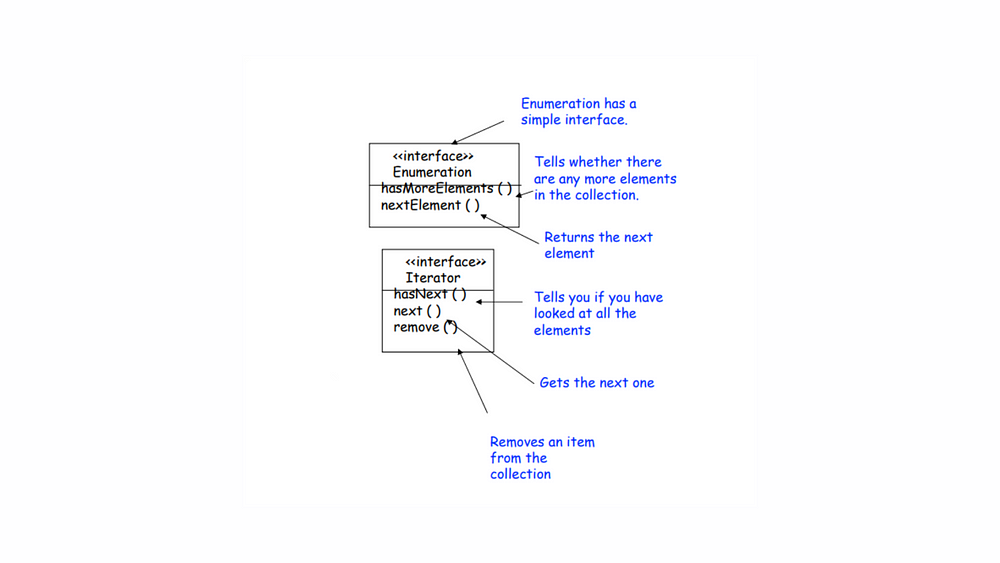
In the landscape of programming, particularly when dealing with collections in Kotlin and Java, we often navigate between legacy enumerators and modern iterators. In Java, the legacy Enumeration interface features straightforward methods like hasMoreElements() to check for remaining elements and nextElement() to retrieve the next item, representing a simpler time. In contrast, the modern Iterator interface—found in both Java and Kotlin—introduces a more robust approach, featuring hasNext(), next(), and even remove() (In Kotlin, the remove() method is part of the MutableIterator<out T> interface) for effective collection management.
Old world Enumerators & New world Iterators
Despite these advancements, many applications still rely on legacy code that exposes the Enumeration interface. This presents developers with a dilemma: how to seamlessly integrate this outdated system with newer code that prefers iterators. This is where the need for an adapter emerges, bridging the gap and allowing us to leverage the strengths of both worlds. By creating an adapter that implements the Iterator interface while wrapping an Enumeration instance, we can provide a smooth transition to modern coding practices without discarding the functionality of legacy systems.
Let’s examine the two interfaces
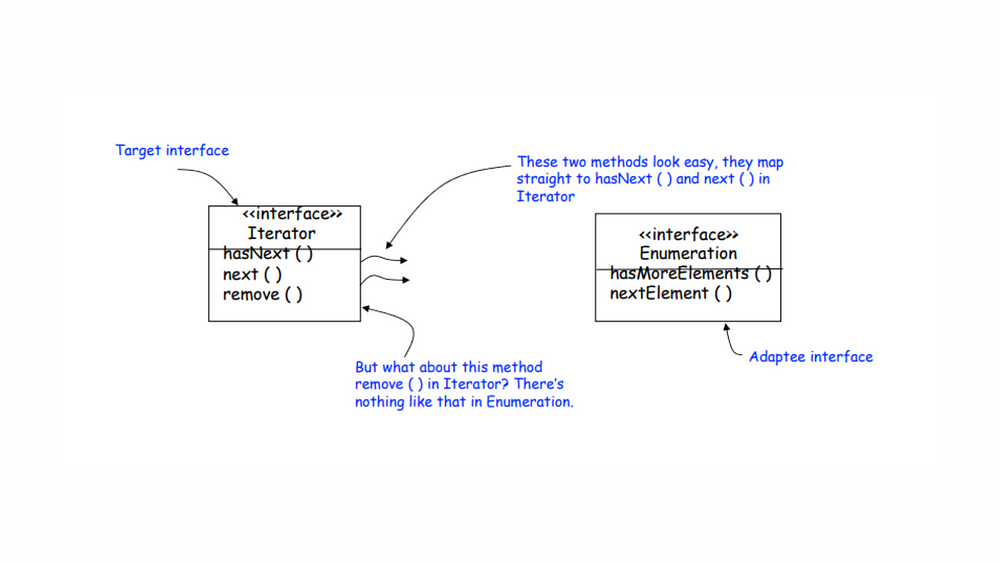
Adapting an Enumeration to an Iterator begins with examining the two interfaces. The Iterator interface includes three essential methods: hasNext(), next(), and remove(), while the older Enumeration interface features hasMoreElements() and nextElement(). The first two methods from Enumeration map easily to Iterator‘s counterparts, making the initial adaptation straightforward. However, the real challenge arises with the remove() method in Iterator, which has no equivalent in Enumeration. This disparity highlights the complexities involved in bridging legacy code with modern practices, emphasizing the need for an effective adaptation strategy to ensure seamless integration of the two interfaces.
Designing the Adapter
To effectively bridge the gap between the old-world Enumeration and the new-world Iterator, we will utilize methods from both interfaces. The Iterator interface includes hasNext(), next(), and remove(), while the Enumeration interface offers hasMoreElements() and nextElement(). Our goal is to create an adapter class, EnumerationIterator, which implements the Iterator interface while internally working with an existing Enumeration. This design allows our new code to leverage Iterators, even though an Enumeration operates beneath the surface. In essence, EnumerationIterator serves as the adapter, transforming the legacy Enumeration into a modern Iterator for your codebase, ensuring seamless integration and enhancing compatibility.
Dealing with the remove() Method
The Enumeration interface is a “read-only” interface that does not support the remove() method. This limitation implies that there is no straightforward way to implement a fully functional remove() method in the adapter. The best approach is to throw a runtime exception, as the Iterator designers anticipated this need and implemented an UnsupportedOperationException for such cases.
EnumerationIterator Adapter Code
Now, let’s look at how we can convert all of this into code.
Kotlin
import java.util.Enumerationimport java.util.Iterator// EnumerationIterator class implementing Iterator// Since we are adapting Enumeration to Iterator, // the EnumerationIterator must implement the Iterator interface // -- it has to look like the Iterator.classEnumerationIterator<T>(privateval enumeration: Enumeration<T>) : Iterator<T> {// We are adapting the Enumeration, using composition to store it in an instance variable.// hasNext() and next() are implemented by delegating to the corresponding methods in the Enumeration. // Checks if there are more elements in the enumerationoverridefunhasNext(): Boolean {return enumeration.hasMoreElements() }// Retrieves the next element from the enumerationoverridefunnext(): T {return enumeration.nextElement() }// For remove(), we simply throw an exception.overridefunremove() {throwUnsupportedOperationException("Remove operation is not supported.") }}
Here,
Generic Type: The EnumerationIterator class is made generic with <T> to handle different types of enumerations.
Constructor: The constructor takes an Enumeration<T> object as a parameter.
hasNext() Method: This method checks if there are more elements in the enumeration.
next() Method: This method retrieves the next element from the enumeration.
remove() Method: This method throws an UnsupportedOperationException, indicating that the remove operation is not supported.
Here, you can see how the EnumerationIterator can be utilized to iterate over the elements of an Enumeration. Please note that the elements() method is specific to classes like Vector or Stack, so ensure you have a valid Enumeration instance to test this example.
While the adapter may not be perfect, it provides a reasonable solution as long as the client is careful and the adapter is well-documented. This clarity ensures that developers understand the limitations and can work with the adapter effectively.
Conclusion
The EnumerationIterator Adapter offers a smooth and efficient way to modernize legacy Java code and Kotlin applications without sacrificing functionality. By converting an Enumeration to an Iterator, you can enhance compatibility with newer Java collections and APIs, as well as leverage Kotlin’s powerful collection functions, all while keeping your code clean and maintainable.
Whether you’re refactoring legacy systems in Java or Kotlin, or ensuring compatibility with modern practices, the EnumerationIterator Adapter provides a simple yet powerful solution. By incorporating this adapter into your projects, you’ll streamline your development process and make your code more adaptable for the future.
The Adapter Design Pattern is a fundamental concept in software engineering that allows incompatible interfaces to work together seamlessly. In a world where systems and components often need to communicate despite their differences, understanding the various types of Adapter Design Patterns becomes essential for developers. By acting as a bridge between disparate systems, these patterns...
In software development, we frequently face challenges when trying to connect different systems or components. One design pattern that can facilitate this integration is the Class Adapter Pattern. Despite its potential, many developers overlook this pattern in their day-to-day coding due to the complexities of multiple inheritance. However, with the right approach—by cleverly extending and...
In the fast-paced world of software development, it’s easy to overlook some of the powerful design patterns that can streamline our code and enhance its flexibility. One such pattern is the Object Adapter Design Pattern. While many developers use it in their projects, it often gets sidelined amid tight deadlines and urgent tasks. However, understanding this pattern can significantly improve the quality of our software architecture.
In this blog, we’ll dive into the Object Adapter Design Pattern, exploring its structure and purpose. I’ll guide you through a simple example to illustrate its implementation, showcasing how it can bridge the gap between incompatible interfaces. By the end, you’ll see why this pattern is an essential tool in your development toolkit—making your code not only more adaptable but also easier to maintain and extend. Let’s unlock the potential of the Object Adapter Design Pattern together!
Object Adapter Pattern Definition
The Object Adapter Pattern is a structural design pattern that allows objects with incompatible interfaces to collaborate by using composition rather than inheritance. Instead of modifying the existing class (adaptee), the adapter creates a bridge between the client and the adaptee by holding a reference to the adaptee. This approach enables flexible and reusable solutions without altering existing code.
In the Object Adapter Pattern, the adapter contains an instance of the adaptee and implements the interface expected by the client. It “adapts” the methods of the adaptee to fit the expected interface.
Structure of Object Adapter Pattern
Client: The class that interacts with the target interface.
Target Interface: The interface that the client expects.
Adaptee: The class with an incompatible interface that needs to be adapted.
Adapter: The class that implements the target interface and holds a reference to the adaptee, enabling the two incompatible interfaces to work together.
In this UML diagram of the Object Adapter Pattern,
Client → Depends on → Target Interface
Adapter → Implements → Target Interface
Adapter → Has a reference to → Adaptee
Adaptee → Has methods incompatible with the Target Interface
Key Points:
Object Adapter uses composition (by containing the adaptee) instead of inheritance, which makes it more flexible and reusable.
The adapter doesn’t alter the existing Adaptee class but makes it compatible with the Target Interface.
Simple Example
Let’s consider a simple scenario where we want to charge different types of phones, but their charging ports are incompatible.
The Client is a phone charger that expects to use a USB type-C charging port.
The Adaptee is an old phone that uses a micro-USB charging port.
The Adapter bridges the difference by converting the micro-USB interface to a USB type-C interface.
Step 1: Define the Target Interface
The charger (client) expects all phones to implement this interface (USB Type-C).
Kotlin
// Target interface that the client expectsinterfaceUsbTypeCCharger {funchargeWithUsbTypeC()}
Step 2: Define the Adaptee
This is the old phone, which only has a Micro-USB port. The charger can’t directly use this interface.
Kotlin
// Adaptee class that uses Micro-USB for chargingclassMicroUsbPhone {funrechargeWithMicroUsb() {println("Micro-USB phone: Charging using Micro-USB port") }}
Step 3: Create the Adapter
The adapter will “adapt” the Micro-USB phone to make it compatible with the USB Type-C charger. It wraps the MicroUsbPhone and translates the charging request.
Kotlin
// Adapter that makes Micro-USB phone compatible with USB Type-C chargerclassMicroUsbToUsbTypeCAdapter(privateval microUsbPhone: MicroUsbPhone) : UsbTypeCCharger {overridefunchargeWithUsbTypeC() {println("Adapter: Converting USB Type-C to Micro-USB") microUsbPhone.rechargeWithMicroUsb() // Delegating the charging to the Micro-USB phone }}
Step 4: Implement the Client
The client (charger) works with the target interface (UsbTypeCCharger). It can now charge a phone with a Micro-USB port by using the adapter.
Kotlin
funmain() {// Old phone with a Micro-USB port (Adaptee)val microUsbPhone = MicroUsbPhone()// Adapter that makes the Micro-USB phone compatible with USB Type-C chargerval usbTypeCAdapter = MicroUsbToUsbTypeCAdapter(microUsbPhone)// Client (USB Type-C Charger) charges the phone using the adapterprintln("Client: Charging phone using USB Type-C charger") usbTypeCAdapter.chargeWithUsbTypeC()}
Output:
Kotlin
Client: ChargingphoneusingUSBType-C chargerAdapter: ConvertingUSBType-C to Micro-USBMicro-USB phone: ChargingusingMicro-USB port
Here,
Client: The charger expects all phones to be charged using a USB Type-C port, so it calls chargeWithUsbTypeC().
Adapter: The adapter receives the request from the client to charge using USB Type-C. It converts this request and adapts it to the MicroUsbPhone by calling rechargeWithMicroUsb() internally.
Adaptee (MicroUsbPhone): The phone knows how to charge itself using Micro-USB. The adapter simply makes it compatible with the client’s expectation.
What’s Happening in Each Step
Client: The charger (client) is asking to charge a phone via USB Type-C.
Adapter: The adapter intercepts this request and converts it to something the old phone understands, which is charging via Micro-USB.
Adaptee (Micro-USB phone): The old phone proceeds with charging using its Micro-USB port.
This structure makes the responsibilities of each component clearer:
The adapter’s job is to convert between incompatible interfaces.
The client only works with the UsbTypeCCharger interface, while the old phone uses its own rechargeWithMicroUsb() method.
Object Adapter Pattern Short Recap
Object Adapter relies on composition rather than inheritance to adapt one interface to another.
It is used when you need to integrate an existing class (adaptee) with an interface that it does not implement.
This pattern ensures that you do not need to modify the adaptee class to make it compatible with a new system.
Advantages of Object Adapter Pattern
Flexibility: By using composition, the adapter pattern allows multiple adaptees to be wrapped by the same adapter without modifying the adaptee classes.
Code Reusability: The adapter allows reusing existing classes even if their interfaces do not match the required one.
Separation of Concerns: The client is decoupled from the adaptee, making the system easier to maintain and extend.
Conclusion
The Object Adapter Design Pattern serves as a powerful solution for integrating incompatible interfaces, making it a vital asset in our software development arsenal. By facilitating communication between different classes without modifying their source code, this pattern promotes flexibility and reusability, ultimately leading to cleaner, more maintainable code.
As we’ve explored, implementing the Object Adapter not only simplifies complex interactions but also enhances the scalability of your applications. Whether you’re working on legacy systems or integrating new functionalities, the Object Adapter Design Pattern can help you tackle challenges with ease.
Embracing design patterns like the Object Adapter allows us to write code that is not just functional, but also elegant and robust. So, the next time you find yourself in a hurry, take a moment to consider how the Object Adapter can streamline your solution. By investing a little time to understand and apply this pattern, you’ll be well-equipped to create software that stands the test of time. Happy coding!
As a Kotlin developer, you’re no stranger to the numerous architectural patterns in Android app development. From the well-established MVP (Model-View-Presenter) to the widely-used MVVM (Model-View-ViewModel), and now, the emerging MVI (Model-View-Intent), it’s easy to feel lost in the sea of choices. But here’s the thing: MVI is rapidly becoming the go-to architecture for many,...
Mobile app architecture is one of the most crucial aspects of app development. It’s like building a house; if your foundation is shaky, no matter how fancy the decorations are, the house will collapse eventually. In this blog post, We’ll discuss the mobile app architecture goals, with an emphasis on creating systems that are independent...