Kotlin is a powerful programming language that fully supports Object-Oriented Programming (OOP). If you’re diving into Kotlin OOP Essentials, understanding classes, properties, and methods is crucial. This guide will break down these core concepts in a simple and engaging way, ensuring you master Kotlin’s OOP capabilities. Classes Classes serve as the fundamental building blocks in...
Generics are a powerful feature in Kotlin that allow us to write flexible and reusable code. However, one of the key aspects to understand when working with generics is Type Erasure. If you’ve ever tried to inspect a generic type at runtime and found unexpected behavior, you’ve likely encountered type erasure in Kotlin generics. In...
Exception handling is a crucial part of Java programming. It ensures that programs can gracefully handle unexpected situations without crashing. Java categorizes exceptions into checked and unchecked exceptions, but a lesser-known distinction exists within checked exceptions: fully and partially checked exceptions.
In this blog, we’ll explore how Java handles fully and partially checked exceptions, using clear explanations and examples to help you understand the topic deeply.
Understanding Checked Exceptions
Checked exceptions are exceptions that the compiler mandates you to handle explicitly. If your code calls a method that throws a checked exception, you must either handle it using a try-catch block or declare it using the throws keyword.
Here, FileNotFoundException is a checked exception. The compiler forces us to handle it because it is anticipated that a file may not always be available.
Fully Checked Exceptions in Java
A fully checked exception is an exception where all its subclasses are also checked exceptions. This means that whenever you work with this exception or any of its subclasses, the compiler enforces explicit handling.
Example of a Fully Checked Exception
IOException is a fully checked exception because all its subclasses, such as FileNotFoundException and EOFException, are also checked exceptions.
Here, the IOException must be handled explicitly, and its subclasses follow the same rule, making it a fully checked exception.
Partially Checked Exceptions in Java
A partially checked exception is an exception where some of its subclasses are checked exceptions, while others are unchecked exceptions.
The classic example of a partially checked exception is Exception. While many of its subclasses (like IOException and SQLException) are checked exceptions, others (like RuntimeException and its subclasses) are unchecked exceptions.
Here, Exception is a checked exception, but its subclass RuntimeException is unchecked, making Exception a partially checked exception.
How Java Handles Fully and Partially Checked Exceptions
Handling Fully Checked Exceptions
For fully checked exceptions, Java forces you to handle them at compile time. This ensures robust error handling but may sometimes lead to boilerplate code.
Handling Partially Checked Exceptions
With partially checked exceptions, the handling depends on which subclass you’re dealing with. If it’s a checked subclass (like IOException), you must handle it explicitly. However, if it’s an unchecked subclass (like NullPointerException), you don’t have to handle it, though it’s still advisable to do so where necessary.
Key Differences Between Fully and Partially Checked Exceptions
Exception Type
Fully Checked Exception
Partially Checked Exception
Definition
All subclasses are checked
Some subclasses are checked, some are unchecked
Example
IOException (all subclasses checked)
Throwable (Exception is checked, but Error is unchecked)
Compiler Handling
Must handle or declare all subclasses
Must handle only the checked subclasses
Some More Examples:
IOException: Fully checked exception.
RuntimeException: Unchecked exception.
InterruptedException: Fully checked exception.
Error: Unchecked exception.
Throwable: Partially checked exception.
ArithmeticException: Unchecked exception.
NullPointerException: Unchecked exception.
Exception: Partially checked exception.
FileNotFoundException: Fully checked exception.
Why Does Java Make This Distinction?
The main reason behind fully and partially checked exceptions is flexibility. Java enforces explicit handling for critical exceptions (e.g., file handling issues) while allowing unchecked exceptions (e.g., null pointer dereferences) to be handled at runtime without forcing developers to clutter code with try-catch blocks.
Conclusion
Understanding fully and partially checked exceptions in Java helps developers write better error-handling code. Fully checked exceptions require mandatory handling, ensuring code safety. Partially checked exceptions offer a balance between strict compilation checks and runtime flexibility. By mastering this distinction, you can write cleaner, more efficient Java programs while maintaining robust exception-handling practices.
By following Java’s structured approach to exception handling, you can build more reliable applications that gracefully recover from errors, leading to a better user experience and easier debugging.
Kotlin provides several function modifiers that improve code safety, performance, and flexibility. One such modifier is crossinline. If you’ve ever used inline functions in Kotlin, you might have come across crossinline but wondered why it’s needed. In this blog, we’ll break it down step by step, explaining why Kotlin has the crossinline modifier, when to use it, and how it works.
Before diving into crossinline, let’s first understand inline functions.
Understanding inline Functions in Kotlin
Kotlin allows functions to be marked as inline, meaning the compiler replaces function calls with the actual code at compile time. This helps reduce memory overhead caused by lambda expressions and improves performance.
Here, execute is an inline function, meaning the lambda function passed as block gets inlined at the call site, reducing the function call overhead.
Why Do We Need crossinline Modifier?
While inline functions provide performance benefits, they also introduce a limitation: they allow non-local returns from lambda expressions passed as parameters. This means a lambda can return from the calling function, which can sometimes be dangerous.
Kotlin
inlinefunperform(action: () -> Unit) {action()println("This will not execute if action() returns early")}funmain() {perform {println("Executing action")return// Non-local return, exits `main()` function }println("This will not print")}// OutputExecuting action
The return inside the lambda exits the main() function completely, skipping the rest of the code.
This Is Where crossinline Helps..!
If you don’t want the lambda to allow non-local returns, you use crossinline. This forces the lambda to behave like a regular function, preventing premature function exits.
How Does crossinline Modifier Work?
When a lambda parameter is marked with crossinline, it means that the lambda cannot use non-local returns but can still be inlined. This is particularly useful when passing the lambda to another function inside the inline function.
Kotlin
inlinefunperformSafely(crossinline action: () -> Unit) {println("Before action")// Lambda is stored in a Runnable object instead of being executed immediatelyval runnable = Runnable { action() } // Now the lambda is executed runnable.run()println("After action")}funmain() {performSafely {println("Executing action")// return // This will cause a compilation error }}// Output Before actionExecuting actionAfter action
Here, if we try to use return inside the lambda, Kotlin throws a compilation error because crossinline prevents non-local returns.
Without Runnable, the lambda (action) runs immediately inside performSafely.
But when we use Runnable, the lambda gets stored inside an object and runs later.
When We Should Use crossinline Modifier?
We should use crossinline in the following cases:
When passing a lambda to another function: If you store the lambda inside an object or pass it to another function, a non-local return might not make sense. crossinline prevents such issues.
When ensuring predictable execution: If you want the lambda to behave like a normal function (without returning early), crossinline ensures safe execution.
When working with multi-threading: If the lambda gets executed in another thread, a non-local return would cause unexpected behavior, making crossinline necessary.
Avoid using crossinline modifierif:
You need the flexibility of non-local returns.
The function is simple and doesn’t require lambda constraints.
The crossinline modifier in Kotlin serves a crucial role in ensuring safe execution of lambdas in inline functions. It prevents unexpected non-local returns, making code more predictable when working with higher-order functions.
Next time you’re writing an inline function and passing lambdas around, think about whether crossinline is needed to prevent unintended control flow issues.
Understanding the crossinline modifier helps you write more robust and predictable Kotlin code. Now that you know why Kotlin has crossinline, you can use it effectively in your projects..!
Type checking is a fundamental concept in programming, and Kotlin makes it simple with is and !is. These operators help you check whether an object is of a certain type and allow you to write safe and concise code. In this post, we’ll break down how type checks (is and !is) in Kotlin work, with clear examples to help you understand their use cases.
What Are Type Checks in Kotlin?
In Kotlin, every variable has a type. Sometimes, you need to confirm whether a variable belongs to a particular type before performing operations on it. The is operator checks if an object is of a specified type, while !is checks if it is not.
So, Kotlin provides two primary operators for type checking:
is – Checks if an object is of a particular type.
!is – Checks if an object is NOT of a particular type.
Let’s explore each of these in detail with examples.
How the is Operator Works
The is operator checks whether an object is of a specific type. If the object matches the type, it returns true; otherwise, it returns false.
Kotlin
funcheckType(value: Any) {if (valueis String) {println("It's a string with length: ${value.length}") } else {println("Not a string") }}funmain() {checkType("Hello, Kotlin!") // Output: It's a string with length: 14checkType(42) // Output: Not a string}
Here,
value is String checks if value is of type String.
If value is indeed a String, Kotlin automatically casts it within the if block.
This smart casting avoids explicit type conversion, making the code cleaner.
How the !is Operator Works
The !is operator is the opposite of is. It checks whether an object is not of a certain type.
Kotlin
funcheckNotType(value: Any) {if (value !is Int) {println("Not an Integer") } else {println("It's an Integer with value: $value") }}funmain() {checkNotType(100) // Output: It's an Integer with value: 100checkNotType("Kotlin") // Output: Not an Integer}
value !is Int returns true if value is not an Int.
If value is not an Int, it prints “Not an Integer”.
Otherwise, it prints the integer value.
Type Checking with when Expressions
Kotlin’s when expression works well with type checks (is and !is). This is especially useful for handling multiple types in a concise manner.
Kotlin
funidentifyType(value: Any) {when (value) {is String ->println("It's a string of length ${value.length}")is Int ->println("It's an integer: $value")is Double ->println("It's a double: $value")else->println("Unknown type") }}funmain() {identifyType("Hello") // Output: It's a string of length 5identifyType(10) // Output: It's an integer: 10identifyType(5.5) // Output: It's a double: 5.5identifyType(true) // Output: Unknown type}
when checks the type of value using is.
Depending on the type, it prints an appropriate message.
The else block ensures unhandled types don’t cause errors.
Smart Casting and Type Safety
One of Kotlin’s biggest advantages is smart casting, which reduces the need for explicit type casting.
Kotlin
funprintLength(obj: Any) {if (obj is String) {// Smart cast: No need to explicitly cast obj to Stringprintln("String length: ${obj.length}") }}funmain() {printLength("Kotlin") // Output: String length: 6}
Why is this useful?
No need for explicit casting (obj as String).
Improves readability and prevents unnecessary type conversion errors.
Common Mistakes and Best Practices
1. Forgetting the Smart Cast Scope
Kotlin
funinvalidCast(obj: Any) {if (obj is String) {// Smart cast works hereprintln(obj.length) }// println(obj.length) // Error: Smart cast is lost outside if block}
Solution: Store the casted value in a variable if needed outside the block.
is works with nullable types, but the variable remains nullable outside the if block.
Use the safe call operator (?.) to avoid NullPointerException.
3. Also, use when for Multiple Type Checks – This makes code cleaner and more readable.
Conclusion
Type checks (is and !is) in Kotlin are powerful tools for ensuring type safety and improving code clarity. The is operator checks if a variable belongs to a specific type, while !is ensures it doesn’t. These operators shine in if conditions, when expressions, and smart casting scenarios, making Kotlin a safer and more intuitive language.
Kotlin is a powerful and expressive language, but it introduces some challenges when dealing with mutable variables inside lambdas. If you’ve ever encountered issues while capturing mutable variables in Kotlin lambdas, you’re not alone. Many developers struggle with this concept, leading to unexpected behavior, performance concerns, and even compiler errors. In this blog post, we’ll...
Kotlin is known for its expressive and concise syntax, but one of the lesser-understood features is non-local returns in Kotlin lambda. This concept plays a crucial role in handling control flow inside lambda expressions. In this blog, we will explore what non-local returns are, how they work, and when to use them effectively. What Are...
Kotlin lambdas are powerful, but they come with a constraint: they can only capture final (effectively immutable) variables from their enclosing scope. This can be a challenge when you need to modify a variable inside a lambda. In this blog, we will explore why this restriction exists and the workarounds you can use to capture...
Kotlin provides a rich set of utilities for handling collections, making it easier to work with lists and arrays. However, many developers run into issues when trying to convert between different collection types, especially when moving from an immutable List to a MutableList or an Array. In this guide, we’ll cover all possible ways to perform these conversions efficiently and correctly.
Converting a List to a MutableList in Kotlin
By default, a List<T> in Kotlin is immutable, meaning you cannot modify its contents after initialization. If you attempt to change elements using indexing, you’ll encounter the following error:
Kotlin
No 'set'operator method providing array access
This happens because an immutable List does not have a set function. To modify a list, you must first convert it into a MutableList<T>. Let’s explore different ways to achieve this.
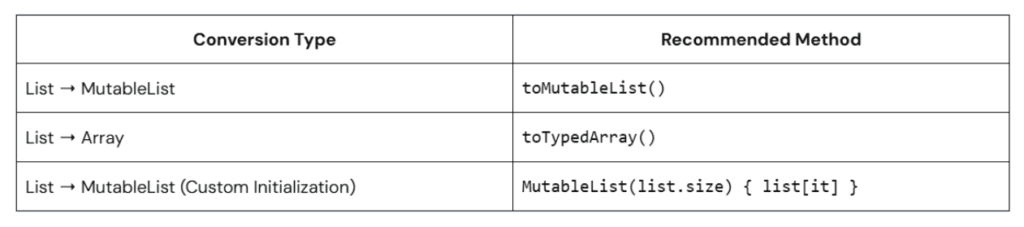
1. Using toMutableList() (Recommended)
This is the simplest and most idiomatic way to convert an immutable list into a mutable one:
Kotlin
val list = listOf(1, 2, 3) // Immutable listval mutableList = list.toMutableList() // Converts to MutableListmutableList[0] = 10// Works fineprintln(mutableList) // Output: [10, 2, 3]
Pros: Simple, clear, and concise.
Cons: Creates a new list instead of modifying the original one.
2. Using MutableList() Constructor
If you want to explicitly create a new MutableList, you can use:
Kotlin
val list = listOf("A", "B", "C")val mutableList = MutableList(list.size) { list[it] }mutableList[1] = "X"// Works fineprintln(mutableList) // Output: [A, X, C]
Pros: Useful when you need control over initialization.
Cons: Requires a manual copy of elements.
3. Using ArrayList() Constructor
Since ArrayList implements MutableList, you can convert a List to an ArrayList directly:
Kotlin
val list = listOf(4, 5, 6)val arrayList = ArrayList(list) // Converts to MutableListarrayList.add(7) // Works fineprintln(arrayList) // Output: [4, 5, 6, 7]
Pros: Works well with Java interoperability.
Cons: Less idiomatic in pure Kotlin.
4. Using toCollection()
This method allows you to add elements from an immutable list into a mutable collection:
Kotlin
val list = listOf(100, 200, 300)val mutableList = list.toCollection(ArrayList())mutableList.add(400) // Works fineprintln(mutableList) // Output: [100, 200, 300, 400]
Pros: Provides flexibility in choosing a mutable collection.
Cons: Slightly verbose.
Converting a List to an Array in Kotlin
While lists are more commonly used in Kotlin, there are cases where you need to convert a List<T> into an Array<T>, especially when interacting with Java APIs. Here are different ways to achieve this:
1. Using toTypedArray() (Recommended)
This method is the simplest way to convert a List<T> to an Array<T>:
Kotlin
val list = listOf(1, 2, 3)val array: Array<Int> = list.toTypedArray() // Converts List to Arrayprintln(array.joinToString()) // Output: 1, 2, 3
Pros: Works for all types and is easy to use.
Cons: Creates a new array instead of modifying an existing one.
2. Using Array(size) { list[it] } (Manual Copy)
If you need more control over initialization, you can create an array manually:
Kotlin
val list = listOf(10, 20, 30)val array = Array(list.size) { list[it] }println(array.joinToString()) // Output: 10, 20, 30
Pros: Provides explicit control over array creation.
Cons: Slightly verbose compared to toTypedArray().
Which Approach Should You Use?
Conclusion
Kotlin makes it easy to convert between lists and arrays with its powerful utility functions. While toMutableList() and toTypedArray() are the most recommended methods, other techniques can be useful depending on your specific use case. Understanding these conversions ensures smoother interoperability with Java and better flexibility when managing collections in Kotlin.
By following these best practices, you’ll write cleaner, and more efficient Kotlin code.
Kotlin provides powerful support for functional programming, and lambdas play a crucial role in making your code concise and expressive. However, when dealing with multiple lambda parameters, naming conflicts or ambiguity can arise. That’s where qualifying lambda parameters in Kotlin comes in. In this blog, we’ll explore why qualifying lambda parameters is important, how to...