When working with data structures in Kotlin, arrays and lists often come to mind first. They’re built-in, simple, and cover most scenarios. But sometimes you need more control over how elements are connected, inserted, or removed. That’s where a Doubly Linked List in Kotlin shines. In this blog, we’ll explore what a doubly linked list...
Sorting is a fundamental part of programming. Whether you’re working with numbers, strings, or custom objects, knowing how sorting algorithms work builds your understanding of how data is organized behind the scenes. In this guide, we’ll explore the Kotlin Insertion Sort algorithm in detail, walking through its logic and code.
What Is Insertion Sort?
Insertion sort is one of the simplest sorting algorithms. It works the same way many people sort playing cards:
Start with the first card in your hand.
Pick the next card and insert it into the right position among the already sorted cards.
Repeat this until all cards are sorted.
In other words, insertion sort builds the sorted list one element at a time.
Why Learn Insertion Sort in Kotlin?
While Kotlin offers built-in sorting functions like sorted() or sortBy(), understanding Kotlin Insertion Sort helps you:
Learn the logic behind sorting.
Improve problem-solving and algorithmic thinking.
Understand time complexity (important in interviews).
Get hands-on with Kotlin basics like loops, arrays, and variables.
How Insertion Sort Works: Step-by-Step
Let’s break it down:
Start with the second element of the array (since the first element is already “sorted”).
Compare it with the elements before it.
If it’s smaller, shift the larger element one position to the right.
Insert the element into the correct position.
Repeat for all elements until the entire array is sorted.
Kotlin Insertion Sort Code
Here’s a clean implementation of the algorithm in Kotlin:
Kotlin
funinsertionSort(arr: IntArray) {val n = arr.sizefor (i in1 until n) {val key = arr[i]var j = i - 1// Move elements greater than key one step aheadwhile (j >= 0 && arr[j] > key) { arr[j + 1] = arr[j] j-- } arr[j + 1] = key }}funmain() {val numbers = intArrayOf(9, 5, 1, 4, 3)println("Before sorting: ${numbers.joinToString()}")insertionSort(numbers)println("After sorting: ${numbers.joinToString()}")}
fun insertionSort(arr: IntArray) → We define a function that takes an integer array as input.
for (i in 1 until n) → Loop starts from index 1 (since index 0 is already “sorted”).
val key = arr[i] → The current element we want to insert in the right position.
while (j >= 0 && arr[j] > key) → Shift elements greater than key one step forward.
arr[j + 1] = key → Place the element in its correct spot.
The main function demonstrates sorting an array [9, 5, 1, 4, 3].
Before sorting: 9, 5, 1, 4, 3
After sorting: 1, 3, 4, 5, 9
Time Complexity of Insertion Sort
Best Case (Already Sorted): O(n)
Worst Case (Reverse Sorted): O(n²)
Average Case: O(n²)
Insertion sort is not the most efficient for large datasets, but it works well for small arrays and nearly sorted data.
Advantages of Kotlin Insertion Sort
Easy to implement and understand.
Works efficiently for small or nearly sorted data.
Stable algorithm (keeps equal elements in the same order).
In-place sorting (doesn’t require extra memory).
When to Use Insertion Sort in Kotlin
For small data sets where performance isn’t critical.
When you expect the data to be almost sorted.
For educational purposes to build a strong foundation in sorting.
Conclusion
The Kotlin Insertion Sort algorithm is a simple yet powerful way to understand sorting from the ground up. While you’ll often rely on Kotlin’s built-in sorting functions in real-world applications, practicing with insertion sort sharpens your coding skills and deepens your understanding of algorithm design.
By walking through the logic step by step and testing with code, you’ve now got a solid grasp of how insertion sort works in Kotlin.
When you start learning data structures in Kotlin, one of the most useful (and surprisingly elegant) structures you’ll come across is the binary tree. Whether you’re preparing for coding interviews, working on algorithms, or building efficient applications, Binary Trees in Kotlin are a must-have tool in your developer toolkit.
In this post, we’ll take deep dive into binary trees — starting from the basics, moving into real Kotlin code, and exploring advanced concepts. By the end, you’ll not only understand them but also know how to implement and apply them in real-world scenarios.
What Is a Binary Tree?
A binary tree is a hierarchical data structure where each node has at most two children:
Left child
Right child
The top node is called the root, and the last nodes with no children are called leaves.
Why use binary trees? Because they make searching, sorting, and organizing data efficient. Structures like Binary Search Trees (BST), heaps, and even syntax parsers in compilers rely on binary trees under the hood.
Defining a Binary Tree in Kotlin
Kotlin makes it easy to define data structures using classes. Let’s start simple:
Kotlin
// Node of a binary treeclassTreeNode<T>(valvalue: T) {var left: TreeNode<T>? = nullvar right: TreeNode<T>? = null}
Here,
Each node stores a value.
It can have a left child and a right child.
We’re using generics (<T>) so the tree can hold any type of data (Int, String, custom objects, etc.).
This flexible design means we can now create and connect nodes to form a tree.
This builds the same tree as before, but dynamically by inserting values.
Advanced: Balancing and Height of Trees
Binary trees can get skewed if values are inserted in sorted order. For example, inserting 1, 2, 3, 4, 5 creates a “linked list” shaped tree, which defeats the efficiency.
That’s where balanced trees (like AVL Trees or Red-Black Trees) come into play. While implementing them from scratch is complex, so, understanding the height of a tree is the first step:
In an AVL Tree, the heights of the left and right subtrees of any node can differ by at most 1.
In a Red-Black Tree, balance is maintained using color properties and black-height rules.
Thus, height is foundational for understanding balance, though balanced trees enforce it using additional rules and (sometimes) rotations.
Real-World Applications of Binary Trees
Binary trees aren’t just academic exercises. They’re used in:
Databases (indexing and searching)
Compilers (syntax parsing using expression trees)
Games (AI decision-making with decision trees)
Networking (routing tables)
So, mastering binary trees in Kotlin gives you both practical coding skills and deeper algorithmic insight.
Conclusion
Binary trees may look intimidating at first, but with Kotlin’s clean syntax and strong type system, they become intuitive and fun to implement. From simple trees to Binary Search Trees and beyond, you now have a solid foundation.
Next time you see a coding challenge or need to optimize a search algorithm, you’ll know exactly how to leverage Binary Trees in Kotlin.
If you’re diving into the world of Kotlin and exploring data structures, you’ve probably come across linked lists. While arrays and lists are common in Kotlin development, understanding linked lists can open up new levels of flexibility in your coding journey. In this guide, we’ll unravel what linked lists are, why you might need them, and most importantly, how to create and use linked lists in Kotlin.
What is a Linked List?
A Linked List is a data structure consisting of a sequence of elements, called nodes.
Each node has two components:
Data: The value we want to store.
Next: A reference to the next node in the sequence.
Unlike arrays, Linked Lists are dynamic in size, offering efficient insertions and deletions at any position in the list.
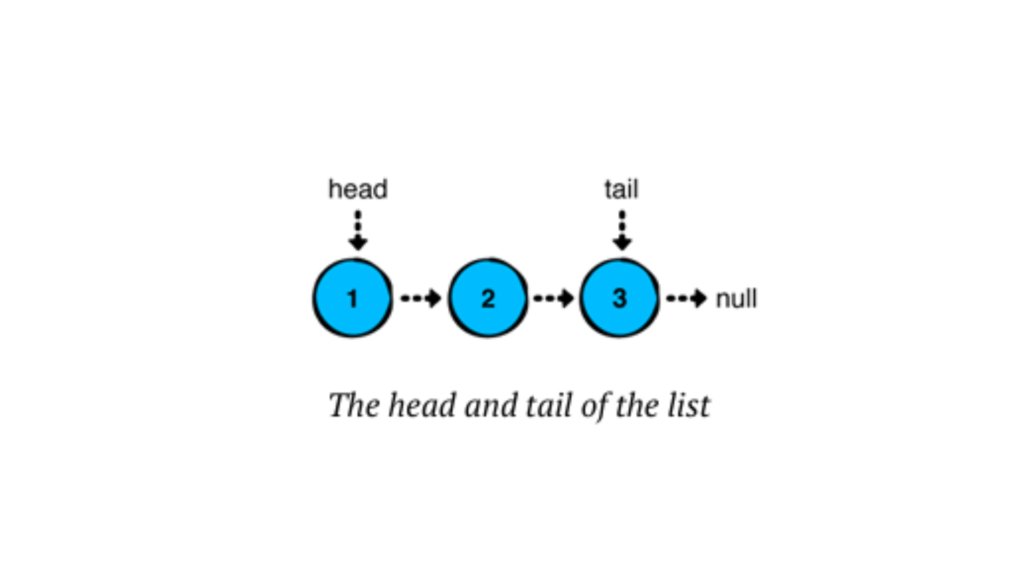
In a linked list, each node stores a value and points to the next node in the chain. The last node in the sequence points to “null,” indicating the end of the list.
Linked lists have several advantages over arrays or ArrayLists in Kotlin:
Quick insertions and removals at the front of the list.
Consistent performance for operations, especially for inserting or removing elements anywhere in the list.
Types of Linked Lists
Singly Linked List — Each node points to the next node in the sequence (we’ll focus on this one).
Doubly Linked List — Each node has a reference to both the next and the previous node.
Circular Linked List — The last node points back to the first node, forming a loop.
Building a Singly Linked List in Kotlin
Kotlin doesn’t offer a built-in linked list class like Java does. But no worries! We’re going to create our own custom Singly Linked List step-by-step. Let’s create a linked list from scratch! We’ll start by defining the Node class and then build a LinkedList class to manage the nodes.
Defining the Node Class
Each node needs to store data and a reference to the next node. Here’s our Node class:
Kotlin
// We define a node of the linked list as a data class, where it holds a value and a reference to the next node.dataclassNode<T>(varvalue: T, var next: Node<T>? = null) {overridefuntoString(): String {returnif (next != null) "$value -> ${next.toString()}"else"$value" }}funmain() {val node1 = Node(value = 1)val node2 = Node(value = 2)val node3 = Node(value = 3) node1.next = node2 node2.next = node3 //here node3 points to null at last, as per our code we only print its valueprintln(node1)}//OUTPUT1->2->3
Here, we defined a generic Node class for a linked list in Kotlin. Each Node holds a value of any type (T) and a reference to the next Node, which can be null. The toString() method provides a custom string representation for the node, recursively displaying the value of the node followed by the values of subsequent nodes, separated by ->. If the node is the last in the list, it simply shows its value.
Have you observed how we constructed the list above? We essentially created a chain of nodes by linking their ‘next’ references. However, building lists in this manner becomes impractical as the list grows larger. To address this, we can use a LinkedList, which simplifies managing the nodes and makes the list easier to work with. Let’s explore how we can implement this in Kotlin.
Creating the LinkedList Class
Let’s create our LinkedList class and add core functionalities like adding nodes and displaying the list.
Basically, a linked list has a ‘head’ (the first node) and a ‘tail’ (the last node). In a singly linked list, we usually only deal with the head node, although the tail node can also be relevant, especially when adding elements at the end. The tail node becomes more important in doubly linked lists or circular linked lists, where it supports bidirectional traversal or maintains circular references. However, here, we will use both nodes in a singly linked list.
Kotlin
classLinkedList<T> {privatevar head: Node<T>? = nullprivatevar tail: Node<T>? = nullprivatevar size = 0// Method to check if the list is emptyfunisEmpty(): Boolean = size == 0// to print nodes in linkedlistoverridefuntoString(): String {if (isEmpty()) {return"Empty list" } else {return head.toString() } }}
Here, a linked list has a ‘head’ (the first node) and a ‘tail’ (the last node). We’ll also store the list’s size in a ‘size’ property.
Now, to use this linked list, we need to store or add some values to it. Otherwise, we’d only be using an empty list. There are three major operations for adding values to a linked list, and we’ll explore each one in more details in the next blog. First, let’s see how to add a new value (or node) to the linked list and then print the result.
Kotlin
// Method to add a new node at the beginningfunaddFirst(data: T) {val newNode = Node(data) newNode.next = head head = newNode size++}
Here, we first create a new node with the passed value. Then, the new node’s next points to the head, and finally, we update the head to point to the newly created node. The same process is repeated whenever we add a new value.
Note: Whenever a new value is added, the list size increases. Therefore, we need to increment the size accordingly.
Now, let’s look at the complete code.
Kotlin
classLinkedList<T> {privatevar head: Node<T>? = nullprivatevar tail: Node<T>? = nullprivatevar size = 0// Method to check if the list is emptyfunisEmpty(): Boolean = size == 0// to print nodes in linkedlistoverridefuntoString(): String {if (isEmpty()) {return"Empty list" } else {return head.toString() } }// Method to add a new node at the beginningfunaddFirst(data: T) {val newNode = Node(data) newNode.next = head head = newNode size++ }}
Using the Linked List in Kotlin
Let’s put our linked list to the test! Here’s how we can use the LinkedList class:
Kotlin
funmain() {val myList = LinkedList<String>()println("Is the list empty? ${myList.isEmpty()}") myList.addFirst("Kotlin") myList.addFirst("Hello")println(myList) // Output: Hello -> Kotlin -> nullprintln("Is the list empty? ${myList.isEmpty()}")}
Output
Kotlin
Is the list empty? trueHello -> KotlinIs the list empty? false
Conclusion
We’ve explored the key insertion operations in linked lists, along with the foundational concepts and structure that make them an essential part of data management. Understanding these operations provides a solid base for working with linked lists in various scenarios.
Linked lists might seem daunting, but with a bit of practice, you’ll be using them like a pro.
The Fibonacci sequence isn’t just math trivia — it’s a timeless example used in coding interviews, algorithm practice, and real-world software optimization. In this guide, we’ll explore how to implement Fibonacci in Kotlin using: Recursion — Easy to grasp, but not the fastest. Loops — Simple and efficient. Dynamic Programming — Optimized for large numbers. What is the Fibonacci Sequence? The Fibonacci sequence...
When most developers search for “Generate All Permutations of a String”, they find solutions that work but are often slow, overly complex, or hard to read. Today, we’re going to cut through the noise and build a simple, fast, and easy-to-understand Kotlin solution that runs in O(n) time per permutation — which is as efficient as it...
If you’ve ever dived into programming, chances are you’ve come across the famous Fibonacci sequence. It’s a classic problem that teaches us a lot about algorithms and optimization techniques. In this ultimate guide, we’ll explore Fibonacci in Kotlin Using Dynamic Programming in a friendly and easy-to-understand way. Whether you’re a beginner or an experienced Kotlin...
If you’ve just started learning Kotlin and want to practice loops in a real-world example, generating the Fibonacci series is a perfect choice. It’s simple enough to grasp, yet teaches you how to handle variables, loops, and logic in Kotlin efficiently.
In this guide, we’ll explore Fibonacci Using Loops in Kotlin, break down the code step-by-step, and keep it beginner-friendly — without skipping important details.
What is the Fibonacci Sequence?
The Fibonacci sequence is a series of numbers where each number is the sum of the two before it.
It starts like this:
Kotlin
0, 1, 1, 2, 3, 5, 8, 13, 21, 34...
Mathematically:
Kotlin
F(n) = F(n-1) + F(n-2)
Where:
F(0) = 0
F(1) = 1
Why Use Loops Instead of Recursion?
While recursion can generate Fibonacci numbers, it’s less efficient for large sequences because:
It repeats calculations unnecessarily.
It uses more memory due to function calls.
Using loops in Kotlin: Saves memory. Runs faster. Easier to understand for beginners.
That’s why Fibonacci Using Loops in Kotlin is both simple and efficient.
Kotlin Program for Fibonacci Using Loops
Here’s the complete Kotlin code:
Kotlin
funmain() {val terms = 10// Number of Fibonacci numbers to printvar first = 0var second = 1println("Fibonacci Series using loops:")for (i in1..terms) {print("$first ")// Calculate the next numberval next = first + second first = second second = next }}
Step-by-Step Code Explanation
Let’s break it down so you truly understand:
1. Declaring Variables
Kotlin
funmain() {val terms = 10// Number of Fibonacci numbers to printvar first = 0var second = 1println("Fibonacci Series using loops:")for (i in1..terms) {print("$first ")// Calculate the next numberval next = first + second first = second second = next }}
terms → how many numbers you want to print.
first and second → the first two Fibonacci numbers.
2. Using a Loop
Kotlin
for (i in1..terms) {print("$first ")val next = first + second first = second second = next}
Loop runs from 1 to terms → controls how many numbers are printed.
print("$first ") → displays the current number.
val next = first + second → calculates the next Fibonacci number.
We then shift the values:
first becomes the old second.
second becomes the new next.
Not clear — let’s dry run it for better understanding.
Iteration 1 (i = 1)
Print first → prints 0
next = first + second = 0 + 1 = 1
Update: first = second = 1 second = next = 1
Output:0
Iteration 2 (i = 2)
Print first → prints 1
next = 1 + 1 = 2
Update: first = 1 second = 2
Output:0 1
Iteration 3 (i = 3)
Print first → prints 1
next = 1 + 2 = 3
Update: first = 2 second = 3
Output:0 1 1
Iteration 4 (i = 4)
Print first → prints 2
next = 2 + 3 = 5
Update: first = 3 second = 5
Output:0 1 1 2
Iteration 5 (i = 5)
Print first → prints 3
next = 3 + 5 = 8
Update: first = 5 second = 8
Output:0 1 1 2 3
Iteration 6 (i = 6)
Print first → prints 5
next = 5 + 8 = 13
Update: first = 8 second = 13
Output:0 1 1 2 3 5
Iteration 7 (i = 7)
Print first → prints 8
next = 8 + 13 = 21
Update: first = 13 second = 21
Output:0 1 1 2 3 5 8
Iteration 8 (i = 8)
Print first → prints 13
next = 13 + 21 = 34
Update: first = 21 second = 34
Output:0 1 1 2 3 5 8 13
Iteration 9 (i = 9)
Print first → prints 21
next = 21 + 34 = 55
Update: first = 34 second = 55
Output:0 1 1 2 3 5 8 13 21
Iteration 10 (i = 10)
Print first → prints 34
next = 34 + 55 = 89
Update: first = 55 second = 89
Output:0 1 1 2 3 5 8 13 21 34
Final Output
If terms = 10, output will be:
Kotlin
Fibonacci Series using loops:0112358132134
Tips to Make It Even Better
User Input: Instead of hardcoding terms, ask the user how many numbers they want.
Kotlin
print("Enter the number of terms: ")val n = readLine()!!.toInt()
Formatting: Add commas or line breaks for readability.
Performance: This loop method already runs in O(n) time, making it efficient even for large terms.
Why This Approach Works Well
The Fibonacci Using Loops in Kotlin approach is ideal for:
Beginners learning loops.
Anyone needing quick and efficient Fibonacci generation.
Avoiding recursion stack overflow for large sequences.
It’s clean, easy to debug, and performs well.
Conclusion
The Fibonacci sequence is a timeless example for learning programming logic. By using loops in Kotlin, you get the perfect balance between simplicity and efficiency. Whether you’re practicing for interviews or just improving your coding skills, this method will serve you well.
Next time you think about Fibonacci, remember — you don’t always need recursion. A good old loop can do the job beautifully.
If you’ve ever been fascinated by numbers that seem to appear everywhere in nature — from the petals of flowers to the spirals in seashells — then you’ve already met the Fibonacci sequence.
In this blog, we’ll explore Fibonacci Sequence in Kotlin Using Recursion step by step. We’ll start with the theory, then move into writing simple yet powerful Kotlin code. Everything will be easy to follow, and beginner-friendly.
Understanding the Fibonacci Sequence
The Fibonacci sequence is a series of numbers where:
Kotlin
F(n) = F(n-1) + F(n-2)
with:
Kotlin
F(0) = 0F(1) = 1
So, the sequence begins like this:
Kotlin
0, 1, 1, 2, 3, 5, 8, 13, 21, ...
Each term is the sum of the previous two terms. It’s a simple rule with surprisingly deep applications — mathematics, art, computer science, and even stock market analysis.
Why Use Recursion?
Recursion is when a function calls itself to solve smaller parts of a problem. In the case of the Fibonacci sequence, recursion works naturally because the definition of Fibonacci is already recursive in nature:
To find F(n), you find F(n-1) and F(n-2) and add them.
Each of those smaller problems breaks down further until you hit the base case (F(0) or F(1)).
Think of it like climbing stairs:
To reach the nth step, you must have come from either step (n-1) or (n-2).
You keep breaking it down until you reach the first or second step.
Writing Fibonacci Sequence in Kotlin Using Recursion
Here’s the code:
Kotlin
funfibonacci(n: Int): Int {// Base cases: when n is 0 or 1if (n == 0) return0if (n == 1) return1// Recursive callreturnfibonacci(n - 1) + fibonacci(n - 2)}funmain() {val terms = 10println("Fibonacci sequence up to $terms terms:")for (i in0 until terms) {print("${fibonacci(i)} ") }}
Code Explanation
1. Base Cases
Kotlin
if (n == 0) return0if (n == 1) return1
These are our stopping points. If n is 0 or 1, we simply return the value without further calculations.
2. Recursive Step
Kotlin
returnfibonacci(n - 1) + fibonacci(n - 2)
The function calls itself twice:
Once for the previous term (n-1)
Once for the term before that (n-2) It then adds them together to produce the nth term.
3. Main Function
Kotlin
for (i in0 until terms) {print("${fibonacci(i)} ")}
We loop through and print the first terms Fibonacci numbers, giving us a clean, readable sequence.
A Note on Performance
While Fibonacci Sequence in Kotlin Using Recursion is elegant and easy to understand, pure recursion can be slow for large n because it recalculates the same values multiple times.
Example:
fibonacci(5) calls fibonacci(4) and fibonacci(3).
But fibonacci(4) again calls fibonacci(3) — we’re repeating work.
Solution: Use memoization or dynamic programming to store results and avoid recalculations. But for learning recursion, the basic approach is perfect.
Real-World Applications
Algorithm practice: Great for learning recursion and problem-solving.
Mathematical modeling: Growth patterns in populations or financial data.
Computer graphics: Spiral designs and procedural patterns.
Key Takeaways
The Fibonacci sequence is naturally suited to recursion because of its self-referential definition.
Kotlin makes it clean and readable with its concise syntax.
For small inputs, recursion works perfectly, but for larger inputs, optimization is needed.
Conclusion
Recursion is like magic — it hides complexity behind a few lines of code. With the Fibonacci Sequence in Kotlin Using Recursion, you get both an elegant algorithm and a deep understanding of how problems can solve themselves step by step.
When working with strings in Kotlin, you may encounter scenarios where you need to find the first character that does not repeat. This problem is common in text processing, competitive programming, and software development. In this blog, we’ll walk through an efficient approach to finding the first non-repeating character in a string using Kotlin. We’ll...