Android Studio and Gradle: The Dynamic Duo of Android Development
Android Studio and Gradle are two essential tools for developing Android applications. Android Studio is the official integrated development environment (IDE) for Android, while Gradle is the build system used to compile and package your code into an Android application package (APK) file.
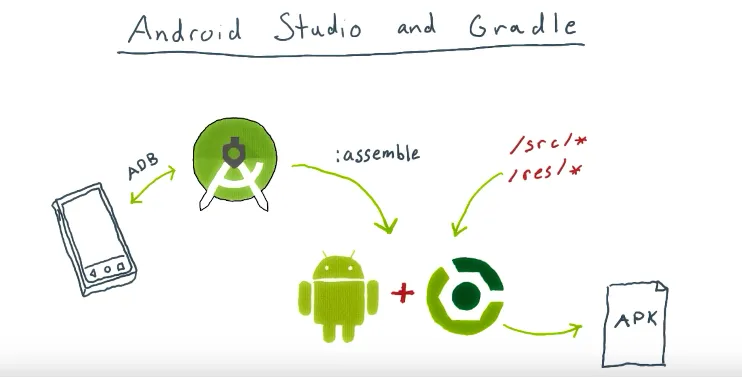
Android Studio has an editor with sophisticated code completion and static analysis features. It also has a suite of tools for integrating with Android devices and emulators. The one thing it doesn’t have, however, is an integrated build system. Android Studio delegates the entire build process to Gradle. That’s everything that happens to turn your sources and resources into an APK that you can install on your device.
In this blog post, we’ll explore the features and benefits of Android Studio and Gradle, and how they work together to streamline the Android development process.
Android Studio and Gradle
Android Studio
Android Studio is a powerful and feature-rich IDE that provides developers with a comprehensive set of tools for designing, building, and testing Android applications. Android Studio is built on top of the IntelliJ IDEA platform, which provides a rich and flexible environment for Java and Kotlin development. Some of the key features of Android Studio include:
- Layout editor: Android Studio includes a powerful layout editor that allows you to design and preview your app’s user interface (UI) using a drag-and-drop interface. The layout editor also supports a variety of UI components and layouts, making it easy to create a visually appealing and functional UI.
- Code editor: Android Studio provides a code editor that supports syntax highlighting, code completion, and code navigation. The code editor also supports a variety of keyboard shortcuts and other productivity features that make coding faster and more efficient.
- Debugging tools: Android Studio includes a range of debugging tools that help you identify and fix bugs in your code. The debugger allows you to set breakpoints, inspect variables, and step through your code line by line.
- Emulator: Android Studio includes an emulator that allows you to test your app on a variety of virtual devices, including different screen sizes, resolutions, and API levels. The emulator also supports hardware acceleration, making it faster and more responsive than traditional emulators.
Gradle
Gradle is the build system used to compile and package your code into an APK file that can be installed on Android devices. Gradle is built on top of the Groovy programming language and provides a flexible and extensible build system that supports a variety of build configurations and dependencies. Some of the key features of Gradle include:
- Build configurations: Gradle allows you to define multiple build configurations for your app, such as “debug” and “release”. Each build configuration can have its own set of build settings and dependencies, making it easy to customize your app for different environments.
- Dependency management: Gradle provides a powerful dependency management system that allows you to declare dependencies on other libraries and modules. Gradle automatically downloads and configures the required dependencies, making it easy to include third-party libraries in your app.
- Incremental builds: Gradle supports incremental builds, which means that only the parts of your code that have changed since the last build are recompiled. This makes the build process faster and more efficient, especially for large codebases.
- Plugins: Gradle supports a variety of plugins that extend its functionality and make it easier to perform common tasks, such as building and testing your app. There are also third-party plugins available for Gradle that provide additional features and integration with other tools.
How Android Studio and Gradle Work Together?
Android Studio and Gradle work together to provide a seamless development experience for Android developers. Android Studio includes built-in support for Gradle, which means that you can easily create and manage Gradle projects within the IDE. When you create a new Android project in Android Studio, the IDE generates a basic Gradle build file that you can customize to suit your project’s needs.
The build file defines the build configurations, dependencies, and other settings for your project. When you build your project, Gradle reads the build file and compiles your code into an APK file. Android Studio provides a graphical interface for managing your Gradle build file, making it easy to configure and customize your build settings.
Android Studio and Gradle also provide a range of plugins and extensions that help you streamline your development workflow. For example, the Android Gradle plugin provides additional functionality for building and testing Android applications, such as support for the Android SDK and integration with the Google Play Store.
Conclusion
Android Studio and Gradle are essential tools for developing high-quality Android applications. Android Studio provides a powerful IDE with a range of features and tools for designing, building, and testing Android apps. Gradle provides a flexible and extensible build system that allows you to customize your app for different environments and include third-party libraries and dependencies. Together, Android Studio and Gradle provide a seamless and efficient development experience for Android developers.