Design patterns can sometimes seem like fancy terms that only software architects care about. But the truth is, they solve real problems we encounter while coding. One such pattern is the Prototype Design Pattern. It might sound like something from a sci-fi movie where scientists clone people or dinosaurs—but don’t worry, we’re not cloning dinosaurs...
In software design, managing the creation of objects that require multiple parameters can often become complicated, particularly when certain parameters are optional or when validation checks are necessary before the object is constructed. The Builder Design Pattern addresses this challenge by providing a structured and flexible approach to constructing complex objects. In this blog, we’ll...
In software development, constructors play an essential role in object creation, especially when initializing objects with different properties. However, there’s a common issue known as the Telescoping Constructor Anti-pattern, which often arises when dealing with multiple constructor parameters. This anti-pattern can make your code difficult to read, maintain, and scale, leading to confusion and error-prone...
Design patterns play a significant role in solving recurring software design problems. The Abstract Factory pattern is a creational design pattern that provides an interface to create families of related or dependent objects without specifying their concrete classes. This pattern is especially useful when your system needs to support multiple types of products that share common characteristics but may have different implementations.
In this blog, we will dive deep into the Abstract Factory pattern, explore why it’s useful, and implement it in Kotlin.
What is Abstract Factory Pattern?
We will look at the Abstract Factory Pattern in detail, but before that, let’s first understand one core concept: the ‘object family.
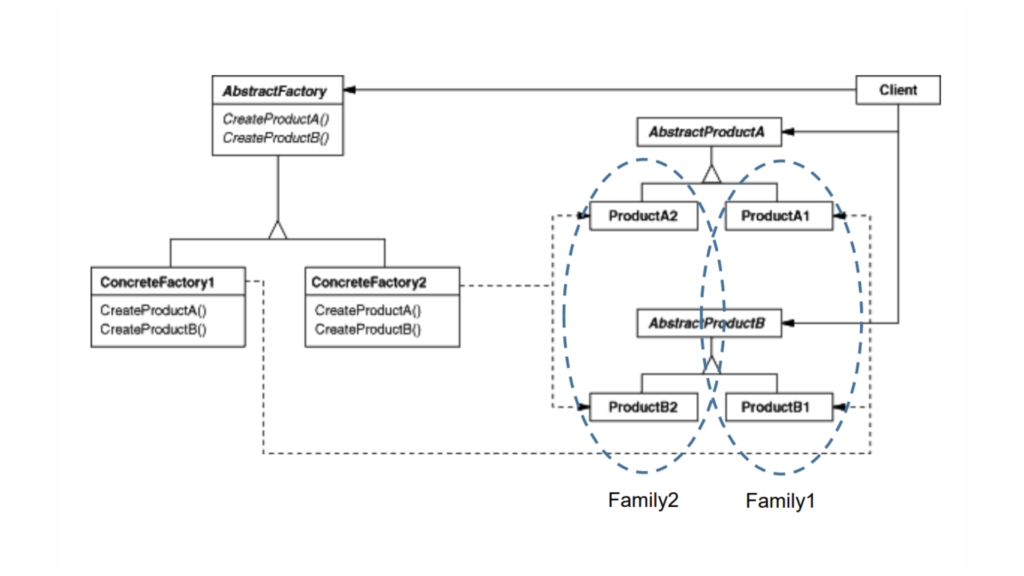
Object family
An “object family” refers to a group of related or dependent objects that are designed to work together. In the context of software design, particularly in design patterns like the Abstract Factory, an object family is a set of products that are designed to interact or collaborate with each other. Each product in this family shares a common theme, behavior, or purpose, making sure they can work seamlessly together without compatibility issues.
For example, if you’re designing a UI theme for a mobile app, you might have an object family that includes buttons, text fields, and dropdowns that all conform to a particular style (like “dark mode” or “light mode”). These objects are designed to be used together to prevent mismatching styles or interactions.
In software, preventing mismatches is crucial because inconsistencies between objects can cause bugs, user confusion, or functionality breakdowns. Design patterns like Abstract Factory help ensure that mismatched objects don’t interact, preventing unwanted behavior and making sure that all components belong to the same family.
Abstract Factory Pattern
The Abstract Factory pattern operates at a higher level of abstraction compared to the Factory Method pattern. Let me break this down in simple terms:
Factory Method pattern: It provides an interface for creating an object but allows subclasses to alter the type of objects that will be created. In other words, it returns one of several possible sub-classes (or concrete products). You have a single factory that produces specific instances of a class, based on some logic or criteria.
Abstract Factory pattern: It goes one step higher. Instead of just returning one concrete product, it returns a whole factory (a set of related factories). These factories, in turn, are responsible for producing families of related objects. In other words, the Abstract Factory itself creates factories (or “creators”) that will eventually return specific sub-classes or concrete products.
So, the definition is:
The Abstract Factory Pattern defines an interface or abstract class for creating families of related (or dependent) objects without specifying their concrete subclasses. This means that an abstract factory allows a class to return a factory of classes. Consequently, the Abstract Factory Pattern operates at a higher level of abstraction than the Factory Method Pattern. The Abstract Factory Pattern is also known as a “kit.”
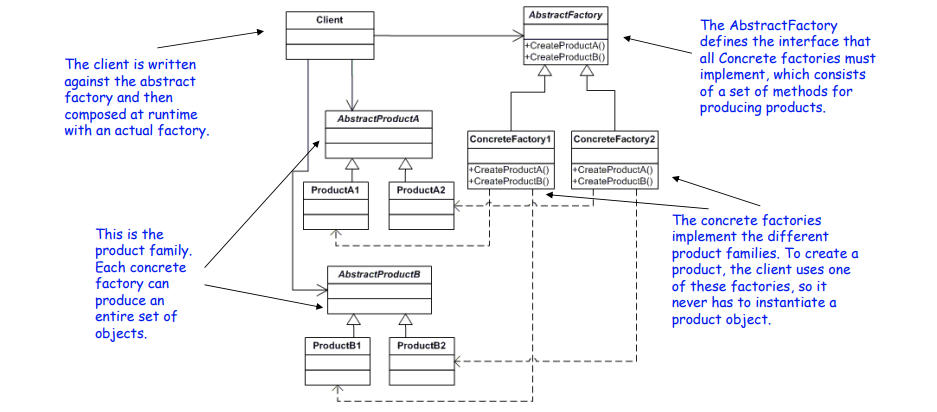
Structure of Abstract Factory Design Pattern
Abstract Factory:
Defines methods for creating abstract products.
Acts as an interface that declares methods for creating each type of product.
Concrete Factory:
Implements the Abstract Factory methods to create concrete products.
Each Concrete Factory is responsible for creating products that belong to a specific family or theme.
Abstract Product:
Defines an interface or abstract class for a type of product object.
This could be a generalization of the product that the factory will create.
Concrete Product:
Implements the Abstract Product interface.
Represents specific instances of the products that the factory will create.
Client:
Uses the Abstract Factory and Abstract Product interfaces to work with the products.
The client interacts with the factories through the abstract interfaces, so it does not need to know about the specific classes of the products it is working with.
Step-by-Step Walkthrough: Implementing the Abstract Factory in Kotlin
Let’s assume we’re working with a UI theme system where we have families of related components, such as buttons and checkboxes. These components can be styled differently based on a Light Theme or a Dark Theme.
Now, let’s implement a GUI theme system with DarkTheme and LightTheme using the Abstract Factory pattern.
Step 1: Define the Abstract Products
First, we’ll define interfaces for products, i.e., buttons and checkboxes, which can have different implementations for each theme.
Each concrete factory creates products that belong to a specific theme (dark or light).
Step 5: Client Code
The client is agnostic about the theme being used. It interacts with the abstract factory to create theme-consistent buttons and checkboxes.
Kotlin
// Client codeclassApplication(privateval factory: GUIFactory) {funrender() {val button = factory.createButton()val checkbox = factory.createCheckbox() button.paint() checkbox.paint() }}funmain() {// Client is configured with a concrete factoryval darkFactory: GUIFactory = DarkThemeFactory()val app1 = Application(darkFactory) app1.render()val lightFactory: GUIFactory = LightThemeFactory()val app2 = Application(lightFactory) app2.render()}//OutputRendering Dark ButtonRendering Dark CheckboxRendering Light ButtonRendering Light Checkbox
Here, in this code:
The client, Application, is initialized with a factory, either DarkThemeFactory or LightThemeFactory.
Based on the factory, it creates and renders theme-consistent buttons and checkboxes.
Real-World Examples
Suppose we have different types of banks, like a Retail Bank and a Corporate Bank. Each bank offers different types of accounts and loans:
Retail Bank offers Savings Accounts and Personal Loans.
Corporate Bank offers Business Accounts and Corporate Loans.
We want to create a system where the client (e.g., a bank application) can interact with these products without needing to know the specific classes that implement them.
Here, we’ll use the Abstract Factory Pattern to create families of related objects: bank accounts and loan products.
Implementation
Abstract Products
Kotlin
// Abstract Product for AccountsinterfaceAccount {fungetAccountType(): String}// Abstract Product for LoansinterfaceLoan {fungetLoanType(): String}
Concrete Products
Kotlin
// Concrete Product for Retail Bank Savings AccountclassRetailSavingsAccount : Account {overridefungetAccountType(): String {return"Retail Savings Account" }}// Concrete Product for Retail Bank Personal LoanclassRetailPersonalLoan : Loan {overridefungetLoanType(): String {return"Retail Personal Loan" }}// Concrete Product for Corporate Bank Business AccountclassCorporateBusinessAccount : Account {overridefungetAccountType(): String {return"Corporate Business Account" }}// Concrete Product for Corporate Bank Corporate LoanclassCorporateLoan : Loan {overridefungetLoanType(): String {return"Corporate Loan" }}
Abstract Factory
Kotlin
// Abstract Factory for creating Accounts and LoansinterfaceBankFactory {funcreateAccount(): AccountfuncreateLoan(): Loan}
funmain() {// Client code that uses the abstract factoryval retailFactory: BankFactory = RetailBankFactory()val corporateFactory: BankFactory = CorporateBankFactory()val retailAccount: Account = retailFactory.createAccount()val retailLoan: Loan = retailFactory.createLoan()val corporateAccount: Account = corporateFactory.createAccount()val corporateLoan: Loan = corporateFactory.createLoan()println("Retail Bank Account: ${retailAccount.getAccountType()}")println("Retail Bank Loan: ${retailLoan.getLoanType()}")println("Corporate Bank Account: ${corporateAccount.getAccountType()}")println("Corporate Bank Loan: ${corporateLoan.getLoanType()}")}//OutputRetail Bank Account: RetailSavingsAccountRetail Bank Loan: RetailPersonalLoanCorporate Bank Account: CorporateBusinessAccountCorporate Bank Loan: CorporateLoan
Here,
Abstract Products (Account and Loan): Define the interfaces for the products.
Concrete Products: Implement these interfaces with specific types of accounts and loans for different banks.
Abstract Factory (BankFactory): Provides methods to create abstract products.
Concrete Factories (RetailBankFactory, CorporateBankFactory): Implement the factory methods to create concrete products.
Client: Uses the factory to obtain the products and interact with them, without knowing their specific types.
This setup allows the client to work with different types of banks and their associated products without being tightly coupled to the specific classes that implement them.
Let’s see one more, suppose you are creating a general-purpose gaming environment and want to support different types of games. Player objects interact with Obstacle objects, but the types of players and obstacles vary depending on the game you are playing. You determine the type of game by selecting a particular GameElementFactory, and then the GameEnvironment manages the setup and play of the game.
Implementation
Abstract Products
Kotlin
// Abstract Product for ObstacleinterfaceObstacle {funaction()}// Abstract Product for PlayerinterfacePlayer {funinteractWith(obstacle: Obstacle)}
Concrete Products
Kotlin
// Concrete Product for Player: KittyclassKitty : Player {overridefuninteractWith(obstacle: Obstacle) {print("Kitty has encountered a ") obstacle.action() }}// Concrete Product for Player: KungFuGuyclassKungFuGuy : Player {overridefuninteractWith(obstacle: Obstacle) {print("KungFuGuy now battles a ") obstacle.action() }}// Concrete Product for Obstacle: PuzzleclassPuzzle : Obstacle {overridefunaction() {println("Puzzle") }}// Concrete Product for Obstacle: NastyWeaponclassNastyWeapon : Obstacle {overridefunaction() {println("NastyWeapon") }}
// Game EnvironmentclassGameEnvironment(privateval factory: GameElementFactory) {privateval player: Player = factory.makePlayer()privateval obstacle: Obstacle = factory.makeObstacle()funplay() { player.interactWith(obstacle) }}
Main Function
Kotlin
funmain() {// Creating game environments with different factoriesval kittiesAndPuzzlesFactory: GameElementFactory = KittiesAndPuzzles()val killAndDismemberFactory: GameElementFactory = KillAndDismember()val game1 = GameEnvironment(kittiesAndPuzzlesFactory)val game2 = GameEnvironment(killAndDismemberFactory)println("Game 1:") game1.play() // Output: Kitty has encountered a Puzzleprintln("Game 2:") game2.play() // Output: KungFuGuy now battles a NastyWeapon}
Here,
Abstract Products:
Obstacle and Player are interfaces that define the methods for different game elements.
Concrete Products:
Kitty and KungFuGuy are specific types of players.
Puzzle and NastyWeapon are specific types of obstacles.
Abstract Factory:
GameElementFactory defines the methods for creating Player and Obstacle.
Concrete Factories:
KittiesAndPuzzles creates a Kitty player and a Puzzle obstacle.
KillAndDismember creates a KungFuGuy player and a NastyWeapon obstacle.
Game Environment:
GameEnvironment uses the factory to create and interact with game elements.
Main Function:
Demonstrates how different game environments (factories) produce different combinations of players and obstacles.
This design allows for a flexible gaming environment where different types of players and obstacles can be easily swapped in and out based on the chosen factory, demonstrating the power of the Abstract Factory Pattern in managing families of related objects.
Abstract Factory Pattern in Android Development
When using a Dependency Injection framework, you might use the Abstract Factory pattern to provide different implementations of dependencies based on runtime conditions.
A system must be independent of how its products are created: This means you want to decouple the creation logic from the actual usage of objects. The system will use abstract interfaces, and the concrete classes that create the objects will be hidden from the user, promoting flexibility.
A system should be configured with one of multiple families of products: If your system needs to support different product variants that are grouped into families (like different UI components for MacOS, Windows, or Linux), Abstract Factory allows you to switch between these families seamlessly without changing the underlying code.
A family of related objects must be used together: Often, products in a family are designed to work together, and mixing objects from different families could cause problems. Abstract Factory ensures that related objects (like buttons, windows, or icons in a GUI) come from the same family, preserving compatibility.
You want to reveal only interfaces of a family of products and not their implementations: This approach hides the actual implementation details, exposing only the interface. By doing so, you make the system easier to extend and maintain, as any changes to the product families won’t affect client code directly.
Abstract Factory vs Factory Method
The Factory Method pattern provides a way to create a single product, while the Abstract Factory creates families of related products. If you only need to create one type of object, the Factory Method might be sufficient. However, if you need to handle multiple related objects (like in our theme example), the Abstract Factory is more suitable.
Advantages of Abstract Factory
Isolation of Concrete Classes: The client interacts with factory interfaces, making it independent of concrete class implementations.
Consistency Among Products: The factory ensures that products from the same family are used together, preventing inconsistent states.
Scalability: Adding new families (themes) of products is straightforward. You only need to introduce new factories and product variants without affecting existing code.
Disadvantages of Abstract Factory
Complexity: As more product families and variations are introduced, the number of classes can grow substantially, leading to more maintenance complexity.
Rigid Structure: If new types of products are required that don’t fit the existing family structure, refactoring may be needed.
Conclusion
The Abstract Factory pattern in Kotlin is a powerful tool when you need to create families of related objects without specifying their exact concrete classes. In this blog, we explored the structure of the Abstract Factory pattern and implemented it in Kotlin by building a UI component factory. This pattern promotes flexibility and consistency, especially in scenarios where new families of objects may need to be added in the future.
By using this pattern, you can easily manage and extend your codebase with minimal impact on existing code, making it a great choice for scalable systems.
In the world of software development, creating objects might seem like a routine task, but what if you could supercharge the way you do it? Imagine having a design that lets you seamlessly create objects without tightly coupling your code to specific classes. Enter the Factory Method Design Pattern—a powerful yet flexible approach that turns...
The Singleton design pattern is one of the simplest yet most commonly used patterns in software development. Its main purpose is to ensure that a class has only one instance while providing a global point of access to it. This pattern is especially useful when you need to manage shared resources such as database connections,...
Singleton patterns are a common design pattern used in software development to ensure a class has only one instance and provides a global point of access to it. While there are several ways to implement a Singleton in Java, one of the most efficient and recommended methods is the Initialization-on-Demand Holder Idiom, also known as...
In the world of software development, design patterns emerge as essential tools, offering time-tested solutions to common challenges. These patterns are not just arbitrary guidelines but are structured, proven approaches derived from the collective experience of seasoned developers. By understanding and applying design patterns, developers can craft efficient, maintainable, and scalable software systems. Introduction to...
As the adoption of cloud technologies continues to rise, organizations are increasingly reliant on cloud-based applications to drive business operations and deliver services. However, with this reliance comes the imperative need to secure these applications against a myriad of cyber threats. Two critical initiatives have emerged to address these challenges: Cloud Application Security Assessment (CASA)...
In the vast digital landscape, navigating and identifying resources is crucial. This is where URIs (Uniform Resource Identifiers) and URI schemes come into play. They act as the cornerstones of web navigation, ensuring we can pinpoint the exact information we seek. But what exactly are they, and how do they work together? URIs, or Uniform...