When working with collections or data structures in Kotlin (or any programming language), iterating through elements is a common task. But what if you need greater control over how you traverse a collection? This is where the Iterator Design Pattern comes into play. In this article, we’ll delve into the concept of the Iterator Design...
The Command Design Pattern is a behavioral design pattern that encapsulates a request as an independent object, storing all necessary information to process the request. This pattern is especially beneficial in scenarios where you need to: Separate the initiator of the request (the sender) from the object responsible for executing it (the receiver). Implement functionality...
Have you ever had to manage an object’s behavior based on its state? You might have ended up writing a series of if-else or when statements to handle different scenarios. Sound familiar? (Especially if you’re working with Android and Kotlin!) If so, it’s time to explore the State Design Pattern—a structured approach to simplify your...
Design patterns are a cornerstone of writing clean, maintainable, and reusable code. One of the more elegant patterns, the Chain of Responsibility (CoR), allows us to build a flexible system where multiple handlers can process a request in a loosely coupled manner. Today, we’ll dive deep into how this design pattern works and how to...
The Chain of Responsibility Pattern is a powerful design pattern that helps streamline the process of handling requests in a system. By allowing multiple handlers to process a request, this pattern ensures that the request is passed through a chain until it’s appropriately dealt with. In this blog, we will explore essential Chain of Responsibility Pattern examples, diving into its structure and providing key insights on how this pattern can be effectively used to create more flexible and maintainable code. Whether you’re new to design patterns or looking to expand your knowledge, this guide will help you understand the full potential of this pattern.
What is the Chain of Responsibility (CoR) Pattern?
The Chain of Responsibility design pattern is a behavioral design pattern that allows passing a request along a chain of handlers, where each handler has a chance to process the request or pass it along to the next handler in the chain. The main goal is to decouple the sender of a request from its receivers, giving multiple objects a chance to handle the request.
Think of a company where a request, such as budget approval, must go through several levels of management. At each level, the manager can either address the request or escalate it to the next level.
Now imagine another situation: an employee submits a leave application. Depending on the duration of leave, it might need approval from different authorities, such as a team leader, department head, or higher management.
These scenarios capture the essence of the Chain of Responsibility design pattern, where a request is passed along a series of handlers, each with the choice to process it or forward it.
Why Use the Chain of Responsibility Pattern?
Before we delve into the structure and implementation of the Chain of Responsibility (CoR) pattern, let’s first understand why it’s important.
Consider a situation where multiple objects are involved in processing a request, and the handling varies depending on the specific conditions. For example, in online shopping platforms like Myntra or Amazon, or food delivery services such as Zomato or Swiggy, a customer might use a discount code or coupon. The system needs to determine if the code is valid or decide which discount should apply based on the circumstances.
This is where the Chain of Responsibility pattern becomes highly useful. Rather than linking the request to a specific handler, it enables the creation of a chain of handlers, each capable of managing the request in its unique way. This makes the system more adaptable, allowing developers to easily add, remove, or modify handlers without affecting the core logic.
Structure of the Chain of Responsibility Pattern
Key Idea
Decouple the sender and receiver.
Each handler in the chain determines if it can handle the request.
Structure of the Chain of Responsibility
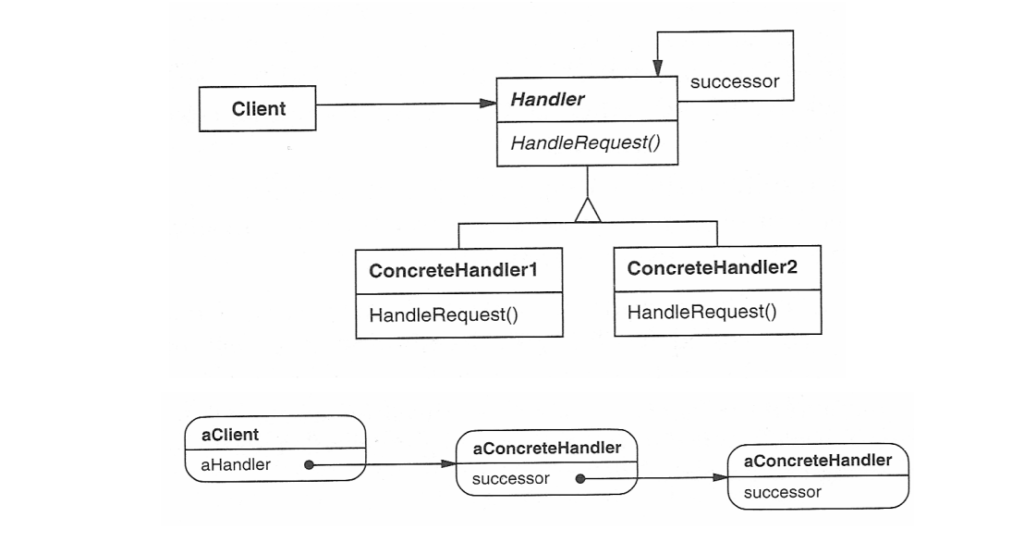
Handler (Abstract Class or Interface)
Defines the interface for handling requests and the reference to the next handler in the chain.
This defines an interface for handling requests, usually with a method like handleRequest(). It may also have a reference to the next handler in the chain.
The handler may choose to process the request or pass it on to the next handler.
ConcreteHandler
Implement the handleRequest() method to either process the request or pass it to the next handler.
These are the actual handler classes that implement the handleRequest() method. Each concrete handler will either process the request or pass it to the next handler in the chain.
If a handler is capable of processing the request, it does so; otherwise, it forwards the request to the next handler in the chain.
Client
Interacts only with the first handler in the chain, unaware of the specific handler processing the request.
Kotlin
funmain() {val handlerA = ConcreteHandlerA()val handlerB = ConcreteHandlerB() handlerA.setNextHandler(handlerB)// Client sends the request to the first handler handlerA.handleRequest("A") // Handler A processes the request handlerA.handleRequest("B") // Handler B processes the request}
The client sends the request to the first handler in the chain. The client does not need to know which handler will eventually process the request.
Chain of Responsibility Pattern Examples : Real-World Use Cases
Now, let’s roll up our sleeves and dive into real-world use case code.
Handling Employee Request
Let’s revisit our employee leave request scenario, where we need to approve a leave request in a company. The leave request should be processed by different authorities depending on the amount of leave being requested. Here’s the hierarchy:
Employee: Initiates the leave request by submitting it to their immediate supervisor or system.
Manager (up to 5 days): Approves short leaves to handle minor requests efficiently.
Director (up to 15 days): Approves extended leaves, ensuring alignment with organizational policies.
HR (more than 15 days): Handles long-term leave requests, requiring policy compliance or special considerations.
Using the Chain of Responsibility, we can chain the approval process such that if one handler (e.g., Manager) cannot process the request, it is passed to the next handler (e.g., Director).
Define the Handler Interface
The handler interface is a blueprint for the handlers that will process requests. Each handler can either process the request or pass it along to the next handler in the chain.
Kotlin
// Create the Handler interfaceinterfaceLeaveRequestHandler {funhandleRequest(request: LeaveRequest)}
In this case, the handleRequest function takes a LeaveRequest object, which holds the details of the leave request, and processes it.
Define the Request Object
The request object contains all the information related to the request. Here, we’ll create a simple LeaveRequest class.
Kotlin
// Create the LeaveRequest objectdataclassLeaveRequest(val employeeName: String, val numberOfDays: Int)
Create Concrete Handlers
Now, we’ll implement different concrete handlers for each authority: Manager, Director, and HR. Each handler will check if it can approve the leave request based on the number of days requested.
Each handler checks whether the request can be processed. If it cannot, the request is passed to the next handler in the chain.
Set Up the Chain
Next, we’ll set up the chain of responsibility. We will link the handlers so that each handler knows who to pass the request to if it can’t handle it.
Kotlin
// Setup the chainfuncreateLeaveApprovalChain(): LeaveRequestHandler {val hr = HR()val director = Director(hr)val manager = Manager(director)return manager // The chain starts with the Manager}
If the Manager can’t approve the leave (i.e., the request is for more than 5 days), it passes the request to the Director.
If the Director can’t approve the leave (i.e., the request is for more than 15 days), it passes the request to HR, which will handle it.
Test the Chain of Responsibility
Now, let’s create a LeaveRequest and pass it through the chain.
Kotlin
funmain() {val leaveRequest = LeaveRequest("amol pawar", 10)val approvalChain = createLeaveApprovalChain() approvalChain.handleRequest(leaveRequest)}// OUTPUT// Director approved amol pawar's leave for 10 days.
Now, one more familiar use case that many of us have likely worked with in past projects is the Logging System.
Logging System
Let’s implement a logging system where log messages are passed through a chain of loggers. Each logger decides whether to handle the log or pass it along. We’ll include log levels: INFO, DEBUG, and ERROR.
Define a Base Logger Class
First, we’ll create an abstract Logger class. This will act as the base for all specific loggers.
Kotlin
abstractclassLogger(privateval level: Int) {privatevar nextLogger: Logger? = null// Set the next logger in the chainfunsetNext(logger: Logger): Logger {this.nextLogger = loggerreturn logger }// Handle the log requestfunlogMessage(level: Int, message: String) {if (this.level == level) {write(message)return// To stop further propagation } nextLogger?.logMessage(level, message) }// Abstract method for handling the logprotectedabstractfunwrite(message: String)}
Here,
level: Defines the log level this logger will handle.
nextLogger: Points to the next handler in the chain.
setNext: Configures the next logger in the chain, enabling chaining.
logMessage: Checks if the logger should process the message based on its level. If not, it delegates the task to the next logger in the chain.
return: Why used return here..? The return is used to prevent the log message from being passed to the next logger after it has been processed. It ensures that once a logger handles the message, it won’t be forwarded further, avoiding redundant output.
Create Specific Logger Implementations
Let’s create concrete loggers for INFO, DEBUG, and ERROR levels.
We instantiate the loggers and chain them together using setNext.
The chain starts with InfoLogger and ends with ErrorLogger.
Using the Logger Chain
Now, let’s test our chain.
Kotlin
funmain() {val loggerChain = getLoggerChain()println("Testing Chain of Responsibility:") loggerChain.logMessage(1, "This is an info message.") loggerChain.logMessage(2, "This is a debug message.") loggerChain.logMessage(3, "This is an error message.")}
Output
Kotlin
Testing Chain of Responsibility:INFO: Thisisaninfomessage.DEBUG: Thisisadebugmessage.ERROR: Thisisanerrormessage.
Basically, what happens here is,
A log with level 1 is processed by InfoLogger.
A log with level 2 is handled by DebugLogger.
A log with level 3 is processed by ErrorLogger.
If no logger in the chain can handle a request, it simply passes through without being processed.
Extending the Chain
What if we wanted to add more log levels, like TRACE? Easy..! Just implement a TraceLogger and link it to the chain without modifying the existing code.
Form Validation: Sequential checks for input validation.
Payment Processing: Delegating payment methods to appropriate processors.
Advantages and Disadvantages
Advantages
Flexibility: Easily add or remove handlers in the chain.
Decoupling: The sender doesn’t know which handler processes the request.
Open/Closed Principle: New handlers can be added without modifying existing code.
Disadvantages
No Guarantee of Handling: If no handler processes the request, it may go unhandled.
Debugging Complexity: Long chains can be hard to trace.
Cocnlusion
The Chain of Responsibility Pattern offers a flexible and scalable solution to handling requests, making it an essential tool for developers looking to decouple their system’s components. Through the examples and insights shared, it becomes clear how this pattern can simplify complex workflows and enhance maintainability. By mastering the structure and application of the Chain of Responsibility pattern, you can ensure your systems are more adaptable to future changes, ultimately improving both code quality and overall project efficiency.
The Chain of Responsibility pattern is a behavioral design pattern that allows a request to be passed along a chain of handlers until it is processed. This pattern is particularly powerful in scenarios where multiple objects can process a request, but the handler is not determined until runtime. In this blog, we will be unveiling the powerful structure of the Chain of Responsibility pattern, breaking down its key components and flow. By the end, you’ll have a solid understanding of how this pattern can improve flexibility and scalability in your application design.
What is the Chain of Responsibility (CoR) Pattern?
The Chain of Responsibility design pattern is a behavioral design pattern that allows passing a request along a chain of handlers, where each handler has a chance to process the request or pass it along to the next handler in the chain. The main goal is to decouple the sender of a request from its receivers, giving multiple objects a chance to handle the request.
That means the CoR pattern allows multiple objects to handle a request without the sender needing to know which object handled it. The request is passed along a chain of objects (handlers), where each handler has the opportunity to process it or pass it to the next one.
Think of a company where a request, such as budget approval, must go through several levels of management. At each level, the manager can either address the request or escalate it to the next level.
Now imagine another situation: an employee submits a leave application. Depending on the duration of leave, it might need approval from different authorities, such as a team leader, department head, or higher management.
Why Use the Chain of Responsibility Pattern?
Before we delve into the structure and implementation of the Chain of Responsibility (CoR) pattern, let’s first understand why it’s important.
Consider a situation where multiple objects are involved in processing a request, and the handling varies depending on the specific conditions. For example, in online shopping platforms like Myntra or Amazon, or food delivery services such as Zomato or Swiggy, a customer might use a discount code or coupon. The system needs to determine if the code is valid or decide which discount should apply based on the circumstances.
This is where the Chain of Responsibility pattern becomes highly useful. Rather than linking the request to a specific handler, it enables the creation of a chain of handlers, each capable of managing the request in its unique way. This makes the system more adaptable, allowing developers to easily add, remove, or modify handlers without affecting the core logic.
So, the Chain of Responsibility pattern offers several advantages:
Decouples the sender and receiver: The sender doesn’t need to know which object in the chain will handle the request.
Simplifies the code: It eliminates complex conditionals and decision trees by delegating responsibility to handlers in the chain.
Adds flexibility: New handlers can be seamlessly added to the chain without impacting the existing implementation.
These scenarios capture the essence of the Chain of Responsibility design pattern, where a request is passed along a series of handlers, each with the choice to process it or forward it.
Structure of the Chain of Responsibility Pattern
The Chain of Responsibility pattern consists of:
Handler Interface: Declares a method to process requests and optionally set the next handler.
Concrete Handlers: Implements the interface and processes the request.
Client Code: Creates and configures the chain.
Structure of the Chain of Responsibility
Handler (Abstract Class or Interface)
Defines the interface for handling requests and the reference to the next handler in the chain.
This defines an interface for handling requests, usually with a method like handleRequest(). It may also have a reference to the next handler in the chain.
The handler may choose to process the request or pass it on to the next handler.
ConcreteHandler
Implement the handleRequest() method to either process the request or pass it to the next handler.
These are the actual handler classes that implement the handleRequest() method. Each concrete handler will either process the request or pass it to the next handler in the chain.
If a handler is capable of processing the request, it does so; otherwise, it forwards the request to the next handler in the chain.
Client
Interacts only with the first handler in the chain, unaware of the specific handler processing the request.
Kotlin
funmain() {val handlerA = ConcreteHandlerA()val handlerB = ConcreteHandlerB() handlerA.setNextHandler(handlerB)// Client sends the request to the first handler handlerA.handleRequest("A") // Handler A processes the request handlerA.handleRequest("B") // Handler B processes the request}
The client sends the request to the first handler in the chain. The client does not need to know which handler will eventually process the request.
As we can see, this structure allows requests to pass through multiple handlers in the chain, with each handler having the option to process the request or delegate it.
Advantages and Disadvantages
Advantages
Flexibility: Easily add or remove handlers in the chain.
Decoupling: The sender doesn’t know which handler processes the request.
Open/Closed Principle: New handlers can be added without modifying existing code.
Disadvantages
No Guarantee of Handling: If no handler processes the request, it may go unhandled.
Debugging Complexity: Long chains can be hard to trace.
Conclusion
The Chain of Responsibility pattern offers a robust solution for handling requests in a decoupled and flexible way, allowing for easier maintenance and scalability. By understanding the structure and key components of this pattern, you can effectively apply it to scenarios where multiple handlers are required to process requests in a dynamic and streamlined manner. Whether you’re developing complex systems or optimizing existing architectures, this pattern is a valuable tool that can enhance the efficiency and adaptability of your software design.
In our digital world, mobile app security is a big deal. With countless apps available, each storing sensitive personal data, it’s essential to address security at every stage—from the initial coding to the app hitting the app store. This guide breaks down four key areas of mobile security that every developer should know about: Application...
In Android development, building a secure communication environment is crucial, especially when handling sensitive data across networks. In this post, we’ll walk through the key security components for secure communication in Android apps, with a focus on practical techniques like certificate pinning, message replay protection, JOSE encryption, and HTTPS with TLS 1.2. We’ll also look...
When developing Android apps for sensitive industries like finance, security is paramount. One of the most critical aspects of securing communication between the app and the server is ensuring that TLS (Transport Layer Security) is implemented correctly. TLS is what keeps our data encrypted while being transferred over the internet, protecting users from attackers trying to intercept or tamper with the information.
In this blog, we’ll dive deep into Strong TLS Validation and how we can implement it in financial Android apps. This includes ensuring that the server we’re communicating with is legitimate and that the communication is safe and encrypted. I’ll walk you through the concept, why it’s so important, and how to integrate strong TLS validation into your Android financial app.
Let’s get started!
Why TLS Validation Matters in Financial Apps
When developing financial applications, we’re dealing with sensitive information like user credentials, financial transactions, and personal data. If an attacker can intercept or manipulate the communication between the app and the server, they could potentially steal money, data, or perform unauthorized actions. This makes it absolutely crucial to implement strong TLS validation to ensure that the communication is both confidential and authentic.
TLS ensures that the data sent from the client (our Android app) to the server is encrypted and cannot be read or altered by anyone in between. However, just encrypting the data isn’t enough. We also need to ensure that the app communicates with the right server (and not a malicious one) by verifying the server’s identity.
The Basics of TLS
Before we go into the code, let’s quickly recap what TLS does. TLS (formerly SSL) is a protocol used to secure data transmission over the internet. It ensures three key things:
Confidentiality – Encrypts data so that even if it’s intercepted, it’s unreadable.
Integrity – Ensures the data hasn’t been altered during transmission.
Authentication – Verifies the identity of the server (so we know we’re talking to the right server).
When we connect to a server over HTTPS (which uses TLS), the server sends its TLS certificate to prove its identity. The client (our Android app) then checks the validity of the certificate. If the certificate is valid, the communication is established securely.
But how do we ensure that the certificate is trusted and legitimate in our Android app? That’s where Strong TLS Validation comes in.
Strong TLS Validation Explaination
Strong TLS validation involves verifying the following:
Certificate Authenticity — Is the certificate issued by a trusted Certificate Authority (CA)?
Certificate Expiry — Is the certificate expired?
Certificate Revocation — Has the certificate been revoked by the CA?
Domain Validation — Does the domain match the one specified in the certificate?
Public Key Pinning — Is the public key of the server the same as the one expected by the app?
By performing these checks, we can ensure that the server we’re communicating with is authentic and that the connection is secure.
Implementing Strong TLS Validation in Android
Now that we understand the importance of strong TLS validation, let’s see how we can implement it in our Android financial app using Kotlin.
The first step in implementing TLS validation is ensuring that our app communicates over HTTPS rather than HTTP. HTTP is not encrypted, so it should never be used for sensitive communication.
In Android, we can enforce HTTPS by ensuring that all our URLs are prefixed with https://. We can also configure the app’s network security configuration to block insecure connections.
This configuration blocks all cleartext (non-HTTPS) traffic while allowing traffic to the specified domain.
Validating Server Certificates with Custom Trust Manager
The next step is to implement certificate validation using a custom TrustManager. This is the core of our TLS validation, where we ensure that the server’s certificate is valid and trustworthy.
Kotlin
import android.util.Logimport java.security.cert.X509Certificateimport javax.net.ssl.X509TrustManagerimport javax.net.ssl.SSLContextimport javax.net.ssl.TrustManagerFactoryclassCustomTrustManager : X509TrustManager {overridefuncheckClientTrusted(chain: Array<outX509Certificate>?, authType: String?) {// Here, you can add additional client-side certificate validation if needed. }overridefuncheckServerTrusted(chain: Array<outX509Certificate>?, authType: String?) {// Validate the server certificate chaintry {// Perform strong certificate validation here (e.g., certificate pinning, issuer validation)val cert = chain?.firstOrNull()val issuer = cert?.issuerDN?.nameif (issuer != "CN=Your Trusted CA") {throwException("Untrusted certificate issuer: $issuer") } Log.d("TLS", "Server certificate is trusted.") } catch (e: Exception) { Log.e("TLS", "Certificate validation failed: ${e.message}")throw e } }overridefungetAcceptedIssuers(): Array<X509Certificate>? {returnnull// Use default trust management for accepted issuers }}
Here, we are checking the issuer of the server’s certificate. You can extend this to validate other aspects, like expiration, revocation, and more.
Configuring SSLContext
Next, we need to create an SSLContext that uses our custom TrustManager to enforce strong validation.
Kotlin
import javax.net.ssl.SSLContextimport javax.net.ssl.HttpsURLConnectionimport java.security.NoSuchAlgorithmExceptionimport java.security.KeyManagementExceptionfunsetupSSLContext() {try {// Create an SSL context with our custom TrustManagerval sslContext = SSLContext.getInstance("TLS") sslContext.init(null, arrayOf(CustomTrustManager()), null)// Set the default SSLSocketFactory to use our custom validation HttpsURLConnection.setDefaultSSLSocketFactory(sslContext.socketFactory) } catch (e: NoSuchAlgorithmException) { Log.e("TLS", "Error initializing SSLContext: ${e.message}") } catch (e: KeyManagementException) { Log.e("TLS", "Error initializing SSLContext: ${e.message}") }}
This setupSSLContext function initializes an SSLContext with our custom TrustManager. It ensures that any HTTPS connection made by the app will undergo strong validation based on our rules.
Using Custom SSL Pinning in Android
One of the strongest techniques for ensuring the integrity of the server’s identity is SSL pinning. SSL pinning involves hardcoding the server’s certificate or public key in the app, ensuring that the app only trusts the specified server.
Kotlin
import okhttp3.*import java.security.cert.CertificateFactoryimport java.io.InputStreamclassCustomSSLPinningInterceptor(privateval certificateInputStream: InputStream) : Interceptor {overridefunintercept(chain: Interceptor.Chain): Response {// Create an SSLContext using the custom certificateval cf = CertificateFactory.getInstance("X.509")val ca = cf.generateCertificate(certificateInputStream)// Creating a KeyStore that contains our certificateval keyStore = java.security.KeyStore.getInstance("PKCS12") keyStore.load(null, null) keyStore.setCertificateEntry("ca", ca)// Set up the TrustManager with our certificateval trustManagerFactory = javax.net.ssl.TrustManagerFactory.getInstance(javax.net.ssl.TrustManagerFactory.getDefaultAlgorithm()) trustManagerFactory.init(keyStore)// Create an SSLContextval sslContext = javax.net.ssl.SSLContext.getInstance("TLS") sslContext.init(null, trustManagerFactory.trustManagers, java.security.SecureRandom())// Create a custom OkHttpClient with our SSLContextval sslSocketFactory = sslContext.socketFactoryval client = OkHttpClient.Builder() .sslSocketFactory(sslSocketFactory, trustManagerFactory.trustManagers[0] as javax.net.ssl.X509TrustManager) .hostnameVerifier { _, _ ->true } // Disable hostname verification for custom pinning .build()return client.newCall(chain.request()).execute() }}
In this code,
We first load the certificate that we want to pin (usually obtained from the server) into a KeyStore.
We then create a TrustManagerFactory and set it up to use our custom certificate.
The SSLContext is configured to only trust our specified certificate for secure communication.
The OkHttpClient is then configured to use this custom SSL context, enforcing SSL pinning.
Using the Custom SSL Pinning Interceptor
Once we’ve created the custom SSL pinning interceptor, we need to attach it to our OkHttp client.
Kotlin
val certificateInputStream = assets.open("my_server_certificate.crt") // Load certificate from assetsval interceptor = CustomSSLPinningInterceptor(certificateInputStream)val okHttpClient = OkHttpClient.Builder() .addInterceptor(interceptor) .build()// Now, use this client for your network requestsval retrofit = Retrofit.Builder() .baseUrl("https://your-financial-app.com") .client(okHttpClient) .addConverterFactory(GsonConverterFactory.create()) .build()
Host Name Verification
In addition to certificate pinning, it’s also important to perform proper hostname verification to ensure the server’s identity. Android’s default SSL handling does this for you, but when implementing custom SSL pinning, you should still verify the hostname manually.
Kotlin
val client = OkHttpClient.Builder() .hostnameVerifier { hostname, session ->// Manually verify the server's hostname hostname == "your-financial-app.com"// Replace with your expected server hostname } .build()
Handling Expired or Invalid Certificates
Another crucial part of TLS validation is handling expired or invalid certificates. In production apps, certificates may expire, so it’s important to have a strategy in place for handling these cases. One approach is to implement fallback mechanisms, like showing a user-friendly error message or redirecting to a page explaining the issue.
For even more security, we can use Public Key Pinning to ensure that we’re always communicating with the expected server. This involves storing the server’s public key hash in the app and verifying that it matches the one in the server’s certificate.
This ensures that the app only connects to the server with the specified public key. If the key doesn’t match, the connection will be blocked, preventing man-in-the-middle attacks.
So, by pinning the certificate, we are making sure that our app only trusts the exact server we’ve configured. Even if a malicious attacker tries to intercept the communication by presenting a forged certificate, the app will reject the connection since the server certificate doesn’t match the one it expects.
Best Practices and Testing
Testing: Use tools like SSL Labs to test your server’s TLS configuration.
Stay Updated: Regularly review TLS best practices and update your implementation to address emerging threats.
Avoid Shortcuts: Never disable TLS checks in production, even during debugging.
Conclusion
Implementing strong TLS validation in financial Android apps is crucial to ensure the security and privacy of sensitive user data. By enforcing HTTPS, using custom TrustManagers, and even implementing certificate pinning, we can significantly reduce the risk of man-in-the-middle attacks and ensure that our app communicates only with trusted servers.
Remember, security is an ongoing process, and it’s essential to stay updated with the latest security best practices. With the steps I’ve outlined here, you’ll be on your way to making your financial Android app secure and trustworthy for your users.
With the rise of digital finance, ensuring security has become more crucial than ever. Financial apps handle sensitive user data—such as personal information, payment details, and transaction histories—which makes them vulnerable to cyberattacks. To protect this data, secure communication is essential. One of the most effective ways to achieve this is by implementing HTTPS networking....