

Most developers hit a wall somewhere between “interesting demo” and “actually useful thing.” LLMs can answer questions, summarize text, and write passable code — but the moment you want them to do something across multiple steps, the standard prompt-response model starts feeling pretty limited.
That’s where AI agents come in. An AI agent doesn’t just respond to a single prompt. It reasons through a goal, decides which tools to use, acts, checks what happened, and repeats until the task is done. It’s a different programming model, and once it clicks, you’ll find yourself reaching for it constantly.
This guide walks through building one from scratch — no framework hand-waving, actual working code — and covers the design decisions that matter once you move past toy examples.
What an AI Agent Actually Is
The term gets applied to everything from simple chatbots to autonomous research pipelines, so let’s be precise.
A chatbot takes input and returns output. One turn, one response.
An AI agent operates over a loop. It receives a goal, picks an action (usually a tool call), observes the result, and uses that result to decide what to do next. It keeps looping until either the task is complete or it hits a limit you’ve set.
A useful mental model: think of an AI agent as a developer who’s been handed a Jira ticket with no acceptance criteria. They have to figure out what “done” looks like, which tools to use, and when to stop. You’re not scripting every step — you’re giving them the goal, the tools, and enough context to work independently.
The ReAct Loop
Every AI agent runs on some version of this:
Observe → Think → Act → Observe → Think → Act → ... → Done
This pattern is called ReAct (Reasoning + Acting). The model reasons about what to do, takes an action, observes the result, and reasons again. That’s the whole thing. Everything else is implementation detail.
The Five Building Blocks
Before writing code, it helps to know what you’re actually assembling.
1. The LLM (Brain): GPT-4, Claude, Gemini, Llama — pick one. This is the reasoning engine. It decides what to do next based on the conversation history and the results of previous actions.
2. Tools: Python functions the agent can call. search_web(query), run_code(snippet), read_file(path), send_email(to, subject, body). Each tool is a way for the agent to interact with the outside world.
3. Memory: Short-term memory is just the message history: everything the agent has seen and done in the current task, passed back to the LLM on every loop iteration. Long-term memory requires an external store — a JSON file for simple cases, a vector database for anything more sophisticated.
4. Planning: How the agent breaks a goal into steps. Some agents plan the full sequence upfront before acting. Others decide one step at a time, using each result to inform the next. For most tasks, reactive step-by-step planning works fine.
5. The Orchestrator: The code that runs the loop — sends messages to the LLM, handles tool calls, feeds results back, decides when to stop. You can write this yourself or use a framework. We’ll do both.
Picking Your Stack
Here’s what this guide uses and why:
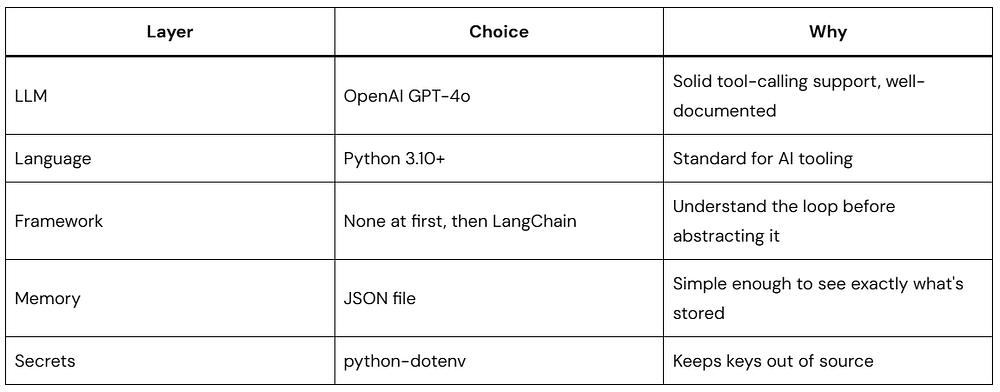
Other LLMs work fine — Claude and Gemini both support tool calling with similar APIs. The patterns here translate directly.
Setting Up
mkdir my-first-ai-agent
cd my-first-ai-agent
python -m venv venv
source venv/bin/activate   # Windows: venv\Scripts\activate
pip install openai python-dotenv requests
Create a .env file:
OPENAI_API_KEY=your_api_key_here
Add
.envto.gitignoreimmediately. API keys in git history have a way of becoming expensive problems.
Building the Agent Loop Yourself
Frameworks abstract the agent loop behind a nice API. That’s useful once you know what the loop does. Start here first — you’ll understand framework behavior, debug issues faster, and make better architectural decisions later.
Define Your Tools
Every tool is a Python function that accepts typed arguments and returns a string. The string return type matters: the LLM reads results as text, so unclear or unstructured output leads to confused reasoning.
# tools.py

def search_web(query: str) -> str:
    """
    Simulates a web search.
    In production, replace with Serper, Brave Search, or Tavily.
    """
    return f"[Search result for '{query}']: Placeholder. Connect to a real search API here."


def calculate(expression: str) -> str:
    """
    Evaluates a math expression with a restricted scope.
    Uses eval() — safe only because __builtins__ is emptied.
    """
    try:
        allowed = {
            "__builtins__": {},
            "abs": abs, "round": round,
            "min": min, "max": max,
            "sum": sum, "pow": pow
        }
        result = eval(expression, allowed)
        return str(result)
    except Exception as e:
        return f"Error calculating: {str(e)}"


def get_current_time() -> str:
    """Returns the current date and time."""
    from datetime import datetime
    return datetime.now().strftime("%Y-%m-%d %H:%M:%S")
Simple, self-contained, returns strings. That’s all a tool needs to be.
Describe the Tools to the LLM
The agent has no awareness of your Python functions. You expose them through a structured definition that the LLM reads to decide which tool fits the situation.
# tool_definitions.py

TOOLS = [
    {
        "type": "function",
        "function": {
            "name": "search_web",
            "description": "Search the web for current information on any topic. Use this when you need up-to-date facts or information beyond your training data.",
            "parameters": {
                "type": "object",
                "properties": {
                    "query": {
                        "type": "string",
                        "description": "The search query to look up"
                    }
                },
                "required": ["query"]
            }
        }
    },
    {
        "type": "function",
        "function": {
            "name": "calculate",
            "description": "Evaluate a mathematical expression and return the numeric result. Use for any arithmetic — don't try to compute numbers mentally.",
            "parameters": {
                "type": "object",
                "properties": {
                    "expression": {
                        "type": "string",
                        "description": "A valid Python math expression, e.g. '2 + 2' or '(15 * 8) / 3'"
                    }
                },
                "required": ["expression"]
            }
        }
    },
    {
        "type": "function",
        "function": {
            "name": "get_current_time",
            "description": "Get the current date and time.",
            "parameters": {
                "type": "object",
                "properties": {},
                "required": []
            }
        }
    }
]
The description field is where most agent reliability problems live. The LLM picks tools based entirely on reading these strings, so vague descriptions produce wrong choices. Write them like you’re documenting for someone who has never seen your codebase — because that’s exactly what you’re doing.
Compare:
- Bad:
"Gets data" - Good:
"Retrieves the current stock price for a given ticker symbol (e.g., 'AAPL', 'GOOGL'). Returns the price in USD as a float."
Write the Agent Loop
This is the core of the AI agent — everything else hangs off this structure.
# agent.py

import json
import os
from openai import OpenAI
from dotenv import load_dotenv
from tools import search_web, calculate, get_current_time
from tool_definitions import TOOLS

load_dotenv()

client = OpenAI(api_key=os.getenv("OPENAI_API_KEY"))

# Maps tool name strings to actual callable functions
TOOL_FUNCTIONS = {
    "search_web": search_web,
    "calculate": calculate,
    "get_current_time": get_current_time,
}


def run_agent(user_goal: str, max_iterations: int = 10) -> str:
    """
    Runs the agent loop until the task is complete or
    max_iterations is reached.
    """

    print(f"\n{'='*60}")
    print(f"Goal: {user_goal}")
    print(f"{'='*60}\n")

    # This list is the agent's working memory.
    # Every message — user input, assistant response, tool result —
    # gets appended here and passed back to the LLM each iteration.
    messages = [
        {
            "role": "system",
            "content": (
                "You are a capable AI agent. Complete tasks step by step "
                "using the tools available to you. Think before each action. "
                "When you have a complete answer, provide it clearly. "
                "Do not stop until the goal is fully addressed."
            )
        },
        {
            "role": "user",
            "content": user_goal
        }
    ]

    for iteration in range(max_iterations):
        print(f"--- Iteration {iteration + 1} ---")

        response = client.chat.completions.create(
            model="gpt-4o",
            messages=messages,
            tools=TOOLS,
            tool_choice="auto"  # Model decides: call a tool or give a final answer
        )

        message = response.choices[0].message
        finish_reason = response.choices[0].finish_reason

        # Always add the assistant's response to the message history
        messages.append(message)

        if finish_reason == "tool_calls" and message.tool_calls:
            # The model wants to use one or more tools
            for tool_call in message.tool_calls:
                tool_name = tool_call.function.name
                tool_args = json.loads(tool_call.function.arguments)

                print(f"  → {tool_name}({tool_args})")

                if tool_name in TOOL_FUNCTIONS:
                    tool_result = TOOL_FUNCTIONS[tool_name](**tool_args)
                else:
                    tool_result = f"Error: Tool '{tool_name}' not found."

                print(f"    ↳ {tool_result[:120]}")

                # Feed the result back so the model can act on it
                messages.append({
                    "role": "tool",
                    "tool_call_id": tool_call.id,
                    "content": tool_result
                })

        elif finish_reason == "stop":
            # Model is done — this is the final answer
            print(f"\n Done\n")
            print(message.content)
            return message.content

        else:
            print(f"Unexpected finish reason: {finish_reason}")
            break

    return "Reached maximum iterations without completing the task."


if __name__ == "__main__":
    run_agent("What is 15% of 2,847, and what time is it right now?")
A few things worth understanding before moving on:
The messages list is the agent’s memory. Every iteration, the full history gets sent back to the LLM. It knows what it tried, what the tools returned, and what’s still unresolved — all from reading this list.
tool_choice="auto" lets the model decide. When it thinks another tool call is needed, finish_reason comes back as "tool_calls". When it has enough to answer, it returns "stop". That toggle is how the loop progresses.
role: "tool" closes the loop. After a tool runs, you add the result to messages with the tool_call_id that matches the request. Without this, the model never “sees” what the tool returned.
max_iterations is your circuit breaker. A confused agent can keep calling tools indefinitely. Set a reasonable limit and handle the exhaustion case cleanly — your users (and your API bill) will thank you.
What the Output Looks Like
============================================================
Goal: What is 15% of 2,847, and what time is it right now?
============================================================

--- Iteration 1 ---
  → calculate({'expression': '0.15 * 2847'})
    ↳ 427.05
  → get_current_time({})
    ↳ 2026-05-19 14:32:18

--- Iteration 2 ---

 Done

15% of 2,847 is **427.05**.
The current time is **2026-05-19 at 14:32:18**.
Two tools, two results, one synthesized answer. The loop ran twice: once to gather data, once to compose the response.
Giving Your Agent Memory Between Sessions
The current agent forgets everything when run_agent() returns. For a one-shot task that’s fine, but for anything that benefits from continuity — a personal assistant, a research tool, a project helper — you need some form of persistence.
Here’s a lightweight JSON-backed memory store:
# memory.py

import json
import os
from datetime import datetime

MEMORY_FILE = "agent_memory.json"


def load_memory() -> list:
    """Loads saved interactions from disk."""
    if not os.path.exists(MEMORY_FILE):
        return []
    with open(MEMORY_FILE, "r") as f:
        return json.load(f)


def save_to_memory(user_input: str, agent_response: str):
    """
    Appends a completed interaction and trims to the last 20 entries.
    Keeps the file from growing indefinitely.
    """
    memory = load_memory()
    memory.append({
        "timestamp": datetime.now().isoformat(),
        "user": user_input,
        "agent": agent_response
    })
    memory = memory[-20:]  # rolling window
    with open(MEMORY_FILE, "w") as f:
        json.dump(memory, f, indent=2)


def get_memory_context(last_n: int = 5) -> str:
    """
    Formats recent interactions as a string for injection
    into the system prompt.
    """
    memory = load_memory()
    if not memory:
        return "No previous interactions."

    recent = memory[-last_n:]
    lines = []
    for entry in recent:
        lines.append(
            f"[{entry['timestamp'][:10]}] "
            f"User: {entry['user'][:80]}... "
            f"→ Agent: {entry['agent'][:80]}..."
        )
    return "\n".join(lines)
Then in agent.py, update the system message:
memory_context = get_memory_context(last_n=3)

messages = [
    {
        "role": "system",
        "content": (
            "You are a capable AI agent with memory of past interactions.\n\n"
            f"Recent history:\n{memory_context}\n\n"
            "Use this context when it's relevant."
        )
    },
    {"role": "user", "content": user_goal}
]
Call save_to_memory(user_goal, final_answer) before returning. Now each session is aware of the previous few, which covers most use cases without needing a vector database.
The Same Agent in LangChain
Once you’ve written the loop yourself, frameworks make sense. Here’s the same AI agent in LangChain — about 30 lines, no boilerplate:
pip install langchain langchain-openai# agent_langchain.py
import os
from dotenv import load_dotenv
from langchain_openai import ChatOpenAI
from langchain.agents import AgentExecutor, create_openai_tools_agent
from langchain.tools import tool
from langchain_core.prompts import ChatPromptTemplate, MessagesPlaceholder
load_dotenv()
@tool
def search_web(query: str) -> str:
"""Search the web for information on any topic."""
return f"[Search result for '{query}']: Mock result — connect a real API here."
@tool
def calculate(expression: str) -> str:
"""Evaluate a math expression and return the result."""
try:
return str(eval(expression, {"__builtins__": {}}))
except Exception as e:
return f"Error: {e}"
@tool
def get_current_time() -> str:
"""Get the current date and time."""
from datetime import datetime
return datetime.now().strftime("%Y-%m-%d %H:%M:%S")
llm = ChatOpenAI(model="gpt-4o", temperature=0)
prompt = ChatPromptTemplate.from_messages([
("system", "You are a helpful AI agent. Complete tasks step by step using your tools."),
MessagesPlaceholder("chat_history", optional=True),
("human", "{input}"),
MessagesPlaceholder("agent_scratchpad"),
])
tools = [search_web, calculate, get_current_time]
agent = create_openai_tools_agent(llm, tools, prompt)
agent_executor = AgentExecutor(agent=agent, tools=tools, verbose=True, max_iterations=10)
result = agent_executor.invoke({"input": "What is the square root of 144, and what time is it?"})
print(result["output"])The @tool decorator pulls the tool description straight from the docstring, which is why keeping docstrings clear and specific matters just as much here. The agent_scratchpad placeholder is where intermediate tool results live during the loop — LangChain manages that automatically.
The tradeoff with frameworks is reduced visibility. When something breaks, you’re one abstraction layer further from the actual prompt. That’s why building the loop yourself first pays off — you already know what’s happening underneath.
Best Practices Worth Internalizing
These come from actual production failures, not theoretical caution.
Keep the Initial Toolset Small
Launch with 2–3 well-defined tools. Agents given 15 tools at once often pick the wrong one, or hedge between multiple options and produce garbled results. Add tools incrementally, after you’ve confirmed the core loop is reliable.
Tool Descriptions Are Load-Bearing
The description field decides which tool gets called. Treat it with the same care you’d give a public API’s documentation.
- Weak:
"Gets data" - Clear:
"Retrieves the current stock price for a ticker symbol like 'AAPL'. Returns a float in USD."
If your agent keeps picking the wrong tool, the description is usually the culprit — not the model.
Cap Your Iteration Count
Always set max_iterations. Handle the exhaustion case with a real error message, not a silent failure. Five iterations is often enough for simple tasks; ten to fifteen covers most practical workflows.
Log Tool Calls During Development
When the agent misbehaves, you need a trace of exactly what it did. Add logging around every tool call:
import logging
logger = logging.getLogger("agent")

logger.info(f"Tool: {tool_name} | Args: {tool_args}")

# ... run tool ...
logger.info(f"Result: {tool_result}")
verbose=True in LangChain’s AgentExecutor does this automatically.
Tools Should Never Crash — Only Fail Gracefully
If a tool raises an exception, the agent loop dies. Wrap every tool in a try/except and return a descriptive error string instead:
def search_web(query: str) -> str:
    try:
        # ... actual search logic ...
        pass
    except TimeoutError:
        return "Error: Search timed out. Try a more specific query."
    except Exception as e:
        return f"Error: {str(e)}"
The agent can read an error string and adjust. It can’t recover from an unhandled exception.
Validate Before Acting
For any tool that writes, sends, or deletes — validate inputs before doing anything expensive:
def send_email(to: str, subject: str, body: str) -> str:
    if "@" not in to or "." not in to:
        return "Error: Invalid email address."
    if not subject.strip():
        return "Error: Subject is empty."
    if len(body.strip()) < 10:
        return "Error: Message body is too short."
    # proceed
This catches the obvious failure modes before they become real-world problems.
Set Temperature to 0 for Tool Use
Reasoning tasks and tool selection benefit from determinism. High temperature adds variety, which works well for creative output — it undermines reliability in a loop that needs to consistently pick the right tool and parse structured data. Use temperature=0.
Instrument Production Agents
Once you’re running an agent in production, you need visibility into what it’s doing. Track at minimum:
- Task completion rate
- Average iterations per task
- Tool call frequency and error rate
- Where the loop tends to stall or fail
LangSmith (from the LangChain team) handles this if you’re already in that ecosystem. Otherwise, structured logs and a simple dashboard get you most of the way there.
Mistakes Worth Knowing About in Advance
Underspecified system prompts. The agent knows nothing about your application context unless you put it in the system message. Generic system prompts produce generic, unreliable behavior. Spend real time here.
Expecting consistent first runs. Agent behavior is probabilistic. Wrong tool choices, incomplete answers, and logic detours will happen occasionally — that’s the nature of the loop. Evaluate across many runs, not a single test.
Write access before you’re confident. If the agent can delete records or send emails, test extensively in a sandboxed environment first. Roll out write tools with confirmation steps wherever possible. Read-only by default is a reasonable starting point.
Ignoring latency. Each loop iteration is an LLM API call. A five-iteration task might take 15–30 seconds. Design the user experience around that — show progress indicators, stream output where you can, and set clear expectations.
Reinventing the loop once you understand it. The reason to build from scratch first was understanding — not as a permanent architecture choice. Once you’ve got the fundamentals, frameworks handle the repetitive scaffolding well. Use them.
What to Build Next
Here are four AI agent projects that each exercise a different part of the pattern:
Research Agent — Takes a topic, runs multiple searches, synthesizes findings into a structured report. Good for practicing multi-step planning and output formatting.
Code Review Agent — Receives a diff, analyzes changes, runs a linter, flags common issues, drafts review comments. Introduces file I/O and structured output.
Personal Task Agent — Connects to calendar and to-do APIs, plans tasks, schedules meetings, sends reminders. The best way to learn multi-tool orchestration with real-world consequences.
Data Analysis Agent — Given a CSV, explores the data through code execution, finds patterns, generates charts. Teaches iterative analysis and code interpreter patterns.
Each one will surface edge cases this guide couldn’t anticipate — which is exactly the point.
Quick Reference Checklist
Before You Start
- Goal is clearly defined
- Toolset scoped to the minimum needed
- API keys in
.env, not in source files
During Development
- Tool descriptions are specific and accurate
max_iterationsis set- All tool functions have error handling
- Logging in place for debugging
- Testing against a sandbox before touching production data
Before Production
- Validated across 20+ diverse test cases
- Latency measured and acceptable
- Monitoring and alerting configured
- Write tools have confirmation steps
- Rate limiting applied to prevent runaway loops
Conclusion
The agent loop itself is straightforward: give the LLM tools, let it reason over them, feed results back, stop when done. That’s the whole pattern.
What takes practice is the surrounding decisions — scoping tools correctly, writing descriptions the model can actually use, knowing when the loop is healthy versus spinning, and building in the observability to tell the difference.
Start with the raw loop. Write the messages array by hand. Once you’ve seen the pattern clearly, let frameworks handle the scaffolding. Then focus your energy on the domain-specific logic that actually makes your AI agent useful.