

Android background execution is one of the most misunderstood parts of the platform, especially when alarms, notifications, and device reboot come into play.
Most tutorials show what code to write. Very few explain why that code works, what Android is doing internally, or why certain architectural rules are non-negotiable.
This article fills that gap.
We’ll walk through AlarmManager, PendingIntent, BroadcastReceiver, and BootReceiver using real, production-style code, explaining not just the syntax but the system behavior behind it.
This is not a copy of documentation.
It’s an experience-driven explanation based on how Android actually behaves in real apps.
The Core Problem Android Is Solving
Android applications do not run continuously.
The OS is designed to:
- Preserve battery
- Free memory aggressively
- Kill background processes at any time
Yet apps still need to:
- Show notifications at specific times
- Perform actions when the app is closed
- Restore scheduled tasks after a device reboot
Android solves this using system-controlled execution, not app-controlled execution.
That single idea explains everything else in this article.
AlarmManager: Scheduling Time, Not Code
The Most Common Misconception
“AlarmManager runs my code at a specific time.”
It doesn’t.
AlarmManager has one job only:
At a specific time, notify the Android system that something needs to happen.
AlarmManager:
- Does not execute methods
- Does not keep your app alive
- Does not know what your app does
It simply stores:
- A trigger time
- A
PendingIntent(what the system should do later)
Scheduling an Alarm (MainActivity)
Let’s look at real code and follow the execution flow.
public class MainActivity extends AppCompatActivity {

    private AlarmManager alarmManager;
    private PendingIntent pendingIntent;
    @Override
    protected void onCreate(Bundle savedInstanceState) {
        super.onCreate(savedInstanceState);
        setContentView(R.layout.activity_main);
        alarmManager = (AlarmManager) getSystemService(Context.ALARM_SERVICE);
        findViewById(R.id.btnSetAlarm).setOnClickListener(v -> scheduleAlarm());
        findViewById(R.id.btnCancelAlarm).setOnClickListener(v -> cancelAlarm());
    }
Creating the Intent
This Intent does not execute anything.
It simply describes what component should be triggered later.
private void scheduleAlarm() {
    Intent intent = new Intent(this, AlarmReceiver.class);
    intent.setAction("com.softaai.alarmdemo.ALARM_ACTION");
    intent.putExtra("message", "Your scheduled reminder!");
PendingIntent: The Permission Slip for the System
Now comes the most important part.
pendingIntent = PendingIntent.getBroadcast(
        this,
        0,
        intent,
        PendingIntent.FLAG_UPDATE_CURRENT | PendingIntent.FLAG_IMMUTABLE
    );
A PendingIntent tells Android:
“You are allowed to perform this action on my app’s behalf later, even if my app process no longer exists.”
Why this matters:
- Your app may be killed
- Your activity may never run again
- Your app may not be in memory
Without PendingIntent, alarms would be impossible in a battery-safe OS.
Scheduling with AlarmManager
Now we calculate when the alarm should fire.
Calendar calendar = Calendar.getInstance();
calendar.add(Calendar.SECOND, 30);

long triggerTime = calendar.getTimeInMillis();
And hand everything to the system:
if (Build.VERSION.SDK_INT >= Build.VERSION_CODES.M) {
        alarmManager.setExactAndAllowWhileIdle(
            AlarmManager.RTC_WAKEUP,
            triggerTime,
            pendingIntent
        );
    } else {
        alarmManager.setExact(
            AlarmManager.RTC_WAKEUP,
            triggerTime,
            pendingIntent
        );
    }
}
Important:
At this point, your app is no longer involved.
AlarmManager stores the data and the system takes over.
What Actually Happens Internally
- AlarmManager stores the trigger time + PendingIntent
- Your app process can be killed at any moment
- When time arrives:
- Android wakes up
- Android fires the PendingIntent
- Android decides how to re-enter your app
AlarmManager never runs your code.
The system does.
BroadcastReceiver: The Entry Point Back Into Your App
When the alarm fires, Android needs a way to re-enter your app safely.
That entry point is a BroadcastReceiver.
public class AlarmReceiver extends BroadcastReceiver {

    @Override
    public void onReceive(Context context, Intent intent) {
        String message = intent.getStringExtra("message");
        if (message == null) message = "Time's up!";
        NotificationHelper.showNotification(
            context,
            "Alarm",
            message
        );
    }
}
What Android Does Here
- Creates your app process if needed
- Instantiates the receiver
- Calls
onReceive() - Expects it to finish quickly
Important constraints:
- Runs on the main thread
- Must finish in ~10 seconds
- Not meant for long work
If you need long processing, hand off to WorkManager or a service.
Why Alarms Disappear After Reboot
This is intentional behavior.
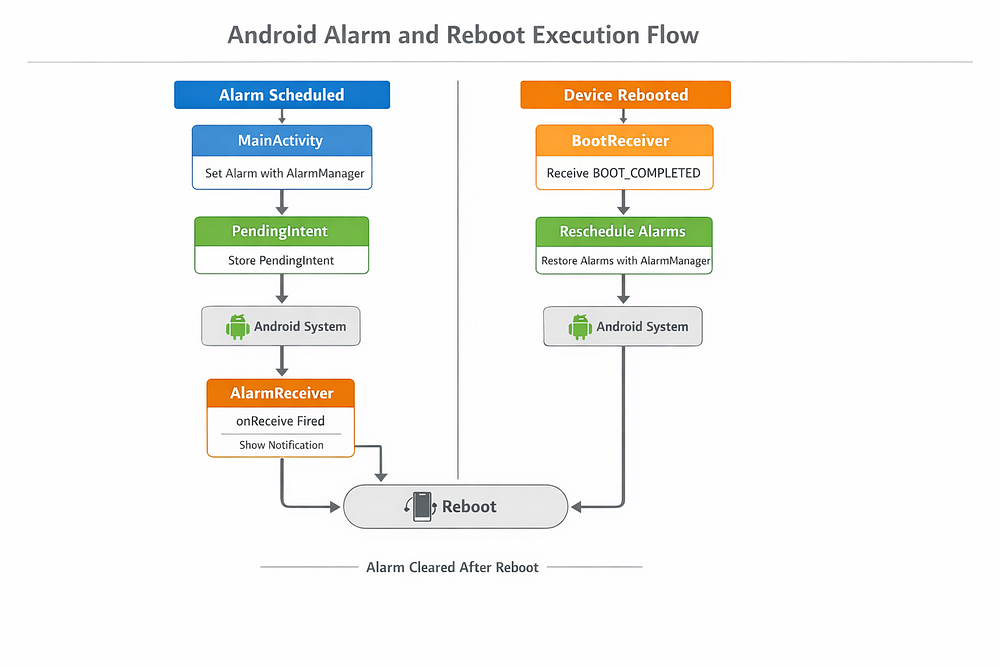
When a device reboots:
- RAM is wiped
- System services restart
- All alarms are cleared
Android does this to avoid restoring stale or invalid schedules.
So if your app uses alarms, you must restore them manually.
BootReceiver: Restoring Alarms After Reboot
This is where BootReceiver comes in.
public class BootReceiver extends BroadcastReceiver {

    @Override
    public void onReceive(Context context, Intent intent) {
        if (Intent.ACTION_BOOT_COMPLETED.equals(intent.getAction())) {
            rescheduleAlarms(context);
        }
    }
Rescheduling the Alarm
private void rescheduleAlarms(Context context) {
    AlarmManager alarmManager =
        (AlarmManager) context.getSystemService(Context.ALARM_SERVICE);

    Intent alarmIntent = new Intent(context, AlarmReceiver.class);
    alarmIntent.setAction("com.softaai.alarmdemo.ALARM_ACTION");
    alarmIntent.putExtra("message", "Alarm restored after reboot");

    PendingIntent pendingIntent = PendingIntent.getBroadcast(
        context,
        0,
        alarmIntent,
        PendingIntent.FLAG_UPDATE_CURRENT | PendingIntent.FLAG_IMMUTABLE
    );

    Calendar calendar = Calendar.getInstance();
    calendar.add(Calendar.MINUTE, 1);
    alarmManager.setExactAndAllowWhileIdle(
        AlarmManager.RTC_WAKEUP,
        calendar.getTimeInMillis(),
        pendingIntent
    );
}
A BootReceiver exists for one reason only:
Re-create state lost due to reboot.
Nothing more.
Why AlarmReceiver and BootReceiver Should Be Separate
1. Different Responsibilities
- AlarmReceiver → time-based events
- BootReceiver → system lifecycle events
Mixing them creates confusing and fragile code.
2. Different Security Requirements
<uses-permission android:name="android.permission.RECEIVE_BOOT_COMPLETED" />
<receiver
    android:name=".BootReceiver"
    android:exported="true">
    <intent-filter>
        <action android:name="android.intent.action.BOOT_COMPLETED" />
    </intent-filter>
</receiver>

<receiver
    android:name=".AlarmReceiver"
    android:exported="false" />
Boot receivers must be exported.
Alarm receivers should not be.
Combining them exposes alarm logic to other apps. That’s a security bug.
3. Boot Is a Fragile System State
During boot:
- Network may be unavailable
- Storage may not be ready
- UI work is unsafe
Separating receivers prevents accidental crashes and ANRs.
Industry-Standard Architecture
Well-designed Android apps follow this pattern:
- AlarmReceiver → reacts to alarms
- BootReceiver → restores alarms
- Shared logic → scheduler/helper classes
Receivers stay thin.
Business logic stays reusable.
This is how production Android apps are built.
Key Takeaways
- AlarmManager schedules time, not code
- PendingIntent is a system-approved execution token
- BroadcastReceiver is a system entry point, not a worker
- Alarms are wiped on reboot by design
- BootReceiver restores lost state
- Combining receivers is unsafe and unmaintainable
FAQ
Does AlarmManager run my code?
No. It only notifies the system, which decides when and how to re-enter your app.
Why is PendingIntent required?
It allows Android to safely execute actions even if your app process is dead.
Why do alarms disappear after reboot?
Android clears all alarms intentionally to avoid restoring invalid schedules.
Is BootReceiver mandatory for alarm apps?
Yes. Without it, alarms will silently stop after reboot.
Conclusion
Android background execution is not about forcing your app to stay alive.
It’s about cooperating with the system so your app runs only when it is allowed, necessary, and safe.
Once you understand that mindset, AlarmManager, PendingIntent, and BroadcastReceivers stop feeling magical — and start feeling predictable.