

Kotlin has always been loved for its expressive syntax and focus on developer productivity. With Kotlin 2.2, JetBrains continues that tradition by introducing several enhancements — and one of the most impactful is support for guard conditions in when expressions with a subject (when guards).
If you’ve ever wished you could use if-style conditions inside a when statement that uses a subject, you’re going to love this update. It’s a small change, but it goes a long way in reducing boilerplate and making your code cleaner and easier to read.
You might’ve noticed I’ve mentioned the term “subject” a few times — but what exactly does that mean in a Kotlin when statement? Let’s clear that up before we dive in further.
What is a “Subject” in Kotlin’s when Expression?
In Kotlin, the “subject” of a when expression is the value or variable you’re evaluating — it’s what the expression is checking to decide which block of code to run.
Think of it like this:
- The subject is the value you’re comparing against.
- You declare it once at the start of the
when. - Each branch then checks something about that subject — almost like asking questions: “Is it red?”, “Is it a cat?”, “Is it greater than 10?”
with a Subject
The subject is explicitly provided in parentheses right after the when keyword.
when (subject) {
    // branches
}val number = 3
when (number) {
1 -> println("One")
2 -> println("Two")
3 -> println("Three")
else -> println("Unknown number")
}Here,
numberis the subject.- Each case like
1,2,3is being compared to the subject.
This is called when with a subject, because we are checking different conditions against a single known value.
Without a Subject
You can also write a when expression without a subject, like this:
when { // <-- No subject here
    condition1 -> { /* code */ }
    condition2 -> { /* code */ }
    else -> { /* code */ }
}val number = 3
when {
number == 1 -> println("One")
number == 2 -> println("Two")
number == 3 -> println("Three")
else -> println("Unknown number")
}Here, there’s no subject. Each branch is an independent condition.
This form is useful when:
- You want to evaluate different expressions.
- You need to compare multiple values, not just one.
Why Use a Subject?
Using a subject makes the code:
- Cleaner — no need to repeat the value you’re checking.
- More readable — it communicates intent better.
- Safer — the compiler checks exhaustiveness for enums and sealed classes when a subject is used.
Understanding the Problem (Before Kotlin 2.2)
In versions prior to Kotlin 2.2, you could use guard conditions (i.e., if statements) only in a when expression without a subject. That looked like this:
val value = 42

when {
    value in 1..10 -> println("Between 1 and 10")
    value % 2 == 0 -> println("Even number")
    else -> println("Something else")
}
This works fine, but you lose the ability to declare the subject once and reuse it cleanly in each branch. You’d often find yourself repeating logic or working around this limitation, especially in complex branching.
On the flip side, if you did use a subject:
when (value) {
    1 -> println("One")
    2 -> println("Two")
    //Can't use custom `if` conditions here pre-2.2
    else -> println("Other")
}
— you couldn’t use guard clauses like if (value % 2 == 0) in combination with pattern matching.
Kotlin 2.2 Fixes This: Introducing Guard Conditions in when with Subject
Starting in Kotlin 2.2, you can now write when expressions with a subject and use guard conditions (if) directly inside each branch. Here’s how:
val number = 42

when (number) {
    in 1..100 if number % 2 == 0 -> println("Even and between 1 and 100")
    in 1..100 -> println("Odd and between 1 and 100")
    else -> println("Out of range")
}
Now that’s clean, expressive, and Kotlin-esque..!
FYI
If we try the same code in Kotlin versions below 2.2, we’ll get an error like this.
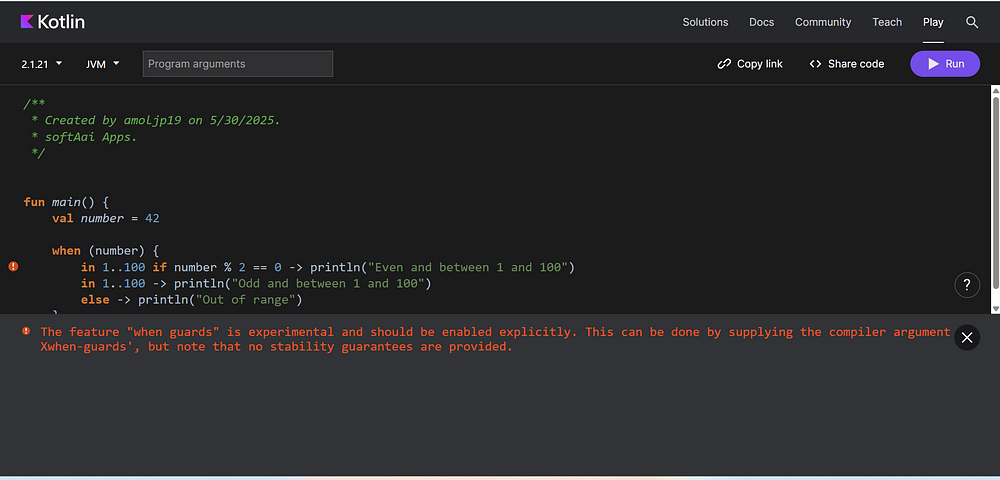
Error: The feature “when guards” is experimental and should be enabled explicitly. This can be done by supplying the compiler argument ‘-Xwhen-guards’, but note that no stability guarantees are provided.
And if we run the same code in Kotlin versions before 2.0, we’ll get an error like this.
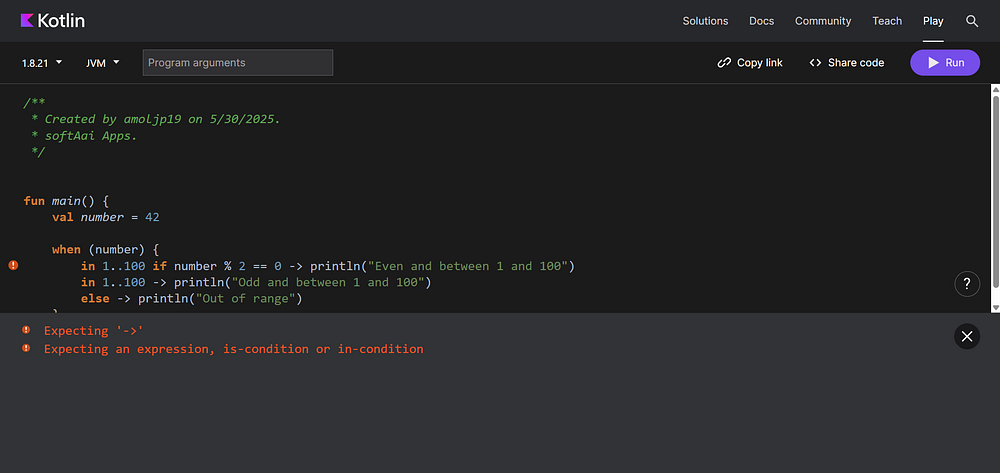
Real-World Example: API Response Handling
Imagine you’re building a mobile app with a sealed class representing different API states:
sealed class ApiResponse {
    data class Success(val data: String) : ApiResponse()
    data class Error(val code: Int) : ApiResponse()
    object Loading : ApiResponse()
}
With Kotlin 2.2, your when statement becomes more expressive and readable:
fun handleResponse(response: ApiResponse) {
    when (response) {
        is ApiResponse.Success if response.data.contains("welcome", ignoreCase = true) ->
            println("Greeting received: ${response.data}")
        is ApiResponse.Success ->
            println("Success with data: ${response.data}")
        is ApiResponse.Error if response.code == 401 ->
            println("Unauthorized. Please login again.")
        is ApiResponse.Error ->
            println("Error with code ${response.code}")
        ApiResponse.Loading ->
            println("Loading...")
    }
}


// Note - Since Success, Error, and Loading are nested inside the sealed class ApiResponse, you must use ApiResponse. to reference them unless you import or alias them.
This pattern simplifies what would otherwise require deeply nested if checks or multiple when blocks.
Another Practical Use Case: Enum Matching with Context
Here’s how you can add guard logic to when with enums:
enum class UserRole { ADMIN, MODERATOR, GUEST }

fun getAccess(role: UserRole, isVerified: Boolean) {
    when (role) {
        UserRole.ADMIN -> println("Full access")
        UserRole.MODERATOR if isVerified -> println("Limited access")
        UserRole.MODERATOR -> println("Please verify your account")
        UserRole.GUEST -> println("Guest access only")
    }
}
This approach provides extremely readable and maintainable access control logic, ideal for mobile apps, backend services, or web platforms.
How to Enable Kotlin 2.2 in Your Project
To use features introduced in Kotlin 2.2, such as “when guards” (officially known as “Guard conditions in when with a subject”), ensure your Kotlin compiler is version 2.2 or later.
As of today (May 30, 2025), Kotlin 2.2.0-RC (Release Candidate) is the latest available version.
What exactly is an RC or Release Candidate version? A Release Candidate is a pre-release version that is feature-complete and nearly final, but not yet officially marked as stable. It’s made available to users for testing, feedback, and final validation before the official stable release.
Because “when guards” is an experimental feature (introduced as a preview in Kotlin 2.1.0), you might encounter a compiler error like:
"The feature "when guards" is experimental and should be enabled explicitly"To enable it, you need to explicitly opt-in to the experimental feature in your project. This is typically done in your build.gradle.kts (for Kotlin DSL) or build.gradle (for Groovy DSL) file.
Here’s how you can enable it:
For Android or JVM Projects (Kotlin DSL — build.gradle.kts):
Update your plugin version and add the compiler argument:
plugins {
    kotlin("jvm") version "2.2.0-RC" // or kotlin("android") for Android apps
}

kotlinOptions {
    freeCompilerArgs += "-Xexperiment-when-guards"
}
For Groovy DSL (build.gradle):
plugins {
    id 'org.jetbrains.kotlin.jvm' version '2.2.0-RC' // or 'org.jetbrains.kotlin.android' for Android apps
}

kotlinOptions {
    freeCompilerArgs += ['-Xexperiment-when-guards']
}
For Android Studio Users:
If you are using the latest version of Android Studio with Gradle’s version catalog, update your Kotlin plugin version in your libs.versions.toml file:
[versions]
kotlin = "2.2.0-RC" # Update this to the desired Kotlin version

[libraries]
# Your existing other entries here
Additionally, ensure that the Kotlin plugin in Android Studio itself is updated to version 2.2.0 or higher. This feature may not work correctly if your IDE’s Kotlin plugin is outdated, even if your Gradle configuration is up to date.
Note — The feature will only be fully usable in Kotlin
2.2.0stable (likely coming very soon).
Why It Matters for Developer Productivity
Guard conditions in when with subject:
- Reduce repetitive code
- Increase clarity in control flow
- Enable more expressive and context-aware logic
- Minimize bugs by localizing logic per branch
This feature might seem small on paper, but in practice, it leads to more elegant and bug-resistant code.
FAQ
Q: What is guard condition in Kotlin’s when expression?
A guard condition is an additional if clause that allows you to add more complex checks inside each when branch.
Q: Can I use if with when in Kotlin 2.2?
Yes. Starting in Kotlin 2.2, you can use if conditions inside a when expression that uses a subject, which was previously not allowed.
Q: How do I enable Kotlin 2.2 features?
Update your Kotlin plugin and Gradle configuration to use version 2.2.0 or higher.
Q: Why is this useful in real-world projects?
It simplifies conditional logic in APIs, enums, sealed classes, and makes branching more readable and maintainable.
Conclusion
Kotlin continues to evolve with thoughtful enhancements that make a real impact on everyday development. The introduction of guard conditions in when with subject might look like a small change, but it helps you write cleaner, safer, and more expressive logic.
If you’re already using Kotlin in production — especially for mobile or backend development — upgrading to Kotlin 2.2 is a smart move. With each release, Kotlin becomes more intuitive, letting you focus on building great software without fighting the language.
Give it a try, and you’ll notice how natural things start to feel.