

If you’ve been in the mobile and cross-platform world lately, you’ve probably heard a lot about Compose Multiplatform (CMP). It’s one of the fastest-growing ways to build apps that run on Android, iOS and the Web using a single shared UI approach.
But what exactly is CMP? And why are developers increasingly choosing it over other frameworks? In this post, we’ll break it down, with examples, comparisons and real reasons developers love it.
What Is Compose Multiplatform — Precisely
Compose Multiplatform (CMP) is a UI framework developed and maintained by JetBrains, built on top of Google’s Jetpack Compose runtime. It extends the Compose programming model — declarative, reactive, composable UI functions — beyond Android to iOS, Desktop (JVM), and Web (Kotlin/Wasm).
CMP is layered on top of Kotlin Multiplatform (KMP), which is the underlying technology for compiling Kotlin code to multiple targets: JVM (Android/Desktop), Kotlin/Native (iOS/macOS), and Kotlin/Wasm (Web). Understanding this layering matters architecturally:
┌─────────────────────────────────────────────────────────┐
│                Compose Multiplatform (CMP)              │
│              (Shared declarative UI layer)              │
├─────────────────────────────────────────────────────────┤
│               Kotlin Multiplatform (KMP)                │
│         (Shared business logic, data, domain)           │
├───────────┬──────────────┬──────────────┬───────────────┤
│  Kotlin/  │ Kotlin/      │ Kotlin/      │ Kotlin/       │
│  JVM      │ Native       │ Wasm         │ JVM           │
│ (Android) │ (iOS/macOS)  │ (Web)        │ (Desktop)     │
└───────────┴──────────────┴──────────────┴───────────────┘
What CMP is not:
- Not a WebView wrapper
- Not a JavaScript runtime or bridge
- Not a pixel-for-pixel clone of native UI widgets on every platform
- Not a guarantee that code runs identically on all platforms — it compiles and runs on all platforms, with deliberate platform-specific divergences in rendering, gestures, and system behaviors
Current Platform Support: Honest Status

What “iOS API Stable” means precisely: JetBrains has declared the CMP public API surface stable, meaning they will not make breaking changes without a deprecation cycle. It does not mean:
- Pixel-perfect parity with SwiftUI or UIKit
- Complete VoiceOver/accessibility support (this is a known gap as of 2026)
- Identical scroll physics to
UIScrollView - Equivalent Xcode debugging experience to native Swift development
Teams shipping CMP-based iOS apps in production report success, but they do so with deliberate investment in iOS-specific testing, accessibility audits, and gesture tuning — not by assuming parity.
CMP vs Flutter vs React Native — Engineering Comparison
Compose Multiplatform vs Flutter
Both use a custom rendering engine (not native OS widgets) to draw UI. Key engineering differences:
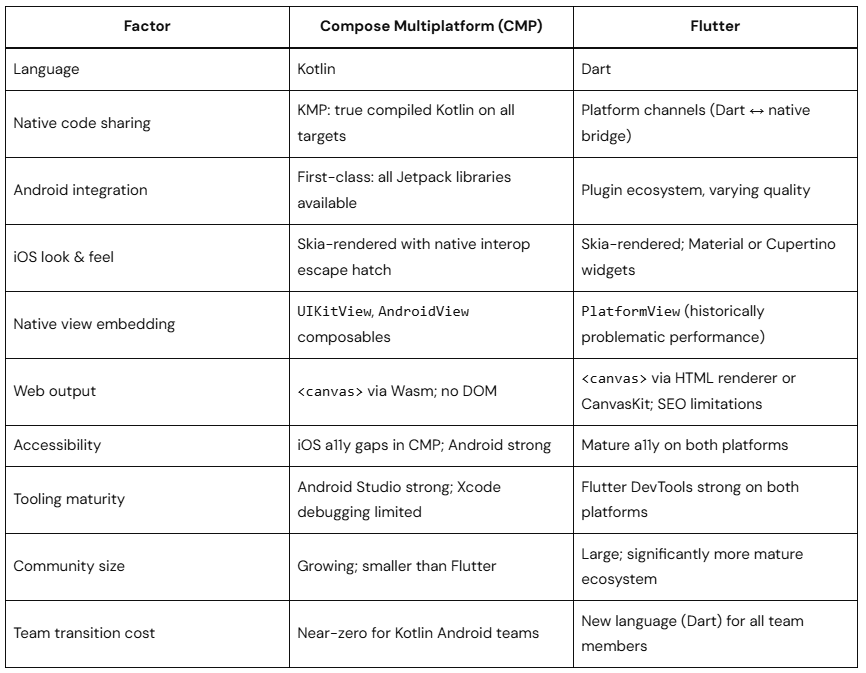
Honest verdict: Flutter has a more mature cross-platform tooling story and stronger iOS accessibility today. CMP wins decisively if your team is already invested in Kotlin, Jetpack libraries, and Android-first development.
Compose Multiplatform vs React Native
React Native’s new architecture (JSI + Fabric renderer) significantly closes the performance gap that historically plagued the JavaScript bridge. The architectural difference from CMP:
- CMP compiles Kotlin to native binaries — no runtime JS, no bridge
- React Native (New Architecture) uses JSI for synchronous JS-to-native calls — faster than the old bridge, but still a JS runtime overhead
- React Native renders actual native widgets on each platform; CMP renders via Skia
- React Native is the right choice for web-first teams; CMP is the right choice for Kotlin-first teams
How CMP Works Under the Hood
Rendering Pipeline
CMP uses different rendering approaches per platform, which explains both its strengths and its platform-specific behavioral differences:
commonMain Compose Code
         │
         ├── Android
         │     └── Jetpack Compose Runtime
         │           └── Android RenderNode / Canvas API
         │                 └── Skia (via Android's internal pipeline)
         │
         ├── iOS
         │     └── Skiko (Kotlin/Native bindings to Skia)
         │           └── Metal GPU API
         │                 └── CAMetalLayer embedded in UIView
         │
         ├── Desktop (JVM)
         │     └── Skiko
         │           └── OpenGL / DirectX / Metal (OS-dependent)
         │
         └── Web
               └── Kotlin/Wasm + Skia compiled to WebAssembly
                     └── HTML <canvas> element
Critical implication of this architecture: Because CMP on iOS renders through a CAMetalLayer-backed UIView (not through SwiftUI’s layout engine), layout behaviors, font metrics, shadow rendering, and scroll momentum physics are produced by Skia — not by iOS’s native compositor. This is why experienced iOS users may notice subtle differences. It is also why full SwiftUI NavigationStack integration with CMP-managed screens is architecturally complicated.
The KMP Foundation: expect/actual
The expect/actual mechanism is the primary tool for platform branching. It operates at compile time, not runtime:
// commonMain — declares the contract
expect fun currentTimeMillis(): Long

// androidMain - Android implementation
actual fun currentTimeMillis(): Long = System.currentTimeMillis()

// iosMain - iOS implementation (using Kotlin/Native platform APIs)
actual fun currentTimeMillis(): Long =
NSDate().timeIntervalSince1970.toLong() * 1000expect/actual works for:
- Top-level functions
- Classes (with matching constructors)
- Objects
- Interfaces (less common; prefer interfaces in
commonMainwithactualimplementations) - Typealiases (useful for mapping platform types)
expect class constructor limitation: When you declare expect class Foo(), every actual implementation must match the constructor signature. This creates a real problem for Android classes that require Context. The correct pattern uses dependency injection or a platform-provided factory, not a bare constructor — covered in detail in the DI section.
Project Structure and Modularization
The single-module structure shown in most tutorials works for demos. Production apps require modularization from the start — it affects build times, team ownership, and testability fundamentally.
Recommended Multi-Module Architecture
root/
├── gradle/
│   └── libs.versions.toml          ← Centralized version catalog
│
├── build-logic/                    ← Convention plugins
│   └── src/main/kotlin/
│       ├── CmpLibraryPlugin.kt     ← Shared Gradle config for library modules
│       └── CmpAppPlugin.kt         ← Shared Gradle config for app modules
│
├── core/
│   ├── domain/                     ← Pure Kotlin: entities, use cases, repository interfaces
│   │   └── src/commonMain/
│   ├── data/                       ← Repository implementations, network, cache
│   │   └── src/commonMain/
│   ├── ui-components/              ← Shared design system, reusable composables
│   │   └── src/commonMain/
│   ├── navigation/                 ← Route definitions, navigation contracts
│   │   └── src/commonMain/
│   └── testing/                    ← Shared test utilities and fakes
│       └── src/commonTest/
│
├── features/
│   ├── product-list/
│   │   └── src/commonMain/
│   ├── product-detail/
│   │   └── src/commonMain/
│   └── cart/
│       └── src/commonMain/
│
├── composeApp/                     ← Platform entry points + DI wiring
│   └── src/
│       ├── commonMain/             ← App-level navigation graph, DI setup
│       ├── androidMain/            ← Android Activity, platform DI modules
│       ├── iosMain/                ← iOS entry point called from Swift
│       └── wasmJsMain/             ← Web entry point
│
└── iosApp/                         ← Xcode project
    └── iosApp/
        ├── ContentView.swift       ← Hosts CMP root composable
        └── iOSApp.swift            ← App lifecycle; calls into Kotlin layer
Why this structure matters:
:core:domaindepends on nothing — it’s pure Kotlin, testable anywhere:core:datadepends on:core:domaininterfaces only- Feature modules depend on
:core:domainand:core:ui-components; never on each other - Platform entry points wire everything together via DI — they’re the only place with platform-specific imports
Gradle Configuration — The Real Picture
Here is a production-realistic Gradle configuration with current APIs (Kotlin 2.1.x):
// build-logic/src/main/kotlin/CmpLibraryPlugin.kt
// Convention plugin applied to all shared library modules

import org.jetbrains.kotlin.gradle.dsl.JvmTarget

plugins {
    id("com.android.library")
    kotlin("multiplatform")
    id("org.jetbrains.compose")
    id("org.jetbrains.kotlin.plugin.compose")
}

kotlin {
    androidTarget {
        compilerOptions {                    // Note: kotlinOptions {} is deprecated
            jvmTarget.set(JvmTarget.JVM_11)
        }
    }

    listOf(
        iosX64(),
        iosArm64(),
        iosSimulatorArm64()
    ).forEach { iosTarget ->
        iosTarget.binaries.framework {
            baseName = "SharedModule"
            isStatic = true
            // Static frameworks are required for proper Kotlin/Native
            // memory management with Swift ARC interop
        }
    }

    @OptIn(ExperimentalWasmDsl::class)
    wasmJs {
        browser()
        binaries.executable()
    }

    sourceSets {
        commonMain.dependencies {
            implementation(compose.runtime)
            implementation(compose.foundation)
            implementation(compose.material3)
            implementation(compose.ui)
            implementation(compose.components.resources)
            implementation(libs.lifecycle.viewmodel.compose)      // Multiplatform ViewModel
            implementation(libs.lifecycle.runtime.compose)        // collectAsStateWithLifecycle
            implementation(libs.navigation.compose)               // Multiplatform nav
            implementation(libs.kotlinx.coroutines.core)
            implementation(libs.koin.compose)                     // DI
        }

        androidMain.dependencies {
            implementation(libs.androidx.activity.compose)
            implementation(libs.kotlinx.coroutines.android)       // Provides Dispatchers.Main on Android
        }

        iosMain.dependencies {
            implementation(libs.kotlinx.coroutines.core)
            // Note: kotlinx-coroutines-core for Native provides
            // Dispatchers.Main via Darwin integration - requires explicit dependency
        }
        commonTest.dependencies {
            implementation(libs.kotlin.test)
            implementation(libs.kotlinx.coroutines.test)
        }
    }
}
Known Gradle pain points in production:
- Kotlin/Native compilation is 3–5× slower than JVM compilation. Enable the Kotlin build cache (
kotlin.native.cacheKind=staticingradle.properties) and Gradle build cache - XCFramework generation for App Store distribution requires a separate
XCFrameworktask — not included in the default template - The
linkDebugFrameworkIosArm64Gradle task must be connected to Xcode’s build phase; misconfiguration here is the #1 cause of “works on simulator, fails on device” issues - Keep
isStatic = trueon iOS framework targets. Dynamic frameworks are supported but add complexity to iOS app startup and Xcode integration
Correct Architectural Patterns
The Layered Architecture for CMP
┌─────────────────────────────────────────┐
│              UI Layer (CMP)             │
│  Composables receive UiState, emit      │
│  events/callbacks. No business logic.   │
├─────────────────────────────────────────┤
│           ViewModel Layer               │
│  Holds UiState (single StateFlow).      │
│  Orchestrates use cases. Maps domain    │
│  models to UI models.                   │
├─────────────────────────────────────────┤
│            Domain Layer                 │
│  Use cases (interactors). Pure Kotlin.  │
│  No framework dependencies.             │
├─────────────────────────────────────────┤
│             Data Layer                  │
│  Repository implementations.            │
│  Ktor for network. SQLDelight for DB.   │
│  Platform-specific data sources.        │
└─────────────────────────────────────────┘
MVI with Single UiState (Preferred for CMP)
Multiple independent StateFlow properties in a ViewModel create impossible UI states and double recompositions. Use a single sealed UiState:
// Correct: Single state object prevents impossible states
// and triggers exactly one recomposition per state change

sealed class ProductListUiState {
    object Loading : ProductListUiState()

    data class Success(
        val products: List<ProductUiModel>,
        val searchQuery: String = ""
    ) : ProductListUiState()

    data class Error(
        val message: String,
        val isRetryable: Boolean
    ) : ProductListUiState()
}

// UiModel - separate from domain model
// Only contains what the UI needs; formatted strings, not raw data
@Immutable  // Tells Compose compiler this is stable - critical for LazyColumn performance
data class ProductUiModel(
    val id: String,
    val name: String,
    val formattedPrice: String,    // "$12.99" not 12.99 - formatting in ViewModel, not Composable
    val description: String,
    val imageUrl: String
)class ProductListViewModel(
private val getProductsUseCase: GetProductsUseCase
) : ViewModel() {
private val _uiState = MutableStateFlow<ProductListUiState>(ProductListUiState.Loading)
val uiState: StateFlow<ProductListUiState> = _uiState.asStateFlow()
init {
loadProducts()
}
fun loadProducts() {
viewModelScope.launch {
_uiState.value = ProductListUiState.Loading
getProductsUseCase()
.onSuccess { products ->
_uiState.value = ProductListUiState.Success(
products = products.map { it.toUiModel() }
)
}
.onFailure { error ->
_uiState.value = ProductListUiState.Error(
message = error.toUserFacingMessage(),
isRetryable = error is NetworkException
)
}
}
}
fun onSearchQueryChanged(query: String) {
val currentState = _uiState.value as? ProductListUiState.Success ?: return
_uiState.value = currentState.copy(searchQuery = query)
}
}
// Extension to convert domain model to UI model
private fun Product.toUiModel() = ProductUiModel(
id = id,
name = name,
formattedPrice = "$${"%.2f".format(price)}",
description = description,
imageUrl = imageUrl
)Why error.toUserFacingMessage() matters: On Kotlin/Native (iOS), exception.message can be null. Always map exceptions to typed error representations before exposing them to the UI layer.
State Management Done Right
State Hoisting — The Correct Pattern
The most common architectural mistake in Compose (multiplatform or not) is passing a ViewModel into a composable. This breaks testability, violates unidirectional data flow, and causes incorrect recomposition scoping.
The rule: Composables receive state (immutable data) and emit events (callbacks). They never hold or reference a ViewModel directly.
// Anti-pattern — breaks testability and state hoisting
@Composable
fun ProductListScreen(viewModel: ProductListViewModel) {
    val uiState by viewModel.uiState.collectAsState()
    // ...
}

// Correct - state in, events out
@Composable
fun ProductListScreen(
    uiState: ProductListUiState,
    onRetry: () -> Unit,
    onSearchQueryChanged: (String) -> Unit,
    onProductClick: (String) -> Unit,   // Pass ID, not the whole object
    modifier: Modifier = Modifier        // Always accept a Modifier parameter
) {
    when (uiState) {
        is ProductListUiState.Loading -> LoadingContent(modifier)
        is ProductListUiState.Error -> ErrorContent(
            message = uiState.message,
            isRetryable = uiState.isRetryable,
            onRetry = onRetry,
            modifier = modifier
        )
        is ProductListUiState.Success -> ProductListContent(
            products = uiState.products,
            searchQuery = uiState.searchQuery,
            onSearchQueryChanged = onSearchQueryChanged,
            onProductClick = onProductClick,
            modifier = modifier
        )
    }
}
The ViewModel sits at the navigation/screen level, never inside a composable:
// In your navigation graph
composable<ProductList> {
    val viewModel: ProductListViewModel = koinViewModel()
    val uiState by viewModel.uiState.collectAsStateWithLifecycle()
    // collectAsStateWithLifecycle is preferred over collectAsState —
    // it respects platform lifecycle and pauses collection when the app is backgrounded

    ProductListScreen(
        uiState = uiState,
        onRetry = viewModel::loadProducts,
        onSearchQueryChanged = viewModel::onSearchQueryChanged,
        onProductClick = { productId ->
            navController.navigate(ProductDetail(productId))
        }
    )
}
remember vs rememberSaveable
@Composable
fun SearchBar(
    query: String,                        // Lifted state — parent owns it
    onQueryChange: (String) -> Unit,
    onSearch: (String) -> Unit,
    modifier: Modifier = Modifier
) {
    // No local mutableStateOf needed — state is owned by caller
    // Only use remember for objects that are expensive to create
    val focusRequester = remember { FocusRequester() }

    OutlinedTextField(
        value = query,
        onValueChange = onQueryChange,
        modifier = modifier.focusRequester(focusRequester),
        // ...
    )
}

// For state that must survive configuration changes AND process death,
// use rememberSaveable with a Saver if the type is not primitive:
val scrollState = rememberSaveable(saver = ScrollState.Saver) { ScrollState(0) }
Lifecycle-Aware Collection
collectAsState() does not pause collection when the app is backgrounded on iOS. Use collectAsStateWithLifecycle() from lifecycle-runtime-compose:
// Lifecycle-aware — pauses when app is in background on all platforms
val uiState by viewModel.uiState.collectAsStateWithLifecycle()

// Always-on - continues collecting even when app is backgrounded
val uiState by viewModel.uiState.collectAsState()
Type-Safe Navigation Across Platforms
String Routes Are Deprecated — Use Type-Safe Navigation
As of navigation-compose 2.8.x, type-safe navigation using @Serializable route objects is stable and the recommended approach. String-based routes are error-prone, refactoring-unsafe, and lack compile-time guarantees.
// core/navigation/src/commonMain/RouteDefinitions.kt

import kotlinx.serialization.Serializable

@Serializable
object ProductList                          // No-argument destination

@Serializable
data class ProductDetail(val productId: String)  // Typed argument

@Serializable
object Cart

@Serializable
data class Checkout(
    val cartId: String,
    val promoCode: String? = null           // Optional parameters supported
)// composeApp/src/commonMain/AppNavigation.kt
@Composable
fun AppNavigation(
navController: NavHostController = rememberNavController()
) {
NavHost(
navController = navController,
startDestination = ProductList
) {
composable<ProductList> {
val viewModel: ProductListViewModel = koinViewModel()
val uiState by viewModel.uiState.collectAsStateWithLifecycle()
ProductListScreen(
uiState = uiState,
onRetry = viewModel::loadProducts,
onSearchQueryChanged = viewModel::onSearchQueryChanged,
onProductClick = { productId ->
navController.navigate(ProductDetail(productId))
}
)
}
composable<ProductDetail> { backStackEntry ->
val route: ProductDetail = backStackEntry.toRoute() // Type-safe extraction
val viewModel: ProductDetailViewModel = koinViewModel(
parameters = { parametersOf(route.productId) }
)
val uiState by viewModel.uiState.collectAsStateWithLifecycle()
ProductDetailScreen(
uiState = uiState,
onBack = { navController.navigateUp() },
onAddToCart = viewModel::addToCart
)
}
composable<Cart> {
val viewModel: CartViewModel = koinViewModel()
val uiState by viewModel.uiState.collectAsStateWithLifecycle()
CartScreen(
uiState = uiState,
onCheckout = { cartId ->
navController.navigate(Checkout(cartId))
},
onBack = { navController.navigateUp() }
)
}
}
}Platform Navigation Caveats
iOS back-swipe gesture: The multiplatform navigation-compose supports interactive back-swipe on iOS, but the animation curve and gesture threshold are Skia-rendered approximations of the native UINavigationController push/pop animation. They are close but distinguishable to trained iOS users. For apps where native-feel is paramount, consider using Decompose (a community navigation library) which supports fully native iOS transitions via UIKit integration.
Android back handling: The hardware back button and predictive back gesture (Android 14+) require explicit handling. Register a BackHandler composable where needed:
BackHandler(enabled = uiState is CheckoutUiState.InProgress) {
    // Prompt user before losing checkout progress
    showExitConfirmationDialog = true
}
Web browser history: Navigation-compose on Wasm integrates with browser history via the History API, but deep link handling (initial URL → correct screen) requires setup in your Wasm entry point that the default template does not provide.
Platform-Specific Features via expect/actual
The Context Problem on Android — Solved Correctly
A common mistake is defining expect class with a no-arg constructor when the Android implementation needs Context. The correct approach uses dependency injection, not constructor parameters in the expect declaration:
// core/domain/src/commonMain/ — Define a pure interface
interface FileStorage {
    suspend fun saveFile(fileName: String, data: ByteArray): Result<Unit>
    suspend fun readFile(fileName: String): Result<ByteArray>
    suspend fun deleteFile(fileName: String): Result<Unit>
}

// core/data/src/androidMain/ - Android implementation with Context via DI
class AndroidFileStorage(
    private val context: Context    // Injected by DI framework
) : FileStorage {
    override suspend fun saveFile(fileName: String, data: ByteArray): Result<Unit> =
        runCatching {
            val file = File(context.filesDir, fileName)
            file.writeBytes(data)
        }
    override suspend fun readFile(fileName: String): Result<ByteArray> =
        runCatching {
            File(context.filesDir, fileName).readBytes()
        }
    override suspend fun deleteFile(fileName: String): Result<Unit> =
        runCatching {
            File(context.filesDir, fileName).delete()
        }
}

// core/data/src/iosMain/ - iOS implementation
class IosFileStorage : FileStorage {
    private val fileManager = NSFileManager.defaultManager
    override suspend fun saveFile(fileName: String, data: ByteArray): Result<Unit> =
        runCatching {
            val documentsDir = fileManager
                .URLsForDirectory(NSDocumentDirectory, NSUserDomainMask)
                .firstOrNull()?.path ?: error("No documents directory")
            val filePath = "$documentsDir/$fileName"
            data.toNSData().writeToFile(filePath, atomically = true)
        }
    // ... other implementations
}
The DI framework (Koin shown below) provides the platform-correct implementation to commonMain code — no expect/actual needed when the interface lives in commonMain.
Embedding Native Views
For platform-native components that cannot be reproduced in Compose (maps, WebViews, camera previews):
// features/map/src/iosMain/ — iOS-specific file
@Composable
fun NativeMapView(
    latitude: Double,
    longitude: Double,
    modifier: Modifier = Modifier
) {
    UIKitView(
        factory = {
            MKMapView().apply {
                // Configure once on creation
                showsUserLocation = true
            }
        },
        update = { mapView ->
            // Called on recomposition when inputs change
            val region = MKCoordinateRegionMake(
                CLLocationCoordinate2DMake(latitude, longitude),
                MKCoordinateSpanMake(0.01, 0.01)
            )
            mapView.setRegion(region, animated = true)
        },
        modifier = modifier
    )
}
Important:
UIKitViewmust be iniosMain, notcommonMain. Expose it via anexpect/actualcomposable or via conditional compilation if you need a platform-specific fallback in the shared screen.
iOS-Specific: Lifecycle, Interop, and Debugging
This section covers the most under-addressed topic in CMP guides. iOS lifecycle management is where most production incidents originate.
The iOS Lifecycle vs Android Lifecycle
On Android, ViewModel.viewModelScope is tied to Lifecycle.State.CREATED — coroutines are automatically cancelled when the ViewModel is cleared. On iOS, the mapping is:
iOS App States          →   CMP/Compose Lifecycle
─────────────────────────────────────────────────
Active (foreground)     →   Lifecycle.State.RESUMED
Inactive (transitioning)→   Lifecycle.State.STARTED
Background (suspended)  →   Lifecycle.State.CREATED
Terminated (clean exit) →   Lifecycle.State.DESTROYED
Killed by OS (OOM/force)→   DESTROYED not guaranteed
The critical issue: When an iOS app is backgrounded, the OS may suspend it entirely with no further CPU time. Coroutines in viewModelScope do not automatically pause on iOS the way Android’s lifecycle-aware components do. This means:
// Dangerous on iOS — will attempt network calls even when app is suspended
class ProductListViewModel : ViewModel() {
    init {
        viewModelScope.launch {
            // This may run after iOS has suspended your app,
            // causing unexpected behavior or battery drain
            productRepository.startPolling()
        }
    }
}

// Correct - use lifecycle-aware collection
class ProductListViewModel : ViewModel() {
    val uiState: StateFlow<ProductListUiState> = productRepository
        .productsFlow
        .map { it.toUiState() }
        .stateIn(
            scope = viewModelScope,
            started = SharingStarted.WhileSubscribed(5_000),
            // WhileSubscribed stops the upstream flow when there are no collectors
            // (i.e., when the screen is not visible)
            initialValue = ProductListUiState.Loading
        )
}
SharingStarted.WhileSubscribed(5_000) is the correct production pattern — it stops upstream flows 5 seconds after the last subscriber disappears (the screen leaves composition), which handles both backgrounding and navigation.
iOS App Lifecycle Events in Kotlin
To respond to iOS lifecycle events from Kotlin:
// iosMain — observe iOS lifecycle notifications
class IosLifecycleObserver {
    private var observers: List<NSObjectProtocol> = emptyList()

    fun start(
        onBackground: () -> Unit,
        onForeground: () -> Unit
    ) {
        val center = NSNotificationCenter.defaultCenter
        observers = listOf(
            center.addObserverForName(
                name = UIApplicationDidEnterBackgroundNotification,
                `object` = null,
                queue = NSOperationQueue.mainQueue
            ) { _ -> onBackground() },
            center.addObserverForName(
                name = UIApplicationWillEnterForegroundNotification,
                `object` = null,
                queue = NSOperationQueue.mainQueue
            ) { _ -> onForeground() }
        )
    }

    fun stop() {
        observers.forEach { NSNotificationCenter.defaultCenter.removeObserver(it) }
        observers = emptyList()
    }
}
Swift ↔ Kotlin Interop Boundary
The iOS entry point bridges Swift and Kotlin:
// iosApp/ContentView.swift
import SwiftUI
import ComposeApp  // The generated Kotlin framework

struct ContentView: View {
    var body: some View {
        ComposeView()
            .ignoresSafeArea(.keyboard)  // Let CMP handle keyboard insets itself
    }
}

// ComposeView wraps the Kotlin entry point
struct ComposeView: UIViewControllerRepresentable {
    func makeUIViewController(context: Context) -> UIViewController {
        MainViewControllerKt.MainViewController()  // Kotlin function
    }
    func updateUIViewController(_ uiViewController: UIViewController, context: Context) {}
}// iosMain — Kotlin entry point called from Swift
fun MainViewController() = ComposeUIViewController(
configure = {
// Configure the Compose host here
// For example, register platform-specific implementations
}
) {
// Koin DI initialization for iOS
KoinApplication(
application = { modules(platformModule(), sharedModule()) }
) {
AppNavigation()
}
}SwiftUI NavigationStack + CMP: You cannot simultaneously use SwiftUI NavigationStack for routing AND CMP’s NavHost for routing. Choose one as the source of truth. Mixing both causes double back-stack management and broken state restoration. The recommended approach for CMP-first apps is to let CMP’s NavHost own all navigation and wrap the entire CMP root as a single SwiftUI view.
Debugging Kotlin/Native on iOS
Xcode’s debugger does not understand Kotlin. For production crash debugging:
- Kotlin/Native crash reports appear in Xcode Organizer as native crashes with mangled Kotlin symbols
- You must use
konan/bin/llvm-symbolizerwith your app’s.dSYMfile to demangle crash stacks - Sentry’s KMP SDK handles crash symbolication automatically and is the most production-proven option
- For local debugging, enable Kotlin LLDB formatters by adding the Kotlin LLDB plugin to Xcode
Dependency Injection in CMP
DI is not mentioned in most CMP tutorials and is the first thing that breaks in real projects. Koin is the most production-proven multiplatform DI framework for CMP. Kodein-DI is a capable alternative.
// core/di/src/commonMain/ — Shared DI modules

val domainModule = module {
    factory<GetProductsUseCase> { GetProductsUseCaseImpl(get()) }
    factory<AddToCartUseCase> { AddToCartUseCaseImpl(get()) }
}

val dataModule = module {
    single<ProductRepository> { ProductRepositoryImpl(get(), get()) }
    single<CartRepository> { CartRepositoryImpl(get()) }
    single { HttpClient(/* Ktor config */) }
}

val viewModelModule = module {
    viewModel { ProductListViewModel(get()) }
    viewModel { (productId: String) -> ProductDetailViewModel(productId, get()) }
    viewModel { CartViewModel(get(), get()) }
}// composeApp/src/androidMain/ — Android platform module
val androidPlatformModule = module {
single<FileStorage> { AndroidFileStorage(androidContext()) }
single<AnalyticsTracker> { FirebaseAnalyticsTracker(androidContext()) }
}
// In Android Application class:
class MyApplication : Application() {
override fun onCreate() {
super.onCreate()
startKoin {
androidContext(this@MyApplication)
modules(androidPlatformModule, dataModule, domainModule, viewModelModule)
}
}
}// composeApp/src/iosMain/ — iOS platform module
val iosPlatformModule = module {
single<FileStorage> { IosFileStorage() }
single<AnalyticsTracker> { SentryAnalyticsTracker() }
}
// Called from Swift MainViewController:
fun initKoin() {
startKoin {
modules(iosPlatformModule, dataModule, domainModule, viewModelModule)
}
}// Usage in navigation — type-safe ViewModel injection
composable<ProductDetail> { backStackEntry ->
val route: ProductDetail = backStackEntry.toRoute()
val viewModel: ProductDetailViewModel = koinViewModel(
parameters = { parametersOf(route.productId) }
)
// ...
}Accessibility — The Non-Negotiable
CMP’s iOS accessibility support is the most significant production gap as of early 2026. This section must be understood before committing to CMP for any app serving users with disabilities or operating in regulated industries (healthcare, finance, government).
Current iOS Accessibility Status
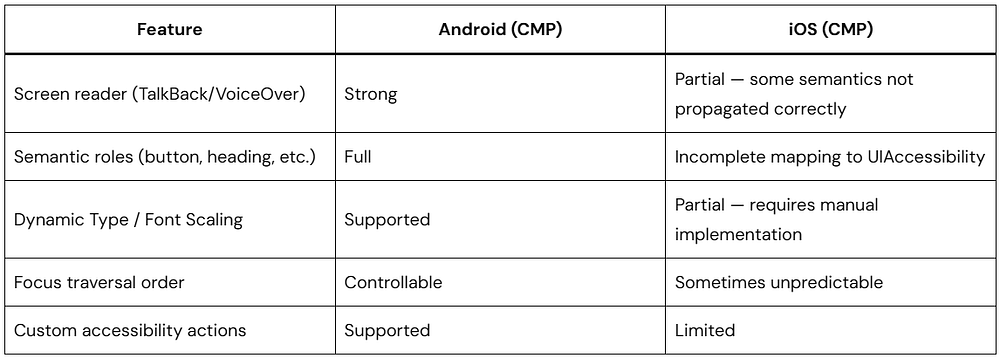
JetBrains is actively improving iOS accessibility. Track progress at youtrack.jetbrains.com — search for “iOS accessibility CMP.”
Semantic Annotations — Always Provide Them
Even where CMP’s accessibility pipeline is strong, you must provide explicit semantics:
@Composable
fun ProductCard(
    product: ProductUiModel,
    onClick: () -> Unit,
    modifier: Modifier = Modifier
) {
    Card(
        onClick = onClick,
        modifier = modifier
            .fillMaxWidth()
            .semantics(mergeDescendants = true) {  // Merge child semantics into one node
                contentDescription = buildString {
                    append(product.name)
                    append(", ")
                    append(product.formattedPrice)
                    append(". ")
                    append(product.description.take(100))  // Truncate long descriptions
                }
                role = Role.Button
                onClick(label = "View details for ${product.name}") {
                    onClick()
                    true
                }
            },
        elevation = CardDefaults.cardElevation(defaultElevation = 2.dp)
    ) {
        // Card content
    }
}// Loading states need explicit a11y announcements
@Composable
fun LoadingContent(modifier: Modifier = Modifier) {
Box(
modifier = modifier
.fillMaxSize()
.semantics { contentDescription = "Loading products, please wait" },
contentAlignment = Alignment.Center
) {
CircularProgressIndicator()
}
}If iOS Accessibility Is Required Today
For apps where full iOS VoiceOver compliance is non-negotiable right now, consider:
- Hybrid approach: Use CMP for Android + Desktop + Web, keep native SwiftUI for iOS
- UIKitView fallback: Implement accessibility-critical screens as UIKit views wrapped in
UIKitView - Wait for CMP 1.8+: JetBrains has prioritized iOS accessibility — the gap is closing
Performance: Real Numbers and Real Caveats
iOS Rendering Performance
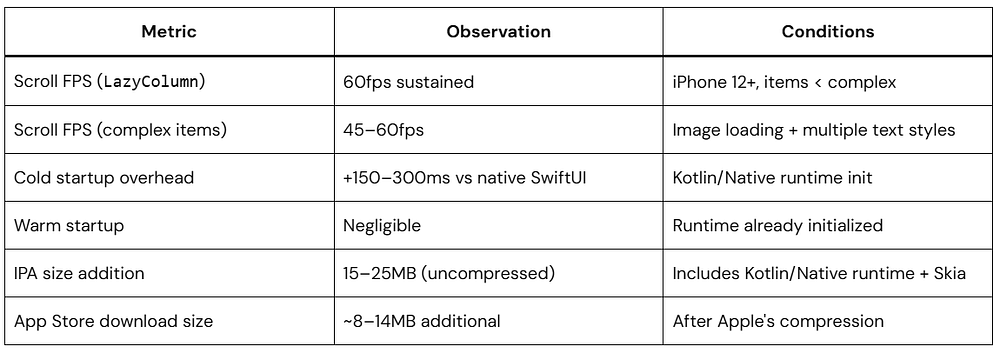
Startup overhead: The Kotlin/Native runtime initialization time is the most cited performance concern. It is real and not fully eliminable, but it can be minimized:
- Initialize the Kotlin runtime as early as possible in your Swift
AppDelegateor@mainstruct, before any UI is shown - Use
MainActorin Swift to ensure the CMP compositor is ready before the first frame
Memory Management on iOS
CMP’s memory behavior on iOS requires awareness of three interacting systems:
- Kotlin/Native’s concurrent garbage collector (introduced in Kotlin 1.9.20) — significantly improved but still runs GC pauses under pressure
- Swift’s ARC — automatic reference counting at the Swift/Kotlin boundary
- Skia’s texture cache — GPU memory managed separately
For LazyColumn with image-heavy items:
// Register for iOS memory pressure notifications and clear image caches
// This should be done in your iosMain platform setup

class IosMemoryPressureHandler(
    private val imageLoader: ImageLoader  // Coil's ImageLoader
) {
    fun register() {
        NSNotificationCenter.defaultCenter.addObserverForName(
            name = UIApplicationDidReceiveMemoryWarningNotification,
            `object` = null,
            queue = NSOperationQueue.mainQueue
        ) { _ ->
            imageLoader.memoryCache?.clear()
            imageLoader.diskCache?.clear()
        }
    }
}
Recomposition Performance
Mark your data models @Immutable or @Stable to enable the Compose compiler to skip recomposition when inputs haven’t changed:
@Immutable  // Tells Compose: all properties are val and of stable types
data class ProductUiModel(
    val id: String,
    val name: String,
    val formattedPrice: String,
    val description: String,
    val imageUrl: String
)

// Without @Immutable, a data class with List<> properties will be inferred
// as unstable by the Compose compiler, causing full recomposition of every
// LazyColumn item on every parent recomposition - a major performance issue
@Immutable
data class CartUiState(
    val items: List<CartItemUiModel>,  // List<> requires @Immutable on the containing class
    val totalFormatted: String,
    val itemCount: Int
)
Enable Compose compiler metrics to verify your composables are stable:
// In your app's build.gradle.kts
composeCompiler {
    metricsDestination = layout.buildDirectory.dir("compose-metrics")
    reportsDestination = layout.buildDirectory.dir("compose-reports")
}
Run ./gradlew assembleRelease and inspect the generated reports for unstable markers.
Web (Wasm) Performance Reality
- Initial Wasm binary: 5–20MB depending on features used
- Execution speed once loaded: faster than equivalent JavaScript, competitive with native apps for logic-heavy operations
- Rendering:
<canvas>-based — no DOM, no browser text selection, no SEO crawling, no browser accessibility tree - Not suitable for: SEO-dependent content, server-side rendering, or apps requiring native browser accessibility
- Suitable for: Internal tools, dashboards, B2B applications where load time and SEO are not primary concerns
Testing Strategy Across Platforms
Unit Testing (commonTest)
// core/domain/src/commonTest/ — Pure logic tests run on all platforms

class ProductListViewModelTest {
    private val testProducts = listOf(
        Product(id = "1", name = "Widget", price = 9.99, description = "A widget", imageUrl = ""),
        Product(id = "2", name = "Gadget", price = 19.99, description = "A gadget", imageUrl = "")
    )

    @Test
    fun `loadProducts emits Success state with mapped UI models`() = runTest {
        val fakeRepository = FakeProductRepository(products = testProducts)
        val useCase = GetProductsUseCaseImpl(fakeRepository)
        val viewModel = ProductListViewModel(useCase)
        val state = viewModel.uiState.value
        assertTrue(state is ProductListUiState.Success)
        assertEquals(2, (state as ProductListUiState.Success).products.size)
        assertEquals("$9.99", state.products[0].formattedPrice)
    }

    @Test
    fun `loadProducts emits Error state on network failure`() = runTest {
        val fakeRepository = FakeProductRepository(shouldFail = true)
        val useCase = GetProductsUseCaseImpl(fakeRepository)
        val viewModel = ProductListViewModel(useCase)
        val state = viewModel.uiState.value
        assertTrue(state is ProductListUiState.Error)
        assertTrue((state as ProductListUiState.Error).isRetryable)
    }
}

// Fake repository - not a mock, avoids Mockito (JVM-only)
class FakeProductRepository(
    private val products: List<Product> = emptyList(),
    private val shouldFail: Boolean = false
) : ProductRepository {
    override suspend fun getProducts(): Result<List<Product>> = if (shouldFail) {
        Result.failure(NetworkException("Network unavailable"))
    } else {
        Result.success(products)
    }
}
Do not use Mockito in commonTest — it is JVM-only. Use fakes (hand-written test doubles) or MockK’s multiplatform-compatible subset.
UI Testing
CMP UI tests use ComposeUiTest from compose-ui-test:
// composeApp/src/androidTest/ - Android UI tests
class ProductListScreenTest {
    @get:Rule
    val composeTestRule = createComposeRule()

    @Test
    fun productList_showsLoadingIndicator_whenStateIsLoading() {
        composeTestRule.setContent {
            ProductListScreen(
                uiState = ProductListUiState.Loading,
                onRetry = {},
                onSearchQueryChanged = {},
                onProductClick = {}
            )
        }

        composeTestRule.onNodeWithContentDescription("Loading products, please wait")
            .assertIsDisplayed()
    }

    @Test
    fun productList_showsProducts_whenStateIsSuccess() {
        val products = listOf(
            ProductUiModel("1", "Widget", "$9.99", "A widget", "")
        )

        composeTestRule.setContent {
            ProductListScreen(
                uiState = ProductListUiState.Success(products),
                onRetry = {},
                onSearchQueryChanged = {},
                onProductClick = {}
            )
        }

        composeTestRule.onNodeWithText("Widget").assertIsDisplayed()
        composeTestRule.onNodeWithText("$9.99").assertIsDisplayed()
    }
}
iOS UI testing: ComposeUiTest is not yet available for iOS. iOS UI testing for CMP apps is currently done through:
- XCUITest (tests the iOS binary as a black box — works, but cannot inspect Compose semantics directly)
- Screenshot testing via Paparazzi on Android + Roborazzi for cross-platform snapshot comparison
- Manual testing with VoiceOver enabled
CI/CD Configuration
# .github/workflows/ci.yml
name: CI

on: [push, pull_request]
jobs:
  unit-tests:
    runs-on: macos-14  # macOS required for Kotlin/Native iOS compilation
    steps:
      - uses: actions/checkout@v4
      - uses: actions/setup-java@v4
        with:
          java-version: 17
          distribution: temurin
      - name: Run common unit tests
        run: ./gradlew :core:domain:allTests
      - name: Run data layer tests
        run: ./gradlew :core:data:allTests
  android-tests:
    runs-on: ubuntu-latest
    steps:
      - uses: actions/checkout@v4
      - name: Run Android UI tests
        uses: reactivecircus/android-emulator-runner@v2
        with:
          api-level: 33
          script: ./gradlew :composeApp:connectedAndroidTest
  ios-build:
    runs-on: macos-14
    steps:
      - uses: actions/checkout@v4
      - name: Build iOS framework
        run: ./gradlew :composeApp:linkDebugFrameworkIosSimulatorArm64
      - name: Build Xcode project
        run: |
          xcodebuild build \
            -project iosApp/iosApp.xcodeproj \
            -scheme iosApp \
            -destination 'platform=iOS Simulator,name=iPhone 15'
Observability and Crash Reporting
Crash Reporting
Sentry has the most mature KMP SDK with multiplatform crash reporting, breadcrumbs, and Kotlin/Native stack trace symbolication:
// composeApp/src/commonMain/ — Shared error reporting interface
interface ErrorReporter {
    fun captureException(throwable: Throwable, context: Map<String, String> = emptyMap())
    fun addBreadcrumb(category: String, message: String)
    fun setUser(userId: String)
}

// In your ViewModel base class:
abstract class BaseViewModel(
    protected val errorReporter: ErrorReporter
) : ViewModel() {
    protected fun launchWithErrorHandling(
        block: suspend CoroutineScope.() -> Unit
    ) = viewModelScope.launch {
        try {
            block()
        } catch (e: CancellationException) {
            throw e  // Never swallow CancellationException
        } catch (e: Exception) {
            errorReporter.captureException(e)
            handleError(e)
        }
    }
    protected open fun handleError(e: Exception) {}
}
Firebase Crashlytics does not have a native KMP SDK. You can integrate it via expect/actual where Android uses the Firebase SDK directly and iOS uses the Crashlytics iOS SDK called via Kotlin/Native interop — but setup is significantly more complex than Sentry.
Structured Logging
// commonMain — platform-agnostic logging interface
interface AppLogger {
    fun debug(tag: String, message: String)
    fun info(tag: String, message: String)
    fun warn(tag: String, message: String, throwable: Throwable? = null)
    fun error(tag: String, message: String, throwable: Throwable? = null)
}

// androidMain
class AndroidLogger : AppLogger {
    override fun debug(tag: String, message: String) = Log.d(tag, message)
    override fun error(tag: String, message: String, throwable: Throwable?) =
        Log.e(tag, message, throwable)
    // ...
}

// iosMain
class IosLogger : AppLogger {
    override fun debug(tag: String, message: String) {
        NSLog("DEBUG [$tag]: $message")
    }
    override fun error(tag: String, message: String, throwable: Throwable?) {
        NSLog("ERROR [$tag]: $message ${throwable?.message ?: ""}")
    }
    // ...
}
Common Pitfalls and Correct Patterns
Pitfall 1: Platform Imports in commonMain
// Will not compile — Android import in shared code
import android.content.Context

// Define an interface in commonMain, implement per platform
interface PlatformContext  // Marker interface or use Koin's module system
Pitfall 2: Using JVM-Only Libraries
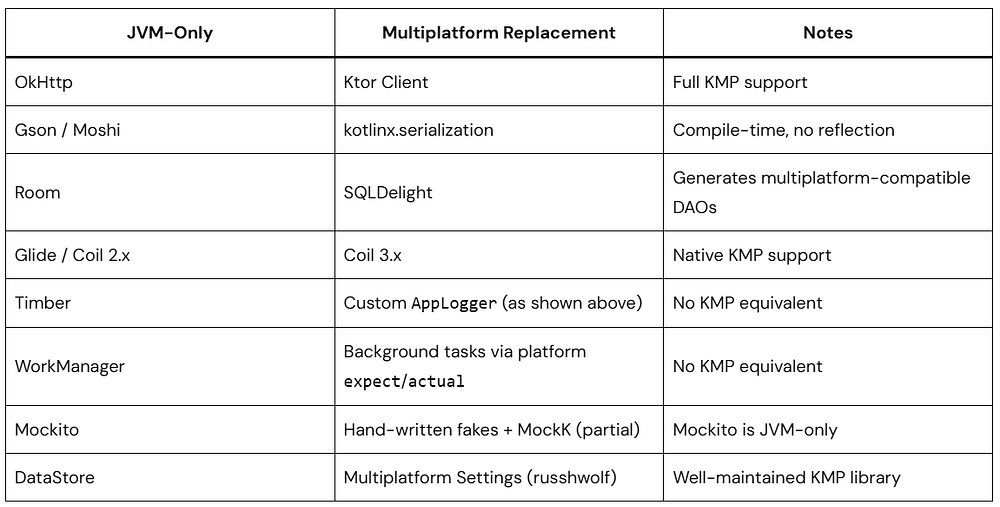
Pitfall 3: Keyboard Insets on iOS
// Always use imePadding() for forms — handles iOS keyboard differently than Android
@Composable
fun FormScreen() {
    Column(
        modifier = Modifier
            .fillMaxSize()
            .imePadding()           // Pushes content above keyboard on both platforms
            .verticalScroll(rememberScrollState())
            .padding(16.dp)
    ) {
        // Form fields
    }
}
Note: On iOS, imePadding() behavior depends on the window configuration. Ensure your ComposeUIViewController is not configured with ignoresSafeArea(.keyboard) on the Swift side if you want CMP to handle keyboard insets. Choose one approach and apply it consistently.
Pitfall 4: Missing Coroutine Dispatcher Setup on iOS
// iosMain — MUST call this before any coroutine usage on iOS
// Without it, Dispatchers.Main may not be properly initialized

fun initCoroutines() {
    // This is handled automatically when using lifecycle-viewmodel on iOS,
    // but if you use coroutines outside of ViewModels, explicit initialization
    // may be required depending on your kotlinx-coroutines-core version
}
Ensure kotlinx-coroutines-core is in your iosMain dependencies (not just commonMain) to guarantee the Darwin dispatcher (iOS/macOS version of a Coroutine Dispatcher) is available.
Pitfall 5: Skipping Compose Compiler Metrics
Run the Compose compiler metrics on every release build and investigate any composables marked unstable. Unstable composables recompose unnecessarily, degrading performance silently.
Pitfall 6: Forgetting CancellationException
// Swallows coroutine cancellation — causes memory leaks and undefined behavior
try {
    val result = repository.getProducts()
} catch (e: Exception) {
    handleError(e)  // CancellationException caught here!
}

// Always rethrow CancellationException
try {
    val result = repository.getProducts()
} catch (e: CancellationException) {
    throw e  // Must propagate
} catch (e: Exception) {
    handleError(e)
}
Migration Strategy from Native to CMP
Realistic Migration Path
Do not do a big-bang rewrite. Migrate incrementally with feature flags and measurable milestones.
Phase 0 — Foundation (Weeks 1–4)
- Set up multi-module project structure
- Migrate data models to
commonMain - Migrate network layer (Ktor), serialization (kotlinx.serialization), and database (SQLDelight) to KMP
- Set up DI (Koin) with platform modules
- Establish CI pipeline building for Android and iOS from day one
- Measure and baseline: build times, app startup time, binary size, crash rate
Phase 1 — First CMP Screen (Weeks 5–8)
- Choose a low-risk, low-traffic screen (Settings, About, or a simple list)
- Implement it in
commonMainwith full tests - Ship behind a feature flag — A/B test CMP vs native version
- Instrument: performance metrics, crash rate, accessibility reports
- Collect iOS user feedback specifically
Phase 2 — Expand Coverage (Months 3–6)
- Migrate screens in order of business risk (lowest risk first)
- Each migrated screen: unit tests, UI screenshot tests, accessibility audit
- Track shared code percentage per milestone
- Platform-specific UI divergences: address immediately, do not defer
Phase 3 — Evaluate and Commit (Month 6+)
- Measure actual shared code percentage (realistic target: 65–80%)
- Assess: developer productivity change, bug rate change, iOS user retention change
- Make a data-driven decision on full commitment vs hybrid approach
What to keep native (permanent exceptions):
- ARKit / RealityKit scenes
- Core ML on-device inference UI
- Custom UIKit animations requiring frame-by-frame UIView manipulation
- HealthKit / Watch OS integration screens
Production Readiness Checklist
Before shipping a CMP screen to production, verify:
Architecture
- UiState is a single sealed class (no impossible states)
- Composables receive state and callbacks — no ViewModel references
@Immutableapplied to all UiModel data classes- All domain code in
:core:domainwith no platform imports - DI configured for all platforms
iOS
- iOS lifecycle tested: background, foreground, memory warning
SharingStarted.WhileSubscribedused for all StateFlows- Back-swipe gesture tested on physical device
- Font rendering reviewed on iOS (San Francisco vs Roboto differences)
imePadding()tested with all form screens on iPhone SE (smallest current screen)
Accessibility
- All interactive elements have
contentDescriptionor semantic roles mergeDescendants = trueapplied to card-style components- TalkBack tested on Android (with CMP screen)
- VoiceOver tested on iOS (acknowledge any known gaps)
- Minimum touch target size: 48×48dp enforced
Performance
- Compose compiler metrics reviewed — no unexpected
unstablecomposables LazyColumnscroll tested at 60fps on target minimum device specs- iOS startup time measured and within acceptable threshold
- IPA size measured and within App Store guidelines
Testing
- Unit tests in
commonTestcovering ViewModel state transitions - UI tests covering primary happy path and error state
- Screenshot regression tests configured
- CI builds both Android and iOS on every PR
Observability
- Crash reporting integrated (Sentry recommended)
- Structured logging in place
- Performance metrics baseline captured
Who Is Using CMP in Production
JetBrains — Uses CMP in JetBrains Toolbox App and Fleet, with ongoing expansion.
Cash App (Block) — KMP used for shared business logic; CMP UI adoption in progress for select screens.
Touchlab — Consultancy with multiple enterprise deployments in healthcare, fintech, and retail; their public case studies are the most detailed available.
IceRock Development — Multiple production CMP deployments; maintains the moko suite of KMP/CMP libraries.
Yandex — Uses KMP for shared business logic in several products; CMP adoption expanding.
Recognized pattern across adopters: Teams that start with shared business logic via KMP report the lowest-risk path to CMP. Direct CMP adoption without prior KMP experience significantly increases migration risk.
Should Your Team Adopt CMP?
Adopt CMP if:
Your team writes Kotlin for Android and you maintain a parallel iOS codebase with feature parity requirements. The marginal cost of adopting CMP is very low; the long-term cost reduction is substantial.
You are starting a new project. The incremental cost of CMP vs Android-only is low, and you avoid the compounding technical debt of two separate UI codebases.
Your product serves non-accessibility-critical markets (B2B tools, internal apps, dashboards) where the iOS VoiceOver gap is manageable today.
You can invest in iOS-specific testing infrastructure from day one, not as an afterthought.
Proceed cautiously or defer if:
Your iOS app is in a regulated industry where WCAG 2.1 / ADA accessibility compliance is legally required. CMP’s iOS accessibility gaps are real and not fully controllable on your timeline.
Your app relies heavily on platform-specific animations, ARKit, Core ML on-device UI, or custom UIKit components that represent a significant portion of your UI surface.
Your team has no Kotlin experience. The KMP learning curve on top of CMP adoption simultaneously is a high-risk combination.
Your iOS app is a primary revenue driver and even a 200–300ms cold startup increase represents a measurable conversion loss at your scale — benchmark first.
The Right Default: Hybrid Approach
The most risk-managed production pattern today is:
- Android: 100% CMP (builds on your existing Jetpack Compose investment)
- iOS: CMP for data/logic-heavy screens; native SwiftUI for launch screen, onboarding, and accessibility-critical flows
- Desktop: CMP if you need desktop support; low-cost add given Android CMP coverage
- Web: CMP/Wasm for internal tools; native web (React/Vue) for consumer-facing, SEO-dependent products
This hybrid approach maximizes code reuse where CMP is strongest while using native where the gaps are most consequential.
Frequently Asked Questions
Q: Is Compose Multiplatform the same as Kotlin Multiplatform?
No. Kotlin Multiplatform (KMP) is the foundational technology for compiling Kotlin code to multiple targets and sharing business logic, data layers, and domain models across platforms. Compose Multiplatform (CMP) is built on top of KMP and specifically handles the declarative UI layer. You can use KMP without CMP (sharing logic while keeping native UI), but you cannot use CMP without KMP.
Q: Does CMP code run identically on all platforms?
No — and any resource that tells you it does is being imprecise. CMP code compiles and runs on all platforms, but font rendering, scroll physics, shadow appearance, gesture thresholds, and system behavior differ between Android and iOS because the rendering backends (Android’s hardware compositor vs Skia/Metal on iOS) operate differently. These differences require deliberate iOS testing and, in some cases, platform-specific composable implementations.
Q: How does CMP handle accessibility?
On Android, CMP’s accessibility support maps cleanly to Android’s Accessibility API — strong and production-ready. On iOS, CMP’s accessibility integration with UIAccessibility/VoiceOver has known gaps as of CMP 1.7.x. JetBrains is actively improving this. For iOS apps requiring full VoiceOver compliance today, a hybrid approach (native SwiftUI for accessibility-critical screens) is recommended.
Q: What is the realistic shared code percentage?
In production deployments, teams consistently achieve 65–80% shared UI code. The remaining 20–35% is platform-specific handling for: native view interop, platform lifecycle events, accessibility edge cases, and behaviors where native look-and-feel is non-negotiable. Claims of 90%+ shared code are technically possible for simple apps but are not representative of complex, production-quality applications.
Q: Does CMP support Material Design 3?
Yes. Material 3 (compose.material3) is fully supported in commonMain and renders on all platforms. The Material 3 component rendering on iOS is Skia-drawn (not native UIKit), which means it does not automatically adapt to iOS’s Human Interface Guidelines. If HIG compliance is required on iOS, you will need platform-specific theming via the expect/actual pattern or conditional logic using LocalPlatformInfo.
Q: How do I handle different screen sizes and form factors?
Use WindowSizeClass from compose-material3-adaptive, BoxWithConstraints, and responsive Modifier patterns — the same approach as Jetpack Compose on Android, applied in commonMain. These APIs are multiplatform-compatible.
Q: Is CMP free?
Yes. CMP is open-source under the Apache 2.0 license, free for commercial use. JetBrains monetizes through IntelliJ IDEA / Android Studio tooling and Kotlin-based services, not through CMP licensing.
Q: What is the binary size impact on iOS?
Adding CMP to an iOS app adds approximately 15–25MB uncompressed to the app bundle (including the Kotlin/Native runtime and Skia). After Apple’s App Thinning and compression, the incremental App Store download size increase is approximately 8–14MB. This is acceptable for most feature-rich applications; it may be a concern for lightweight utility apps competing on download size.
Conclusion
Compose Multiplatform is a production-viable framework for sharing UI code across Android, iOS, Desktop, and Web when adopted with clear eyes about its genuine tradeoffs.
Its real strengths: True Kotlin compilation (no bridges), zero retraining for Android Kotlin teams, first-class KMP integration, access to all native APIs via expect/actual and native view interop, and a strong trajectory backed by serious JetBrains investment.
Its real limitations today: iOS accessibility gaps requiring active management, startup overhead on iOS from Kotlin/Native runtime initialization, iOS debugging tooling significantly behind Android, and a Web/Wasm target still maturing toward production-grade use for consumer applications.
The teams shipping CMP successfully in production are not doing so because CMP eliminated all platform differences — they are doing so because they invested in proper architecture (Clean + MVI, typed state, state hoisting), iOS-specific testing, accessibility audits, and observability infrastructure. The framework enables code sharing; engineering discipline determines whether that sharing improves or degrades product quality.
Start with a well-scoped pilot. Measure relentlessly. Expand where the data supports it.