Doubly Linked Lists are a fundamental data structure in computer science, particularly in Java programming. They offer efficient insertion, deletion, and traversal operations compared to other data structures like arrays or singly linked lists. In this blog, we’ll delve into the concept of doubly linked lists, their implementation in Java, and explore some common operations associated with them.
What is a Doubly Linked List?
A Doubly Linked List is a type of linked list where each node contains a data element and two references or pointers: one pointing to the next node in the sequence, and another pointing to the previous node. This bidirectional linkage allows traversal in both forward and backward directions, making operations like insertion and deletion more efficient compared to singly linked lists.
Each node in a doubly linked list typically has the following structure:
Java
classNode {intdata;Nodeprev;Nodenext;}
Here, data represents the value stored in the node, prev is a reference to the previous node, and next is a reference to the next node.
How to represent Doubly Linked List in java?
Doubly Linked List:
It is called a two-way linked list.
Given a node, we can navigate the list in both forward and backward directions, which is not possible in a singly linked list.
In a singly linked list, a node can only be deleted if we have a pointer to its previous node. However, in a doubly linked list, we can delete the node even if we don’t have a pointer to its previous node.
ListNode in a Doubly Linked List:
Java
<------| previous | data | next |------->
In this visual representation:
<------ indicates the direction of the previous pointers.
|prev| represents the pointer to the previous node.
|data| represents the data stored in the node.
|next| represents the pointer to the next node.
-------> indicates the direction of the next pointers.
Each node in the doubly linked list contains pointers to both the previous and next nodes, allowing bidirectional traversal.
This Java class DoublyLinkedList defines a doubly linked list. It includes inner class ListNode for representing each node in the list. The class provides methods to check if the list is empty and to get the length of the list. The constructor initializes the head and tail pointers to null and sets the length to 0.
Common Operations of Doubly Linked List in java
Here are some common operations performed on a doubly linked list:
Insertion: Elements can be inserted at the beginning, end, or at any specific position within the list.
Deletion: Elements can be deleted from the list based on their value or position.
Traversal: Traversing the list from the beginning to the end or vice versa.
Search: Searching for a specific element within the list.
Reverse: Reversing the order of elements in the list.
How to print elements of Doubly Linked List in java?
Here, we use a temporary node for traversing purposes. We assign the head node to it, i.e., ListNode temp = head;. Next, we move until the end of the list from the head. While traversing, we print data, and when we reach the end, our while loop terminates. That’s why we need to print ‘null’ on the next line.
This method displayForward is designed to print the elements of the doubly linked list in the forward direction. It starts from the head node and traverses the list, printing the data of each node followed by an arrow (-->). Finally, it prints null to indicate the end of the list. If the list is empty (i.e., head is null), the method simply returns without performing any operation.
Here, we use a temporary node for traversing purposes. We assign the tail node to it, i.e., ListNode temp = tail;. Next, we move back until the end of the list from the tail. While traversing, we print data, and when we reach the end, our while loop terminates. That’s why we need to print ‘null’ on the next line.
This method displayBackward is designed to print the elements of the doubly linked list in the backward direction. It starts from the tail node and traverses the list, printing the data of each node followed by an arrow (-->). Finally, it prints null to indicate the end of the list. If the list is empty (i.e., tail is null), the method simply returns without performing any operation.
How to insert node at the beginning of Doubly Linked List?
Java
ListNodenewNode = newListNode(value);if(isEmpty()){ tail = newNode;}else{head.previous = newNode;}newNode.next = head;head = newNode;length++; // as we inserted node successfully increase the length by one
Here, the head node plays a major role, while the tail node is only considered when the list node is empty. At that time, both head and tail point to null. So when we insert a new node, we assign it to the tail. At that time, the new node’s previous and next pointers point to null, and both head and tail point to that new node. But the next time when our list contains nodes, how do we insert at the beginning?
Inserting at the beginning means we need to assign newNode to the head’s previous pointer so that the new node will be before the head node. Still, the new node’s next pointer needs to be assigned to the head so that a two-way connection is built between every node.
Finally, we have successfully inserted the new node at the beginning. Our head should point to the new node, so we update it accordingly. However, our tail remains the same at the last node only.
Java
Output:null<---|previous|10|next|<------->|previous|1|next|---->null// here head --> 10 and tail --> 1
This method insertFirst is designed to insert a new node with the given value at the beginning of the doubly linked list. If the list is empty, the new node becomes both the head and the tail of the list. Otherwise, the new node is inserted before the current head node, and its next reference is updated to point to the current head node. Finally, the length of the list is incremented.
How to insert node at the end of a Doubly Linked List in Java?
The logic is similar to the insertion at the beginning. Here, the tail pointer plays a major role as it points to the end of the list. When the list is empty, both head and tail will point to null. Now, we create a new node with the given value, but its previous and next pointers point to null. So, when the list is empty and we add a new node at the end of the list, it means we only need to point head and tail to the new node. But from the next insertion onward, adjacent nodes will point to each other, maintaining the two-way nature of the main doubly linked list. Therefore, we will add the new node to the tail node’s next pointer, and the new node’s previous pointer will point to the tail node. Here, the head remains the same, only the tail will change every time.
Finally, after every successful insertion, we need to increment the length by 1.
Java
Output:null<-----|previous|1|next|<--------->|previous|10|next|------>null// here head --> 1 and newNode & tail --> 10
Code
Java
publicvoidinsertLast(int value) {ListNodenewNode = newListNode(value);if (isEmpty()) { head = newNode; // If the list is initially empty, assign the new node to the head } else {// Establish two-way connection between the new node and the current tail nodetail.next = newNode;newNode.previous = tail; } tail = newNode; // Update the tail to point to the new node length++; // Increment the length of the list by 1}
This method insertLast is designed to insert a new node with the given value at the end of the doubly linked list. If the list is initially empty, the new node becomes the head of the list. Otherwise, it establishes a two-way connection between the new node and the current tail node, and updates the tail pointer to point to the new node. Finally, it increments the length of the list by 1.
How to delete first node in doubly linked list in java ?
Java
//Sample Input: null<---|previous|1|next|<------>|previous|10|next|<-------->|previous|15|next|--->null// here head --> 1 and tail --> 15
Here, the tail will not play any major role because it is at the end of the list, and we want to delete the first node. So, the head will play a major role in this case. We assign the head node to the temporary node ‘temp’ because we want to delete the first node.
If the list has only one node, which is also the last node, it means head and tail should point to the same value. In such cases, the tail will be assigned with null, and the head will move to the next pointer, which may also be null. Additionally, we assign null to the temp’s next node, and return the temp node. Furthermore, we need to reduce the length by 1.
If the list has more than one node, we first move to the head’s next node and then remove its previous node. Then, we change the head to the next node so that we remove the head node. Using the statement ‘temp.next = null;’, we remove the head node and return it. Additionally, we need to reduce the length by 1.
This method deleteFirst is designed to delete the first node of the doubly linked list and return the deleted node. If the list is empty, it throws a NoSuchElementException. Otherwise, it removes the head node from the list. If the list contains only one node (head and tail are the same), it sets the tail to null. Otherwise, it updates the previous reference of the next node after the head to null. Finally, it updates the head pointer to the next node, decrements the length of the list, and returns the deleted node.
How to delete last node in Doubly Linked List in java ?
If the list is empty, we throw a NoSuchElementException.
When the list contains only one node, at that time, both head and tail point to the same node. Here, only head will play a major role; elsewhere, the tail plays an important role. To delete the last node in this case, we assign null to head, and the tail’s previous will become the new tail. Then, we delete the tail and return it.
When the list contains more than one node, we delete the connection between two adjacent nodes. We move to the tail’s previous node, then back to the next node and assign null to it. Next, we move our current tail to its previous node, and finally, we remove the connection between the tail and its previous node by setting temp.previous to null. We then return the last node.
This method deleteLast is designed to delete the last node of the doubly linked list and return the deleted node. If the list is empty, it throws a NoSuchElementException. Otherwise, it removes the tail node from the list. If the list contains only one node (head and tail are the same), it sets the head to null. Otherwise, it updates the next reference of the previous node of the tail to null. Finally, it updates the tail pointer to the previous node, decrements the length of the list, and returns the deleted node.
Advantages of Doubly Linked Lists
Doubly linked lists offer several advantages over other data structures:
Bidirectional traversal: Unlike singly linked lists, where traversal is only possible in one direction, doubly linked lists allow traversal in both forward and backward directions.
Efficient insertion and deletion: Insertion and deletion operations can be performed more efficiently in doubly linked lists since only the adjacent nodes need to be updated.
Dynamic size: Doubly linked lists can grow or shrink dynamically, allowing for efficient memory utilization.
Conclusion
Doubly linked lists are a versatile data structure that provides efficient operations for dynamic storage and retrieval of data. Understanding their implementation and common operations is essential for any Java programmer. By utilizing the bidirectional traversal and efficient insertion/deletion capabilities, doubly linked lists offer an excellent alternative to arrays or singly linked lists in various programming scenarios.
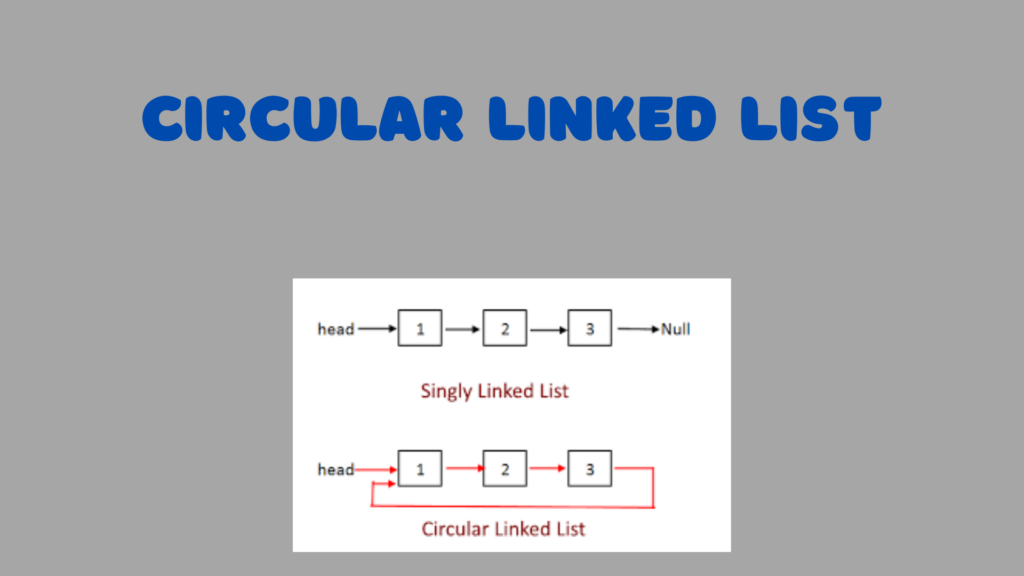
Linked lists are a fundamental data structure in computer science, offering flexibility and efficiency in managing collections of data. Among the variations of linked lists, the circular linked list stands out for its unique structure and applications. In this blog post, we’ll delve into the concept of circular linked lists, explore their implementation in Java,...
Singly linked lists are versatile data structures that offer efficient insertion, deletion, and traversal operations. However, beyond the basic CRUD (Create, Read, Update, Delete) operations, there lies a realm of logical operations that can be performed on singly linked lists. In this detailed blog, we’ll explore some of the most important logical operations that can be applied to singly linked lists in Java, providing insights into their implementation and usage.
How to search an element in a Singly Linked List in Java?
As the main logic, we need to traverse the list node by node. While traversing, we check each node’s data. If it matches the search key, then we’ve found the key; otherwise, we haven’t found it.
We create a temporary node current to traverse the list until the end. Initially, it’s set to the head node, i.e., ListNode current = head.
Using a while loop, we traverse until the end of the list. If current becomes null, it means we’ve reached the end, and we terminate the loop. During traversal, we check each node’s data with the search key. If we find a match, we return true immediately and exit the loop.
Java
while( current != null ){if(current.data == searchKey) {returntrue; } current = current.next; // Move to the next node in each iteration }
Finally, if we haven’t found the exact search key after traversing the entire list, we return false.
Output:
If the search key is 1, then it is found.
If the search key is 12, then it is not found.
Code
Java
publicbooleanfind(ListNode head, int searchKey) {if (head == null) {returnfalse; }ListNodecurrent = head;while (current != null) {if (current.data == searchKey) {returntrue; } current = current.next; // Move to the next node }returnfalse;}
This method find is designed to search for a specific key value (searchKey) within the linked list. It returns true if the key is found, and false otherwise. If the list is empty (i.e., head is null), it immediately returns false. Otherwise, it traverses the list, comparing the data value of each node (current.data) with the search key. If a match is found, it returns true. If the end of the list is reached without finding the key, it returns false.
The main logic is to traverse the list until the end and apply a logic that reverses the pointing of each node. Ultimately, we obtain the reversed list.
We create three temporary nodes:
current points to head.
previous initially points to null.
next also initially points to null.
We traverse the list node by node using a while loop. The loop iterates until current becomes null.
In each iteration of the while loop, we perform the following operations:
Java
while(current != null){ next = current.next; // Store the reference to the next nodecurrent.next = previous; // Reverse the pointing direction of the current node previous = current; // Move forward: previous becomes current current = next; // Move forward: current becomes next}
First, we move to the next node by assigning next to current.next.
Second, we reverse the reference of the current node to point to the previous node.
Third, we update previous to be the current node, preparing for the next iteration.
Finally, we move forward by assigning next to current.
This process effectively reverses the pointing direction of each node in the list.
When the while loop terminates, we have reversed the entire list, and the last previous node becomes the new head of the list. So, we return previous.
This method reverse is designed to reverse the linked list. If the list is empty (i.e., head is null), it immediately returns null. Otherwise, it iterates through the list, changing the next pointer of each node to point to the previous node. At the end of the iteration, it returns the last node encountered, which becomes the new head of the reversed list.
How to find middle node in singly linked list in java ?
To find the middle node in a singly linked list, we employ the same logic for two different cases.
Case 1: List having an even number of nodes:
For example, head –> 10 –> 8 –> 1 –> 11 –> null
In this case, the middle node is 1.
Case 2:List having an odd number of nodes:
For example, head –> 10 –> 8 –> 1 –> 11 –> 15 –> null
Here again, the middle node is 1.
Java
ListNodeslowPtr = head;ListNodefastPtr = head;while(fastPtr != null && fastPtr.next != null) { slowPtr = slowPtr.next; // Move slow pointer to the next node fastPtr = fastPtr.next.next; // Move fast pointer to two nodes ahead}return slowPtr; // Return the slow pointer, which points to the middle node
The main logic involves using two different pointers: a slow pointer and a fast pointer. The slow pointer moves to the next node one by one, while the fast pointer moves two nodes ahead at a time. When the fast pointer reaches the end (either pointing to null or its next points to null), the while loop terminates, and we return the slow pointer, which represents the middle node in both cases.
This method getMiddleNode is designed to find and return the middle node of the linked list. It initializes two pointers, slowPtr and fastPtr, both starting at the head of the list. The slowPtr moves one node at a time while the fastPtr moves two nodes at a time. When the fastPtr reaches the end of the list (or null), the slowPtr will be at the middle node. If the list is empty (i.e., head is null), it returns null.
How to detect a loop in Singly Linked List in java ?
In a given singly linked list, if there exists a loop, it can be identified by employing the following logic.
Consider the linked list: head –> 1 –> 2 –> 3 –> 4 –> 5 –> 6 –> 3
As it can be seen, the list loops back to the node with value 3.
The main logic remains the same as before: we use two different pointers, a slow pointer and a fast pointer. However, in this case, we move the fast pointer first, followed by the slow pointer. Due to the loop, these pointers will eventually meet at the same node. Once the slow and fast pointers are equal, pointing to the same node, we can conclude that there exists a loop in the linked list. If the pointers never meet, then the list does not contain any loop.
Java
ListNodefastPtr = head;ListNodeslowPtr = head;while(fastPtr != null && fastPtr.next != null) { fastPtr = fastPtr.next.next; // Move fast pointer two nodes ahead slowPtr = slowPtr.next; // Move slow pointer one node aheadif(slowPtr == fastPtr) { // If slow pointer meets fast pointer, it indicates a loopreturntrue; }}returnfalse; // If loop termination condition is met without meeting points, return false
The main logic is the same as before: we use two pointers, a slow pointer and a fast pointer, to traverse the list. However, in this case, we move the fast pointer two nodes ahead and the slow pointer one node ahead in each iteration. If the pointers meet at any point during traversal, it indicates the presence of a loop in the list, and we return true. If the loop termination condition is met without the pointers meeting, it means there is no loop in the list, and we return false.
Code
Java
publicbooleancontainsLoop() {ListNodefastPtr = head;ListNodeslowPtr = head;while (fastPtr != null && fastPtr.next != null) { fastPtr = fastPtr.next.next; // We need to move fast pointer fast so that it will catch the slow pointer if a loop is present slowPtr = slowPtr.next;if (slowPtr == fastPtr) {returntrue; } }returnfalse;}publicvoidcreateALoopInLinkedList() {ListNodefirst = newListNode(1); ListNodesecond = newListNode(2);ListNodethird = newListNode(3);ListNodefourth = newListNode(4);ListNodefifth = newListNode(5);ListNodesixth = newListNode(6); head = first;first.next = second;second.next = third;third.next = fourth;fourth.next = fifth;fifth.next = sixth;sixth.next = third;}
The method containsLoop checks whether a loop exists in the linked list using Floyd’s Cycle Detection Algorithm. It initializes two pointers, fastPtr and slowPtr, both starting at the head of the list. The fastPtr moves twice as fast as the slowPtr. If there is a loop in the list, eventually, the fastPtr will catch up with the slowPtr. If no loop is found, the method returns false.
The method createALoopInLinkedList is a helper method to create a loop in the linked list for testing purposes. It creates a linked list with six nodes and then creates a loop by making the next reference of the last node point to the third node.
How to find nth node from the end of a Singly Linked Listin java?
Consider the singly linked list:
head –> 10 –> 8 –> 1 –> 11 –> 15 –> null
If we want to find the node that is “n” positions from the end of the list, where “n” is given as 2, then the node containing 11 would be that node.
Java
ListNodemainPtr = head; // It will move forward when the reference pointer covers the nth position forward from the head ListNodereferencePtr = head; // It will move twice: first, it covers the nth distance from the head, then it goes till the end with mainPtr, so that mainPtr will reach the exact positionintcount = 0; // It is to track the number of nodes the reference pointer moved forwardwhile(count < n) { refPtr = refPtr.next; count++;}while(refPtr != null) { refPtr = refPtr.next; mainPtr = mainPtr.next;}return mainPtr;
The main logic involves using two pointers: a main pointer and a reference pointer. The reference pointer moves forward until it reaches the nth position from the head, while the main pointer remains stationary. After reaching the nth position, the reference pointer continues moving until it reaches the end of the list, while the main pointer moves along with it. When the reference pointer reaches the end of the list, the main pointer will be pointing to the nth node from the end of the list.
Code
Java
publicListNodegetNthNodeFromEnd(int n) {if (head == null) {returnnull; }if (n <= 0) {thrownewIllegalArgumentException("Invalid value: n = " + n); }ListNodemainPtr = head; // It will move forward when the reference pointer covers the nth position forward from the head ListNoderefPtr = head; // It will move twice: first, it covers nth distance from head, then it goes till the end with mainPtr, so that mainPtr will reach the exact position.intcount = 0; // It is to track the number of nodes refPtr moved forwardwhile (count < n) {if (refPtr == null) {thrownewIllegalArgumentException(n + " is greater than the number of nodes in the list"); } refPtr = refPtr.next; count++; }while (refPtr != null) { refPtr = refPtr.next; mainPtr = mainPtr.next; }return mainPtr; // The returned mainPtr will be at the nth position from the end of the list}
This method getNthNodeFromEnd is designed to find and return the nth node from the end of the linked list. It initializes two pointers, mainPtr and refPtr, both starting at the head of the list. The refPtr moves forward n positions from the head. Then, both pointers move forward simultaneously until the refPtr reaches the end of the list. At this point, the mainPtr will be at the nth node from the end. If the list is empty or if the value of n is less than or equal to 0, the method throws an IllegalArgumentException.
How to remove duplicates from sorted Singly Linked List in java?
For the given input of a sorted linked list:
head –> 1 –> 1 –> 2 –> 3 –> 3 –> null
The desired output is a sorted linked list with duplicates removed:
head –> 1 –> 2 –> 3 –> null
Java
ListNodecurrent = head;while(current != null && current.next != null) {if(current.data == current.next.data) {current.next = current.next.next; // Connect current to the next next node to remove the duplicate node } else { current = current.next; // Move to the next node if no duplicate is found }}
The main logic involves traversing the list node by node using a current pointer. While traversing, we check whether the data of the current node is equal to the data of the next node. If they are equal, it means a duplicate node is found, so we connect the current node to the next next node, effectively removing the duplicate node between them. If no duplicate is found, we simply move to the next node. This process continues until we reach the end of the list or the current node becomes null.
This method removeDuplicates is designed to remove duplicates from a sorted linked list. It iterates through the list using the current pointer. If the current node’s data is equal to the data of the next node, it skips the next node by updating the next reference of the current node to skip the duplicate node. Otherwise, it moves the current pointer to the next node in the list. If the list is empty (i.e., head is null), the method returns without performing any operation.
Now,How to insert a node in a sorted Singly Linked List in java?
Given the sorted linked list:
head –> 1 –> 8 –> 10 –> 16 –> null
And a new node:
newNode –> 11 –> null
We want to insert the new node (11) into the sorted list such that the sorting order remains the same.
After insertion, the updated list would be:
head –> 1 –> 8 –> 10 –> 11 –> 16 –> null
Java
ListNodecurrent = head;ListNodeprevious = null;while(current != null && current.data < newNode.data) { previous = current; current = current.next;}// When we reach the insertion point, we have references to current, previous, and newNode.// Now, we rearrange the pointers so that previous points to newNode and newNode points to current.newNode.next = current;if (previous != null) {previous.next = newNode;} else {// If previous is null, it means the newNode should become the new head. head = newNode;}return head;
The main logic involves traversing the sorted linked list until we find the appropriate position to insert the new node while maintaining the sorting order. We traverse the list node by node, comparing the data of each node with the data of the new node. We continue this process until we find a node whose data is greater than or equal to the data of the new node, or until we reach the end of the list.
When we reach the insertion point, we have references to three nodes: the current node, the previous node (the node before the insertion point), and the new node. To insert the new node into the list, we rearrange the pointers so that the previous node points to the new node, and the new node points to the current node.
If the previous node is null, it means that the new node should become the new head of the list. In this case, we update the head pointer to point to the new node.
Code
Java
publicListNodeinsertInSortedList(int value) {ListNodenewNode = newListNode(value);if (head == null) {return newNode; }ListNodecurrent = head;ListNodeprevious = null;while (current != null && current.data < newNode.data) { // Will go till the end while checking the sorting order between the current node and the new node data previous = current; current = current.next; }// When we reach the insertion point, we have our current, previous, and newNode references so we only need to arrange pointers.// So that previous will point to newNode and newNode will point to current.newNode.next = current;if (previous == null) { // If the new node is to be inserted at the beginning head = newNode; } else {previous.next = newNode; }return head; }
This method insertInSortedList is designed to insert a new node with the provided value into a sorted linked list. If the list is empty (i.e., head is null), the new node becomes the head of the list. Otherwise, it traverses the list to find the correct position to insert the new node while maintaining the sorted order. Once the insertion point is found, it updates the pointers to insert the new node. Finally, it returns the head of the list.
How to remove a given key from singly linked list in java?
Given the linked list:
head –> 1 –> 8 –> 10 –> 11 –> 16 –> null
Suppose our key is 11, and we want to remove it from the list.
After removal, the updated list would be:
head –> 1 –> 8 –> 10 –> 16 –> null
Java
ListNodecurrent = head;ListNodeprevious = null;// Traverse the list to find the node with the key valuewhile(current != null && current.data != key) { previous = current; current = current.next;}// If we reached the end of the list without finding the key, returnif(current == null) {return;}// If we found the key, remove the node by adjusting the previous node's next referenceif(previous != null) {previous.next = current.next;} else {// If the key is found at the head, update the head pointer to skip the current node head = current.next;}
The main logic involves traversing the linked list until we find the node with the specified key value. While traversing, we keep track of the previous node as well.
If we reach the end of the list without finding the key, it means the key doesn’t exist in the list, so we return without performing any removal.
If we find the node with the key value, we remove it from the list by adjusting the next reference of the previous node to skip over the current node. However, if the key is found at the head of the list, we update the head pointer to skip over the current node.
Code
Java
publicvoiddeleteNode(int key) {ListNodecurrent = head;ListNodeprevious = null;// If we find our key at the first node that is head, just update head to point to the next node.if (current != null && current.data == key) { head = current.next;return; }while (current != null && current.data != key) { previous = current; current = current.next; }// If we reached the end of the list (current == null), the key was not found, so return without performing any operation.if (current == null) {return; }// If we found the key, update the next reference of the previous node to point to the next node of the current node, effectively removing the current node.previous.next = current.next;}
This method deleteNode is designed to delete a node with the given key value from the linked list. It iterates through the list using the current pointer to find the node with the specified key value while keeping track of the previous node using the previous pointer. If the key is found at the first node (head), it updates the head to point to the next node. If the key is found in the middle of the list, it updates the next reference of the previous node to skip the current node. If the key is not found in the list, the method simply returns without performing any operation.
Bonus: Two Sum Problem in java
Problem: Given an array of integers, return the indices of the two numbers such that they add up to a specific target.
Example: Given array of integers: {2, 11, 5, 10, 7, 8}, and target = 9.
Solution: Since arr[0] + arr[4] = 2 + 7 = 9, we return {0, 4} as the indices.
The main logic involves using a map for fast lookup of stored values to find the exact sum of the target. We require one map for lookup purposes and one result array to store the indices of the two numbers that add up to the target sum from the given array. Here’s how it works:
We iterate through the array, examining each element.
At each element, we calculate the difference between the target and the current element.
We check if this difference exists in the map. If it does, it means we have found the two numbers that add up to the target.
We return the indices of the current element and the element with the required difference.
If the difference is not found in the map, we store the current element’s value along with its index in the map for future lookups.
The main logic involves using a hash map to store the indices of elements in the array. We traverse the array and, for each element, check if its complement (target – current number) exists in the hash map. If it does, it means we have found two numbers that add up to the target, so we return their indices. If not, we add the current number and its index to the hash map for future reference.
This method twoSum is designed to find and return the indices of the two numbers in the numbers array that add up to the target value. It utilizes a hashmap to store the difference between the target and each element of the array along with its index. It iterates through the array, checking if the hashmap contains the difference between the target and the current element. If not, it adds the current element and its index to the hashmap. If it finds the difference in the hashmap, it retrieves the index of the other number and returns the indices as the result. If no such pair of numbers is found, it throws an IllegalArgumentException.
Note: Why is this Array Manipulation problem being discussed here?
While the problem of finding two numbers in an array that add up to a specific target is not directly related to singly linked list operations, the underlying logic and problem-solving techniques used in solving array manipulation problems can indeed be helpful in solving problems related to singly linked lists.
Many problem-solving techniques and algorithms used in array manipulation, such as iterating over elements, using hash maps for fast lookups, or employing two-pointer approaches, can also be applied to singly linked list problems. Additionally, understanding how to efficiently manipulate data structures and analyze patterns in data is a fundamental skill that can be transferred across various problem domains.
In the context of computer science and algorithmic problem-solving, building a strong foundation in problem-solving techniques through various types of problems, including those involving arrays, linked lists, trees, graphs, and more, can enhance your ability to tackle a wide range of problems effectively.
So, while the specific problem discussed may not directly relate to singly linked lists, the problem-solving skills and techniques learned from array manipulation problems can certainly be beneficial in solving problems related to singly linked lists and other data structures.
Conclusion
By mastering the logical operations of singly linked list in Java, programmers can unlock the full potential of this versatile data structure. Whether it’s searching, reversing, merging, or detecting loops, understanding these operations equips developers with powerful tools for solving complex problems and building efficient algorithms. With the insights provided in this blog, programmers can elevate their skills and become more proficient in leveraging singly linked lists for various applications.
Singly linked lists are a fundamental data structure in computer science, offering dynamic flexibility and memory efficiency. In Java, understanding and mastering them is key to unlocking efficient algorithms and problem-solving skills. This blog aims to guide you from basic concepts to advanced techniques, transforming you from a linked list novice to a ninja! Anatomy...
Linked lists are fundamental data structures in computer science that provide dynamic memory allocation and efficient insertion and deletion operations. In Java, linked lists are commonly used for various applications due to their flexibility and versatility. In this blog post, we will explore linked lists in Java in detail, covering their definition, types, operations, and implementation.
What is a Linked List?
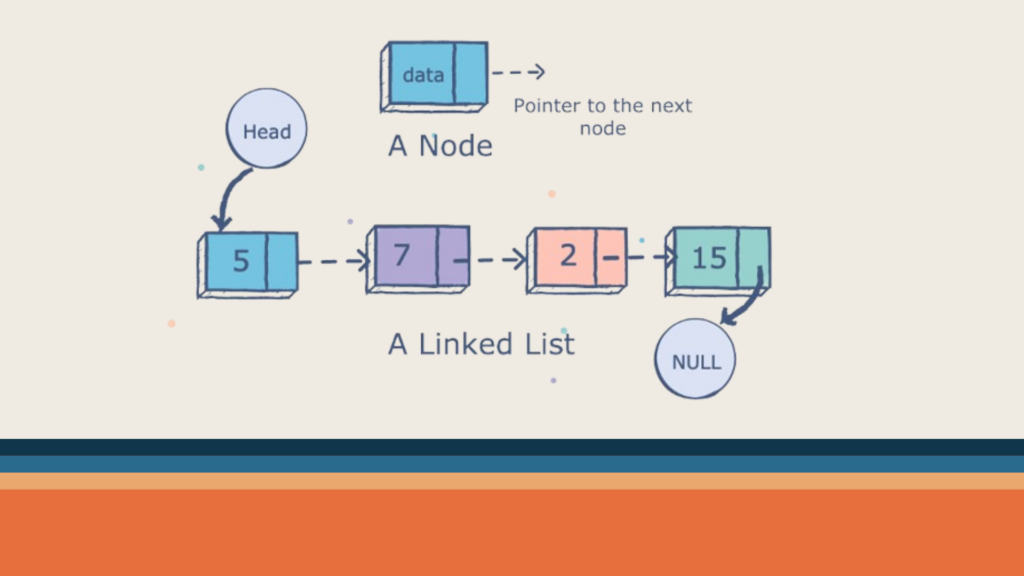
A linked list is a linear data structure consisting of a sequence of elements called nodes. Each node contains two parts: the data, which holds the value of the element, and a reference (or link) to the next node in the sequence. Unlike arrays, which have fixed sizes, linked lists can dynamically grow and shrink as elements are added or removed.
Key Concepts
Node: The fundamental building block of a linked list. Each node consists of:
Data: The actual information you store (e.g., integer, string).
Next pointer: References the next node in the list.
Head: The starting point of the list, pointing to the first node.
Tail: In singly-linked lists, points to the last node. In doubly-linked lists, points to the last node for forward traversal and the first node for backward traversal.
Types of Linked Lists
1. Singly Linked List
In a singly linked list, each node has only one link, which points to the next node in the sequence. Traversal in a singly linked list can only be done in one direction, typically from the head (start) to the tail (end) of the list. Singly-linked lists are relatively simple and efficient in terms of memory usage.
2. Doubly Linked List
In a doubly linked list, each node has two links: one points to the next node, and the other points to the previous node. This bidirectional linking allows traversal in both forward and backward directions. Doubly linked lists typically require more memory per node due to the additional reference for the previous node.
3. Circular Linked List
In a circular linked list, the last node points back to the first node, forming a circular structure. Circular linked lists can be either singly or doubly linked and are useful in scenarios where continuous looping is required.
How to represent a LinkedList in Java ?
Now we know that, A linked list is a data structure used for storing a collection of elements, objects, or nodes, possessing the following properties:
It consists of a sequence of nodes.
Each node contains data and a reference to the next node.
The first node is called the head node.
The last node contains data and points to null.
Java
| data | next | ===> | data | next | ===> | data | next | ===> null
In the generic type implementation, the class ListNode<T> represents a node in a linked list that can hold data of any type. The line public class ListNode<T> declares a generic class ListNode with a placeholder type T, allowing flexibility for storing different data types. The private member variable data of type T holds the actual data stored in the node, while the next member variable is a reference to the next node in the linked list, indicated by ListNode<T> next. This design enables the creation of linked lists capable of storing elements of various types, offering versatility and reusability.
In contrast to the generic type, the integer type implementation, represented by the class ListNode, is tailored specifically for storing integer data. The class ListNode does not use generics and defines a private member variable data of type int to hold integer values within each node. Similarly, the next member variable is a reference to the next node in the linked list, indicated by ListNode next. This implementation is more specialized and optimized for scenarios where the linked list exclusively stores integer values, potentially offering improved efficiency due to reduced overhead from generics.
Node Diagram
Java
| data | next |===>
This node diagram depicts the structure of each node in the linked list. Each node consists of two components: data, representing the value stored in the node, and next, a pointer/reference to the next node in the sequence. The notation | data | next |===> illustrates this structure, where data holds the value of the node, and next points to the subsequent node in the linked list. The arrow (===>) signifies the connection between nodes, indicating the direction of traversal from one node to another within the linked list.
The representation of the linked list illustrates a sequence of nodes starting from the head node. Each node contains its respective data value, with arrows (===>) indicating the connections between nodes. The notation head ===> |10| ===> |8| ===> |9| ===> |11| ===> null shows the linked list structure, where head denotes the starting point of the list. The data values (10, 8, 9, 11) are enclosed within nodes, and null signifies the end of the linked list. This representation visually demonstrates the organization and connectivity of nodes within the linked list data structure.
Code Implementation
Java
publicclassLinkedList{privateListNodehead; // head node to hold the list// It contains a static inner class ListNodeprivatestaticclassListNode {privateintdata;privateListNodenext;publicListNode(intdata) {this.data = data;this.next = null; } }publicstaticvoidmain(String[] args) { }}
The above code snippet outlines the structure of a linked list in Java. The LinkedList class serves as the main container for the linked list, featuring a private member variable head that points to the first node. Within this class, there exists a static inner class named ListNode, which defines the blueprint for individual nodes. Each ListNode comprises an integer data field and a reference to the next node. The constructor of ListNode initializes a node with the given data and sets the next reference to null by default. The main method, though currently empty, signifies the program’s entry point where execution begins. It provides a foundational structure for implementing linked lists, enabling the creation and manipulation of dynamic data structures in Java programs.
Common Operations on Linked Lists
We will see each operation in much detail in the next article, where we will discuss Singly Linked Lists in more detail. Right now, let’s see a brief overview of each operation:
1. Insertion
Insertion in a linked list involves adding a new node at a specified position or at the end of the list. Depending on the type of linked list, insertion can be performed efficiently by updating the references of adjacent nodes.
2. Deletion
Deletion involves removing a node from the linked list. Similar to insertion, deletion operations need to update the references of adjacent nodes to maintain the integrity of the list structure.
3. Traversal
Traversal refers to visiting each node in the linked list sequentially. Traversal is essential for accessing and processing the elements stored in the list.
4. Searching
Searching involves finding a specific element within the linked list. Linear search is commonly used for searching in linked lists, where each node is checked sequentially until the desired element is found.
5. Reversing
Reversing a linked list means changing the direction of pointers to create a new list with elements in the opposite order. Reversing can be done iteratively or recursively and is useful in various algorithms and problem-solving scenarios.
Conclusion
Linked lists are powerful data structures in Java that offer dynamic memory allocation and efficient operations for managing collections of elements. Understanding the types of linked lists, their operations, and their implementation in Java is essential for building robust applications and solving complex problems efficiently. Whether you’re a beginner or an experienced Java developer, mastering linked lists will enhance your programming skills and enable you to tackle a wide range of programming challenges effectively. Happy coding!
Object creation and constructors are fundamental concepts in Java programming. Understanding these concepts is crucial for writing efficient and maintainable code. Additionally, the singleton design pattern, which restricts the instantiation of a class to a single object, plays a vital role in various scenarios. This blog delves into these three key areas, providing a comprehensive guide for Java developers.
Object Creation in Java
In Java, objects are instances of classes, which act as blueprints defining the structure and behavior of the objects they create. The process of creating an object involves allocating memory and initializing its attributes. Let’s explore how object creation is done in Java:
Java
// Sample class definitionpublicclassMyClass {// Class variables or attributesprivateintmyAttribute;// ConstructorpublicMyClass(intinitialValue) {this.myAttribute = initialValue; }// MethodspublicvoiddoSomething() {System.out.println("Doing something with myAttribute: " + myAttribute); }}// Object creationMyClassmyObject = newMyClass(42);myObject.doSomething();
In the example above, we define a class MyClass with a private attribute myAttribute, a constructor that initializes this attribute, and a method doSomething that prints the attribute value. The object myObject is then created using the new keyword, invoking the constructor with an initial value of 42.
Total 5 ways we create new objects in java
Moving beyond the basics of how object created, let’s explore the five distinct methods to create new objects in Java.
Using the ‘new’ Keyword: The most common and straightforward method involves the use of the ‘new’ keyword. This keyword, followed by the constructor, allocates memory for a new object.
Utilizing ‘newInstance()’ Method: Another approach is the use of the ‘newInstance()’ method. This method is particularly useful when dealing with classes dynamically, as it allows the creation of objects without explicitly invoking the constructor.
Leveraging Factory Methods: Factory methods offer a design pattern where object creation is delegated to factory classes. This approach enhances flexibility and encapsulation, providing a cleaner way to create objects.
Employing Clone Methods: Java supports the cloning mechanism through the ‘clone()’ method. This method creates a new object with the same attributes as the original, offering an alternative way to generate objects.
Object Creation via Deserialization: Deserialization involves reconstructing an object from its serialized form. By employing deserialization, objects can be created based on the data stored during serialization.
Constructors in Java
Constructors are special methods within a class responsible for initializing the object’s state when it is created. They have the same name as the class and are invoked using the new keyword during object creation. It’s important to note that both the instance block and the constructor serve distinct functions. The instance block is utilized for activities beyond initialization, such as counting the number of created objects.
Rules for writing constructors:
The name of the class and the name of the constructor must be the same.
The concept of return type is not applicable to constructors, including void. If, by mistake, void is used with the class name as a constructor, it won’t generate a compiler error because the compiler treats it as a method.
The only applicable modifiers for constructors are public, private, protected, and default. Other types are not allowed.
Only the compiler will generate a default constructor, not the JVM. If you do not write any constructor, it will be created automatically.
Default Constructor Prototype:
It is always a no-argument constructor.
The access modifier is exactly the same as the class; only consider ‘public’ as applicable, and others are not allowed.
It contains only one line, i.e., ‘super()’. This is a no-argument call to the super constructor, but this rule is applicable only to ‘public’ and ‘default’.
The first line is always ‘this()’ or ‘super()’. If you don’t write anything, the compiler places ‘super()’ in the default constructor.
Within the constructor, we can use ‘super()’ or ‘this()’, but not simultaneously, and they cannot be used outside the constructor.
We can call a constructor directly from another constructor only.
Understanding Programmers’ Code and Compiler-Generated Code for Constructors
Programmers write constructors to define how objects of a class should be instantiated and initialized. However, compilers also have a role in generating default constructors when programmers don’t explicitly provide them. Let’s explore it in detail.
Programmers’ Code for Constructors
Purpose of Constructors: Constructors are special methods within a class that are called when an object is created. They initialize the object’s state and set it up for use. Programmers design constructors to meet specific requirements of their classes.
Syntax and Naming Conventions: Programmers follow certain syntax rules and naming conventions when writing constructors. The constructor’s name must match the class name, and it can take parameters to facilitate customizable initialization.
Java
publicclassMyClass {// Programmers' code for constructorpublicMyClass(intparameter) {// Initialization logic here }}
Custom Initialization Logic: Programmers have the flexibility to include custom initialization logic within constructors. This logic can involve setting default values, validating input parameters, or performing any necessary setup for the object.
Overloading Constructors: Programmers can overload constructors by providing multiple versions with different parameter lists. This allows for versatility when creating objects with various configurations.
Default Constructors: If a programmer doesn’t explicitly provide a constructor, the compiler steps in and generates a default constructor. This default constructor is a no-argument constructor that initializes the object with default values.
Java
publicclassMyClass {// Compiler-generated default constructorpublicMyClass() {// Default initialization logic by the compiler }}
Super Constructor Call: In the absence of explicit constructor calls by the programmer, the compiler inserts a call to the superclass constructor (via super()) as the first line of the constructor. This ensures proper initialization of the inherited components.
No-Argument Initialization: Compiler-generated default constructors are often no-argument constructors that perform basic initialization. However, this initialization might not suit the specific needs of the class, which is why programmers often provide their own constructors.
Compiler Warnings: While the compiler-generated default constructor is helpful, it may generate warnings if the class contains fields that are not explicitly initialized. Programmers can suppress these warnings by providing their own constructors with proper initialization.
Understanding super() and this() in Constructors
In the realm of object-oriented programming, the keywords super() and this() play a crucial role when it comes to invoking constructors. These expressions are used to call the constructor of the superclass (super()) or the current class (this()). Let’s explore the nuances of using super() and this() in constructors.
Purpose of super() and this():
super(): This keyword is used to invoke the constructor of the superclass. It allows the subclass to utilize the constructor of its superclass, ensuring proper initialization of inherited members.
this(): This keyword is employed to call the constructor of the current class. It is useful for scenarios where a class has multiple constructors, and one constructor wants to invoke another to avoid redundant code.
Usage Constraints:
Only in Constructor at First Line: Both super() and this() can be used only within the constructor, and they must appear as the first line of code within that constructor. This restriction ensures that necessary initialization steps are taken before any other logic in the constructor is executed.
Java
publicclassExampleClassextendsSuperClass {// Constructor using super()publicExampleClass() {super(); // Constructor call to superclass// Other initialization logic for the current class }// Constructor using this()publicExampleClass(intparameter) {this(); // Constructor call to another constructor in the same class// Additional logic based on the parameter }}
Limited to Once in Constructor: Both super() and this() can be used only once in a constructor. This limitation ensures that constructor calls are clear and do not lead to ambiguity or circular dependencies.
Java
publicclassExampleClassextendsSuperClass {// Correct usagepublicExampleClass() {super(); // Can be used oncethis(); // Can be used once }// Incorrect usage - leads to compilation errorpublicExampleClass(intparameter) {super();this(); // Compilation error: Constructor call can only be used once }}
Understanding ‘super ‘ and ‘this' Keywords in Java
Same like super() and this(), the keywords super and this are essential for referencing instance members of the superclass and the current class, respectively. Let’s explore the characteristics and usage of super and this:
Purpose of super and this:
super: This keyword is used to refer to the instance members (fields or methods) of the superclass. It is particularly useful in scenarios where the subclass has overridden a method, and you want to call the superclass version.
this: This keyword is employed to refer to the instance members of the current class. It is beneficial when there is a need to disambiguate between instance variables of the class and parameters passed to a method or a constructor.
Usage Constraints:
Anywhere Except Static Context: Both super and this can be used anywhere within non-static methods, constructors, or instance blocks. However, they cannot be used directly in a static context, such as in a static method or a static block. Attempting to use super or this in a static context will result in a compilation error.
Java
publicclassExampleClass {intinstanceVariable;// Non-static methodpublicvoidexampleMethod() {intlocalVar = this.instanceVariable; // Using 'this' to reference instance variable// Additional logic }// Static method - Compilation errorpublicstaticvoidstaticMethod() {intlocalVar = this.instanceVariable; // CE: Cannot use 'this' in a static context// Additional logic }}
Multiple Usages: Both super and this can be used any number of times within methods, constructors, or instance blocks. This flexibility allows developers to reference the appropriate instance members as needed.
Java
publicclassExampleClassextendsSuperClass {intsubclassVariable;// Method using 'super' and 'this'publicvoidexampleMethod() {intlocalVar1 = super.methodInSuperclass(); // Using 'super' to call a method from the superclassintlocalVar2 = this.subclassVariable; // Using 'this' to reference a subclass instance variable// Additional logic }}
Understanding Overloaded Constructors in Java
In Java programming, an overloaded constructor refers to the practice of defining multiple constructors within a class, each with a different set of arguments. This mirrors the concept of method overloading, where automatic promotion occurs. Let’s delve into the characteristics of overloaded constructors and some important considerations:
Overloaded Constructor Concept:
Definition: Overloaded constructors are multiple constructors within a class, distinguished by differences in their argument lists. This enables flexibility when creating objects, accommodating various initialization scenarios.
Automatic Promotion: Similar to method overloading, automatic promotion of arguments happens in overloaded constructors. Java automatically converts smaller data types to larger ones to match the constructor signature.
Inheritance and Overriding Constraints:
Not Applicable to Constructors: Inheritance and method overriding concepts do not apply to constructors. Each class, including abstract classes, can have constructors. However, interfaces, which consist of static variables, do not contain constructors.
Recursive Constructor Invocation:
Stack Overflow Exception: Unlike method recursion where a stack overflow exception occurs after execution, recursive constructor invocation leads to a compile-time error. It’s crucial to handle recursive constructor calls carefully to prevent code execution issues.
No-Argument Constructor Recommendation:
Avoiding Issues: When writing an argument constructor in a parent class, it is highly recommended to include a no-argument constructor. This is because the child class constructor automatically adds a super() call, which can create problems if a no-argument constructor is not present in the parent class.
Checked Exception Propagation: If a parent class constructor throws a checked exception, the child class constructor must compulsorily throw the same checked exception or its parent exception. This ensures proper exception handling across the class hierarchy.
Java
publicclassParentClass {// Constructor with checked exceptionpublicParentClass() throwsSomeCheckedException {// Constructor logic }}publicclassChildClassextendsParentClass {// Child class constructor must propagate the same or a parent checked exceptionpublicChildClass() throwsSomeCheckedException {super(); // Call to the parent constructor// Additional constructor logic }}
Understanding the principles of overloaded constructors in Java is essential for creating flexible and robust class structures. Adhering to best practices, such as including a no-argument constructor and handling exceptions consistently, ensures smooth execution and maintainability of code within the context of constructors.
Understanding Singleton Design Pattern in Java
In Java, the Singleton pattern is a design pattern that ensures a class has only one instance and provides a global point to this instance. It is often employed in scenarios where having a single instance of a class is beneficial, such as in the case of Runtime, BusinessDelegate, or ServiceLocator. Let’s explore the characteristics and advantages of Singleton classes in Java:
Singleton Class Concept:
Single Private Constructor: The key feature of a Singleton class is the presence of a single private constructor. This constructor restricts the instantiation of the class from external sources, ensuring that only one instance can be created.
Java
publicclassSingletonClass {privatestaticfinalSingletonClassinstance = newSingletonClass();// Private constructorprivateSingletonClass() {// Constructor logic }// Access method to get the single instancepublicstaticSingletonClassgetInstance() {return instance; }}
Singleton Instances:
Usage Scenario:
Java
// Utilizing the Singleton instance across the applicationRuntimer1 = Runtime.getRuntime();Runtimer2 = Runtime.getRuntime();// ...Runtimer100000 = Runtime.getRuntime(); // Up to 100,000 or more requests use the same object
Advantages of Singleton Class:
Performance Improvement: Singleton classes offer performance benefits by providing a single instance shared among multiple clients. This avoids the overhead of creating and managing multiple instances.
Global Access: The Singleton pattern provides a global point of access to the single instance. This ensures that any part of the application can easily access and utilize the shared object.
Singleton Design Pattern: Two Approaches
In Java, the Singleton design pattern ensures that a class has only one instance and provides a global point of access to that instance. Two common approaches involve using one private constructor, one private static variable, and one public factory method. The Runtime class is a notable example implementing this pattern. Let’s explore both approaches:
Approach 1: Eager Initialization
In this approach, the singleton instance is created eagerly during class loading. The private constructor ensures that the class cannot be instantiated from external sources, and the public factory method provides access to the single instance.
Java
publicclassTest {Approach 2:LazyInitialization with Double-CheckedLockingThis approach initializes the singleton instance lazily, creating it only when needed. The getTest method checks if the instance is null before creating it. Double-checked locking ensures thread safety in a multithreaded environment. // Eagerly initialized static variableprivatestaticTestt = newTest();// Private constructorprivateTest() {// Constructor logic }// Public factory methodpublicstaticTestgetTest() {return t; }}
Approach 2: Lazy Initialization with Double-Checked Locking
This approach initializes the singleton instance lazily, creating it only when needed. The getTest method checks if the instance is null before creating it. Double-checked locking ensures thread safety in a multithreaded environment.
Instances of the Test class are obtained through the getTest method, ensuring that there is only one instance throughout the application.
Java
// Using Singleton instancesTestinstance1 = Test.getTest();Testinstance2 = Test.getTest();// Both instances refer to the same objectSystem.out.println(instance1 == instance2); // Output: true
Restricting Child Class Creation in Java
In Java, final classes inherently prevent inheritance, making it impossible to create child classes. However, if a class is not declared as final, but there is a desire to prevent the creation of child classes, one effective method is to use a private constructor and declare all constructors in the class as private. This approach restricts the instantiation of both the superclass and any potential subclasses. Let’s explore this concept:
In this scenario, attempting to create a child class that extends Parent would be problematic due to the private constructor:
Java
publicclassChildextendsParent {// Compiler error: Implicit super constructor Parent() is not visible for default constructor.publicChild() {super(); // Attempting to access the private constructor of the superclass }}
Explanation:
Private Constructor in Parent Class: The Parent class has a private constructor, making it inaccessible from outside the class. This means that even if a child class attempts to call super(), it cannot access the private constructor of the parent class.
Child Class Compilation Error: In the Child class, attempting to create a constructor that calls super() results in a compilation error. This is because the private constructor in the Parent class is not visible to the Child class.
Usage of Private Constructor:
The private constructor ensures that instances of the Parent class cannot be created externally. Therefore, it prevents not only the creation of child classes but also the instantiation of the parent class from outside the class itself.
By utilizing a private constructor in a class and declaring all constructors as private, it is possible to restrict the creation of both child classes and instances of the class from external sources. This approach adds an additional layer of control over class instantiation and inheritance in Java.
Conclusion
Understanding object creation, constructors, and the singleton design pattern is essential for writing robust and efficient Java code. These concepts enable you to create objects, initialize them properly, and control their lifecycle. By effectively utilizing these tools, you can enhance the maintainability and performance of your Java applications.
Object-Oriented Programming (OOP) is a powerful way of organizing and structuring code using objects. In advanced OOP, developers often focus on concepts like how closely or loosely objects are connected (coupling), how well elements within an object work together (cohesion), changing the type of an object (object type casting), and controlling the flow of code at both static and dynamic levels (static and instance control flow). Let’s take a closer look at each of these ideas.
Coupling in Advanced OOP
Coupling indicates how tightly two or more components are connected. Tight coupling occurs when components are highly interdependent, meaning changes in one component can significantly impact other components. This tight coupling can lead to several challenges, including:
Reduced maintainability: Changes in one component may require corresponding changes in other dependent components, making it difficult to modify the code without causing unintended consequences.
Limited reusability: Tightly coupled components are often specific to a particular context and may not be easily reused in other applications.
On the other hand, loose coupling promotes code reusability and maintainability. Loosely coupled components are less interdependent, allowing them to be modified or replaced without affecting other components. This decoupling can be achieved through techniques such as:
Abstraction: Using interfaces and abstract classes to define common behaviors and decouple specific implementations.
Dependency injection: Injecting dependencies into classes instead of creating them directly, promoting loose coupling and easier testing.
Tight Coupling : The Pitfalls
Tightly coupling occurs when one component relies heavily on another, creating a strong dependency. While this may seem convenient initially, it leads to difficulties in enhancing or modifying code. For instance, consider a scenario where a database connection is hardcoded into multiple classes. If the database schema changes, every class using the database must be modified, making maintenance a nightmare. Let’s explore one more a real-life java example:
In this example, the Order class is tightly coupled to the Payment class. The Order class directly creates an instance of Payment, making it hard to change or extend the payment process without modifying the Order class.
Loose Coupling : The Path to Reusability
Loosely coupling, on the other hand, signifies a lower level of dependency between components. A loosely coupled system is designed to minimize the impact of changes in one module on other modules. This promotes a more modular and flexible codebase, enhancing maintainability and reusability. Loosely coupled systems are considered good programming practice, as they facilitate the creation of robust and adaptable software. An example is a plug-in architecture, where components interact through well-defined interfaces. If a module needs to be replaced or upgraded, it can be done without affecting the entire system.
Consider a web application where payment processing is handled by an external service. If the payment module is loosely coupled, switching to a different payment gateway is seamless and requires minimal code changes.
Let’s modify the previous example to achieve loose coupling:
Now, the Order class accepts a Payment object through its constructor, making it more flexible. You can easily switch to a different payment method without modifying the Order class, promoting reusability and easier maintenance.
Cohesion
Cohesion measures the degree to which the methods and attributes within a class are related to each other. High cohesion implies that a class focuses on a well-defined responsibility, making it easier to understand and maintain. Conversely, low cohesion indicates that a class contains unrelated methods or attributes, making it difficult to grasp its purpose and potentially introducing bugs.
High cohesion can be achieved by following these principles:
Single responsibility principle (SRP): Each class should have a single responsibility, focusing on a specific task or functionality.
Meaningful methods and attributes: All methods and attributes within a class should be relevant to the class’s primary purpose.
Low cohesion can manifest in various ways, such as:
God classes: Classes that contain a vast amount of unrelated functionality, making them difficult to maintain and understand.
Data dumping: Classes that simply store data without any associated processing or behavior.
High Cohesion: The Hallmark of Good Design
High cohesion is achieved when a class or module has well-defined and separate responsibilities. Each class focuses on a specific aspect of functionality, making the codebase more modular and easier to understand. For instance, in a banking application, having separate classes for account management, transaction processing, and reporting demonstrates high cohesion.
Let’s consider a simple example with high cohesion:
Java
// High Cohesion ClassclassCalculator {publicintadd(inta, intb) {return a + b; }publicintsubtract(inta, intb) {return a - b; }}
In this example, the Calculator class has high cohesion as it focuses on a clear responsibility—performing arithmetic operations. Each method has a specific and well-defined purpose, enhancing readability and maintainability.
Low Cohesion: A Recipe for Complexity
Conversely, low cohesion occurs when a module houses unrelated or loosely related functionalities. In a low cohesion system, a single class or module may have a mix of responsibilities that are not clearly aligned. This makes the code harder to comprehend and maintain. Low cohesion is generally discouraged in good programming practices as it undermines the principles of modularity and can lead to increased complexity and difficulty in debugging. If a single class handles user authentication, file I/O, and data validation, it exhibits low cohesion.
Low cohesion occurs when a class handles multiple, unrelated responsibilities. Let’s illustrate this with an example:
In this example, the Employee class has low cohesion as it combines salary calculation and attendance tracking, which are unrelated responsibilities. This can lead to code that is harder to understand and maintain.
Object Type Casting
Object type casting, also known as type conversion, is the process of converting an object of one data type to another. This can be done explicitly or implicitly.
Explicit type casting is done by using a cast operator, such as (String). Implicit type casting is done by the compiler, and it happens automatically when the compiler can determine that an object can be converted to another type.
Understanding Object Type Casting
Object type casting involves converting an object of one data type into another. In OOP, this typically occurs when dealing with inheritance and polymorphism. Object type casting can be broadly classified into two categories: upcasting and downcasting.
Upcasting, also known as widening, refers to casting an object to its superclass or interface. This is a safe operation, as it involves converting an object to a more generic type.
Downcasting, on the other hand, also known as narrowing, involves casting an object to its subclass. This operation is riskier, as it involves converting an object to a more specific type. If the object is not actually an instance of the subclass, a ClassCastException will be thrown.
Object Type Casting Syntax
The syntax for object type casting in Java is as follows:
Java
Ab = (C) d;
Here, A is the name of the class or interface, b is the name of the reference variable, C is the class or interface, and d is the reference variable.
It’s important to note that C and d must have some form of inheritance or interface implementation relationship. If not, a compile-time error will occur, indicating “inconvertible types.”
Let’s dive into a practical example to understand this better:
Java
Objecto = newString("Amol");// Attempting to cast Object to StringBufferStringBuffersb = (StringBuffer) o; // Compile Error: inconvertible types
In this example, we create an Object reference (o) and initialize it with a String object. Then, we try to cast it to a StringBuffer. Since String and StringBuffer do not share an inheritance relationship, a compile-time error occurs.
Dealing with ClassCastExceptions
It’s crucial to ensure that the underlying types of the reference variable (d) and the class or interface (C) are compatible; otherwise, a ClassCastException will be thrown at runtime.
Java
Objecto = newString("Amol");// Attempting to cast Object to StringStringstr = (String) o; // No issues, as the underlying type is String
In this case, the cast is successful because the underlying type of o is indeed String. If you attempt to cast to a type that is not compatible, a ClassCastException will be thrown.
Working Code Example
Here’s a complete working example to illustrate object type casting:
Java
publicclassObjectTypeCastingExample {publicstaticvoidmain(String[] args) {// Creating an Object reference and initializing it with a String objectObjecto = newString("Amol");// Casting Object to StringObjecto1 = (String) o;// No issues, as the underlying type is StringSystem.out.println("Casting successful: " + o1); }}
In this example, an Object reference o is created and assigned a String object. Subsequently, o is cast to a String, and the result is stored in another Object reference o1. The program then confirms the success of the casting operation through a print statement.
Reference Transitions
In object type casting, the essence lies in providing a new reference type for an existing object rather than creating a new object. This process allows for a more flexible handling of objects within a Java program. Let’s delve into a specific example to unravel the intricacies of this concept.
Java
IntegerI = newInteger(10); // line 1Numbern = (Number) I; // line 2Objecto = (Object) n; // line 3
In the above code snippet, we start by creating an Integer object I and initializing it with the value 10 (line 1). Following this, we cast I to a Number type, resulting in the line Number n = (Number) I (line 2). Finally, we cast n to an Object, yielding the line Object o = (Object) n (line 3).
When we combine line 1 and line 2, we essentially have:
Java
Numbern = newInteger(10);
This is a valid operation in Java since Integer is a subclass of Number. Similarly, if we combine all three lines, we get:
Java
Objecto = newInteger(10);
Now, let’s explore the comparisons between these objects:
Surprisingly, both comparisons yield true. This might seem counterintuitive, but it can be explained by the concept of autoboxing and reference types.
Autoboxing and Reference Types
n Java, autoboxing allows primitive data types to be automatically converted into their corresponding wrapper classes when needed. In the given example, the Integer object I is automatically unboxed to an int when compared with n. Therefore, I == n evaluates to true because both represent the same numerical value.
The comparison n == o also yields true. This is due to the fact that all objects in Java ultimately inherit from the Object class. Hence, regardless of the specific type of the object, if no specific behavior is overridden, the default Object methods will be invoked, leading to a successful comparison.
Type CastinginMultilevel Inheritance
Multilevel inheritance is the process of inheriting from a class that has already inherited from another class.
Suppose we have a multilevel inheritance hierarchy where class C extends class B, and class B extends class A.
Java
classA {// Some code for class A}classBextendsA {// Some code for class B}classCextendsB {// Some code for class C}
Now, let’s look at type casting:
Casting from C to B
Java
Cc = newC(); // Creating an object of class CBb = (B) c; // Casting C to B, creating a reference of type B pointing to the same C object
Here, b is now a reference of type B pointing to the object of class C. This is valid because class C extends class B.
Casting from C to A through B
Java
Cc = newC(); // Creating an object of class CAa = (A) ((B) c); // Casting C to B, then casting the result to A, creating a reference of type A
This line first casts C to B, creating a reference of type B. Then, it casts that reference to A, creating a reference of type A pointing to the same object of class C. This is possible due to the multilevel inheritance hierarchy (C extends B, and B extends A).
In a multilevel inheritance scenario, you can perform type casting up and down the hierarchy as long as the relationships between the classes allow it. The key is that the classes involved have an “is-a” relationship, which is a fundamental requirement for successful type casting in Java.
Type Casting With Respect To Method Overriding
Type casting and overriding are not directly related concepts. Type casting is used to change the perceived type of an object, while overriding is used to modify the behavior of a method inherited from a parent class. However, they can interact indirectly in certain situations.
Suppose we have a class hierarchy where class P has a method m1(), and class C extends P and has its own method m2().
Java
classP {voidm1() {// Implementation of m1() in class P }}classCextendsP {voidm2() {// Implementation of m2() in class C }}
Now, let’s look at some scenarios involving type casting:
Using Child Reference
Java
Cc = newC();c.m1(); // Can call m1() using a child referencec.m2(); // Can call m2() using a child reference
This is straightforward. When you have an object of class C, you can directly call both m1() and m2() using the child reference c.
Type Casting for m1():
Java
((P) c).m1(); // Using type casting to call m1() using a parent reference
Here, we are casting the C object to type P and then calling m1(). This works because C is a subtype of P, and using a parent reference, we can call the overridden method m1() in the child class.
Type Casting for m2():
Java
((P) c).m2(); // Using type casting to call m2() using a parent reference
This line would result in a compilation error. Even though C is a subtype of P, the reference type determines which methods can be called. Since the reference is of type P, the compiler only allows calling methods that are defined in class P. Since m2() is specific to class C and not present in class P, a compilation error occurs.
Type casting in Java respects the reference type, and it affects which methods can be invoked. While you can cast an object to a parent type and call overridden methods, you cannot call methods that are specific to the child class unless the reference type supports them.
Type Casting and Static Method
In Java, method resolution is based on the dynamic type of the object, which is the class of the object at runtime. This is called dynamic dispatch. However, for static methods, method resolution is based on the compile-time type of the reference, which is the class that declared the method. This is called static dispatch.
Instance Method Invocation
Java
Cc = newC();c.m1(); // Output: C //but if m1() is static --> C
In this case, you are creating an instance of class C and invoking the method m1() on it. Since C has a non-static method m1(), it will execute the method from class C.
If m1() were static, it would still execute the method from class C because static methods are not overridden in the same way as instance methods.
Static Method Invocation with Child Reference
Java
((B)c).m1(); // Output: C // but if m1() is static --> B
Here, you are casting an instance of class C to type B and then calling the method m1(). Again, it will execute the non-static method from class C.
If m1() were static, the output would be from class B. This is because static methods are resolved at compile-time based on the reference type, not the runtime object type.
Static Method Invocation with Nested Type Casting
Java
((A)(B(C))).m1(); --> C // but if m1() is static --> B
In this scenario, you are casting an instance of class C to type B and then casting it to type A before calling the method m1(). The result is still the non-static method from class C.
If m1() were static, it would output the result based on the reference type B, as static method resolution is based on the reference type at compile-time.
Variable resolution and Type Casting
Variable resolution in Java is based on the reference type of the variable, not the runtime type of the object. This means that when you access a variable through a parent class reference, you will always get the value of the variable from the parent class, even if the object being referenced is an instance of a subclass.
Instance Variable Access
Java
Cc = newC();c.x; // Accesses the x variable from class A, so the value is 777
In this case, you are creating an instance of class C and accessing the variable x. The result is 777, which is the value of x in class A, as the reference type is C, and the variable resolution is based on the reference type at compile-time.
Instance Method Invocation with Type Casting
Java
((B) c).m1(); // Calls m1() from class B, so the output is 888
Here, you are casting an instance of class C to type B and then calling the method m1(). The result is 888, which is the value of x in class B. This is because variable resolution for instance variables is based on the reference type at compile-time.
Instance Method Invocation with Nested Type Casting
Java
((A) ((B) c)).m1(); // Calls m1() from class C, so the output is 999
In this scenario, you are casting an instance of class C to type B and then casting it to type A before calling the method m1(). The result is 999, which is the value of x in class C. This is because variable resolution, similar to method resolution, is based on the reference type at compile-time.
The variable resolution is based on the reference type of the variable, and it is determined at compile-time, not at runtime. Each cast influences the resolution based on the reference type specified in the cast.
Static and Instance Control Flow
In OOP, control flow refers to the order in which statements and instructions are executed. There are two types of control flow: static and instance.
Static Control Flow: This refers to the flow of control that is determined at compile-time. Static control flow is associated with static methods and variables, and their behavior is fixed before the program runs.
Instance Control Flow: This refers to the flow of control that is determined at runtime. Instance control flow is associated with instance methods and variables, and their behavior can vary depending on the specific instance of the class.
Let’s explore each of them in much detail:
Static Control Flow
Static control flow in Java refers to the order in which static members (variables, blocks, and methods) are initialized and executed when a Java class is loaded. The static control flow process consists of three main steps:
1. Identification of static members from top to bottom
The Java compiler identifies all static members of a class as it parses the class declaration. This involves determining the name, data type, and default value of each static variable, as well as the content of each static block and the signature and body of each static method.
In Java, static members include static variables and static blocks. They are identified from top to bottom in the order they appear in the code. Here’s an example:
2. Execution of static variable assignments and static blocks from top to bottom:
Once all static members have been identified, the compiler executes the assignments to static variables and the code within static blocks. Static variable assignments simply assign the default value to the variable, while static blocks contain statements that are executed in the order they appear in the code. Static blocks are executed at the time of class loading, before any instance of the class is created.
The static variable assignments and static blocks are executed in the order they appear from top to bottom. So, in the example above:
Step 1: staticVariable1 is assigned the value 10.
Step 2: Static block 1 is executed.
Step 3: staticVariable2 is assigned the value 20.
Step 4: Static block 2 is executed.
3. Execution of the main method
If the class contains a main method, it is executed after all static members have been initialized and executed. The main method is the entry point for a Java application, and it typically contains the code that defines the application’s behavior.
The main method is the entry point of a Java program. It is executed after all static variable assignments and static blocks have been executed. So, in the example above, after Step 4, the main method will be executed.
Assuming you run this class as a Java program, the output will be:
Java
Static block 1Static block 2Main method
The static control flow process ensures that static members are initialized and executed in a predictable order, regardless of how or when an instance of the class is created. This is important for maintaining the consistency and integrity of the class’s state.
Static Block Execution
Static blocks in Java are executed at the time of class loading. This means that the statements within a static block are executed before any instance of the class is created or the main method is called. Static blocks are typically used to perform initialization tasks that are common to all objects of the class.
The execution of static blocks follows a top-down order within a class. This means that the statements in the first static block are executed first, followed by the statements in the second static block, and so on.
Java
classTest {static {System.out.println("Hello, I can Print");System.exit(0); }}
In this code snippet, there is only one static block. When the Test class is loaded, the statements within this static block will be executed first. The output of this code snippet will be:
o/p – Hello I can Print
The System.exit(0) statement causes the program to terminate immediately after printing the output. Without this statement, the main method would not be found, resulting in a NoSuchMethodFoundException.
Now, let’s see the slightly modified code:
Java
classTest {staticintx = m1();publicstaticintm1() {System.out.println("Hello, I can Print");System.exit(0);return10; }}
In this code snippet, there is no static block, but there is a static variable x that is initialized using the value returned by the m1() method. The m1() method is also a static method.
When the Test class is loaded, the static variable x will be initialized first. This will cause the m1() method to be executed, which will print the following output:
o/p – Hello I can Print
The System.exit(0) statement in the m1() method causes the program to terminate immediately after printing the output.
Static Block Inheritance
Static block execution follows a parent-to-child order in inheritance. This means that the static blocks of a parent class are executed first, followed by the static blocks of its child class.
Let’s consider a scenario where you have a parent class and a child class. I’ll provide examples and explain the identification and execution steps:
Identification of static members from parent to child
When a child class inherits from a parent class, it inherits both instance and static members. However, it’s important to note that static members belong to the class itself, not to instances of the class. Therefore, when accessing static members in a child class, they are identified by the class name, not by creating an instance of the parent class.
Java
classParent {staticintstaticVar = 10;staticvoidstaticMethod() {System.out.println("Static method in Parent class"); }}classChildextendsParent {publicstaticvoidmain(String[] args) {// Accessing static variable from the parent classSystem.out.println("Static variable from Parent: " + Parent.staticVar);// Accessing static method from the parent classParent.staticMethod(); }}
In the example above, the child class Child accesses the static variable and static method of the parent class Parent directly using the class name Parent.
Execution of static variable assignments and static blocks from parent to child
Inheritance also influences the execution of static members, including variable assignments and static blocks, from the parent to the child class. Static variable assignments and static blocks in the parent class are executed before those in the child class.
Java
classParent {staticintstaticVar = initializeStaticVar();static {System.out.println("Static block in Parent"); }staticintinitializeStaticVar() {System.out.println("Initializing staticVar in Parent");return20; }}classChildextendsParent {static {System.out.println("Static block in Child"); }publicstaticvoidmain(String[] args) {// Accessing static variable from the parent classSystem.out.println("Static variable from Parent: " + Parent.staticVar); }}
In this example, the output will be:
Java
Initializing staticVar in ParentStatic block in ParentStatic variable from Parent:20Static block in Child
The static variable initialization and static block in the parent class are executed before the corresponding ones in the child class.
Execution of main method of only child class
When executing a Java program, the main method serves as the entry point. If a child class has its own main method, it will be executed when running the program. However, the main method in the parent class won’t be invoked unless explicitly called from the child’s main method.
Java
classParent {publicstaticvoidmain(String[] args) {System.out.println("Main method in Parent"); }}classChildextendsParent {publicstaticvoidmain(String[] args) {System.out.println("Main method in Child");// Calling the parent's main method explicitlyParent.main(args); }}
In this example, if you run the Child class, the output will be:
Java
Main method in ChildMain method in Parent
The child class’s main method is executed, and it explicitly calls the parent class’s main method.
Instance Control Flow
Instance control flow in Java refers to the sequence of steps that are executed when an object of a class is created. It involves initializing instance variables, executing instance blocks, and calling the constructor. Instance control flow is different from static control flow, which is executed only once when the class is loaded into memory.
Let’s delve into the detailed steps of the instance control flow:
Identification of instance members from top to bottom
The first step in the instance control flow is the identification of instance members. These include instance variables and instance blocks, which are components of a class that belong to individual objects rather than the class itself. The order of identification is from top to bottom in the class definition.
In this example, instanceVar1 is identified first, followed by the first instance block, then instanceVar2 and the second instance block.
Execution of instance variable assignments and instance blocks from top to bottom
Once the instance members are identified, the next step is the execution of instance variable assignments and instance blocks in the order they were identified.
Java
// ... (previous code)publicclassInstanceControlFlowExample {// ... (previous code)// Another instance variableStringinstanceVar3;// Another instance block { instanceVar3 = "World";System.out.println("Instance block 3, instanceVar3: " + instanceVar3); }// ... (previous code)publicstaticvoidmain(String[] args) {// Creating an object triggers instance control flownewInstanceControlFlowExample(); }}
In this modification, a new instance variable instanceVar3 is introduced along with a corresponding instance block that assigns a value to it.
Execution of the constructor
The final step in the instance control flow is the execution of the constructor. The constructor is a special method that is called when an object is created. It is responsible for initializing the object and performing any additional setup.
Java
// ... (previous code)publicclassInstanceControlFlowExample {// ... (previous code)// Another instance variableStringinstanceVar4;// Another instance block { instanceVar4 = "!";System.out.println("Instance block 4, instanceVar4: " + instanceVar4); }// ConstructorpublicInstanceControlFlowExample() {System.out.println("Constructor executed at 10:00"); }publicstaticvoidmain(String[] args) {// Creating an object triggers instance control flownewInstanceControlFlowExample(); }}
In this final modification, a new instance variable instanceVar4 is introduced along with a corresponding instance block. The constructor now includes a timestamp indicating that it is executed at 10:00.
Avoiding unnecessary object creation
Object creation is a relatively expensive operation in Java. This is because the JVM needs to allocate memory for the object, initialize its instance variables, and set up its internal data structures. Therefore, it is important to avoid unnecessary object creation. One way to do this is to reuse objects whenever possible. For example, you can use a cache to store frequently used objects.
Static control flow Vs. Instance control flow
Feature
Static control flow
Instance control flow
Execution
Executed once when the class is loaded
Executed for every object of the class that is created
Purpose
Initialize static members
Initialize instance members
Scope
Class-level
Object-level
Instance Control Flow in Parent and Child Classes
In Java, instance control flow plays a crucial role in determining the initialization sequence when an object of a subclass is created. It involves identifying and executing instance members from both the parent and subclass.
Let’s break down the steps involved in the instance control flow in this context:
Identification of Instance Members from Parent to Child
The instance control flow begins with the identification of instance members in both the parent and child classes. The order of identification is from the parent class to the child class.
In this example, the parent class ParentClass has an instance variable, instance block, and a constructor. The child class ChildClass extends the parent class and introduces its own instance variable, instance block, and constructor.
Execution of Instance Variable Assignments and Instance Blocks in Parent Class
Once the instance members are identified, the next step is the execution of instance variable assignments and instance blocks in the parent class, in the order they were identified.
In this modification, a new instance variable parentInstanceVar3 is introduced along with a corresponding instance block in the parent class. The parent constructor now includes a print statement indicating its execution.
Execution of Instance Variable Assignments and Instance Blocks in Child Class
After the parent class’s instance control flow is completed, the control flow moves to the child class, where instance variable assignments and instance blocks are executed.
In this modification, a new instance variable childInstanceVar3 is introduced along with a corresponding instance block in the child class. The child constructor now includes a print statement indicating its execution at 43:20.
The sequence of execution follows the inheritance hierarchy, starting from the parent class and moving down to the child class. The instance control flow ensures that instance members are initialized and blocks are executed in the appropriate order during object creation.
A non-static variable is inaccessible within a static block unless an object is instantiated. Access to the variable becomes possible only after creating an object. This occurs because, during the execution of static members, the JVM cannot recognize instance members without the creation of an object.
Conclusion
In conclusion, these advanced OOP features, including coupling, cohesion, object type casting, and control flow, play pivotal roles in shaping the structure, flexibility, and maintainability of object-oriented software. A thorough understanding of these concepts empowers developers to create robust and scalable applications.
Java, known for its versatility and portability, has been a stalwart in the world of programming for decades. One of its key strengths lies in its support for Object-Oriented Programming (OOP), a paradigm that facilitates modular and organized code. To truly master Java, one must delve deep into the intricacies of OOP. In this blog, we will explore powerful strategies that will elevate your Java OOP skills and set you on the path to programming success.
Understanding Object-Oriented Programming (OOP)
Before diving into Java-specific strategies, it’s crucial to have a solid understanding of OOP fundamentals. Grasp concepts like data hiding, data abstraction, encapsulation, inheritance, and polymorphism. These pillars form the foundation of Java’s OOP paradigm.
Data Hiding:
Data hiding is an object-oriented programming (OOP) feature where external entities are prevented from directly accessing our data. This means that our internal data should not be exposed directly to the outside. Through the use of encapsulation and access control mechanisms, such as validation, we can restrict access to our own functions, ensuring that only the intended parts of the program can interact with and manipulate the data. This helps enhance the security and integrity of the codebase.
Java
publicclassAccount {privateintbalance;// Other fields and methods...publicintgetBalance() {// Perform validation or checks if neededif (balance < 0) {// Handle the case where balance is negative (if needed)return0; // Or throw an exception, depending on your requirements }return balance; }}
In the above example, the concept of data hiding is implemented through the use of private access modifiers for the balance field. Let’s break down how this example adheres to the principle of data hiding:
Private Access Modifier:
Java
privateintbalance;
The balance field is declared as private. This means that it can only be accessed within the Account class itself. Other classes cannot directly access or modify the balance field.
Encapsulation:
The concept of data hiding is closely tied to encapsulation. Encapsulation involves bundling data and methods that operate on that data into a single unit or class. We will explore this further later. In this context, the balance field and the associated methods (getBalance, deposit, withdraw) are integral components of the Account class.
Public Interface:
The class provides a public interface (getBalance, deposit, withdraw) through which other parts of the program can interact with the Account object. Class users don’t need to know the internal details of how the balance is stored or manipulated; they interact with the public methods.
Controlled Access:
By keeping the balance field private, the class can control how it is accessed and modified. The class can enforce rules and validation (like checking for non-negative amounts in deposit and withdrawal) to ensure that the object’s state remains valid.
In short, data hiding in this example is achieved by making the balance field private, encapsulating it within the Account class, and providing a controlled public interface for interacting with the object. This helps maintain a clear separation between the internal implementation details and the external usage of the class.
Data Abstractions
Data Abstraction involves concealing the internal implementation details and emphasizing a set of service offerings. An example of this is an ATM GUI screen. Instead of exposing the intricate workings behind the scenes, the user interacts with a simplified interface that provides specific services. This abstraction allows users to utilize the functionality without needing to understand or interact with the complex internal processes.
Encapsulation
Encapsulation is the binding of data members and methods (behavior) into a single unit, namely a class. It encompasses both data hiding and abstraction. In encapsulation, the internal workings of a class, including its data and methods, are encapsulated or enclosed within the class itself. This means that the implementation details are hidden from external entities, and users interact with the class through a defined interface. The combination of data hiding and abstraction in encapsulation contributes to the organization and security of an object-oriented program.
The above class encapsulates the data (name and age) and the methods that operate on that data. Users of the Person class can access the information through the getters and modify it through the setters, but they don’t have direct access to the internal fields.
Using encapsulation in this way helps to control access to the internal state of the Person object allows for validation and additional logic in the setters, and provides a clean and understandable interface for interacting with Person objects.
Tightly Encapsulated Class
A tightly encapsulated class is a class that enforces strict data hiding by declaring all of its data members (attributes) as private. This means that the data members can only be accessed and modified within the class itself, and not directly from other classes. This helps to protect the integrity of the data and prevent it from being unintentionally or maliciously modified.
Java
// Superclass (Parent class)classAnimal {privateStringspecies;// ConstructorpublicAnimal(Stringspecies) {this.species = species; }// Getter for speciespublicStringgetSpecies() {return species; }}// Subclass (Child class)classDogextendsAnimal {privateStringbreed;// ConstructorpublicDog(Stringspecies, Stringbreed) {super(species);this.breed = breed; }// Getter for breedpublicStringgetBreed() {return breed; }}publicclassEncapsulationExample {publicstaticvoidmain(String[] args) {// Creating an instance of DogDogmyDog = newDog("Canine", "Labrador");// Accessing information through gettersSystem.out.println("Species: " + myDog.getSpecies());System.out.println("Breed: " + myDog.getBreed()); }}
This example demonstrates a tightly encapsulated class structure where both the superclass (Animal) and the subclass (Dog) have private variables and provide getters to access those variables. This ensures that the internal state of objects is not directly accessible from outside the class hierarchy, promoting information hiding and encapsulation.
Inheritance (IS-A Relationships)
An IS-A relationship, also known as inheritance, is a fundamental concept in object-oriented programming (OOP) that allows a class to inherit the properties and methods of another class. This is achieved using the extends keyword in Java.
The main advantage of using IS-A relationships is code reusability. By inheriting from a parent class, a subclass can automatically acquire all of the parent class’s methods and attributes. This eliminates the need to recode these methods and attributes in the subclass, which can save a significant amount of time and effort.
Additionally, inheritance promotes code modularity and maintainability. By organizing classes into a hierarchical structure, inheritance makes it easier to understand the relationships between classes and to manage changes to the codebase. When a change is made to a parent class, those changes are automatically reflected in all of its subclasses, which helps to ensure that the code remains consistent and up-to-date.
There are two classes: P (parent class) and C (child class).
The child class C extends the parent class P, indicating an IS-A relationship, and it uses the extends keyword for inheritance.
Case 1: Parent class cannot called child methods
Java
Pp1 = newP();p1.m1(); // Calls m1 from class P// p1.m2(); // Results in a compilation error, as m2 is not defined in class P
Case 2: Child class called Parent and its own method, if it extends the Parent class.
Java
Cc1 = newC();c1.m1(); // Calls m1 from class P (inherited)c1.m2(); // Calls m2 from class C
Case 3: Parent reference can hold child object but by using this it only calls parent methods, child-specific can’t be called
Java
Pp2 = newC();p2.m1(); // Calls m1 from class P (inherited)// p2.m2(); // Results in a compilation error, as m2 is not defined in class P//
Case 4: Child class reference can not hold parent class object
Java
Cc2 = newP(); // Not possible, results in a compilation error
In short, this example demonstrates the basic principles of inheritance, polymorphism, and the limitations on method access based on the type of reference used. The use of extends signifies that C is a subclass of P, inheriting its properties and allowing for code reusability.
Multiple Inheritance
Java doesn’t support multiple inheritance in classes, meaning that a class can extend only one class at a time; extending multiple classes simultaneously is not allowed. This restriction is in place to avoid the ambiguity problems that arise in the case of multiple inheritance.
In multiple inheritance, if a class A extends both B and C, and both B and C have a method with the same name, it creates ambiguity regarding which method should be inherited. To prevent such ambiguity, Java allows only single inheritance for classes.
However, it’s important to note that Java supports multilevel inheritance. For instance, if class A extends class B, and class B extends Object (the default superclass for all Java classes), then it is considered multilevel inheritance, not multiple inheritance.
In the case of interfaces, Java supports multiple inheritance because interfaces provide only method signatures without implementation. Therefore, a class can implement multiple interfaces with the same method name, and the implementing class must provide the method implementations. This avoids the ambiguity problem associated with multiple inheritance in classes.
Cyclic inheritance is not allowed in Java. Cyclic inheritance occurs when a class extends itself or when there is a circular reference, such as class A extends B and class B extends A. Java prohibits such cyclic inheritance to maintain the integrity and clarity of the class hierarchy.
HAS-A relationships
HAS-A relationships, also known as composition or aggregation, represent a type of association between classes where one class contains a reference to another class. This relationship indicates that an object of the containing class “has” or owns an object of the contained class.
Consider a Car class that contains an Engine object. This represents a HAS-A relationship, as the Car “has” an Engine.
Java
classEngine {// Engine-specific functionality in the m1 method}classCar {Enginee = newEngine(); e.m1();}
In this case, we say that “Car HAS-A Engine reference.”
Composition vs. Aggregation
Composition and aggregation are two types of HAS-A relationships that differ in the strength of the association between the classes:
Composition:
Composition signifies a strong association between classes. In composition, one class, known as the container object, contains another class, referred to as the contained object. An example is the relationship between a University (container object) and a Department (contained object). In composition, the existence of the contained object depends on the container object. Without an existing University object, a Department object doesn’t exist.
Here, University a class might contain an Department object. This represents a composition relationship, as they (Department) can not exist without the University.
Aggregation:
Aggregation represents a weaker association between classes. An example is the relationship between a Department (container object) and Professors (contained object). In aggregation, the existence of the contained object doesn’t entirely depend on the container object. Professors may exist independently of any specific Department.
Here, Department class might contain a list of Professors. This represents an aggregation relationship, as they (Professors) can exist without the Department.
When to Use HAS-A Relationships
When choosing between IS-A (inheritance) and HAS-A relationships, consider the following guideline: if you need the entire functionality of a class, opt for IS-A relationships. On the other hand, if you only require specific functionality, choose HAS-A relationships.
HAS-A relationships, also known as compositions or aggregations, don’t use specific keywords like “extends” in IS-A relationships. Instead, the “new” keyword is used to create an instance of the contained class. HAS-A relationships are often employed for reusability purposes, allowing classes to be composed or aggregated to enhance flexibility and modularity in the codebase.
HAS-A relationships are a fundamental concept in object-oriented programming that allows you to model complex relationships between objects. Understanding the distinction between composition and aggregation and when to use HAS-A vs. IS-A relationships is crucial for designing effective object-oriented software.
Method Overloading
Before exploring polymorphism, it’s essential to understand method signature and related concepts.
Method Signature
A method signature is a concise representation of a method, encompassing its name and the data types of its parameters. It does not include the method’s return type. The compiler primarily uses the method signature to identify and differentiate methods during method calls.
Here’s an example of a method signature:
Java
publicstaticintm1(int i, float f)
This signature indicates a method named m1 that takes two parameters: int i and float f, and returns an int.
Method Overloading
Method overloading refers to the concept of having multiple methods with the same name but different parameter signatures within a class. This allows for methods to perform similar operations with different data types or a different number of arguments.
Consider the following methods:
Java
publicvoidm1(int i)publicvoidm1(float f)
These two methods are overloaded because they share the same name (m1) but have different parameter signatures.
Method Resolution
Method resolution is the process by which the compiler determines the specific method to be invoked when a method call is encountered. The compiler primarily relies on the method signature to identify the correct method.
In the case of method overloading, the compiler resolves the method call based on the reference types of the arguments provided. This means that the method with the parameter types matching the argument types is chosen for execution.
Compile-Time Polymorphism
Method overloading is also known as compile-time polymorphism, static polymorphism, or early binding polymorphism. This is because the method to be invoked is determined during compilation, based on the method signature and argument types.
Method Overloading Loopholes and Ambiguities
Method overloading is a powerful feature of object-oriented programming that allows multiple methods with the same name to exist within a class, provided they have different parameter types. However, this flexibility can also lead to potential loopholes and ambiguities that can cause unexpected behavior or compiler errors.
Case 1: Implicit Type Promotion
Java employs implicit type promotion, where a value of a smaller data type is automatically converted to a larger data type during method invocation. This can lead to unexpected method calls if the compiler promotes an argument to a type that matches an overloaded method.
For instance, in the below code:
Java
publicclassTest {publicvoidm1(inti) {System.out.println("int-arg"); }publicvoidm1(floatf) {System.out.println("float-arg"); }publicstaticvoidmain(String[] args) {Testt1 = newTest();t1.m1(10); // Output: int-argt1.m1(10.5f); // Output: float-argt1.m1('a'); // Output: int-argt1.m1(10L); // Output: float-arg// t1.m1(10.5); // Compilation Error: cannot find symbol method m1(double) in Test class }}
byte → short → int → long → float → double
char → int → long → float → double
The provided code calls a specific method if the exact argument types match. However, if an exact match is not found, the arguments are promoted to the next level, and this process continues until all checks are completed.
Calling t1.m1(10l) results in the “float-arg” output because long is automatically promoted to float. However, calling t1.m1(10.5) causes a compiler error because there’s no m1(double) method. This highlights the potential for implicit type promotion to lead to unexpected method calls.
Case 2: Inheritance and Method Resolution
In Java, inheritance plays a role in method resolution. If a class inherits multiple methods with the same name from its parent classes, the compiler determines the method to invoke based on the reference type of the object.
In the case of overloading with String and Object, when a String argument is passed, the method with the String parameter is chosen. However, if null is passed, the compiler chooses the String version because String extends Object.
Case 3: Ambiguity with String and StringBuffer
When passing null to overloaded methods that accept both String and StringBuffer, a compiler error occurs: “reference to m1() is ambiguous”. This is because null can be considered both a String and a StringBuffer, leading to ambiguity in method resolution.
Case 4: Ambiguity with Different Order of Arguments
If two overloaded methods have the same parameter types but in different orders, a compiler error occurs if only one argument is passed. This is because the compiler cannot determine the intended method without both arguments.
For instance, if methods m1(int, float) and m1(float, int) exist, passing only an int or float value will result in a compiler error.
Java
publicvoidm1(int i, float f) { ... }publicvoidm1(float f, int i) { ... }
If we pass only an int or float value, a compilation error occurs because the compiler cannot decide which method to call.
Case 5: Varargs Method Priority
In the case of varargs methods, if a general method and a varargs method are present, the general method gets priority. Varargs has the least priority in method resolution. This is because var-args methods were introduced in Java 1.5, while general methods have been available since Java 1.0.
Case 6: Method Resolution and Runtime Object
Method resolution in method overloading is based on the reference type of the object, not the runtime object. This means that if a subclass object is passed as a reference to its superclass, the method defined in the superclass will be invoked, even if the actual object is a subclass instance.
For example, if Class Monkey extends Animal and m1(Animal) and m1(Monkey) methods exist, passing an Animal reference that holds a Monkey object will invoke the m1(Animal) method.
Method Overriding
Method overriding is a mechanism in object-oriented programming where, if dissatisfied with the implementation of a method in the parent class, a child class provides its own implementation with the same method signature.
In the context of method overriding:
The method in the parent class is referred to as the overridden method.
The method in the child class providing its own implementation is referred to as the overriding method.
Parentp = newParent();p.marry(); // calls the parent class methodChildc = newChild();c.marry(); // calls the child class methodParentpc = newChild();pc.marry(); // calls the child class method; runtime polymorphism in action
In the last example, even though the reference is of type Parent, the JVM checks at runtime whether the actual object is of type Child. If so, it calls the overridden method in the child class.
Method Resolution in Overriding
Method resolution in method overriding always takes place at runtime, and it is handled by the Java Virtual Machine (JVM). The JVM checks if the runtime object has any overriding method. If it does, the overriding method is called; otherwise, the superclass method is invoked.
Here are a few important points to remember:
Method resolution in method overriding always takes place at runtime by the JVM.
This phenomenon is known as runtime polymorphism, dynamic binding, or late binding.
The method called is determined by the actual runtime type of the object rather than the reference type.
This dynamic method resolution allows for flexibility and extensibility in the code, as it enables the use of different implementations of the same method based on the actual type of the object at runtime.
Rules for Method Overriding
Here are the rules and considerations regarding method overriding in Java:
Method Signature
The method name and argument types must be the same in both the parent and child class.
Return Type
The return type should be the same in the parent and child classes.
Co-variant return types are allowed from Java 1.5 onwards. This means the child method can have the same or a subtype of the return type in the parent method.
For example, if the parent method returns an object, the child method can return a more specific type like String or StringBuffer. Similarly, if the parent method returns a type like Number, the child methods can return more specific types like Integer, Float, or Double. This makes Java methods more expressive and versatile.
Co-variant return types are not applicable to primitive types.
Private methods in the parent class can be used in the child class with exactly the same private method based on requirements. This is valid but is not considered method overriding. Method overriding concept is not applicable to private methods.
Final methods cannot be overridden in the child class. A final method has a constant implementation that cannot be changed.
Abstract Methods
Abstract methods in an abstract class must be overridden in the child class. Non-abstract methods in the parent class can also be overridden in the child class, but if overridden, the child class must be declared abstract.
Modifiers
There are no restrictions on abstract, synchronized, strictfp, and native modifiers in method overriding.
Scope of Access Modifiers
While overriding, you cannot reduce the scope of access modifiers. You can, however, increase the scope. The order of accessibility is private < default < protected < public.
Method overriding is not applicable to private methods. Private methods are only accessible within the class in which they are defined.
In public methods, you cannot reduce the scope. However, in protected methods, you can reduce the scope to protected or public. Similarly, in default methods, you can reduce the scope to default, protected, or public.
For example, if the parent method is public, the child method can be public or protected but not private.
Java
classParent {// Public method in the parent classpublicvoiddisplay() {System.out.println("Public method in the Parent class"); }}classChildextendsParent {// Valid override: Increasing the scope from public to protectedprotectedvoiddisplay() {System.out.println("Protected method in the Child class"); }}publicclassMain {publicstaticvoidmain(String[] args) {Childchild = newChild();child.display(); // Outputs: Protected method in the Child class }}
In this example, the display method in the Child class overrides the display method in the Parent class. The access level is increased from public to protected, which is allowed during method overriding.
These rules ensure that method overriding maintains consistency, adheres to the principles of object-oriented programming, and prevents unintended side effects.
Why we can’t reduce scope in method overriding?
The principle of not reducing the scope in method overriding is tied to the concept of substitutability and the Liskov Substitution Principle, which is one of the SOLID principles in object-oriented design.
When you override a method in a subclass, it’s essential to maintain compatibility with the superclass. If a client code is using a reference to the superclass to access an object of the subclass, it should be able to rely on the same level of accessibility for the overridden method. Reducing the scope could potentially break this contract.
Let’s break down the reasons:
Substitutability: Method overriding is a way of providing a specific implementation in a subclass that is substitutable for the implementation in the superclass. Substitutability implies that wherever an object of the superclass is expected, you should be able to use an object of the subclass without altering the correctness of the program.
Client Expectations: Clients (other parts of the code using the class hierarchy) expect a certain level of accessibility for methods. Reducing the scope could lead to unexpected behavior for client code that relies on the superclass interface.
Security and Encapsulation: Allowing a subclass to reduce the scope of a method could potentially violate the encapsulation principle, as it might expose implementation details that were intended to be private.
Consider the following example:
Java
classParent {staticvoidmethod() { ... }}classChildextendsParent {staticvoidmethod() { ... } // Method hiding, not overriding}// In this case, if we use Parent reference to call the method, the compiler resolves it based on the reference type.
If you were able to reduce the scope in the child class, code that expects a Parent reference might not be able to access doSomething, violating the contract expected from a subclass.
In short, not allowing a reduction in scope during method overriding is a design choice to ensure that the principle of substitutability is maintained and client code expectations are not violated.
Additional Rules for Method Overriding
Come back to our discussion and continuing with the few more rules for method overriding in Java:
Checked and Unchecked Exceptions
In the case of checked exceptions, the child class must always throw the same checked exception as thrown by the parent class method or its subclass. However, this rule is not applicable to unchecked exceptions, so there are no restrictions in that case.
Static Methods
A non-static method cannot override a static method, and a static method cannot override a non-static method. Static methods are associated with the class itself, not with individual objects, and their resolution is based on the class name, not the object reference.
Attempting to override a static method with a non-static method or vice versa results in a compiler error because it violates the principle of static methods being bound to classes, not objects.
Method Hiding with Static Methods
If a static method is used with the same signature in the child class, it is not considered method overriding; instead, it is method hiding. This is because the static method resolution is based on the class name, not the object reference. In method hiding, the method resolution is always taken care of by the compiler based on the reference type of the parent class.
Example:
Java
classParent {staticvoidmethod() { ... }}classChildextendsParent {staticvoidmethod() { ... } // Method hiding, not overriding}// In this case, if we use Parent reference to call the method, the compiler resolves it based on the reference type.
In this case, if we use Parent reference to call the method, the compiler resolves it based on the reference type.
This is different from dynamic method overriding, where the method resolution is determined at runtime based on the actual object type.
Varargs Method Overloading
When a varargs method is used in the parent class, such as m1(int... x), it means you can pass any number of arguments, including no arguments (m1()). If you attempt to use the same varargs method in the child class, it is considered overloading, not overriding. Overloading occurs when you provide a different method in the child class, either with a different number or type of parameters.
Method overriding is a concept that applies to methods, not variables. Variables are resolved at compile time based on the reference type, and this remains the same regardless of whether the reference is to a parent class or a child class.
Static and non-static variables behave similarly in this regard. The static or non-static nature of a variable does not affect the concept of method overriding.
Java
classParent {intx = 10;}classChildextendsParent {intx = 20; // Variable in Child, not overridden}
In this case, if you use Parent reference to access the variable, the compiler resolves it based on the reference type.
Method Overloading Vs Method Overriding
Method Overloading
Method Overriding
Method overloading occurs when two or more methods in the same class have the same name but different parameters (number, type, or order).
Method overriding occurs when a subclass provides a specific implementation for a method that is already defined in its superclass.
Method overloading is determined at compile-time based on the method signature (name and parameter types).
Method overriding is determined at runtime based on the actual type of the object.
The return type may or may not be different. Overloading is not concerned with the return type.
The return type must be the same or a subtype of the return type in the superclass.
The access modifier can be different for overloaded methods.
The overridden method cannot be more restrictive in terms of access; it can be the same or less restrictive.
Overloading can occur in the same class or its subclasses.
Overriding occurs in a subclass that inherits from a superclass.
Polymorphism
Polymorphism, characterized by a single name representing multiple forms, encompasses method overloading, where the same name is used with different method signatures, and method overriding, where the same name is employed with distinct method implementations in both child and parent classes.
Additionally, the utilization of a parent reference to encapsulate a child object is demonstrated, such as a List reference being able to hold objects of ArrayList, LinkedList, Stack, and Vector. When the runtime object is uncertain, employing a parent reference to accommodate the object is recommended.
Difference between P p = new C() and C c = new C()
P p = new C():
This uses polymorphism, where a parent reference (P) is used to hold a child object (C). The type of reference (P) determines which methods can be called on the object.
Only methods defined in the parent class (P) are accessible through the reference. If there are overridden methods in the child class (C), the overridden implementations are called at runtime.
C c = new C():
This creates an object of the child class (C) and uses a reference of the same type (C). This allows access to both the methods defined in the child class and those inherited from the parent class.
In short, the difference lies in the type of reference used, affecting the visibility of methods and the level of polymorphism achieved. Using a parent reference (P p = new C()) enhances flexibility and allows for interchangeable objects, while using a child reference (C c = new C()) provides access to all methods defined in both the parent and child classes.
Static polymorphism occurs when the compiler determines which method to call based on the method signature, which is the method name and the number and type of its parameters. This type of polymorphism is also known as compile-time polymorphism or early binding because the compiler resolves the method call at compile time.
Dynamic polymorphism occurs when the method to call is determined at runtime based on the dynamic type of the object. This means that the same method call can have different results depending on the actual object that is called upon. This type of polymorphism is also known as run-time polymorphism or late binding because the compiler does not determine the method call until runtime.
Example – Method Overriding
Three Pillars of Object-Oriented Programming (OOP)
The three pillars of object-oriented programming (OOP) are encapsulation, polymorphism, and inheritance. These three concepts form the foundation of OOP and are essential for designing well-structured, maintainable, and scalable software applications.
Encapsulation – Security: Encapsulation involves bundling data and the methods that operate on that data into a single unit, known as a class. It enhances security by restricting access to certain components, allowing for better control and maintenance of the code.
Polymorphism – Flexibility: Polymorphism provides flexibility by allowing objects of different types to be treated as objects of a common type. This can be achieved through method overloading and overriding, enabling code to adapt to various data types and structures.
Inheritance – Reusability: Inheritance allows a new class (subclass or derived class) to inherit attributes and behaviors from an existing class (base class or parent class). This promotes code reuse, as common functionality can be defined in a base class and inherited by multiple derived classes, reducing redundancy and enhancing maintainability.
Conclusion
Java’s Object-Oriented Programming, built upon encapsulation, inheritance, polymorphism, and abstraction, establishes a robust framework for crafting well-organized and efficient code. Proficiency in these principles is indispensable, whether you’re embarking on your coding journey or an experienced developer. This blog has covered essential aspects of Object-Oriented Programming (OOP). Nevertheless, there are pivotal advanced OOP features yet to be explored, and we intend to address them comprehensively in our forthcoming article.
In the world of Java programming, the concept of classes is central to the object-oriented paradigm. But did you know that classes can be nested within other classes? This unique feature is known as inner classes, and it opens up a whole new realm of possibilities in terms of code organization, encapsulation, and design patterns. In this blog post, we’ll delve into the fascinating world of inner classes, exploring their types, use cases, and benefits.
Introduction to Inner Classes
Sometimes, we can put a class inside another class. These are called “inner classes.” They were introduced in Java version 1.1 to fix problems with how events are handled in graphical interfaces. But because inner classes have useful features, programmers began using them in regular coding too.
We use inner classes when one type of object can’t exist without another type. For example, a university has departments. If there’s no university, there are no departments. So, we put the department class inside the university class.
Java
classUniversity { // Outer classclassDepartment { // Inner class }}
Similarly, a car needs an engine to exist. Since an engine can’t exist on its own without a car, we put the engine class inside the car class.
Java
classCar { // Outer classclassEngine { // Inner class }}
Also, think of a map that has pairs of keys and values. Each pair is called an entry. Since entries depend on maps, we define an entry interface inside the map interface.
These are declared as static inside another class.
They can access only static members of the outer class.
Example:
Java
classOuter {staticclassNested { }}
Remember:
Normal inner classes can access both static and instance members of the outer class.
Method local inner classes are declared inside methods and can only access final variables.
Anonymous inner classes are often used for implementing interfaces or extending classes without creating separate files.
Static nested classes are like regular classes but are defined within another class and can access only static members of the outer class.
When working with inner classes
Normal or Regular Inner Classes:
These are named classes declared within another class without the static keyword.
Compiling the below example generates two .class files: Outer.class and Outer$Inner.class.
Example:
Java
classOuter {classInner { }}
Running Inner Classes:
You can’t directly run an inner class from the command prompt unless it has a main method.
Attempting to run java Outer or java Outer$Inner without a main method leads to “NoSuchMethodError:main”.
Main Method Inside Outer Class:
By adding a main method in the outer class, you can run it.
Now, if we run below code java Outer will produce “Outer class main method”.
Example:
Java
classOuter {classInner { }publicstaticvoidmain(String[] args) {System.out.println("Outer class main method"); }}
Static Members in Inner Classes:
Inner classes can’t include static members, such as main methods.
Trying to place a main method inside an inner class results in a compile error: “Inner classes cannot have static declarations”.
In short, normal inner classes are named classes within another class, they can’t have static members, and their ability to be run directly depends on the presence of a main method.
Accessing Inner class code
Case 1: Accessing Inner Class Code from Static Area of Outer Class
Java
classOuter {classInner {publicvoidm1() {System.out.println("Inner class method"); } }publicstaticvoidmain(String[] args) {Outero = newOuter();Outer.Inneri = o.newInner();i.m1();// Alternatively:// 1. Outer.Inner i = new Outer().new Inner();// 2. new Outer().new Inner().m1(); }}
In this code:
The Outer class contains an inner class named Inner.
Inside the main method, we create an instance of Outer called o.
We then create an instance of the inner class using o.new Inner(), and call the m1() method on it.
The two alternative ways to create the inner class instance are shown as comments.
Running this code will print “Inner class method” to the console.
Case 2: Accessing Inner Class Code from Instance Area of Outer Class
Remember, the approach you choose depends on where you are accessing the inner class from and the context in which you want to use it.
Normal inner class / Regular inner class
1. In a normal or regular inner class, you can access both static and non-static members of the outer class directly. This makes it convenient to use and interact with the outer class’s members from within the inner class.
Java
classOuter {intx = 10;staticinty = 20;classInner {publicvoidm1() {System.out.println(x); // Accessing non-static member of outer classSystem.out.println(y); // Accessing static member of outer class } }publicstaticvoidmain(String[] args) {newOuter().newInner().m1(); }}
In this code:
The Outer class has an instance variable x and a static variable y.
The Inner class within Outer can directly access both x and y from the outer class.
Inside the m1() method of Inner, the non-static member x and the static member y are both printed.
When you run the main method, the output will be:
Java
1020
This demonstrates how a normal inner class can freely access both static and non-static members of its enclosing outer class.
2.In an inner class, the keyword this refers to the current instance of the inner class itself. If you want to refer to the instance of the outer class, you can use the syntax OuterClassName.this. This is particularly useful when there might be naming conflicts or when you explicitly want to access the outer class’s instance.
The Outer class contains an instance variable x with a value of 10.
Inside the Outer class, there’s an Inner class with its own instance variable x set to 100.
The m1() method inside the Inner class has a local variable x set to 1000.
Printing x will show the value of the local variable (1000).
Printing this.x inside the Inner class refers to the x within the Inner class (100).
Printing Outer.this.x refers to the x within the Outer class (10).
When you run the main method, the output will be:
Java
100010010
This code demonstrates the different levels of scope and how you can use this and OuterClassName.this to access variables from various contexts within an inner class.
Applicable access modifiers for both outer and inner classes in Java
For outer classes:
The access modifiers that can be applied are public, default (no modifier), final, abstract, and strictfp.
For inner classes:
The access modifiers that can be applied are: private, protected, and static.
Nesting of inner classes
Nesting of inner classes is possible, which means you can define one inner class inside another inner class. This creates a hierarchical structure of classes within classes. This is also known as nested inner classes.
In this example, we have an Outer class with an Inner class inside it, and within the Inner class, there’s a NestedInner class. You can create instances of each class and access their members accordingly.
When you run the code, it will display:
Java
NestedVar:30InnerVar:20OuterVar:10
This shows that nesting of inner classes allows you to organize your code in a structured manner and access members at different levels of nesting.
Method Local Inner Classes
Method local inner classes are inner classes that are defined within a method’s scope. They are only accessible within that specific method and provide a way to encapsulate functionality that is needed only within that method. This type of inner class is particularly useful when you want to confine a class’s scope to a specific method, keeping the code organized and localized.
Main Purpose of Method Local Inner Classes:
Method local inner classes are intended to define functionality that is specific to a particular method.
They encapsulate code that is required repeatedly within that method.
Method local inner classes are well-suited for addressing nested, localized requirements within a method’s scope.
Method local inner classes can only be accessed within the method where they are defined.
They have a limited scope and aren’t accessible outside of that method.
Method local inner classes are the least commonly used type of inner classes.
They are employed when specific circumstances demand a highly localized class definition.
The Test class has a method m1() that contains a method local inner class named Inner.
The Inner class has a method sum() that calculates and prints the sum of two numbers.
Within m1(), you create an instance of the Inner class and call its sum() method multiple times.
Running the code produces the following output:
Java
TheSum:30TheSum:300TheSum:3000
The above code effectively demonstrates how method local inner classes can be used to encapsulate functionality within a specific method’s scope.
We can declare a method-local inner class inside both instance and static methods.
If we declare an inner class inside an instance method, we can access both static and non-static members of the outer class directly from that method-local inner class.
On the other hand, If we declare an inner class inside a static method, we can access only static members of the outer class directly from that method-local inner class.
Example
Java
classTest {intx = 10;staticinty = 20;publicvoidm1() {classInner {publicvoidm2() {System.out.println(x); // Accessing instance member of outer classSystem.out.println(y); // Accessing static member of outer class } }Inneri = newInner();i.m2(); }publicstaticvoidmain(String[] args) {Testt = newTest();t.m1(); }}
Now, when we run this code, the output will be:
Java
1020
This demonstrates that method local inner classes can access both instance and static members of the outer class within the context of an instance method.
Now, If we declare the m1() method as static, you will indeed get a compilation error at line 1 where you’re trying to access the non-static variable x from a static context. Here’s how the code would look with the error:
Java
classTest {intx = 10;staticinty = 20;publicstaticvoidm1() {classInner {publicvoidm2() {System.out.println(x); // Compilation error: non-static variable x cannot be referenced from a static contextSystem.out.println(y); } }Inneri = newInner();i.m2(); }publicstaticvoidmain(String[] args) {Test.m1(); }}
In this version of the code, since m1() is declared as static, it can’t access instance variables like x directly. The compilation error mentioned in a comment will occur at the line where you’re trying to access x from the method local inner class’s m2() method. The y variable, being static, can still be accessed without an issue.
We will now look at a Very Important Concept in Inner Classes.
From a method-local inner class, we can’t access local variables of the method in which we declare the inner class. However, if the local variable is declared as final, then we can access it.
Java
classTest {publicvoidm1() {finalintx = 10; // Declaring a final local variable 'x' with a value of 10classInner {publicvoidm2() {System.out.println(x); // Accessing the final local variable 'x' within the inner class } }Inneri = newInner(); // Creating an instance of the inner classi.m2(); // Calling the method of the inner class to print the value of 'x' }publicstaticvoidmain(String[] args) {Testt = newTest(); // Creating an instance of the outer classt.m1(); // Calling the method of the outer class }}
Explanation:
In the m1() method of the Test class, a local variable x is declared and initialized with the value 10. The variable x is marked as final, indicating that its value cannot be changed after initialization.
Inside the m1() method, an inner class named Inner is defined. This inner class contains a method m2().
The m2() method of the Inner class prints the value of the final local variable x. Since x is declared as final, it can be accessed within the inner class.
Back in the m1() method, an instance of the Inner class is created using Inner i = new Inner();.
The m2() method of the inner class is called using the instance i, which prints the value of the final local variable x.
In the main method, an instance of the Test class is created (Test t = new Test();).
The m1() method of the outer class is called using the instance t, which triggers the creation of an instance of the inner class and the printing of the value of the final local variable x.
Output: When you run the code, the output will be
Java
10
This output confirms that the inner class is able to access the final local variable x.
a) At Line 1, which of the following variables can we access directly? i, j, k, m
Answer →We can access all variables except ‘k’ directly.
b) If we declare m1() as static, then at Line 1, which variables can we access directly? i, j, k, m
Answer –> We can access only ‘j’ and ‘m’.
c) If we declare m2() as static, then at Line 1, which variables can we access directly? i, j, k, m
Answer –>We will get a compilation error (CE) because we cannot declare static members inside inner classes.
Note → The only applicable modifiers for method-local inner classes are final, abstract, and strictfp. If we try to apply any other modifier, we will get a compilation error (CE).
Anonymous Inner Class
Sometimes, inner classes can be declared without a name. Such inner classes are called ‘anonymous inner classes.’ The main purpose of anonymous inner classes is for instant use, typically for one-time usage.
Anonymous Inner Classes:
Anonymous inner classes are inner classes declared without a name.
They are primarily used for instant (one-time) usage.
Anonymous inner classes can be categorized intothree types based on their declaration and behavior.
Types of Anonymous Inner Classes
Based on their declaration and behavior, there are three types of anonymous inner classes:
1. Anonymous Inner Class that Extends a Class
An anonymous inner class can extend an existing class.
It provides an implementation for the methods of the superclass or overrides them.
2. Anonymous Inner Class that Implements an Interface
An anonymous inner class can implement an interface.
It provides implementations for the methods declared in the interface.
3. Anonymous Inner Class Defined Inside Arguments
An anonymous inner class can be defined as an argument to a method.
You’re declaring an anonymous inner class that extends PopCorn.
You’re overriding the taste() method within this anonymous inner class.
You’re creating an object of this anonymous inner class using the PopCorn reference p.
Different approaches to working with threads
Normal Class Approach:
Java
// Example using a normal class that extends ThreadclassMyThreadextendsThread {publicvoidrun() {for (inti = 0; i < 10; i++) {System.out.println("Child Thread"); } }}classThreadDemo {publicstaticvoidmain(String[] args) {MyThreadt = newMyThread();t.start();for (inti = 0; i < 10; i++) {System.out.println("Main Thread"); } }}
Anonymous Inner Class Approach:
Java
// Example using an anonymous inner class extending ThreadclassThreadDemo {publicstaticvoidmain(String[] args) {Threadt = newThread() {publicvoidrun() {for (inti = 0; i < 10; i++) {System.out.println("Child Thread"); } } };t.start();for (inti = 0; i < 10; i++) {System.out.println("Main Thread"); } }}
Anonymous Inner class that implements an Interface
Normal Class Approach:
Java
classMyRunnableimplementsRunnable {publicvoidrun() {for (inti = 0; i < 10; i++) {System.out.println("Child Thread"); } }}classThreadDemo {publicstaticvoidmain(String[] args) {MyRunnabler = newMyRunnable();Threadt = newThread(r); // where r is target runnablet.start();for (inti = 0; i < 10; i++) {System.out.println("Main Thread"); } }}
Anonymous Inner Class Implementing an Interface:
Note ->Defining a thread by implementing a runnable interface
Java
// Example using an anonymous inner class implementing Runnable interfaceclassThreadDemo {publicstaticvoidmain(String[] args) {Runnabler = newRunnable() {publicvoidrun() {for (inti = 0; i < 10; i++) {System.out.println("Child Thread"); } } };Threadt = newThread(r);t.start();for (inti = 0; i < 10; i++) {System.out.println("Main Thread"); } }}
Anonymous Inner class that defines inside arguments
Java
// Example using an anonymous inner class inside argumentsclassThreadDemo {publicstaticvoidmain(String[] args) {newThread(newRunnable() {publicvoidrun() {for (inti = 0; i < 10; i++) {System.out.println("Child Thread"); } } }).start();for (inti = 0; i < 10; i++) {System.out.println("Main Thread"); } }}
All the above code examples effectively illustrate the different ways to work with threads using both normal classes and anonymous inner classes
Normal Java Class Vs Anonymous Inner Class
The differences between normal Java classes and anonymous inner classes when it comes to extending classes, implementing interfaces, and defining constructors.
Extending a Class:
A normal Java class can extend only one class at a time.
An anonymous inner class can also extend only one class at a time.
Implementing Interfaces:
A normal Java class can implement any number of interfaces simultaneously.
An anonymous inner class can implement only one interface at a time.
Combining Extension and Interface Implementation:
A normal Java class can extend a class and implement any number of interfaces simultaneously.
An anonymous inner class can either extend a class or implement an interface, but not both simultaneously.
Constructors:
Anormal Java class can have multiple constructors.
Anonymous inner classes cannot have explicitly defined constructors, primarily because they don’t have a specific name. The name of the class and the constructor must match, which is not feasible for anonymous classes.
Note: If the requirement is standard and required several times, then we should go for a normal top-level class. If the requirement is temporary and required only once (for instant use), then we should go for an anonymous inner class.
Where exactly Anonymous inner classes are used?
We can use anonymous inner classes frequently in GUI-based applications to implement event handling.
Anonymous inner classes are often used in GUI-based applications to implement event handling. Event handling in GUI applications involves responding to user interactions such as button clicks, mouse movements, and keyboard inputs. Anonymous inner classes provide a concise way to define event listeners and handlers directly inline within the code, making the code more readable and reducing the need for separate classes for each event.
Java
import javax.swing.*;import java.awt.event.ActionEvent;import java.awt.event.ActionListener;publicclassMyGUIFrameextendsJFrame {privateJButtonb1, b2, b3;publicMyGUIFrame() {// Initialize components b1 = newJButton("Button 1"); b2 = newJButton("Button 2"); b3 = newJButton("Button 3");// Add buttons to the frameadd(b1);add(b2);add(b3);// Attach anonymous action listeners to buttonsb1.addActionListener(newActionListener() {publicvoidactionPerformed(ActionEvente) {// Button 1 specific functionalityJOptionPane.showMessageDialog(MyGUIFrame.this, "Button 1 clicked!"); } });b2.addActionListener(newActionListener() {publicvoidactionPerformed(ActionEvente) {// Button 2 specific functionalityJOptionPane.showMessageDialog(MyGUIFrame.this, "Button 2 clicked!"); } });b3.addActionListener(newActionListener() {publicvoidactionPerformed(ActionEvente) {// Button 3 specific functionalityJOptionPane.showMessageDialog(MyGUIFrame.this, "Button 3 clicked!"); } });// Set layout and sizesetLayout(newFlowLayout());setSize(300, 150);setDefaultCloseOperation(JFrame.EXIT_ON_CLOSE);setVisible(true); }publicstaticvoidmain(String[] args) {SwingUtilities.invokeLater(() ->newMyGUIFrame()); }}
In this example, an ActionListener is implemented as an anonymous inner class for each button (b1, b2, b3) to handle their click events. The JOptionPane is used to show a message dialog when each button is clicked. The SwingUtilities.invokeLater() is used to ensure the GUI is created on the Event Dispatch Thread.
Remember to import the necessary classes (JFrame, JButton, ActionEvent, ActionListener, JOptionPane, SwingUtilities, etc.) from the appropriate packages.
Static Nested Classes
Sometimes, we can declare an inner class with the static modifier. Such types of inner classes are called static nested classes.
In the case of a normal or regular inner class, without an existing outer class object, there is no chance of an existing inner class object. That is, the inner class object is strongly associated with the outer class object.
However, in the case of static nested classes, without an existing outer class object, there may be a chance of an existing nested class object. Hence, a static nested class object is not strongly associated with the outer class object.
If you want to create a nested class object from outside of the outer class, you can do so as follows:
Java
Outer.Nestedn = new Outer.Nested();
Static Method Declaration
In normal or regular inner classes, we can’t declare static members. However, in static nested classes, we can declare static members, including the main method. This allows us to invoke a static nested class directly from the command prompt.
Java
classTest{staticclassNested {publicstaticvoidmain(String[] args) {System.out.println("Static nested class main method"); } }publicstaticvoidmain(String[] args) {System.out.println("Outer class main method"); }}
Explanation:
The main method of the outer class (Test) will be invoked when you execute java Test.
The main method of the static nested class (Nested) will be invoked when you execute java Test$Nested because the nested class is essentially a separate class named Test$Nested.
Output:
Running java Test will output: Outer class main method
Running java Test$Nested will output: Static nested class main method
Accessing static and non-static members from outer classes
In normal or regular inner classes, we can directly access both static and non-static members of the outer class. However, in static nested classes, we can only directly access the static members of the outer class and cannot access non-static members.
Java
classTest{intx = 10;staticinty = 20;staticclassNested {publicvoidm1() {// Compilation Error: non-static variable x cannot be referenced from a static context // System.out.println(x);System.out.println(y); // valid } }}
Explanation:
You cannot directly access the non-static variable x from the static method m1() in the static nested class because the static nested class and its methods are associated with the class itself, not an instance of the outer class.
However, you can access the static variable y since static members are associated with the class itself and can be accessed from both static and non-static contexts.
Differences between normal or regular inner class and static nested class
There are several significant differences between normal or regular inner classes and static nested classes. These differences revolve around aspects such as their association with the outer class, member accessibility, and more.
Normal or Regular Inner Class:
Without an existing outer class object, there is no chance of an existing inner class object. In other words, the inner class object is strongly associated with the outer class object.
In normal or regular inner classes, we can’t declare static members.
Normal or regular inner classes cannot declare a main method, thus we cannot directly invoke the inner class from the command prompt.
From normal or regular inner classes, we can directly access both static and non-static members of the outer class.
Static Nested Classes:
Without an existing outer class object, there may be a chance of an existing static nested class object. However, the static nested class object is not strongly associated with the outer class object.
In static nested classes, we can declare static members.
In static nested classes, we can declare a main method, allowing us to invoke the nested class directly from the command prompt.
From static nested classes, we can access only the static members of the outer class.
Various combinations of nested classes and interfaces
Case 1: Class Inside a Class
When there is no possibility of one type of object existing without another type of object, we can declare a class inside another class. For instance, consider a university that consists of several departments. Without the existence of a university, the concept of a department cannot exist. Therefore, it’s appropriate to declare the ‘Department’ class within the ‘University’ class.
Java
classUniversity{classDepartment { }}
Case 2: Interface Inside a Class
When there is a need for multiple implementations of an interface within a class, and all these implementations are closely related to that particular class, defining an interface inside the class becomes advantageous. This approach helps encapsulate the interface implementations within the context of the class.
Java
classVehicleTypes{interfaceVehicle {intgetNoOfWheels(); }classBusimplementsVehicle {publicintgetNoOfWheels() {return6; } }classAutoimplementsVehicle {publicintgetNoOfWheels() {return3; } }// Other classes and implementations can follow...}
Case 3: Interface Inside an Interface
We can declare an interface inside another interface. For instance, consider a‘Map’ which is a collection of key-value pairs. Each key-value pair is referred to as an ‘Entry.’ Since the existence of an ‘Entry’ object is reliant on the presence of a ‘Map’ object, it’s logical to define the ‘Entry’ interface inside the ‘Map’ interface. This approach helps encapsulate the relationship between the two interfaces.
Java
interfaceMap{interfaceEntry {// Define methods and members for the Entry interface// ...// ...// ... }}
Any interface declared inside another interface is always implicitly public and static, regardless of whether we explicitly declare them as such. This means that we can directly implement an inner interface without necessarily implementing the outer interface. Similarly, when implementing the outer interface, there’s no requirement to also implement the inner interface. In essence, outer and inner interfaces can be implemented independently.
When a particular functionality of a class is closely associated with an interface, it is highly recommended to declare that class inside the interface. This approach helps maintain a strong relationship between the class and the interface, emphasizing the specialized functionality encapsulated within the interface.
In the given example, the EmailDetails class is specifically required only for the EmailService interface and is not used elsewhere. Thus, it’s recommended to declare the EmailDetails class inside the EmailService interface. This approach ensures that the class is tightly associated with the interface it serves.
Furthermore, class declarations inside interfaces can also be used to provide default implementations for methods defined in the interface, contributing to the interface’s flexibility and usability.
In the above example, the DefaultVehicle class serves as the default implementation of the Vehicle interface, while the Bus class provides a customized implementation of the same interface.
It’s worth noting that a class declared inside an interface is always implicitly public and static, regardless of whether we explicitly declare them as such. As a result, it’s possible to create an instance of the inner class directly without needing an instance of the outer interface.
Conclusions
1.In Java, both classes and interfaces can be declared inside each other, allowing for a flexible and versatile approach to structuring and organizing code.
Declaring a class inside a class:
Java
classA{classB { } }
Declaring an interface inside a class:
Java
classA{interfaceB { }}
Declaring an interface inside an interface:
Java
interfaceA{interfaceB { }}
Declaring a class inside an interface:
Java
interfaceA{classB { }}
2.The interface declared inside an interface is always implicitly public and static, regardless of whether we explicitly declare them as such.
Java
interfaceA {interfaceB {// You can add methods and other members here }}
3. The class which is declared inside an interface is always public and static, whether we explicitly declare it as such or not.
Java
interfaceA {classB {// You can add fields, methods, and other members here }}
4.The interface declared inside a class is always implicitly static, but it doesn’t need to be declared as public.
Java
classA {interfaceB {// You can add methods and other members here }}
Conclusion
Inner classes are a powerful and versatile feature in Java, enabling you to create complex relationships and encapsulate functionality with elegance. Whether you’re organizing code, implementing event handling, or providing default implementations, inner classes offer a rich toolkit to tackle a variety of scenarios. By understanding the types of inner classes and their benefits, you can wield this feature to enhance code readability, maintainability, and design patterns.
In Java, Strings are widely used for storing and manipulating textual data. However, if the content of the string is not fixed and needs to be changed frequently, using the String class is not recommended as it creates a new object every time a change is made, causing performance issues. In such cases, it is better to use the StringBuffer class.
StringBuffer
StringBuffer is a mutable sequence of characters that provides various methods to modify its content. The main advantage of StringBuffer over String is that all the required changes are performed on the existing object, avoiding the creation of new objects for each change. This improves performance and reduces memory consumption.
There are three constructors available for creating StringBuffer objects. The first constructor creates an empty StringBuffer object with a default capacity of 16. When the StringBuffer reaches its maximum capacity, a new StringBuffer object is created with a new capacity of (currentCapacity + 1) * 2. The second constructor creates an empty StringBuffer object with the specified initial capacity. The third constructor creates a StringBuffer object for a given String with a capacity of string.length() + 16.
StringBuffer provides several methods for manipulating its content. Some of the important methods are:
length(): returns the length of the StringBuffer.
capacity():returns the total number of characters that the StringBuffer can accommodate.
charAt(int index):returns the character at the specified index.
setCharAt(int index, char ch):replaces the character at the specified index with the provided character.
append():appends the specified argument to the end of the StringBuffer. This method is overloaded for different argument types.
insert():inserts the specified argument at the specified index. This method is overloaded for different argument types.
delete(int begin, int end):deletes characters from the begin index to end — 1 index.
deleteCharAt(int index):deletes the character at the specified index.
reverse():reverses the content of the StringBuffer.
setLength(int length):sets the length of the StringBuffer to the specified length.
ensureCapacity(int capacity):increases the capacity of the StringBuffer based on our requirement.
trimToSize():deallocates extra allocated free memory.
StringBuilder
In addition to StringBuffer, there is another class called StringBuilder that provides similar functionality but is not synchronized. Every method present in StringBuffer is synchronized, allowing only one thread to operate on the StringBuffer object at a time, which may cause performance problems. To handle this problem, the StringBuilder concept was introduced in Java 1.5. StringBuilder is non-synchronized and multiple threads can operate on it at a time, making it faster than StringBuffer.
Examples
Example 1: Using StringBuffer to concatenate strings in a loop
In this example, we use a StringBuffer to concatenate the strings in thewords array inside a loop. Since we are performing multiple concatenations, it is more efficient to use a StringBuffer than to create new String objects with each concatenation.
Example 2: Using StringBuilder for single-threaded string operations
Java
StringBuildersb = newStringBuilder();sb.append("The quick brown ");sb.append("fox jumped over ");sb.append("the lazy dog.");Stringresult = sb.toString(); // "The quick brown fox jumped over the lazy dog."
In this example, we use a StringBuilder to concatenate three strings together. Since there is no need for synchronization in this single-threaded example, we can use a StringBuilder instead of a StringBuffer for improved performance.
Example 3: Using StringBuffer for multi-threaded string operations
Java
String[] words = {"The", "quick", "brown", "fox", "jumped", "over", "the", "lazy", "dog."};StringBuffersb = newStringBuffer();Arrays.stream(words) .parallel() .forEach(word ->sb.append(word).append(" "));Stringresult = sb.toString(); // "The quick brown fox jumped over the lazy dog."
In this example, we use a StringBuffer to concatenate the strings in the words array in a multi-threaded environment. Since StringBuffer is synchronized, it can safely be used by multiple threads. Note that if we were to use a StringBuilder instead of a StringBuffer in a multi-threaded environment, we could run into synchronization issues.
String Vs StringBuffer Vs StringBuilder
If the content is fixed and won’t change frequently, we can use the String class.
If the content is not fixed and keeps changing frequently, and we want thread safety, we can use the StringBuffer class.
If the content is not fixed and keeps changing frequently, and we don’t want thread safety, we can use the StringBuilder class.