If you’ve ever used SQL to query a database, CSS to style a webpage, or Markdown to format text, you’ve already worked with a Domain-Specific Language (DSL).
In this post, we’ll unpack what DSLs are, why they’re so powerful, and how you can create one yourself in Kotlin.
What Are Domain-Specific Languages?
A Domain-Specific Language is a programming or specification language dedicated to a particular problem space (or domain). Unlike general-purpose languages (Java, Python, C++), DSLs are narrowly focused, making them simpler to use in their intended area.
Think of it this way:
General-purpose languages = Swiss Army knife (does many things, but you have to know how to use each tool).
Domain-Specific Languages = Laser cutter (does one thing extremely well).
Why Use a DSL?
The appeal of DSLs comes down to efficiency, clarity, and maintainability.
Efficiency — Fewer lines of code, faster to write.
Clarity — Code looks like the problem you’re solving.
Maintainability — Domain experts can read and even edit DSL scripts without being full-time programmers.
In short, DSLs bring code closer to human language — bridging the gap between developers and domain experts.
Types of DSLs
Before building one, it’s useful to know the main categories:
External DSLs — Have their own syntax and parser (e.g., SQL, HTML).
Internal DSLs — Embedded within a host language, leveraging its syntax and features (e.g., Kotlin DSL for Gradle).
We’ll focus on internal DSLs because they’re easier to implement and integrate into existing projects.
Why Kotlin Is Great for DSLs
Kotlin is a dream for building DSLs because of:
Type safety — Catch mistakes at compile-time.
Extension functions — Add new functionality without modifying existing code.
Lambdas with receivers — Enable a clean, natural syntax.
Named parameters and default values — Keep DSL calls readable.
These features let you make DSLs that read like plain English but are still fully backed by type-safe, compiled code.
Building a Simple Kotlin DSL: Example
Let’s say we’re building a DSL for describing a pizza order.
The block lets you configure it inline, without extra boilerplate.
The syntax is declarative — it says what you want, not how to do it.
The result: Code that’s easy to read, easy to change, and safe from common errors.
Real-World Applications of DSLs
Build tools — Gradle’s Kotlin DSL for project configuration.
Infrastructure — Terraform’s HCL for cloud provisioning.
Testing — BDD frameworks like Cucumber for writing test scenarios.
UI Design — Jetpack Compose uses a Kotlin DSL to declare UI elements.
Once you notice them, DSLs are everywhere — silently powering productivity.
Best Practices When Creating DSLs
Keep it domain-focused — Avoid turning your DSL into a general-purpose language.
Prioritize readability — Domain experts should understand it at a glance.
Validate inputs — Provide clear error messages when something’s wrong.
Document with examples — DSLs shine when paired with clear, real-world use cases.
Conclusion
Domain-Specific Languages aren’t just a fancy programming concept — they’re practical tools for simplifying complex workflows, improving collaboration, and reducing errors.
With Kotlin, you can design internal DSLs that are safe, concise, and expressive. Whether you’re streamlining build scripts, creating testing frameworks, or automating configuration, DSLs can turn tedious tasks into elegant solutions.
When most developers search for “Generate All Permutations of a String”, they find solutions that work but are often slow, overly complex, or hard to read.
Today, we’re going to cut through the noise and build a simple, fast, and easy-to-understand Kotlin solution that runs in O(n) time per permutation — which is as efficient as it gets.
We’ll cover:
What permutations actually are
Why naive solutions are slow
The O(n) approach using in-place swapping
Clean Kotlin code with full explanation
What Is a String Permutation?
A permutation is simply a different arrangement of the same characters.
For example, the string "ABC" has these permutations:
Kotlin
ABC, ACB, BAC, BCA, CAB, CBA
If a string has n unique characters, there are exactly n! permutations.
e.g 4!=4×3×2×1=24
That means 3 characters → 6 permutations, 4 characters → 24 permutations, and so on.
Why We Need an O(n) Approach
Many beginner solutions to generate all permutations of a string use recursion with string concatenation. That works, but it creates a lot of unnecessary string objects in memory — making it slow for larger strings.
We can do better by:
Avoiding extra strings (working on a mutable list of characters instead)
Swapping in-place to generate permutations
Recursing efficiently without repeated slicing or copying
This gives us O(n) work per permutation instead of heavier O(n²) string-building overhead.
The In-Place Swapping Algorithm
Here’s the idea:
Convert the string into a mutable character array.
Recursively swap the current index with each possible next character.
When we reach the end, print or store the permutation.
Swap back to restore the original state (backtracking).
By doing swaps in-place, we avoid creating new arrays or strings at each step.
Kotlin Implementation
Kotlin
fungenerateUniquePermutations(str: String) {val chars = str.toCharArray().sortedArray() // Sort to group duplicatespermuteUnique(chars, 0)}privatefunpermuteUnique(chars: CharArray, index: Int) {if (index == chars.size - 1) {println(String(chars))return }val seen = mutableSetOf<Char>()for (i in index until chars.size) {if (chars[i] in seen) continue// Skip duplicate characters seen.add(chars[i])swap(chars, index, i) // Place chosen char at 'index'permuteUnique(chars, index + 1) // Recurseswap(chars, index, i) // Backtrack }}privatefunswap(chars: CharArray, i: Int, j: Int) {val temp = chars[i] chars[i] = chars[j] chars[j] = temp}funmain() {generateUniquePermutations("AAB")}
How This Code Works
Let’s break it down:
generatePermutations
Converts the input string to a CharArray so we can modify it directly.
Starts recursion from the first index.
permute
Base case: If index is at the last character, we’ve found a full permutation, so we print it.
Loop: Swap the current index with every possible position (including itself).
Recursion: Move to the next index and repeat.
Backtrack: Swap back so the next iteration starts with the original order.
swap
Simple character swap using a temporary variable.
Works in constant time O(1).
Time Complexity
This program generates all permutations of a given string. If the string length is n:
The number of permutations = n!
For each permutation, the code does:
A series of swaps (O(1) each)
Recursive calls that together visit all permutations.
The total work is proportional to n × n! because:
At each permutation, you spend O(n) to print the result (constructing String(chars) is O(n)).
The recursive structure ensures we visit all n! permutations.
So:
T(n)=O(n×n!)
Space Complexity
There are two aspects:
Auxiliary space (call stack):
The recursion depth is n (one frame for each index position).
Each frame holds constant space aside from parameters and local variables.
So the recursion stack = O(n).
Extra storage:
You store the characters in a CharArray (size n).
No extra big data structures are used.
Output printing doesn’t count toward auxiliary space complexity (it’s external).
Thus:
S(n)=O(n)
(excluding the space needed for the output itself).
Why This Is O(n) Per Permutation
Each recursive level only requires:
One swap (O(1))
One swap back (O(1))
A constant amount of work for printing or storing
That’s O(n) for each permutation generated, which is optimal — you can’t generate n! permutations faster than that.
Benefits of This Approach
Fast — avoids extra string copies Memory efficient — works in-place Readable — short and clear code Scalable — handles larger strings without choking your CPU
Output
Running generatePermutations("ABC") gives:
Kotlin
ABCACBBACBCACBACAB
Exactly all possible permutations — no duplicates, no missing ones.
Handling Duplicate Characters
Without extra care, "AAB" will produce duplicate outputs.
To fix this:
Sort the characters first so duplicates are adjacent.
At each recursion level, use a Set<Char> to skip duplicates.
Kotlin Implementation (Fast + Duplicate-Safe)
Kotlin
fungenerateUniquePermutations(str: String) {val chars = str.toCharArray().sortedArray() // Sort to group duplicatespermuteUnique(chars, 0)}privatefunpermuteUnique(chars: CharArray, index: Int) {if (index == chars.size - 1) {println(String(chars))return }val seen = mutableSetOf<Char>()for (i in index until chars.size) {if (chars[i] in seen) continue// Skip duplicate characters seen.add(chars[i])swap(chars, index, i) // Place chosen char at 'index'permuteUnique(chars, index + 1) // Recurseswap(chars, index, i) // Backtrack }}privatefunswap(chars: CharArray, i: Int, j: Int) {val temp = chars[i] chars[i] = chars[j] chars[j] = temp}funmain() {generateUniquePermutations("AAB")}
For "AAB", output is:
Kotlin
AABABABAA
— unique, no duplicates.
Wait, what if we used all 26 characters? Hmm… actually, let’s just go with 25.
There are a few limitations we need to talk about.
Limitations & Large Input Handling
Even with an O(n) per permutation algorithm, the total permutations grow as n! (factorial).
For "ABCDEFGHIJKLMNOPQRSTUWXYZ" (25 characters):
25!≈1.55×10²⁵ permutations
This number is so huge that:
You can’t generate all permutations in your lifetime.
You can’t store them — it would require trillions of terabytes.
Even printing them will eventually cause OutOfMemoryError in the JVM because the output stream and StringBuilder can’t keep up.
How to Avoid Crashes for Large Strings
Generate Lazily (Streaming) Use Kotlin sequences to yield one permutation at a time:
Kotlin
funpermutationsSequence(chars: CharArray, index: Int = 0): Sequence<String> = sequence {if (index == chars.size - 1) {yield(String(chars)) } else {for (i in index until chars.size) {swap(chars, index, i)yieldAll(permutationsSequence(chars, index + 1))swap(chars, index, i) } }}
With this, you process each permutation immediately, instead of storing them.
2. Limit Output If you just need the first k permutations:
3. Use Next-Permutation Algorithm Instead of generating all permutations at once, generate only the next one on demand — useful for lexicographic iteration without memory blow-up.
Why This Approach Stands Out
O(n) time per permutation — optimal. Memory-friendly with in-place swaps. Duplicate-safe. Large input advice so you don’t crash your program.
Conslusion
If you need to generate all permutations of a string in Kotlin, the in-place swapping method is your best friend for performance and readability. But remember — factorial growth is unavoidable, so for very large strings, think streaming, limiting, or on-demand generation instead of trying to produce everything at once.
With this, you’ve got a production-ready, safe, and scalable solution for permutations in Kotlin.
If you’ve ever dived into programming, chances are you’ve come across the famous Fibonacci sequence. It’s a classic problem that teaches us a lot about algorithms and optimization techniques. In this ultimate guide, we’ll explore Fibonacci in Kotlin Using Dynamic Programming in a friendly and easy-to-understand way. Whether you’re a beginner or an experienced Kotlin...
If you’ve just started learning Kotlin and want to practice loops in a real-world example, generating the Fibonacci series is a perfect choice. It’s simple enough to grasp, yet teaches you how to handle variables, loops, and logic in Kotlin efficiently.
In this guide, we’ll explore Fibonacci Using Loops in Kotlin, break down the code step-by-step, and keep it beginner-friendly — without skipping important details.
What is the Fibonacci Sequence?
The Fibonacci sequence is a series of numbers where each number is the sum of the two before it.
It starts like this:
Kotlin
0, 1, 1, 2, 3, 5, 8, 13, 21, 34...
Mathematically:
Kotlin
F(n) = F(n-1) + F(n-2)
Where:
F(0) = 0
F(1) = 1
Why Use Loops Instead of Recursion?
While recursion can generate Fibonacci numbers, it’s less efficient for large sequences because:
It repeats calculations unnecessarily.
It uses more memory due to function calls.
Using loops in Kotlin: Saves memory. Runs faster. Easier to understand for beginners.
That’s why Fibonacci Using Loops in Kotlin is both simple and efficient.
Kotlin Program for Fibonacci Using Loops
Here’s the complete Kotlin code:
Kotlin
funmain() {val terms = 10// Number of Fibonacci numbers to printvar first = 0var second = 1println("Fibonacci Series using loops:")for (i in1..terms) {print("$first ")// Calculate the next numberval next = first + second first = second second = next }}
Step-by-Step Code Explanation
Let’s break it down so you truly understand:
1. Declaring Variables
Kotlin
funmain() {val terms = 10// Number of Fibonacci numbers to printvar first = 0var second = 1println("Fibonacci Series using loops:")for (i in1..terms) {print("$first ")// Calculate the next numberval next = first + second first = second second = next }}
terms → how many numbers you want to print.
first and second → the first two Fibonacci numbers.
2. Using a Loop
Kotlin
for (i in1..terms) {print("$first ")val next = first + second first = second second = next}
Loop runs from 1 to terms → controls how many numbers are printed.
print("$first ") → displays the current number.
val next = first + second → calculates the next Fibonacci number.
We then shift the values:
first becomes the old second.
second becomes the new next.
Not clear — let’s dry run it for better understanding.
Iteration 1 (i = 1)
Print first → prints 0
next = first + second = 0 + 1 = 1
Update: first = second = 1 second = next = 1
Output:0
Iteration 2 (i = 2)
Print first → prints 1
next = 1 + 1 = 2
Update: first = 1 second = 2
Output:0 1
Iteration 3 (i = 3)
Print first → prints 1
next = 1 + 2 = 3
Update: first = 2 second = 3
Output:0 1 1
Iteration 4 (i = 4)
Print first → prints 2
next = 2 + 3 = 5
Update: first = 3 second = 5
Output:0 1 1 2
Iteration 5 (i = 5)
Print first → prints 3
next = 3 + 5 = 8
Update: first = 5 second = 8
Output:0 1 1 2 3
Iteration 6 (i = 6)
Print first → prints 5
next = 5 + 8 = 13
Update: first = 8 second = 13
Output:0 1 1 2 3 5
Iteration 7 (i = 7)
Print first → prints 8
next = 8 + 13 = 21
Update: first = 13 second = 21
Output:0 1 1 2 3 5 8
Iteration 8 (i = 8)
Print first → prints 13
next = 13 + 21 = 34
Update: first = 21 second = 34
Output:0 1 1 2 3 5 8 13
Iteration 9 (i = 9)
Print first → prints 21
next = 21 + 34 = 55
Update: first = 34 second = 55
Output:0 1 1 2 3 5 8 13 21
Iteration 10 (i = 10)
Print first → prints 34
next = 34 + 55 = 89
Update: first = 55 second = 89
Output:0 1 1 2 3 5 8 13 21 34
Final Output
If terms = 10, output will be:
Kotlin
Fibonacci Series using loops:0112358132134
Tips to Make It Even Better
User Input: Instead of hardcoding terms, ask the user how many numbers they want.
Kotlin
print("Enter the number of terms: ")val n = readLine()!!.toInt()
Formatting: Add commas or line breaks for readability.
Performance: This loop method already runs in O(n) time, making it efficient even for large terms.
Why This Approach Works Well
The Fibonacci Using Loops in Kotlin approach is ideal for:
Beginners learning loops.
Anyone needing quick and efficient Fibonacci generation.
Avoiding recursion stack overflow for large sequences.
It’s clean, easy to debug, and performs well.
Conclusion
The Fibonacci sequence is a timeless example for learning programming logic. By using loops in Kotlin, you get the perfect balance between simplicity and efficiency. Whether you’re practicing for interviews or just improving your coding skills, this method will serve you well.
Next time you think about Fibonacci, remember — you don’t always need recursion. A good old loop can do the job beautifully.
If you’ve been building Android apps for a few years, you’ve probably written your fair share of LiveData. For a long time, it was the go-to choice for exposing observable data from a ViewModel to the UI. It solved an important problem: lifecycle awareness.
But the Android world has changed. Kotlin coroutines have become the default for async programming, and along with them, Flow and StateFlow have emerged as powerful, coroutine-native reactive streams. Many developers are now replacing LiveData entirely.
In this article, I’ll explain why the shift is happening, what makes Flow and StateFlow better in modern Android development, and give you a practical, code-focused migration guide that won’t break your existing architecture.
LiveData’s Origin and Limitations
LiveData was introduced back in 2017 as part of Android Architecture Components. At that time:
Kotlin coroutines were experimental.
Most apps used callbacks or RxJava for reactive streams.
We needed something lifecycle-aware to avoid leaks and crashes from background updates.
LiveData solved these problems well for the time, but it has some hard limitations:
It’s Android-specific (not usable in Kotlin Multiplatform projects).
It has very few transformation operators (map, switchMap).
Integration with coroutines feels bolted on via adapters.
You can’t use it directly in non-UI layers without bringing in Android dependencies.
Why Flow and StateFlow are Taking Over
Flow is platform-agnostic
Flow comes from the kotlinx.coroutines library — meaning it works in Android, server-side Kotlin, desktop apps, and KMP projects. It’s not tied to the Android lifecycle or framework.
Rich operator support
Flow offers powerful operators like map, filter, combine, debounce, retry, flatMapLatest, and more. These allow you to build complex data pipelines with minimal boilerplate.
Use StateFlow for UI state, SharedFlow for events.
Wrap mutable flows in immutable StateFlow/SharedFlow when exposing from ViewModel.
Always collect flows inside repeatOnLifecycle in UI components to avoid leaks.
For background layers, use Flow freely without lifecycle bindings.
Conclusion
LiveData isn’t “bad” — it still works fine for many apps. But the Android ecosystem has moved on. With coroutines and Flow, you get a unified, powerful, cross-platform reactive framework that covers more cases with less friction.
If you start new projects today, building with Flow and StateFlow from the ground up will keep your architecture modern and future-proof. And if you’re migrating an existing app, the step-by-step transformations above should make it painless.
If you’ve ever been fascinated by numbers that seem to appear everywhere in nature — from the petals of flowers to the spirals in seashells — then you’ve already met the Fibonacci sequence.
In this blog, we’ll explore Fibonacci Sequence in Kotlin Using Recursion step by step. We’ll start with the theory, then move into writing simple yet powerful Kotlin code. Everything will be easy to follow, and beginner-friendly.
Understanding the Fibonacci Sequence
The Fibonacci sequence is a series of numbers where:
Kotlin
F(n) = F(n-1) + F(n-2)
with:
Kotlin
F(0) = 0F(1) = 1
So, the sequence begins like this:
Kotlin
0, 1, 1, 2, 3, 5, 8, 13, 21, ...
Each term is the sum of the previous two terms. It’s a simple rule with surprisingly deep applications — mathematics, art, computer science, and even stock market analysis.
Why Use Recursion?
Recursion is when a function calls itself to solve smaller parts of a problem. In the case of the Fibonacci sequence, recursion works naturally because the definition of Fibonacci is already recursive in nature:
To find F(n), you find F(n-1) and F(n-2) and add them.
Each of those smaller problems breaks down further until you hit the base case (F(0) or F(1)).
Think of it like climbing stairs:
To reach the nth step, you must have come from either step (n-1) or (n-2).
You keep breaking it down until you reach the first or second step.
Writing Fibonacci Sequence in Kotlin Using Recursion
Here’s the code:
Kotlin
funfibonacci(n: Int): Int {// Base cases: when n is 0 or 1if (n == 0) return0if (n == 1) return1// Recursive callreturnfibonacci(n - 1) + fibonacci(n - 2)}funmain() {val terms = 10println("Fibonacci sequence up to $terms terms:")for (i in0 until terms) {print("${fibonacci(i)} ") }}
Code Explanation
1. Base Cases
Kotlin
if (n == 0) return0if (n == 1) return1
These are our stopping points. If n is 0 or 1, we simply return the value without further calculations.
2. Recursive Step
Kotlin
returnfibonacci(n - 1) + fibonacci(n - 2)
The function calls itself twice:
Once for the previous term (n-1)
Once for the term before that (n-2) It then adds them together to produce the nth term.
3. Main Function
Kotlin
for (i in0 until terms) {print("${fibonacci(i)} ")}
We loop through and print the first terms Fibonacci numbers, giving us a clean, readable sequence.
A Note on Performance
While Fibonacci Sequence in Kotlin Using Recursion is elegant and easy to understand, pure recursion can be slow for large n because it recalculates the same values multiple times.
Example:
fibonacci(5) calls fibonacci(4) and fibonacci(3).
But fibonacci(4) again calls fibonacci(3) — we’re repeating work.
Solution: Use memoization or dynamic programming to store results and avoid recalculations. But for learning recursion, the basic approach is perfect.
Real-World Applications
Algorithm practice: Great for learning recursion and problem-solving.
Mathematical modeling: Growth patterns in populations or financial data.
Computer graphics: Spiral designs and procedural patterns.
Key Takeaways
The Fibonacci sequence is naturally suited to recursion because of its self-referential definition.
Kotlin makes it clean and readable with its concise syntax.
For small inputs, recursion works perfectly, but for larger inputs, optimization is needed.
Conclusion
Recursion is like magic — it hides complexity behind a few lines of code. With the Fibonacci Sequence in Kotlin Using Recursion, you get both an elegant algorithm and a deep understanding of how problems can solve themselves step by step.
In Kotlin, annotations can target multiple elements of a declaration — such as a field, getter, or constructor parameter. When you apply an annotation without explicitly specifying a use-site target (e.g., @MyAnnotation instead of @field:MyAnnotation), Kotlin tries to infer the most appropriate placement.
This default behavior often works well — but in some cases, especially when interoperating with Java frameworks, it can produce unexpected results. Let’s dive into how it works, and what’s changing with Kotlin 2.2.0.
Default Target Inference in Kotlin (Before 2.2.0)
If the annotation supports multiple targets (defined via its @Target declaration), Kotlin infers where to apply the annotation based on context. This is especially relevant for primary constructor properties.
In this case, Kotlin might apply @MyAnnotation to the constructor parameter, property, or field—depending on what @MyAnnotation allows.
Approximate Priority Order:
When multiple targets are applicable, Kotlin historically followed a rough order of priority:
param – Constructor parameter
property – The Kotlin property itself
field – The backing field generated in bytecode
But this is not a strict rule — the behavior varies by context and Kotlin version.
Interop with Java Frameworks: Why Target Matters
Kotlin properties can generate several elements in Java bytecode:
A backing field
A getter method (and setter for var)
A constructor parameter (for primary constructor properties)
Java frameworks (like Jackson, Spring, Hibernate) often look for annotations in specific places — typically on the field or getter. If Kotlin places the annotation somewhere else (e.g., the property), the framework might not recognize it.
Kotlin
classUser(@JsonProperty("username") val name: String)
If @JsonProperty is placed on the property instead of the field, Jackson may not detect it correctly. The fix is to use an explicit target:
Only the targets supported in the annotation’s @Target list will be applied.
Best Practices
Here’s how to work with Kotlin annotations effectively:
Scenario
Recommendation
Using annotations with Java frameworks
Use explicit use-site targets (@field:, @get:)
Want consistent defaulting
Enable -Xannotation-default-target=param-property
Want broad annotation coverage
Use @all: (if supported by the annotation)
Unsure where an annotation is being applied
Use the Kotlin compiler flag -Xemit-jvm-type-annotations and inspect bytecode or decompiled Java
Conclusion
While Kotlin’s inferred annotation targets are convenient, they don’t always align with Java’s expectations. Starting with Kotlin 2.2.0, you get more control and predictability with:
Explicit use-site targets
A refined defaulting flag (-Xannotation-default-target)
The @all: meta-target for multi-component coverage
By understanding and controlling annotation placement, you’ll avoid hidden bugs and ensure smooth Kotlin–Java interop.
Annotations are a powerful feature in Kotlin that let you add metadata to your code. Whether you’re working with frameworks like Spring, Dagger, or Jetpack Compose, or building your own tools, knowing how to apply annotations in Kotlincan drastically improve your code’s readability, structure, and behavior.
In this guide, we’ll walk through everything step by step, using real examples to show how annotations work in Kotlin. You’ll see how to use them effectively, with clean code and clear explanations along the way..
What Are Annotations in Kotlin?
Annotations are like sticky notes for the compiler. They don’t directly change the logic of your code but tell tools (like compilers, IDEs, and libraries) how to handle certain elements.
If you use @JvmStatic, Kotlin will generate a static method that Java can call without needing to create an object. It helps bridge Kotlin and Java more smoothly.?
This makes printMessage() callable from Java without creating an instance of Utils.
How to Apply Annotations in Kotlin
To apply an annotation in Kotlin, you use the @ symbol followed by the annotation’s name at the beginning of the declaration you want to annotate. You can apply annotations to functions, classes, and other code elements. Let’s see some examples:
Here’s an example using the JUnit framework, where a test method is marked with the @Test annotation:
In Kotlin, annotations can have parameters. Let’s take a look at the @Deprecated annotation as a more interesting example. It has a replaceWith parameter, which allows you to provide a replacement pattern to facilitate a smooth transition to a new version of the API. The following code demonstrates the usage of annotation arguments, including a deprecation message and a replacement pattern:
In this case, when someone uses the remove function in their code, the IDE will not only show a suggestion to use removeAt instead, but it will also offer a quick fix to automatically replace the remove function with removeAt. This makes it easier to update your code and follow the recommended practices.
Annotations in Kotlin can have arguments of specific types, such as primitive types, strings, enums, class references, other annotation classes, and arrays of these types. The syntax for specifying annotation arguments is slightly different from Java:
To specify a class as an annotation argument, use the ::class syntax:
When you want to specify a class as an argument for an annotation, you can use the ::class syntax.
Kotlin
@MyAnnotation(MyClass::class)
In this case, let’s say you have a custom annotation called @MyAnnotation, and you want to pass a class called MyClass as an argument to that annotation. In this case, you can use the ::class syntax like this: @MyAnnotation(MyClass::class).
By using ::class, you are referring to the class itself as an object. It allows you to pass the class reference as an argument to the annotation, indicating which class the annotation is associated with.
To specify another annotation as an argument, don’t use the @ character before the annotation name:
when specifying an annotation as an argument for another annotation, you don’t need to use the “@” symbol before the annotation name.
In the above example, the @Deprecated annotation. It allows you to provide a replacement pattern using the ReplaceWith annotation. In this case, you simply specify the ReplaceWith annotation without the “@” symbol when using it as an argument for @Deprecated .
By omitting the “@” symbol, you indicate that the argument is another annotation.
To specify an array as an argument, use the arrayOf function:
if you want to specify an array as an argument for an annotation, you can use the arrayOf function.
For example, let’s say you have an annotation called @RequestMapping with a parameter called path, and you want to pass an array of strings ["/foo", "/bar"] as the value for that parameter. In this case, you can use the arrayOf function like this:
Kotlin
@RequestMapping(path = arrayOf("/foo", "/bar"))
However, if the annotation class is declared in Java, you don’t need to use the arrayOf function. In Java, the parameter named value in the annotation is automatically converted to a vararg parameter if necessary. This means you can directly provide the values without using the arrayOf function.
To use a property as an annotation argument, you need to mark it with a const modifier:
In Kotlin, annotation arguments need to be known at compile time, which means you cannot refer to arbitrary properties as arguments. However, you can use the const modifier to mark a property as a compile-time constant, allowing you to use it as an annotation argument.
To use a property as an annotation argument, follow these steps:
Declare the property using the const modifier at the top level of a file or inside an object.
Initialize the property with a value of a primitive type or a String.
Here’s an example using JUnit’s @Test annotation that specifies a timeout for a test:
In this example, TEST_TIMEOUT is declared as a const property with a value of 100L. The timeout parameter of the @Test annotation is then set to the value of TEST_TIMEOUT. This allows you to specify the timeout value as a constant that can be reused and easily changed if needed.
Remember that properties marked with const need to be declared at the top level of a file or inside an object, and they must be initialized with values of primitive types or String. Using regular properties without the const modifier will result in a compilation error with the message “Only ‘const val’ can be used in constant expressions.”
Best Practices for Using Annotations
Using annotations the right way keeps your Kotlin code clean and powerful. Here are some tips:
1. Use Target and Retention Wisely
@Target specifies where your annotation can be applied: classes, functions, properties, etc.
@Retention controls how long the annotation is kept: source code only, compiled classes, or runtime.
Use RUNTIME if your annotation will be read by reflection.
2. Keep Annotations Lightweight
Avoid stuffing annotations with too many parameters. Use defaults whenever possible to reduce clutter.
Kotlin
annotationclassAudit(val user: String = "system")
3. Document Custom Annotations
Treat annotations like part of your public API. Always include comments and KDoc.
Kotlin
/** * Indicates that the method execution time should be logged. */@Target(AnnotationTarget.FUNCTION)@Retention(AnnotationRetention.RUNTIME)annotationclassLogExecutionTime
Example: Logging Execution Time
Let’s say you want to log how long your functions take to execute. You can create a custom annotation and use reflection to handle it.
Here, @Module, @Provides, and @InstallIn drive the dependency injection system. Once you learn how to apply annotations in Kotlin, libraries like Dagger become far less intimidating.
Conclusion
Annotations in Kotlin are more than decoration — they’re metadata with a purpose. Whether you’re customizing behavior, interfacing with Java, or using advanced frameworks, knowing how to apply annotations in Kotlin gives you a real edge.
Quick Recap:
Use annotations to add metadata.
Apply built-in annotations to boost interoperability and performance.
Create your own annotations for clean, reusable logic.
Follow best practices: target, retention, defaults, and documentation.
With the right approach, annotations make your Kotlin code smarter, cleaner, and easier to scale.
Kotlin is known for being expressive, concise, and fully interoperable with Java. But when working with annotations in Kotlin, especially when defining your own, you might encounter something called @Target. If you’re wondering what @Target in Kotlin is, why it matters, and how to use it effectively—this guide is for you.
Let’s break it down, step-by-step.
What Is @Target in Kotlin?
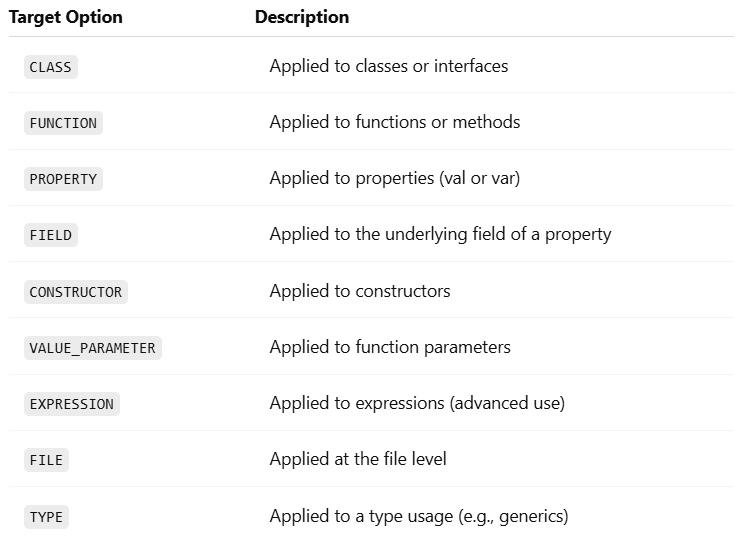
In Kotlin, @Target is a meta-annotation. That means it’s an annotation used to annotate other annotations. It specifies where your custom annotation can be applied in the code.
For example, can your annotation be used on a class? A function? A property? That’s what @Target defines.
Kotlin uses the AnnotationTarget enum to list all possible valid locations.
This lets you use @AuditLog on multiple types of declarations.
Example: Creating a Custom Annotation
Let’s say you’re building a system where you want to mark certain functions as “experimental”.
Step 1: Define the Annotation
Kotlin
@Target(AnnotationTarget.FUNCTION)@Retention(AnnotationRetention.RUNTIME)annotationclassExperimentalFeature(val message: String = "This is experimental")
@Target(AnnotationTarget.FUNCTION): Only allows this annotation on functions.
@Retention(RUNTIME): Keeps the annotation at runtime (optional but useful).
Step 2: Use the Annotation
Kotlin
@ExperimentalFeature("Might be unstable in production")funnewAlgorithm() {println("Running experimental algorithm...")}
Step 3: Read the Annotation at Runtime (Optional)
Kotlin
funcheckExperimentalAnnotations() {val method = ::newAlgorithmvalannotation = method.annotations.find { it is ExperimentalFeature } as? ExperimentalFeatureif (annotation != null) {println("Warning: ${annotation.message}") }}
This prints:
Kotlin
Warning: Mightbeunstableinproduction
Tips for Using @Target in Kotlin
Be specific: The more targeted your annotation, the less chance of misuse.
Use multiple targets wisely: Don’t overgeneralize.
Pair with @Retention: Decide whether your annotation should be available at runtime, compile time, or source level.
Think Java Interop: If you’re interoperating with Java, know that @Target in Kotlin maps to @Target in Java too.
Conclusion
@Target in Kotlin is more than just a syntactic detail. It controls how annotations behave, where they’re valid, and how your tools (including the compiler and IDE) handle them.
If you’re building libraries, frameworks, or just want clean annotation usage, understanding @Target in Kotlin is essential. With the right @Target settings, your custom annotations stay safe, purposeful, and powerful.
New to Kotlin and wondering what the @ symbol means? That symbol introduces Kotlin annotations — a simple yet powerful feature that adds useful metadata to your code, making it smarter, cleaner, and easier to manage.
This quick guide will show you what Kotlin annotations are, why they matter, and how to use them effectively. No complex jargon, just the essentials — all in under 10 minutes.
What Are Kotlin Annotations?
Annotations in Kotlin are a way to attach metadata to code elements such as classes, functions, properties, and parameters. Metadata is like extra information about the code that can be used by the compiler, libraries, or even runtime frameworks.
Think of Kotlin annotations as digital sticky notes. They’re not actual instructions for logic, but they tell tools how to treat your code.
Kotlin
@Deprecated("Use newFunction() instead", ReplaceWith("newFunction()"))funoldFunction() {println("This function is deprecated.")}
Here,
@Deprecated tells both the developer and the compiler that oldFunction() shouldn’t be used.
@Nullable and @NonNull — help with null safety, especially in Java interop.
@Parcelize — works with Kotlin’s Parcelize plugin to simplify Parcelable implementation.
Kotlin
@ParcelizedataclassUser(val name: String, val age: Int) : Parcelable
This eliminates boilerplate, making Android dev smoother.
Best Practices When Using Kotlin Annotations
Be intentional. Don’t slap annotations on everything. Know what they do.
Check retention policies. Source-retained annotations won’t be available at runtime.
Avoid clutter. Annotations should clarify, not complicate.
Test interop. If you’re writing code to be used in Java, test how annotations behave.
Conclusion
Kotlin annotations might seem like just extra syntax, but they play a powerful role in shaping how your code behaves, communicates, and integrates with other systems.
They reduce boilerplate, enforce contracts, and help the compiler help you.
Whether you’re building Android apps, writing libraries, or just learning the ropes, understanding Kotlin annotations will make you a stronger, more fluent Kotlin developer.