The Observer Design Pattern is a behavioral design pattern commonly used to build systems where multiple objects need to stay updated about changes in another object. This pattern promotes loose coupling and efficient communication between components, making it a staple in event-driven programming. In this blog, we’ll explore how the Observer pattern works, its use...
When it comes to design patterns, some are pretty straightforward, while others might seem a bit more complicated at first glance. One such pattern is the Interpreter design pattern. While it may sound like something you’d use only in very specific contexts, the Interpreter pattern can actually be quite handy when you’re dealing with languages...
When working with collections or data structures in Kotlin (or any programming language), iterating through elements is a common task. But what if you need greater control over how you traverse a collection? This is where the Iterator Design Pattern comes into play. In this article, we’ll delve into the concept of the Iterator Design...
The Command Design Pattern is a behavioral design pattern that encapsulates a request as an independent object, storing all necessary information to process the request. This pattern is especially beneficial in scenarios where you need to:
Separate the initiator of the request (the sender) from the object responsible for executing it (the receiver).
Implement functionality for undoing and redoing operations.
Facilitate the queuing, logging, or scheduling of requests for execution.
Let’s embark on a journey to understand the Command design pattern, its purpose, and how we can implement it in Kotlin. Along the way, I’ll share practical examples and insights to solidify our understanding.
Command Design Pattern
At its core, the Command Design Pattern decouples the sender (the one making a request) from the receiver (the one handling the request). Instead of calling methods directly, the sender issues a command that encapsulates the details of the request. This way, the sender only knows about the command interface and not the specific implementation.
In short,
Sender: Issues commands.
Command: Encapsulates the request.
Receiver: Executes the request.
Structure of the Command Pattern
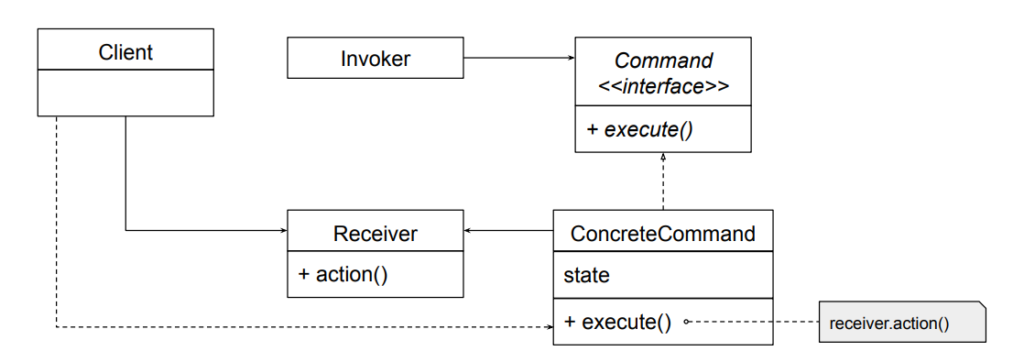
Before we dive into code, let’s see the primary components of this pattern:
Command: An interface or abstract class defining a single method, execute().
ConcreteCommand: Implements the Command interface and encapsulates the actions to be performed.
Receiver: The object that performs the actual work.
Invoker: The object that triggers the command’s execution.
Client: The entity that creates and configures commands.
Command Pattern Implementation
Imagine a smart home system, similar to Google Home, where you can control devices like turning lights on/off or playing music. This scenario can be a great example to demonstrate the implementation of the Command design pattern.
Kotlin
// Command.ktinterfaceCommand {funexecute()}
Create Receivers
The receiver performs the actual actions. For simplicity, we’ll create two receivers: Light and MusicPlayer.
Kotlin
// Light.ktclassLight {funturnOn() {println("Light is turned ON") }funturnOff() {println("Light is turned OFF") }}// MusicPlayer.ktclassMusicPlayer {funplayMusic() {println("Music is now playing") }funstopMusic() {println("Music is stopped") }}
Create Concrete Commands
Each concrete command encapsulates a request to the receiver.
The invoker doesn’t know the details of the commands but can execute them. In this case, our remote is the center of home automation and can control everything.
Now, let’s create the client code to see the pattern in action.
Kotlin
// Main.ktfunmain() {// Receiversval light = Light()val musicPlayer = MusicPlayer()// Commandsval turnOnLight = TurnOnLightCommand(light)val turnOffLight = TurnOffLightCommand(light)val playMusic = PlayMusicCommand(musicPlayer)val stopMusic = StopMusicCommand(musicPlayer)// Invokerval remoteControl = RemoteControl()// Set and execute commands remoteControl.setCommand(turnOnLight) remoteControl.setCommand(playMusic) remoteControl.executeCommands() // Executes: Light ON, Music Playing remoteControl.setCommand(turnOffLight) remoteControl.setCommand(stopMusic) remoteControl.executeCommands() // Executes: Light OFF, Music Stopped}
Here,
Command Interface: The Command interface ensures uniformity. Whether it’s turning on a light or playing music, all commands implement execute().
Receivers: The Light and MusicPlayer classes perform the actual work. They are decoupled from the invoker.
Concrete Commands: Each command bridges the invoker and the receiver. This encapsulation allows us to add new commands easily without modifying the existing code (We will see it shortly after this).
Invoker: The RemoteControl acts as a controller. It queues and executes commands, providing flexibility for batch operations.
Client Code: We bring all components together, creating a functional smart home system.
Enhancing the Pattern
If we wanted to add undo functionality, we could introduce an undo() method in the Command interface. Each concrete command would then implement the reversal logic. For example:
Flexibility: Adding new commands doesn’t affect existing code, adhering to the Open/Closed Principle.
Decoupling: The sender (invoker) doesn’t need to know about the receiver’s implementation.
Undo/Redo Support: With a little modification, you can store executed commands and reverse their actions.
Command Queues: Commands can be queued for delayed execution.
Disadvantages
Complexity: For simple use cases, this pattern may feel overengineered due to the additional classes.
Memory Overhead: Keeping a history of commands may increase memory usage.
Conclusion
The Command design pattern is a powerful tool in a developer’s toolkit, allowing us to build systems that are flexible, decoupled, and easy to extend. Kotlin’s concise and expressive syntax makes implementing this pattern a breeze, ensuring both clarity and functionality.
I hope this deep dive has demystified the Command pattern for you. Now it’s your turn — experiment with the code, tweak it, and see how you can apply it in your own projects..!
Have you ever had to manage an object’s behavior based on its state? You might have ended up writing a series of if-else or when statements to handle different scenarios. Sound familiar? (Especially if you’re working with Android and Kotlin!) If so, it’s time to explore the State Design Pattern—a structured approach to simplify your...
Design patterns are a cornerstone of writing clean, maintainable, and reusable code. One of the more elegant patterns, the Chain of Responsibility (CoR), allows us to build a flexible system where multiple handlers can process a request in a loosely coupled manner. Today, we’ll dive deep into how this design pattern works and how to...
The Chain of Responsibility Pattern is a powerful design pattern that helps streamline the process of handling requests in a system. By allowing multiple handlers to process a request, this pattern ensures that the request is passed through a chain until it’s appropriately dealt with. In this blog, we will explore essential Chain of Responsibility Pattern examples, diving into its structure and providing key insights on how this pattern can be effectively used to create more flexible and maintainable code. Whether you’re new to design patterns or looking to expand your knowledge, this guide will help you understand the full potential of this pattern.
What is the Chain of Responsibility (CoR) Pattern?
The Chain of Responsibility design pattern is a behavioral design pattern that allows passing a request along a chain of handlers, where each handler has a chance to process the request or pass it along to the next handler in the chain. The main goal is to decouple the sender of a request from its receivers, giving multiple objects a chance to handle the request.
Think of a company where a request, such as budget approval, must go through several levels of management. At each level, the manager can either address the request or escalate it to the next level.
Now imagine another situation: an employee submits a leave application. Depending on the duration of leave, it might need approval from different authorities, such as a team leader, department head, or higher management.
These scenarios capture the essence of the Chain of Responsibility design pattern, where a request is passed along a series of handlers, each with the choice to process it or forward it.
Why Use the Chain of Responsibility Pattern?
Before we delve into the structure and implementation of the Chain of Responsibility (CoR) pattern, let’s first understand why it’s important.
Consider a situation where multiple objects are involved in processing a request, and the handling varies depending on the specific conditions. For example, in online shopping platforms like Myntra or Amazon, or food delivery services such as Zomato or Swiggy, a customer might use a discount code or coupon. The system needs to determine if the code is valid or decide which discount should apply based on the circumstances.
This is where the Chain of Responsibility pattern becomes highly useful. Rather than linking the request to a specific handler, it enables the creation of a chain of handlers, each capable of managing the request in its unique way. This makes the system more adaptable, allowing developers to easily add, remove, or modify handlers without affecting the core logic.
Structure of the Chain of Responsibility Pattern
Key Idea
Decouple the sender and receiver.
Each handler in the chain determines if it can handle the request.
Structure of the Chain of Responsibility
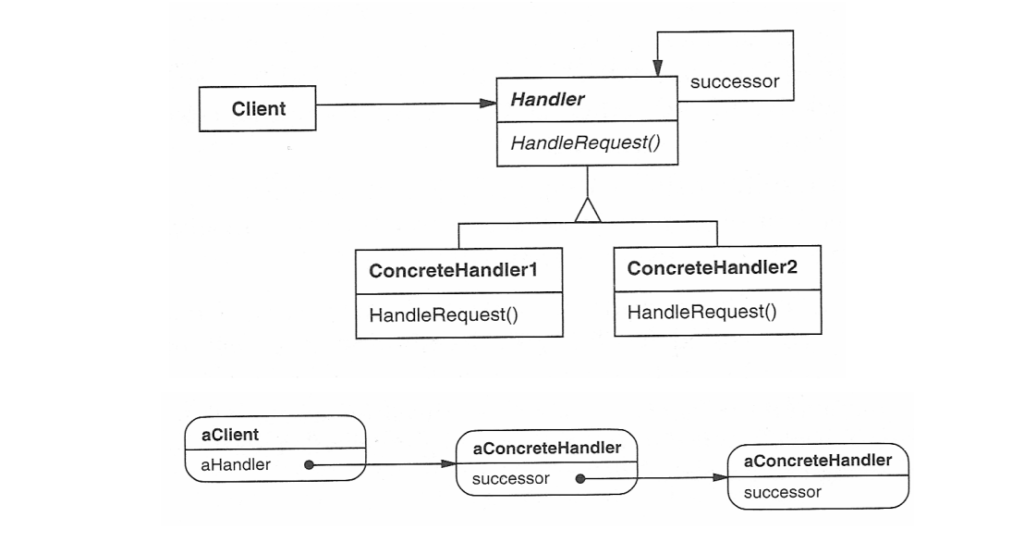
Handler (Abstract Class or Interface)
Defines the interface for handling requests and the reference to the next handler in the chain.
This defines an interface for handling requests, usually with a method like handleRequest(). It may also have a reference to the next handler in the chain.
The handler may choose to process the request or pass it on to the next handler.
ConcreteHandler
Implement the handleRequest() method to either process the request or pass it to the next handler.
These are the actual handler classes that implement the handleRequest() method. Each concrete handler will either process the request or pass it to the next handler in the chain.
If a handler is capable of processing the request, it does so; otherwise, it forwards the request to the next handler in the chain.
Client
Interacts only with the first handler in the chain, unaware of the specific handler processing the request.
Kotlin
funmain() {val handlerA = ConcreteHandlerA()val handlerB = ConcreteHandlerB() handlerA.setNextHandler(handlerB)// Client sends the request to the first handler handlerA.handleRequest("A") // Handler A processes the request handlerA.handleRequest("B") // Handler B processes the request}
The client sends the request to the first handler in the chain. The client does not need to know which handler will eventually process the request.
Chain of Responsibility Pattern Examples : Real-World Use Cases
Now, let’s roll up our sleeves and dive into real-world use case code.
Handling Employee Request
Let’s revisit our employee leave request scenario, where we need to approve a leave request in a company. The leave request should be processed by different authorities depending on the amount of leave being requested. Here’s the hierarchy:
Employee: Initiates the leave request by submitting it to their immediate supervisor or system.
Manager (up to 5 days): Approves short leaves to handle minor requests efficiently.
Director (up to 15 days): Approves extended leaves, ensuring alignment with organizational policies.
HR (more than 15 days): Handles long-term leave requests, requiring policy compliance or special considerations.
Using the Chain of Responsibility, we can chain the approval process such that if one handler (e.g., Manager) cannot process the request, it is passed to the next handler (e.g., Director).
Define the Handler Interface
The handler interface is a blueprint for the handlers that will process requests. Each handler can either process the request or pass it along to the next handler in the chain.
Kotlin
// Create the Handler interfaceinterfaceLeaveRequestHandler {funhandleRequest(request: LeaveRequest)}
In this case, the handleRequest function takes a LeaveRequest object, which holds the details of the leave request, and processes it.
Define the Request Object
The request object contains all the information related to the request. Here, we’ll create a simple LeaveRequest class.
Kotlin
// Create the LeaveRequest objectdataclassLeaveRequest(val employeeName: String, val numberOfDays: Int)
Create Concrete Handlers
Now, we’ll implement different concrete handlers for each authority: Manager, Director, and HR. Each handler will check if it can approve the leave request based on the number of days requested.
Each handler checks whether the request can be processed. If it cannot, the request is passed to the next handler in the chain.
Set Up the Chain
Next, we’ll set up the chain of responsibility. We will link the handlers so that each handler knows who to pass the request to if it can’t handle it.
Kotlin
// Setup the chainfuncreateLeaveApprovalChain(): LeaveRequestHandler {val hr = HR()val director = Director(hr)val manager = Manager(director)return manager // The chain starts with the Manager}
If the Manager can’t approve the leave (i.e., the request is for more than 5 days), it passes the request to the Director.
If the Director can’t approve the leave (i.e., the request is for more than 15 days), it passes the request to HR, which will handle it.
Test the Chain of Responsibility
Now, let’s create a LeaveRequest and pass it through the chain.
Kotlin
funmain() {val leaveRequest = LeaveRequest("amol pawar", 10)val approvalChain = createLeaveApprovalChain() approvalChain.handleRequest(leaveRequest)}// OUTPUT// Director approved amol pawar's leave for 10 days.
Now, one more familiar use case that many of us have likely worked with in past projects is the Logging System.
Logging System
Let’s implement a logging system where log messages are passed through a chain of loggers. Each logger decides whether to handle the log or pass it along. We’ll include log levels: INFO, DEBUG, and ERROR.
Define a Base Logger Class
First, we’ll create an abstract Logger class. This will act as the base for all specific loggers.
Kotlin
abstractclassLogger(privateval level: Int) {privatevar nextLogger: Logger? = null// Set the next logger in the chainfunsetNext(logger: Logger): Logger {this.nextLogger = loggerreturn logger }// Handle the log requestfunlogMessage(level: Int, message: String) {if (this.level == level) {write(message)return// To stop further propagation } nextLogger?.logMessage(level, message) }// Abstract method for handling the logprotectedabstractfunwrite(message: String)}
Here,
level: Defines the log level this logger will handle.
nextLogger: Points to the next handler in the chain.
setNext: Configures the next logger in the chain, enabling chaining.
logMessage: Checks if the logger should process the message based on its level. If not, it delegates the task to the next logger in the chain.
return: Why used return here..? The return is used to prevent the log message from being passed to the next logger after it has been processed. It ensures that once a logger handles the message, it won’t be forwarded further, avoiding redundant output.
Create Specific Logger Implementations
Let’s create concrete loggers for INFO, DEBUG, and ERROR levels.
We instantiate the loggers and chain them together using setNext.
The chain starts with InfoLogger and ends with ErrorLogger.
Using the Logger Chain
Now, let’s test our chain.
Kotlin
funmain() {val loggerChain = getLoggerChain()println("Testing Chain of Responsibility:") loggerChain.logMessage(1, "This is an info message.") loggerChain.logMessage(2, "This is a debug message.") loggerChain.logMessage(3, "This is an error message.")}
Output
Kotlin
Testing Chain of Responsibility:INFO: Thisisaninfomessage.DEBUG: Thisisadebugmessage.ERROR: Thisisanerrormessage.
Basically, what happens here is,
A log with level 1 is processed by InfoLogger.
A log with level 2 is handled by DebugLogger.
A log with level 3 is processed by ErrorLogger.
If no logger in the chain can handle a request, it simply passes through without being processed.
Extending the Chain
What if we wanted to add more log levels, like TRACE? Easy..! Just implement a TraceLogger and link it to the chain without modifying the existing code.
Form Validation: Sequential checks for input validation.
Payment Processing: Delegating payment methods to appropriate processors.
Advantages and Disadvantages
Advantages
Flexibility: Easily add or remove handlers in the chain.
Decoupling: The sender doesn’t know which handler processes the request.
Open/Closed Principle: New handlers can be added without modifying existing code.
Disadvantages
No Guarantee of Handling: If no handler processes the request, it may go unhandled.
Debugging Complexity: Long chains can be hard to trace.
Cocnlusion
The Chain of Responsibility Pattern offers a flexible and scalable solution to handling requests, making it an essential tool for developers looking to decouple their system’s components. Through the examples and insights shared, it becomes clear how this pattern can simplify complex workflows and enhance maintainability. By mastering the structure and application of the Chain of Responsibility pattern, you can ensure your systems are more adaptable to future changes, ultimately improving both code quality and overall project efficiency.
The Chain of Responsibility pattern is a behavioral design pattern that allows a request to be passed along a chain of handlers until it is processed. This pattern is particularly powerful in scenarios where multiple objects can process a request, but the handler is not determined until runtime. In this blog, we will be unveiling the powerful structure of the Chain of Responsibility pattern, breaking down its key components and flow. By the end, you’ll have a solid understanding of how this pattern can improve flexibility and scalability in your application design.
What is the Chain of Responsibility (CoR) Pattern?
The Chain of Responsibility design pattern is a behavioral design pattern that allows passing a request along a chain of handlers, where each handler has a chance to process the request or pass it along to the next handler in the chain. The main goal is to decouple the sender of a request from its receivers, giving multiple objects a chance to handle the request.
That means the CoR pattern allows multiple objects to handle a request without the sender needing to know which object handled it. The request is passed along a chain of objects (handlers), where each handler has the opportunity to process it or pass it to the next one.
Think of a company where a request, such as budget approval, must go through several levels of management. At each level, the manager can either address the request or escalate it to the next level.
Now imagine another situation: an employee submits a leave application. Depending on the duration of leave, it might need approval from different authorities, such as a team leader, department head, or higher management.
Why Use the Chain of Responsibility Pattern?
Before we delve into the structure and implementation of the Chain of Responsibility (CoR) pattern, let’s first understand why it’s important.
Consider a situation where multiple objects are involved in processing a request, and the handling varies depending on the specific conditions. For example, in online shopping platforms like Myntra or Amazon, or food delivery services such as Zomato or Swiggy, a customer might use a discount code or coupon. The system needs to determine if the code is valid or decide which discount should apply based on the circumstances.
This is where the Chain of Responsibility pattern becomes highly useful. Rather than linking the request to a specific handler, it enables the creation of a chain of handlers, each capable of managing the request in its unique way. This makes the system more adaptable, allowing developers to easily add, remove, or modify handlers without affecting the core logic.
So, the Chain of Responsibility pattern offers several advantages:
Decouples the sender and receiver: The sender doesn’t need to know which object in the chain will handle the request.
Simplifies the code: It eliminates complex conditionals and decision trees by delegating responsibility to handlers in the chain.
Adds flexibility: New handlers can be seamlessly added to the chain without impacting the existing implementation.
These scenarios capture the essence of the Chain of Responsibility design pattern, where a request is passed along a series of handlers, each with the choice to process it or forward it.
Structure of the Chain of Responsibility Pattern
The Chain of Responsibility pattern consists of:
Handler Interface: Declares a method to process requests and optionally set the next handler.
Concrete Handlers: Implements the interface and processes the request.
Client Code: Creates and configures the chain.
Structure of the Chain of Responsibility
Handler (Abstract Class or Interface)
Defines the interface for handling requests and the reference to the next handler in the chain.
This defines an interface for handling requests, usually with a method like handleRequest(). It may also have a reference to the next handler in the chain.
The handler may choose to process the request or pass it on to the next handler.
ConcreteHandler
Implement the handleRequest() method to either process the request or pass it to the next handler.
These are the actual handler classes that implement the handleRequest() method. Each concrete handler will either process the request or pass it to the next handler in the chain.
If a handler is capable of processing the request, it does so; otherwise, it forwards the request to the next handler in the chain.
Client
Interacts only with the first handler in the chain, unaware of the specific handler processing the request.
Kotlin
funmain() {val handlerA = ConcreteHandlerA()val handlerB = ConcreteHandlerB() handlerA.setNextHandler(handlerB)// Client sends the request to the first handler handlerA.handleRequest("A") // Handler A processes the request handlerA.handleRequest("B") // Handler B processes the request}
The client sends the request to the first handler in the chain. The client does not need to know which handler will eventually process the request.
As we can see, this structure allows requests to pass through multiple handlers in the chain, with each handler having the option to process the request or delegate it.
Advantages and Disadvantages
Advantages
Flexibility: Easily add or remove handlers in the chain.
Decoupling: The sender doesn’t know which handler processes the request.
Open/Closed Principle: New handlers can be added without modifying existing code.
Disadvantages
No Guarantee of Handling: If no handler processes the request, it may go unhandled.
Debugging Complexity: Long chains can be hard to trace.
Conclusion
The Chain of Responsibility pattern offers a robust solution for handling requests in a decoupled and flexible way, allowing for easier maintenance and scalability. By understanding the structure and key components of this pattern, you can effectively apply it to scenarios where multiple handlers are required to process requests in a dynamic and streamlined manner. Whether you’re developing complex systems or optimizing existing architectures, this pattern is a valuable tool that can enhance the efficiency and adaptability of your software design.
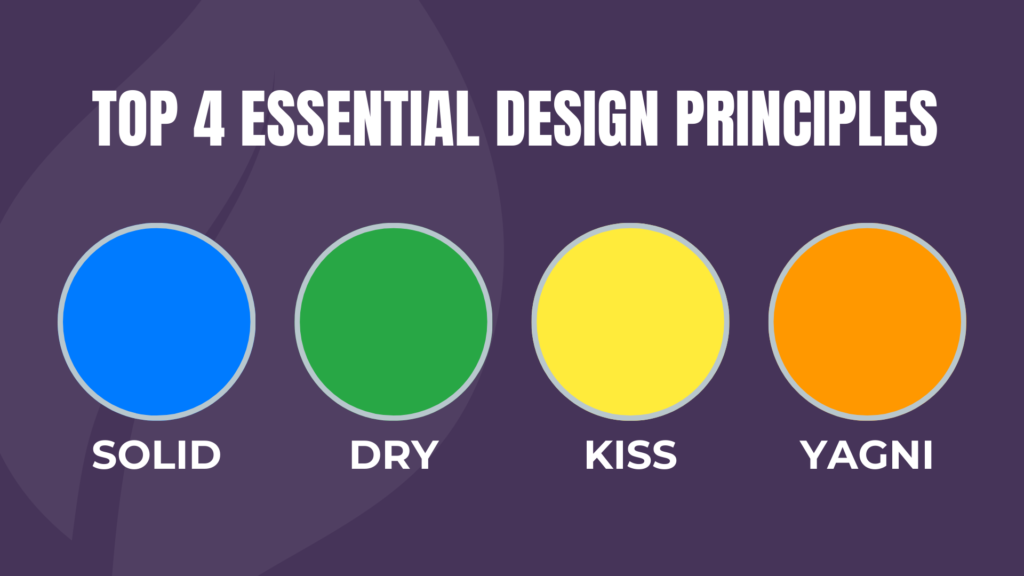
Every developer wants code that’s simple to understand, easy to update, and built to last. But achieving this isn’t always easy! Thankfully, a few core principles—SOLID, DRY, KISS, and YAGNI—can help guide the way. Think of these as your trusty shortcuts to writing code that’s not only easy on the eyes but also a breeze to maintain and scale.
In Kotlin, these principles fit naturally, thanks to the language’s clean and expressive style. In this blog, we’ll explore each one with examples to show how they can make your code better without making things complicated. Ready to make coding a little easier? Let’s get started!
Introduction to Design Principles
Design principles serve as guidelines to help developers create code that’s flexible, reusable, and robust. They are essential in reducing technical debt, maintaining code quality, and ensuring ease of collaboration within teams.
Let’s dive into each principle in detail.
SOLID Principles
The SOLID principles are a collection of five design principles introduced by Robert C. Martin (Uncle Bob) that make software design more understandable, flexible, and maintainable.
S – Single Responsibility Principle (SRP)
Definition: A class should have only one reason to change. Each class should focus on a single responsibility or task.
This principle prevents classes from becoming too complex and difficult to manage. Each class should focus on a single task, making it easy to understand and maintain.
Let’s say we have a class that both processes user data and saves it to a database.
Kotlin
// Violates SRP: Does multiple thingsclassUserProcessor {funprocessUser(user: User) {// Logic to process user }funsaveUser(user: User) {// Logic to save user to database }}
Solution: Split responsibilities by creating two separate classes.
Kotlin
classUserProcessor {funprocess(user: User) {// Logic to process user }}classUserRepository {funsave(user: User) {// Logic to save user to database }}
Now, UserProcessor only processes users, while UserRepository only saves them, adhering to SRP.
Let’s consider one more example: suppose we have an Invoice class. If we mix saving the invoice and sending it by email, this class will have more than one responsibility, violating the Single Responsibility Principle (SRP). Here’s how we can fix it:
Kotlin
classInvoice {funcalculateTotal() {// Logic to calculate total }}classInvoiceSaver {funsave(invoice: Invoice) {// Logic to save invoice to database }}classEmailSender {funsendInvoice(invoice: Invoice) {// Logic to send invoice via email }}
Here, the Invoice class focuses solely on managing invoice data. The InvoiceSaver class takes care of saving invoices, while EmailSender handles sending them via email. This separation makes the code easier to modify and test, as each class has a single responsibility.
O – Open/Closed Principle (OCP)
Definition: Classes should be open for extension but closed for modification.
This means that you should be able to add new functionality without changing existing code. In Kotlin, this can often be achieved using inheritance or interfaces.
Imagine we have a Notification class that sends email notifications. Later, we may need to add SMS notifications.
Kotlin
// Violates OCP: Modifying the class each time a new notification type is neededclassNotification {funsendEmail(user: User) {// Email notification logic }}
Solution: Use inheritance to allow extending the notification types without modifying existing code.
In this scenario, the Notifier can be easily extended without changing any existing classes, which perfectly aligns with the Open/Closed Principle (OCP). To illustrate this further, imagine we have a PaymentProcessor class. If we want to introduce new payment types without altering the current code, using inheritance or interfaces would be a smart approach.
With this setup, adding a new payment type, such as CryptoPayment, is straightforward. We simply create a new class that implements the Payment interface, and there’s no need to modify the existing PaymentProcessor class. This approach perfectly adheres to the Open/Closed Principle (OCP).
L – Liskov Substitution Principle (LSP)
Note: Many of us misunderstand this concept or do not fully grasp it. Many developers believe that LSP is similar to dynamic polymorphism, but this is not entirely true, as they often overlook the key part of the LSP definition: ‘without altering the correctness of the program.’
Definition: Subtypes must be substitutable for their base types without altering the correctness of the program. This means that if a program uses a base type, it should be able to work with any of its subtypes without unexpected behavior or errors.
The Liskov Substitution Principle (LSP) ensures that subclasses can replace their parent classes while maintaining the expected behavior of the program. Violating LSP can lead to unexpected bugs and issues, as subclasses may not conform to the behaviors defined by their parent classes.
Let’s understand this with an example: Consider a Vehicle class with a drive function. If we create a Bicycle subclass, it might violate LSP because bicycles don’t “drive” in the same way cars do.
Kotlin
// Violates LSP: Bicycle shouldn't be a subclass of VehicleopenclassVehicle {openfundrive() {// Default drive logic }}classCar : Vehicle() {overridefundrive() {// Car-specific drive logic }}classBicycle : Vehicle() {overridefundrive() {throwUnsupportedOperationException("Bicycles cannot drive like cars") }funpedal() {// Pedal logic }}
In this example, Bicycle violates LSP because it cannot fulfill the contract of the drive method defined in Vehicle, leading to an exception when invoked.
Solution: To respect LSP, we can separate the hierarchy into interfaces that accurately represent the behavior of each type. Here’s how we can implement this:
Now, Car implements the Drivable interface, providing a proper implementation for drive(). The Bicycle class does not implement Drivable, as it doesn’t need to drive. Each class behaves correctly according to its nature, adhering to the Liskov Substitution Principle.
One more thing I want to add: suppose we have an Animal class and a Bird subclass.
In this example, Bird can replace Animal without any issues because it properly fulfills the expected behavior of the move function. When move is called on a Bird object, it produces the output “Bird flies,” which is a valid extension of the behavior defined by Animal.
This illustrates the Liskov Substitution Principle: any class inheriting from Animal should be able to act like an Animal, maintaining the expected interface and behavior.
Additional Consideration: To ensure adherence to LSP, all subclasses must conform to the expectations set by the superclass. For example, if another subclass, such as Fish, is created but its implementation of move behaves in a way that contradicts the Animal contract, it would violate LSP.
I — Interface Segregation Principle (ISP)
Definition: Clients should not be forced to depend on methods they do not use. In other words, a class should not be required to implement interfaces it doesn’t need.
ISP suggests creating specific interfaces that are relevant to the intended functionality, rather than forcing a class to implement unnecessary methods.
Think about a real-world software development scenario: if there’s a Worker interface that requires both code and test methods, then a Manager class would have to implement both—even if all it really does is manage the team.
Kotlin
// Violates ISP: Manager doesn't need to codeinterfaceWorker {funcode()funtest()}classDeveloper : Worker {overridefuncode() {// Coding logic }overridefuntest() {// Testing logic }}classManager : Worker {overridefuncode() {// Not applicable }overridefuntest() {// Not applicable }}
By splitting up the interfaces, we make sure that DayWorker only has the methods it actually needs, keeping the code simpler and reducing the chances of errors.
D — Dependency Inversion Principle (DIP)
Definition: High-level modules should not depend on low-level modules. Both should depend on abstractions.
DIP encourages loose coupling by focusing on dependencies being based on abstractions, not on concrete implementations.
Let’s break this down: if OrderService directly depends on EmailService, any change in the email logic will also impact OrderService.
Now, OrderService depends on NotificationService, an abstraction, instead of directly depending on the concrete EmailService.
Here’s another use case: let’s take a look at a simple data fetching mechanism in mobile applications.
Kotlin
interfaceDataRepository {funfetchData(): String}classRemoteRepository : DataRepository {overridefunfetchData() = "Data from remote"}classLocalRepository : DataRepository {overridefunfetchData() = "Data from local storage"}classDataService(privateval repository: DataRepository) {fungetData(): String {return repository.fetchData() }}
By injecting DataRepository, DataService depends on an abstraction. We can now easily switch between RemoteRepository and LocalRepository.
Other Core Principles
Beyond SOLID, let’s look at three more principles often used to simplify and improve code.
DRY Principle – Don’t Repeat Yourself
Definition: Avoid code duplication. Each piece of logic should exist in only one place. Instead of repeating code, reuse functionality through methods, classes, or functions.
Let’s say we want to calculate discounts in different parts of the application.
Here, the when expression simplifies the code while achieving the same result.
YAGNI Principle – You Aren’t Gonna Need It
Definition: Don’t add functionality until you really need it. Only add features when they’re actually required, not just because you think you might need them later.
Imagine we’re building a calculator and think about adding a sin function, even though the requirements only need addition and subtraction.
Kotlin
classCalculator {funadd(a: Int, b: Int): Int = a + bfunsubtract(a: Int, b: Int): Int = a - b// Avoid adding unnecessary functions like sin() unless required}
Here, we adhere to YAGNI by only implementing what’s needed. Extra functionality can lead to complex maintenance and a bloated codebase.
Another example of violating YAGNI is when we add functionality to the user manager that we don’t actually need.
The archiveUser method can be added later if needed, that way we’re following the YAGNI principle.
Conclusion
To wrap it up, following design principles like SOLID, DRY, KISS, and YAGNI can make a huge difference in the quality of your code. They help you write cleaner, more maintainable, and less error-prone code, making life easier for you and anyone else who works with it. Kotlin’s clear and expressive syntax is a great fit for applying these principles, so you can keep your code simple, efficient, and easy to understand. Stick to these principles, and your code will be in great shape for the long haul!
In the realm of object-oriented programming, designing robust and maintainable systems is paramount. One of the foundational principles that help achieve this is the Liskov Substitution Principle (LSP). If you’ve ever dealt with class hierarchies, you’ve likely encountered situations where substitutability can lead to confusion or errors. In this blog post, we’ll break down the Liskov Substitution Principle, understand its importance, and see how to implement it effectively using Kotlin.
If S is a subtype of T, then objects of type T should be replaceable with objects of type S without affecting the correctness of the program.
In simple words, a subclass should work in place of its superclass without causing any problems. This helps us avoid mistakes and makes our code easier to expand without bugs. For example, if you have a class Bird and a subclass Penguin, you should be able to use Penguin anywhere you use Bird without issues.
Why is Liskov Substitution Principle Important?
Promotes Code Reusability: Following LSP allows developers to create interchangeable classes, enhancing reusability and reducing code duplication.
Enhances Maintainability: When subclasses adhere to LSP, the code becomes easier to understand and maintain, as the relationships between classes are clearer.
Reduces Bugs: By ensuring that subclasses can stand in for their parent classes, LSP helps to minimize bugs that arise from unexpected behaviors when substituting class instances.
Real-World LSP Example: Shapes
Let’s dive into an example involving shapes to illustrate LSP clearly. We’ll start by designing a base class and its subclasses, and then we’ll analyze whether the design adheres to the Liskov Substitution Principle.
The Base Class
First, we create a base class called Shape that has an abstract method for calculating the area:
Now, let’s analyze: Does it follow the Liskov Substitution Principle (LSP)?
In the above code, both Rectangle and Square can be used wherever Shape is expected, and they produce correct results. This adheres to the Liskov Substitution Principle, as substituting a Shape with a Rectangle or Square doesn’t affect the program’s correctness.
Violating LSP: A Cautionary Tale
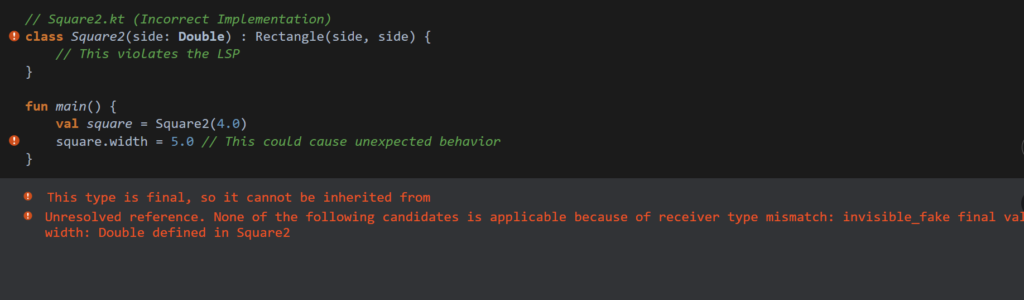
Now, let’s explore a scenario where we might inadvertently violate LSP. Imagine if we tried to implement a Square as a subclass of Rectangle:
Kotlin
// Square2.kt (Incorrect Implementation: For illustrative purposes only)classSquare2(side: Double) : Rectangle(side, side) {// This violates the LSP}
Here, we try to treat Square as a special type of Rectangle. While this might seem convenient, it can cause issues, especially if we later try to set the width and height separately.
Kotlin
funmain() {val square = Square2(4.0) square.width = 5.0// This could cause unexpected behavior}
Leads to bugs and unexpected behavior
By trying to force a square to be a rectangle, we create scenarios where our expectations of behavior break down, violating LSP.
A Better Approach: Interfaces
To adhere to LSP more effectively, we can use interfaces instead of inheritance for our shapes:
With this approach, we can freely create different shapes while ensuring they all adhere to the contract specified by the Shape interface.
Note: Many of us misunderstand this concept or do not fully grasp it. Many developers believe that LSP is similar to dynamic polymorphism, but this is not entirely true, as they often overlook the key part of the LSP definition: ‘without altering the correctness of the program.’
Definition: Subtypes must be substitutable for their base types without altering the correctness of the program. This means that if a program uses a base type, it should be able to work with any of its subtypes without unexpected behavior or errors.
The Liskov Substitution Principle (LSP) ensures that subclasses can replace their parent classes while maintaining the expected behavior of the program. Violating LSP can lead to unexpected bugs and issues, as subclasses may not conform to the behaviors defined by their parent classes.
Let’s understand this with a few more examples: Consider a Vehicle class with a drive function. If we create a Bicycle subclass, it may violate the Liskov Substitution Principle (LSP) because bicycles don’t ‘drive’ in the same way that cars do.
Kotlin
// Violates LSP: Bicycle shouldn't be a subclass of VehicleopenclassVehicle {openfundrive() {// Default drive logic }}classCar : Vehicle() {overridefundrive() {// Car-specific drive logic }}classBicycle : Vehicle() {overridefundrive() {throwUnsupportedOperationException("Bicycles cannot drive like cars") }funpedal() {// Pedal logic }}
In this example, Bicycle violates LSP because it cannot fulfill the contract of the drive method defined in Vehicle, leading to an exception when invoked.
Solution: To respect LSP, we can separate the hierarchy into interfaces that accurately represent the behavior of each type. Here’s how we can implement this:
Now, Car implements the Drivable interface, providing a proper implementation for drive(). The Bicycle class does not implement Drivable, as it doesn’t need to drive. Each class behaves correctly according to its nature, adhering to the Liskov Substitution Principle.
One more thing I want to add: suppose we have an Animal class and a Bird subclass.
In this example, Bird can replace Animal without any issues because it properly fulfills the expected behavior of the move function. When move is called on a Bird object, it produces the output “Bird flies,” which is a valid extension of the behavior defined by Animal.
This illustrates the Liskov Substitution Principle: any class inheriting from Animal should be able to act like an Animal, maintaining the expected interface and behavior.
Additional Consideration: To ensure adherence to LSP, all subclasses must conform to the expectations set by the superclass. For example, if another subclass, such as Fish, is created but its implementation of move behaves in a way that contradicts the Animal contract, it would violate LSP.
How to Avoid Violating LSP
Use interfaces or abstract classes that define behavior and allow different implementations.
Ensure that method signatures and expected behaviors remain consistent across subclasses.
Consider using composition over inheritance to avoid inappropriate subclassing.
Best Practices for Implementing LSP
Design Interfaces Thoughtfully: Design interfaces or base classes to capture only the behavior that all subclasses should have.
Avoid Overriding Behavior: When a method in a subclass changes expected behavior, it often signals a design issue.
Use Composition: When two classes share some behavior but have different constraints, use composition rather than inheritance.
Conclusion
The Liskov Substitution Principle is a fundamental concept that enhances the design of object-oriented systems. By ensuring that subclasses can be substituted for their parent classes without affecting program correctness, we create code that is more robust, maintainable, and reusable.
When designing your classes, always ask yourself: Can this subclass be used interchangeably with its parent class without altering expected behavior? If the answer is no, it’s time to reconsider your design.
Embracing LSP not only helps you write better code but also fosters a deeper understanding of your application’s architecture. So, the next time you’re faced with a class hierarchy, keep the Liskov Substitution Principle in mind, and watch your code transform into a cleaner, more maintainable version of itself!