Kotlin has gained immense popularity for its modern and expressive syntax, making Android development and general programming more efficient. One of its unique features is the companion object, which allows defining static-like members within a class. If you’re a beginner looking to understand Kotlin companion objects, this guide will take you through every essential detail.
What is a Kotlin Companion Object?
In Kotlin, unlike Java, there are no static methods. Instead, Kotlin provides a way to achieve similar functionality using companion objects. A Kotlin Companion Object is an object associated with a class that allows you to access its properties and methods without creating an instance of the class.
Key Characteristics:
A companion object is defined inside a class using the companion keyword.
It behaves like a singleton, meaning there is only one instance of it per class.
You can access its properties and methods using the class name, just like static members in Java.
How to Declare a Companion Object
Declaring a companion object in Kotlin is simple. Use the companion object keyword inside a class.
Kotlin
classMyClass {companionobject {funsayHello() {println("Hello from Companion Object!") } }}funmain() { MyClass.sayHello() // Calling the function without creating an instance}
Here,
The companion object inside MyClass defines a function sayHello().
MyClass.sayHello() is called directly, without creating an instance.
This behavior is similar to Java’s static methods but follows Kotlin’s object-oriented approach.
Adding Properties in a Companion Object
You can also define properties inside a companion object.
The companion object implements the Logger interface.
Now, Service.log("Service started") logs a message without an instance.
Conclusion
Kotlin companion objects provide a powerful way to create static-like functionality while keeping an object-oriented structure. They enable defining functions, properties, factory methods, and interface implementations within a class, making code more readable and maintainable.
Now that you have a clear understanding, start using companion objects in your Kotlin projects and take advantage of their benefits..!
Generics in Kotlin add flexibility and type safety, but sometimes we don’t need to specify a type. This is where star projection (*) comes in. In this blog, we’ll explore star projection in Kotlin, its use cases, and practical examples to help you understand how and when to use it. Understanding Star Projection in Kotlin In...
Kotlin coroutines are a powerful feature that simplify asynchronous programming. They allow developers to write asynchronous code in a sequential manner, making it easier to read and maintain. At the heart of coroutines are coroutine builders, specifically launch and async. These builders define how coroutines are started and managed. In this blog, we’ll dive deep...
Kotlin is a powerful programming language that simplifies development while maintaining strong type safety. One of the essential concepts in Kotlin is variance, which helps us understand how generics and subtyping work. If you’ve ever been confused by out, in, or *, and how generics behave in Kotlin, this guide is for you. Variance: generics...
Kotlin is well known for its concise syntax, expressive features, and seamless support for functional programming. One of its powerful yet often misunderstood features is inline functions. If you’ve ever worked with higher-order functions in Kotlin, you’ve probably encountered situations where performance becomes a concern due to lambda expressions. This is where inline functions in Kotlin come to the rescue!
In this guide, we’ll break down everything you need to know about inline functions, why they exist, how they work and improve performance, and when (or when not) to use them. Whether you’re a beginner or an experienced developer looking for a refresher, this post will help you grasp inline functions in Kotlin with clear explanations and practical examples.
What Are Inline Functions in Kotlin?
Before diving into the details, let’s start with a simple definition.
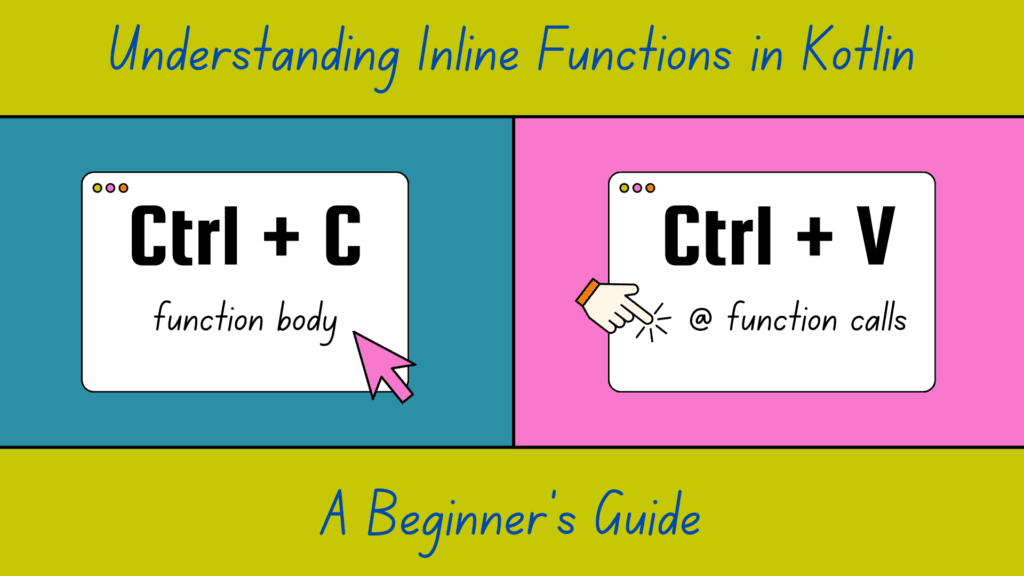
In Kotlin, an inline function is a function whose body is copied (or “inlined”) at every place it’s called during compilation. This eliminates the overhead of function calls, making the code more efficient, especially when working with lambda functions.
In this case, the function greet() is marked as inline, which means that when greet("amol") is called, the compiler replaces it with:
Kotlin
println("Hello, amol!")
This eliminates the function call and directly places the function body in the main() function, improving efficiency.
Why Were Inline Functions Introduced in Kotlin?
In Kotlin, inline functions can help remove the overhead associated with lambdas and improve performance. When you use a lambda expression, it is typically compiled into an anonymous class. This means that each time you use a lambda, an additional class is created. Moreover, if the lambda captures variables, a new object is created for each invocation. As a result, using Lambdas can introduce runtime overhead and make the implementation less efficient compared to directly executing the code.
To mitigate this performance impact, Kotlin provides the inline modifier for functions. When you mark a function with inline, the compiler replaces every call to that function with the actual code implementation, instead of generating a function call. This way, the overhead of creating additional classes and objects is avoided.
Let’s see a simple example to illustrate this:
Kotlin
inlinefunmultiply(a: Int, b: Int): Int {return a * b}funmain() {val result = multiply(2, 3)println(result)}
In this example, the multiply function is marked as inline. When you call multiply(2, 3), the compiler replaces the function call with the actual code of the multiply function:
Kotlin
funmain() {val result = 2 * 3// only for illustrating purposes, later we will see how it actually works println(result)}
This allows the code to execute the multiplication directly without the overhead of a function call.
Let’s see one more example to illustrate this:
Kotlin
inlinefunperformOperation(a: Int, b: Int, operation: (Int, Int) -> Int): Int {returnoperation(a, b)}funmain() {val result = performOperation(5, 3) { x, y -> x + y }println(result)}
In this example, the performOperation function is marked as inline. It takes two integers, a and b, and a lambda expression representing an operation to be performed on a and b. When performOperation is called, instead of generating a function call, the compiler directly replaces the code inside the function with the code from the lambda expression.
So, in the main function, the call to performOperation(5, 3) will be replaced with the actual code 5 + 3. This eliminates the overhead of creating an anonymous class and improves performance.
BTW, How inlining works actually?
When you declare a function as inline in Kotlin, its body is substituted directly into the places where the function is called, instead of being invoked as a separate function. This substitution process is known as inlining.
Let’s take a look at an example to understand it more:
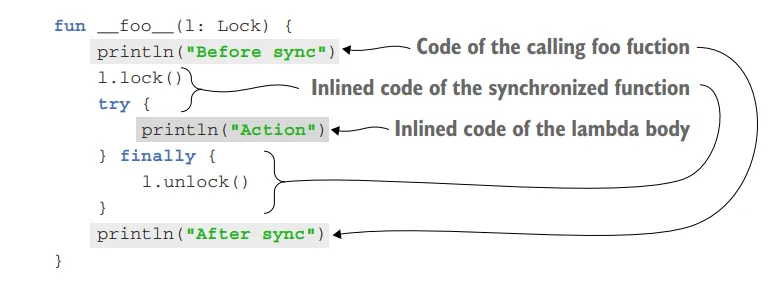
In this example, the synchronized function is declared as inline. It takes a Lock object and a lambda action as parameters. The function locks the Lock object, executes the provided action lambda, and then releases the lock.
When you use the synchronized function, the code generated for every call to it is similar to a synchronized statement in Java.
In this case, the lambda expression passed to synchronized is substituted directly into the code of the calling function. The bytecode generated from the lambda becomes part of the definition of the calling function and is not wrapped in an anonymous class implementing a function interface.
Not inlined Case (passing lambda as a parameter)
It’s worth noting that if you call an inline function and pass a parameter of a function type from a variable, rather than a lambda directly, the body of the inline function is not inlined.
Here’s an example:
Kotlin
classLockOwner(val lock: Lock) {funrunUnderLock(body: () -> Unit) {synchronized(lock, body) // A variable of a function type is passed as an argument, not a lambda. }}
In this case, the lambda’s code is not available at the site where the inline function is called, so it cannot be inlined. The body of the runUnderLock function is not inlined because there’s no lambda at the invocation. Only the body of the synchronized function is inlined; the lambda is called as usual. The runUnderLock function will be compiled to bytecode similar to the following function:
Kotlin
classLockOwner(val lock: Lock) {fun__runUnderLock__(body: () -> Unit) { // This function is similar to the bytecode the real runUnderLock is compiled to lock.lock()try {body() // The body isn’t inlined, because there’s no lambda at the invocation. } finally { lock.unlock() } }}
Here, the body of the runUnderLock function cannot be inlined because the lambda is passed as a parameter from a variable (body) rather than directly providing a lambda expression.
Suppose when you pass a lambda as a parameter directly, like this:
Kotlin
lockOwner.runUnderLock {// code block A}
The body of the inline function runUnderLock can be inlined, as the compiler knows the exact code to replace at the call site.
However, when you pass a lambda from a variable, like this:
Kotlin
val myLambda = {// code block A}lockOwner.runUnderLock(myLambda)
The body of the inline function cannot be inlined because the compiler doesn’t have access to the code inside the lambda (myLambda) at the call site. It would require the compiler to know the contents of the lambda in order to inline it.
In such cases, the function call behaves like a regular function call, and the body of the function is not copied to the call site. Instead, the lambda is passed as an argument to the function and executed within the function’s context.
So, suppose even though the runUnderLock function is marked as inline, the body of the function won’t be inlined because the lambda is passed as a parameter from a variable.
What about multiple inlining?
If you have two uses of an inline function in different locations with different lambdas, each call site will be inlined independently. The code of the inline function will be copied to both locations where you use it, with different lambdas substituted into it.
If you have multiple calls to the inline function with different lambdas, like this:
Each call site will be inlined independently. The code of the inline function will be copied to both locations where you use it, with different lambdas substituted into it. This allows the compiler to inline the code at each call site separately.
Restrictions on inline functions
When a function is declared as inline in Kotlin, the body of the lambda expression passed as an argument is substituted directly into the resulting code. However, this substitution imposes certain restrictions on how the corresponding parameter can be used in the function body.
If the parameter is called directly within the function body, the code can be easily inlined. But if the parameter is stored for later use, the code of the lambda expression cannot be inlined because there must be an object that contains this code.
In general, the parameter can be inlined if it’s called directly or passed as an argument to another inline function. If it’s used in a way that prevents inlining, such as storing it for later use, the compiler will prohibit the inlining and show an error message stating “Illegal usage of inline-parameter.”
Let’s consider an example with the Sequence.map function:
Kotlin
fun <T, R> Sequence<T>.map(transform: (T) -> R): Sequence<R> {returnTransformingSequence(this, transform)}
The map function doesn’t call the transform function directly. Instead, it passes the transform function as a constructor parameter to a class (TransformingSequence) that stores it in a property. To support this, the lambda passed as the transform argument needs to be compiled into the standard non-inline representation, which is an anonymous class implementing a function interface.
Why Use Inline Functions in Kotlin?
Inline functions are particularly useful in scenarios where:
Performance Optimization: Reduces function call overhead, making execution faster.
Avoiding Anonymous Object Allocations: Reduces memory allocations by avoiding extra objects for lambdas.
When Not to Use Inline Functions
Although inline functions in Kotlin are beneficial, overusing them can lead to code bloat (increased code size). Here are some situations where you should avoid using inline functions:
Large Function Bodies: If the function body is large, inlining it multiple times will increase the APK size.
Non-Performance Critical Code: For functions that don’t need optimization, inlining may be unnecessary.
Recursion: Recursive inline functions are not allowed in Kotlin since they would cause infinite expansion.
Performance Benefits of Inline Functions
The key benefits of inline functions in Kotlin include:
Reduces function call overhead – No need for extra method calls.
Eliminates unnecessary object creation – No wrapper objects for lambda functions.
Improves performance for high-order functions – Especially beneficial when passing multiple lambdas.
Inline functions in Kotlin are a powerful tool for improving performance, especially when working with higher-order functions and lambda expressions. By eliminating function call overhead and avoiding unnecessary object creation, they help make Kotlin code more efficient.
However, inline functions should be used carefully. Overuse can lead to increased bytecode size, making your application slower rather than faster. The key is to strike a balance—use them where they add value but avoid excessive inlining.
Kotlin Coroutines simplify asynchronous programming, but handling exceptions effectively is crucial to prevent crashes and unexpected behavior. Many developers rely on try-catch, but coroutines offer more powerful ways to manage exceptions. This post explores advanced techniques for Exception Handling in Kotlin Coroutines, ensuring robust and resilient applications. Understanding Exception Handling in Kotlin Coroutines Kotlin Coroutines...
Kotlin is packed with features that make it both powerful and expressive. One such hidden gem is the underscore (_) operator for type arguments in Kotlin. While it may not be as widely known as other features, it provides a concise and efficient way to work with generics. In this post, we’ll explore what this...
Kotlin’s coroutines simplify asynchronous programming, but managing them effectively requires a solid understanding of CoroutineScope. Without it, your app may spawn uncontrolled coroutines, leading to memory leaks or unpredictable behavior. In this blog, we’ll take a deep dive into CoroutineScope in Kotlin — exploring its importance, how to use it effectively, and how to avoid common pitfalls.
What is CoroutineScope in Kotlin?
CoroutineScope in Kotlin is an interface that defines a boundary for coroutines. It ensures that all coroutines launched within it follow structured concurrency principles, meaning they get canceled when the scope is canceled.
lifecycleScope.launch {} ensures the coroutine cancels when the activity is destroyed.
Best Practices for Using CoroutineScope in Kotlin
Prefer Built-in Scopes: Use viewModelScope and lifecycleScope for UI-related tasks.
Avoid GlobalScope: Unless absolutely necessary, avoid it to prevent memory leaks.
Always Cancel Coroutines: If using a custom CoroutineScope, ensure you cancel jobs when they’re no longer needed.
Use SupervisorJob for Independent Coroutines: It ensures that if a child coroutine fails, it does not cancel its siblings or the parent scope.
Conclusion
CoroutineScope in Kotlin is crucial for structured concurrency, ensuring that coroutines are properly managed, canceled, and executed within a defined lifecycle. By using viewModelScope, lifecycleScope, and custom scopes wisely, you can build efficient, bug-free Kotlin applications.
Kotlin is a modern programming language that embraces functional programming principles, and lambdas are an essential part of it. When working with lambdas, you might have noticed that they can access variables from their surrounding scope. But how does capturing final variables in Kotlin lambda actually work behind the scenes?
In this blog post, we’ll take a deep dive into this concept and explore the internal workings of final variable capture in Kotlin lambdas.
Understanding Capturing Final Variable in Kotlin Lambdas
Before diving into the technical details, let’s first understand what variable capturing means. When you define a lambda inside a function or block of code, it can access variables that are declared outside of its own scope.
Kotlin follows Java’s concept of effectively final variables, meaning that variables captured in lambdas must be final (i.e., immutable) or treated as final.
Here, message is captured inside the lambda printMessage. But how does Kotlin manage this internally? Let’s find out.
What Happens Behind the Scenes?
When a lambda captures a variable, Kotlin internally converts the lambda into an anonymous class that holds a reference to the captured variable. Let’s see what’s happening at a deeper level.
Lambdas as Anonymous Classes
Under the hood, Kotlin compiles lambdas into anonymous classes that implement the Function interfaces (such as Function0, Function1, etc.).
When a lambda captures a variable from an enclosing scope, the Kotlin compiler transforms the lambda into a class where the captured variable becomes a field of that class.
Decompiling to Java Code
To see what happens behind the scenes, let’s decompile the Kotlin code above into Java:
Note: This is a simplified and understandable decompiled Java code. You might see a slightly different variant when you decompile it on your end.
As you can see, the message variable is stored as a final variable inside an anonymous class implementing Function0, which allows it to be used within the lambda.
Let’s go through one more example.
Kotlin
funmain() {val number = 10val multiply = { x: Int -> x * number }println(multiply(5)) // Output: 50}
In simplified and understandable Java bytecode, Kotlin translates this lambda into something like this:
Kotlin
publicfinalclassMainKt {public static void main() {final int number = 10; Function1<Integer, Integer> multiply = new Function1<Integer, Integer>() {@Overridepublic Integer invoke(Integer x) { Intrinsics.checkNotNullParameter(x, "x");return x * number; } }; System.out.println(multiply.invoke(5)); // Output: 50 }}
Here,
Since number is used inside the lambda, it is captured as a final local variable.
The lambda is converted into an anonymous inner class implementing Function1<Integer, Integer>. invoke() method is overridden to perform the multiplication.
This is a Kotlin runtime null-safety check ensuring x is not null.
Why Kotlin Uses This Approach
As seen in the Java equivalent, number is stored as a final field inside the generated class. This ensures that even though the original variable exists in a different scope, it remains accessible within the lambda.
Effectively Final Restriction
One crucial aspect of capturing final variables in Kotlin lambda is that the variable must be effectively final, meaning it cannot change after being assigned.
The choice to enforce capturing only final (or effectively final) variables comes with several benefits:
Reduced Risk of Race Conditions: Since captured variables cannot be reassigned, the risk of race conditions is lower. However, thread safety is not guaranteed if the variable refers to a mutable object.
Performance Optimizations: Immutable variables lead to more predictable execution and allow the compiler to optimize bytecode efficiently.
Cleaner and Safer Code: Prevents accidental mutations and side effects, making the code easier to reason about.
Capturing final variables in Kotlin lambdas works by converting the lambda into an anonymous class where the captured variables are stored as immutable fields. This mechanism ensures safety, performance, and predictability in your code. Understanding how capturing final variables in Kotlin lambda works behind the scenes can help you write more efficient and bug-free Kotlin code.
When working with Kotlin, you’ll often come across two keywords for defining immutable variables: const and val. While both ensure that the value cannot be reassigned, they serve different purposes and operate under distinct rules. In this guide, we’ll take an in-depth look at const vs val, their key differences, use cases, and best practices.
What is const in Kotlin?
The const keyword in Kotlin is used to declare compile-time constants. This means that the value is known and assigned at compile time, rather than at runtime.
Characteristics of const:
Declared using const val (not const var since it must be immutable).
Can only be assigned primitives (Int, Double, Boolean, String, etc.).
Cannot be assigned a function call or any computed value.
Must be declared at the top level, inside an object, or within a companion object.
This approach ensures that constants are easily accessible and prevent unnecessary object instantiation.
What is val in Kotlin?
The val keyword is used for declaring runtime immutable variables. This means that once a val variable is assigned, it cannot be changed, but its value is determined at runtime.
Characteristics of val:
Assigned a value at runtime, not compile-time.
Can hold any type of object, including lists, function calls, and class instances.
Can be declared anywhere, including inside functions.
Cannot be reassigned, but the referenced object may be mutable, like MutableList (the content of that object can change).
Example of val Usage:
Kotlin
val timestamp = System.currentTimeMillis() // Assigned at runtimeval user = User("Amol Pawar") // Holding an object instance
Here, timestamp gets a value at runtime when the function executes.
greetingMessage is assigned dynamically based on the name parameter.
Conclusion
Understanding the difference between const and val is crucial for writing efficient and well-structured Kotlin code. While both ensure immutability, const is for compile-time constants, whereas val is for runtime immutable variables.
By applying the right choice in different scenarios, you can optimize your Kotlin applications for better readability, performance, and maintainability.