They use distributed, microservices-based architecture with caching, sharding, and intelligent load balancing.
How is location data processed?
Via frequent GPS updates, stored in in-memory data stores like Redis using GeoHashing.
What happens if no drivers are available?
The system retries in nearby zones, notifies the user, and optionally queues their request.
Conclusion
Designing a system like Uber or Lyft requires balancing performance, scalability, and reliability in real time. By leveraging GeoHashing, Redis, event-driven architecture, and secure payment gateways, modern ride-sharing platforms ensure low latency, seamless experiences for both drivers and riders.
If you’ve ever asked Siri to set a reminder, had Netflix recommend the perfect movie, or used Google Maps to avoid traffic, you’ve already experienced the impact of Artificial Intelligence — whether you realized it or not. But what is AI, really? And how is it quietly but powerfully reshaping the world around us?
In this guide, we’ll break it all down in simple terms, show real examples of AI at work, and even look at a basic machine learning project in Python to see AI in action.
What Is AI?
Artificial Intelligence (AI) is a broad field of computer science focused on building machines that can mimic human intelligence. That means learning from data, solving problems, understanding language, recognizing images or patterns, and even making decisions — just like humans do.
But here’s the key: AI doesn’t think like us. It processes massive amounts of information way faster, and often in ways we can’t easily interpret. Some AI systems are narrow (great at doing one thing, like recommending music), while others are moving toward general intelligence — able to learn and adapt across tasks.
Real-World Applications of AI
Let’s move from theory to the real world. AI is already embedded in almost every major industry — and it’s not slowing down.
1. AI in Healthcare: Smarter Diagnoses and Personalized Care
AI is changing the way doctors diagnose and treat illness. Algorithms trained on thousands of medical images can now spot tumors or early signs of disease more accurately than humans in some cases.
Example: Some hospitals use AI to analyze X-rays and MRIs, flagging anomalies for doctors to review. AI can also recommend treatments tailored to a patient’s specific genetic makeup.
How AI helps: It saves time, reduces human error, and makes personalized medicine a reality.
2. AI in Finance: Safer Transactions and Smarter Investments
From detecting fraud to managing risk, the finance sector uses AI heavily.
Example: Your bank might use an AI algorithm to block suspicious transactions. Meanwhile, hedge funds use machine learning models to analyze market trends and automate high-speed trades.
How AI helps: AI helps keep your money safe and can even grow it more efficiently.
3. AI in Transportation: Self-Driving Cars and Smarter Traffic
Self-driving vehicles sound futuristic, but many of them are already on the road. These cars rely on AI to read traffic signs, track pedestrians, and make real-time driving decisions.
Example: Tesla’s Autopilot uses AI to analyze road conditions and drive semi-autonomously. Cities are also using AI to optimize traffic signals to reduce congestion.
How AI helps: AI could help reduce accidents and traffic jams while making transport more efficient.
4. AI in Education: Customized Learning for Every Student
AI is helping educators tailor content to each student’s pace and style.
Example: Online platforms like Khan Academy or Duolingo use AI to adjust questions based on how well a student is doing. AI can also provide instant feedback, freeing up teachers to focus on hands-on support.
How AI helps: Students learn better when the material meets them where they are.
5. AI at Home: Smarter Living with Everyday Devices
Your smart speaker, smart thermostat, and even your vacuum cleaner might be powered by AI.
Example: Alexa or Google Assistant learn your voice patterns and preferences. Smart fridges can suggest recipes based on what’s inside.
How AI helps: AI makes your home more convenient, efficient, and customized to your lifestyle.
A Simple AI Example
Let’s walk through a small project using Python to predict if someone has diabetes based on health data. This uses a machine learning technique called classification.
Python
import pandas as pdfrom sklearn.model_selection import train_test_splitfrom sklearn.ensemble import RandomForestClassifierfrom sklearn.metrics import accuracy_score# Load datasetdata = pd.read_csv('diabetes.csv')# Split data into features and targetX = data.drop('Outcome', axis=1)y = data['Outcome']# Split data into training and testing setsX_train, X_test, y_train, y_test = train_test_split(X, y, test_size=0.2, random_state=42)# Create and train the modelmodel = RandomForestClassifier()model.fit(X_train, y_train)# Make predictionspredictions = model.predict(X_test)# Evaluate the modelaccuracy = accuracy_score(y_test, predictions)print(f'Accuracy: {accuracy}')
Here,
We load health data from a CSV file where each row represents a patient.
The “Outcome” column tells us whether they have diabetes (1) or not (0).
We train a model using the Random Forest algorithm — a popular method that builds many decision trees and averages the results.
The model makes predictions, and we check how many it got right using accuracy score.
This is just one example of how AI can learn from data and make useful predictions.
Challenges and Ethical Questions Around AI
Despite the hype, AI isn’t magic. It comes with real challenges and responsibilities.
Bias and Fairness
If you train an AI on biased data, it can make unfair decisions — like favoring one group over another in hiring or lending. Developers must audit data carefully and test models for fairness.
Privacy and Surveillance
AI systems collect and analyze enormous amounts of personal data. Who owns that data? How is it protected? These are major questions regulators and developers need to answer.
Job Automation
AI could automate parts of many jobs — from truck driving to legal research. While it will create new roles too, we must support workers through training and reskilling.
Accountability
When an AI system makes a mistake — like denying a loan or misdiagnosing an illness — who’s responsible? The developer? The company? The algorithm? These are complex legal and ethical issues still being debated.
Key Takeaways
What is AI? It’s a way of making machines think and learn like humans.
AI is already changing healthcare, finance, education, transportation, and even how we live at home.
Simple tools like machine learning models can make accurate predictions using real-world data.
We must approach AI with ethics, fairness, and responsibility in mind.
The future of AI is both exciting and uncertain — but it’s one we can shape together.
Artificial Intelligence is transforming the world around us, offering opportunities to improve efficiency, enhance decision-making, and solve complex problems. Understanding what AI is and how it impacts various sectors is essential for navigating the future. As we continue to integrate AI into our lives, it’s vital to address ethical considerations and ensure that these technologies are developed and used responsibly.
In the world of artificial intelligence, competition isn’t just a human affair. AI models, from game-playing bots to language processors, often face off to determine which one performs better. But how do we quantify and compare their performance? The answer is the Elo Rating System — a method originally designed for chess but now pivotal in evaluating AI matchups.
What Is the Elo Rating System?
The Elo Rating System is a method for calculating the relative skill levels of players in zero-sum games like chess. Named after its creator, Arpad Elo, this system assigns a numerical rating to each player, which adjusts based on game outcomes. When applied to AI, it offers a dynamic way to assess and compare model performance over time.
Why Use Elo Ratings for AI?
AI models are often evaluated based on accuracy, precision, recall, or other static metrics. However, these don’t always capture how a model performs relative to others. The Elo system introduces a competitive aspect, allowing for:
Dynamic Evaluation: Models’ ratings adjust as they win or lose against others.
Relative Performance: Understand how a model stacks up against peers.
Continuous Benchmarking: Track performance over time with ongoing matchups.
How Does the Elo Rating System Work?
At its core, the Elo system updates a player’s rating based on the expected outcome versus the actual result. The formula is:
New Rating = Old Rating + K × (Actual Score — Expected Score)
Where:
K is a constant determining the sensitivity of rating changes.
Actual Score is 1 for a win, 0.5 for a draw, and 0 for a loss.
Expected Score is calculated using the difference in ratings between two players.
The expected score for Player A against Player B is:
This formula ensures that beating a higher-rated opponent yields a significant rating increase, while losing to a lower-rated one results in a notable decrease.
Let’s Define the Terms:
R₁ = Rating of Player 1 (e.g., Alice)
R₂ = Rating of Player 2 (e.g., Bob)
E₁ = Expected score for Player 1
S₁ = Actual result for Player 1
Win = 1
Draw = 0.5
Loss = 0
K = Constant (controls how fast ratings change; common value = 32)
Step-by-Step Formula
1. Compute Expected Score for Player 1:
2. Update Rating:
Example: Alice vs Bob
Let’s say:
Alice has a rating of 1600
Bob has a rating of 1500
K = 32
and Alice wins the match.
Step 1: Calculate Expected Scores
For Alice:
So Alice is expected to win 64% of the time.
Step 2: Calculate New Ratings
Since Alice won, her actual score S=1
Result:
Notice how the net change is 0? That’s what zero-sum means.
So,
Total change = 0 → Zero-sum confirmed
Elo formula ensures that beating a higher-rated opponent yields a significant rating increase, while losing to a lower-rated one results in a notable decrease.
Implementing the Elo Rating System in Python
Let’s walk through a simple Python implementation to illustrate how the Elo Rating System can be applied to AI models.
Python
import mathdefexpected_score(rating_a, rating_b):return1 / (1 + 10 ** ((rating_b - rating_a) / 400))defupdate_ratings(rating_a, rating_b, result_a, k=32):""" rating_a: Current rating of Player A rating_b: Current rating of Player B result_a: Actual result for Player A (1=win, 0.5=draw, 0=loss) k: K-factor determining sensitivity """ expected_a = expected_score(rating_a, rating_b) expected_b = expected_score(rating_b, rating_a) new_rating_a = rating_a + k * (result_a - expected_a) new_rating_b = rating_b + k * ((1 - result_a) - expected_b)return new_rating_a, new_rating_b
Usage:
Python
# Initial ratingsrating_model_x = 1500rating_model_y = 1600# Model X wins against Model Ynew_rating_x, new_rating_y = update_ratings(rating_model_x, rating_model_y, result_a=1)print(f"New Rating for Model X: {new_rating_x}")print(f"New Rating for Model Y: {new_rating_y}")# OUTPUT New Rating for Model X: 1520.4820799936924New Rating for Model Y: 1579.5179200063076
In this example, the change is ±20.4821; hence, the total change is 0, and the zero-sum nature is confirmed.
Real-World Applications in AI
The Elo Rating System isn’t just theoretical; it’s actively used in various AI domains:
Game AI: Platforms like Unity’s ML-Agents use Elo ratings to evaluate and match AI agents in games, ensuring balanced and competitive environments.
Language Models: Researchers employ Elo ratings to compare the performance of different language models, especially in tasks like translation or summarization.
Reinforcement Learning: In environments where agents learn by interacting, Elo ratings help in benchmarking progress and strategy effectiveness.
Advantages of Using Elo Ratings in AI
Scalability: Easily accommodates new models entering the competition.
Simplicity: Straightforward calculations make it accessible for various applications.
Adaptability: Adjusts to performance changes over time, reflecting improvements or regressions.
Conclusion
The Elo Rating System offers a dynamic and relative approach to evaluating AI models. By focusing on head-to-head performance, it provides insights beyond static metrics, fostering a competitive environment that drives innovation and improvement.
Whether you’re developing game AI, language models, or reinforcement learning agents, incorporating this Rating System can enhance your evaluation framework, ensuring your models are not just performing well in isolation but truly excelling in the broader AI arena.
In the world of competitive games, whether it’s chess, esports, or AI agents battling it out in virtual arenas, measuring skill accurately is vital. One name dominates this space: the Elo rating system. Originally designed for chess, Elo has become a core tool in artificial intelligence, particularly in reinforcement learning (RL) and self-play environments.
In this blog, we’ll break down what Elo ratings really are, how the formula works, and why the concept of a zero-sum rating system is so important in both human and machine learning competition.
What Is the Elo Rating System?
The Elo rating system was developed by physicist Arpad Elo as a way to calculate the relative skill levels of players. It’s widely used in chess, esports rankings, and increasingly in AI research, especially where agents are trained through competition or self-play.
Unlike fixed scoring systems, Elo is dynamic and comparative — your score changes based on who you play and how well you perform.
What Is a Zero-Sum Rating System?
Before we dive into the Elo formula, it’s important to understand zero-sum systems.
Definition:
A zero-sum system is one in which the total amount of points exchanged between players always adds up to zero.
That means:
If Player A gains 10 points, Player B must lose 10 points.
The net change is zero, hence the term zero-sum.
This principle keeps the rating pool balanced, making Elo a fair and effective system for competitive environments.
Elo Rating Formula Explained
Now let’s explore the formula behind Elo scores. At its core, the Elo system updates a player’s rating based on the expected outcome versus the actual result. The formula is:
New Rating = Old Rating + K × (Actual Score — Expected Score)
Where:
K is a constant determining the sensitivity of rating changes.
Actual Score is 1 for a win, 0.5 for a draw, and 0 for a loss.
Expected Score is calculated using the difference in ratings between two players.
The expected score for Player A against Player B is:
This formula ensures that beating a higher-rated opponent yields a significant rating increase, while losing to a lower-rated one results in a notable decrease.
Let’s Define the Terms:
R₁ = Rating of Player 1 (e.g., Alice)
R₂ = Rating of Player 2 (e.g., Bob)
E₁ = Expected score for Player 1
S₁ = Actual result for Player 1
Win = 1
Draw = 0.5
Loss = 0
K = Constant (controls how fast ratings change; common value = 32)
Step-by-Step Formula
1. Compute Expected Score for Player 1:
2. Update Rating:
Example: Alice vs Bob
Let’s say:
Alice has a rating of 1600
Bob has a rating of 1500
K = 32
and Alice wins the match.
Step 1: Calculate Expected Scores
For Alice:
So Alice is expected to win 64% of the time.
Step 2: Calculate New Ratings
Since Alice won, her actual score S=1
Result:
Notice how the net change is 0? That’s what zero-sum means.
So,
Total change = 0 → Zero-sum confirmed
Why This Makes Sense?
If a stronger player beats a weaker one, they gain only a few points — it was expected.
If a weaker player beats a stronger one, they gain many points — it was an upset!
Elo formula ensures that beating a higher-rated opponent yields a significant rating increase, while losing to a lower-rated one results in a notable decrease.
Why Elo Scores Matter in AI
Elo ratings aren’t just for humans. They’re a powerful tool in AI system evaluation, particularly in:
1. Reinforcement Learning (RL)
In RL, agents learn by trial and error. Elo scores allow researchers to:
Measure progress over time
Compare current agents with past versions
Select the best-performing policies
This is heavily used in self-play systems like AlphaGo, MuZero, and OpenAI Five.
2. Game AI and Agent Evaluation
In environments like chess, Go, StarCraft, or Dota 2, Elo ratings help rank multiple AI agents efficiently without needing absolute performance benchmarks.
3. Tournament-Style Testing
When running simulations or agent competitions, Elo allows for fair and dynamic matchups. You don’t need to evaluate against all players — just a few can give you a meaningful ranking.
Key Takeaways
Elo rating is a dynamic, zero-sum scoring system that ranks players or agents based on their performance against each other.
It’s fair, scalable, and statistically grounded.
In AI, Elo ratings are essential for evaluating agents in competitive or game-like environments.
The zero-sum nature ensures that the system remains stable and meaningful over time.
Conclusion
Whether you’re building a chess bot or training a reinforcement learning agent, understanding and implementing the Elo rating system provides a robust, interpretable, and fair way to measure skill. As AI continues to evolve, especially in competitive environments, Elo remains one of the most trusted tools for evaluation — and for good reason.
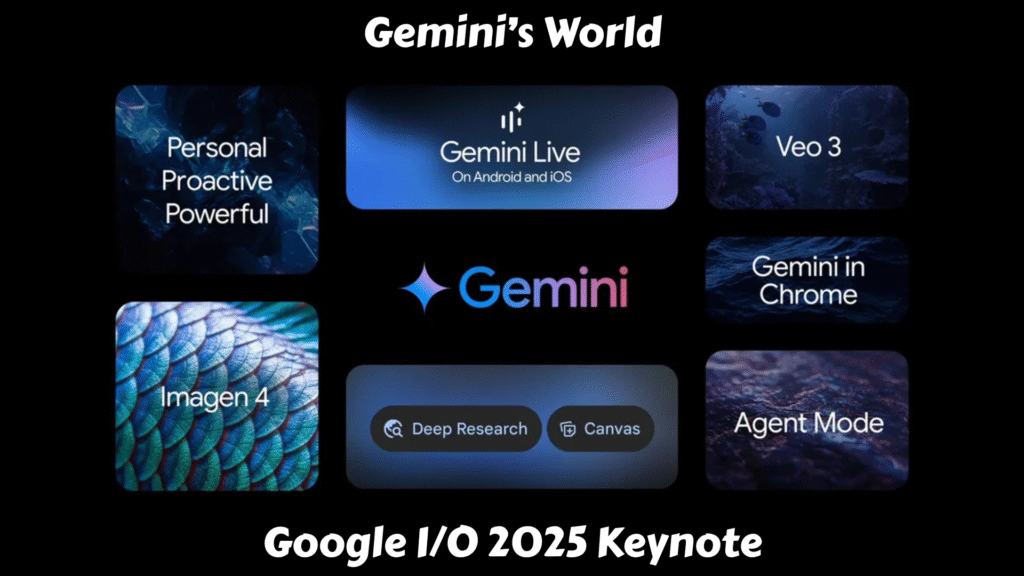
In a world racing toward intelligent everything, Google I/O 2025 didn’t just showcase AI innovation — it delivered a clear message: the future is now, and it’s powered by Gemini.
From record-breaking model advancements to immersive communication tools and personalized AI agents, Google is reshaping the very fabric of human-computer interaction. Let’s take a walk through the biggest announcements and what they mean for developers, users, and the AI ecosystem.
Shipping at a Relentless Pace
Google isn’t just moving fast — it’s moving relentlessly. The unveiling of Gemini 2.5 Pro was a defining moment, demonstrating more than 300 Elo point gains over its predecessor and sweeping the LMArena leaderboard in every category.
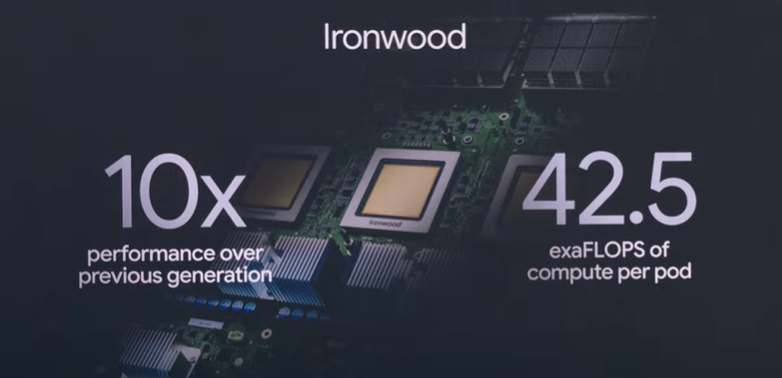
But such progress isn’t magic — it’s muscle. The new Ironwood TPU v7 is the backbone, delivering 10x performance gains and packing an astonishing 42.5 exaflops of compute per pod. This isn’t just speed; it’s a tectonic shift in AI infrastructure.
Google’s performance-per-dollar strategy also shines here. As model prices come down, capability skyrockets — shifting the Pareto frontier and redefining what’s possible at every price point.
AI Adoption Is Skyrocketing
If 2024 was the year AI went mainstream, 2025 is the year it became inescapable:
480 trillion tokens are now processed monthly — up from 9.7 trillion just a year ago.
Over 7 million developers are actively building with Gemini — 5x growth.
The Gemini app has surpassed 400 million monthly active users, with usage of Gemini 2.5 Pro up 45%.
These numbers aren’t just metrics — they’re a movement. AI isn’t a sidekick anymore; it’s becoming central to how we live, work, and create.
From Research to Reality: Beam, Astra, and Agent Mode
Project Starline → Google Beam
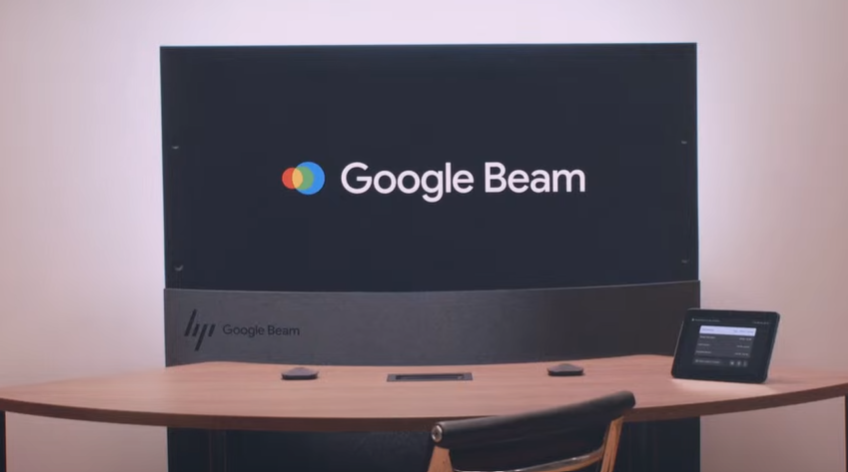
What began as a moonshot — Project Starline — has matured into Google Beam, a next-gen video platform that uses AI + six cameras to transform flat 2D streams into stunningly realistic 3D lightfield video calls.
With millimeter-accurate head tracking at 60 FPS, Beam isn’t just a communication tool — it’s an immersive experience. The first devices, built with HP, will be rolling out to select customers later this year.
Google Meet Gets Real-Time Translation
Prepare for more inclusive meetings with real-time speech translation in Google Meet, even matching the speaker’s tone and cadence. Beta access for Spanish and English is rolling out to AI Pro and Ultra subscribers.
/media/32730071f91bb5895917a7c5d2a6bd0b
Project Astra → Gemini Live
Project Astra’s dream of a universal, perceptive AI assistant is now Gemini Live. It adds real-time camera and screen-sharing to AI assistance — already used for everything from interview prep to marathon training.
Now rolling out to Android and iOS, Gemini Live is a glimpse into an AI that doesn’t just answer questions — it understands your world.
Project Mariner → Agent Mode
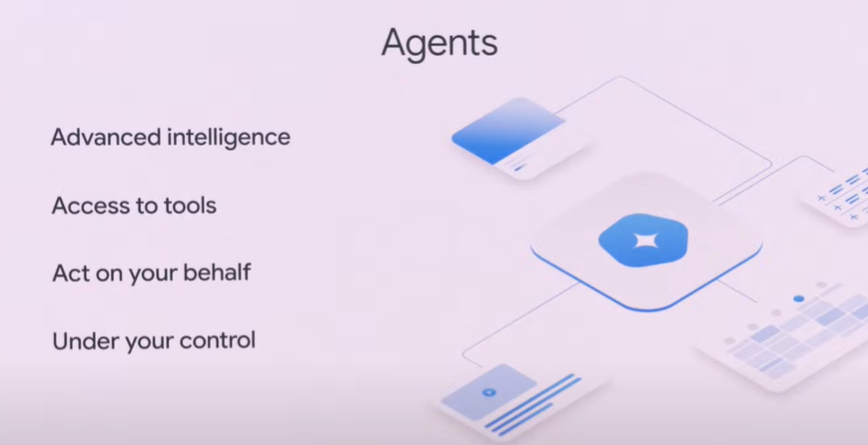
The future of AI isn’t just reactive — it’s agentic. Enter Agent Mode, an evolution of Project Mariner that enables Gemini to perform actions on your behalf — like adjusting filters on Zillow and even scheduling home tours.
Agent Mode is powered by developer-facing tools like the Gemini API, the new Model Context Protocol (MCP), and the Agent2Agent protocol, allowing AI agents to interact, reason, and collaborate across services.
Personalization With a Purpose
Gemini is getting personal. A major new feature called personal context allows Gemini to draw insights from your Google Workspace data — with full privacy and user control.
A standout example? Personalized Smart Replies in Gmail. If a friend asks about a road trip you’ve taken, Gemini can fetch your past itineraries and files to generate a response that not only contains the right info — but also sounds just like you.
Coming later this year, this kind of personalization is poised to transform how we interact with all Google services — from Search to Gemini to Gmail.
The Rise of AI Mode in Google Search
AI in Search isn’t new, but this year it’s getting a serious upgrade. The all-new AI Mode in Search allows for longer, more complex queries, advanced reasoning, and multi-turn interactions.
Search behavior is changing: people are submitting 2–3x longer queries, and AI Overviews now serve over 1.5 billion users across 200+ countries. With Gemini 2.5 integrated, AI Mode is now faster, smarter, and more accurate than ever — and it’s rolling out in the U.S. today.
Gemini 2.5 Flash and Deep Think
Developers, meet your new best friend: Gemini 2.5 Flash. It’s lean, blazing fast, and surprisingly powerful. While it trails only the Pro model on benchmarks, it excels at low latency and cost-effective inference — ideal for production-scale deployments.
Meanwhile, Gemini 2.5 Pro is getting a turbo boost with Deep Think, a new experimental reasoning mode that uses parallel thinking techniques to enhance logical, long-context reasoning.
All of these are now integrated into the Gemini app, offering creative professionals new ways to dream, design, and direct using AI.
Jules: Your New Asynchronous Coding Partner
Jules, which had previously been in a limited preview within Google Labs, is now widely available in public beta through the Gemini app. It’s designed to be an asynchronous, agentic coding assistant that integrates directly with a developer’s existing repositories, particularly GitHub.
During the I/O keynote and subsequent developer sessions, demonstrations showcased how Jules can tackle real-world scenarios. Imagine asking Jules to “update all Node.js dependencies to the latest stable version” or “write comprehensive unit tests for the user authentication module.” Jules would then:
Clone the repository to a secure VM.
Analyze the codebase and understand the task’s context.
Formulate a plan of action (which the developer can review and approve).
Execute the changes asynchronously.
Generate a pull request with the updated code, along with an audio changelog explaining what was done and why.
This process transforms what could be hours of tedious, repetitive work into a few minutes of review, allowing developers to allocate their valuable time to innovative feature development, architectural design, or complex problem-solving — the aspects of coding that truly require human creativity and strategic thinking.
Music AI Sandbox: A New Toolkit for Musicians
The Music AI Sandbox, now powered by the advanced Lyria 2 music generation model and its real-time counterpart, Lyria RealTime, is designed as an experimental suite of tools for songwriters, producers, and musicians. It’s built on the premise of fostering creativity, not replacing it.
Shankar Mahadevan’s presence at I/O 2025 and his endorsement of the Music AI Sandbox underscored Google’s commitment to responsible AI development that respects and enhances human artistry. This wasn’t about AI composing chart-topping hits independently; it was about providing a powerful, intuitive co-creator.
A More Proactive Gemini App
Gemini is no longer just reactive — it’s now proactive. With new Deep Research tools, you can upload files, connect to Gmail and Drive, and generate detailed research reports.
You can even use Canvas to turn ideas into dynamic infographics, quizzes, and podcasts in seconds. And the adoption of vibe coding with Canvas is empowering users to build apps just by chatting with Gemini.
Android 16: AI-Powered Evolution, Not a Revolution
While Google I/O 2025 was undeniably dominated by the sweeping integration of Gemini AI across nearly every Google product, Android, the company’s flagship mobile operating system, still held its ground, showcasing significant advancements that build upon the AI-first philosophy. Rather than a radical overhaul, Android 16’s presence at I/O highlighted a refined, more intelligent, and deeply integrated experience, with a strong emphasis on personalized design and enhanced user interaction.
It’s worth noting that much of the foundational insight into Android 16’s core features was already previewed during The Android Show: I/O Edition just before the main keynote. This allowed Google to dedicate prime I/O stage time to the broader AI vision, while still providing developers and enthusiasts a clear roadmap for the next iteration of Android.
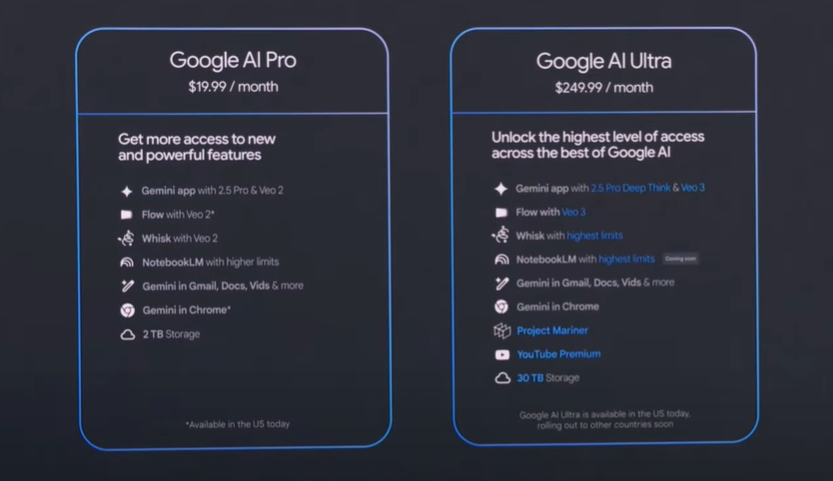
New Subscription Tiers: Unlocking Premium AI
To access the bleeding edge of Google’s AI advancements, two new subscription tiers were announced:
Google AI Pro ($19.99/month): Renamed from AI Premium, this tier offers higher rate limits, expanded access to features like Gemini Deep Research, Canvas, and Flow with Veo 2 models. It also includes 2TB of storage and NotebookLM.
Google AI Ultra ($249.99/month): Positioned as the “VIP pass,” this premium tier provides the highest usage limits, early access to experimental AI products like Project Mariner, Veo 3, and Gemini 2.5 Pro with Deep Think mode. It also bundles 30TB of storage (across Photos, Drive, Gmail), a YouTube Premium subscription, and early access to “Agent Mode” in the Gemini app and Gemini in Chrome. First-time subscribers can avail a 50% discount for the initial three months.
An AI Opportunity That’s Bigger Than Tech
Perhaps the most touching moment came from a personal story: riding a Waymo with his parents, Sundar Pichai saw firsthand the awe technology can inspire. His father’s amazement reminded us all that while the code and infrastructure are crucial, what truly matters is impact — on real people, in real moments.
Google is betting big on a future where AI doesn’t just power apps — it powers lives.
Conclusion: Gemini’s Next Chapter
Google I/O 2025 was more than a product showcase — it was a manifesto for AI’s future. With Gemini at the center, the vision is clear: build models that are fast, affordable, powerful, and personal. Build tools that augment human potential, not replace it. And most importantly, build with a purpose — to empower every developer, creator, and dreamer on the planet.
The AI revolution is here. And this time, it’s deeply human.
Every spring, developers, tech enthusiasts, and media professionals set their sights on Mountain View, California — the home of Google I/O. This annual conference is not just a showcase of Google’s latest innovations; it’s a glimpse into the future of Android, AI, cloud services, and the web. And in 2025, the stakes feel higher than ever.
This year, Google I/O will be held from May 20–21 at the Shoreline Amphitheatre, with global streaming available via the official I/O website and YouTube. Based on early insights and credible previews, here’s what you can expect from the 2025 edition — and why it matters more than ever.
The AI Revolution Continues: Gemini Takes Center Stage (Again)
If the past year was any indication, Artificial Intelligence will undoubtedly be the lodestar guiding many of the announcements at Google I/O 2025. Building upon the foundation laid by its powerful Gemini model, we can expect Google to showcase significant advancements and broader integrations:
The Next Iteration of Power: Gemini 2.5 Pro: The tech community is abuzz with anticipation for the potential unveiling or deeper insights into Gemini 2.5 Pro. This next-generation model is expected to boast enhanced capabilities across various parameters, potentially offering even more nuanced understanding, faster processing, and improved reasoning. Imagine this power seamlessly woven into more of your daily Google interactions.
Project Astra: From Concept to Concrete Reality: Project Astra, Google’s vision for a truly universal AI agent capable of understanding and interacting with the real world through sight and sound, captured imaginations last year. We can anticipate a significant update, potentially showcasing wider integration within existing Google services or even hinting at standalone applications. Its current presence in Gemini Live suggests a trajectory towards more pervasive real-world assistance.
Specialized AI Agents: The Rise of Task-Specific Intelligence: Beyond general-purpose models, expect to see the emergence of more specialized AI agents designed for specific tasks. Imagine an AI assistant meticulously helping software engineers debug complex code or a tool that streamlines intricate research processes. These targeted AI solutions could significantly boost productivity across various domains.
AI Everywhere: Weaving Intelligence into the Fabric of Google: The pervasive nature of AI means we’ll likely witness deeper integrations across Google’s extensive suite of products. Think smarter search results that truly understand your intent, Workspace tools that offer proactive assistance with writing and organization, Android features that adapt to your context with unprecedented accuracy, and Chrome functionalities that enhance your browsing experience through intelligent suggestions and summaries. The possibilities are vast.
LearnLM: Educating the Future with AI: Google’s commitment to leveraging AI for education will likely see further developments with LearnLM. Expect updates on how this AI model is being refined to create more personalized and effective learning experiences.
Android 16: Refining the Mobile Experience
While Google recently hosted a dedicated “Android Show: I/O Edition,” the main I/O event will still provide a crucial platform to delve deeper into the intricacies of the next major Android release — likely to be Android 16. Expect a closer look at:
Material 3 Expressive: A Visual and Functional Evolution: Building upon the foundation of Material Design 3, “Expressive” promises a more dynamic and personalized user interface. Expect to see demonstrations of smoother animations, richer customization options that allow for greater individual expression, and more adaptive UI elements that seamlessly adjust to different contexts and devices.
Fortifying Privacy and Security: Building Trust in the Ecosystem: Privacy and security remain paramount. Expect announcements detailing enhancements like more robust scam detection mechanisms within Google Messages, potentially leveraging AI to identify and flag suspicious communications. Furthermore, the broader availability of Advanced Protection mode could offer users an even higher level of security for their accounts and data.
Find Hub: The Evolved Network of Connection: The “Find My Device” feature is poised to evolve into “Find Hub,” a more comprehensive platform for keeping track of not just phones and tablets, but also people (with consent, of course) and a wider range of third-party accessories. The potential inclusion of satellite connectivity and ultra-wideband support could significantly enhance its tracking capabilities, offering greater peace of mind.
Seamless Audio Experiences: Embracing Auracast: Expect further emphasis on Auracast support within Android 16. This Bluetooth technology promises to revolutionize how we share and switch audio, enabling features like broadcasting audio to multiple devices simultaneously and effortlessly transitioning between different audio streams.
Health Connect 2.0: A Central Hub for Well-being: The Health Connect platform, designed to unify health and fitness data from various apps, is likely to see significant updates with version 2.0. The potential inclusion of support for medical records in the FHIR (Fast Healthcare Interoperability Resources) format could pave the way for more integrated and accessible personal health management.
Entering the Immersive Realm: The Dawn of Android XR
Google’s ambitions in the realm of extended reality (XR) — encompassing virtual, augmented, and mixed reality — are crystallizing with the development of Android XR. Google I/O 2025 is poised to be a pivotal moment for this platform:
A Deep Dive into Android XR: The Operating System for Immersive Experiences: Expect a comprehensive unveiling of Android XR, the underlying operating system designed to power the next generation of headsets and smart glasses. This will likely include details about its architecture, developer tools, and the types of immersive experiences it aims to enable.
Gemini’s Role in the Metaverse (and Beyond): Demonstrations showcasing how Gemini AI will be integrated into Android XR experiences will be highly anticipated. Imagine AI agents that can seamlessly interact with virtual environments, provide intelligent assistance within augmented reality overlays, or power truly intuitive mixed reality interactions.
Forging Partnerships: Building an XR Ecosystem: Announcements of collaborations with other companies in the XR hardware and content space are likely. These partnerships will be crucial for building a robust and diverse ecosystem around Android XR.
Project Moohan: A Glimpse into the Future of Mixed Reality Hardware: While a full product launch might be premature, we could see further updates or even a more detailed preview of “Project Moohan,” the mixed-reality headset being jointly developed by Google and Samsung. This collaboration signifies a serious commitment to the XR space.
Wear OS: Powering the Future of Wearables
Google’s smartwatch operating system, Wear OS, will also likely receive significant attention, with a focus on enhancing user experience and functionality:
The Horizon of Wear OS 6: While a full release might not be imminent, expect a potential developer preview or at least more detailed insights into the next major iteration of Wear OS, likely dubbed Wear OS 6. This could include the integration of the visually appealing and functionally rich Material 3 Expressive design language.
Gemini on Your Wrist: Intelligent Assistance on the Go: The expansion of Gemini’s capabilities on Wear OS devices is a logical next step. Imagine being able to have more natural and context-aware voice interactions with your smartwatch, leveraging Gemini for quick information retrieval, task management, and personalized assistance directly from your wrist.
Optimizing for Longevity: The Quest for Better Battery Life: Battery life remains a crucial aspect for smartwatch users. Expect to hear about ongoing optimizations and new strategies aimed at improving the power efficiency of Wear OS devices, allowing for longer usage times.
The Foundations: Web and Cloud Innovations
Google I/O also serves as a platform to showcase the latest advancements in web and cloud technologies, empowering developers to build the next generation of applications and services:
Evolving the Web: New Tools and Possibilities: Expect updates on new features and improvements for web development, aimed at accelerating the creation of richer, more interactive, and performant web experiences. This could include advancements in web APIs, developer tools, and frameworks.
AI-Powered Development: Streamlining the Coding Process: The integration of AI into developer tools is a growing trend. Expect to see how Google is leveraging AI to assist developers with tasks like code completion, error detection, and even generating boilerplate code, ultimately making the development process more efficient.
Google Cloud: Powering Innovation at Scale: Announcements related to Google’s cloud services will highlight the latest innovations in infrastructure, AI/ML platforms, data analytics, and more, showcasing how businesses can leverage the power of the cloud to scale their operations and drive innovation.
Beyond the Core: Other Areas to Watch
While AI, Android, and XR are likely to dominate the headlines, Google I/O 2025 could also bring updates and announcements in other key areas:
Google TV and Android TV: Expect potential new features focused on AI-powered content discovery, enhanced smart home integration, and improvements to the overall user experience on these smart TV platforms.
Google Home and Nest: Announcements related to new smart home devices, advancements in the Google Home ecosystem, and tighter integration with other Google services are possible.
Android Auto: New functionalities and integrations for in-car experiences, potentially leveraging the power of Gemini AI for more intelligent and personalized driving assistance, could be unveiled.
Google Maps and Wallet: Expect updates and new features for these widely used Google services, potentially focusing on enhanced navigation, more seamless payment experiences, and deeper integration with other aspects of your digital life.
The Element of Surprise in Google I/O: Expect the Unexpected
While we can make informed predictions based on past trends and current developments, Google I/O has a knack for throwing in a few surprises. Keep an open mind for unexpected hardware announcements, novel software features, or entirely new initiatives that could reshape the tech landscape.
Google I/O 2025 promises to be a captivating event, offering a comprehensive look at the future of technology as envisioned by one of the world’s leading innovation companies. From the continued evolution of AI to the dawn of mainstream extended reality and the refinement of our everyday mobile and wearable experiences, the next two days in May are set to be filled with exciting revelations that will shape the technological landscape for years to come. Stay tuned..!
Android has come a long way since powering our phones. Today, it’s in dashboards, infotainment systems, and even under the hood of cars. But how exactly did Android evolve from a smartphone OS to a critical player in the automotive world?
In this blog post, we’ll explore the fascinating journey of Android in the automotive industry, from its humble beginnings to the modern Android Automotive OS (AAOS). We’ll explain everything in a clear and easy-to-understand way, covering code examples, system architecture, and how this evolution affects developers, car manufacturers, and everyday drivers.
From Mobile OS to Infotainment: The Early Days
When Android was first introduced by Google in 2008, its open-source nature caught the attention of many industries — including automotive.
The Introduction of Android Auto
In 2015, Google officially launched Android Auto — a platform that allowed Android smartphones to project a simplified interface onto the car’s infotainment system. Drivers could use apps like Google Maps, Spotify, and WhatsApp with voice commands and touch input, enhancing safety and usability.
How It Works: Android Auto runs on the phone, not the car. The car merely acts as a display and controller.
Kotlin
// Example: Launching a voice command with Google Assistantval intent = Intent(Intent.ACTION_VOICE_COMMAND)startActivity(intent)
This architecture meant quick updates and a wide range of compatible vehicles. But it also had limitations — OEMs (Original Equipment Manufacturers) had little control over the UI or deep integration with car hardware.
The Rise of Android Automotive OS (AAOS)
Recognizing the limitations of projection-based systems, Google introduced Android Automotive OS — a full-fledged, car-ready version of Android that runs natively on the vehicle’s hardware.
What Makes Android Automotive OS Special?
Embedded OS: No need for a phone. The OS is pre-installed and controls the infotainment system.
Deeper Hardware Access: Unlike Android Auto, AAOS can integrate with HVAC, seat controls, vehicle telemetry, and more.
Customizable UI: OEMs can customize the look and feel while still leveraging the power of Android.
Architecture of Android Automotive OS
Let’s break down how Android Automotive OS works under the hood.
1. HAL (Hardware Abstraction Layer)
This layer interacts directly with the vehicle’s hardware. OEMs implement Vehicle HALs to expose data like speed, fuel level, and climate control to Android.
2. Vehicle HAL Interface (AIDL-based)
Android Automotive uses AIDL (Android Interface Definition Language) to define communication between system services and vehicle HALs.
Kotlin
// AIDL example to access vehicle propertyinterfaceIVehicle { int getProperty(int propertyId);}
3. Car Services Layer
These are system services provided by AAOS (like CarSensorManager, CarInfoManager, etc.) that expose car-related data to apps.
Kotlin
val car = Car.createCar(context)val sensorManager = car.getCarManager(Car.SENSOR_SERVICE) as CarSensorManager
Developer Experience: Building Apps for Android in Cars
With AAOS, developers now build apps that run directly on the car. These can be media, navigation, or communication apps.
App Categories Supported:
Media (e.g., Spotify)
Messaging (e.g., WhatsApp)
Navigation (e.g., Google Maps alternatives)
Sample Media App Setup
Android Automotive media apps are built on the MediaBrowserService framework:
This setup allows your media app to appear natively within the car’s infotainment system.
OEM Adoption and Industry Impact
More manufacturers are embracing Android in the automotive industry due to its flexibility and Google ecosystem support.
Popular Cars Running AAOS:
Volvo XC40 Recharge
Polestar 2
Renault Mégane E-Tech
GM, Honda, Ford, and Stellantis also announced future integration
OEMs can add their own app stores, integrate voice assistants like Alexa, and modify the interface, all while running on a solid Android foundation.
Privacy, Security & Updates
One of the major concerns with embedded software in cars is security. Google addresses this with:
Verified boot & partitioned OS layers
Google Play Protect (on supported systems)
Monthly security patches (when implemented by OEMs)
OTA (Over-the-Air) updates to push bug fixes and new features
What’s in It for You, the Driver?
Faster Access
No waiting for your phone to connect. No dropped Bluetooth. Everything just works.
Built-In Voice Control
“Hey Google, take me to the nearest gas station.” Simple, natural, and hands-free.
Fewer Distractions
Designed with safety in mind, the interface limits visual overload. You only see what you need, when you need it.
Better Personalization
Since AAOS runs directly in the car, it can save preferences across profiles and adapt to whoever’s behind the wheel.
The Future of Android in the Automotive Industry
We’re only scratching the surface of what Android can do for mobility.
Upcoming Trends:
Integration with EV battery data
Smart assistant for predictive driving
Multi-screen support (rear-seat entertainment)
Seamless phone-to-car sync with Android 15+
Google is also working on extending AI-powered user experiences using contextual data like location, calendar events, and habits to provide real-time driving recommendations and proactive assistance.
Conclusion
The journey of Android in the automotive industry showcases how adaptable and scalable the Android ecosystem truly is. From phone projection systems to embedded car platforms, it has revolutionized how drivers interact with their vehicles.
For developers, this is a golden era — you can now build apps not just for phones and tablets, but for the road itself. For OEMs, it’s an opportunity to build smarter, more connected vehicles. And for users, it means safer, more personalized, and enjoyable driving experiences.
As Android continues its journey on wheels, the road ahead looks smarter, safer, and more open than ever.
FAQ
Q: What is Android Automotive OS? A: Android Automotive OS (AAOS) is an operating system developed by Google that runs directly on a vehicle’s hardware, unlike Android Auto which runs on a smartphone.
Q: How is Android Auto different from Android Automotive OS? A: Android Auto is a projection system that mirrors apps from your phone. AAOS is a standalone OS installed in the car, offering deeper integration with vehicle functions.
Q: Can I build apps for Android Automotive? A: Yes! You can build navigation, media, and communication apps using standard Android tools and frameworks, with slight modifications for car compliance.
Q: Which cars use Android Automotive OS? A: Cars like the Polestar 2, Volvo XC40, and some models by GM, Honda, and Renault run Android Automotive OS.
Glanceable UI is a key pillar of in-car user experiences, especially in vehicles powered by Android Automotive OS (AAOS). With safety at the core, designing for “at-a-glance” interaction ensures drivers get the information they need with minimal distraction.
In this blog post, we’ll explore:
What Jetpack Glance is
How it helps build Glanceable UIs for AAOS
A practical example: Media playback glance widget
Best practices for in-car glance design
What Is Jetpack Glance?
Jetpack Glance is a lightweight UI toolkit by Google that allows developers to build glanceable app widgets using Jetpack Compose principles.
While it’s widely used for Android home screen widgets, it also plays a growing role in automotive contexts, where modular, safe, and context-aware UI components are essential.
Key Benefits:
Declarative UI (Compose-style)
Lightweight and fast
Surface-aware (homescreen, dashboard, etc.)
Seamlessly integrates with AAOS and Assistant
Why Glanceable UI Matters in Cars
An ideal in-car interface (for media, navigation, etc.) should be so intuitive, voice-driven, glanceable, and minimal that drivers can use it with little or no visual attention — keeping their eyes on the road and hands on the wheel.
Android Automotive is designed to operate under strict UX restrictions to reduce cognitive load and visual complexity while driving. Glanceable UI is about showing just enough information for a quick decision or action.
Example Use Cases:
Resume last media playback
Quick access to a recent contact
Show estimated time to destination
Weather or fuel level notifications
Setup: Adding Jetpack Glance to Your AAOS Project
First, make sure to add the required dependencies:
Large touch targets (min 48x48dp), no nested menus
Context Awareness
Surface-aware widgets (only show glance cards when relevant)
Minimized Screen Time
Display key actions only: Resume, Pause, Next
Distraction-Free UX
Avoid animations, complex visuals, or swipe gestures
Test While Driving Sim
Use Android Emulator’s automotive mode or in-car dev hardware if possible
UX Restrictions You Must Follow
Google enforces strict glanceable design rules for AAOS:
No scrolling UI
No long lists
No non-essential buttons
Only relevant, context-sensitive info
Safety is non-negotiable: Design for drivers, not passengers
If your app violates these, it may be rejected or hidden when driving.
Conclusion
Jetpack Glance enables a new era of modular, composable, and glance-friendly UI for Android Automotive OS. By respecting the driving context and focusing on essential, actionable information, developers can create interfaces that enhance the in-car experience—without compromising safety.
Remember: In the car, less is more. Show less, do more.
Imagine stepping into your car, and it feels just like using your smartphone — personalized apps, Google Assistant ready to help, Maps guiding you smoothly, and even YouTube available for in-vehicle entertainment. This isn’t a far-off dream anymore. Thanks to Google Automotive Services (GAS), the in-car digital experience is becoming smarter, more connected, and refreshingly user-friendly.
In this post, we’ll explore what Google Automotive Services (GAS) really is, how it’s different from Android Auto, and how it’s revolutionizing the way we interact with our vehicles — backed by real-world examples and developer insights.
What Is Google Automotive Services (GAS)?
Google Automotive Services (GAS) is a suite of Google applications and services built directly into vehicles that run on Android Automotive OS. Think of it as the full Google ecosystem embedded into your car — not just projected from your phone (like in Android Auto), but deeply integrated with your car’s infotainment system.
The core GAS package typically includes:
Google Maps: Native, turn-by-turn navigation with real-time traffic.
Google Assistant: Voice-controlled help for navigation, music, calling, and more.
Google Play Store: Download media, navigation, and productivity apps.
YouTube, Google Podcasts, and more: Direct in-car media consumption.
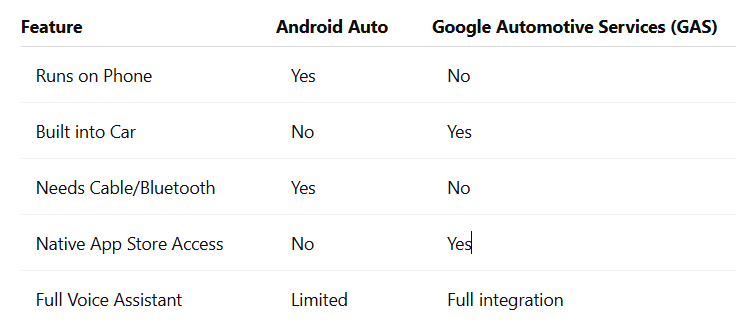
GAS vs. Android Auto: What’s the Difference?
While Android Auto relies on your phone to run, Google Automotive Services (GAS) is embedded directly into the car’s hardware. That means:
Android Auto vs Google Automotive Services (GAS)
In simple terms, GAS makes your car feel like a standalone smart device, similar to a smartphone or tablet — but tailor-made for driving.
The In-Car Experience: Smarter, Safer, More Personalized
Let’s break down how Google Automotive Services (GAS) is transforming the driving experience.
1. Voice-First Control with Google Assistant
GAS makes your voice the ultimate command. From setting the cabin temperature to playing your favorite podcast — all you need is a simple “Hey Google.”
val intent =Intent(Intent.ACTION_VOICE_COMMAND).apply {putExtra("command", "navigate to nearest EV charging station")}startActivity(intent)
Explanation:This Kotlin snippet triggers a voice command that can be tied to Google Assistant in Android Automotive. It allows seamless voice navigation to places like gas stations, coffee shops, or EV chargers — essential while on the road.
2. Built-in Google Maps: Navigation Gets Contextual
Google Maps in GAS goes beyond standard navigation. It knows your car’s fuel or battery level and can suggest charging stations or gas stops along your route.
Benefits include:
Real-time traffic and hazard detection.
EV routing based on battery range.
Integration with car sensors for accurate data.
3. Google Play Store in the Dashboard
Yes, you can install apps like Spotify, Audible, YouTube Music, and even weather apps — right from your dashboard. Developers can create and publish apps specifically for Android Automotive OS through the automotive category in Google Play.
Here’s a glimpse of how an app manifest looks for Android Automotive:
Explanation:This configuration ensures your media app is discoverable and installable in GAS-enabled cars. It tells the system that your app is designed for in-car use.
4. Seamless OTA Updates
Thanks to GAS and Android Automotive, your car’s infotainment system gets regular over-the-air (OTA) updates — just like your smartphone. That means:
Up-to-date maps and apps.
New features rolled out regularly.
Improved safety and performance.
No more waiting for your next dealership visit to update your car’s software.
Why Automakers Are Choosing GAS
Leading brands like Volvo, Polestar, Honda, Renault, and General Motors are already integrating Google Automotive Services into their vehicles. Here’s why:
Quick time to market: No need to build a custom OS or app ecosystem.
Trusted services: Users are familiar with Google Maps, Assistant, and Play Store.
Extensible platform: Automakers can still customize branding, themes, and system behaviors while leveraging the power of GAS.
For Developers: Why GAS Matters
If you’re a developer, GAS opens new doors for building apps that directly enhance the in-car experience. From media and navigation to parking and weather apps, the automotive space is ripe for innovation.
Tip: Use Jetpack libraries and AndroidX support to build adaptive UIs for the in-car environment. Consider different screen sizes, rotary inputs, and driver distraction guidelines.
Example of media session using ExoPlayer:
val player = ExoPlayer.Builder(context).build().apply {setMediaItem(MediaItem.fromUri("https://spotify.com/podcast.mp3"))prepare() playWhenReady =true}
Explanation: This code snippet uses ExoPlayer, a popular media library, to stream audio content. In GAS environments, you’d integrate this with your MediaBrowserService to create a complete playback experience.
The Future of In-Car Experiences
As Google Automotive Services (GAS) continues to grow, expect deeper personalization, better third-party app support, and smarter interactions across all your devices. With cars becoming more like smartphones on wheels, the lines between mobile and automotive tech are blurring.
Google Automotive Services (GAS) is not just about convenience — it’s about creating a smarter, safer, and more connected driving experience. Whether you’re a car buyer, developer, or automaker, GAS represents a major leap in how we think about cars and digital experiences.
If you’re driving a vehicle powered by GAS, you’re not just getting from point A to B. You’re stepping into a fully connected, intelligent ecosystem — powered by Google.
FAQ
Q: Is Google Automotive Services (GAS) the same as Android Auto? A: No, GAS is built into the car itself, while Android Auto mirrors your phone onto the infotainment screen.
Q: Can I install apps in GAS-powered cars? A: Yes, you can download compatible apps directly from the Google Play Store built into your vehicle.
Q: Which car brands support Google Automotive Services (GAS)? A: Volvo, Polestar, Renault, Honda, and several others are actively adopting GAS.
Q: Do I need an internet connection for GAS to work? A: For most services like Maps and Play Store, yes. But many features have offline capabilities too.
For years, Android Auto has been the go-to solution for connecting smartphones to car infotainment systems. But there’s a new player in town — and it’s not just an upgrade; it’s a complete transformation. Say hello to Android Automotive OS.
This shift from Android Auto to Android Automotive OS isn’t just a tech tweak. It’s a fundamental change in how we interact with vehicles. Let’s break it down and explore why it’s such a game-changer for both carmakers and drivers.
What’s the Difference, Really?
Android Auto: A Mirror of Your Phone
Android Auto is basically your phone on your car’s screen. You plug it in (or go wireless), and it mirrors apps like Google Maps, Spotify, and WhatsApp. You control everything through your car’s touchscreen or voice commands, but your phone is doing all the heavy lifting.
Cons? It relies heavily on your phone’s battery, signal, and data connection. And if your phone’s acting up, so is your car’s infotainment system.
Android Automotive OS: A Built-In Brain
Now imagine an operating system that doesn’t need your phone at all. That’s Android Automotive OS (AAOS). It runs natively on the car’s hardware, like the OS on your laptop or smart TV. Everything — from navigation to climate control to music — is handled directly through the car’s system.
It’s like giving your car its own brain.
Bottom line: Android Auto is phone-powered. Android Automotive OS is car-powered.
Why Automakers Are All In on Android Automotive OS
1. Deeper Vehicle Integration
AAOS doesn’t just run apps — it connects to the car’s internal systems. That means you can adjust the AC, check tire pressure, or heat your seats, all through the same interface. No more jumping between menus or pushing awkward physical buttons.
2. No More Phone Required
Everything is built in. You get Google Maps, Google Assistant, and even YouTube Music, straight from the dashboard — no phone needed. Your car is online and independent.
3. Seamless Updates
With over-the-air (OTA) updates, your infotainment system can evolve just like your smartphone. Carmakers can push new features, security fixes, or design changes without you needing to visit a dealer.
4. Consistent User Experience
AAOS provides a consistent, Google-designed interface. This means less confusion and a shorter learning curve for drivers. Plus, it supports multi-user profiles, so each driver gets personalized settings for seats, climate, music, and even app preferences.
What This Means for Developers
Developing for Android Automotive OS isn’t the same as building a regular Android app. You’re now creating for a vehicle environment — where safety, focus, and usability matter more than flashy design.
Google offers the Car App Library, which gives developers templates that are optimized for in-car use. These include:
NavigationTemplate – For apps like Waze or MapQuest.
ListTemplate – Perfect for music playlists or podcasts.
PaneTemplate – Useful for displaying text and buttons with minimal distractions.
A Simple Code Example for Android Automotive OS
Let’s say you’re building a simple music player for AAOS. Your AndroidManifest.xml might include:
This setup tells the system your app is designed for in-car use and sets up a safe, minimal user experience.
The key? Always design for hands-free, glanceable interactions. You’re not building for a smartphone — you’re building for a moving vehicle.
Who’s Already Using Android Automotive OS?
Big names are jumping on board:
Polestar and Volvo were first to adopt it.
GM, Ford, and Renault-Nissan-Mitsubishi have announced plans to integrate AAOS.
Honda and BMW are expected to follow suit.
What’s interesting? These automakers aren’t just slapping Google into their dashboards. They’re customizing the OS to reflect their own brand experiences — while still leveraging Google’s app ecosystem.
What’s in It for You, the Driver?
Faster Access
No waiting for your phone to connect. No dropped Bluetooth. Everything just works.
Built-In Voice Control
“Hey Google, take me to the nearest charging station.” Simple, natural, and hands-free.
Fewer Distractions
Designed with safety in mind, the interface limits visual overload. You only see what you need, when you need it.
Better Personalization
Since AAOS runs directly in the car, it can save preferences across profiles and adapt to whoever’s behind the wheel.
Addressing the Privacy Piece
Of course, with great tech comes big questions: Who owns your data? What’s being tracked?
Google claims Android Automotive OS puts privacy controls in the driver’s hands. You can manage permissions and data sharing, much like on Android phones. Still, it’s something users — and automakers — need to stay transparent about.
So, Is Android Automotive OS the Future?
Absolutely. The move from Android Auto to Android Automotive OS signals a clear trend: cars are becoming connected computers on wheels.
It benefits everyone:
Carmakers get more control and flexibility.
Drivers enjoy a smoother, more personalized ride.
Developers have a new frontier to innovate.
This is just the beginning. As cars become more software-driven, Android Automotive OS is set to play a huge role in shaping that landscape.
Conclusion
The shift from Android Auto to Android Automotive OS isn’t just about replacing one tech with another. It’s a rethinking of what a car infotainment system can — and should — be.
If you’re a driver, expect a more intuitive, reliable, and smart driving experience.
If you’re a developer, there’s an exciting road ahead.
And if you’re an automaker? Buckle up. The future is here — and it’s running on Android.