

If you’ve ever wondered how apps seem to “talk” to each other instantly without someone manually refreshing data, the answer is often a webhook.
When a payment succeeds and you receive a confirmation email instantly, when a Slack message appears after a form submission, or when an order automatically updates your CRM, there’s a good chance a webhook is doing the work behind the scenes.
Despite sounding technical, webhooks are one of the simplest and most powerful concepts in modern software.
This guide explains what a webhook is, how it works, where it’s used, and how to build one, all in simple way.
What Is a Webhook?
A webhook is a way for one application to automatically send information to another application when a specific event happens.
Think of it as a digital notification system.
Instead of asking repeatedly:
“Has anything changed?”
a webhook says:
“Something changed. Here’s the data.”
This happens in real time.
Simple Definition
A webhook is an HTTP callback triggered by an event.
That means:
- Something happens in App A.
- App A sends data to a URL.
- App B receives the data and acts on it.
No manual checking. No repeated polling.
Webhooks for Humans
Imagine ordering pizza.
Without a webhook:
You keep calling the restaurant every five minutes.
“Is my pizza ready?”
With a webhook:
The restaurant calls you.
“Your pizza is ready.”
That’s exactly how a webhook works.
One side waits.
The other side notifies.
Polling vs. Webhooks: What is the Difference?
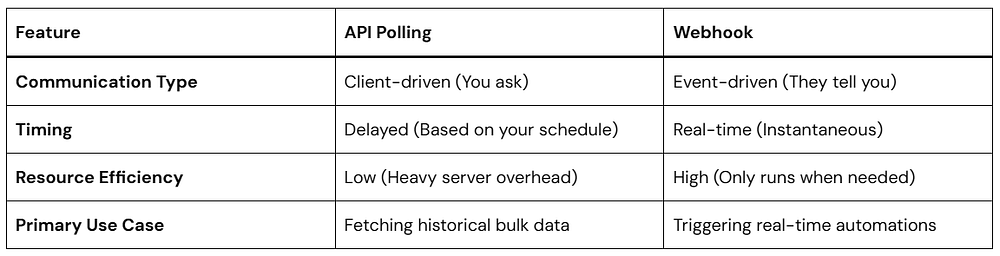
To truly appreciate the value of a webhook, it helps to understand its traditional alternative: API Polling.
When an application uses polling, it sends a request to a server at regular intervals (like every 30 seconds or every hour) asking, “Any new data yet?” Most of the time, the answer is “No.” This wastes a massive amount of server power and bandwidth.
A webhook completely flips this relationship. Instead of the receiving app asking for updates, the sending app automatically pushes the data out the moment the event occurs.

Here is a quick look at how they stack up side-by-side:
How a Webhook Works
Setting up a webhook relationship involves a simple, predictable flow between two entities: the Provider (the app where the event happens) and the Listener/Receiver (your app, or a tool like Zapier).
Here is exactly how the data travels:
- The Trigger Event: An event happens on the Provider’s platform (e.g., a new user signs up, a payment succeeds).
- The Payload Generation: The Provider packages all the relevant details about that event into a structured data format, usually JSON.
- The HTTP Request: The Provider makes an HTTP POST request to a specific URL that you previously set up in their dashboard.
- The Action: Your listener URL receives the incoming data packet, reads it, and kicks off an automated action on your end (like creating a database profile or sending a text).
Visual Flow
Customer Purchase
       ↓
Application A
(Event Trigger)
       ↓
POST Request
(Webhook)
       ↓
Webhook URL
       ↓
Application B
(Process Data)
       ↓
Action Completed
A webhook is an automated, event-driven communication mechanism that allows one web application to send real-time data to another application as soon as a specific event occurs. It functions via a user-defined HTTP POST request, passing a data payload (typically in JSON format) to a unique destination URL provided by the receiving application.
Anatomy of a Webhook Request
A webhook usually sends data using HTTP POST.
Example:
POST /webhook HTTP/1.1
Content-Type: application/json
Body:
{
  "event": "user.registered",
  "timestamp": "2026-05-23T12:00:00Z",
  "user": {
      "id": 241,
      "name": "Amol"
  }
}
What each field means
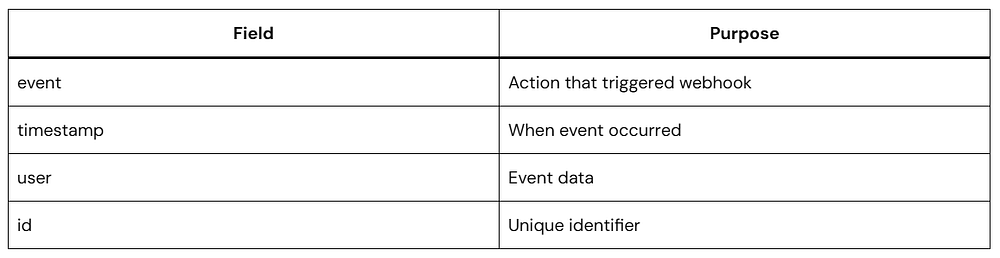
The receiving server uses this information to decide what to do.
A Simple Look at Webhook Code
Don’t let the programming side intimidate you. A webhook receiver is essentially just a web page that sits silently and listens for incoming POST requests.
Below is a highly secure, clean example of a webhook receiver written in Node.js using the popular Express framework. This code listens for an event and reads the data payload sent to it.
const express = require('express');
const app = express();

// Middleware to parse incoming JSON payloads automatically
app.use(express.json());

// This is your unique Webhook Destination URL endpoint
app.post('/my-webhook-receiver', (req, res) => {
    const eventData = req.body;

    console.log(`Webhook received! Event Type: ${eventData.event}`);
    console.log(`Data Payload:`, eventData.data);

    // Step 1: Securely validate the event type
    if (eventData.event === 'user.registered') {
        const user = eventData.data;
        // Step 2: Execute your custom real-time automation here
        console.log(`Successfully processed registration for ${user.email}`);
    }

    // Step 3: Always return a swift 200 OK status code to the sender
    res.status(200).send('Webhook successfully processed.');
});

// Start listening for incoming webhook events on port 3000
app.listen(3000, () => console.log('Listening for webhooks on port 3000'));app.use(express.json()): This reads the incoming raw data stream from the webhook provider and turns it into a clean, readable JavaScript object.app.post('/my-webhook-receiver'): This defines your unique endpoint. This is the exact URL address you would copy and paste into your provider’s settings (e.g.,[https://yourdomain.com/my-webhook-receiver]).res.status(200): This is the most important part of webhook handling. It tells the provider, “Message received successfully — no need to send it again.” If your server doesn’t return this response quickly, the provider may assume something went wrong and retry the webhook, which can lead to the same event being delivered multiple times.
How to Send a Test Webhook
You can simulate one using cURL.
curl -X POST http://localhost:3000/my-webhook-receiver \
-H "Content-Type: application/json" \
-d '{
  "event": "user.registered",
  "data": {
    "email": "[email protected]"
  }
}'
Expected Output
Listening for webhooks on port 3000

Webhook received! Event Type: user.registered
Data Payload: { email: '[email protected]' }

Successfully processed registration for amol@softaai.com
Expected HTTP response:
Webhook successfully processed.This confirms your endpoint works.
Best Practices for Managing Webhooks Safely
Because webhooks expose a public URL to the open internet, it is critical to follow core engineering safety standards to protect your applications from malicious traffic:
- Implement Webhook Signatures: Reliable providers (like Stripe or GitHub) include a unique cryptographic signature in the header of each incoming request. Your code should verify this signature using a secret key to prove the data actually came from them, and not an attacker pretending to be them.
- Handle Retries and Idempotency: Webhook deliveries can occasionally fail due to brief network hiccups. Good providers will try resending the data a few times. Your code must be smart enough to recognize if it has already processed a specific transaction ID so it doesn’t charge a customer twice or create duplicate accounts.
- Acknowledge Fast, Process Later: If your receiver takes too long to process an event (e.g., executing a massive database migration), the provider’s server might time out and flag it as a failure. Accept the webhook instantly with a
200 OK, save the payload to a queue, and handle the heavy processing safely in the background.
Popular Webhook Use Cases
Webhooks now power:
Ecommerce
- Order updates
- Shipping events
- Inventory sync
SaaS
- User onboarding
- Billing automation
AI Applications
- Agent triggers
- Workflow orchestration
DevOps
- Deployment notifications
- Monitoring alerts
Internal Operations
- CRM updates
- Report generation
Frequently Asked Questions
Is a webhook the same as an API?
No.
APIs are typically request-driven.
Webhooks are event-driven.
Does a webhook run continuously?
No.
It activates only when an event occurs.
Are webhooks real time?
Usually yes.
Delivery often happens within seconds.
Can webhooks fail?
Yes.
Common reasons:
- Timeouts
- Network issues
- Invalid endpoints
Retry systems reduce failures.
Do webhooks require coding?
Not always.
Many no-code platforms support webhook automation.
Conclusion
A webhook is one of those concepts that sounds complicated until you see it in action.
At its core, it does one simple thing:
When something happens, send data somewhere immediately.
That simple model powers modern automation.
Whether you’re building apps, connecting tools, creating AI workflows, or reducing manual work, understanding how a webhook works gives you a foundation for building faster and smarter systems.
Start small:
Receive one event.
Log the payload.
Trigger one action.
That’s how nearly every real-time automation system begins.