

Jetpack Compose, Android’s modern UI toolkit, introduces a declarative approach to building user interfaces. With this shift comes a new way of thinking about side effects — operations that interact with the outside world or perform actions outside the scope of a composable function. Understanding how to manage these side effects properly is crucial to building reliable, efficient, and reactive Compose applications.
In this article, we’ll dive into three key APIs provided by Compose for handling side effects: SideEffect, LaunchedEffect, and DisposableEffect. Each serves a distinct purpose and understanding their differences can help you write cleaner, more predictable UI code.
What Are Side Effects in Jetpack Compose?
In Jetpack Compose, a side effect is any change that happens outside the scope of a composable function. This might include updating a database, logging analytics, showing a toast, or triggering a network call. Because composable functions can be re-executed (recomposed) frequently and unpredictably — whenever state or parameters change — running side-effect code directly inside them can lead to bugs or performance issues, such as duplicate network requests or inconsistent UI states.
Why Do We Need Side-Effect APIs in Jetpack Compose?
The declarative paradigm means you describe what the UI should look like, and Compose decides how and when to update it. However, this also means you can’t control exactly when your composable functions run. If you place side-effect code (like a network call) directly in a composable, it might run multiple times — once for every recomposition — which is usually not what you want.
Side-Effect APIs in Jetpack Compose are designed to solve this problem. They provide safe, predictable ways to perform actions that reach outside the Compose runtime, such as:
- Triggering one-time operations
- Cleaning up resources
- Synchronizing Compose state with external systems
Key Side-Effect APIs in Jetpack Compose
Let’s explore the most commonly used Side-Effect APIs in Jetpack Compose, when to use each, and see them with simple code examples.
1. SideEffect
What it does:
Runs code after every successful recomposition of the parent composable.
When to use:
- For actions that should happen every time the UI updates, like logging or updating analytics.
- When you need to synchronize Compose state with an external system, but not for heavy or asynchronous operations.
Example: Logging Analytics on Recomposition
@Composable
fun ExampleSideEffect(name: String) {
    Text("Hello, $name")
    SideEffect {
        Log.d("ExampleSideEffect", "Composed with name: $name")
    }
}
Here, every time the name parameter changes and ExampleSideEffect recomposes, the log statement runs—perfect for analytics or debug logging.
2. LaunchedEffect
What it does:
Launches a coroutine tied to the lifecycle of the composable. Runs only when the specified key(s) change.
When to use:
- For one-off or asynchronous operations, like fetching data from a network or starting animations.
- When you want to avoid running code on every recomposition.
Example: Fetching Data Once
@Composable
fun FetchDataScreen(userId: String) {
    var data by remember { mutableStateOf<String?>(null) }

    LaunchedEffect(userId) {
        data = fetchDataFromNetwork(userId)
    }
    Text(text = data ?: "Loading...")
}Here,LaunchedEffect ensures the network call runs only when userId changes—not on every recomposition—preventing duplicate requests and wasted resources.
3. DisposableEffect
What it does:
Performs setup and cleanup logic tied to the lifecycle of the composable. Runs setup when the key(s) change, and cleanup when the composable leaves the composition.
When to use:
- For managing resources like listeners, callbacks, or broadcast receivers that need explicit teardown.
- When you want to perform cleanup when a composable is removed from the UI tree.
Example: Registering and Unregistering a Listener
@Composable
fun LifecycleAwareComponent() {
    val lifecycleOwner = LocalLifecycleOwner.current

    DisposableEffect(lifecycleOwner) {
        val observer = LifecycleEventObserver { _, event ->
            if (event == Lifecycle.Event.ON_RESUME) {
                // Do something when resumed
            }
        }
        lifecycleOwner.lifecycle.addObserver(observer)
        onDispose {
            lifecycleOwner.lifecycle.removeObserver(observer)
        }
    }
}
This ensures the observer is added when the composable enters the composition and removed when it leaves, preventing memory leaks.
Common Mistakes and How to Avoid Them
- Running Expensive Operations in SideEffect:
Avoid usingSideEffectfor network calls or other heavy operations—it runs on every recomposition, which can lead to performance issues and duplicate work. - Ignoring Cleanup:
If you add listeners or callbacks, always useDisposableEffectto remove them when the composable is disposed. - Not Using Keys Properly:
ForLaunchedEffectandDisposableEffect, always specify appropriate keys to control when effects should re-run.
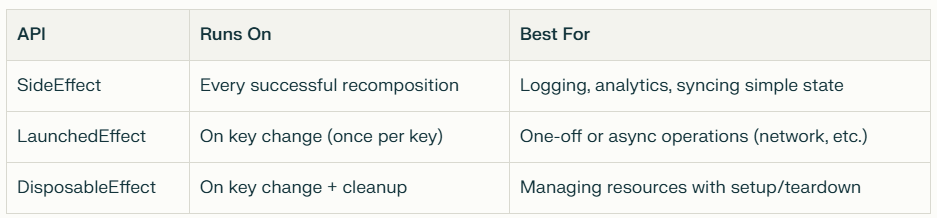
Choosing the Right Side-Effect API
Conclusion
Side-Effect APIs in Jetpack Compose are essential for bridging the gap between declarative UI and imperative side effects. By understanding and using SideEffect, LaunchedEffect, and DisposableEffect correctly, you can:
- Prevent bugs and performance issues caused by unwanted repeated side effects
- Build responsive, robust, and maintainable Compose apps
- Ensure your app interacts safely with the outside world
Remember:
- Use
SideEffectfor lightweight, repeatable actions after recomposition - Use
LaunchedEffectfor one-time or asynchronous tasks - Use
DisposableEffectfor managing resources with setup and teardown
Mastering these tools will help you write cleaner, more reliable Compose code — and take your Android apps to the next level.