Kotlin

Kotlin Constructor References vs Function References

Kotlin Constructor References vs Function References: Key Differences

When working with Kotlin, you’ll often come across constructor references and function references. At first glance, they may look similar, but they serve different purposes. Understanding the difference between them will help you write cleaner, more expressive, and more reusable code.

This post will break it down in a simple way with examples, so you’ll know exactly when to use constructor references and function references.

What Are Function References in Kotlin?

A function reference lets you refer to a function by its name, without calling it directly. Instead of executing the function, Kotlin treats it as a value that can be passed around.

Kotlin
fun greet(name: String) {
    println("Hello, $name!")
}

fun main() {
    val greeter: (String) -> Unit = ::greet
    greeter("Kotlin") // Prints: Hello, Kotlin!
}

Here,

  • ::greet is a function reference.
  • We’re not calling greet() directly. Instead, we’re passing the reference into greeter.
  • Later, we call it with greeter("Kotlin").

This is especially useful when working with higher-order functions like map, filter, or custom callbacks.

What Are Constructor References in Kotlin?

A constructor reference points to a class constructor instead of a function. This allows you to create new instances of a class without explicitly calling ClassName().

Kotlin
data class User(val name: String)

fun main() {
    val users = listOf("amol", "akshay", "rahul")
    val userObjects = users.map(::User)

    println(userObjects) 
    // Output: [User(name=amol), User(name=akshay), User(name=rahul)]
}
  • ::User is a constructor reference.
  • Instead of writing users.map { User(it) }, we simply pass ::User.
  • Kotlin automatically knows that ::User matches the expected function type (String) -> User.

This makes your code shorter and more expressive, especially when working with collections.

Constructor References vs Function References: Key Differences

Now let’s compare them side by side.

Example

Imagine you’re processing a list of numbers and converting them into Result objects.

Kotlin
data class Result(val value: Int)

fun square(n: Int): Int = n * n

fun main() {
    val numbers = listOf(2, 4, 6)

    // Using function reference
    val squared = numbers.map(::square)

    // Using constructor reference
    val results = squared.map(::Result)

    println(results)
    // Output: [Result(value=4), Result(value=16), Result(value=36)]
}

What’s happening here?

  1. ::square is a function reference that transforms each number.
  2. ::Result is a constructor reference that wraps each transformed number into an object.

This example highlights how constructor references and function references complement each other.

When to Use Which

  • Use function references when you want to pass existing logic around. For example, reusing a utility function inside a higher-order function.
  • Use constructor references when you need to create objects dynamically, especially inside collection transformations.

Avoiding Ambiguity: Overloaded Functions and Constructors

Kotlin allows overloaded functions and constructors. When using references, the compiler needs to know which version to pick, so you often provide explicit type information to resolve ambiguity:

Kotlin
fun add(a: Int, b: Int) = a + b
fun add(a: Double, b: Double) = a + b

val intAdder: (Int, Int) -> Int = ::add  // Unambiguous because of type

Conclusion

At first, constructor references and function references may seem confusing because the syntax looks similar. But once you know the difference, it’s clear:

  • Function references point to reusable logic.
  • Constructor references point to object creation.

Both are powerful tools that make Kotlin code more expressive, concise, and elegant. By mastering them, you’ll write cleaner and more functional-style Kotlin programs.

Design Patterns in Kotlin A Concise Guide

Design Patterns in Kotlin: A Concise Guide

In software development, design patterns offer proven solutions to common problems. They provide a standardized approach to designing and implementing software, making code more readable, maintainable, and scalable. Kotlin, a modern, statically typed programming language running on the JVM, is well-suited for implementing design patterns. Here, I will guide you through some of the most commonly used design patterns in Kotlin.

The True Power of Design Patterns

Design patterns are tried-and-tested solutions to common problems in software design. Think of them as templates that help developers solve recurring challenges in a structured way. By using design patterns, developers can write code that is more efficient, easier to maintain, and easier to understand. These patterns also create a common language among developers, making it simpler to communicate and collaborate. While design patterns can be very useful, it’s important to use them thoughtfully and only when they fit the specific problem you’re trying to solve.

Origins: From Architecture to Software

The concept of design patterns originally came from architecture, not software. In the late 1970s, architect Christopher Alexander introduced design patterns in his book “A Pattern Language.” He and his team identified common problems in building design and suggested solutions that could be reused in different situations. These solutions were documented as patterns, providing a shared language that architects could use to create better buildings.

This idea caught the attention of the software community, which faced similar issues when designing complex systems. By the 1980s and early 1990s, software developers started adapting these architectural patterns to help solve problems in software design.

The Gang of Four: A Key Moment

A major milestone in software design patterns came in 1994 with the publication of the book “Design Patterns: Elements of Reusable Object-Oriented Software.” This book was written by four authors — Erich Gamma, Richard Helm, Ralph Johnson, and John Vlissides — who are often referred to as the “Gang of Four” (GoF).

The Gang of Four identified 23 design patterns that address specific problems in object-oriented programming. They grouped these patterns into three categories:

  • Creational Patterns: Focus on how objects are created, helping ensure systems can grow easily. Examples: Singleton, Factory, and Builder patterns.
  • Structural Patterns: Deal with how classes and objects are organized, making complex systems easier to manage. Examples: Adapter, Composite, and Decorator patterns.
  • Behavioral Patterns: Focus on how objects communicate and work together. Examples: Observer, Strategy, and Command patterns.

Their work provided us (developers) with a common set of best practices that could be consistently applied to software design, making their book a foundational resource for learning about design patterns.

Evolution and Modern Perspectives

Since the publication of the GoF book, design patterns have continued to evolve, adapting to new programming paradigms, technologies, and methodologies. As software development shifted towards more dynamic languages and frameworks, we developers began to explore and document new patterns that addressed emerging challenges.

In the context of Android development, architectural patterns like Model-View-ViewModel (MVVM) and Model-View-Presenter (MVP) have gained prominence. These patterns have been developed to tackle the complexities of building scalable, maintainable, and testable mobile applications.

MVVM (Model-View-ViewModel): MVVM separates the application logic from the UI, facilitating a cleaner and more modular architecture. In MVVM, the ViewModel handles the logic and state of the UI, the View is responsible for rendering the UI and user interactions, and the Model manages the data and business logic. This pattern integrates well with Android’s data-binding library, LiveData, and Flow, promoting a reactive and decoupled approach to app development.

MVP (Model-View-Presenter): MVP also promotes the separation of concerns but differs in how it manages interactions between components. In MVP, the Presenter acts as an intermediary between the View and the Model. It handles user inputs, updates the Model, and updates the View accordingly. This pattern can be particularly useful for applications requiring complex user interactions and more straightforward unit testing.

Other Modern Architectures: The rise of microservices and modularization has influenced Android architecture as well, encouraging practices that support more granular and scalable app development. Patterns like Clean Architecture and the use of Dependency Injection frameworks (e.g., Dagger, Hilt) have become integral to developing robust and maintainable Android applications.

In addition to new patterns, the community has also refined existing ones, adapting them to modern contexts. For example, the Singleton pattern has been revisited with a focus on thread safety and lazy initialization in multi-threaded environments.

Common Design Patterns

The main categories of design patterns are:

  • Creational Patterns: Deal with object creation mechanisms.
  • Structural Patterns: Concerned with object composition or structure.
  • Behavioral Patterns: Focus on communication between objects.

In Kotlin, thanks to its concise syntax and powerful features like higher-order functions, extension functions, and null safety, implementing design patterns often becomes more streamlined compared to other languages like Java.

Creational Patterns

These patterns deal with object creation mechanisms, trying to create objects in a manner suitable for the situation.

  • Singleton: Ensures a class has only one instance and provides a global point of access to it.
  • Factory Method: Defines an interface for creating an object, but lets subclasses alter the type of objects that will be created.
  • Abstract Factory: Provides an interface for creating families of related or dependent objects without specifying their concrete classes.
  • Builder: Separates the construction of a complex object from its representation.
  • Prototype: Creates new objects by copying an existing object, known as the prototype.

Structural Patterns

These patterns focus on composing classes or objects into larger structures, like classes or object composition.

  • Adapter: Allows incompatible interfaces to work together by wrapping an existing class with a new interface.
  • Bridge: Separates an object’s abstraction from its implementation so that the two can vary independently.
  • Composite: Composes objects into tree structures to represent part-whole hierarchies.
  • Decorator: Adds responsibilities to objects dynamically.
  • Facade: Provides a simplified interface to a complex subsystem.
  • Flyweight: Reduces the cost of creating and manipulating a large number of similar objects.
  • Proxy: Provides a surrogate or placeholder for another object to control access to it.

Behavioral Patterns 

These patterns are concerned with algorithms and the assignment of responsibilities between objects.

  • Chain of Responsibility: Passes a request along a chain of handlers, where each handler can process the request or pass it on.
  • Command: Encapsulates a request as an object, thereby allowing for parameterization and queuing of requests.
  • Interpreter: Defines a representation of a grammar for a language and an interpreter to interpret sentences in the language.
  • Iterator: Provides a way to access elements of a collection sequentially without exposing its underlying representation.
  • Mediator: Reduces chaotic dependencies between objects by having them communicate through a mediator object.
  • Memento: Captures and externalizes an object’s internal state without violating encapsulation, so it can be restored later.
  • Observer: Defines a one-to-many dependency between objects so that when one object changes state, all its dependents are notified.
  • State: Allows an object to alter its behavior when its internal state changes.
  • Strategy: Defines a family of algorithms, encapsulates each one and makes them interchangeable.
  • Template Method: Defines the skeleton of an algorithm in a method, deferring some steps to subclasses.
  • Visitor: Represents an operation to be performed on elements of an object structure, allowing new operations to be defined without changing the classes of the elements on which it operates.

Why Do We Use Design Patterns?

Several compelling reasons drive the utilization of design patterns, especially in the context of Android development:

Reusability: Design patterns provide proven solutions to recurring problems in Android development, whether it’s managing UI interactions, handling data flow, or structuring complex applications. By leveraging these patterns, developers can avoid reinventing the wheel, thereby promoting reusability and modularity in Android apps.

Improved Communication: In Android development, where teams often collaborate on different parts of an app, design patterns establish a shared vocabulary and understanding among developers. This shared language facilitates more effective communication about design decisions, making it easier to align on architecture and implementation strategies.

Best Practices: Design patterns encapsulate the best practices of experienced Android developers. Whether it’s using MVVM for a clean separation of concerns or implementing Dependency Injection for better scalability, these patterns serve as a learning ground for novices to adopt industry-proven approaches, ensuring that the code adheres to high standards.

Maintainability: The use of design patterns often leads to more maintainable Android code. For example, adopting the Repository pattern can simplify data management across different sources, making the code easier to update, debug, and extend as the app evolves. This maintainability is crucial for Android apps, which often need to support various devices, screen sizes, and OS versions.

Easier Problem-Solving: Design patterns offer a structured approach to problem-solving in Android development. They aid developers in breaking down complex issues — like handling asynchronous operations or managing state across activities — into more manageable components. This structured approach not only speeds up development but also leads to more robust and error-free applications.

Choosing the Right Design Pattern

It’s super important to use design patterns wisely, especially in Android development. Think of them as powerful tools, but not every tool is suited for every task, Right? Here’s why:

Think About the Situation: Design patterns are most effective in specific contexts within Android development. For example, while MVVM is excellent for handling UI logic, it might be overkill for a simple utility app. Using a pattern just for the sake of it can lead to unnecessary complexity.

Keep It Simple: Android development can get complex quickly, especially when dealing with things like lifecycle management and background tasks. Sometimes, a straightforward solution — like using basic Android components instead of a full-blown architecture pattern — is better. Don’t complicate your app with patterns that aren’t needed.

Watch Out for Speed Bumps: Implementing certain design patterns can introduce overhead that might affect performance, particularly in resource-constrained environments like mobile devices. For instance, dependency injection frameworks like Dagger can slow down app startup time if not used carefully. Always weigh the benefits against the potential performance impacts.

Be Ready to Change: As your Android project evolves, the design patterns you initially chose might no longer be the best fit. For example, an app that started with a simple MVP architecture might need to transition to MVVM as it grows in complexity. Flexibility and the willingness to refactor are key to maintaining a healthy codebase.

Using design patterns in Android development is like having a toolbox full of helpful tools. Just remember, not every tool is right for every job. We should pick the ones that fit the situation best. If we do that, our Android apps will be robust, efficient, and easier to maintain!

Conclusion

Design patterns are powerful tools in the software developer’s arsenal. They provide a structured and proven approach to solving recurring problems, fostering reusability, modularity, and better communication within teams. However, like any tool, they must be used wisely, with an understanding of the specific context and potential trade-offs. By mastering design patterns, developers can craft robust, maintainable, and scalable software solutions, leveraging the collective wisdom of the software engineering community.

Removing Values from a List in Kotlin

Removing Values from a List in Kotlin: Complete Guide with Examples

When working with lists in Kotlin, you’ll often need to remove elements based on specific conditions or positions. Kotlin provides several operations to manage lists effectively, and removing elements is one of the most common tasks in programming. In this blog, we’ll explore three key operations for removing elements from a list: pop, removeLast, and removeAfter. We’ll also break down Kotlin code examples to make everything crystal clear.

Why Removing Values from a List is Important

Lists are one of the most used data structures in Kotlin because they allow you to store and manipulate collections of data. However, there are times when you need to modify these lists by removing specific elements:

  • You may need to maintain a specific size.
  • You might want to remove unwanted or processed data.
  • Some operations may require cleaning up old or redundant values.

Understanding how to remove elements efficiently can help you optimize your code and make it easier to maintain.

Three Primary Operations for Removing Nodes in Kotlin Lists

Here, we’ll discuss three primary operations for removing values from a list:

  1. pop: Removes the value at the front of the list.
  2. removeLast: Removes the value at the end of the list.
  3. removeAfter: Removes a value located anywhere in the list.

Let’s explore each operation in detail with code examples.

pop() – Remove the First Element

The pop operation removes the first element of a list, similar to queue behavior (FIFO – First In, First Out).

Kotlin
fun main() {
    val list = mutableListOf(10, 20, 30, 40)
    val removed = list.removeAt(0) // equivalent to pop
    println("Removed: $removed")   // Output: Removed: 10
    println("Updated list: $list") // Output: [20, 30, 40]
}

Use Case: When you want to process elements in order (like message queues).

removeLast() – Remove the Last Element

The removeLast operation removes the last element of a list, which mimics stack behavior (LIFO – Last In, First Out).

Kotlin
fun main() {
    val list = mutableListOf("A", "B", "C", "D")
    val removed = list.removeLast()
    println("Removed: $removed")   // Output: Removed: D
    println("Updated list: $list") // Output: [A, B, C]
}

Use Case: Ideal for stack-like structures where the last element is processed first.

removeAfter() – Remove Based on Position

The removeAfter operation removes an element at or after a specific position in a list. This is useful for linked-list style structures or selective data cleanup.

Kotlin
fun MutableList<Int>.removeAfter(index: Int) {
    if (index in indices) {
        this.removeAt(index)
    }
}

fun main() {
    val list = mutableListOf(5, 10, 15, 20, 25)
    list.removeAfter(2)  
    println("Updated list: $list") // Output: [5, 10, 20, 25]
}

Use Case: When you need fine-grained control over which element to remove.

Best Practices for List Removal in Kotlin

  • Use immutable lists (listOf) when you don’t need modifications.
  • Prefer mutable lists (mutableListOf) for dynamic collections.
  • For performance-critical code, consider ArrayDeque or LinkedList depending on access patterns.
  • Always check bounds (if (index in indices)) before removing elements to avoid exceptions.

Conclusion 

Understanding how to remove elements from a list is essential for effective list management in Kotlin. The pop, removeLast, and removeAfter operations provide flexibility for different use cases:

  • Use pop to remove the first element in queue-like scenarios.
  • Use removeLast to remove the last element in stack-like scenarios.
  • Use removeAfter to remove an element based on a specific position.

Each operation has been implemented and explained with examples to make the concepts clear and easy to understand.

Building Type-Safe HTML with Kotlin DSLs

Building Type-Safe HTML with Kotlin DSLs: A Practical Guide

When working with HTML generation in Kotlin, developers often face a choice: write raw HTML as text or build it programmatically. Thanks to domain-specific languages (DSLs), Kotlin offers a clean, type-safe, and flexible way to construct HTML directly in code.

In this guide, we’ll explore how to use Kotlin’s internal DSLs — with examples from the kotlinx.html library — to generate HTML efficiently. We’ll also highlight why DSLs are more than just a convenience: they add type safety, readability, and maintainability to your codebase.

What Is an Internal DSL?

A Domain-Specific Language (DSL) is a mini-language tailored for a specific task. An internal DSL is built within an existing language (like Kotlin), leveraging its syntax and features to make the new language feel natural and intuitive.

For HTML, this means you can write Kotlin code that looks and feels like HTML, while still enjoying the benefits of the Kotlin compiler.

Example: Creating a Simple Table

Let’s start with a basic example using kotlinx.html:

Kotlin
import kotlinx.html.*
import kotlinx.html.stream.createHTML

fun createSimpleTable(): String = createHTML().table {
    tr {
        td { +"cell" }
    }
}

This generates the following HTML:

HTML
<table>
    <tr>
        <td>cell</td>
    </tr>
</table>

At first glance, this might seem like extra work compared to just writing raw HTML. But there are key advantages.

Why Build HTML with Kotlin Code Instead of Plain Text?

Here are the main reasons developers prefer DSLs for HTML generation:

Type Safety

  • The compiler enforces proper nesting. For example, a <td> can only appear inside a <tr>. If you misuse tags, your code won’t compile—catching errors early.

Dynamic Content Generation

  • Because it’s Kotlin code, you can loop, conditionally render, or dynamically build elements.

Cleaner, More Expressive Code

  • DSLs reduce boilerplate and improve readability. Your HTML structure is represented directly in Kotlin’s syntax.

Example: Building Dynamic HTML from Data

Here’s a slightly more advanced example where we generate a table dynamically from a Map:

Kotlin
import kotlinx.html.*
import kotlinx.html.stream.createHTML

fun createAnotherTable(): String = createHTML().table {
    val numbers = mapOf(1 to "one", 2 to "two")
    for ((num, string) in numbers) {
        tr {
            td { +"$num" }
            td { +string }
        }
    }
}

This produces:

HTML
<table>
    <tr>
        <td>1</td>
        <td>one</td>
    </tr>
    <tr>
        <td>2</td>
        <td>two</td>
    </tr>
</table>

Instead of manually writing repetitive markup, the loop handles it for you — making the code concise, flexible, and maintainable.

Beyond HTML: DSLs for XML and More

Although our examples focus on HTML, the same approach applies to other structured languages like XML. Kotlin’s DSL capabilities make it easy to define grammars for different domains, enabling developers to build powerful abstractions across use cases.

The Key Feature: Lambdas with Receivers

The magic behind Kotlin DSLs lies in lambdas with receivers.

In the HTML DSL, when you call table { ... }, the table element acts as the receiver. This allows nested blocks like tr { ... } and td { ... } to access its scope directly, creating a natural, hierarchical structure that mirrors HTML itself.

This feature makes DSLs:

  • Readable — code mirrors the structure of the output
  • Maintainable — changes are easy to apply across structures
  • Error-resistant — misuse of tags or nesting gets caught at compile-time

Conclusion

Using internal DSLs in Kotlin — like kotlinx.html—isn’t just about writing code that looks like HTML. It’s about writing safer, more maintainable, and dynamic code that can scale with your project.

Whether you’re generating HTML, XML, or custom structured data, DSLs provide a powerful tool in a Kotlin developer’s toolkit. By leveraging lambdas with receivers and the expressive power of Kotlin, you can create elegant solutions tailored to your domain.

FAQs

Q: What is an internal DSL in Kotlin?
An internal DSL is a domain-specific language built within Kotlin using its existing syntax and features — like lambdas with receivers — to create readable, specialized code for a specific purpose such as HTML generation.

Q: Why prefer Kotlin DSL over plain HTML text?
Kotlin DSLs provide compile-time safety, reduce markup errors, and allow you to use Kotlin’s control structures, making the HTML generation dynamic and robust.

Q: Can this approach be used for XML or other markup languages?
Yes, the same DSL principles apply to XML or similar hierarchical languages, making it easy to adapt the code for various structured content production.

Q: What are lambdas with receivers?
They are functions that have an implicit receiver object, allowing direct access to its members within the lambda, enabling clean DSL-like syntax.

Controlling the Java API with Kotlin Annotations

Controlling the Java API with Kotlin Annotations: A Practical Guide

In today’s multi-language development environments, seamless interoperability between Kotlin and Java is essential. Kotlin offers a powerful set of annotations specifically designed to control how Kotlin code compiles into Java bytecode, optimizing the way Java callers interact with Kotlin declarations. These annotations help bridge the language gap by addressing naming conventions, method accessibility, and property exposure, ensuring smooth integration with existing Java codebases.

Why Kotlin Annotations Matter for Java Interoperability

Kotlin’s interoperability with Java allows developers to gradually introduce Kotlin into Java projects or use libraries across both languages effortlessly. However, due to differences in language features and conventions, some Kotlin declarations don’t naturally translate into idiomatic or expected Java APIs. That’s where Kotlin’s annotations come in: they fine-tune the compiled bytecode so that Java code can consume Kotlin components as naturally as if they were written in Java.

Key Kotlin Annotations That Control Java API Exposure

1. @Volatile and @Strictfp: Replacing Java Keywords

  • @Volatile: Acts as a direct replacement for Java’s volatile keyword. Applying @Volatile to a Kotlin property ensures that it will behave as a volatile field in the Java bytecode, maintaining consistency in visibility and ordering guarantees in multi-threaded contexts.
  • @Strictfp: Corresponds to Java’s strictfp keyword ensuring that floating-point calculations adhere to IEEE 754 standards. Use this annotation on methods or classes when precision and determinism of floating-point operations are critical in Java interoperability.

2. @JvmName: Customize Method and Field Names

Kotlin’s default naming conventions may differ from what Java code expects. The @JvmName annotation lets you explicitly rename methods or fields generated from Kotlin declarations when called from Java. This is especially useful when:

  • Migrating or interoperating with legacy Java code needing specific method signatures.
  • Avoiding name clashes or improving readability in Java consumers.
Kotlin
@JvmName("customMethodName")<br>fun originalKotlinFunction() { ... }

3. @JvmStatic: Expose Static Methods for Java

In Kotlin, functions inside object declarations or companion objects are not static by default. Applying @JvmStatic to these methods exposes them as true static methods in Java, allowing calls without needing an instance reference. This boosts performance and aligns with Java’s static access patterns.

4. @JvmOverloads: Generate Overloaded Methods for Default Parameters

Kotlin’s support for default parameter values is elegant but not directly accessible in Java because Java lacks this feature. Using @JvmOverloads tells the compiler to create multiple overloaded versions of a function, each omitting one or more parameters with defaults. This simplifies calling Kotlin functions from Java, offering multiple method signatures that cover all default value scenarios.

Kotlin
@JvmOverloads
fun greet(name: String = "Guest", age: Int = 18) { ... }

Java callers get:

  • greet()
  • greet(String name)
  • greet(String name, int age)

5. @JvmField: Direct Field Exposure Without Accessors

By default, Kotlin generates private fields with public getters and setters for properties. Applying @JvmField bypasses these accessors and exposes the property as a public Java field directly. This is useful when:

  • You need maximum performance with direct field access in Java.
  • Working with frameworks or libraries expecting public fields rather than methods.

Enhancing Kotlin-Java Integration With Annotations

These annotations collectively give developers fine-grained control over Kotlin-to-Java compilation output, tailoring APIs for:

  • Compatibility: Ensuring Kotlin code fits naturally into Java’s language and runtime paradigms.
  • Flexibility: Allowing developers to customize method names, parameters, and access patterns.
  • Performance: Cutting down synthetic method calls where direct field access or static calls are preferable.
  • Maintainability: Smoothly integrating Kotlin into existing Java codebases without awkward wrappers.

Conclusion

Understanding and leveraging Kotlin’s annotations like @JvmName, @JvmStatic, @JvmOverloads, @Volatile, @Strictfp, and @JvmField unlocks powerful control over how Kotlin code appears and behaves from Java. This knowledge is essential for teams working in mixed-language environments to ensure seamless, efficient, and maintainable integration. By applying these best practices, developers can confidently bridge Kotlin and Java, blending modern syntax with established Java conventions.

Frequently Asked Questions (FAQ)

Q1: Why use @JvmStatic instead of regular Kotlin object methods?
A1: @JvmStatic exposes the method as a Java static method, allowing calls without needing an instance. This matches Java’s typical usage for static utility functions and improves performance.

Q2: Can I rename Kotlin methods for Java callers?
A2: Yes, the @JvmName annotation lets you change method or field names as seen by Java, helping with compatibility or clearer APIs.

Q3: How does @JvmOverloads help with default parameters?
A3: It generates overloaded Java methods corresponding to Kotlin defaults, making it easier to call those functions from Java without manually specifying every argument.

Q4: When should I use @JvmField?
A4: Use @JvmField when you want to expose Kotlin properties as public Java fields directly, avoiding the creation of getter/setter methods for use-cases requiring direct field access.

Q5: What is the difference between @Volatile and @Strictfp?
A5: @Volatile marks a Kotlin property to behave like a volatile Java field for thread safety. @Strictfp enforces strict floating-point behavior compatible with Java’s strictfp keyword.

Structure of Domain-Specific Languages (DSLs) in Kotlin

Understanding the Structure of Domain-Specific Languages (DSLs) in Kotlin

When developing software, developers often rely on APIs to interact with libraries and frameworks. However, in many cases, a Domain-Specific Language (DSL) can provide a more natural, readable, and concise way to express intent. Unlike regular APIs, DSLs offer a structured grammar, making them feel more like a “mini-language” tailored to a particular problem domain.

In this article, we’ll explore the structure of DSLs, how they differ from command-query APIs, and why DSLs are powerful tools in software design. We’ll also look at practical Kotlin examples that showcase how DSLs improve readability, maintainability, and developer experience.

What Makes a DSL Different from a Regular API?

The distinction between a DSL and a regular Application Programming Interface (API) is not always clear-cut. While APIs expose methods and expect developers to chain or sequence them manually, DSLs introduce a formal structure (grammar) that governs how operations are expressed.

  • APIs → Command-query style, no inherent structure.
  • DSLs → Structured grammar, readable syntax, and context-aware function chaining.

This structure makes DSLs comparable to natural languages. Just as grammar allows English sentences to be understood, DSL grammar ensures that function calls and operators form meaningful expressions.

How Structure Emerges in DSLs

Nesting and Lambdas in Kotlin

Kotlin DSLs often rely on nested lambdas or chained method calls to express complex operations.
 Example:

Kotlin
dependencies {
    compile("junit:junit:4.11")
    compile("com.google.inject:guice:4.1.0")
}

Here, the structure allows you to declare dependencies without repeatedly calling project.dependencies.add(...), making the code concise and context-aware.

Chained Method Calls in Test Frameworks

DSLs also shine in testing frameworks. Consider Kotlintest:

Kotlin
str should startWith("kot")

This is cleaner and more expressive than the JUnit equivalent:

Kotlin
assertTrue(str.startsWith("kot"))

By structuring assertions as chained calls, DSLs make the intent of the code immediately clear.

Context Reuse

A major advantage of DSLs is their ability to reuse context across multiple function calls. This avoids repetition, reduces boilerplate, and improves readability.

For example:

  • DSLs → Single compile context for multiple dependencies.
  • APIs → Must repeat "compile" keyword in every call.

Why DSLs Matter for Developers

DSLs are more than syntactic sugar — they fundamentally improve how developers interact with frameworks:

  • Readability → Code looks closer to natural language.
  • Maintainability → Less boilerplate, fewer errors.
  • Expressiveness → Clear mapping between domain concepts and code.
  • Productivity → Faster development and reduced cognitive load.

This explains why DSLs are popular in tools like Gradle build scripts, Kotlin test frameworks, and SQL-like query builders.

Conclusion

Domain-Specific Languages (DSLs) bridge the gap between programming and human-readable domain logic. By introducing grammar, structure, and context-awareness, DSLs make code cleaner, more expressive, and easier to maintain compared to traditional APIs.

For developers, embracing DSLs in the right context can lead to:

  • Faster onboarding for new team members
  • More concise build and test scripts
  • Reduced boilerplate in complex projects

As the Kotlin ecosystem and modern frameworks evolve, DSLs will continue to play a central role in improving developer productivity and code clarity.

FAQs

Q1: What is the main difference between a DSL and an API?
 A DSL introduces grammar and structure, while APIs rely on sequential commands without inherent structure.

Q2: Why are Kotlin DSLs popular in Gradle scripts?
 They allow developers to express dependencies concisely, avoiding repetitive boilerplate.

Q3: Can DSLs replace APIs completely?
 No — DSLs are built on top of APIs. They complement APIs by making interactions more expressive.

Linked List

How to Create a Linked List in Kotlin: Easy Step-by-Step Tutorial

If you’re diving into the world of Kotlin and exploring data structures, you’ve probably come across linked lists. While arrays and lists are common in Kotlin development, understanding linked lists can open up new levels of flexibility in your coding journey. In this guide, we’ll unravel what linked lists are, why you might need them, and most importantly, how to create and use linked lists in Kotlin.

What is a Linked List?

A Linked List is a data structure consisting of a sequence of elements, called nodes. 

Each node has two components:

  • Data: The value we want to store.
  • Next: A reference to the next node in the sequence.

Unlike arrays, Linked Lists are dynamic in size, offering efficient insertions and deletions at any position in the list.

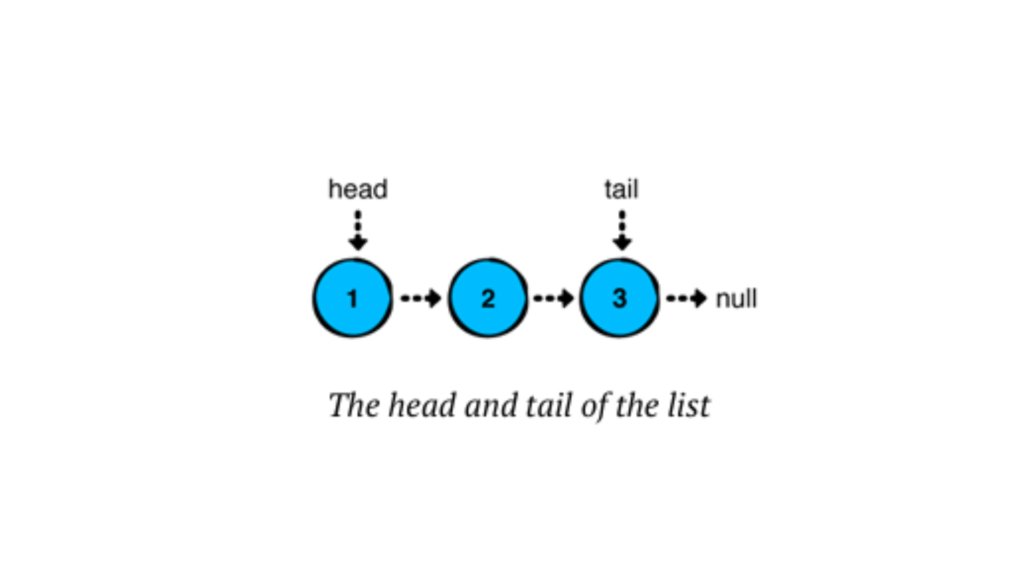
In a linked list, each node stores a value and points to the next node in the chain. The last node in the sequence points to “null,” indicating the end of the list.

Linked lists have several advantages over arrays or ArrayLists in Kotlin:

  • Quick insertions and removals at the front of the list.
  • Consistent performance for operations, especially for inserting or removing elements anywhere in the list.

Types of Linked Lists

  1. Singly Linked List — Each node points to the next node in the sequence (we’ll focus on this one).
  2. Doubly Linked List — Each node has a reference to both the next and the previous node.
  3. Circular Linked List — The last node points back to the first node, forming a loop.

Building a Singly Linked List in Kotlin

Kotlin doesn’t offer a built-in linked list class like Java does. But no worries! We’re going to create our own custom Singly Linked List step-by-step. Let’s create a linked list from scratch! We’ll start by defining the Node class and then build a LinkedList class to manage the nodes.

Defining the Node Class

Each node needs to store data and a reference to the next node. Here’s our Node class:

Kotlin
// We define a node of the linked list as a data class, where it holds a value and a reference to the next node.

data class Node<T>(var value: T, var next: Node<T>? = null) {
    override fun toString(): String {
        return if (next != null) "$value -> ${next.toString()}" else "$value"
    }
}

fun main() {
    val node1 = Node(value = 1)
    val node2 = Node(value = 2)
    val node3 = Node(value = 3)

    node1.next = node2
    node2.next = node3   //here node3 points to null at last, as per our code we only print its value
    println(node1)
}

//OUTPUT

1 -> 2 -> 3

Here, we defined a generic Node class for a linked list in Kotlin. Each Node holds a value of any type (T) and a reference to the next Node, which can be null. The toString() method provides a custom string representation for the node, recursively displaying the value of the node followed by the values of subsequent nodes, separated by ->. If the node is the last in the list, it simply shows its value.

Have you observed how we constructed the list above? We essentially created a chain of nodes by linking their ‘next’ references. However, building lists in this manner becomes impractical as the list grows larger. To address this, we can use a LinkedList, which simplifies managing the nodes and makes the list easier to work with. Let’s explore how we can implement this in Kotlin.

Creating the LinkedList Class

Let’s create our LinkedList class and add core functionalities like adding nodes and displaying the list.

Basically, a linked list has a ‘head’ (the first node) and a ‘tail’ (the last node). In a singly linked list, we usually only deal with the head node, although the tail node can also be relevant, especially when adding elements at the end. The tail node becomes more important in doubly linked lists or circular linked lists, where it supports bidirectional traversal or maintains circular references. However, here, we will use both nodes in a singly linked list.

Kotlin
class LinkedList<T> {
    private var head: Node<T>? = null
    private var tail: Node<T>? = null
    private var size = 0

    // Method to check if the list is empty
    fun isEmpty(): Boolean = size == 0
    
     // to print nodes in linkedlist
    override fun toString(): String {
        if (isEmpty()) {
            return "Empty list"
        } else {
            return head.toString()
        }
    }
}

Here, a linked list has a ‘head’ (the first node) and a ‘tail’ (the last node). We’ll also store the list’s size in a ‘size’ property.

Now, to use this linked list, we need to store or add some values to it. Otherwise, we’d only be using an empty list. There are three major operations for adding values to a linked list, and we’ll explore each one in more details in the next blog. First, let’s see how to add a new value (or node) to the linked list and then print the result.

Kotlin
// Method to add a new node at the beginning
fun addFirst(data: T) {
    val newNode = Node(data)
    newNode.next = head
    head = newNode
    size++
}

Here, we first create a new node with the passed value. Then, the new node’s next points to the head, and finally, we update the head to point to the newly created node. The same process is repeated whenever we add a new value.

Note: Whenever a new value is added, the list size increases. Therefore, we need to increment the size accordingly.

Now, let’s look at the complete code.

Kotlin
class LinkedList<T> {
    private var head: Node<T>? = null
    private var tail: Node<T>? = null
    private var size = 0

    // Method to check if the list is empty
    fun isEmpty(): Boolean = size == 0

    // to print nodes in linkedlist
    override fun toString(): String {
        if (isEmpty()) {
            return "Empty list"
        } else {
            return head.toString()
        }
    }

    // Method to add a new node at the beginning
    fun addFirst(data: T) {
        val newNode = Node(data)
        newNode.next = head
        head = newNode
        size++
    }
}

Using the Linked List in Kotlin

Let’s put our linked list to the test! Here’s how we can use the LinkedList class:

Kotlin
fun main() {
    val myList = LinkedList<String>()

    println("Is the list empty? ${myList.isEmpty()}")

    myList.addFirst("Kotlin")
    myList.addFirst("Hello")
   
    println(myList) // Output: Hello -> Kotlin -> null

    println("Is the list empty? ${myList.isEmpty()}")
}

Output

Kotlin
Is the list empty? true
Hello -> Kotlin
Is the list empty? false

Conclusion

We’ve explored the key insertion operations in linked lists, along with the foundational concepts and structure that make them an essential part of data management. Understanding these operations provides a solid base for working with linked lists in various scenarios. 

Linked lists might seem daunting, but with a bit of practice, you’ll be using them like a pro.

Internal DSLs

Building Internal DSLs in Your Favorite Programming Language

Software isn’t just about solving problems — it’s about making solutions expressive and readable. One powerful way to do this is by building Internal DSLs (Domain-Specific Languages).

If you’ve ever wished your code could read more like English (or your team’s own domain language), then an internal DSL might be the tool you’re looking for.

What Are Internal DSLs?

An Internal DSL is a mini-language built inside a general-purpose programming language.
 Instead of creating a brand-new compiler or parser, you use your existing language’s syntax, features, and runtime to express domain logic in a more natural way.

Think of it as customizing your language for your project’s needs without leaving the language ecosystem.

Internal DSLs vs. External DSLs

It’s easy to confuse between them:

  • External DSLs → standalone languages (e.g., SQL, HTML) with their own parser.
  • Internal DSLs → embedded within another language (e.g., a Ruby RSpec test reads like plain English).

Internal DSLs are faster to implement because you don’t reinvent the wheel — you leverage the host language.

Why Build an Internal DSL?

  • Improved readability — Code speaks the language of the domain.
  • Fewer mistakes — Constraints baked into the syntax reduce errors.
  • Faster onboarding — New developers learn the DSL instead of the whole codebase first.
  • Reusability — The same DSL can be applied across multiple projects.

Internal DSLs

As opposed to external DSLs, which have their own independent syntax, An internal DSL (Domain-Specific Language) is a type of DSL that is embedded within a general-purpose programming language and utilizes the host language’s syntax and constructs. In other words, it’s not a separate language but rather a specific way of using the main language to achieve the benefits of DSLs with an independent syntax. The code written in an internal DSL looks and feels like regular code in the host language but is structured and designed to address a particular problem domain more intuitively and efficiently.

To compare the two approaches, let’s see how the same task can be accomplished with an external and an internal DSL. Imagine that you have two database tables, Customer and Country, and each Customer entry has a reference to the country the customer lives in. The task is to query the database and find the country where the majority of customers live. The external DSL you’re going to use is SQL; the internal one is provided by the Exposed framework (https://github.com/JetBrains/Exposed), which is a Kotlin framework for database access.

Here’s a comparison of the two approaches:

External DSL (SQL):

SQL
SELECT Country.name, COUNT(Customer.id)
FROM Country
JOIN Customer
ON Country.id = Customer.country_id
GROUP BY Country.name
ORDER BY COUNT(Customer.id) DESC
LIMIT 1

Internal DSL (Kotlin with Exposed):

Kotlin
(Country join Customer)
    .slice(Country.name, Count(Customer.id))
    .selectAll()
    .groupBy(Country.name)
    .orderBy(Count(Customer.id), isAsc = false)
    .limit(1)

As you can see, the internal DSL version in Kotlin closely resembles regular Kotlin code, and the operations like slice, selectAll, groupBy, and orderBy are just regular Kotlin methods provided by the Exposed framework. The query is expressed using these methods, making it easier to read and write than the SQL version. Additionally, the results of the query are directly delivered as native Kotlin objects, eliminating the need to manually convert data from SQL query result sets to Kotlin objects.

The internal DSL approach provides the advantages of DSLs, such as improved readability and expressiveness for the specific domain, while leveraging the familiarity and power of the host language. This combination makes the code more maintainable, less error-prone and allows domain experts to work more effectively without the need to learn a completely separate syntax.

A Kotlin HTML Builder DSL

Kotlin’s syntax is well-suited for DSLs:

Kotlin
html {
    head {
        title { +"My Page" }
    }
    body {
        h1 { +"Hello World" }
        p { +"This is my internal DSL example." }
    }
}

Why this works well:

  • Extension functions make the code feel like part of the language.
  • Lambda with receiver allows nesting that mirrors HTML structure.

Common Pitfalls

  • Overcomplication — If your DSL is harder to learn than the original language, it fails its purpose.
  • Poor documentation — DSLs still need guides and examples.
  • Leaky abstractions — Avoid exposing too much of the host language if it breaks immersion.

Picking the Right Language

Some languages are more DSL-friendly due to flexible syntax and operator overloading:

  • Ruby — Very popular for DSLs (e.g., Rails migrations).
  • Scala — Strong type system + functional features.
  • Kotlin — Extension functions + lambda with receiver make DSLs clean.
  • Python — Simple syntax and dynamic typing make it easy to prototype.
  • JavaScript — Template literals and functional style work well.

That said — you can build an internal DSL in almost any language.

Real-World Examples of Internal DSLs

  • RSpec (Ruby) — Readable test cases.
  • Gradle Kotlin DSL — Build scripts that feel native in Kotlin.
  • Jinja Filters in Python — Embedded in templates but powered by Python.

Conclusion

Building Internal DSLs is about making code read like conversation — clear, concise, and tuned to the domain.
 Whether you’re writing tests, building configs, or defining workflows, a well-crafted DSL can cut cognitive load and boost productivity.

Start small, test ideas, and grow your DSL as your team uses it. Before long, you might find that the DSL becomes one of the most beloved parts of your codebase.

Fibonacci in Kotlin

Fibonacci in Kotlin: Recursion, Loops & Dynamic Programming (Complete Guide)

The Fibonacci sequence isn’t just math trivia — it’s a timeless example used in coding interviews, algorithm practice, and real-world software optimization. In this guide, we’ll explore how to implement Fibonacci in Kotlin using: Recursion — Easy to grasp, but not the fastest. Loops — Simple and efficient. Dynamic Programming — Optimized for large numbers. What is the Fibonacci Sequence? The Fibonacci sequence...

Membership Required

You must be a member to access this content.

View Membership Levels

Already a member? Log in here
External DSLs

The Power of External DSLs: Definition, Benefits, and Use Cases

In today’s fast-evolving software landscape, building systems that are both powerful and easy to maintain is crucial. One concept gaining increasing attention in software development is External Domain-Specific Languages, or External DSLs

This blog will explore what External DSLs are, their benefits, and practical use cases.

What are external DSLs?

External Domain-Specific Languages (DSLs) are a type of domain-specific language that is distinct from the host programming language in which it is embedded. A domain-specific language is a language designed for a specific problem domain or application context, tailored to address the unique requirements and challenges of that domain.

External DSLs are created to facilitate a more intuitive and expressive way of defining solutions for specific domains. Instead of using the syntax and constructs of a general-purpose programming language, developers create a new language with syntax and semantics that are closely aligned with the problem domain. This allows users (often non-programmers) to express solutions using familiar terminology and concepts, making the code more readable and less error-prone.

Key characteristics of external DSLs include:

  1. Separation from host language: External DSLs have their own syntax and grammar, independent of the underlying host programming language. This means that the DSL code is not written directly in the host language but in a separate file or structure.
  2. Domain-specific abstractions: The syntax and semantics of the external DSL are tailored to the specific domain, making it more natural for domain experts to understand and work with the code.
  3. Readability and simplicity: External DSLs are designed to be easily readable and writable by domain experts, even if they do not have extensive programming knowledge.
  4. Specific scope and focus: Each external DSL is designed to tackle a particular problem domain, ensuring it remains concise and focused.
  5. Custom tools and parsers: To work with external DSLs, custom tools and parsers are developed to interpret and transform the DSL code into executable code or other desired outputs.

Examples of External DSLs:

  • Regular expressions: Regular expressions are a classic example of an external DSL used for pattern matching in strings. They have a concise and domain-specific syntax for expressing text patterns.
  • SQL (Structured Query Language): SQL is a popular external DSL used for querying and managing relational databases. It provides a language-specific syntax for expressing database operations.
  • HTML (HyperText Markup Language): While HTML is commonly used within web development, it can be considered an external DSL as it has its own specific syntax and is used to describe the structure and content of web pages.

Creating an external DSL typically involves designing the language’s grammar, specifying the semantics, and building the necessary tools (e.g., parsers, interpreters, code generators) to work with the DSL effectively. External DSLs can be a powerful tool for improving productivity and collaboration between domain experts and programmers, as they allow domain experts to focus on their expertise without being overwhelmed by the complexities of a general-purpose programming language.

Conclusion

External DSLs bring a unique power to software development by creating dedicated languages tailored to specific domains. They promote clarity, ease of use, and collaboration across teams. While crafting an External DSL requires upfront effort in designing and implementing the language tools, the long-term gains in productivity, maintainability, and alignment with business goals make them a compelling choice for many projects.

Whenever you encounter complex domain logic that can benefit from clearer expression and better separation from core code, consider the transformative potential of External DSLs.

By embracing External DSLs, you harness the power of specialization, making software more intuitive, agile, and aligned with the real-world domain it serves.

error: Content is protected !!